
Microsoft plans to roll out a redesigned post creation experience for Viva Engage on the web in May 2026, with Roadmap ID 558935 now listed as in development for worldwide standard Microsoft 365 tenants. The change is small in the way most enterprise UI changes are small: a cleaner composer, fewer distracting controls, and better organization. But in Viva Engage, the post box is not just a text field. It is the narrow gate through which Microsoft wants more workplace communication, leadership messaging, community discussion, and eventually AI-assisted knowledge capture to pass.
The new Viva Engage post creation experience is framed by Microsoft as a simplification exercise. The company says the redesigned composer makes it easier and faster to create posts, with a clearer layout, improved accessibility, and smarter organization of tools. That sounds like the sort of roadmap language that usually disappears into admin center noise.
It should not. In social products, the composer is where intent either becomes action or evaporates. Every extra click, hidden option, awkward mode switch, or ambiguous posting target reduces the likelihood that someone will share an update, ask a question, praise a colleague, or publish an announcement.
That is especially true for Viva Engage because it occupies an odd but important place inside Microsoft 365. It is not Teams chat, not SharePoint news, not Outlook, and not quite the old Yammer either. It is Microsoft’s attempt to preserve a company-wide conversation layer inside a suite increasingly dominated by meetings, documents, feeds, and Copilot surfaces.
A better post creation experience will not, by itself, solve Viva Engage adoption. But it does suggest Microsoft understands a blunt truth about employee networks: the success of the platform depends less on how impressive the destination looks and more on how little friction users feel when they decide to contribute.
For some organizations, Engage is a useful place for leadership communication, employee resource groups, community support, and broad knowledge sharing. For others, it is the app that appeared in Teams one day and looked suspiciously like a corporate Facebook clone nobody asked for. That split perception matters because enterprise social networks live or die by participation density.
Microsoft’s challenge is not merely to add features. It has to make Engage feel like a natural part of daily work rather than a separate destination competing with Teams, Outlook, SharePoint, and line-of-business apps. A modernized composer is one of the few UI changes that touches every contributor, from the frontline employee posting a photo to the executive delegate preparing a formal announcement.
The old Yammer problem was never that people lacked things to say. It was that too few users believed Yammer was the obvious place to say them. Viva Engage inherits that dilemma, and the new post creation experience appears designed to make the act of posting feel less like operating a legacy enterprise social tool and more like publishing into the Microsoft 365 fabric.
Viva Engage supports multiple content patterns: conversations, questions, polls, praise, announcements, storyline posts, and longer-form articles. These are not interchangeable. A question can become organizational knowledge. An announcement can trigger notifications. A storyline post can carry leadership visibility. An article can function more like internal publishing than casual social chatter.
That variety gives communicators and community managers flexibility, but it also creates user confusion. If the composer presents too many choices too early, ordinary employees hesitate. If it hides important choices, corporate communicators complain. If the layout is cluttered, accessibility suffers. If the layout is too sparse, governance controls become discoverability problems.
This is why Microsoft’s phrase “smarter organization of tools” is doing a lot of work. A well-designed composer can expose the right capability at the right time without making every user confront the full complexity of Viva Engage’s publishing model. A poorly designed one turns every post into a miniature product tour.
For IT administrators, the important question is whether the redesign preserves policy clarity. A cleaner UI is welcome only if users still understand where they are posting, who can see the content, what notification behavior applies, and whether they are acting as themselves, a delegate, a leader, or a community administrator.
A composer that is easier to navigate with a keyboard, clearer for screen readers, and less visually cluttered helps more than users with formally recognized accessibility needs. It also helps workers who are tired, distracted, multilingual, or using unfamiliar devices. Enterprise software often treats these conditions as edge cases. In a large organization, they are normal.
The accessibility angle also matters because internal communication platforms frequently become channels for urgent or sensitive information. Policy updates, benefits announcements, organizational changes, crisis communications, and leadership messages all pass through tools like Engage. If the publishing interface makes it harder for some communicators to compose or verify content, the platform’s inclusiveness suffers at the point of creation.
Microsoft has spent years putting accessibility language into its product messaging. The meaningful test is whether redesigned experiences reduce actual friction. In Viva Engage, that means clearer controls, predictable focus behavior, readable layouts, sensible labeling, and fewer hidden affordances that only power users discover.
The roadmap item does not provide implementation detail, so administrators should avoid assuming too much. But the direction is right. If Viva Engage is meant to be the social layer of Microsoft 365, the act of posting must be available to the full organization, not just to the people already fluent in Microsoft’s constantly shifting UI grammar.
That fragmentation makes interface consistency important. If Microsoft wants employees to move fluidly between Teams conversations, SharePoint news, Viva Connections, Viva Engage posts, and Copilot-assisted work, the basic creation patterns need to feel coherent. A composer that looks and behaves like an older product undermines that strategy.
The redesign also arrives as Microsoft pushes more work into feeds and AI-indexed knowledge surfaces. Posts in Engage are not just messages; they are artifacts that can be searched, analyzed, surfaced, summarized, and connected to communities of expertise. The easier it is to create structured, high-quality posts, the better the downstream knowledge graph becomes.
This is where the seemingly modest UI change becomes strategically relevant. Microsoft does not need every employee to become an internal blogger. It needs enough employees to contribute enough useful signals that Engage remains worth indexing, recommending, and integrating. The composer is the intake valve for that system.
The company’s roadmap status says the feature is still in development, which means dates can shift. But the last-updated timestamp on June 26, 2026 shows the item is active rather than abandoned. For admins tracking Viva changes, this is one to watch not because it is disruptive, but because it may change daily user behavior more than a splashier back-end feature would.
If Engage is buried inside Teams yet still feels like a separate destination, adoption suffers. If it becomes too much like Teams, it loses its purpose. The product’s value is in broader, more durable, less interruptive communication: community posts, leadership updates, Q&A, campaigns, and conversations that outlive the meeting calendar.
A simplified post composer may help Microsoft draw that line more clearly. Teams is optimized for immediate collaboration. Engage is supposed to be better for open discussion and organization-wide participation. The creation experience needs to reinforce that distinction by making it obvious when a user is posting to a community, sharing to a storyline, asking a question, or preparing a more formal update.
This matters for information architecture. In many organizations, Teams channels already contain too much semi-permanent knowledge trapped in conversational streams. SharePoint news can be too formal for lightweight discussion. Outlook distribution lists are noisy and closed. Engage can fill the middle ground, but only if posting there feels quick and purposeful.
The redesigned experience should therefore be judged not only by visual polish, but by whether it helps users choose Engage instead of defaulting to the nearest chat box. Microsoft’s broader collaboration suite does not need another place to type. It needs clearer reasons to type in the right place.
Viva Engage already supports more formal content types, including announcements and articles, alongside ordinary posts. The more Microsoft can make those paths feel coherent, the more likely communications teams are to standardize around Engage for campaigns, leadership messaging, and community activation. The alternative is the familiar sprawl of SharePoint pages, Teams posts, email blasts, and manually cross-posted updates.
A redesigned creation flow could also reduce training overhead. Many internal comms teams spend an unreasonable amount of time teaching people where to post, which post type to use, what permissions apply, and how to avoid over-notifying colleagues. If the interface guides users more clearly, governance becomes less dependent on slide decks and office hours.
Still, communicators should be cautious. Cleaner publishing does not automatically mean better content strategy. If an organization lacks community norms, moderation practices, leadership participation, or clear channel guidance, a better composer may simply produce more noise.
That is the paradox of reducing friction. It helps good communication travel faster, but it can also make low-value posting easier. The organizations that benefit most will be those that pair the new experience with clearer expectations about what belongs in Engage and what belongs elsewhere.
Any change to a creation surface in a collaboration app can trigger support tickets. Users notice when buttons move. Community managers notice when workflows change. Accessibility teams notice when focus order, labels, or formatting controls behave differently. Communications staff notice when drafting habits are interrupted.
Admins should therefore treat the rollout as a change-management item, even if Microsoft ships it as a standard cloud update. The right preparation is modest: notify community managers, update internal help pages if they include screenshots, validate the experience with assistive technologies if accessibility is a priority, and watch early feedback from pilot users once the new UI appears.
The roadmap entry lists worldwide standard multi-tenant cloud availability and general availability release rings. That means government, sovereign, and specialized cloud customers should not assume identical timing. Microsoft’s roadmap language also reminds customers that estimated dates can move, and features can shift from in development to rolling out to launched on Microsoft’s schedule.
The practical admin posture is simple: do not overreact, but do not ignore it. The people who own Viva Engage adoption inside an organization should know this change is coming before their users discover it in the middle of publishing an important announcement.
Viva Engage succeeds when it captures that moment before it gets displaced into a less suitable tool. If the post creation experience feels heavy, users choose email. If it feels ambiguous, they choose Teams. If it feels too public, they choose a private chat. If it feels too corporate, they say nothing.
The redesigned composer is Microsoft’s chance to reduce that hesitation. Cleaner layout is not merely about aesthetics. It is about lowering the cognitive tax between thought and publication.
This is why small UI work is often underrated in enterprise software. Administrators and analysts tend to focus on policy, compliance, licensing, and integrations. Users experience software one button, panel, and empty field at a time.
If Microsoft gets this right, most users may not even notice the redesign as a “feature.” They will simply post a little faster, make fewer mistakes, and feel less like they are wrestling with an enterprise platform.
This creates a subtle incentive for Microsoft. The company needs more structured human contribution, not less. Copilot can summarize, draft, and retrieve, but it cannot invent authentic organizational context out of nothing. Communities, leadership posts, employee questions, and shared solutions provide the raw material that AI systems can later surface.
A better composer may therefore serve two audiences at once. It helps humans publish with less friction today, and it improves the quality and volume of content that Microsoft 365 can reason over tomorrow. That does not mean every Engage post becomes an AI asset, nor should organizations treat internal social chatter as automatically useful knowledge. But the direction is clear.
This is also where governance becomes more sensitive. As employee-generated content becomes more discoverable and more likely to be summarized by AI, organizations need confidence that people understand where they are posting and who can access the content. A simplified UI must not blur those boundaries.
Microsoft’s challenge is to make creation easier without making context invisible. The best version of the new composer would feel light to casual users while still keeping audience, community, and content type unmistakable.
The culture of a workplace will not change because Microsoft rearranged a posting toolbar. Employees will not suddenly trust leadership communications because the composer has fewer clicks. Communities will not become active unless someone tends them. Knowledge sharing will not happen without incentives, norms, and visible participation.
But software design can either support those cultural goals or quietly sabotage them. A confusing creation experience tells users that posting is risky or burdensome. A cluttered interface tells occasional contributors that the tool is for specialists. Poor accessibility tells some employees the platform was not designed with them in mind.
The new Viva Engage composer matters precisely because it is not a magic fix. It is infrastructure for participation. Microsoft is sanding down one of the places where enterprise communication often fails: the moment when someone has something useful to say but decides the tool is not worth the effort.
Before the new composer lands, administrators and communications teams should look at community sprawl, dormant groups, unclear posting norms, and overlapping channels. A better creation experience will expose weak governance if every employee can post more easily into a messy environment. It will produce better results in a tenant where communities have owners, audiences are understood, and leaders know how to participate.
The rollout is also a chance to revisit training materials. If internal documentation still refers to Yammer-era terminology or shows old screenshots, the redesigned composer will make that debt more obvious. Updating guidance around post types, announcements, questions, articles, and storyline content can turn a minor UI refresh into a broader reset.
The most successful organizations will not present the change as “Microsoft moved the buttons.” They will present it as an opportunity to clarify how Engage fits into the communication stack: Teams for active collaboration, SharePoint for authoritative pages, Outlook for targeted messages, and Engage for open community conversation.
That division will never be perfect. But without it, users are left to guess, and guessed information architecture usually becomes chat sprawl.
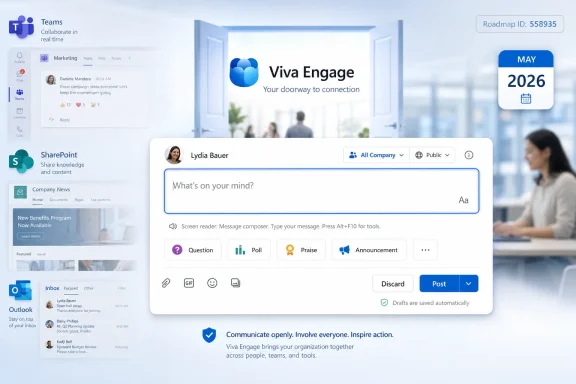 Microsoft Is Rebuilding the Doorway, Not the Destination
The new Viva Engage post creation experience is framed by Microsoft as a simplification exercise. The company says the redesigned composer makes it easier and faster to create posts, with a clearer layout, improved accessibility, and smarter organization of tools. That sounds like the sort of roadmap language that usually disappears into admin center noise.It should not. In social products, the composer is where intent either becomes action or evaporates. Every extra click, hidden option, awkward mode switch, or ambiguous posting target reduces the likelihood that someone will share an update, ask a question, praise a colleague, or publish an announcement.
That is especially true for Viva Engage because it occupies an odd but important place inside Microsoft 365. It is not Teams chat, not SharePoint news, not Outlook, and not quite the old Yammer either. It is Microsoft’s attempt to preserve a company-wide conversation layer inside a suite increasingly dominated by meetings, documents, feeds, and Copilot surfaces.
A better post creation experience will not, by itself, solve Viva Engage adoption. But it does suggest Microsoft understands a blunt truth about employee networks: the success of the platform depends less on how impressive the destination looks and more on how little friction users feel when they decide to contribute.
Viva Engage Still Carries Yammer’s Burden
Viva Engage has spent years trying to outrun the ghost of Yammer. Microsoft acquired Yammer in 2012, folded it into Office 365, renamed and repositioned pieces of it, and eventually wrapped the employee social network in the Viva brand. The result is a product with a long institutional memory and a persistent identity problem.For some organizations, Engage is a useful place for leadership communication, employee resource groups, community support, and broad knowledge sharing. For others, it is the app that appeared in Teams one day and looked suspiciously like a corporate Facebook clone nobody asked for. That split perception matters because enterprise social networks live or die by participation density.
Microsoft’s challenge is not merely to add features. It has to make Engage feel like a natural part of daily work rather than a separate destination competing with Teams, Outlook, SharePoint, and line-of-business apps. A modernized composer is one of the few UI changes that touches every contributor, from the frontline employee posting a photo to the executive delegate preparing a formal announcement.
The old Yammer problem was never that people lacked things to say. It was that too few users believed Yammer was the obvious place to say them. Viva Engage inherits that dilemma, and the new post creation experience appears designed to make the act of posting feel less like operating a legacy enterprise social tool and more like publishing into the Microsoft 365 fabric.
The Composer Has Become a Governance Surface
The post box in Viva Engage is more complicated than it looks. It is the point where ordinary conversation, corporate communication, compliance obligations, accessibility requirements, and audience targeting collide. Microsoft’s roadmap wording focuses on simplicity, but the underlying stakes are administrative.Viva Engage supports multiple content patterns: conversations, questions, polls, praise, announcements, storyline posts, and longer-form articles. These are not interchangeable. A question can become organizational knowledge. An announcement can trigger notifications. A storyline post can carry leadership visibility. An article can function more like internal publishing than casual social chatter.
That variety gives communicators and community managers flexibility, but it also creates user confusion. If the composer presents too many choices too early, ordinary employees hesitate. If it hides important choices, corporate communicators complain. If the layout is cluttered, accessibility suffers. If the layout is too sparse, governance controls become discoverability problems.
This is why Microsoft’s phrase “smarter organization of tools” is doing a lot of work. A well-designed composer can expose the right capability at the right time without making every user confront the full complexity of Viva Engage’s publishing model. A poorly designed one turns every post into a miniature product tour.
For IT administrators, the important question is whether the redesign preserves policy clarity. A cleaner UI is welcome only if users still understand where they are posting, who can see the content, what notification behavior applies, and whether they are acting as themselves, a delegate, a leader, or a community administrator.
Accessibility Is Not Cosmetic in an Employee Network
Microsoft’s explicit mention of better accessibility is notable because Viva Engage is not a niche productivity tool used by a self-selected expert audience. It is designed for broad employee communication across roles, regions, devices, abilities, and technical comfort levels. In that context, accessibility is not a compliance afterthought; it is part of whether the product works at all.A composer that is easier to navigate with a keyboard, clearer for screen readers, and less visually cluttered helps more than users with formally recognized accessibility needs. It also helps workers who are tired, distracted, multilingual, or using unfamiliar devices. Enterprise software often treats these conditions as edge cases. In a large organization, they are normal.
The accessibility angle also matters because internal communication platforms frequently become channels for urgent or sensitive information. Policy updates, benefits announcements, organizational changes, crisis communications, and leadership messages all pass through tools like Engage. If the publishing interface makes it harder for some communicators to compose or verify content, the platform’s inclusiveness suffers at the point of creation.
Microsoft has spent years putting accessibility language into its product messaging. The meaningful test is whether redesigned experiences reduce actual friction. In Viva Engage, that means clearer controls, predictable focus behavior, readable layouts, sensible labeling, and fewer hidden affordances that only power users discover.
The roadmap item does not provide implementation detail, so administrators should avoid assuming too much. But the direction is right. If Viva Engage is meant to be the social layer of Microsoft 365, the act of posting must be available to the full organization, not just to the people already fluent in Microsoft’s constantly shifting UI grammar.
The Timing Points to a Broader Viva Reset
The May 2026 general availability target places this redesign inside a period when Microsoft continues to adjust the Viva portfolio around communications, engagement, analytics, and Copilot-era knowledge work. Viva has always been a packaging challenge as much as a product family. It spans employee experience, learning, insights, communications, communities, and leadership engagement, but many users encounter it only as a set of scattered entry points inside Teams and Microsoft 365.That fragmentation makes interface consistency important. If Microsoft wants employees to move fluidly between Teams conversations, SharePoint news, Viva Connections, Viva Engage posts, and Copilot-assisted work, the basic creation patterns need to feel coherent. A composer that looks and behaves like an older product undermines that strategy.
The redesign also arrives as Microsoft pushes more work into feeds and AI-indexed knowledge surfaces. Posts in Engage are not just messages; they are artifacts that can be searched, analyzed, surfaced, summarized, and connected to communities of expertise. The easier it is to create structured, high-quality posts, the better the downstream knowledge graph becomes.
This is where the seemingly modest UI change becomes strategically relevant. Microsoft does not need every employee to become an internal blogger. It needs enough employees to contribute enough useful signals that Engage remains worth indexing, recommending, and integrating. The composer is the intake valve for that system.
The company’s roadmap status says the feature is still in development, which means dates can shift. But the last-updated timestamp on June 26, 2026 shows the item is active rather than abandoned. For admins tracking Viva changes, this is one to watch not because it is disruptive, but because it may change daily user behavior more than a splashier back-end feature would.
Cleaner Posting Could Help Microsoft’s Teams Problem
Viva Engage is increasingly tied to Teams, both as an app surface and as part of Microsoft’s larger collaboration story. That creates an opportunity and a problem. Teams is where many employees already spend their day, but it is also overloaded with chats, channels, meetings, files, apps, and notifications.If Engage is buried inside Teams yet still feels like a separate destination, adoption suffers. If it becomes too much like Teams, it loses its purpose. The product’s value is in broader, more durable, less interruptive communication: community posts, leadership updates, Q&A, campaigns, and conversations that outlive the meeting calendar.
A simplified post composer may help Microsoft draw that line more clearly. Teams is optimized for immediate collaboration. Engage is supposed to be better for open discussion and organization-wide participation. The creation experience needs to reinforce that distinction by making it obvious when a user is posting to a community, sharing to a storyline, asking a question, or preparing a more formal update.
This matters for information architecture. In many organizations, Teams channels already contain too much semi-permanent knowledge trapped in conversational streams. SharePoint news can be too formal for lightweight discussion. Outlook distribution lists are noisy and closed. Engage can fill the middle ground, but only if posting there feels quick and purposeful.
The redesigned experience should therefore be judged not only by visual polish, but by whether it helps users choose Engage instead of defaulting to the nearest chat box. Microsoft’s broader collaboration suite does not need another place to type. It needs clearer reasons to type in the right place.
Corporate Communicators May Be the Biggest Winners
For internal communications teams, small friction reductions can compound. A cleaner composer can make it easier to draft, format, schedule, and publish content without turning every update into a mini production cycle. That matters because communications teams are often asked to serve very different audiences with the same tool: executives, managers, frontline staff, employee communities, and regional groups.Viva Engage already supports more formal content types, including announcements and articles, alongside ordinary posts. The more Microsoft can make those paths feel coherent, the more likely communications teams are to standardize around Engage for campaigns, leadership messaging, and community activation. The alternative is the familiar sprawl of SharePoint pages, Teams posts, email blasts, and manually cross-posted updates.
A redesigned creation flow could also reduce training overhead. Many internal comms teams spend an unreasonable amount of time teaching people where to post, which post type to use, what permissions apply, and how to avoid over-notifying colleagues. If the interface guides users more clearly, governance becomes less dependent on slide decks and office hours.
Still, communicators should be cautious. Cleaner publishing does not automatically mean better content strategy. If an organization lacks community norms, moderation practices, leadership participation, or clear channel guidance, a better composer may simply produce more noise.
That is the paradox of reducing friction. It helps good communication travel faster, but it can also make low-value posting easier. The organizations that benefit most will be those that pair the new experience with clearer expectations about what belongs in Engage and what belongs elsewhere.
IT Admins Should Watch for Change Management, Not Just Feature Arrival
For Microsoft 365 administrators, this roadmap item is unlikely to demand the same kind of preparation as a security baseline change, authentication update, or major Teams policy shift. There is no indication that the new post creation experience introduces a new licensing model, migration task, or tenant-wide switch administrators must configure. But that does not make it invisible.Any change to a creation surface in a collaboration app can trigger support tickets. Users notice when buttons move. Community managers notice when workflows change. Accessibility teams notice when focus order, labels, or formatting controls behave differently. Communications staff notice when drafting habits are interrupted.
Admins should therefore treat the rollout as a change-management item, even if Microsoft ships it as a standard cloud update. The right preparation is modest: notify community managers, update internal help pages if they include screenshots, validate the experience with assistive technologies if accessibility is a priority, and watch early feedback from pilot users once the new UI appears.
The roadmap entry lists worldwide standard multi-tenant cloud availability and general availability release rings. That means government, sovereign, and specialized cloud customers should not assume identical timing. Microsoft’s roadmap language also reminds customers that estimated dates can move, and features can shift from in development to rolling out to launched on Microsoft’s schedule.
The practical admin posture is simple: do not overreact, but do not ignore it. The people who own Viva Engage adoption inside an organization should know this change is coming before their users discover it in the middle of publishing an important announcement.
The Real Test Is Whether Posting Feels Less Like Work
Microsoft’s productivity empire is full of creation experiences: compose an email, draft a Teams post, publish SharePoint news, create a Loop component, write a Word document, build a Planner task, start a form, open a whiteboard, prompt Copilot. Each has its own context, affordances, and implied audience. Users do not think in product taxonomies; they think, “I need to tell people something.”Viva Engage succeeds when it captures that moment before it gets displaced into a less suitable tool. If the post creation experience feels heavy, users choose email. If it feels ambiguous, they choose Teams. If it feels too public, they choose a private chat. If it feels too corporate, they say nothing.
The redesigned composer is Microsoft’s chance to reduce that hesitation. Cleaner layout is not merely about aesthetics. It is about lowering the cognitive tax between thought and publication.
This is why small UI work is often underrated in enterprise software. Administrators and analysts tend to focus on policy, compliance, licensing, and integrations. Users experience software one button, panel, and empty field at a time.
If Microsoft gets this right, most users may not even notice the redesign as a “feature.” They will simply post a little faster, make fewer mistakes, and feel less like they are wrestling with an enterprise platform.
Copilot Makes the Quality of Human Posts More Important
Although the roadmap item does not describe Copilot functionality, the redesign still belongs in the Copilot-era story of Microsoft 365. AI assistants become more useful when they can draw from clean, current, permission-respecting organizational knowledge. Viva Engage conversations, questions, answers, announcements, and articles are part of that knowledge environment.This creates a subtle incentive for Microsoft. The company needs more structured human contribution, not less. Copilot can summarize, draft, and retrieve, but it cannot invent authentic organizational context out of nothing. Communities, leadership posts, employee questions, and shared solutions provide the raw material that AI systems can later surface.
A better composer may therefore serve two audiences at once. It helps humans publish with less friction today, and it improves the quality and volume of content that Microsoft 365 can reason over tomorrow. That does not mean every Engage post becomes an AI asset, nor should organizations treat internal social chatter as automatically useful knowledge. But the direction is clear.
This is also where governance becomes more sensitive. As employee-generated content becomes more discoverable and more likely to be summarized by AI, organizations need confidence that people understand where they are posting and who can access the content. A simplified UI must not blur those boundaries.
Microsoft’s challenge is to make creation easier without making context invisible. The best version of the new composer would feel light to casual users while still keeping audience, community, and content type unmistakable.
Microsoft’s Wording Is Modest Because the Stakes Are Cultural
The roadmap description avoids grand claims. It says the experience is cleaner, more intuitive, more accessible, and better organized. That is probably wise. Enterprise social software has seen enough transformation rhetoric to last several product cycles.The culture of a workplace will not change because Microsoft rearranged a posting toolbar. Employees will not suddenly trust leadership communications because the composer has fewer clicks. Communities will not become active unless someone tends them. Knowledge sharing will not happen without incentives, norms, and visible participation.
But software design can either support those cultural goals or quietly sabotage them. A confusing creation experience tells users that posting is risky or burdensome. A cluttered interface tells occasional contributors that the tool is for specialists. Poor accessibility tells some employees the platform was not designed with them in mind.
The new Viva Engage composer matters precisely because it is not a magic fix. It is infrastructure for participation. Microsoft is sanding down one of the places where enterprise communication often fails: the moment when someone has something useful to say but decides the tool is not worth the effort.
The May 2026 Rollout Gives Organizations Time to Clean House
Because general availability is targeted for May 2026, organizations have a useful window to review their own Viva Engage posture. Too many tenants treat Engage as an app that either “has adoption” or “doesn’t have adoption,” as if the outcome were mostly a matter of Microsoft’s product decisions. In practice, adoption depends heavily on whether the organization has made clear choices about purpose.Before the new composer lands, administrators and communications teams should look at community sprawl, dormant groups, unclear posting norms, and overlapping channels. A better creation experience will expose weak governance if every employee can post more easily into a messy environment. It will produce better results in a tenant where communities have owners, audiences are understood, and leaders know how to participate.
The rollout is also a chance to revisit training materials. If internal documentation still refers to Yammer-era terminology or shows old screenshots, the redesigned composer will make that debt more obvious. Updating guidance around post types, announcements, questions, articles, and storyline content can turn a minor UI refresh into a broader reset.
The most successful organizations will not present the change as “Microsoft moved the buttons.” They will present it as an opportunity to clarify how Engage fits into the communication stack: Teams for active collaboration, SharePoint for authoritative pages, Outlook for targeted messages, and Engage for open community conversation.
That division will never be perfect. But without it, users are left to guess, and guessed information architecture usually becomes chat sprawl.
The Small Box Where Microsoft’s Social Strategy Lives
The concrete details are straightforward, but the implications are wider than the roadmap entry suggests.- Microsoft is developing a redesigned Viva Engage post creation experience for the web, with general availability currently targeted for May 2026.
- The change is intended for worldwide standard multi-tenant Microsoft 365 environments and is listed under the General Availability release phase.
- The redesigned composer is meant to reduce clutter, improve accessibility, and organize publishing tools more clearly.
- The most affected users will likely be community managers, corporate communicators, leaders and delegates, and employees who post only occasionally.
- Administrators should prepare by updating guidance, warning key stakeholders, and watching whether the new interface changes support patterns or posting behavior.
- The larger strategic value is that easier posting could make Viva Engage a more useful source of community knowledge inside Microsoft 365.
References
- Primary source: Microsoft 365 Roadmap
Published: 2026-06-26T22:01:51.0909953Z
Microsoft 365 Roadmap | Microsoft 365
The Microsoft 365 Roadmap lists updates that are currently planned for applicable subscribers. Check here for more information on the status of new features and updates.www.microsoft.com
- Official source: directionsonmicrosoft.com
- Official source: support.microsoft.com
Write and schedule posts, articles, and announcements in Viva Engage | Microsoft Support
Write and schedule posts, articles, and announcements in Viva Engagesupport.microsoft.com - Official source: techcommunity.microsoft.com
Viva Engage Updates June 2026 | What’s New & Next
Discover the latest Viva Engage updates for June 2026, including new features that improve employee engagement, communication, and collaboration. techcommunity.microsoft.com
- Related coverage: petri.com
- Official source: enablement.microsoft.com
Microsoft Viva Engage – Microsoft Adoption
Connect people, communities and ideas across your organization through communities, conversations and more in Viva Engage. Get started today.enablement.microsoft.com
- Official source: cdn-dynmedia-1.microsoft.com
- Related coverage: swooppublic.blob.core.windows.net