
Microsoft confirmed on June 9, 2026, that new Outlook for Windows and Outlook on the web will group email notifications that arrive within seconds, with rollout beginning in late June and broader availability expected by mid-September. That is a sensible fix to a real annoyance, but it also exposes the bigger problem Microsoft still has not solved. New Outlook is being tuned to interrupt users less often, while classic Outlook still appears to answer the interruption more quickly. For a mail client Microsoft wants to make the future of Windows productivity, that gap matters more than the notification count.
The new grouped-notification behavior is easy to defend. Anyone who has created an account, ordered something online, triggered a security alert, or been copied into a fast-moving thread knows the pattern: Windows lights up with one banner after another, each announcing a separate message that probably belongs to the same burst of activity. Microsoft’s plan is to collapse those messages into a single alert when they arrive within a short window.
That should reduce notification fatigue. It should also make Outlook feel less like an attention tax layered on top of Windows. The company says clicking a grouped notification opens the most recent message, leaving the user to find the rest in the inbox.
The feature is also designed to be on by default. Users who do not want it will need to disable it under Outlook’s notification settings, which tells us Microsoft sees this not as a niche preference but as the new baseline behavior. That is probably the right default for ordinary users and a defensible one for organizations trying to preserve focus.
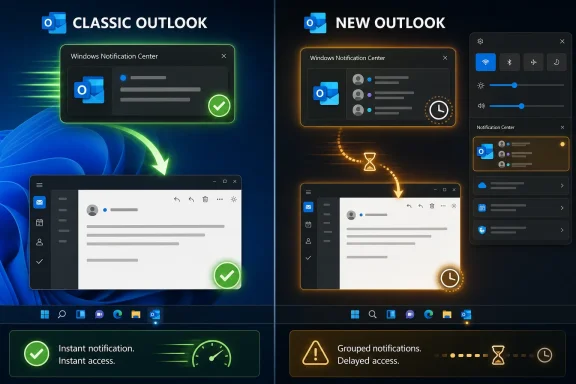
But the fix lands in an awkward place. Grouping notifications reduces how many times Outlook asks for your attention; it does not necessarily improve what happens after Outlook gets it. If clicking an email alert in new Outlook still means waiting 10, 20, or even 30 seconds before the message becomes usable, the product has not solved the interruption problem. It has merely made the interruptions arrive in a tidier stack.
Email notifications are not decorative. They are a promise that the system can take you from an event to the relevant object quickly. When that chain breaks, users adapt by ignoring the banner, opening the client manually, refreshing the inbox, or falling back to another device.
That is why the comparison with classic Outlook is so damaging. Classic Outlook is the supposedly old product, the Win32 workhorse with decades of accumulated machinery, enterprise bolt-ons, COM add-ins, local data files, and all the baggage Microsoft would clearly prefer to leave behind. Yet in this specific workflow, it behaves like the modern app: click, open, read.
New Outlook, by contrast, often behaves like a web app being asked to impersonate a native one. It may eventually get there, and for many users it already does enough. But “eventually” is not the standard for a notification-driven workflow. The point of clicking the toast is immediacy.
For personal Outlook.com-style usage, that approach is often fine. Many users live happily inside webmail, and new Outlook can feel familiar because it largely is familiar. If your mailbox is simple, your accounts are supported, and your expectations are shaped by browser-based mail, the new client may be perfectly acceptable.
The trouble is that Windows users do not judge Outlook only as webmail. They judge it as the thing that replaced Mail and Calendar, the thing Microsoft keeps nudging into the foreground, and eventually the thing many organizations must evaluate as classic Outlook’s successor. In that context, “good enough for webmail” is not the same as “good enough for Windows.”
A native desktop mail client is expected to be deeply integrated with the operating system. It should launch predictably, handle notifications reliably, respect local workflows, and avoid turning every interaction into a cloud round trip. The more Microsoft argues that new Outlook is the future, the less patience users will have for performance excuses rooted in its architecture.
That does not mean classic Outlook is flawless. It can be heavy, add-in conflicts are real, search has had its share of drama, and administrators know the pain of corrupt profiles and OST troubleshooting. Classic Outlook earned its scars honestly.
But the new Outlook debate is not about whether classic Outlook is perfect. It is about whether the replacement is better at the things users actually notice. Opening a message from a notification is one of those things. So is receiving the notification in the first place.
Windows Latest reports hit-or-miss notifications across connected accounts, especially on a system with multiple Microsoft 365 domains or accounts. Microsoft has reportedly acknowledged unreliable email notifications and said it is working on a fix. That makes the grouped-notification rollout feel like an improvement arriving beside, rather than instead of, a deeper reliability problem.
In isolation, this is good product hygiene. The best notification system is not the loudest one; it is the one that understands when a cluster of related signals should be represented as a single interruption. Apple, Google, Slack, Teams, and browser platforms have all wrestled with similar problems because users have learned to punish apps that constantly demand attention.
But Outlook’s challenge is not merely volume. It is trust. Users need to trust that a notification will appear when it should, that it will represent the right account, and that clicking it will take them to the message quickly.
Grouping can even make trust issues feel worse if the underlying delivery remains inconsistent. If several emails are compressed into one banner, but some accounts are unreliable or delayed, users may wonder what else has been hidden, merged, or missed. A cleaner notification surface is only reassuring when the plumbing underneath is dependable.
That gives Microsoft time, but not infinite time. Every visible flaw in new Outlook becomes more consequential when users believe the choice is temporary. A bug in an optional preview is annoying; the same bug in a mandatory future is a warning sign.
Administrators see this differently from consumers. A home user can switch back, complain, or use a browser. An IT department has to consider training, support volume, policy controls, account compatibility, add-ins, offline workflows, compliance requirements, and executive tolerance for broken habits.
Notification behavior may sound minor compared with PST support, S/MIME, shared mailboxes, or add-in compatibility. It is not minor in practice. Notifications are the edge of the product that touches the operating system dozens or hundreds of times a day. If that edge is unreliable, users experience the whole client as unreliable.
The danger is that a busy roadmap can become a substitute for a persuasive product. Users do not experience a roadmap; they experience the next click. If that click is slow, delayed, or confusing, promised parity in September or December does not help the person trying to answer a customer, approve an invoice, or join a meeting now.
This has been Microsoft’s recurring problem with new Outlook. The company can credibly say the app is improving. It can point to features shipped, gaps closed, and enterprise controls added. It can argue that maintaining two Outlook clients forever is inefficient.
All of that may be true. It still does not negate the simple user verdict that classic Outlook often feels faster and more reliable in the workflows that matter. A replacement does not win because the vendor’s architecture diagram is cleaner. It wins when users stop reaching for the old thing.
But Windows users have a different baseline. They expect local responsiveness, OS-native behavior, and some degree of resilience when networks are imperfect. They expect clicking a notification to feel like clicking a local object, not sending a request into a layered web experience and waiting for it to reconstruct state.
This is where new Outlook’s identity crisis becomes visible. Microsoft wants the operational simplicity of web Outlook and the distribution advantages of a Windows app. Users want the responsiveness of a native client and the continuity of Outlook’s desktop heritage. Those demands are not impossible to reconcile, but new Outlook has not consistently reconciled them yet.
The best version of new Outlook would not merely copy classic Outlook feature for feature. It would use the cloud where the cloud is strong and preserve native speed where Windows users demand it. Notifications are exactly the sort of seam where that bargain is tested.
But admins are unlikely to treat this as a decisive milestone. Their concern is not just whether Outlook interrupts less often. It is whether Outlook behaves consistently across accounts, profiles, devices, update rings, and policy configurations.
A user who misses an alert for one connected mailbox creates a support problem. A user who clicks a notification and waits half a minute creates a confidence problem. Multiply that across a department, and Outlook becomes the visible face of a migration that users may already distrust.
That distrust matters because forced or semi-forced migrations generate their own resistance. If users believe Microsoft is replacing a mature desktop application with a slower web wrapper, every flaw confirms the story. Even good features, like grouped notifications, get interpreted through that lens.
Classic Outlook is not merely legacy code. It is the standard new Outlook must beat. If Microsoft wants users to embrace the replacement, it has to treat classic Outlook’s strengths as product requirements, not historical accidents.
That means measuring new Outlook against classic Outlook in practical, user-visible workflows. How long does it take to open a message from a toast? How reliably do notifications arrive for every configured account? How quickly can the app become interactive after a cold start? How does it behave when the network is slow, when the mailbox is large, when the user has multiple tenants, or when Windows resumes from sleep?
Those are not nostalgic benchmarks. They are the minimum bar for a desktop productivity client. If classic Outlook clears them and new Outlook does not, the problem is not user resistance to change. The problem is the product.
But the ethics of defaults matter. Making new Outlook the default before it convincingly matches classic Outlook’s reliability risks turning every ordinary defect into a grievance about control. Users forgive bugs more readily when they chose the product. They are less forgiving when the product was chosen for them.
Notification grouping being on by default is a small example of the same philosophy. Microsoft is deciding that most users will prefer fewer banners and making that choice for them. In this case, the decision is probably right. Still, defaults carry responsibility.
If Microsoft wants to default users into new Outlook over time, it needs to be ruthless about the interactions users cannot avoid. Notifications are one of those interactions. A slow notification click is not a missing power-user feature; it is a failure in the basic contract between app and operating system.
Microsoft is right that users need fewer interruptions, and grouped notifications should help. But the future of Outlook on Windows will not be decided by whether alerts are bundled more elegantly; it will be decided by whether the new client can make the old one feel unnecessary. Until new Outlook opens the message as quickly and reliably as classic Outlook does, every grouped notification will carry the same quiet reminder: the replacement is still trying to catch up.
 Microsoft Is Fixing the Noise, Not the Lag
The new grouped-notification behavior is easy to defend. Anyone who has created an account, ordered something online, triggered a security alert, or been copied into a fast-moving thread knows the pattern: Windows lights up with one banner after another, each announcing a separate message that probably belongs to the same burst of activity. Microsoft’s plan is to collapse those messages into a single alert when they arrive within a short window.That should reduce notification fatigue. It should also make Outlook feel less like an attention tax layered on top of Windows. The company says clicking a grouped notification opens the most recent message, leaving the user to find the rest in the inbox.
The feature is also designed to be on by default. Users who do not want it will need to disable it under Outlook’s notification settings, which tells us Microsoft sees this not as a niche preference but as the new baseline behavior. That is probably the right default for ordinary users and a defensible one for organizations trying to preserve focus.
But the fix lands in an awkward place. Grouping notifications reduces how many times Outlook asks for your attention; it does not necessarily improve what happens after Outlook gets it. If clicking an email alert in new Outlook still means waiting 10, 20, or even 30 seconds before the message becomes usable, the product has not solved the interruption problem. It has merely made the interruptions arrive in a tidier stack.
The Fastest Notification Is the One That Becomes Mail
The complaint from Windows Latest is not subtle: classic Outlook opens a message from a notification in roughly a second or two, while new Outlook can take more than 10 seconds and sometimes far longer. That is the kind of performance delta users do not need a stopwatch to feel. It turns a notification from a shortcut into a detour.Email notifications are not decorative. They are a promise that the system can take you from an event to the relevant object quickly. When that chain breaks, users adapt by ignoring the banner, opening the client manually, refreshing the inbox, or falling back to another device.
That is why the comparison with classic Outlook is so damaging. Classic Outlook is the supposedly old product, the Win32 workhorse with decades of accumulated machinery, enterprise bolt-ons, COM add-ins, local data files, and all the baggage Microsoft would clearly prefer to leave behind. Yet in this specific workflow, it behaves like the modern app: click, open, read.
New Outlook, by contrast, often behaves like a web app being asked to impersonate a native one. It may eventually get there, and for many users it already does enough. But “eventually” is not the standard for a notification-driven workflow. The point of clicking the toast is immediacy.
New Outlook’s Web Roots Are Both Its Strength and Its Alibi
New Outlook is not a mystery product. It is built around the Outlook on the web experience, packaged for Windows, updated more like a service than a traditional Office desktop application, and positioned as the path toward a more unified Outlook codebase. That strategy has obvious benefits for Microsoft. Features can ship across web and Windows with less duplication, interface changes can be coordinated, and the company can keep dragging the Outlook experience toward Microsoft 365’s cloud-first center of gravity.For personal Outlook.com-style usage, that approach is often fine. Many users live happily inside webmail, and new Outlook can feel familiar because it largely is familiar. If your mailbox is simple, your accounts are supported, and your expectations are shaped by browser-based mail, the new client may be perfectly acceptable.
The trouble is that Windows users do not judge Outlook only as webmail. They judge it as the thing that replaced Mail and Calendar, the thing Microsoft keeps nudging into the foreground, and eventually the thing many organizations must evaluate as classic Outlook’s successor. In that context, “good enough for webmail” is not the same as “good enough for Windows.”
A native desktop mail client is expected to be deeply integrated with the operating system. It should launch predictably, handle notifications reliably, respect local workflows, and avoid turning every interaction into a cloud round trip. The more Microsoft argues that new Outlook is the future, the less patience users will have for performance excuses rooted in its architecture.
Classic Outlook Is Legacy Only in Microsoft’s Storytelling
Classic Outlook is not beloved because it is pretty. It is beloved, or at least defended, because it is competent in ways that are difficult to replace. It has years of muscle memory behind it, a mature offline model, deep Exchange integration, advanced rules and workflow support, and a vast ecosystem of corporate habits built around it.That does not mean classic Outlook is flawless. It can be heavy, add-in conflicts are real, search has had its share of drama, and administrators know the pain of corrupt profiles and OST troubleshooting. Classic Outlook earned its scars honestly.
But the new Outlook debate is not about whether classic Outlook is perfect. It is about whether the replacement is better at the things users actually notice. Opening a message from a notification is one of those things. So is receiving the notification in the first place.
Windows Latest reports hit-or-miss notifications across connected accounts, especially on a system with multiple Microsoft 365 domains or accounts. Microsoft has reportedly acknowledged unreliable email notifications and said it is working on a fix. That makes the grouped-notification rollout feel like an improvement arriving beside, rather than instead of, a deeper reliability problem.
Notification Grouping Is a Productivity Feature With a Trust Problem
Microsoft’s case for grouped notifications is easy to understand. Modern work produces too many alerts, and email is one of the worst offenders because it mixes urgent human messages with receipts, automated reports, marketing, security prompts, and workflow noise. Grouping messages that land within seconds should reduce the feeling that Outlook is hammering the Windows notification center.In isolation, this is good product hygiene. The best notification system is not the loudest one; it is the one that understands when a cluster of related signals should be represented as a single interruption. Apple, Google, Slack, Teams, and browser platforms have all wrestled with similar problems because users have learned to punish apps that constantly demand attention.
But Outlook’s challenge is not merely volume. It is trust. Users need to trust that a notification will appear when it should, that it will represent the right account, and that clicking it will take them to the message quickly.
Grouping can even make trust issues feel worse if the underlying delivery remains inconsistent. If several emails are compressed into one banner, but some accounts are unreliable or delayed, users may wonder what else has been hidden, merged, or missed. A cleaner notification surface is only reassuring when the plumbing underneath is dependable.
Microsoft’s Migration Strategy Raises the Stakes
The timing matters because Microsoft is not treating new Outlook as an experiment forever. New Outlook reached general availability in 2024, Windows Mail and Calendar have been replaced, and Microsoft’s own migration documentation frames the move from classic Outlook in stages: opt-in, opt-out, and eventually cutover. Classic Outlook remains supported until at least 2029, but the direction of travel is unmistakable.That gives Microsoft time, but not infinite time. Every visible flaw in new Outlook becomes more consequential when users believe the choice is temporary. A bug in an optional preview is annoying; the same bug in a mandatory future is a warning sign.
Administrators see this differently from consumers. A home user can switch back, complain, or use a browser. An IT department has to consider training, support volume, policy controls, account compatibility, add-ins, offline workflows, compliance requirements, and executive tolerance for broken habits.
Notification behavior may sound minor compared with PST support, S/MIME, shared mailboxes, or add-in compatibility. It is not minor in practice. Notifications are the edge of the product that touches the operating system dozens or hundreds of times a day. If that edge is unreliable, users experience the whole client as unreliable.
The Roadmap Is Busy, but Roadmaps Do Not Open Mail
Microsoft has been adding missing pieces to new Outlook and has more planned. The company’s roadmap and support pages show a client still being filled out: account support, file and sharing integration, calendar improvements, admin controls, migration tools, and features intended to close gaps with classic Outlook. The pace is real.The danger is that a busy roadmap can become a substitute for a persuasive product. Users do not experience a roadmap; they experience the next click. If that click is slow, delayed, or confusing, promised parity in September or December does not help the person trying to answer a customer, approve an invoice, or join a meeting now.
This has been Microsoft’s recurring problem with new Outlook. The company can credibly say the app is improving. It can point to features shipped, gaps closed, and enterprise controls added. It can argue that maintaining two Outlook clients forever is inefficient.
All of that may be true. It still does not negate the simple user verdict that classic Outlook often feels faster and more reliable in the workflows that matter. A replacement does not win because the vendor’s architecture diagram is cleaner. It wins when users stop reaching for the old thing.
The Windows Client Cannot Be Merely a Wrapper
A deeper issue sits underneath the notification debate: what should a Windows email client be in 2026? Microsoft’s answer appears to be a cloud-connected, frequently updated, web-aligned application that can move faster than the old Office release model. That answer has merit.But Windows users have a different baseline. They expect local responsiveness, OS-native behavior, and some degree of resilience when networks are imperfect. They expect clicking a notification to feel like clicking a local object, not sending a request into a layered web experience and waiting for it to reconstruct state.
This is where new Outlook’s identity crisis becomes visible. Microsoft wants the operational simplicity of web Outlook and the distribution advantages of a Windows app. Users want the responsiveness of a native client and the continuity of Outlook’s desktop heritage. Those demands are not impossible to reconcile, but new Outlook has not consistently reconciled them yet.
The best version of new Outlook would not merely copy classic Outlook feature for feature. It would use the cloud where the cloud is strong and preserve native speed where Windows users demand it. Notifications are exactly the sort of seam where that bargain is tested.
Enterprise IT Will Measure This in Tickets, Not Promises
For IT administrators, the new grouped-notification feature is likely to be welcomed cautiously. Fewer notification storms can mean fewer complaints from users who feel buried by email banners. Default-on grouping may also reduce the need for individual coaching around Windows notification settings.But admins are unlikely to treat this as a decisive milestone. Their concern is not just whether Outlook interrupts less often. It is whether Outlook behaves consistently across accounts, profiles, devices, update rings, and policy configurations.
A user who misses an alert for one connected mailbox creates a support problem. A user who clicks a notification and waits half a minute creates a confidence problem. Multiply that across a department, and Outlook becomes the visible face of a migration that users may already distrust.
That distrust matters because forced or semi-forced migrations generate their own resistance. If users believe Microsoft is replacing a mature desktop application with a slower web wrapper, every flaw confirms the story. Even good features, like grouped notifications, get interpreted through that lens.
Microsoft Needs to Stop Treating Classic Outlook as the Embarrassing Relative
There is an odd undertone in Microsoft’s Outlook transition: classic Outlook is still essential, still supported, still widely used, and still better at some core workflows, yet the company’s strategic language inevitably casts it as the past. That may be commercially and architecturally necessary, but it is editorially unconvincing.Classic Outlook is not merely legacy code. It is the standard new Outlook must beat. If Microsoft wants users to embrace the replacement, it has to treat classic Outlook’s strengths as product requirements, not historical accidents.
That means measuring new Outlook against classic Outlook in practical, user-visible workflows. How long does it take to open a message from a toast? How reliably do notifications arrive for every configured account? How quickly can the app become interactive after a cold start? How does it behave when the network is slow, when the mailbox is large, when the user has multiple tenants, or when Windows resumes from sleep?
Those are not nostalgic benchmarks. They are the minimum bar for a desktop productivity client. If classic Outlook clears them and new Outlook does not, the problem is not user resistance to change. The problem is the product.
The New Default Should Be Earned Before It Is Enforced
Microsoft’s staged migration model gives the company a path to move users without flipping a single catastrophic switch. First users opt in, then the product becomes the default with escape hatches, then eventually the escape hatches narrow. That is a rational enterprise migration pattern.But the ethics of defaults matter. Making new Outlook the default before it convincingly matches classic Outlook’s reliability risks turning every ordinary defect into a grievance about control. Users forgive bugs more readily when they chose the product. They are less forgiving when the product was chosen for them.
Notification grouping being on by default is a small example of the same philosophy. Microsoft is deciding that most users will prefer fewer banners and making that choice for them. In this case, the decision is probably right. Still, defaults carry responsibility.
If Microsoft wants to default users into new Outlook over time, it needs to be ruthless about the interactions users cannot avoid. Notifications are one of those interactions. A slow notification click is not a missing power-user feature; it is a failure in the basic contract between app and operating system.
The Real Test Is the Click After the Banner
The grouped-notification rollout is a useful quality-of-life change, but it should not be mistaken for proof that new Outlook is ready to inherit every classic Outlook workflow. The most concrete lessons are narrower and more uncomfortable.- Microsoft is reducing notification spam in new Outlook by grouping emails that arrive within seconds into a single alert.
- The rollout is expected to begin in late June 2026 and expand more broadly by mid-September.
- Grouped notifications will be enabled by default, with an opt-out available in Outlook’s notification settings.
- Windows Latest reports that classic Outlook opens emails from notifications far faster than new Outlook in its testing.
- New Outlook’s notification reliability across multiple connected accounts remains a more serious concern than notification volume alone.
- Microsoft’s broader migration push will keep running into resistance until new Outlook wins everyday speed and reliability comparisons without caveats.
Microsoft is right that users need fewer interruptions, and grouped notifications should help. But the future of Outlook on Windows will not be decided by whether alerts are bundled more elegantly; it will be decided by whether the new client can make the old one feel unnecessary. Until new Outlook opens the message as quickly and reliably as classic Outlook does, every grouped notification will carry the same quiet reminder: the replacement is still trying to catch up.
References
- Primary source: Windows Latest
Published: Fri, 26 Jun 2026 23:42:35 GMT
Loading…
www.windowslatest.com - Official source: microsoft.com
Microsoft 365 Roadmap | Microsoft 365
The Microsoft 365 Roadmap lists updates that are currently planned for applicable subscribers. Check here for more information on the status of new features and updates.www.microsoft.com
- Official source: learn.microsoft.com
Overview of the new Outlook for Windows | Microsoft Learn
Provides an overview of the new Outlook for Windowslearn.microsoft.com - Official source: support.microsoft.com
Loading…
support.microsoft.com - Related coverage: pcworld.com
Windows 11 26H2 is coming: Meet all the new features | PCWorld
Windows 11 26H2 is the next major free update for all Windows users. Among other things, it brings improvements to Explorer, camera control, and AI. Here's an overview.www.pcworld.com - Related coverage: windowscentral.com
Here are the 6 biggest features and improvements coming to Windows 11 in the June 2026 update on Tuesday | Windows Central
Microsoft's June 2026 Windows 11 update boosts responsiveness, adds Shared Audio, expands NPU metrics, and improves OOBE.www.windowscentral.com
- Official source: adoption.microsoft.com
Loading…
adoption.microsoft.com - Official source: cdn-dynmedia-1.microsoft.com
- Related coverage: tech-talk.com
- Related coverage: nubis365.com
</rdf:Alt> </dc:title> <dc:description> <rdf:Alt> <rdf:li xml:lang="x-default"/> </rdf:Alt> </dc:description> <dc:creator> <rdf:Seq> <rdf:li>Mike Wi
</rdf:Alt> </dc:description> <dc:creator> <rdf:Seq> <rdf:li>Mike Windsornubis365.com