

Organizations preparing for Microsoft Copilot, custom AI agents, and similar enterprise AI tools need Data Access Governance because those systems can surface any data their users or service accounts are already permitted to reach, turning old oversharing and stale permissions into immediate business exposure. That is the quiet security lesson behind the AI rollout race. The risk is not that copilots magically break into repositories; it is that they make existing access mistakes searchable, summarizable, and operationally useful. For Windows-heavy enterprises living in Microsoft 365, SharePoint, Teams, OneDrive, file shares, and hybrid identity, AI readiness is now a permissions problem as much as a model problem.
For years, organizations have tolerated a certain amount of permission sprawl because the practical exploitability of that sprawl was limited. A folder shared too broadly in SharePoint might have been technically accessible to thousands of employees, but only a few people knew it existed, fewer knew what to search for, and almost nobody had time to browse stale departmental archives for sensitive material. Bad access hygiene was a latent risk, buried under friction.
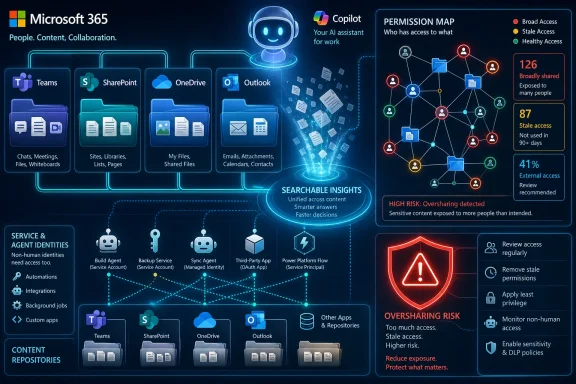
Generative AI changes that bargain. A user no longer needs to know where a file lives, what it is named, or which team created it. If the AI assistant can search across Microsoft 365 content within that user’s permissions, the assistant can connect dots across documents, chats, emails, meeting notes, and old project folders that were never designed to be queried as a single intelligence layer.
Microsoft’s own guidance for Copilot is explicit about the basic permission model: Copilot works with data the user is already allowed to access and honors the security, compliance, and privacy controls applied in Microsoft 365. That sounds reassuring until the second half of the sentence lands. If the controls are wrong, stale, inherited, overbroad, or never reviewed, Copilot is not the problem — it is the mirror.
This is why the old comfort phrase, “Copilot only sees what the user can see,” has become less comforting with each deployment. A user may technically be able to see far more than the business intended. AI does not need to bypass least privilege when least privilege was never actually implemented.
That matters because Microsoft 365 environments tend to accumulate permissions in layers. A site inherits access from a parent. A library breaks inheritance. A Teams-connected SharePoint site adds members. A sharing link is created for convenience. A group is nested inside another group. A guest account remains after a project ends. A service account is granted broad read access because nobody wanted an integration to fail.
Individually, these are familiar compromises. Collectively, they form a map of access that few organizations can accurately describe. When AI tools arrive, they do not ask whether the access makes sense. They ask whether the access exists.
This is the central argument for Data Access Governance, or DAG. The problem is not simply discovering sensitive data. It is understanding whether the current access to that data is appropriate, defensible, and still needed. A classification label can tell you that a file contains payroll information. Governance tells you whether a marketing intern, a retired contractor account, or a broad “everyone except external users” group should be able to reach it.
But classification by itself can become a false finish line. A dashboard showing sensitive data locations does not answer the more operational question: who can access it, why can they access it, when did they last use it, and whether that access lines up with the file’s business purpose. Security teams do not need another inventory that says, “Here is risk.” They need a way to decide what to fix first.
The weakness is especially visible with business-sensitive content that does not fit neat regulatory patterns. Source code, acquisition plans, legal drafts, financial forecasts, product roadmaps, clinical research, pricing models, and executive strategy documents may contain little that matches a traditional PII or PCI detector. Yet in many organizations, these are the files an AI assistant could make most damaging if surfaced to the wrong person.
Proofpoint’s framing of AI classifiers is useful here because it shifts the discussion from “what regulated fields are in this file” to “what kind of business object is this file.” A document can be sensitive because it is a contract, a stability study, a board deck, a clinical trial protocol, or an unreleased product plan. That kind of classification is messier than regex-based detection, but it is closer to how businesses actually experience risk.
The governance implication is straightforward: what remains unclassified tends to remain unprioritized. If the security program only understands regulated data, the AI program may confidently expose the organization’s most valuable non-regulated knowledge.
The difference is context. A finance workbook shared with the finance department is normal. The same workbook shared with the entire organization is exposure. A legal contract accessible to the deal team may be justified. The same contract accessible to a dormant external guest account is a finding. A sensitive research file accessed yesterday by the project owner is different from one untouched for eighteen months but still open to hundreds of employees.
Data Access Governance becomes valuable when it combines several signals at once: data sensitivity, content category, user role, group membership, permission path, external exposure, sharing-link type, service-account access, and usage history. No single signal is enough. The point is to create a risk picture that security teams can act on without treating every sensitive file as equally urgent.
This is where “effective access” becomes more than an administrative nicety. In large Microsoft 365 and hybrid environments, direct permissions are often the least interesting part of the story. Access may arrive through nested Entra ID groups, Microsoft 365 groups, SharePoint inheritance, Teams membership, legacy security groups, or synchronization from on-premises Active Directory. If a tool cannot explain who effectively has access, permission reviews become theater.
AI raises the cost of that theater. A human reviewer may miss a nested group buried three levels deep. An AI agent will not. If the permission graph says access is allowed, the assistant can treat the content as available context.
That creates a familiar but newly urgent problem. Service accounts have historically been overprivileged because reliability was rewarded more visibly than restraint. If an integration needed access to a repository, the fastest answer was often broad read rights. If an automation might need future access, administrators granted it early. If no human logged in interactively, the account faded from governance reviews.
AI agents make that pattern harder to defend. A service account with broad access is no longer just a plumbing credential. It can become the identity through which an AI system reads, summarizes, transforms, and moves information. It may not have human curiosity, but it has scale, speed, and persistence.
Security teams therefore need to govern AI-accessible data as rigorously as employee-accessible data. The question is not merely “Can Alice see this file?” It is also “Can the claims-processing agent see this file?” “Can the HR analytics bot see this folder?” “Can a developer-built retrieval system index this document library?” “Can a workflow identity reach content that no human owner has reviewed in years?”
This is where AI readiness becomes a broader identity governance problem. Least privilege cannot stop at employees and contractors. It must include applications, agents, service accounts, connectors, and any identity that can pull enterprise content into an AI workflow.
That is especially true in collaboration platforms. Broad access often exists for a reason, even if the reason is bad. Departments fear breaking workflows. Site owners are absent. External partners still need some files but not others. Old projects lack accountable owners. Security teams hesitate to remove access at scale because a mistaken change can disrupt the business faster than an unremediated risk can be explained.
A serious DAG program needs native remediation, not just recommendations. Security teams should be able to remove public or organization-wide links, reduce broad group access, revoke stale external sharing, quarantine high-risk content, or trigger policy-based controls without manually stepping through every object. If a platform can identify thousands of overshared sensitive files but cannot help correct them, it has created an audit backlog rather than reduced exposure.
At the same time, centralized remediation has limits. Security does not always know who genuinely needs a file. The owner of a clinical trial folder, engineering repository, or pricing model may understand the business context better than a central analyst. Delegated remediation matters because it lets the people closest to the data make access decisions inside a tracked workflow, rather than forcing security to choose between overreach and inaction.
The operational test is simple: when overprivileged access is found, does the organization have a path from detection to correction to verification? If not, the program is still reactive, no matter how modern the dashboard looks.
AI adoption makes episodic cleanup inadequate. If Copilot, agents, and retrieval-based tools become part of daily work, access governance has to become continuous. The environment is not static, and the risk model is not static either. New sensitive files appear. New users join projects. New external partners are invited. New AI tools connect to repositories. New business context changes which access is appropriate.
A closed-loop model is the right ambition. It discovers exposure, prioritizes risk, drives remediation, verifies completion, measures trend lines, and creates policies that prevent recurrence. That final step is crucial. If a sensitive file is shared through an organization-wide link today, the platform should not wait for the next quarterly review to notice. It should flag or block the condition as part of the normal control fabric.
This is also where the language of “AI readiness” should become more sober. Readiness is not a certificate earned before launch day. It is an operating state. An organization can be ready enough to begin a Copilot pilot and still require continuous governance as adoption expands, agents are introduced, and business units discover new uses for AI.
Microsoft has responded with a growing set of governance guidance and controls around Copilot readiness, SharePoint Advanced Management, Purview, restricted discovery, sensitivity labels, oversharing reports, and data security posture management. The direction is clear: Microsoft knows that permission hygiene is a precondition for trustworthy AI experiences. It is telling customers to reduce accidental oversharing, review broad access, and build a governed data foundation before rolling Copilot widely.
But the existence of controls does not mean the work is done. Many organizations own pieces of the Microsoft security stack without having the staff, process maturity, or licensing alignment to operationalize them. Others use third-party DSPM and DAG platforms because their data estate stretches beyond Microsoft 365 into SaaS applications, cloud stores, databases, developer platforms, and on-premises file shares.
That last point matters. Copilot may be the catalyst, but the data estate is broader than Copilot. Sensitive data lives in Salesforce, Google Workspace, Box, ServiceNow, GitHub, AWS, Azure, file servers, databases, and line-of-business applications. A governance strategy that only addresses one repository may reduce one class of AI exposure while leaving another untouched.
The winning pattern is not necessarily a single vendor. It is a consistent governance model: discover sensitive and business-critical data, understand effective access, include human and non-human identities, prioritize by context, remediate at scale, verify outcomes, and keep doing it.
That does not mean buyers should swallow every vendor claim whole. “AI-powered classification” can mean very different things depending on the product, training approach, explainability, supported repositories, false-positive rates, and ability to handle domain-specific content. “Remediation” can mean anything from opening a ticket to actually revoking a link. “Governance for AI agents” can mean monitoring a few sanctioned tools or deeply understanding service-account access across repositories.
Security leaders should press vendors on evidence. Can the platform show why a file was classified as a certain business document type? Can it map nested group access accurately? Can it distinguish stale but necessary access from stale and unnecessary access? Can it operate across hybrid environments? Can it avoid creating so many findings that teams stop listening?
They should also ask how the product fits into existing Microsoft controls. In some organizations, Microsoft Purview, SharePoint Advanced Management, Entra ID governance, sensitivity labels, DLP, retention, and insider-risk workflows will be the core architecture. In others, a third-party DSPM or DAG platform will sit above multiple repositories and feed remediation into ITSM and security workflows. The wrong answer is assuming that buying any one tool automatically creates governance.
The sharper buyer question is whether the platform changes outcomes. Fewer public links. Fewer broad groups on sensitive content. Fewer stale external shares. Fewer unreviewed repositories accessible to agents. Faster owner attestation. Verified remediation. If those metrics do not move, the organization has purchased visibility, not control.
AI collapses that separation. The quality of an AI deployment depends heavily on the quality of the underlying tenant. If groups are a mess, Copilot inherits the mess. If SharePoint sites have years of broken inheritance, AI search inherits that history. If stale accounts and service principals retain access, agents can inherit that reach. If labels are inconsistent, policy enforcement becomes inconsistent too.
This does not mean sysadmins must become lawyers or records officers. It does mean they need a working partnership with security, compliance, and business data owners. The administrator understands the permission architecture. The security team understands threat and exposure. The compliance team understands obligations. The business owner understands legitimate use. AI readiness requires those views to meet.
The practical starting point is often unglamorous. Identify sites with broad access. Review “everyone” and organization-wide sharing patterns. Look for sensitive data in widely accessible repositories. Examine external shares and guest users. Map service accounts and app permissions. Find stale content that no one has accessed in months or years. Decide what should be archived, restricted, deleted, labeled, or excluded from AI discovery.
That work is not a blocker to AI adoption. It is what makes AI adoption sustainable. A Copilot pilot that exposes a payroll folder in week two will do more damage to enterprise confidence than a slower rollout with disciplined access governance.
Data Security Posture Management provides the visibility layer: where sensitive data lives, how it is exposed, and which risky patterns exist. AI-powered classification can add business meaning beyond standard regulated-data detectors. Data Access Governance should turn that knowledge into prioritized remediation and ongoing control. Together, they form a lifecycle rather than a report.
The most mature organizations will treat AI readiness as a measurable reduction in exposure, not merely completion of a deployment checklist. They will know how many sensitive files are shared broadly. They will know which repositories are available to Copilot or custom agents. They will know which service accounts have excessive access. They will know whether remediation happened. They will track whether the risk is shrinking or merely being rediscovered.
That measurement discipline is important because AI adoption creates executive pressure. Business leaders want productivity gains, developers want agents, employees want better search and summarization, and vendors promise transformation. Security teams that can only say “no” will be routed around. Security teams that can show a path to “yes, after we reduce these exposures” will shape the deployment.
The most concrete moves are also the least exotic:
 AI Did Not Invent Oversharing, but It Made Oversharing Useful
For years, organizations have tolerated a certain amount of permission sprawl because the practical exploitability of that sprawl was limited. A folder shared too broadly in SharePoint might have been technically accessible to thousands of employees, but only a few people knew it existed, fewer knew what to search for, and almost nobody had time to browse stale departmental archives for sensitive material. Bad access hygiene was a latent risk, buried under friction.Generative AI changes that bargain. A user no longer needs to know where a file lives, what it is named, or which team created it. If the AI assistant can search across Microsoft 365 content within that user’s permissions, the assistant can connect dots across documents, chats, emails, meeting notes, and old project folders that were never designed to be queried as a single intelligence layer.
Microsoft’s own guidance for Copilot is explicit about the basic permission model: Copilot works with data the user is already allowed to access and honors the security, compliance, and privacy controls applied in Microsoft 365. That sounds reassuring until the second half of the sentence lands. If the controls are wrong, stale, inherited, overbroad, or never reviewed, Copilot is not the problem — it is the mirror.
This is why the old comfort phrase, “Copilot only sees what the user can see,” has become less comforting with each deployment. A user may technically be able to see far more than the business intended. AI does not need to bypass least privilege when least privilege was never actually implemented.
The Permission Model Becomes the Prompt Surface
The emerging enterprise AI stack is often described in terms of models, retrieval, grounding, and orchestration. Those are important, but they can obscure the more mundane truth facing administrators: access control is now part of the prompt surface. Every file a user can reach is potential context, and every service account used by an agent is a potential bridge into sensitive systems.That matters because Microsoft 365 environments tend to accumulate permissions in layers. A site inherits access from a parent. A library breaks inheritance. A Teams-connected SharePoint site adds members. A sharing link is created for convenience. A group is nested inside another group. A guest account remains after a project ends. A service account is granted broad read access because nobody wanted an integration to fail.
Individually, these are familiar compromises. Collectively, they form a map of access that few organizations can accurately describe. When AI tools arrive, they do not ask whether the access makes sense. They ask whether the access exists.
This is the central argument for Data Access Governance, or DAG. The problem is not simply discovering sensitive data. It is understanding whether the current access to that data is appropriate, defensible, and still needed. A classification label can tell you that a file contains payroll information. Governance tells you whether a marketing intern, a retired contractor account, or a broad “everyone except external users” group should be able to reach it.
Classification Alone Leaves the Most Dangerous Gap Open
The data security industry has spent years building better discovery and classification systems. That work still matters. Organizations cannot protect what they cannot find, and conventional classifiers for personally identifiable information, payment card data, protected health information, and other regulated content remain essential.But classification by itself can become a false finish line. A dashboard showing sensitive data locations does not answer the more operational question: who can access it, why can they access it, when did they last use it, and whether that access lines up with the file’s business purpose. Security teams do not need another inventory that says, “Here is risk.” They need a way to decide what to fix first.
The weakness is especially visible with business-sensitive content that does not fit neat regulatory patterns. Source code, acquisition plans, legal drafts, financial forecasts, product roadmaps, clinical research, pricing models, and executive strategy documents may contain little that matches a traditional PII or PCI detector. Yet in many organizations, these are the files an AI assistant could make most damaging if surfaced to the wrong person.
Proofpoint’s framing of AI classifiers is useful here because it shifts the discussion from “what regulated fields are in this file” to “what kind of business object is this file.” A document can be sensitive because it is a contract, a stability study, a board deck, a clinical trial protocol, or an unreleased product plan. That kind of classification is messier than regex-based detection, but it is closer to how businesses actually experience risk.
The governance implication is straightforward: what remains unclassified tends to remain unprioritized. If the security program only understands regulated data, the AI program may confidently expose the organization’s most valuable non-regulated knowledge.
Context Turns a Permission List Into a Risk Decision
A permission report is not the same thing as governance. Many administrators can export who has access to a site, folder, or file. Far fewer can say whether that access is right.The difference is context. A finance workbook shared with the finance department is normal. The same workbook shared with the entire organization is exposure. A legal contract accessible to the deal team may be justified. The same contract accessible to a dormant external guest account is a finding. A sensitive research file accessed yesterday by the project owner is different from one untouched for eighteen months but still open to hundreds of employees.
Data Access Governance becomes valuable when it combines several signals at once: data sensitivity, content category, user role, group membership, permission path, external exposure, sharing-link type, service-account access, and usage history. No single signal is enough. The point is to create a risk picture that security teams can act on without treating every sensitive file as equally urgent.
This is where “effective access” becomes more than an administrative nicety. In large Microsoft 365 and hybrid environments, direct permissions are often the least interesting part of the story. Access may arrive through nested Entra ID groups, Microsoft 365 groups, SharePoint inheritance, Teams membership, legacy security groups, or synchronization from on-premises Active Directory. If a tool cannot explain who effectively has access, permission reviews become theater.
AI raises the cost of that theater. A human reviewer may miss a nested group buried three levels deep. An AI agent will not. If the permission graph says access is allowed, the assistant can treat the content as available context.
Service Accounts and Agents Are the New Shadow Readers
The Copilot conversation often centers on human users, but the next stage of AI adoption is agentic. Organizations are already experimenting with custom assistants that summarize repositories, triage tickets, generate reports, update records, and take actions through APIs. These systems frequently run through service accounts, delegated permissions, app registrations, connectors, or workflow identities.That creates a familiar but newly urgent problem. Service accounts have historically been overprivileged because reliability was rewarded more visibly than restraint. If an integration needed access to a repository, the fastest answer was often broad read rights. If an automation might need future access, administrators granted it early. If no human logged in interactively, the account faded from governance reviews.
AI agents make that pattern harder to defend. A service account with broad access is no longer just a plumbing credential. It can become the identity through which an AI system reads, summarizes, transforms, and moves information. It may not have human curiosity, but it has scale, speed, and persistence.
Security teams therefore need to govern AI-accessible data as rigorously as employee-accessible data. The question is not merely “Can Alice see this file?” It is also “Can the claims-processing agent see this file?” “Can the HR analytics bot see this folder?” “Can a developer-built retrieval system index this document library?” “Can a workflow identity reach content that no human owner has reviewed in years?”
This is where AI readiness becomes a broader identity governance problem. Least privilege cannot stop at employees and contractors. It must include applications, agents, service accounts, connectors, and any identity that can pull enterprise content into an AI workflow.
Remediation Is Where Governance Programs Usually Break
Most data security programs are better at finding problems than fixing them. Discovery tools produce dashboards. Classification tools produce labels. Posture tools produce severity scores. Then the work slows down, because revoking access is politically and operationally harder than detecting exposure.That is especially true in collaboration platforms. Broad access often exists for a reason, even if the reason is bad. Departments fear breaking workflows. Site owners are absent. External partners still need some files but not others. Old projects lack accountable owners. Security teams hesitate to remove access at scale because a mistaken change can disrupt the business faster than an unremediated risk can be explained.
A serious DAG program needs native remediation, not just recommendations. Security teams should be able to remove public or organization-wide links, reduce broad group access, revoke stale external sharing, quarantine high-risk content, or trigger policy-based controls without manually stepping through every object. If a platform can identify thousands of overshared sensitive files but cannot help correct them, it has created an audit backlog rather than reduced exposure.
At the same time, centralized remediation has limits. Security does not always know who genuinely needs a file. The owner of a clinical trial folder, engineering repository, or pricing model may understand the business context better than a central analyst. Delegated remediation matters because it lets the people closest to the data make access decisions inside a tracked workflow, rather than forcing security to choose between overreach and inaction.
The operational test is simple: when overprivileged access is found, does the organization have a path from detection to correction to verification? If not, the program is still reactive, no matter how modern the dashboard looks.
Closed-Loop Governance Is the Difference Between Cleanup and Control
Many enterprises have done one-time permission cleanups before a major migration, audit, or product rollout. Those exercises can help, but they rarely last. Within months, new links are created, new groups are added, new sites are spun up, and old exceptions become the next generation of invisible exposure.AI adoption makes episodic cleanup inadequate. If Copilot, agents, and retrieval-based tools become part of daily work, access governance has to become continuous. The environment is not static, and the risk model is not static either. New sensitive files appear. New users join projects. New external partners are invited. New AI tools connect to repositories. New business context changes which access is appropriate.
A closed-loop model is the right ambition. It discovers exposure, prioritizes risk, drives remediation, verifies completion, measures trend lines, and creates policies that prevent recurrence. That final step is crucial. If a sensitive file is shared through an organization-wide link today, the platform should not wait for the next quarterly review to notice. It should flag or block the condition as part of the normal control fabric.
This is also where the language of “AI readiness” should become more sober. Readiness is not a certificate earned before launch day. It is an operating state. An organization can be ready enough to begin a Copilot pilot and still require continuous governance as adoption expands, agents are introduced, and business units discover new uses for AI.
Microsoft 365 Is the Flashpoint Because It Is Where the Work Lives
The AI-data-governance debate is not limited to Microsoft, but Microsoft 365 is the obvious pressure point for many WindowsForum readers. It is where knowledge workers live: Outlook, Teams, SharePoint, OneDrive, Office files, meeting artifacts, chats, groups, and increasingly Copilot. The same platform that made enterprise collaboration frictionless also made oversharing easy to normalize.Microsoft has responded with a growing set of governance guidance and controls around Copilot readiness, SharePoint Advanced Management, Purview, restricted discovery, sensitivity labels, oversharing reports, and data security posture management. The direction is clear: Microsoft knows that permission hygiene is a precondition for trustworthy AI experiences. It is telling customers to reduce accidental oversharing, review broad access, and build a governed data foundation before rolling Copilot widely.
But the existence of controls does not mean the work is done. Many organizations own pieces of the Microsoft security stack without having the staff, process maturity, or licensing alignment to operationalize them. Others use third-party DSPM and DAG platforms because their data estate stretches beyond Microsoft 365 into SaaS applications, cloud stores, databases, developer platforms, and on-premises file shares.
That last point matters. Copilot may be the catalyst, but the data estate is broader than Copilot. Sensitive data lives in Salesforce, Google Workspace, Box, ServiceNow, GitHub, AWS, Azure, file servers, databases, and line-of-business applications. A governance strategy that only addresses one repository may reduce one class of AI exposure while leaving another untouched.
The winning pattern is not necessarily a single vendor. It is a consistent governance model: discover sensitive and business-critical data, understand effective access, include human and non-human identities, prioritize by context, remediate at scale, verify outcomes, and keep doing it.
The Vendor Pitch Is Right About the Problem, Even If Buyers Should Stay Skeptical
Proofpoint’s argument lands because it matches what administrators have seen for years. Permission sprawl is real. Stale data is real. Organization-wide sharing links are real. Sensitive business documents often evade traditional classifiers. AI tools do inherit the access realities of the environments they operate in.That does not mean buyers should swallow every vendor claim whole. “AI-powered classification” can mean very different things depending on the product, training approach, explainability, supported repositories, false-positive rates, and ability to handle domain-specific content. “Remediation” can mean anything from opening a ticket to actually revoking a link. “Governance for AI agents” can mean monitoring a few sanctioned tools or deeply understanding service-account access across repositories.
Security leaders should press vendors on evidence. Can the platform show why a file was classified as a certain business document type? Can it map nested group access accurately? Can it distinguish stale but necessary access from stale and unnecessary access? Can it operate across hybrid environments? Can it avoid creating so many findings that teams stop listening?
They should also ask how the product fits into existing Microsoft controls. In some organizations, Microsoft Purview, SharePoint Advanced Management, Entra ID governance, sensitivity labels, DLP, retention, and insider-risk workflows will be the core architecture. In others, a third-party DSPM or DAG platform will sit above multiple repositories and feed remediation into ITSM and security workflows. The wrong answer is assuming that buying any one tool automatically creates governance.
The sharper buyer question is whether the platform changes outcomes. Fewer public links. Fewer broad groups on sensitive content. Fewer stale external shares. Fewer unreviewed repositories accessible to agents. Faster owner attestation. Verified remediation. If those metrics do not move, the organization has purchased visibility, not control.
Windows Administrators Are Now Data Stewards Whether They Wanted the Job or Not
For many Windows and Microsoft 365 administrators, data governance used to feel adjacent to the core job. Identity, endpoints, patching, mail flow, device management, SharePoint administration, and security baselines were already enough. Data classification and access reviews could be delegated to compliance teams, records managers, or business owners.AI collapses that separation. The quality of an AI deployment depends heavily on the quality of the underlying tenant. If groups are a mess, Copilot inherits the mess. If SharePoint sites have years of broken inheritance, AI search inherits that history. If stale accounts and service principals retain access, agents can inherit that reach. If labels are inconsistent, policy enforcement becomes inconsistent too.
This does not mean sysadmins must become lawyers or records officers. It does mean they need a working partnership with security, compliance, and business data owners. The administrator understands the permission architecture. The security team understands threat and exposure. The compliance team understands obligations. The business owner understands legitimate use. AI readiness requires those views to meet.
The practical starting point is often unglamorous. Identify sites with broad access. Review “everyone” and organization-wide sharing patterns. Look for sensitive data in widely accessible repositories. Examine external shares and guest users. Map service accounts and app permissions. Find stale content that no one has accessed in months or years. Decide what should be archived, restricted, deleted, labeled, or excluded from AI discovery.
That work is not a blocker to AI adoption. It is what makes AI adoption sustainable. A Copilot pilot that exposes a payroll folder in week two will do more damage to enterprise confidence than a slower rollout with disciplined access governance.
The Real AI Readiness Test Is Whether Exposure Goes Down
The industry will keep inventing new labels for this space: DSPM, DAG, AI security posture management, data security for AI, AI access governance, and more. Some of those categories are useful. Some are marketing sediment. The durable idea underneath them is that organizations need to reduce unnecessary access before AI makes that access more consequential.Data Security Posture Management provides the visibility layer: where sensitive data lives, how it is exposed, and which risky patterns exist. AI-powered classification can add business meaning beyond standard regulated-data detectors. Data Access Governance should turn that knowledge into prioritized remediation and ongoing control. Together, they form a lifecycle rather than a report.
The most mature organizations will treat AI readiness as a measurable reduction in exposure, not merely completion of a deployment checklist. They will know how many sensitive files are shared broadly. They will know which repositories are available to Copilot or custom agents. They will know which service accounts have excessive access. They will know whether remediation happened. They will track whether the risk is shrinking or merely being rediscovered.
That measurement discipline is important because AI adoption creates executive pressure. Business leaders want productivity gains, developers want agents, employees want better search and summarization, and vendors promise transformation. Security teams that can only say “no” will be routed around. Security teams that can show a path to “yes, after we reduce these exposures” will shape the deployment.
The Copilot Era Rewards the Teams That Fix Boring Things First
The lesson for enterprises is not to fear Copilot, agents, or AI-assisted work. The lesson is to stop pretending that legacy access problems are harmless because they have been quiet. AI makes quiet access loud.The most concrete moves are also the least exotic:
- Organizations should review broad sharing links, public links, guest access, and organization-wide permissions before expanding Copilot or agent deployments.
- Security teams should prioritize sensitive data by combining classification, business context, effective access, and usage history rather than relying on content discovery alone.
- Administrators should include service accounts, app registrations, connectors, and AI agents in access reviews because non-human identities can expose data at scale.
- Governance platforms should be judged by their ability to remediate and verify fixes, not merely by their ability to produce risk dashboards.
- Data owners should be part of delegated remediation workflows because central security teams rarely know the legitimate access needs for every repository.
- AI readiness should be measured continuously, with policies that catch new oversharing as it appears rather than waiting for periodic cleanup projects.
References
- Primary source: Proofpoint
Published: 2026-06-27T21:50:08.952221
Why Data Access Governance is Essential for AI Readiness | Proofpoint US
Security teams cannot afford a reactive approach to data security in the age of AI. As organizations deploy tools such as Microsoft Copilot and custom AI agents, those tools inherit thewww.proofpoint.com
- Official source: learn.microsoft.com
Microsoft 365 Copilot data and compliance readiness | Microsoft Learn
Overview of data compliance readiness to deploy Microsoft 365 Copilot in your organization.learn.microsoft.com - Official source: techcommunity.microsoft.com
Microsoft Purview – Data Security Posture Management (DSPM) for AI | Microsoft Community Hub
Introduction to DSPM for AI In an age where Artificial Intelligence (AI) is rapidly transforming industries, ensuring the security and compliance of AI... techcommunity.microsoft.com
- Related coverage: myworkdrive.com
Microsoft 365 Copilot Oversharing: Stop It Before You Deploy | MyWorkDrive
Copilot surfaces any file a user can already open. Learn what causes Microsoft 365 Copilot oversharing and how to audit and contain it before you deploy.www.myworkdrive.com - Official source: microsoft.com
Microsoft Purview Suite | Microsoft Security
Explore data security, compliance and risk management capabilities. Start your free trial.www.microsoft.com
- Related coverage: techradar.com
Microsoft 365 Copilot can be turned into a one-click data theft tool — inbox, OneDrive, and SharePoint data all at risk, so patch now | TechRadar
Varonis found a way to chain three bugs into one exploitwww.techradar.com
- Official source: cdn-dynmedia-1.microsoft.com
Slide 1: Microsoft Purview Data Governance Roadmap H1 CY2025
PDF documentcdn-dynmedia-1.microsoft.com
