

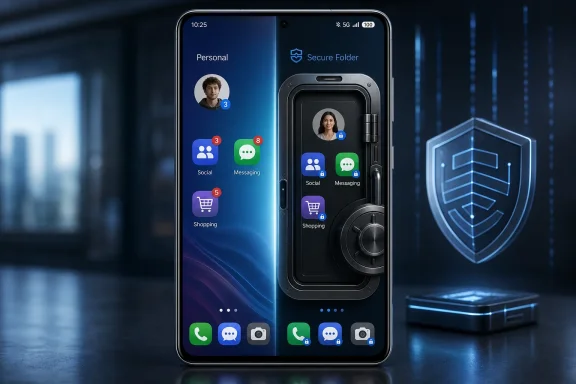
Samsung’s Secure Folder lets Galaxy owners run a second, separate instance of many installed apps by placing or installing those apps inside Samsung’s Knox-backed private space, a capability highlighted this week by How-To Geek as an overlooked use for account separation and app cloning. That framing matters because Secure Folder has long been marketed as a privacy vault, not as a practical second workspace. The feature’s most interesting trick is not that it hides things, but that it changes the phone’s operating model: one device can behave like two semi-independent app environments. For WindowsForum readers, the lesson is familiar from decades of desktop computing: isolation is rarely just about secrecy; it is also about workflow.
Secure Folder has always suffered from a naming problem. “Folder” suggests a locked drawer, a place where photos, PDFs, and maybe a banking app go when a user wants a little discretion. In practice, Samsung built something much closer to a lightweight second profile: a protected space where apps, accounts, files, and notifications can live apart from the rest of the phone.
That distinction is not semantic trivia. If Secure Folder were merely a hidden directory, it would be useful mostly for concealment. Because it is instead a separate app environment, it becomes a tool for duplication, boundary-setting, testing, and compartmentalization.
The How-To Geek piece gets at the everyday consequence: users can install or add an app inside Secure Folder even if that app already exists on the main phone. The copy inside Secure Folder is not simply a shortcut to the existing app state. It behaves like a separate instance, asking for its own sign-in and maintaining its own app data.
That is the part many users miss because Samsung does not sell Secure Folder as “app cloning.” It sells it as protection. But the same isolation that protects a private gallery can also let a user keep two Snapchat accounts, two shopping app sessions, two messaging setups, or a clean developer build without constantly signing in and out.
That model breaks down in ordinary life. People have personal and work accounts, side projects, family accounts, creator identities, test credentials, and regional app profiles. The phone may be personal, but the identity map inside it rarely is.
Secure Folder solves that problem not by persuading each app developer to support multiple accounts, but by giving Android a second place to install the app. To the app, it looks like a fresh environment. To the user, it is a clone with a separate login.
This is the kind of feature that sounds niche until it stops being niche. A parent managing a child’s school app, a gig worker juggling marketplace accounts, a small-business owner with separate banking credentials, or a developer testing production and staging builds can all benefit from the same design. The use case is not espionage; it is modern account sprawl.
That first-party status matters. A third-party app cloner has to work around Android’s rules and may raise uncomfortable questions about permissions, updates, credentials, and trust. Secure Folder sits within Samsung’s supported device architecture, which gives it a legitimacy that hobbyist cloning tools do not have.
That does not mean users should treat it as magic. Secure Folder is still running on the same physical device, under the same operating system vendor, and subject to the same broad realities of Android security, backups, cloud sync, screenshots, notifications, and user behavior. But compared with downloading a random cloning app from the Play Store, Samsung’s built-in container is the more defensible choice.
For administrators and security-minded users, that is the crucial distinction. The feature is not just convenient because it duplicates apps. It is convenient because it duplicates apps inside a vendor-supported isolation model rather than an improvised one.
Secure Folder creates a stronger boundary because the apps inside it can be treated as a set. If the work apps live in Secure Folder, the user can contain their notifications, accounts, and files in one place. The psychological effect is not trivial: work is not sprinkled across the whole home screen; it is behind a door.
That resembles the logic behind managed work profiles in enterprise Android deployments. The difference is that Secure Folder can be used by an ordinary Galaxy owner without waiting for an employer’s mobile device management policy. It is a consumer-facing version of an enterprise idea: isolate the context, not just the app icon.
For Windows veterans, the analogy is less “folder” and more “separate Windows account with a locked desktop,” though even that comparison is imperfect. The important part is that the user gets a boundary they can understand and control. In a world where every app wants attention all the time, a boundary is a productivity feature as much as a privacy feature.
That friction is not a bug in the concept. It is the price of separation. If Secure Folder behaved exactly like the rest of the phone, it would not be much of a secure folder.
But Samsung has to balance security with usability, and that balance has shifted over time. Users can tune locking behavior, hide Secure Folder, manage notifications, and decide whether convenience or isolation matters more for their particular setup. Someone using Secure Folder for a second game account may not need the same lock discipline as someone storing sensitive work documents.
This is where Samsung’s branding undersells the product again. A “secure folder” sounds binary: locked or unlocked, safe or unsafe. In reality, the feature is a configurable compartment, and its value depends on how deliberately the user configures it.
A cloned app is still an app. It may still collect data, send notifications, sync to a cloud service, or expose information through its own account infrastructure. Secure Folder can separate local app data on the device, but it cannot make Facebook, Gmail, a bank, or a game server forget that the same person is behind two sessions.
That matters for privacy claims. Secure Folder is useful for keeping local device access under control. It is not a universal anonymity system, and users should not mistake it for one. If the threat model is “someone borrowing my unlocked phone should not see this app,” Secure Folder is highly relevant. If the threat model is “the app provider should not correlate my identities,” Secure Folder alone is not enough.
This is an old security lesson in a modern mobile wrapper. Sandboxes help, but they do not rewrite the business model of the software inside them.
On desktops, this is why virtual machines, containers, browser profiles, and test accounts became everyday tools. On phones, the equivalent workflow is often clumsy. Secure Folder gives Galaxy users a surprisingly accessible approximation: install the app in the main space for daily use, then keep a second copy in Secure Folder for testing or alternate credentials.
It is not a replacement for a proper device lab. It will not simulate every Android version, screen size, permission state, or OEM variation. But for quick checks, account separation, and reproducing user-facing behavior, it is a practical tool hiding in plain sight.
That makes Secure Folder part of a broader pattern in computing. Features built for one reason often become valuable for another once users realize what the underlying abstraction can do.
That does not make Secure Folder obsolete. Samsung’s version remains important because Galaxy phones are among the most widely used Android devices, and Samsung has years of user expectations wrapped around the feature. But Android’s own movement toward private spaces shows that this is not merely a Samsung quirk.
It also raises interesting questions about convergence. If Android provides a standard private profile and Samsung provides Secure Folder, users and developers benefit when the platform treats these spaces consistently. Notifications, file pickers, recent-apps views, sharing sheets, screenshots, and app visibility all need predictable rules.
The future of these features will be judged less by whether they can hide an app icon and more by whether they can behave coherently across the whole OS. Privacy spaces that leak through convenience surfaces are not just embarrassing; they undermine trust.
On the other hand, any user-controlled second space can complicate visibility. If employees install business apps inside Secure Folder outside official management, IT may not have the policy enforcement, logging, app configuration, or remote wipe behavior it expects from a managed work profile. The user may feel safer, while the organization has less control.
That is not an argument against Secure Folder. It is an argument against pretending that consumer isolation and enterprise management are the same thing. They overlap, but they do not solve identical problems.
The practical recommendation for organizations is straightforward: define whether Secure Folder is allowed, discouraged, or irrelevant in the mobile policy. Ambiguity is where shadow workflows grow. If a company wants work apps in a managed profile, it should say so; if Secure Folder is acceptable for certain low-risk cases, it should say that too.
The name points users toward secrecy. The implementation points power users toward separation. That mismatch is why the app-cloning angle can feel like a revelation even though the feature has existed for years.
This is a recurring problem in modern operating systems. Vendors describe features in terms of the marketing story they want to tell, while users discover value in the architecture beneath the story. “Secure Folder” sounds like a place to hide documents. “A second isolated app environment” sounds like a tool for people who understand why profiles, containers, and sandboxes matter.
Samsung could do more to surface that value without diluting the privacy message. A setup flow that explicitly offers “personal,” “work,” “alternate account,” and “testing” patterns would teach users what the feature can do. Right now, many discover it only through articles, forum posts, or accident.
 Samsung Accidentally Built a Power-User Feature Into a Privacy Box
Secure Folder has always suffered from a naming problem. “Folder” suggests a locked drawer, a place where photos, PDFs, and maybe a banking app go when a user wants a little discretion. In practice, Samsung built something much closer to a lightweight second profile: a protected space where apps, accounts, files, and notifications can live apart from the rest of the phone.That distinction is not semantic trivia. If Secure Folder were merely a hidden directory, it would be useful mostly for concealment. Because it is instead a separate app environment, it becomes a tool for duplication, boundary-setting, testing, and compartmentalization.
The How-To Geek piece gets at the everyday consequence: users can install or add an app inside Secure Folder even if that app already exists on the main phone. The copy inside Secure Folder is not simply a shortcut to the existing app state. It behaves like a separate instance, asking for its own sign-in and maintaining its own app data.
That is the part many users miss because Samsung does not sell Secure Folder as “app cloning.” It sells it as protection. But the same isolation that protects a private gallery can also let a user keep two Snapchat accounts, two shopping app sessions, two messaging setups, or a clean developer build without constantly signing in and out.
The Second App Instance Is the Real Product
Android has never been especially elegant about multiple identities inside a single app. Some apps support account switching well, especially Google’s own services and large social platforms. Others treat one app install as one person, one session, one account, and one notification stream.That model breaks down in ordinary life. People have personal and work accounts, side projects, family accounts, creator identities, test credentials, and regional app profiles. The phone may be personal, but the identity map inside it rarely is.
Secure Folder solves that problem not by persuading each app developer to support multiple accounts, but by giving Android a second place to install the app. To the app, it looks like a fresh environment. To the user, it is a clone with a separate login.
This is the kind of feature that sounds niche until it stops being niche. A parent managing a child’s school app, a gig worker juggling marketplace accounts, a small-business owner with separate banking credentials, or a developer testing production and staging builds can all benefit from the same design. The use case is not espionage; it is modern account sprawl.
Knox Makes the Trick Feel More Serious Than a Third-Party Cloner
App cloning is not new. Android users have long found ways to duplicate apps through OEM tools, third-party cloners, work-profile utilities, or multiple user profiles. The difference with Samsung is that Secure Folder is tied into Knox, Samsung’s broader security platform, and ships as a first-party Galaxy feature.That first-party status matters. A third-party app cloner has to work around Android’s rules and may raise uncomfortable questions about permissions, updates, credentials, and trust. Secure Folder sits within Samsung’s supported device architecture, which gives it a legitimacy that hobbyist cloning tools do not have.
That does not mean users should treat it as magic. Secure Folder is still running on the same physical device, under the same operating system vendor, and subject to the same broad realities of Android security, backups, cloud sync, screenshots, notifications, and user behavior. But compared with downloading a random cloning app from the Play Store, Samsung’s built-in container is the more defensible choice.
For administrators and security-minded users, that is the crucial distinction. The feature is not just convenient because it duplicates apps. It is convenient because it duplicates apps inside a vendor-supported isolation model rather than an improvised one.
The Work-Life Boundary Is Stronger When It Has Walls
The most obvious use case is work-life separation, and it is obvious because it is good. Android and One UI already offer notification controls, Focus modes, Do Not Disturb schedules, and per-app settings. Those tools reduce noise, but they do not fully separate contexts.Secure Folder creates a stronger boundary because the apps inside it can be treated as a set. If the work apps live in Secure Folder, the user can contain their notifications, accounts, and files in one place. The psychological effect is not trivial: work is not sprinkled across the whole home screen; it is behind a door.
That resembles the logic behind managed work profiles in enterprise Android deployments. The difference is that Secure Folder can be used by an ordinary Galaxy owner without waiting for an employer’s mobile device management policy. It is a consumer-facing version of an enterprise idea: isolate the context, not just the app icon.
For Windows veterans, the analogy is less “folder” and more “separate Windows account with a locked desktop,” though even that comparison is imperfect. The important part is that the user gets a boundary they can understand and control. In a world where every app wants attention all the time, a boundary is a productivity feature as much as a privacy feature.
The Convenience Comes With Friction, and That Is by Design
Secure Folder’s biggest advantage is also the reason some users abandon it. A protected space requires authentication, separate setup, separate app management, and occasionally separate file movement. The moment a user wants seamless sharing between the main phone and Secure Folder, the boundary becomes visible.That friction is not a bug in the concept. It is the price of separation. If Secure Folder behaved exactly like the rest of the phone, it would not be much of a secure folder.
But Samsung has to balance security with usability, and that balance has shifted over time. Users can tune locking behavior, hide Secure Folder, manage notifications, and decide whether convenience or isolation matters more for their particular setup. Someone using Secure Folder for a second game account may not need the same lock discipline as someone storing sensitive work documents.
This is where Samsung’s branding undersells the product again. A “secure folder” sounds binary: locked or unlocked, safe or unsafe. In reality, the feature is a configurable compartment, and its value depends on how deliberately the user configures it.
The App Clone Is Separate, but the Human Is Not
The most common mistake with features like Secure Folder is assuming technical separation automatically creates operational separation. It does not. If the same user signs into the same cloud account, syncs the same photos, reuses the same passwords, and forwards the same files back and forth, the wall gets lower.A cloned app is still an app. It may still collect data, send notifications, sync to a cloud service, or expose information through its own account infrastructure. Secure Folder can separate local app data on the device, but it cannot make Facebook, Gmail, a bank, or a game server forget that the same person is behind two sessions.
That matters for privacy claims. Secure Folder is useful for keeping local device access under control. It is not a universal anonymity system, and users should not mistake it for one. If the threat model is “someone borrowing my unlocked phone should not see this app,” Secure Folder is highly relevant. If the threat model is “the app provider should not correlate my identities,” Secure Folder alone is not enough.
This is an old security lesson in a modern mobile wrapper. Sandboxes help, but they do not rewrite the business model of the software inside them.
Developers Get a Pocket-Sized Test Bench
The How-To Geek article briefly mentions developers, and that use deserves more attention. A second app environment is useful for anyone who needs to compare clean and messy states. Developers, testers, support staff, and power users often need one version of an app configured normally and another version configured experimentally.On desktops, this is why virtual machines, containers, browser profiles, and test accounts became everyday tools. On phones, the equivalent workflow is often clumsy. Secure Folder gives Galaxy users a surprisingly accessible approximation: install the app in the main space for daily use, then keep a second copy in Secure Folder for testing or alternate credentials.
It is not a replacement for a proper device lab. It will not simulate every Android version, screen size, permission state, or OEM variation. But for quick checks, account separation, and reproducing user-facing behavior, it is a practical tool hiding in plain sight.
That makes Secure Folder part of a broader pattern in computing. Features built for one reason often become valuable for another once users realize what the underlying abstraction can do.
Google’s Private Space Turns Samsung’s Old Idea Into an Android-Wide Direction
Samsung was early to this consumer-facing private-space model, but it is no longer alone in spirit. Android 15 introduced Private Space as a platform-level way to hide and isolate sensitive apps in a separate area. The direction of travel is clear: mobile operating systems are acknowledging that one phone now contains multiple lives.That does not make Secure Folder obsolete. Samsung’s version remains important because Galaxy phones are among the most widely used Android devices, and Samsung has years of user expectations wrapped around the feature. But Android’s own movement toward private spaces shows that this is not merely a Samsung quirk.
It also raises interesting questions about convergence. If Android provides a standard private profile and Samsung provides Secure Folder, users and developers benefit when the platform treats these spaces consistently. Notifications, file pickers, recent-apps views, sharing sheets, screenshots, and app visibility all need predictable rules.
The future of these features will be judged less by whether they can hide an app icon and more by whether they can behave coherently across the whole OS. Privacy spaces that leak through convenience surfaces are not just embarrassing; they undermine trust.
Enterprise IT Should See Both Utility and Shadow IT
For IT administrators, Secure Folder is a double-edged feature. On one hand, it reinforces a concept enterprise teams already support: separate work data from personal data, limit cross-contamination, and reduce casual exposure. On unmanaged personal devices, Secure Folder may be better than nothing for users who insist on accessing work-adjacent services.On the other hand, any user-controlled second space can complicate visibility. If employees install business apps inside Secure Folder outside official management, IT may not have the policy enforcement, logging, app configuration, or remote wipe behavior it expects from a managed work profile. The user may feel safer, while the organization has less control.
That is not an argument against Secure Folder. It is an argument against pretending that consumer isolation and enterprise management are the same thing. They overlap, but they do not solve identical problems.
The practical recommendation for organizations is straightforward: define whether Secure Folder is allowed, discouraged, or irrelevant in the mobile policy. Ambiguity is where shadow workflows grow. If a company wants work apps in a managed profile, it should say so; if Secure Folder is acceptable for certain low-risk cases, it should say that too.
Samsung’s Best Features Often Hide Behind Bad Names
Samsung phones have a long history of feature abundance. Some of it is bloat, some of it is genuinely useful, and some of it becomes useful only when a user discovers the unofficial use case. Secure Folder belongs in the last category.The name points users toward secrecy. The implementation points power users toward separation. That mismatch is why the app-cloning angle can feel like a revelation even though the feature has existed for years.
This is a recurring problem in modern operating systems. Vendors describe features in terms of the marketing story they want to tell, while users discover value in the architecture beneath the story. “Secure Folder” sounds like a place to hide documents. “A second isolated app environment” sounds like a tool for people who understand why profiles, containers, and sandboxes matter.
Samsung could do more to surface that value without diluting the privacy message. A setup flow that explicitly offers “personal,” “work,” “alternate account,” and “testing” patterns would teach users what the feature can do. Right now, many discover it only through articles, forum posts, or accident.
The Galaxy Trick Worth Stealing
Secure Folder’s app-cloning capability is not a gimmick; it is a practical expression of a deeper design principle. Phones need more than locks. They need compartments.- Galaxy owners can use Secure Folder to run a second instance of many apps with separate sign-ins and separate local app data.
- The feature is especially useful for apps that do not support fast multi-account switching on their own.
- Secure Folder is best understood as a protected app environment rather than a literal folder.
- The isolation improves local privacy and workflow separation, but it does not make users anonymous to the services they sign into.
- IT teams should distinguish between Samsung’s consumer-controlled Secure Folder and formally managed enterprise work profiles.
- The rise of Android Private Space suggests that app compartmentalization is becoming a mainstream mobile OS feature, not a Samsung-only oddity.
References
- Primary source: How-To Geek
Published: Sat, 27 Jun 2026 15:45:07 GMT
Samsung's Secure Folder does something most people miss—run two instances of any app
Be on the lookout for out-of-the-box ways to utilize “boring” features. www.howtogeek.com
- Related coverage: docs.samsungknox.com
- Related coverage: androidauthority.com
What is Samsung Knox and how does it work?
The Samsung Knox branding is seen everywhere on Galaxy phones, but what does it do and how does it work? We answer all your questions!www.androidauthority.com - Related coverage: techbone.net
How to Add Apps to Secure Folder - Samsung Manual | TechBone
Add Apps to Secure Folder - Samsung:www.techbone.net - Related coverage: samsungknox.com
Secure Folder | Knox
Secure Folder is a free app that creates a private, encrypted space on your Samsung Galaxy smartphone. Get an additional layer of security and privacy by leveraging the Samsung security platform.www.samsungknox.com - Related coverage: techradar.com
What is Samsung Secure Folder? | TechRadar
How to use this special security featurewww.techradar.com
- Related coverage: androidcentral.com
How to set up Samsung's Secure Folder on the Galaxy S8 | Android Central
Secure Folder makes it easy to keep your stuff where only you can get to it.www.androidcentral.com - Related coverage: sammobile.com
Samsung officially releases Secure Folder for the Galaxy S7 and Galaxy S7 edge - SamMobile
The much awaited Secure Folder app has been officially released by Samsung for the Galaxy S7 and the Galaxy S7 edge. - SamMobilewww.sammobile.com - Related coverage: kp4-cdn.samsungknox.com
</rdf:Alt> </dc:title> <dc:description> <rdf:Alt> <rdf:li xml:lang="x-default"/> </rdf:Alt> </dc:description> <dc:creator> <rdf:Seq> <rdf:li>MARC DU
</rdf:Alt> </dc:description> <dc:creator> <rdf:Seq> <rdf:li>MARC DUNN/MS Government Relations & Internal Audit /SEAU/Principal Professional/Samsung Electronicskp4-cdn.samsungknox.com
- Related coverage: images.samsung.com
- Related coverage: image-us.samsung.com
- Related coverage: samsung.com
Use the Secure Folder on your Galaxy phone or tablet
With Secure Folder, you can hide your personal data and photos using a passcode, so no one will have access to your private data.www.samsung.com - Related coverage: gizmochina.com
Concerned about work profile apps? Samsung's Secure Folder is switching to Android's Private Space - Gizmochina
Private Space creates a completely isolated environment on the device. www.gizmochina.com
- Related coverage: sammyfans.com
One UI 8 makes Samsung’s Secure Folder truly private
One UI’s Secure Folder is a brilliant idea that landed on Pixel phones as Private Space. This Samsung feature had a privacy flaw, which One UI 8 quietly addresses. Galaxy users can secure their private files under Secure Folder’s dedicated storage, which can’t be accessed without the necessary...www.sammyfans.com - Related coverage: gadgets.beebom.com
What Is Secure Folder in Samsung Phones and How to Use It | Beebom Gadgets
Secure Folder in Samsung phones is a private and encrypted space for your apps and files. Here is how to set up, open, hide and delete Secure Folder on your Galaxy phone.gadgets.beebom.com
