

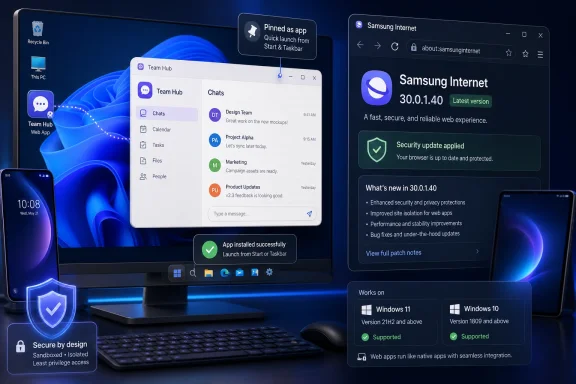
Samsung Internet for Windows version 30.0.1.40 is rolling out in May 2026 with support for installing websites as desktop-style apps, alongside security vulnerability fixes and continued compatibility with Windows 10 version 1809 or later and Windows 11. The update is small on paper, but strategically revealing. Samsung is not trying to reinvent the browser so much as extend the Galaxy ecosystem onto the one platform it cannot afford to ignore: the Windows PC.
For Windows users, the new feature will feel familiar because it is familiar. Chrome, Edge, and other Chromium-based browsers have long blurred the line between websites, shortcuts, and Progressive Web Apps. What makes Samsung’s move interesting is not the novelty of the feature, but the timing: Samsung Internet has only recently escaped beta on Windows, and the company is already filling in the expectations that define a credible modern desktop browser.
Samsung Internet has always occupied an odd place in the browser market. On Android, it is both ordinary and underrated: preinstalled on Galaxy devices, polished enough to keep, and invisible enough that many users never think of it as a strategic product. On Windows, that ambiguity disappears.
A phone browser can survive as a default. A Windows browser has to make a case for itself against Edge, Chrome, Firefox, Brave, Vivaldi, Opera, and a graveyard of “privacy-first” or “AI-first” challengers. The bar is not whether it can open a page, sync a bookmark, or block a pop-up. The bar is whether a user can move their digital muscle memory into it without losing the little conveniences that have accumulated elsewhere.
That is why the ability to install websites as apps matters more than it initially appears. It is not a killer feature. It is a table-stakes feature. Samsung adding it now suggests the company understands that a desktop browser must participate in the operating system, not merely sit on top of it.
The Windows version of Samsung Internet began as a beta in late 2025, initially limited to selected markets, before becoming a stable global release in 2026. The browser supports Windows 10 version 1809 and newer, as well as Windows 11, which means Samsung is targeting the broad installed base rather than limiting the app to Galaxy Book buyers. That decision is important. Samsung wants the browser to be an ecosystem bridge, not a laptop accessory.
That does not make it useless. The browser is full of features whose value lies in reducing friction by a few seconds at a time. Web apps for Gmail, Outlook, Google Calendar, Microsoft 365, WhatsApp, Discord, Notion, Spotify, or internal company dashboards can make a Windows desktop feel less like a tab landfill and more like a working environment.
The feature also speaks to a broader shift in how Windows is used. Microsoft has spent years nudging users toward web-powered apps, whether through Edge, Microsoft Store web wrappers, Teams, Outlook, or Copilot-connected services. Google has done the same from the opposite direction, treating the browser as the operating system’s real center of gravity. Samsung is arriving late to this fight, but it is arriving with the right checklist.
There is a catch, and it is the same catch that applies to most browser-installed apps: not every installed site becomes a true Progressive Web App. Some sites support offline behavior, notifications, background sync, and app-like windowing. Others simply launch in a separate frame. Users expecting native Windows behavior may be disappointed when the “app” is still fundamentally a website with a nicer coat.
That is the same playbook Apple has used for years with Safari, iCloud Keychain, Handoff, and Continuity. The browser is not merely a browser; it is a conduit for identity, history, passwords, tabs, and habits. Samsung cannot replicate Apple’s vertical control over macOS, but it can approximate some of the experience by placing its browser on Windows and tying it to Galaxy phones and tablets.
That is why sync matters more than raw browser share. If a Galaxy user can move bookmarks, history, and open pages between phone, tablet, and PC, Samsung Internet becomes a practical part of daily computing. If Samsung Pass, AI features, and account integration work reliably, the browser becomes one more reason not to drift toward Google or Microsoft for everything.
The web-app installation feature fits neatly into that strategy. A user who pins Samsung Internet-powered web apps to the Windows taskbar is not just using a feature. They are giving Samsung a small but persistent place in the desktop workflow. In platform terms, that is the prize.
For any Chromium-based browser, update cadence is credibility. Chrome and Edge move quickly because the threat landscape moves quickly. A smaller browser that lags behind security patches risks becoming an attractive nuisance: polished enough for users to adopt, but not updated aggressively enough for IT departments to bless.
Samsung has not turned the browser into an enterprise platform simply by shipping one security update. But visible maintenance matters. It tells users that the Windows version is not a one-off experiment destined to be forgotten after launch. It also gives Samsung a baseline from which to argue that its desktop browser can be trusted with the same account and browsing data users already feed into its mobile browser.
The hard question for Samsung is whether it can keep pace. Browser users rarely see the difference between a stable patch train and a neglected one until something breaks or a vulnerability becomes public. IT admins, however, will watch version numbers, release notes, deployment behavior, and policy controls. If Samsung wants more than enthusiast adoption, it will eventually need to speak that language more clearly.
But the browser market has not really been about rendering engines for years. It is about ecosystems. Chrome sells Google account continuity. Edge sells Microsoft 365, Windows integration, enterprise management, and Copilot. Safari sells Apple’s walled garden. Brave sells a privacy posture. Arc, when it was ascendant, sold a different mental model for tabs and workspaces.
Samsung’s pitch is Galaxy continuity. That is narrower than Chrome’s and less entrenched than Edge’s, but it is not meaningless. Samsung sells enormous numbers of phones, tablets, watches, earbuds, and Windows laptops. A browser that follows those users around can be more useful than a technically superior browser that forces them back into someone else’s account system.
This is also why Samsung is unlikely to make much headway with users outside its device world. If you own a Pixel, an iPhone, a Surface, and a random Windows desktop, Samsung Internet is just another Chromium browser with a different logo. If you own a Galaxy S-series phone, a Galaxy Tab, and a Galaxy Book, it becomes a continuity layer. The feature set is the same, but the value proposition changes completely.
The challenge is that browsers are uniquely sensitive places to put AI. A browser sees searches, logins, financial pages, work dashboards, medical research, private messages, and half-finished thoughts. Users may accept AI in a photo editor or note-taking app while remaining deeply uneasy about an assistant that lives next to every page they visit.
Samsung has an advantage here because Galaxy users are already being trained to expect AI features across the device stack. But it also has a trust problem to solve. The more “agentic” a browser becomes, the more clearly Samsung needs to explain what is processed locally, what is sent to the cloud, what is retained, and what can be turned off.
For now, the website-as-app feature is refreshingly noncontroversial. It does not require users to accept a new AI bargain. It simply makes the browser behave more like the desktop expects. In a product increasingly surrounded by AI marketing, that kind of practical feature may do more to win trust than another assistant panel.
Administrators will want to know whether Samsung offers robust management templates, update controls, extension governance, certificate handling, data-loss prevention compatibility, and clear vulnerability disclosure practices. They will also care whether Samsung’s sync and AI services can be disabled, audited, or constrained. In regulated environments, “it syncs nicely with my phone” is not an argument; it is a risk assessment waiting to happen.
That does not mean Samsung Internet has no business role. Plenty of companies already issue Samsung phones, rely on Microsoft 365, and support Windows fleets. A Samsung browser that cleanly bridges mobile and PC could eventually help with managed workflows, secure sign-in, and cross-device productivity. But that future requires administrative maturity, not just user-facing polish.
This is where Samsung’s relationship with Microsoft becomes interesting. Samsung’s Windows ambitions have often worked with, rather than against, Microsoft’s ecosystem: Phone Link, OneDrive gallery integration, Galaxy Book features, and Windows-Android continuity all live in that space. A Samsung browser on Windows, however, rubs closer to Edge’s territory. It is a complement when it helps Galaxy users; it is a competitor when it becomes the place those users spend their workday.
Windows has never fully resolved the identity crisis. A web app can appear in the Start menu, sit on the taskbar, send notifications, and look app-like, yet still feel weirdly second-class when file handling, background behavior, performance, or integration falls short. Microsoft has improved the experience through Edge and the Store, but the average user still does not think in terms of PWAs. They think in terms of apps and websites.
Samsung’s implementation is therefore useful but unlikely to change behavior by itself. The feature works best when users already have specific websites they treat as daily tools. It is less persuasive as a discovery mechanism. No one switches browsers because it can install a website as an app; they appreciate the feature after they have already decided to live there.
Still, browser-installed apps are part of the modern Windows reality. Many “desktop apps” are already Electron shells, web views, or cloud-connected clients. The distinction between native and web is less pure than users imagine. Samsung is not leading this shift, but by supporting it, the company avoids making its Windows browser feel unfinished.
Samsung’s best chance is not to ask users to switch in the abstract. It is to make the switch feel like the natural completion of a Galaxy setup. The browser must be waiting when a user opens a new Galaxy Book. It must sync cleanly when they sign into a Samsung account. It must not stumble on common websites. It must update quickly. It must make web apps, AI tools, and continuity feel practical rather than promotional.
Version 30.0.1.40 is a modest release, but modest releases are how platforms become real. A beta launch proves intent. A stable release proves availability. A maintenance update with security fixes proves someone is still paying attention. A small feature that aligns with desktop expectations proves Samsung is listening to the shape of Windows, not merely porting a phone app and hoping for the best.
For Windows users, the new feature will feel familiar because it is familiar. Chrome, Edge, and other Chromium-based browsers have long blurred the line between websites, shortcuts, and Progressive Web Apps. What makes Samsung’s move interesting is not the novelty of the feature, but the timing: Samsung Internet has only recently escaped beta on Windows, and the company is already filling in the expectations that define a credible modern desktop browser.
 Samsung’s Browser Is No Longer Just a Phone Habit
Samsung Internet has always occupied an odd place in the browser market. On Android, it is both ordinary and underrated: preinstalled on Galaxy devices, polished enough to keep, and invisible enough that many users never think of it as a strategic product. On Windows, that ambiguity disappears.A phone browser can survive as a default. A Windows browser has to make a case for itself against Edge, Chrome, Firefox, Brave, Vivaldi, Opera, and a graveyard of “privacy-first” or “AI-first” challengers. The bar is not whether it can open a page, sync a bookmark, or block a pop-up. The bar is whether a user can move their digital muscle memory into it without losing the little conveniences that have accumulated elsewhere.
That is why the ability to install websites as apps matters more than it initially appears. It is not a killer feature. It is a table-stakes feature. Samsung adding it now suggests the company understands that a desktop browser must participate in the operating system, not merely sit on top of it.
The Windows version of Samsung Internet began as a beta in late 2025, initially limited to selected markets, before becoming a stable global release in 2026. The browser supports Windows 10 version 1809 and newer, as well as Windows 11, which means Samsung is targeting the broad installed base rather than limiting the app to Galaxy Book buyers. That decision is important. Samsung wants the browser to be an ecosystem bridge, not a laptop accessory.
The New Feature Is Useful Because It Is Boring
Installing a website as an app sounds more dramatic than it usually is. In practice, it typically means a site gets its own window, its own icon, and a little less browser chrome around it. For a well-built web app, that can feel natural; for a basic website, it is little more than a dressed-up shortcut.That does not make it useless. The browser is full of features whose value lies in reducing friction by a few seconds at a time. Web apps for Gmail, Outlook, Google Calendar, Microsoft 365, WhatsApp, Discord, Notion, Spotify, or internal company dashboards can make a Windows desktop feel less like a tab landfill and more like a working environment.
The feature also speaks to a broader shift in how Windows is used. Microsoft has spent years nudging users toward web-powered apps, whether through Edge, Microsoft Store web wrappers, Teams, Outlook, or Copilot-connected services. Google has done the same from the opposite direction, treating the browser as the operating system’s real center of gravity. Samsung is arriving late to this fight, but it is arriving with the right checklist.
There is a catch, and it is the same catch that applies to most browser-installed apps: not every installed site becomes a true Progressive Web App. Some sites support offline behavior, notifications, background sync, and app-like windowing. Others simply launch in a separate frame. Users expecting native Windows behavior may be disappointed when the “app” is still fundamentally a website with a nicer coat.
Samsung Is Building a Bridge, Not a Browser War
The temptation is to frame every new browser release as an attack on Chrome or Edge. That makes for clean headlines, but it misses Samsung’s more plausible goal. Samsung does not need to win the browser market on Windows. It needs Galaxy users to feel that staying inside Samsung’s ecosystem is less awkward when they sit down at a PC.That is the same playbook Apple has used for years with Safari, iCloud Keychain, Handoff, and Continuity. The browser is not merely a browser; it is a conduit for identity, history, passwords, tabs, and habits. Samsung cannot replicate Apple’s vertical control over macOS, but it can approximate some of the experience by placing its browser on Windows and tying it to Galaxy phones and tablets.
That is why sync matters more than raw browser share. If a Galaxy user can move bookmarks, history, and open pages between phone, tablet, and PC, Samsung Internet becomes a practical part of daily computing. If Samsung Pass, AI features, and account integration work reliably, the browser becomes one more reason not to drift toward Google or Microsoft for everything.
The web-app installation feature fits neatly into that strategy. A user who pins Samsung Internet-powered web apps to the Windows taskbar is not just using a feature. They are giving Samsung a small but persistent place in the desktop workflow. In platform terms, that is the prize.
The Security Fixes Are the Quietly Important Part
The update’s changelog also mentions fixes for several security vulnerabilities. That line may look routine, but it is more important than the app-installation feature for administrators and security-minded users. A browser is not just another application; it is the front door to untrusted code, hostile pages, credential theft, malicious ads, and enterprise data leakage.For any Chromium-based browser, update cadence is credibility. Chrome and Edge move quickly because the threat landscape moves quickly. A smaller browser that lags behind security patches risks becoming an attractive nuisance: polished enough for users to adopt, but not updated aggressively enough for IT departments to bless.
Samsung has not turned the browser into an enterprise platform simply by shipping one security update. But visible maintenance matters. It tells users that the Windows version is not a one-off experiment destined to be forgotten after launch. It also gives Samsung a baseline from which to argue that its desktop browser can be trusted with the same account and browsing data users already feed into its mobile browser.
The hard question for Samsung is whether it can keep pace. Browser users rarely see the difference between a stable patch train and a neglected one until something breaks or a vulnerability becomes public. IT admins, however, will watch version numbers, release notes, deployment behavior, and policy controls. If Samsung wants more than enthusiast adoption, it will eventually need to speak that language more clearly.
Windows Already Has Too Many Browsers, Which Is Exactly the Point
On paper, Windows does not need another Chromium browser. Edge is built in, Chrome dominates user habit, Brave courts the privacy-conscious, Vivaldi courts the power user, Opera keeps reinventing its pitch, and Firefox remains the major non-Chromium holdout. Samsung Internet enters a crowded market with no obvious desktop-native identity.But the browser market has not really been about rendering engines for years. It is about ecosystems. Chrome sells Google account continuity. Edge sells Microsoft 365, Windows integration, enterprise management, and Copilot. Safari sells Apple’s walled garden. Brave sells a privacy posture. Arc, when it was ascendant, sold a different mental model for tabs and workspaces.
Samsung’s pitch is Galaxy continuity. That is narrower than Chrome’s and less entrenched than Edge’s, but it is not meaningless. Samsung sells enormous numbers of phones, tablets, watches, earbuds, and Windows laptops. A browser that follows those users around can be more useful than a technically superior browser that forces them back into someone else’s account system.
This is also why Samsung is unlikely to make much headway with users outside its device world. If you own a Pixel, an iPhone, a Surface, and a random Windows desktop, Samsung Internet is just another Chromium browser with a different logo. If you own a Galaxy S-series phone, a Galaxy Tab, and a Galaxy Book, it becomes a continuity layer. The feature set is the same, but the value proposition changes completely.
The AI Layer Is Both Differentiator and Risk
Samsung has also been pushing AI features into the browser, including agentic capabilities meant to make browsing more contextual and assistive. That is now the browser industry’s default direction. Microsoft has Copilot in Edge, Google is building Gemini deeper into Chrome and Search, and almost every challenger browser wants some version of summarization, page understanding, or task assistance.The challenge is that browsers are uniquely sensitive places to put AI. A browser sees searches, logins, financial pages, work dashboards, medical research, private messages, and half-finished thoughts. Users may accept AI in a photo editor or note-taking app while remaining deeply uneasy about an assistant that lives next to every page they visit.
Samsung has an advantage here because Galaxy users are already being trained to expect AI features across the device stack. But it also has a trust problem to solve. The more “agentic” a browser becomes, the more clearly Samsung needs to explain what is processed locally, what is sent to the cloud, what is retained, and what can be turned off.
For now, the website-as-app feature is refreshingly noncontroversial. It does not require users to accept a new AI bargain. It simply makes the browser behave more like the desktop expects. In a product increasingly surrounded by AI marketing, that kind of practical feature may do more to win trust than another assistant panel.
Enterprise IT Will Want Controls Before It Wants Continuity
For consumers, Samsung Internet for Windows is easy to understand: install it, sign in, sync the things, and decide whether it feels better than Edge or Chrome. For businesses, the calculation is less generous. A browser deployed at scale is a policy surface, a compliance concern, and a security dependency.Administrators will want to know whether Samsung offers robust management templates, update controls, extension governance, certificate handling, data-loss prevention compatibility, and clear vulnerability disclosure practices. They will also care whether Samsung’s sync and AI services can be disabled, audited, or constrained. In regulated environments, “it syncs nicely with my phone” is not an argument; it is a risk assessment waiting to happen.
That does not mean Samsung Internet has no business role. Plenty of companies already issue Samsung phones, rely on Microsoft 365, and support Windows fleets. A Samsung browser that cleanly bridges mobile and PC could eventually help with managed workflows, secure sign-in, and cross-device productivity. But that future requires administrative maturity, not just user-facing polish.
This is where Samsung’s relationship with Microsoft becomes interesting. Samsung’s Windows ambitions have often worked with, rather than against, Microsoft’s ecosystem: Phone Link, OneDrive gallery integration, Galaxy Book features, and Windows-Android continuity all live in that space. A Samsung browser on Windows, however, rubs closer to Edge’s territory. It is a complement when it helps Galaxy users; it is a competitor when it becomes the place those users spend their workday.
The PWA Dream Still Has a Windows Problem
Progressive Web Apps have long promised a cleaner middle ground between websites and native software. They can be installed, launched, updated through the web, and sometimes run offline. For developers, they avoid app-store gatekeeping and platform-specific code. For users, they reduce the clutter of traditional installers.Windows has never fully resolved the identity crisis. A web app can appear in the Start menu, sit on the taskbar, send notifications, and look app-like, yet still feel weirdly second-class when file handling, background behavior, performance, or integration falls short. Microsoft has improved the experience through Edge and the Store, but the average user still does not think in terms of PWAs. They think in terms of apps and websites.
Samsung’s implementation is therefore useful but unlikely to change behavior by itself. The feature works best when users already have specific websites they treat as daily tools. It is less persuasive as a discovery mechanism. No one switches browsers because it can install a website as an app; they appreciate the feature after they have already decided to live there.
Still, browser-installed apps are part of the modern Windows reality. Many “desktop apps” are already Electron shells, web views, or cloud-connected clients. The distinction between native and web is less pure than users imagine. Samsung is not leading this shift, but by supporting it, the company avoids making its Windows browser feel unfinished.
The Real Test Is Whether Samsung Keeps Showing Up
The history of desktop browsers is littered with technically competent products that failed because their makers stopped investing, lacked a clear audience, or underestimated the inertia of defaults. Users do not switch browsers casually anymore. Their passwords, extensions, profiles, payment methods, tab habits, and work accounts create a gravity well.Samsung’s best chance is not to ask users to switch in the abstract. It is to make the switch feel like the natural completion of a Galaxy setup. The browser must be waiting when a user opens a new Galaxy Book. It must sync cleanly when they sign into a Samsung account. It must not stumble on common websites. It must update quickly. It must make web apps, AI tools, and continuity feel practical rather than promotional.
Version 30.0.1.40 is a modest release, but modest releases are how platforms become real. A beta launch proves intent. A stable release proves availability. A maintenance update with security fixes proves someone is still paying attention. A small feature that aligns with desktop expectations proves Samsung is listening to the shape of Windows, not merely porting a phone app and hoping for the best.
The Small Update That Shows the Bigger Bet
This release does not turn Samsung Internet into the default browser for Windows power users, but it does clarify where Samsung is going. The company is trying to make its browser credible enough that Galaxy users do not have to leave Samsung’s world when they move from pocket to desk.- Samsung Internet for Windows version 30.0.1.40 adds the ability to install websites as app-like desktop experiences.
- The update also includes fixes for several security vulnerabilities, which matters more than the short changelog suggests.
- The browser supports Windows 10 version 1809 or later and Windows 11, making it broadly available beyond Samsung’s own PCs.
- The feature is useful mainly for frequently used web services, but it should not be mistaken for the full value of a native Windows app.
- Samsung’s strongest pitch is not browser superiority in isolation, but continuity for people already using Galaxy phones, tablets, and PCs.
- The browser’s long-term credibility will depend on update cadence, security transparency, sync reliability, and how carefully Samsung handles AI features.
References
- Primary source: SamMobile
Published: Fri, 22 May 2026 13:07:00 GMT
Samsung Browser for Windows updated with a useful new feature - SamMobile
The latest Samsung Browser for Windows update brings the ability to install websites as apps on the PC internet browser. - SamMobilewww.sammobile.com - Related coverage: notebookcheck.net
Samsung Browser for Windows gets new agentic AI features - Notebookcheck News
Samsung has moved its browser beyond last year’s PC beta, adding Windows support, cross-device continuity, and new Perplexity-powered assistant features. www.notebookcheck.net
- Related coverage: news.samsung.com
Samsung Internet Expands to PC With New Beta Program – Samsung Global Newsroom
Samsung brings its popular mobile browser to PC for the first time, unlocking a more fluid and connected experience across the Samsung Galaxy ecosystemnews.samsung.com
- Related coverage: developer.samsung.com
- Related coverage: androidheadlines.com

Samsung Internet Browser for Windows: Stable Version Out Now
Samsung Browser for Windows is finally getting a stable release worldwide. The browser brings AI features, cross-device continuity, and more.
www.androidheadlines.com
- Related coverage: xatakahome.com
El navegador de Samsung deja de ser prueba en Windows: versión estable para PC y despliegue global
Samsung lleva tiempo intentando que su ecosistema no viva solo dentro del móvil, y el siguiente paso acaba de quedar bastante más claro. Samsung Browser para...www.xatakahome.com
- Related coverage: ixbt.com
Альтернатива Google Chrome: браузер Samsung для ПК научился устанавливать веб-сайты в виде приложений
В конце марта тестирование Samsung Browser для Windows завершилось www.ixbt.com
- Related coverage: windowscentral.com
Samsung finally brings popular Internet browser app to Windows PCs — exclusive beta sign up available now | Windows Central
Samsung's default browser on Android has always been somewhat of a hidden gem. Now, it's coming to Windows PCs, complete with cross device sync and AI features.www.windowscentral.com - Related coverage: drwindows.de
Samsung Internet: Windows-Version verlässt die Beta und steht weltweit bereit - außer Galaxy AI - Dr. Windows
Dass Samsung seinen Browser, der schon länger von Android bekannt ist, auch zu Windows bringen würde, wissen wir seit einiger Zeit. Samsung Internet ging im vergangenen Herbst in die Beta und stand zunächst nur in Südkorea und den USA zur Verfügung. Beiden Ländern sind auch die Funktionen von...www.drwindows.de
- Related coverage: phonearena.com
This smartphone browser on Windows might be the first real Chrome alternative in years - PhoneArena
It's time to change the default browser on Windows.www.phonearena.com - Related coverage: ceppek.com
- Related coverage: androidcentral.com
Samsung Internet beta launches on PC, bridging Galaxy experience with new AI features | Android Central
Samsung dropped an Internet browser beta for users, merging its PC and mobile devices.www.androidcentral.com - Related coverage: img1.wsimg.com
