

Microsoft is preparing a dedicated Recap app for Microsoft Teams in July 2026, giving Windows, Mac, and web users a single place to browse recent meeting recordings, transcripts, AI summaries, and related recap material from roughly the previous 30 days. That sounds like a small navigational cleanup, but it is really Microsoft admitting that Teams’ meeting memory has become too important to leave scattered across chats, calendars, recordings, and tabs. The new app is not just a convenience feature; it is another step in turning Teams from a communications client into the front end for workplace knowledge. The catch is familiar: the best version of that memory sits behind Microsoft 365 Copilot licensing.
Teams has spent years accumulating places where a meeting can leave evidence of itself. A recording may live in OneDrive or SharePoint, a transcript may be attached to the meeting, notes may sit in Loop or OneNote, decisions may be buried in chat, and AI-generated summaries may appear only if the right licenses and policies line up. For users, the result has been a paradox: Microsoft has made meetings more searchable and more analyzable, but not always easier to find.
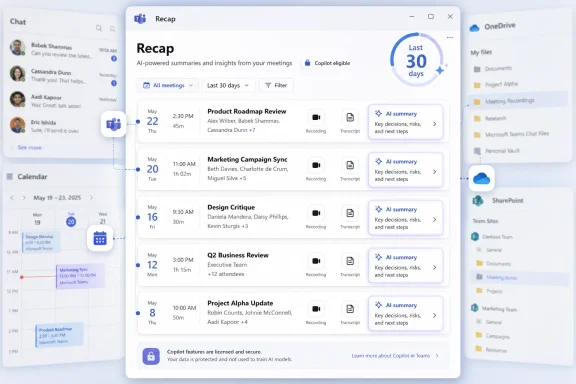
The dedicated Recap app is Microsoft’s answer to that sprawl. Instead of asking users to remember which chat, calendar entry, channel, or storage location contains a meeting’s afterlife, the app presents recent recap content in a chronological feed. Screenshots shared by Neowin show a straightforward list organized by date and time, with meeting duration and other context meant to help users identify the right session quickly.
That design choice matters. Microsoft is not trying to make the Recap app feel like a new document repository or a compliance portal. It is making it feel like a work inbox for meetings that already happened, which is a much better fit for how most people actually recover context.
The 30-day window is also telling. This is not an archival search product. It is a recent work surface, meant for the missed status call, the follow-up from last week’s planning meeting, or the customer discussion someone vaguely remembers but cannot locate. Older material will still depend on the broader Microsoft 365 machinery: search, storage, retention policy, calendar history, and the patience of the person trying to reconstruct what happened.
But the reason the feature feels overdue is that Teams has become a container for too many overlapping experiences. Meetings are no longer just video calls. They are recordings, transcripts, notes, attendance artifacts, chat logs, shared files, Copilot summaries, action items, and, increasingly, generated audio digests. The meeting ends, but the digital object continues to grow.
That is powerful when everything works. It is maddening when it does not. A user who remembers “the meeting where someone explained the migration plan” may not know whether to search Teams chat, the calendar, OneDrive, SharePoint, Stream, Outlook, or Microsoft 365 Copilot. The Recap app reduces that cognitive tax for recent meetings, but it also highlights how much Microsoft 365 has come to rely on cross-product plumbing that ordinary users never asked to understand.
For IT departments, that is both relief and warning. A centralized entry point should reduce help desk noise from users asking where recordings or transcripts went. It may also increase questions about why one user sees an AI summary while another sees only a recording, or why one meeting appears in the Recap app and another does not.
That distinction is the heart of Microsoft’s current productivity strategy. The company is no longer merely selling Office apps that help users create documents, spreadsheets, and messages. It is selling an interpretation layer over the work people have already produced. Meetings are a natural target because they are expensive, frequent, and notoriously inefficient to revisit.
A recording is raw material. A transcript is searchable raw material. A summary is judgment. Once Microsoft can turn a 45-minute discussion into decisions, unresolved issues, follow-ups, chapters, speaker markers, and an audio digest, the product stops being a meeting archive and starts becoming a workplace memory assistant.
That is why the Recap app should not be dismissed as a sidebar convenience. It is a packaging move for Copilot. Microsoft knows that AI features buried inside individual meetings are easy to miss, especially for users who are not living in the product all day. A dedicated app makes the value proposition visible every time someone opens Teams and sees a backlog of meetings that can be skimmed instead of rewatched.
That creates a two-tier meeting memory system. Everyone may be able to find the meeting artifact, assuming they have access. Only some users will be able to ask the system to digest it for them. In a small organization, that may be manageable. In a large enterprise with mixed licensing, it becomes another uneven productivity layer.
This matters because meeting recap is one of the clearest use cases for workplace AI. Even skeptical users can understand the value of not rewatching an hour-long call. If the most obvious Copilot benefit appears inconsistently across a tenant, adoption conversations become more complicated.
Admins will need to explain not only what the Recap app does, but why it behaves differently depending on the user. That means training materials, internal documentation, and support scripts will need to distinguish between meeting artifacts, intelligent recap, Teams Premium-era features, and Microsoft 365 Copilot experiences. Microsoft may present the app as simple. The licensing story behind it is not.
Preinstallation means the app will be available without users hunting through deployment instructions or waiting for IT to package anything. Not pinning it means Microsoft avoids the charge that it is forcing yet another Teams surface into everyone’s daily workflow. Users who want fast access can pin it themselves from the Teams app store.
This is a sensible compromise, but it also reveals Microsoft’s confidence. The company does not need to shove Recap into the rail if the pain point is real enough. Users who frequently miss meetings, manage projects, supervise teams, or bounce across customer calls will find it quickly. Users who do not live in meeting aftermath can ignore it.
For admins, the preinstalled-but-unpinned model reduces immediate disruption but does not eliminate governance work. A feature can be hidden from the rail and still create compliance, privacy, retention, and support questions the moment people begin using it.
That restraint is welcome because Teams has often suffered from feature density. Microsoft’s collaboration client has chats, channels, calendars, apps, files, meetings, workflows, communities, calls, and Copilot experiences competing for attention. Recap works only if it feels faster than the hunt it replaces.
The screenshots suggest Microsoft understands that. Meeting date, time, and duration are practical clues. Chronological ordering matches the way users remember recent work. The app appears designed around recognition rather than search mastery.
Still, Microsoft will need to get filtering and performance right. A user with a few meetings a week can navigate a simple list. A manager with eight calls a day cannot. If the Recap app becomes another long feed with only modest controls, it will help casual users while frustrating the people most likely to need it.
That includes customer conversations, HR discussions, legal strategy, financial planning, engineering reviews, security incidents, and informal internal debates. Transcripts and AI summaries can be more discoverable than the original spoken conversation, and summaries can create their own problems if they omit nuance or frame uncertainty too confidently.
Microsoft’s existing permissions and retention systems still matter here. Recordings and transcripts are not supposed to become universally visible just because a Recap app exists. But the user experience of centralization can change behavior. If people know every meeting may become a browsable object, they may record more carefully, transcribe more deliberately, or push sensitive conversations into channels that leave less machine-readable residue.
For regulated organizations, the Recap app should trigger policy review before broad adoption patterns settle in. Who can record? Who can transcribe? How long should recordings remain available? How are transcripts retained? Which meetings should avoid AI summarization? These are not new questions, but a dedicated app makes them harder to postpone.
But the limit is not neutral. It positions Recap as a current-work tool rather than a long-term knowledge base. That may reduce clutter and improve speed, but it also means the app will not replace enterprise search, eDiscovery, records management, or careful project documentation.
That is probably intentional. Microsoft does not want Teams’ Recap app to become the place where organizations expect all meeting knowledge to live forever. The company already has Purview, SharePoint, OneDrive, Stream, Teams search, and Microsoft 365 Copilot pulling at different parts of that problem. Recap is the fast lane, not the archive.
The risk is that users may not understand the distinction. If they grow accustomed to opening Recap as the place where meetings live, the disappearance of older material from that surface may feel like loss, even if the underlying files still exist elsewhere. Microsoft will need clear messaging inside the product, not just in admin documentation.
That may sound minor, but it changes the social contract of meetings. If missing a meeting no longer means reading a transcript or watching a recording, organizations may become more comfortable with asynchronous attendance. That could reduce meeting overload, at least in theory.
The danger is that it could also normalize more meetings because the penalty for missing them appears lower. A company that believes AI can summarize everything may schedule more conversations, record more of them, and expect employees to consume more generated aftermath. The productivity gain from faster catch-up can be eaten by the expansion of what workers are expected to absorb.
Microsoft is selling relief from meeting fatigue. It must be careful not to provide the infrastructure for a more polished version of the same problem.
For Windows users, the feature lands squarely in the everyday Teams desktop experience. That is where Microsoft can most directly influence habits, especially in organizations that already start and end the workday inside Teams. If the Recap app becomes part of the morning routine, it could join chat, calendar, and email as one of the surfaces people check before deciding what matters.
Mobile support will matter eventually, especially for audio recaps. The phone is the natural device for listening to generated catch-up summaries. But Microsoft’s decision to start with desktop and web suggests the company sees the first use case as organization and review, not passive listening.
That distinction may shift over time. If audio recap becomes popular, the mobile version could become the more behavior-changing client. For now, Microsoft is starting where Teams work already concentrates.
That means the Recap app should be handled as part of a broader meeting governance conversation. Organizations that already have clear policies for recording, transcription, retention, and Copilot access will be in better shape. Organizations that have let Teams meeting defaults evolve organically may find that the app exposes inconsistencies.
Training should be concise but explicit. Users need to know that the app gathers recent meeting material, that permissions still apply, that Copilot features depend on licensing, and that older content may require other search paths. Managers need to know that AI summaries are aids, not official minutes unless the organization says so.
Security teams should also pay attention to cultural drift. The easier it is to revisit meetings, the more tempting it becomes to record by default. That may be useful for transparency, but it is not always wise. Some conversations should produce a controlled record; others should not be casually captured because the tooling makes capture convenient.
That is a recurring theme across Microsoft 365. The suite is extraordinarily capable, but its power is often diffused across too many surfaces. Users do not experience that as richness. They experience it as uncertainty: Is this in Teams, Outlook, SharePoint, OneDrive, Stream, Loop, Planner, or Copilot?
The dedicated Recap app is a modest correction to that problem. It says that meeting aftermath deserves its own front door. That is good product judgment, especially for organizations where Teams meetings are now the operating rhythm of the business.
But Microsoft should not mistake centralization for simplicity. If the app becomes a wrapper around licensing prompts, missing permissions, inconsistent summaries, and unclear retention behavior, it will inherit the frustration it was meant to solve. The interface can be simple while the system behind it remains complicated.
 Microsoft Finally Gives Meeting Memory a Front Door
Teams has spent years accumulating places where a meeting can leave evidence of itself. A recording may live in OneDrive or SharePoint, a transcript may be attached to the meeting, notes may sit in Loop or OneNote, decisions may be buried in chat, and AI-generated summaries may appear only if the right licenses and policies line up. For users, the result has been a paradox: Microsoft has made meetings more searchable and more analyzable, but not always easier to find.The dedicated Recap app is Microsoft’s answer to that sprawl. Instead of asking users to remember which chat, calendar entry, channel, or storage location contains a meeting’s afterlife, the app presents recent recap content in a chronological feed. Screenshots shared by Neowin show a straightforward list organized by date and time, with meeting duration and other context meant to help users identify the right session quickly.
That design choice matters. Microsoft is not trying to make the Recap app feel like a new document repository or a compliance portal. It is making it feel like a work inbox for meetings that already happened, which is a much better fit for how most people actually recover context.
The 30-day window is also telling. This is not an archival search product. It is a recent work surface, meant for the missed status call, the follow-up from last week’s planning meeting, or the customer discussion someone vaguely remembers but cannot locate. Older material will still depend on the broader Microsoft 365 machinery: search, storage, retention policy, calendar history, and the patience of the person trying to reconstruct what happened.
The App Solves a Real Teams Problem by Exposing a Bigger One
The most generous reading of Recap is that it fixes one of Teams’ most common daily annoyances. If Teams is the place where work happens, then users need a sane way to revisit that work without spelunking through the interface. A single app that gathers recordings, transcripts, and summaries is an obvious improvement.But the reason the feature feels overdue is that Teams has become a container for too many overlapping experiences. Meetings are no longer just video calls. They are recordings, transcripts, notes, attendance artifacts, chat logs, shared files, Copilot summaries, action items, and, increasingly, generated audio digests. The meeting ends, but the digital object continues to grow.
That is powerful when everything works. It is maddening when it does not. A user who remembers “the meeting where someone explained the migration plan” may not know whether to search Teams chat, the calendar, OneDrive, SharePoint, Stream, Outlook, or Microsoft 365 Copilot. The Recap app reduces that cognitive tax for recent meetings, but it also highlights how much Microsoft 365 has come to rely on cross-product plumbing that ordinary users never asked to understand.
For IT departments, that is both relief and warning. A centralized entry point should reduce help desk noise from users asking where recordings or transcripts went. It may also increase questions about why one user sees an AI summary while another sees only a recording, or why one meeting appears in the Recap app and another does not.
Copilot Turns Recap From Playback Into Interpretation
The basic Recap app is useful because it collects meeting artifacts. The Copilot-enhanced version is strategically more important because it interprets them. Users with eligible Microsoft 365 Copilot licenses can get AI summaries and other intelligent recap experiences, including audio recaps that turn meeting content into something closer to a podcast-style catch-up.That distinction is the heart of Microsoft’s current productivity strategy. The company is no longer merely selling Office apps that help users create documents, spreadsheets, and messages. It is selling an interpretation layer over the work people have already produced. Meetings are a natural target because they are expensive, frequent, and notoriously inefficient to revisit.
A recording is raw material. A transcript is searchable raw material. A summary is judgment. Once Microsoft can turn a 45-minute discussion into decisions, unresolved issues, follow-ups, chapters, speaker markers, and an audio digest, the product stops being a meeting archive and starts becoming a workplace memory assistant.
That is why the Recap app should not be dismissed as a sidebar convenience. It is a packaging move for Copilot. Microsoft knows that AI features buried inside individual meetings are easy to miss, especially for users who are not living in the product all day. A dedicated app makes the value proposition visible every time someone opens Teams and sees a backlog of meetings that can be skimmed instead of rewatched.
Licensing Remains the Line Between Record and Intelligence
The split between standard recap content and Copilot-powered features is likely to become a familiar source of friction. Recordings and transcripts will continue to follow existing permissions and meeting policies. AI-generated summaries, audio recaps, and richer Copilot experiences require the appropriate Copilot licensing.That creates a two-tier meeting memory system. Everyone may be able to find the meeting artifact, assuming they have access. Only some users will be able to ask the system to digest it for them. In a small organization, that may be manageable. In a large enterprise with mixed licensing, it becomes another uneven productivity layer.
This matters because meeting recap is one of the clearest use cases for workplace AI. Even skeptical users can understand the value of not rewatching an hour-long call. If the most obvious Copilot benefit appears inconsistently across a tenant, adoption conversations become more complicated.
Admins will need to explain not only what the Recap app does, but why it behaves differently depending on the user. That means training materials, internal documentation, and support scripts will need to distinguish between meeting artifacts, intelligent recap, Teams Premium-era features, and Microsoft 365 Copilot experiences. Microsoft may present the app as simple. The licensing story behind it is not.
Preinstalled but Not Pinned Is Microsoft’s Compromise
Microsoft reportedly plans to preinstall the Recap app in Teams, but not automatically pin it to the left navigation rail. That is a small deployment detail with outsized importance. Teams users are already sensitive to interface churn, and administrators are often wary of Microsoft adding new icons to a client that many organizations have spent years trying to simplify.Preinstallation means the app will be available without users hunting through deployment instructions or waiting for IT to package anything. Not pinning it means Microsoft avoids the charge that it is forcing yet another Teams surface into everyone’s daily workflow. Users who want fast access can pin it themselves from the Teams app store.
This is a sensible compromise, but it also reveals Microsoft’s confidence. The company does not need to shove Recap into the rail if the pain point is real enough. Users who frequently miss meetings, manage projects, supervise teams, or bounce across customer calls will find it quickly. Users who do not live in meeting aftermath can ignore it.
For admins, the preinstalled-but-unpinned model reduces immediate disruption but does not eliminate governance work. A feature can be hidden from the rail and still create compliance, privacy, retention, and support questions the moment people begin using it.
The Screenshots Show a Utility, Not a Reinvention
The early look is visually unremarkable, and that is probably the right call. A chronological list of meeting recaps is not glamorous, but it is exactly the sort of interface Teams needs more of. The best version of this app is boring: open it, scan dates and durations, click the right recap, move on.That restraint is welcome because Teams has often suffered from feature density. Microsoft’s collaboration client has chats, channels, calendars, apps, files, meetings, workflows, communities, calls, and Copilot experiences competing for attention. Recap works only if it feels faster than the hunt it replaces.
The screenshots suggest Microsoft understands that. Meeting date, time, and duration are practical clues. Chronological ordering matches the way users remember recent work. The app appears designed around recognition rather than search mastery.
Still, Microsoft will need to get filtering and performance right. A user with a few meetings a week can navigate a simple list. A manager with eight calls a day cannot. If the Recap app becomes another long feed with only modest controls, it will help casual users while frustrating the people most likely to need it.
The Governance Burden Moves Closer to the User
Centralization does not make governance problems disappear. It makes them easier to see. When recap material is scattered, organizations may underestimate how much meeting content they are generating. When that material appears in one convenient app, users and auditors alike may suddenly recognize how much sensitive context is being captured.That includes customer conversations, HR discussions, legal strategy, financial planning, engineering reviews, security incidents, and informal internal debates. Transcripts and AI summaries can be more discoverable than the original spoken conversation, and summaries can create their own problems if they omit nuance or frame uncertainty too confidently.
Microsoft’s existing permissions and retention systems still matter here. Recordings and transcripts are not supposed to become universally visible just because a Recap app exists. But the user experience of centralization can change behavior. If people know every meeting may become a browsable object, they may record more carefully, transcribe more deliberately, or push sensitive conversations into channels that leave less machine-readable residue.
For regulated organizations, the Recap app should trigger policy review before broad adoption patterns settle in. Who can record? Who can transcribe? How long should recordings remain available? How are transcripts retained? Which meetings should avoid AI summarization? These are not new questions, but a dedicated app makes them harder to postpone.
The 30-Day Window Is a Product Decision Masquerading as Simplicity
The Recap app’s roughly 30-day scope is easy to understand, and that is part of its appeal. Most people looking for a meeting recap are looking for something recent. A month of context covers the weekly sync, the sprint planning cycle, the customer escalation, and the budget review someone missed while traveling.But the limit is not neutral. It positions Recap as a current-work tool rather than a long-term knowledge base. That may reduce clutter and improve speed, but it also means the app will not replace enterprise search, eDiscovery, records management, or careful project documentation.
That is probably intentional. Microsoft does not want Teams’ Recap app to become the place where organizations expect all meeting knowledge to live forever. The company already has Purview, SharePoint, OneDrive, Stream, Teams search, and Microsoft 365 Copilot pulling at different parts of that problem. Recap is the fast lane, not the archive.
The risk is that users may not understand the distinction. If they grow accustomed to opening Recap as the place where meetings live, the disappearance of older material from that surface may feel like loss, even if the underlying files still exist elsewhere. Microsoft will need clear messaging inside the product, not just in admin documentation.
Audio Recaps Are the Feature That Changes the Habit
The most interesting piece of the Recap story may not be the app itself, but the audio recap experience it can expose more prominently. Text summaries save time, but audio recaps change when users can catch up. They turn meeting review into something that can happen during a commute, a walk, or a break between tasks.That may sound minor, but it changes the social contract of meetings. If missing a meeting no longer means reading a transcript or watching a recording, organizations may become more comfortable with asynchronous attendance. That could reduce meeting overload, at least in theory.
The danger is that it could also normalize more meetings because the penalty for missing them appears lower. A company that believes AI can summarize everything may schedule more conversations, record more of them, and expect employees to consume more generated aftermath. The productivity gain from faster catch-up can be eaten by the expansion of what workers are expected to absorb.
Microsoft is selling relief from meeting fatigue. It must be careful not to provide the infrastructure for a more polished version of the same problem.
Windows Users Get the First Wave, Mobile Waits Its Turn
The initial rollout plan puts Windows, Mac, and web users first, with mobile support coming later. That ordering makes sense because meeting recap review is still primarily a desk-work activity. Users are more likely to scan transcripts, inspect recordings, copy action items, or compare summaries while working on a full screen.For Windows users, the feature lands squarely in the everyday Teams desktop experience. That is where Microsoft can most directly influence habits, especially in organizations that already start and end the workday inside Teams. If the Recap app becomes part of the morning routine, it could join chat, calendar, and email as one of the surfaces people check before deciding what matters.
Mobile support will matter eventually, especially for audio recaps. The phone is the natural device for listening to generated catch-up summaries. But Microsoft’s decision to start with desktop and web suggests the company sees the first use case as organization and review, not passive listening.
That distinction may shift over time. If audio recap becomes popular, the mobile version could become the more behavior-changing client. For now, Microsoft is starting where Teams work already concentrates.
Admins Should Treat Recap as a Visibility Change, Not Just an App
The practical deployment story is bigger than whether the icon appears in Teams. Admins should assume that making recap content easier to find will change user behavior. More people will open transcripts. More people will discover recordings they forgot existed. More people will ask why AI summaries are unavailable, incomplete, or different from what they expected.That means the Recap app should be handled as part of a broader meeting governance conversation. Organizations that already have clear policies for recording, transcription, retention, and Copilot access will be in better shape. Organizations that have let Teams meeting defaults evolve organically may find that the app exposes inconsistencies.
Training should be concise but explicit. Users need to know that the app gathers recent meeting material, that permissions still apply, that Copilot features depend on licensing, and that older content may require other search paths. Managers need to know that AI summaries are aids, not official minutes unless the organization says so.
Security teams should also pay attention to cultural drift. The easier it is to revisit meetings, the more tempting it becomes to record by default. That may be useful for transparency, but it is not always wise. Some conversations should produce a controlled record; others should not be casually captured because the tooling makes capture convenient.
The Real Win Is Less Time Spent Remembering Where Microsoft Put Things
The strongest argument for Recap is not that it introduces a revolutionary capability. It does not. Teams already has meeting recaps, recordings, transcripts, and Copilot summaries in various places. The win is that Microsoft is reducing the number of places users must remember.That is a recurring theme across Microsoft 365. The suite is extraordinarily capable, but its power is often diffused across too many surfaces. Users do not experience that as richness. They experience it as uncertainty: Is this in Teams, Outlook, SharePoint, OneDrive, Stream, Loop, Planner, or Copilot?
The dedicated Recap app is a modest correction to that problem. It says that meeting aftermath deserves its own front door. That is good product judgment, especially for organizations where Teams meetings are now the operating rhythm of the business.
But Microsoft should not mistake centralization for simplicity. If the app becomes a wrapper around licensing prompts, missing permissions, inconsistent summaries, and unclear retention behavior, it will inherit the frustration it was meant to solve. The interface can be simple while the system behind it remains complicated.
The Recap App Makes Teams’ Meeting Hangover Easier to Manage
The dedicated Recap app is best understood as a usability layer over a meeting ecosystem that has grown too important and too fragmented. It will help users find recent meeting material faster, but it will also make licensing boundaries and governance choices more visible.- Microsoft is preparing the Recap app for Teams users on Windows, Mac, and the web, with mobile support expected later.
- The app brings recent meeting recordings, transcripts, AI summaries, and related recap content into a single chronological surface.
- Standard recordings and transcripts continue to follow existing access controls, while richer AI-powered recap features require Microsoft 365 Copilot eligibility.
- The 30-day focus makes the app useful for current work, but it does not replace long-term search, retention, or compliance systems.
- IT teams should review recording, transcription, retention, and Copilot policies before users start treating Recap as the default place where meeting memory lives.
References
- Primary source: Windows Report
Published: 2026-06-29T06:42:10.914586
Loading…
windowsreport.com - Official source: support.microsoft.com
Recap in Microsoft Teams | Microsoft Support
Quickly revisit highlights of your Microsoft Teams event recordings with event recaps. In the recap, the most important parts of an event-the recording, shared content, and more-are captured and organized in one place. support.microsoft.com
- Related coverage: windowsforum.com
Microsoft Teams Meeting Recap App (July 2026): Filter, Review & Audio Recaps | Windows Forum
Microsoft is preparing a new Microsoft Teams Meeting recap app for general availability in July 2026, giving users a single place to find, filter, browse...windowsforum.com - Related coverage: ad-hoc-news.de
Loading…
www.ad-hoc-news.de - Official source: microsoft.com
Microsoft 365 Roadmap | Microsoft 365
The Microsoft 365 Roadmap lists updates that are currently planned for applicable subscribers. Check here for more information on the status of new features and updates.www.microsoft.com
- Official source: learn.microsoft.com
Loading…
learn.microsoft.com
- Related coverage: uctoday.com
Microsoft Teams Meeting Recap App June 2026 - UC Today
Teams gets a dedicated Meeting Recap app this month alongside Video Recap and AI recap without transcript. Here's what IT teams need to review before it rolls out.www.uctoday.com - Related coverage: techradar.com
Microsoft Teams wants to make it easier to forget all your embarrassing meeting mistakes | TechRadar
Delete Microsoft Teams meeting content and pretend it never happenedwww.techradar.com - Official source: download.microsoft.com
Loading…
download.microsoft.com - Related coverage: certometrics.com
Loading…
certometrics.com - Related coverage: dynamicscon.com
Loading…
dynamicscon.com