

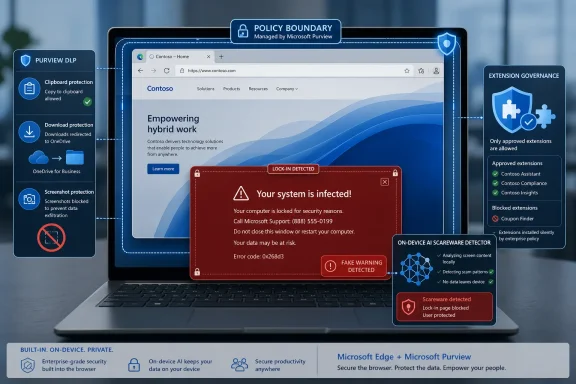
Microsoft has detailed a new wave of Microsoft Edge for Business security controls for commercial customers, including Purview-backed data loss prevention, stricter extension governance, contractor download redirection, protected clipboard behavior, screenshot controls, and an on-device AI scareware blocker that can inspect visible browser content. The headline-grabbing part is the AI model that can “see” what is on the screen, but the more important story is Microsoft’s attempt to turn the browser into the enforcement point for modern work. Edge is no longer being pitched merely as the thing that renders intranet pages and Microsoft 365 portals. It is being positioned as the policy boundary between corporate data, unmanaged devices, generative AI, and increasingly theatrical web scams.
For years, enterprise browser security mostly meant patch cadence, phishing filters, extension controls, and maybe a stern group policy template. That world has not disappeared, but it now feels incomplete. Work has moved into SaaS apps, unmanaged endpoints, contractors’ laptops, web-based AI tools, and browser tabs that are functionally indistinguishable from native applications.
Microsoft’s bet with Edge for Business is that the browser is the one place where those messy realities can still be governed. If a document is opened in SharePoint, a prompt is pasted into an AI chatbot, or a contractor tries to download a file from a client tenant, Edge is close enough to the action to apply policy before data leaves the organization’s preferred lanes.
That is why this announcement is bigger than a list of toggles. Microsoft is not just adding another defensive layer to Edge. It is expanding the definition of what a corporate browser is supposed to do.
The browser is becoming a security broker. It knows the user, the tenant, the device state, the cloud app, and the content sensitivity. In Microsoft’s world, that makes Edge a natural extension of Entra ID, Defender, Intune, and Purview rather than a standalone app with a blue-green icon.
That distinction matters. Traditional browser defenses are very good at blocking known bad domains, suspicious downloads, and pages already classified as phishing or malicious. Scareware often plays a different game. It can use fresh domains, compromised sites, aggressive full-screen behavior, fake system warnings, and panic-inducing visuals that exist just long enough to catch a human being off guard.
Microsoft’s answer is to classify the page by its appearance and behavior, not merely its address. That is a subtle but meaningful shift. It treats the rendered experience itself as evidence.
The privacy question is obvious, and Microsoft is trying to defuse it before it becomes the story. The company says the model runs locally rather than sending screenshots to a cloud service for analysis. That does not make every concern vanish, especially in regulated environments where “AI watches your screen” is the kind of phrase that triggers policy review, but it does change the risk profile. The claim is not that Microsoft is streaming employees’ screens to the cloud. The claim is that Edge is running a local classifier against the visible scam pattern.
There is also a resource tradeoff. Microsoft says the feature is enabled by default only on devices with at least 2GB of RAM and four CPU cores. That threshold is low enough to cover most modern business PCs, but it is still an admission that local AI security has a cost. Browser security is no longer just a network lookup and a warning interstitial. It is computation happening at the edge of the endpoint, inside the browser session.
The scammer’s advantage is speed. The defender’s advantage has traditionally been scale. Microsoft is now trying to add perception to that equation.
That is where computer vision becomes interesting. A fake support scam is often visually loud: full-screen lock-in, alarming red graphics, counterfeit Microsoft branding, fake virus counts, phone numbers, and messages claiming the machine is infected. Those signals may be easier to detect from the rendered page than from the site’s metadata.
But this also brings the familiar AI problem into browser security: false positives and false negatives. A local model that blocks a scam before reputation systems catch up is useful. A local model that interrupts a legitimate support portal, remote assistance workflow, or internal training simulation is a help desk ticket generator.
For home users, an occasional false positive may be annoying. For enterprises, it becomes a governance issue. Who can override the block? How are events logged? Can administrators allow-list known applications? How does the system behave under managed policy? The value of the feature will depend less on the marketing phrase “AI-powered” and more on whether it fits cleanly into administrative reality.
Microsoft’s Edge for Business updates lean heavily into a problem that every organization now has, whether it has formally admitted it or not: employees are using AI tools faster than security teams can approve, classify, monitor, and explain them. Some of those tools are harmless. Some are valuable. Some are black holes for sensitive corporate data.
Microsoft’s proposed answer is not to pretend employees will stop using AI. It is to steer them. Edge can help restrict unsanctioned AI services through Purview data loss prevention policy and redirect users toward approved services such as Microsoft 365 Copilot. That is a very Microsoft solution: solve the governance problem by making the sanctioned route easier to audit, easier to license, and more deeply integrated with the rest of the stack.
This is where the browser becomes a business-control surface, not just a security surface. If an employee tries to paste confidential content into an unapproved AI chatbot, the company does not merely need malware protection. It needs policy enforcement based on data classification, user identity, app trust, and tenant boundaries.
Microsoft is also making a commercial argument. The company wants enterprises to see Copilot not simply as an AI assistant, but as the “safe” destination for AI usage inside a governed Microsoft 365 environment. Edge becomes the traffic cop that nudges users away from unsanctioned AI and toward the paid, auditable Microsoft option.
That will be attractive to many CIOs and deeply irritating to some users. Both reactions can be true. Security teams want fewer uncontrolled data exits. Employees want tools that work. If the approved AI is slower, less capable, poorly configured, or over-blocked, users will route around it. Browser enforcement can reduce that behavior, but it cannot fix a bad internal AI rollout.
That includes preventing file uploads, downloads, copy and paste, printing, and screenshots in protected sessions. These controls are not glamorous, but they are exactly the kinds of friction points that define real-world data leakage. Sensitive content rarely leaves an organization only through a cinematic breach. It leaves through copied text, downloaded files, pasted prompts, unmanaged apps, personal cloud drives, screenshots, browser extensions, and “I just needed to get this done” workarounds.
The value of browser-level DLP is that it can operate where the work happens. A policy that blocks a user from copying sensitive content from a managed app into an unmanaged location is more direct than a warning buried in a compliance dashboard. A screenshot prevention rule attached to a protected browser session is more practical than hoping users remember a training slide from last quarter.
The limitation is that every enforcement point creates operational complexity. DLP rules have to be accurate. Sensitivity labeling has to be maintained. Exceptions have to be handled. Contractors, subsidiaries, guest accounts, shared devices, and unmanaged endpoints all turn clean diagrams into messy deployments.
Still, Microsoft’s direction is clear. Purview is no longer just the system of record for data governance. It is becoming the policy brain behind what Edge permits or refuses in real time.
This is exactly the kind of scenario that makes old perimeter thinking look quaint. There is no single corporate firewall that neatly encloses the work. The identity, device, tenant, application, and data owner can all belong to different administrative worlds.
Microsoft’s answer is to use an Entra ID-joined work profile and Edge policy to prevent local downloads. Instead of saving a file onto the device, the download can be redirected into the contracting firm’s OneDrive. That preserves productivity while reducing the chance that client data lands in an uncontrolled local folder on a machine governed by someone else.
This is not a universal cure. A determined insider can still photograph a screen, summarize a document, or misuse access in other ways. Security controls do not abolish trust. They narrow the easy paths for accidental or casual data leakage.
For many organizations, that narrowing is enough to matter. Contractors are not edge cases anymore. They are part of normal enterprise operations. A browser that can apply tenant-aware policy to contractor workflows gives Microsoft a stronger story than “only use managed devices,” because many businesses know that is not how their work actually happens.
Browser extensions are one of the most underappreciated risks in modern enterprise computing. They can read pages, modify content, inject scripts, collect browsing data, and interact with sensitive web applications. A useful extension can become a supply-chain concern. A malicious extension can become a data-exfiltration tool hiding in plain sight.
The problem is that extensions are also genuinely useful. Password managers, accessibility tools, developer utilities, grammar tools, meeting aids, and line-of-business helpers may all live in the extension ecosystem. A blanket ban is simple, but it creates pressure for exceptions. Total freedom is convenient, but it gives administrators little control over a powerful attack surface.
The mature approach is managed flexibility. Let users request what they need, approve what the business can defend, and block the rest. That is not exciting, but it is how enterprise browser security survives contact with daily work.
Edge for Business benefits here from being part of a larger Microsoft management stack. If extension requests, approvals, and restrictions can be handled alongside identity, device compliance, and security reporting, administrators get one more reason to treat Edge as the default enterprise browser rather than merely a Chromium variant with Microsoft branding.
Administrators should expect questions from legal, privacy, HR, works councils, and employees. What exactly is being analyzed? Is anything stored? Are screenshots captured? Can admins review what the model saw? Is the feature active in personal profiles or only work contexts? What events are logged? Can users disable it? Can enterprises disable it?
Microsoft’s local-processing answer is important, but it is not a complete enterprise answer by itself. Privacy reviews are about data flows, retention, access, purpose limitation, and user notice. “It runs on your computer” helps, but it does not remove the need to document behavior.
There is also a cultural dimension. Employees are already adjusting to productivity analytics, endpoint monitoring, DLP alerts, AI governance, and browser profile separation. A security feature described as visual inspection can easily be misunderstood as surveillance, even when the technical design is narrower. If organizations deploy it silently, they should not be surprised when users fill the explanation gap with suspicion.
The better approach is plain language. Tell users the feature is designed to detect scam pages that try to hijack the browser visually. Explain that it is not a manager watching their screen. Explain what gets logged and what does not. In 2026, security tooling increasingly needs internal communications strategy as much as technical configuration.
This is also why Microsoft keeps tying Edge to Defender, Purview, Entra ID, Intune, and Copilot. The company’s strategic advantage is not that Edge alone has every best-in-class browser feature. It is that Edge can be embedded into the Microsoft 365 security and compliance machine in ways rivals cannot easily duplicate without the same identity, endpoint, data governance, and productivity footprint.
For customers already deep in Microsoft 365 E5-style licensing, that integration is compelling. A security team can make a coherent argument: users authenticate with Entra ID, devices are managed through Intune, activity is monitored through Defender, data policy is defined in Purview, and the browser enforces controls at the moment of use.
For customers outside that stack, the pitch is less automatic. The more Edge’s differentiated features depend on Microsoft’s broader ecosystem, the more the browser becomes a strategic commitment rather than a casual choice. That may be exactly what Microsoft wants.
The risk is lock-in by policy gravity. Once browser behavior, DLP, AI governance, contractor access, and extension management are all wired through Microsoft services, switching browsers becomes a security architecture project. Enterprises may accept that tradeoff, but they should recognize it as a tradeoff.
Edge’s new controls will need careful tuning. Blocking copy and paste from unmanaged locations may be sensible for regulated data, but maddening if applied too broadly. Screenshot prevention can be useful for sensitive portals, but disruptive for support workflows, documentation, training, and accessibility. Download redirection can protect contractor data, but it must be obvious where the file went.
The same is true of AI redirection. If a user is blocked from an unsanctioned AI tool and sent to Copilot, the sanctioned tool has to be good enough for the task. Otherwise, the policy becomes a dare. People will use phones, personal devices, alternate browsers, or less visible routes.
The most successful deployments will start with high-risk data and high-risk apps rather than trying to govern every browser interaction on day one. Security teams should use audit modes, pilot groups, and real user feedback before turning every knob to block. Microsoft can provide the machinery, but customers still have to decide where friction is worth the protection.
Edge does not need to be every consumer’s favorite browser to become the default browser in a Microsoft-heavy enterprise. It needs to give IT and security teams reasons to standardize. DLP enforcement, extension management, AI governance, contractor controls, and local scareware detection are all reasons that speak more to administrators than to browser enthusiasts.
That does not mean users are irrelevant. A browser that workers hate will always create resistance. But in managed environments, the decision is rarely just about preference. It is about whether the browser can enforce the organization’s rules without requiring a patchwork of third-party tools.
Google, Mozilla, and other browser vendors can compete on security, privacy, performance, openness, and cross-platform trust. Microsoft’s unique angle is the enterprise stack. Edge for Business is not just trying to be a browser. It is trying to be the visible face of Microsoft’s security architecture during the workday.
That makes the browser more important and more controversial. The more policy Edge enforces, the more users will associate Edge with restriction. The more threats it blocks, the more administrators will associate Edge with control. Microsoft is betting that the second audience has the final vote.
 Microsoft Is Turning the Browser Into the New Security Perimeter
For years, enterprise browser security mostly meant patch cadence, phishing filters, extension controls, and maybe a stern group policy template. That world has not disappeared, but it now feels incomplete. Work has moved into SaaS apps, unmanaged endpoints, contractors’ laptops, web-based AI tools, and browser tabs that are functionally indistinguishable from native applications.Microsoft’s bet with Edge for Business is that the browser is the one place where those messy realities can still be governed. If a document is opened in SharePoint, a prompt is pasted into an AI chatbot, or a contractor tries to download a file from a client tenant, Edge is close enough to the action to apply policy before data leaves the organization’s preferred lanes.
That is why this announcement is bigger than a list of toggles. Microsoft is not just adding another defensive layer to Edge. It is expanding the definition of what a corporate browser is supposed to do.
The browser is becoming a security broker. It knows the user, the tenant, the device state, the cloud app, and the content sensitivity. In Microsoft’s world, that makes Edge a natural extension of Entra ID, Defender, Intune, and Purview rather than a standalone app with a blue-green icon.
The Scareware Blocker Is the Flashy Feature, Not the Whole Strategy
The most attention-grabbing addition is Edge’s local AI-powered scareware blocker. Microsoft describes it as an on-device model that uses computer vision to detect malicious full-screen content designed to frighten users into calling fake support numbers, installing malware, or paying scammers. Instead of waiting for a site to show up on a reputation list, the model looks at what is being displayed and tries to identify the pattern of an attack in real time.That distinction matters. Traditional browser defenses are very good at blocking known bad domains, suspicious downloads, and pages already classified as phishing or malicious. Scareware often plays a different game. It can use fresh domains, compromised sites, aggressive full-screen behavior, fake system warnings, and panic-inducing visuals that exist just long enough to catch a human being off guard.
Microsoft’s answer is to classify the page by its appearance and behavior, not merely its address. That is a subtle but meaningful shift. It treats the rendered experience itself as evidence.
The privacy question is obvious, and Microsoft is trying to defuse it before it becomes the story. The company says the model runs locally rather than sending screenshots to a cloud service for analysis. That does not make every concern vanish, especially in regulated environments where “AI watches your screen” is the kind of phrase that triggers policy review, but it does change the risk profile. The claim is not that Microsoft is streaming employees’ screens to the cloud. The claim is that Edge is running a local classifier against the visible scam pattern.
There is also a resource tradeoff. Microsoft says the feature is enabled by default only on devices with at least 2GB of RAM and four CPU cores. That threshold is low enough to cover most modern business PCs, but it is still an admission that local AI security has a cost. Browser security is no longer just a network lookup and a warning interstitial. It is computation happening at the edge of the endpoint, inside the browser session.
Reputation Lists Were Always Too Slow for the Scam Economy
Scareware is a useful example of where old security assumptions strain under modern abuse. A domain reputation system can be excellent and still arrive late. A malicious page can rotate infrastructure, borrow legitimacy from compromised sites, or use social engineering that is obvious to a person in hindsight but difficult to classify from the URL alone.The scammer’s advantage is speed. The defender’s advantage has traditionally been scale. Microsoft is now trying to add perception to that equation.
That is where computer vision becomes interesting. A fake support scam is often visually loud: full-screen lock-in, alarming red graphics, counterfeit Microsoft branding, fake virus counts, phone numbers, and messages claiming the machine is infected. Those signals may be easier to detect from the rendered page than from the site’s metadata.
But this also brings the familiar AI problem into browser security: false positives and false negatives. A local model that blocks a scam before reputation systems catch up is useful. A local model that interrupts a legitimate support portal, remote assistance workflow, or internal training simulation is a help desk ticket generator.
For home users, an occasional false positive may be annoying. For enterprises, it becomes a governance issue. Who can override the block? How are events logged? Can administrators allow-list known applications? How does the system behave under managed policy? The value of the feature will depend less on the marketing phrase “AI-powered” and more on whether it fits cleanly into administrative reality.
Shadow AI Is the Real Enterprise Fire Drill
The scareware blocker will get the screenshots. Shadow AI will get the meetings.Microsoft’s Edge for Business updates lean heavily into a problem that every organization now has, whether it has formally admitted it or not: employees are using AI tools faster than security teams can approve, classify, monitor, and explain them. Some of those tools are harmless. Some are valuable. Some are black holes for sensitive corporate data.
Microsoft’s proposed answer is not to pretend employees will stop using AI. It is to steer them. Edge can help restrict unsanctioned AI services through Purview data loss prevention policy and redirect users toward approved services such as Microsoft 365 Copilot. That is a very Microsoft solution: solve the governance problem by making the sanctioned route easier to audit, easier to license, and more deeply integrated with the rest of the stack.
This is where the browser becomes a business-control surface, not just a security surface. If an employee tries to paste confidential content into an unapproved AI chatbot, the company does not merely need malware protection. It needs policy enforcement based on data classification, user identity, app trust, and tenant boundaries.
Microsoft is also making a commercial argument. The company wants enterprises to see Copilot not simply as an AI assistant, but as the “safe” destination for AI usage inside a governed Microsoft 365 environment. Edge becomes the traffic cop that nudges users away from unsanctioned AI and toward the paid, auditable Microsoft option.
That will be attractive to many CIOs and deeply irritating to some users. Both reactions can be true. Security teams want fewer uncontrolled data exits. Employees want tools that work. If the approved AI is slower, less capable, poorly configured, or over-blocked, users will route around it. Browser enforcement can reduce that behavior, but it cannot fix a bad internal AI rollout.
Purview Moves From Compliance Console to Browser Muscle
Purview has often lived in the mental category of compliance tooling: sensitivity labels, retention policies, eDiscovery, DLP rules, audit logs, and the kind of administrative surface that matters most after something has gone wrong. Edge for Business is part of Microsoft’s effort to make Purview feel more immediate. The policy does not just classify the data. It changes what the user can do in the browser.That includes preventing file uploads, downloads, copy and paste, printing, and screenshots in protected sessions. These controls are not glamorous, but they are exactly the kinds of friction points that define real-world data leakage. Sensitive content rarely leaves an organization only through a cinematic breach. It leaves through copied text, downloaded files, pasted prompts, unmanaged apps, personal cloud drives, screenshots, browser extensions, and “I just needed to get this done” workarounds.
The value of browser-level DLP is that it can operate where the work happens. A policy that blocks a user from copying sensitive content from a managed app into an unmanaged location is more direct than a warning buried in a compliance dashboard. A screenshot prevention rule attached to a protected browser session is more practical than hoping users remember a training slide from last quarter.
The limitation is that every enforcement point creates operational complexity. DLP rules have to be accurate. Sensitivity labeling has to be maintained. Exceptions have to be handled. Contractors, subsidiaries, guest accounts, shared devices, and unmanaged endpoints all turn clean diagrams into messy deployments.
Still, Microsoft’s direction is clear. Purview is no longer just the system of record for data governance. It is becoming the policy brain behind what Edge permits or refuses in real time.
Contractors Are Where Clean Security Models Go to Break
The contractor scenario Microsoft highlights is especially revealing. A contractor may be using a device managed by their actual employer while working inside another company’s environment. The contracting company wants data protection, but it may not own the endpoint. The employer may manage the laptop, but it may not own the data being accessed. The user just wants the file.This is exactly the kind of scenario that makes old perimeter thinking look quaint. There is no single corporate firewall that neatly encloses the work. The identity, device, tenant, application, and data owner can all belong to different administrative worlds.
Microsoft’s answer is to use an Entra ID-joined work profile and Edge policy to prevent local downloads. Instead of saving a file onto the device, the download can be redirected into the contracting firm’s OneDrive. That preserves productivity while reducing the chance that client data lands in an uncontrolled local folder on a machine governed by someone else.
This is not a universal cure. A determined insider can still photograph a screen, summarize a document, or misuse access in other ways. Security controls do not abolish trust. They narrow the easy paths for accidental or casual data leakage.
For many organizations, that narrowing is enough to matter. Contractors are not edge cases anymore. They are part of normal enterprise operations. A browser that can apply tenant-aware policy to contractor workflows gives Microsoft a stronger story than “only use managed devices,” because many businesses know that is not how their work actually happens.
Extension Control Is the Boring Feature That Prevents Real Damage
Microsoft also emphasizes extension governance: blocking installation of extensions, hosted apps, themes, and scripts; controlling whether users can install from external locations; approving specific extensions; and allowing users to request access to extensions case by case. This sounds like classic enterprise plumbing, but it belongs in the same conversation as AI and DLP.Browser extensions are one of the most underappreciated risks in modern enterprise computing. They can read pages, modify content, inject scripts, collect browsing data, and interact with sensitive web applications. A useful extension can become a supply-chain concern. A malicious extension can become a data-exfiltration tool hiding in plain sight.
The problem is that extensions are also genuinely useful. Password managers, accessibility tools, developer utilities, grammar tools, meeting aids, and line-of-business helpers may all live in the extension ecosystem. A blanket ban is simple, but it creates pressure for exceptions. Total freedom is convenient, but it gives administrators little control over a powerful attack surface.
The mature approach is managed flexibility. Let users request what they need, approve what the business can defend, and block the rest. That is not exciting, but it is how enterprise browser security survives contact with daily work.
Edge for Business benefits here from being part of a larger Microsoft management stack. If extension requests, approvals, and restrictions can be handled alongside identity, device compliance, and security reporting, administrators get one more reason to treat Edge as the default enterprise browser rather than merely a Chromium variant with Microsoft branding.
The Privacy Debate Will Not Be Settled by Saying “On Device”
The phrase “AI model that can see your screen” is guaranteed to travel farther than the implementation details. That is a communications problem for Microsoft and a governance problem for customers. Even if the model is local, even if it is limited to browser content, and even if it is aimed at scam detection, the optics are sensitive.Administrators should expect questions from legal, privacy, HR, works councils, and employees. What exactly is being analyzed? Is anything stored? Are screenshots captured? Can admins review what the model saw? Is the feature active in personal profiles or only work contexts? What events are logged? Can users disable it? Can enterprises disable it?
Microsoft’s local-processing answer is important, but it is not a complete enterprise answer by itself. Privacy reviews are about data flows, retention, access, purpose limitation, and user notice. “It runs on your computer” helps, but it does not remove the need to document behavior.
There is also a cultural dimension. Employees are already adjusting to productivity analytics, endpoint monitoring, DLP alerts, AI governance, and browser profile separation. A security feature described as visual inspection can easily be misunderstood as surveillance, even when the technical design is narrower. If organizations deploy it silently, they should not be surprised when users fill the explanation gap with suspicion.
The better approach is plain language. Tell users the feature is designed to detect scam pages that try to hijack the browser visually. Explain that it is not a manager watching their screen. Explain what gets logged and what does not. In 2026, security tooling increasingly needs internal communications strategy as much as technical configuration.
Edge for Business Is Becoming Microsoft’s Managed Work Container
The deeper story is that Edge for Business is evolving into a managed work container for Windows and beyond. It separates work and personal browsing, applies enterprise policy, integrates with Microsoft 365 controls, and creates a governed space even on some unmanaged devices. That is powerful because the browser is where much of work now lives.This is also why Microsoft keeps tying Edge to Defender, Purview, Entra ID, Intune, and Copilot. The company’s strategic advantage is not that Edge alone has every best-in-class browser feature. It is that Edge can be embedded into the Microsoft 365 security and compliance machine in ways rivals cannot easily duplicate without the same identity, endpoint, data governance, and productivity footprint.
For customers already deep in Microsoft 365 E5-style licensing, that integration is compelling. A security team can make a coherent argument: users authenticate with Entra ID, devices are managed through Intune, activity is monitored through Defender, data policy is defined in Purview, and the browser enforces controls at the moment of use.
For customers outside that stack, the pitch is less automatic. The more Edge’s differentiated features depend on Microsoft’s broader ecosystem, the more the browser becomes a strategic commitment rather than a casual choice. That may be exactly what Microsoft wants.
The risk is lock-in by policy gravity. Once browser behavior, DLP, AI governance, contractor access, and extension management are all wired through Microsoft services, switching browsers becomes a security architecture project. Enterprises may accept that tradeoff, but they should recognize it as a tradeoff.
The User Experience Will Decide Whether the Controls Survive
Security products often fail not because the policy idea is wrong, but because the user experience is intolerable. DLP is notorious for this. If policies block legitimate work too often, users stop seeing them as guardrails and start seeing them as obstacles. Then they find another route.Edge’s new controls will need careful tuning. Blocking copy and paste from unmanaged locations may be sensible for regulated data, but maddening if applied too broadly. Screenshot prevention can be useful for sensitive portals, but disruptive for support workflows, documentation, training, and accessibility. Download redirection can protect contractor data, but it must be obvious where the file went.
The same is true of AI redirection. If a user is blocked from an unsanctioned AI tool and sent to Copilot, the sanctioned tool has to be good enough for the task. Otherwise, the policy becomes a dare. People will use phones, personal devices, alternate browsers, or less visible routes.
The most successful deployments will start with high-risk data and high-risk apps rather than trying to govern every browser interaction on day one. Security teams should use audit modes, pilot groups, and real user feedback before turning every knob to block. Microsoft can provide the machinery, but customers still have to decide where friction is worth the protection.
This Is a Browser War Fought on Admin Consoles, Not Home Screens
Consumer browser wars are usually measured in market share, performance benchmarks, default prompts, and user complaints about nagging. The enterprise browser war is different. It is fought in admin centers, compliance reviews, procurement meetings, and incident postmortems.Edge does not need to be every consumer’s favorite browser to become the default browser in a Microsoft-heavy enterprise. It needs to give IT and security teams reasons to standardize. DLP enforcement, extension management, AI governance, contractor controls, and local scareware detection are all reasons that speak more to administrators than to browser enthusiasts.
That does not mean users are irrelevant. A browser that workers hate will always create resistance. But in managed environments, the decision is rarely just about preference. It is about whether the browser can enforce the organization’s rules without requiring a patchwork of third-party tools.
Google, Mozilla, and other browser vendors can compete on security, privacy, performance, openness, and cross-platform trust. Microsoft’s unique angle is the enterprise stack. Edge for Business is not just trying to be a browser. It is trying to be the visible face of Microsoft’s security architecture during the workday.
That makes the browser more important and more controversial. The more policy Edge enforces, the more users will associate Edge with restriction. The more threats it blocks, the more administrators will associate Edge with control. Microsoft is betting that the second audience has the final vote.
The Edge Controls That Actually Change the Workday
The practical meaning of Microsoft’s announcement is not that every organization should enable every feature immediately. It is that browser policy is now part of data governance, AI governance, contractor management, and fraud protection in a way that would have sounded excessive a decade ago. The browser has become too central to leave lightly managed.- Edge’s local scareware blocker is designed to detect visual scam patterns before reputation systems necessarily catch up.
- Purview-backed DLP in Edge can restrict uploads, downloads, clipboard actions, printing, and screenshots in protected browser sessions.
- Shadow AI controls are meant to steer employees away from unsanctioned AI tools and toward approved services such as Microsoft 365 Copilot.
- Contractor download redirection addresses a real gap between data ownership and device ownership in modern work arrangements.
- Extension governance remains one of the most important defenses because browser add-ons can become powerful data-access channels.
- The success of these controls will depend on policy tuning, user communication, and whether sanctioned workflows are good enough to prevent workarounds.
References
- Primary source: Neowin
Published: 2026-06-29T10:12:11.957687
Microsoft Edge gets tons of security features, including AI model that can see your screen | Neowin
Edge for Business is getting smarter enterprise protections, but one new AI-powered security feature may have some IT admins pondering over its enforcement too. www.neowin.net
- Official source: microsoft.com

Scareware blocker | Microsoft Edge
Protect your browsing experience with Microsoft Edge’s Scareware Blocker. Learn how this built-in feature helps stop deceptive pop-ups and scare tactics, so you can shop, stream, and explore online with greater peace of mind.
www.microsoft.com
- Official source: learn.microsoft.com
Understand Data Loss Prevention (DLP) in Microsoft Edge for Business | Microsoft Learn
Understand Data Loss Prevention (DLP) in Microsoft Edge for Businesslearn.microsoft.com - Official source: support.microsoft.com
How Copilot Chat works with and without a Microsoft 365 Copilot license | Microsoft Support
Discover the differences between Microsoft 365 Copilot Chat and Microsoft 365 Copilot — explore features available with and without a license.support.microsoft.com - Related coverage: pcworld.com
Edge browser's 'scareware blocker' tool is now enabled by default | PCWorld
After a successful test earlier this year, all Edge users with more than 2GB of RAM are getting the handy protection turned on all the time.www.pcworld.com - Related coverage: techradar.com
Edge gains an upgraded Scareware blocker and sensor system to shield Windows and Mac users | TechRadar
Microsoft Edge should halt scams before users reach fake support pages or make paymentswww.techradar.com
- Official source: slmmicrosoftrijk.nl
- Official source: techcommunity.microsoft.com
Paint by Numbers Part 3b Data Loss Prevention for Endpoint (label based) v1.1
PDF documenttechcommunity.microsoft.com
- Official source: download.microsoft.com
