

Microsoft introduced agentic browsing for Microsoft Edge for Business on May 20, 2026, putting Copilot into a limited preview where it can navigate approved websites, fill forms, and complete multi-step browser workflows under IT policy control. The announcement is less about one flashy AI feature than about Microsoft’s preferred shape of enterprise automation: put the agent where the work already happens, then sell governance as the reason to trust it. For Windows shops, that makes Edge not merely a browser, but a control plane for the coming fight over AI labor, data leakage, and user supervision.
The uncomfortable part is that Microsoft’s pitch is also a tacit admission. If agentic AI is going to act inside business applications, it cannot be treated like a chat window bolted to the side of the screen. It needs permissions, audit trails, tenant boundaries, data-loss prevention, and a very clear answer to the sysadmin’s oldest question: what exactly is this thing allowed to touch?
The browser has always been the soft underbelly of enterprise computing. It is where line-of-business apps live, where SaaS replaced desktop software, where users paste data they should not paste, and where attackers have spent two decades learning how to turn convenience into compromise. Microsoft is now asking businesses to place an AI agent inside that same environment and let it click, type, summarize, compare, and transact.
That sounds reckless until you look at the alternative Microsoft is trying to preempt. Workers are already using consumer AI tools to summarize documents, draft emails, compare vendors, and chew through browser-based admin work. They are doing it in whichever tab is easiest, often outside the tenant, outside DLP, and outside the approved software inventory. Edge for Business is Microsoft’s attempt to turn that shadow workflow into a managed one before it becomes impossible to govern.
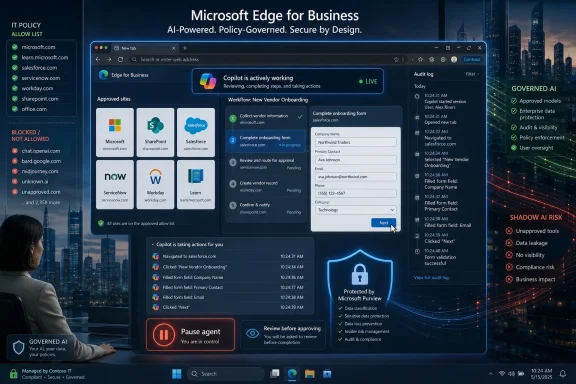
The limited preview allows Copilot to perform multi-step tasks on sites designated by IT. In practical terms, that means the agent is not supposed to wander the open web like an overconfident intern with a keyboard. Administrators can scope where it runs, enable it through policy, and rely on Microsoft Purview protections to keep existing data controls alive while Copilot works.
That last clause is the entire pitch. Agentic browsing is not being sold as “AI can do your work now.” It is being sold as “AI can do some of your browser work without breaking the compliance model you already bought from Microsoft.” Whether that distinction survives first contact with real users is the question that will define this preview.
Those guardrails matter, but they also reveal the limits of the system. A browser agent does not need root access to cause trouble. It can make mistakes at the application layer, where ordinary user permissions are already enough to send an email, update a record, submit a form, download a file, approve a workflow, or expose confidential information to the wrong service.
That is why the “approved sites” model is not just an enterprise nicety. It is the minimum plausible boundary. If Copilot can act only on known internal portals, vetted SaaS tools, and familiar workflows, the risk is at least legible. If the allow list becomes a dumping ground for “whatever users need this week,” the control collapses into theater.
Microsoft is also making a strategic bet that the browser is the right place to mediate agentic behavior. That is sensible from Redmond’s point of view. Edge can see tabs, enforce policies, integrate with Entra ID, honor enterprise profiles, and sit close to Microsoft 365 data. It is also deeply familiar to IT departments that already manage it with policies, baselines, and admin center configuration.
The risk is equally obvious. Once the browser becomes an AI runtime, every browser policy becomes more consequential. A new tab setting is no longer just cosmetic. A copy-and-paste rule is no longer only a productivity nuisance. A site permission is no longer merely a browser convenience; it is an instruction boundary for software that can act on the user’s behalf.
This is the part of the announcement that will matter most to CISOs. Microsoft is not promising that Copilot will never misunderstand a page, never summarize the wrong tab, or never be manipulated by hostile page content. Instead, it is arguing that the enterprise browser can enforce enough policy around the agent to make adoption safer than the unmanaged AI sprawl already happening.
That is a defensible argument, but not a complete one. DLP systems are only as good as their labeling, classification, and coverage. Purview can help block sensitive prompts and uploads, but it cannot magically know every business context. A spreadsheet labeled correctly is easier to protect than an unlabeled paragraph pasted into a browser form. A formal HR document is easier to classify than sensitive strategy discussed in a meeting transcript, a support ticket, or a vendor portal.
Microsoft’s announcement also points toward auditing and blocking risky activity on common consumer AI apps, with the option to redirect users toward Copilot for protected work AI. That is a sharp enterprise move. The company is not merely adding AI features to Edge; it is positioning Edge as a checkpoint between sanctioned and unsanctioned AI.
For administrators, that creates a familiar trade. The more friction they add around consumer AI, the more pressure they will face to make Microsoft’s sanctioned AI actually useful. If Copilot in Edge cannot complete real tasks reliably, users will route around it. If it can, IT inherits the burden of governing a tool that suddenly has much more operational power than a chatbot.
This sounds minor compared with an AI agent that can click around websites, but it may be the more visible change for most employees. The new tab page is the browser’s front door. Microsoft wants that front door to say: your work starts in Copilot, your files are in Microsoft 365, your next action can be suggested, and your browser is no longer neutral territory.
There is an obvious productivity case. Many workers do begin the day by checking calendars, finding recent documents, opening internal tools, and searching the web. A start page that collapses some of that activity into a single pane could save time, especially for users who live in Microsoft 365 all day.
But the cultural signal is bigger than the feature list. Microsoft is remaking Edge around the assumption that users should be prompted, summarized, and nudged continuously. The browser becomes less like a window and more like an executive assistant with opinions. For some organizations, that will feel like the long-promised convergence of search, work graph, and automation. For others, it will feel like yet another Microsoft surface that has become harder to keep clean.
The management details will matter. Microsoft’s documentation says organizations can configure the Copilot new tab page through policy, target Entra groups, and preserve existing behavior for users who do not have it enabled. Some existing new tab policies are supported, while others are obsolete or not yet supported in the Copilot experience. That is the kind of fine print that determines whether a rollout is smooth or becomes another help desk thread titled “Why did everyone’s browser change?”
Compared with agentic browsing, multi-tab reasoning is less dramatic but easier to justify. Users already perform mental joins across tabs: vendor pricing in one, product documentation in another, a spreadsheet in a third, and an email thread somewhere else. Asking Copilot to produce a comparison or extract differences is a natural extension of what browser users do manually.
It is also a useful on-ramp to agentic behavior. Summarizing tabs teaches users to let Copilot observe their workspace. Comparing options teaches them to trust cross-context reasoning. Asking it to act on the result is the next step. Microsoft knows this, which is why the announcement bundles reasoning, summarization, new tab prompts, and agentic browsing into one story rather than treating them as unrelated features.
The enterprise catch is data scope. A tab is not just a page; it is a context window into a user’s job. Open tabs may include confidential documents, customer portals, admin consoles, dashboards, internal wiki pages, and personal content. Microsoft says Purview policies can exclude sensitive content from reasoning, but administrators will still need to think carefully about which users receive these capabilities and how their data is labeled.
There is also a behavioral issue. Summaries are seductive because they reduce friction, but they also reduce attention. A worker who asks Copilot to summarize a compliance document, a vendor contract, or a security advisory may move faster while understanding less. That is not a reason to reject the feature, but it is a reason for organizations to treat AI summaries as workflow accelerants, not substitutes for accountability.
But user oversight is not the same thing as enterprise security. Anyone who has watched users click through certificate warnings, consent prompts, cookie banners, macro alerts, and OAuth permission screens knows the limits of “the user can supervise.” People are busy, distracted, habituated, and often rewarded for speed rather than caution.
Agentic AI makes that old problem stranger. The user is not just approving access to an app; the user may be monitoring a sequence of actions generated by a probabilistic system interpreting a website that may itself contain adversarial content. Even when nothing malicious is happening, the agent may misunderstand the task or interact poorly with a page that was designed for humans, not machines.
Microsoft’s consumer support material for Browse with Copilot is candid about some of these risks. It warns about prompt injection, unintended actions, privacy risks, and the need to avoid sensitive personal or financial activity. Enterprise Edge for Business adds stronger controls, but the underlying hazard remains: web pages are now both information sources and potential instruction surfaces for an AI agent.
That is why IT should resist the temptation to treat the preview as a productivity pilot only. It is a security pilot, a compliance pilot, a change-management pilot, and a user-training pilot. The success criteria should not be “did Copilot save ten minutes?” They should include whether logs are useful, whether policies are enforceable, whether users understand when the agent is acting, and whether the organization can identify exactly where automation is permitted.
This mirrors earlier enterprise shifts. Companies did not adopt mobile device management because smartphones were inherently safe; they adopted it because unmanaged smartphones were inevitable. They did not embrace SaaS identity controls because cloud apps were riskless; they did it because employees and departments were already moving business processes into the cloud. Edge for Business is Microsoft’s attempt to do the same for AI agents.
The company has another advantage: it owns the stack many businesses already use. Entra ID, Microsoft 365, Purview, Edge management, Copilot licensing, and Windows endpoint management all point in the same direction. For Microsoft shops, the procurement and governance path is easier than stitching together a browser, third-party AI agent, CASB, DLP layer, and identity policy from separate vendors.
That integrated story will appeal to overworked IT teams. It will also worry organizations that are already uneasy about Microsoft’s habit of turning every surface into a Copilot surface. The more Microsoft centralizes work around Copilot, the harder it becomes to separate productivity choices from platform lock-in. Edge for Business may be a security boundary, but it is also a distribution channel.
The shadow AI argument therefore cuts both ways. Microsoft is right that unsanctioned AI is a real governance problem. But the solution should not be an automatic surrender to whichever vendor already owns the browser and productivity suite. Enterprises should use Microsoft’s controls where they help, while still demanding clear logs, exportable evidence, interoperable policy concepts, and the ability to say no.
That is where this preview will either gain credibility or become another AI feature admired in keynotes and ignored in daily work. If Copilot can handle small, repetitive, browser-bound tasks inside approved sites without breaking policy, organizations will find uses for it. If it stalls, asks for help constantly, or makes errors that take longer to check than doing the work manually, users will treat it as a novelty.
The ideal first targets are not high-risk decisions. They are tedious workflows with clear inputs, reversible outcomes, and strong auditability. Think gathering status from internal dashboards, pre-filling forms for human review, moving between known portals, comparing approved vendor documentation, or generating summaries from non-sensitive open tabs. The wrong first targets are payments, privileged admin actions, customer-impacting changes, HR decisions, or anything where an accidental click creates a real-world obligation.
Admins should also assume that browser agents will expose messy permission hygiene. If a user can access too much data, Copilot may be able to reason over too much data. If an internal portal lacks role discipline, an AI assistant will not fix that. In some cases, adopting agentic browsing may force organizations to confront access-control debts they have ignored for years.
This may be the hidden benefit of the preview. Properly piloted, it can become a diagnostic tool for governance maturity. If an organization cannot confidently define where Copilot may act, which data it may see, and how actions will be reviewed, the problem is not only the AI. The problem is that the enterprise was already relying on informal boundaries.
Still, the direction is obvious. Copilot Mode is evolving into more granular controls. The new tab page is becoming Copilot-shaped. Multi-tab reasoning is expanding. Mobile is part of the plan. Purview is being positioned as the protective fabric for AI activity in the browser. None of this looks experimental in the strategic sense, even if individual features are still in preview.
For WindowsForum readers, the immediate takeaway is not that Edge has suddenly become autonomous. It has not. The important change is that Microsoft is normalizing the idea that a browser should host an AI system that can observe context and perform actions. Once that idea lands in business environments, the debate shifts from “should agents exist?” to “which agents are allowed, where, and under whose logs?”
That is the kind of shift administrators need to prepare for early. Browser baselines, DLP policies, sensitivity labels, Entra groups, Edge management settings, and user education are no longer separate chores. They become pieces of one larger question: how much agency should software have inside the user’s authenticated workspace?
A cautious rollout should start with limited groups, low-risk sites, and measurable workflows. It should also include explicit rules about what users may not ask Copilot to do, even if the software appears capable of doing it. Most importantly, administrators should test whether the promised controls are understandable in practice, not just present in documentation.
The uncomfortable part is that Microsoft’s pitch is also a tacit admission. If agentic AI is going to act inside business applications, it cannot be treated like a chat window bolted to the side of the screen. It needs permissions, audit trails, tenant boundaries, data-loss prevention, and a very clear answer to the sysadmin’s oldest question: what exactly is this thing allowed to touch?
 Microsoft Moves the AI Agent Into the Most Dangerous App on the Desktop
The browser has always been the soft underbelly of enterprise computing. It is where line-of-business apps live, where SaaS replaced desktop software, where users paste data they should not paste, and where attackers have spent two decades learning how to turn convenience into compromise. Microsoft is now asking businesses to place an AI agent inside that same environment and let it click, type, summarize, compare, and transact.That sounds reckless until you look at the alternative Microsoft is trying to preempt. Workers are already using consumer AI tools to summarize documents, draft emails, compare vendors, and chew through browser-based admin work. They are doing it in whichever tab is easiest, often outside the tenant, outside DLP, and outside the approved software inventory. Edge for Business is Microsoft’s attempt to turn that shadow workflow into a managed one before it becomes impossible to govern.
The limited preview allows Copilot to perform multi-step tasks on sites designated by IT. In practical terms, that means the agent is not supposed to wander the open web like an overconfident intern with a keyboard. Administrators can scope where it runs, enable it through policy, and rely on Microsoft Purview protections to keep existing data controls alive while Copilot works.
That last clause is the entire pitch. Agentic browsing is not being sold as “AI can do your work now.” It is being sold as “AI can do some of your browser work without breaking the compliance model you already bought from Microsoft.” Whether that distinction survives first contact with real users is the question that will define this preview.
The Preview Is Small, but the Architecture Is the Story
Microsoft says agentic browsing in Edge for Business can navigate pages, fill in information, and complete workflows. It can also pause for sensitive actions, such as when passwords or credit-card numbers are required. Users are shown visual indicators when Copilot is acting, and they can pause or stop the agent at any time.Those guardrails matter, but they also reveal the limits of the system. A browser agent does not need root access to cause trouble. It can make mistakes at the application layer, where ordinary user permissions are already enough to send an email, update a record, submit a form, download a file, approve a workflow, or expose confidential information to the wrong service.
That is why the “approved sites” model is not just an enterprise nicety. It is the minimum plausible boundary. If Copilot can act only on known internal portals, vetted SaaS tools, and familiar workflows, the risk is at least legible. If the allow list becomes a dumping ground for “whatever users need this week,” the control collapses into theater.
Microsoft is also making a strategic bet that the browser is the right place to mediate agentic behavior. That is sensible from Redmond’s point of view. Edge can see tabs, enforce policies, integrate with Entra ID, honor enterprise profiles, and sit close to Microsoft 365 data. It is also deeply familiar to IT departments that already manage it with policies, baselines, and admin center configuration.
The risk is equally obvious. Once the browser becomes an AI runtime, every browser policy becomes more consequential. A new tab setting is no longer just cosmetic. A copy-and-paste rule is no longer only a productivity nuisance. A site permission is no longer merely a browser convenience; it is an instruction boundary for software that can act on the user’s behalf.
Purview Is Microsoft’s Answer to the Obvious Security Objection
The security objection writes itself: giving an AI agent browser access creates a new class of accidental disclosure and unintended action. Microsoft’s answer is Purview, enterprise data protection, and tenant-aware Copilot behavior. In Edge for Business, Microsoft says protections such as copy-and-paste blocking continue to apply during AI-assisted workflows, and sensitive content can be excluded from multi-tab reasoning.This is the part of the announcement that will matter most to CISOs. Microsoft is not promising that Copilot will never misunderstand a page, never summarize the wrong tab, or never be manipulated by hostile page content. Instead, it is arguing that the enterprise browser can enforce enough policy around the agent to make adoption safer than the unmanaged AI sprawl already happening.
That is a defensible argument, but not a complete one. DLP systems are only as good as their labeling, classification, and coverage. Purview can help block sensitive prompts and uploads, but it cannot magically know every business context. A spreadsheet labeled correctly is easier to protect than an unlabeled paragraph pasted into a browser form. A formal HR document is easier to classify than sensitive strategy discussed in a meeting transcript, a support ticket, or a vendor portal.
Microsoft’s announcement also points toward auditing and blocking risky activity on common consumer AI apps, with the option to redirect users toward Copilot for protected work AI. That is a sharp enterprise move. The company is not merely adding AI features to Edge; it is positioning Edge as a checkpoint between sanctioned and unsanctioned AI.
For administrators, that creates a familiar trade. The more friction they add around consumer AI, the more pressure they will face to make Microsoft’s sanctioned AI actually useful. If Copilot in Edge cannot complete real tasks reliably, users will route around it. If it can, IT inherits the burden of governing a tool that suddenly has much more operational power than a chatbot.
The New Tab Page Becomes a Work Dashboard, Not a Blank Canvas
Alongside agentic browsing, Microsoft is pushing a Copilot-inspired new tab page for Edge for Business. The surface brings together Microsoft 365 Copilot chat, web search, work files, calendar events, suggested prompts, quick links, and a more personalized work dashboard. It is generally available on desktop and mobile, with configuration through Edge management policies.This sounds minor compared with an AI agent that can click around websites, but it may be the more visible change for most employees. The new tab page is the browser’s front door. Microsoft wants that front door to say: your work starts in Copilot, your files are in Microsoft 365, your next action can be suggested, and your browser is no longer neutral territory.
There is an obvious productivity case. Many workers do begin the day by checking calendars, finding recent documents, opening internal tools, and searching the web. A start page that collapses some of that activity into a single pane could save time, especially for users who live in Microsoft 365 all day.
But the cultural signal is bigger than the feature list. Microsoft is remaking Edge around the assumption that users should be prompted, summarized, and nudged continuously. The browser becomes less like a window and more like an executive assistant with opinions. For some organizations, that will feel like the long-promised convergence of search, work graph, and automation. For others, it will feel like yet another Microsoft surface that has become harder to keep clean.
The management details will matter. Microsoft’s documentation says organizations can configure the Copilot new tab page through policy, target Entra groups, and preserve existing behavior for users who do not have it enabled. Some existing new tab policies are supported, while others are obsolete or not yet supported in the Copilot experience. That is the kind of fine print that determines whether a rollout is smooth or becomes another help desk thread titled “Why did everyone’s browser change?”
Multi-Tab Reasoning Is the Bridge Between Search and Action
Microsoft is also extending multi-tab reasoning and YouTube summarization, including mobile availability. Copilot can look across open tabs to generate comparisons, summaries, and insights, while YouTube summarization can pull takeaways from videos and answer questions about them. This is the part of the product that feels closest to ordinary knowledge work.Compared with agentic browsing, multi-tab reasoning is less dramatic but easier to justify. Users already perform mental joins across tabs: vendor pricing in one, product documentation in another, a spreadsheet in a third, and an email thread somewhere else. Asking Copilot to produce a comparison or extract differences is a natural extension of what browser users do manually.
It is also a useful on-ramp to agentic behavior. Summarizing tabs teaches users to let Copilot observe their workspace. Comparing options teaches them to trust cross-context reasoning. Asking it to act on the result is the next step. Microsoft knows this, which is why the announcement bundles reasoning, summarization, new tab prompts, and agentic browsing into one story rather than treating them as unrelated features.
The enterprise catch is data scope. A tab is not just a page; it is a context window into a user’s job. Open tabs may include confidential documents, customer portals, admin consoles, dashboards, internal wiki pages, and personal content. Microsoft says Purview policies can exclude sensitive content from reasoning, but administrators will still need to think carefully about which users receive these capabilities and how their data is labeled.
There is also a behavioral issue. Summaries are seductive because they reduce friction, but they also reduce attention. A worker who asks Copilot to summarize a compliance document, a vendor contract, or a security advisory may move faster while understanding less. That is not a reason to reject the feature, but it is a reason for organizations to treat AI summaries as workflow accelerants, not substitutes for accountability.
User Oversight Is Necessary, but It Is Not a Security Model
Microsoft emphasizes that users can watch Copilot’s actions, pause it, or stop it. Visual indicators show when the agent is working. For sensitive steps, Copilot can hand control back to the user. These are important design choices, especially in a browser where silent automation would be unacceptable.But user oversight is not the same thing as enterprise security. Anyone who has watched users click through certificate warnings, consent prompts, cookie banners, macro alerts, and OAuth permission screens knows the limits of “the user can supervise.” People are busy, distracted, habituated, and often rewarded for speed rather than caution.
Agentic AI makes that old problem stranger. The user is not just approving access to an app; the user may be monitoring a sequence of actions generated by a probabilistic system interpreting a website that may itself contain adversarial content. Even when nothing malicious is happening, the agent may misunderstand the task or interact poorly with a page that was designed for humans, not machines.
Microsoft’s consumer support material for Browse with Copilot is candid about some of these risks. It warns about prompt injection, unintended actions, privacy risks, and the need to avoid sensitive personal or financial activity. Enterprise Edge for Business adds stronger controls, but the underlying hazard remains: web pages are now both information sources and potential instruction surfaces for an AI agent.
That is why IT should resist the temptation to treat the preview as a productivity pilot only. It is a security pilot, a compliance pilot, a change-management pilot, and a user-training pilot. The success criteria should not be “did Copilot save ten minutes?” They should include whether logs are useful, whether policies are enforceable, whether users understand when the agent is acting, and whether the organization can identify exactly where automation is permitted.
The Shadow AI Argument Is Microsoft’s Strongest Card
Microsoft’s most compelling argument is not that Copilot in Edge is risk-free. It is that the unmanaged alternative is worse. If employees are going to use AI anyway, and if much of their work already happens in the browser, then putting AI inside a managed enterprise browser is a rational containment strategy.This mirrors earlier enterprise shifts. Companies did not adopt mobile device management because smartphones were inherently safe; they adopted it because unmanaged smartphones were inevitable. They did not embrace SaaS identity controls because cloud apps were riskless; they did it because employees and departments were already moving business processes into the cloud. Edge for Business is Microsoft’s attempt to do the same for AI agents.
The company has another advantage: it owns the stack many businesses already use. Entra ID, Microsoft 365, Purview, Edge management, Copilot licensing, and Windows endpoint management all point in the same direction. For Microsoft shops, the procurement and governance path is easier than stitching together a browser, third-party AI agent, CASB, DLP layer, and identity policy from separate vendors.
That integrated story will appeal to overworked IT teams. It will also worry organizations that are already uneasy about Microsoft’s habit of turning every surface into a Copilot surface. The more Microsoft centralizes work around Copilot, the harder it becomes to separate productivity choices from platform lock-in. Edge for Business may be a security boundary, but it is also a distribution channel.
The shadow AI argument therefore cuts both ways. Microsoft is right that unsanctioned AI is a real governance problem. But the solution should not be an automatic surrender to whichever vendor already owns the browser and productivity suite. Enterprises should use Microsoft’s controls where they help, while still demanding clear logs, exportable evidence, interoperable policy concepts, and the ability to say no.
The Real Test Will Be Boring Workflows, Not Demos
Agentic AI demos tend to show tidy tasks: compare products, fill a form, book a meeting, summarize a video, gather facts. Enterprise reality is messier. Internal systems have inconsistent interfaces, ancient portals, conditional approval flows, odd authentication behavior, incomplete data, and business rules that live in people’s heads rather than documentation.That is where this preview will either gain credibility or become another AI feature admired in keynotes and ignored in daily work. If Copilot can handle small, repetitive, browser-bound tasks inside approved sites without breaking policy, organizations will find uses for it. If it stalls, asks for help constantly, or makes errors that take longer to check than doing the work manually, users will treat it as a novelty.
The ideal first targets are not high-risk decisions. They are tedious workflows with clear inputs, reversible outcomes, and strong auditability. Think gathering status from internal dashboards, pre-filling forms for human review, moving between known portals, comparing approved vendor documentation, or generating summaries from non-sensitive open tabs. The wrong first targets are payments, privileged admin actions, customer-impacting changes, HR decisions, or anything where an accidental click creates a real-world obligation.
Admins should also assume that browser agents will expose messy permission hygiene. If a user can access too much data, Copilot may be able to reason over too much data. If an internal portal lacks role discipline, an AI assistant will not fix that. In some cases, adopting agentic browsing may force organizations to confront access-control debts they have ignored for years.
This may be the hidden benefit of the preview. Properly piloted, it can become a diagnostic tool for governance maturity. If an organization cannot confidently define where Copilot may act, which data it may see, and how actions will be reviewed, the problem is not only the AI. The problem is that the enterprise was already relying on informal boundaries.
Microsoft’s Calendar Says Preview, but the Strategy Says Inevitability
The limited preview framing is important. Microsoft is not saying every Edge for Business tenant should immediately let Copilot act across business websites. IT admins must request access, and availability is tied to Microsoft 365 Copilot licensing, with exclusions in some regions. That gives Microsoft room to learn, adjust policies, and discover the failure modes before a broader push.Still, the direction is obvious. Copilot Mode is evolving into more granular controls. The new tab page is becoming Copilot-shaped. Multi-tab reasoning is expanding. Mobile is part of the plan. Purview is being positioned as the protective fabric for AI activity in the browser. None of this looks experimental in the strategic sense, even if individual features are still in preview.
For WindowsForum readers, the immediate takeaway is not that Edge has suddenly become autonomous. It has not. The important change is that Microsoft is normalizing the idea that a browser should host an AI system that can observe context and perform actions. Once that idea lands in business environments, the debate shifts from “should agents exist?” to “which agents are allowed, where, and under whose logs?”
That is the kind of shift administrators need to prepare for early. Browser baselines, DLP policies, sensitivity labels, Entra groups, Edge management settings, and user education are no longer separate chores. They become pieces of one larger question: how much agency should software have inside the user’s authenticated workspace?
The Edge Preview Gives IT a Narrow Window to Set the Rules
The smartest organizations will treat this moment as a policy-design opportunity rather than a feature announcement. Agentic browsing is still constrained enough that IT can shape expectations before users assume every website should be automatable and every tedious task should be handed to Copilot.A cautious rollout should start with limited groups, low-risk sites, and measurable workflows. It should also include explicit rules about what users may not ask Copilot to do, even if the software appears capable of doing it. Most importantly, administrators should test whether the promised controls are understandable in practice, not just present in documentation.
- Agentic browsing in Edge for Business is in limited preview and is designed to let Copilot complete multi-step tasks only on sites scoped by IT.
- Microsoft is relying on Purview, enterprise data protection, and Edge policies to make browser-based AI automation acceptable inside managed tenants.
- The Copilot-inspired new tab page is generally available and turns Edge’s start surface into a Microsoft 365 work dashboard with chat, search, files, calendar items, and suggested prompts.
- Multi-tab reasoning and YouTube summarization are becoming practical bridges between passive AI assistance and more active browser automation.
- User pause and stop controls are useful safeguards, but they do not replace careful allow lists, DLP configuration, audit review, and least-privilege access.
- The best early pilots will focus on repetitive, low-risk workflows where mistakes are visible, reversible, and easy to audit.
References
- Primary source: Neowin
Published: Thu, 21 May 2026 10:56:00 GMT
Copilot agentic AI comes to Edge for Business - Neowin
Microsoft is bringing the magic of agentic AI in its latest limited preview of Edge for Business. IT teams get new controls to ease and control adoption, while users get to do less with more AI www.neowin.net
- Official source: blogs.windows.com
New in Edge for Business: AI for work, safe from day one
TL;DR: Edge for Business adds agentic browsing in limited preview, a Copilot-inspired new tab page, and mobile availability for multi-tab reasoning and YouTube summarization. These experiences are built on a secure enterprise browser foundation wblogs.windows.com - Official source: learn.microsoft.com
Microsoft Edge Browser Policy Documentation CopilotNewTabPageEnabled | Microsoft Learn
Windows and Mac documentation for supported Microsoft Edge Browser policy: Enable the Copilot new tab pagelearn.microsoft.com - Official source: microsoft.com

Copilot in Edge | Microsoft Edge
Compare, decide, and finish tasks without leaving your browser. Copilot in Microsoft Edge works across tabs to help you stay in your flow and move forward.
www.microsoft.com
- Related coverage: windowsreport.com
Microsoft Tests New Agentic AI Controls in Edge for Business
Microsoft is testing new Edge for Business controls that let IT teams manage Copilot’s browser-based AI actions and data access. windowsreport.com
- Related coverage: pcworld.com
AI in a browser tab: How to use Copilot Mode in Edge | PCWorld
Edge offers a new Copilot mode that brings AI directly into new tabs. This allows you to compare content from multiple open web pages and summarize it clearly.www.pcworld.com
- Official source: support.microsoft.com
- Related coverage: supersimple365.com
Copilot Mode for new tabs in Edge - Super Simple 365
Short VersionMicrosoft Edge will soon offer a Copilot-focused page when you select ‘New tab’. Now due early to late May 2026. DetailsThe refreshed ‘Copilot‑inspired new tab page’ (Copilot Mode) in Microsoft Edge for business will offer search, chat, and web combined into a single search box (1)... supersimple365.com
- Related coverage: techradar.com
Microsoft's Copilot can now peek into your open tabs in Edge — if you let it — as part of new AI features for the browser | TechRadar
It's a big change for Edge, but AI isn't going awaywww.techradar.com - Related coverage: windowscentral.com
Microsoft is slowly turning Edge into another Copilot app — tests redesigned UI that takes inspiration from Copilot | Windows Central
The latest Edge preview builds now feature an updated UI that borrows the design language that first debuted in Microsoft's Copilot app.www.windowscentral.com - Related coverage: tomshardware.com
Edge browser's new Copilot Mode lets you talk to AI about your tabs if you opt in — but it's only free for 'a limited time' | Tom's Hardware
Copilot Mode in Edge will be available on Windows and macOSwww.tomshardware.com - Related coverage: reality-tech.com
- Official source: adoption.microsoft.com
- Official source: wwps.microsoft.com
