

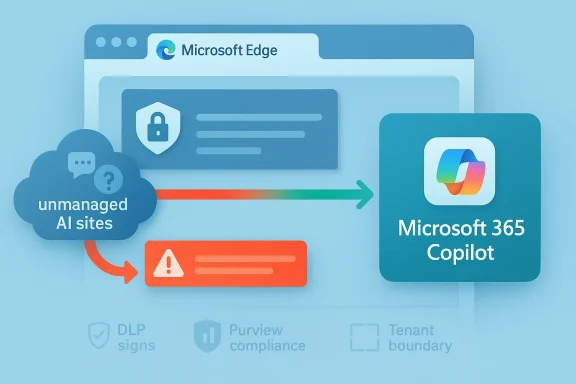
Microsoft’s enterprise AI strategy is shifting from simple blocking to active steering, and that matters a lot for Windows admins. According to a newly tracked Microsoft 365 Roadmap item and supporting Microsoft Learn guidance, the company is preparing an Edge for Business experience that can intercept attempts to use certain unmanaged AI tools and redirect users toward Microsoft 365 Copilot instead. In practical terms, that turns Edge from a passive browser into an enforcement point for shadow AI governance. It also pushes Microsoft deeper into the policy decision of which AI tools employees are allowed to use, and which ones the company would rather they never see.
The significance of this change is easy to miss if you only look at it as another browser management feature. Microsoft has spent the last year building a layered AI governance stack across Edge, Purview, and Microsoft 365 Copilot, and the new redirection behavior is a logical extension of that stack. The company already offers controls that can block prompts, uploads, copy-and-paste actions, and other data-sharing paths to consumer AI apps, including ChatGPT, Google Gemini, and DeepSeek. The new policy concept adds a softer but more opinionated response: if a user tries to open a disallowed AI destination, Edge can show a path to Copilot instead.
That distinction matters because enterprises rarely want only blunt denial. Security teams usually need a blend of restriction, guidance, and auditability. A redirect to Microsoft 365 Copilot may be seen as a better user experience than a hard block, especially in organizations that have already standardized on Microsoft 365 and want to funnel workers into a governed, tenant-bound AI environment. In other words, Microsoft is not just saying “no”; it is saying “use our approved route instead.” (learn.microsoft.com)
This is also part of Microsoft’s broader effort to frame its own AI stack as the safer default for regulated work. Microsoft Learn now describes how Copilot Chat is managed through admin-center controls, how browsing-context access can be limited, and how the browser itself can become a policy enforcement surface. At the same time, Microsoft warns against relying on network-level blocking alone, because that approach can break integrated app behavior and produce unpredictable results. The message to customers is clear: manage AI at the app and browser layer, not just at the firewall. (learn.microsoft.com)
For IT departments, that is both helpful and a little uncomfortable. Helpful, because the tooling is finally becoming more granular and practical. Uncomfortable, because it gives one vendor unusually broad influence over how employees discover, access, and compare AI services at work. That is not just a browser policy; it is a competitive position. (learn.microsoft.com)
A key milestone was the arrival of inline browser DLP in Edge for Business. Microsoft says this capability can block sensitive information from being typed into generative AI apps directly in the browser, and it is not limited to uploads and downloads. That means the browser itself becomes a choke point for risky prompt submission, which is a much more realistic control than hoping employees will self-police their AI habits.
Another important step was Microsoft’s reorganization of the Copilot branding and entry points. Microsoft now explicitly distinguishes Microsoft 365 Copilot Chat for work and education from Microsoft Copilot for personal use, with different URLs and different account models. That separation gives admins a cleaner way to steer corporate users into tenant-governed services and away from consumer-facing AI endpoints. It also makes the browser policy story more coherent, because Edge can distinguish between the work persona and the personal persona more aggressively than before. (learn.microsoft.com)
The company has also been careful to position Copilot as the compliant alternative to unmanaged AI. Microsoft’s own guidance says Copilot Chat and Microsoft 365 Copilot provide work and education entry points through Microsoft 365 surfaces, and it now offers methods for handling Edge sidebar behavior, web-search queries, and the Copilot key on modern keyboards. That broadens the admin surface, but it also creates a single governance story across devices, apps, and the browser. (learn.microsoft.com)
Microsoft’s answer is to make the browser itself part of the control plane. That reflects a practical reality: most AI usage now happens through web apps, not just native clients. If the browser can detect sensitive prompts or block unmanaged AI destinations, then the enterprise has a much better chance of enforcing policy without installing a separate layer of friction.
That matters because users often work around hard blocks. If Edge simply refuses access, employees may reach for a different browser, a mobile device, or an unmanaged app. If the browser instead offers a sanctioned Microsoft 365 Copilot route, the organization may preserve productivity while still shaping behavior. That is an important nuance: the best security control is often the one users are least tempted to evade. (learn.microsoft.com)
That is powerful, but it also introduces dependency. Once organizations start using browser policy to direct AI usage, they become more reliant on Microsoft’s definitions of what counts as managed, unmanaged, consumer, or work-related. The policy language becomes part technical, part strategic. And once a vendor controls the path of least resistance, it can shape market adoption in ways that go beyond normal product design. (learn.microsoft.com)
There is also a subtle compliance benefit. If users land in Microsoft 365 Copilot, the organization can keep prompts inside tenant boundaries and benefit from Microsoft’s data-protection model. Microsoft says Copilot for work is grounded in web and work data, with enterprise protections such as tenant isolation and exclusions from model training. That does not eliminate all risk, but it creates a more defensible baseline than allowing employees to improvise with consumer AI services. (learn.microsoft.com)
The implication is that Microsoft sees AI governance as a fast-moving and expanding problem. Every few months, a new app enters the mainstream or becomes a departmental favorite, and the enterprise has to decide whether to approve it, monitor it, or block it. By grouping these tools into a policy framework, Microsoft reduces the administrative burden of chasing every individual service one at a time.
It also reflects a more mature threat model. The issue is not just “which app?” but “what happens when users paste, upload, summarize, or ask AI to process sensitive content?” That is why Microsoft emphasizes browser-based DLP rather than simple site blocking. The risk follows the data, not the logo on the app icon.
That fluidity is actually a strength from Microsoft’s perspective. It allows the company to react to market shifts and new AI products without requiring customers to reinvent their governance model. But it also means customers need regular policy reviews, not a one-time rollout and forget it exercise.
For organizations already standardized on Microsoft 365, the appeal is obvious. You can let employees use AI while keeping prompts inside a known governance framework. You can log usage. You can apply retention and DLP rules. You can define who gets access, from where, and under what conditions. That is much easier than trying to police every external AI site with a patchwork of endpoint and network controls.
The company is also leaning on the argument that integrated governance is safer than fragmented governance. If users stay inside Microsoft 365, then identity, access, retention, and audit mechanisms can work together. That is the classic platform argument, and it is especially strong in environments already paying for Microsoft security and compliance products.
That may be the most important part of this feature. Microsoft is not merely trying to remove options; it is trying to replace them. The easier it is to use the sanctioned tool, the less likely users are to go looking for an unsanctioned one. That is behavior design as much as it is security engineering. (learn.microsoft.com)
It also gives admins a chance to be more selective. Microsoft’s existing Edge and Purview controls already support policy scoping and managed-device targeting. In principle, that means finance, legal, and R&D can be handled more aggressively than general knowledge workers. The result is not a single universal rule, but a layered model based on risk and role.
In practice, the rollout checklist may look something like this:
That concentration risk may be acceptable for many enterprises, especially those already invested in Microsoft 365 E3, E5, Purview, and Edge for Business. But it should still be recognized as a strategic choice, not just a technical upgrade.
At the same time, users may not appreciate being steered toward a Microsoft product every time they try another AI tool. Some will see it as convenience. Others will see it as vendor favoritism. Both reactions are understandable, and both are likely to show up in enterprise feedback if the feature is deployed broadly. (learn.microsoft.com)
There is also a trust issue. If users feel the company is blocking AI tools without explaining the risk, they may assume the policy is arbitrary. But if the organization explains that the goal is to prevent confidential data from leaving controlled environments, the redirect is more likely to be seen as reasonable. Clarity is part of compliance.
This is one of the more important cultural shifts in enterprise AI: the idea that the same brand name may represent very different governance regimes depending on where and how it is accessed. That can be confusing at first, but it is likely to become normal as AI products continue to fragment into consumer, enterprise, and regulated-work versions. (learn.microsoft.com)
For competing AI vendors, the challenge is not necessarily product quality. It is distribution and policy visibility. If the browser says “this is not allowed here,” many users will stop at that point unless they have a strong reason to switch browsers, devices, or work profiles. That gives Microsoft a structural advantage in organizations that already depend on its identity and endpoint stack.
That does not mean rivals are doomed. It does mean they may need to focus more heavily on integrations, data connectors, and admin-friendly controls that can survive in Microsoft-heavy environments. In the enterprise, winning the admin’s trust can matter just as much as winning the end user’s enthusiasm.
Still, from Microsoft’s perspective, the logic is compelling. If the enterprise wants security, identity, and compliance to work together, then a Microsoft-controlled route to AI may seem like the path of least risk. That is exactly the sales pitch the company appears to be making.
It also fits Microsoft’s broader governance stack unusually well. Purview, Edge, Copilot, and Microsoft 365 management tools now line up in a way that gives admins clearer visibility and more consistent enforcement. For Microsoft-heavy enterprises, that kind of coherence is valuable in itself.
Key strengths include:
There is also an opportunity for Microsoft to improve Copilot usage by making it the easiest compliant choice. If the browser itself nudges employees toward Copilot, adoption could rise simply because the product becomes the default escape route. That is a subtle but powerful distribution advantage. (learn.microsoft.com)
A second concern is policy complexity. Microsoft’s ecosystem now includes DLP, browser controls, app deployment, identity rules, license requirements, and separate consumer-versus-work Copilot surfaces. That is a lot to coordinate, and misconfiguration could easily produce false blocks, broken workflows, or inconsistent user experiences. (learn.microsoft.com)
Potential risks include:
There is also a broader policy risk. If companies rely too heavily on vendor-driven redirect logic, they may neglect the organizational work of AI governance: training, acceptable-use policy, exception handling, and risk reviews. Technology can assist governance, but it cannot replace it. That remains true even in 2026.
Another thing to watch is how customers react. Some will embrace the feature as a sane middle ground between prohibition and permission. Others will worry that Microsoft is turning security policy into a sales funnel for its own AI stack. Both reactions are plausible, and both will likely influence how aggressively enterprises deploy the feature. (learn.microsoft.com)
Source: Neowin Microsoft will allow IT admins to force Copilot in Edge over other AI apps
 Overview
The significance of this change is easy to miss if you only look at it as another browser management feature. Microsoft has spent the last year building a layered AI governance stack across Edge, Purview, and Microsoft 365 Copilot, and the new redirection behavior is a logical extension of that stack. The company already offers controls that can block prompts, uploads, copy-and-paste actions, and other data-sharing paths to consumer AI apps, including ChatGPT, Google Gemini, and DeepSeek. The new policy concept adds a softer but more opinionated response: if a user tries to open a disallowed AI destination, Edge can show a path to Copilot instead.That distinction matters because enterprises rarely want only blunt denial. Security teams usually need a blend of restriction, guidance, and auditability. A redirect to Microsoft 365 Copilot may be seen as a better user experience than a hard block, especially in organizations that have already standardized on Microsoft 365 and want to funnel workers into a governed, tenant-bound AI environment. In other words, Microsoft is not just saying “no”; it is saying “use our approved route instead.” (learn.microsoft.com)
This is also part of Microsoft’s broader effort to frame its own AI stack as the safer default for regulated work. Microsoft Learn now describes how Copilot Chat is managed through admin-center controls, how browsing-context access can be limited, and how the browser itself can become a policy enforcement surface. At the same time, Microsoft warns against relying on network-level blocking alone, because that approach can break integrated app behavior and produce unpredictable results. The message to customers is clear: manage AI at the app and browser layer, not just at the firewall. (learn.microsoft.com)
For IT departments, that is both helpful and a little uncomfortable. Helpful, because the tooling is finally becoming more granular and practical. Uncomfortable, because it gives one vendor unusually broad influence over how employees discover, access, and compare AI services at work. That is not just a browser policy; it is a competitive position. (learn.microsoft.com)
Background
Microsoft’s current direction did not appear out of nowhere. Over the past year, the company has been steadily turning Purview into an AI governance platform, adding DSPM for AI, DLP controls for browser-based prompts, and app-management pathways for Copilot and related services. The roadmap and documentation show a pattern: detect AI usage, classify the risk, then either block, warn, or guide the user toward a more compliant Microsoft experience.A key milestone was the arrival of inline browser DLP in Edge for Business. Microsoft says this capability can block sensitive information from being typed into generative AI apps directly in the browser, and it is not limited to uploads and downloads. That means the browser itself becomes a choke point for risky prompt submission, which is a much more realistic control than hoping employees will self-police their AI habits.
Another important step was Microsoft’s reorganization of the Copilot branding and entry points. Microsoft now explicitly distinguishes Microsoft 365 Copilot Chat for work and education from Microsoft Copilot for personal use, with different URLs and different account models. That separation gives admins a cleaner way to steer corporate users into tenant-governed services and away from consumer-facing AI endpoints. It also makes the browser policy story more coherent, because Edge can distinguish between the work persona and the personal persona more aggressively than before. (learn.microsoft.com)
The company has also been careful to position Copilot as the compliant alternative to unmanaged AI. Microsoft’s own guidance says Copilot Chat and Microsoft 365 Copilot provide work and education entry points through Microsoft 365 surfaces, and it now offers methods for handling Edge sidebar behavior, web-search queries, and the Copilot key on modern keyboards. That broadens the admin surface, but it also creates a single governance story across devices, apps, and the browser. (learn.microsoft.com)
Why “shadow AI” became a policy priority
The term shadow AI is quickly becoming the AI-era cousin of shadow IT. Employees are using third-party chatbots for drafting, summarizing, coding, and brainstorming, often without security review. From the business side, that looks efficient. From the governance side, it can mean sensitive data is being exposed to tools the company cannot supervise.Microsoft’s answer is to make the browser itself part of the control plane. That reflects a practical reality: most AI usage now happens through web apps, not just native clients. If the browser can detect sensitive prompts or block unmanaged AI destinations, then the enterprise has a much better chance of enforcing policy without installing a separate layer of friction.
How the New Edge Policy Fits Microsoft’s Stack
The new feature appears to build on the same control architecture that already governs Copilot in Edge. Microsoft Learn documents existing policies such as EdgeEntraCopilotPageContext and HubsSidebarEnabled for controlling browsing-context behavior and disabling the sidebar entirely. The new redirect behavior would be a more user-friendly sibling to those controls, replacing a dead-end block with an alternative destination. (learn.microsoft.com)That matters because users often work around hard blocks. If Edge simply refuses access, employees may reach for a different browser, a mobile device, or an unmanaged app. If the browser instead offers a sanctioned Microsoft 365 Copilot route, the organization may preserve productivity while still shaping behavior. That is an important nuance: the best security control is often the one users are least tempted to evade. (learn.microsoft.com)
The browser as a governance surface
Microsoft’s documentation now treats Edge for Business almost like a policy-aware workspace, not just a browser. Inline DLP can block text prompts. Sidebar settings can manage access to Copilot Chat. Integrated Apps controls can govern deployment of the Copilot app across Teams, Outlook, and the web. Taken together, those controls suggest Microsoft wants enterprises to think of Edge as part of their compliance stack. (learn.microsoft.com)That is powerful, but it also introduces dependency. Once organizations start using browser policy to direct AI usage, they become more reliant on Microsoft’s definitions of what counts as managed, unmanaged, consumer, or work-related. The policy language becomes part technical, part strategic. And once a vendor controls the path of least resistance, it can shape market adoption in ways that go beyond normal product design. (learn.microsoft.com)
Redirect is softer than block
A redirect feels gentler than a denial message, but it can still be highly prescriptive. In enterprise UX terms, that matters because soft coercion often works better than punitive enforcement. A user who is trying to work may accept a seamless switch to Copilot if it gets the job done quickly, especially if the company already encourages Microsoft 365 usage. (learn.microsoft.com)There is also a subtle compliance benefit. If users land in Microsoft 365 Copilot, the organization can keep prompts inside tenant boundaries and benefit from Microsoft’s data-protection model. Microsoft says Copilot for work is grounded in web and work data, with enterprise protections such as tenant isolation and exclusions from model training. That does not eliminate all risk, but it creates a more defensible baseline than allowing employees to improvise with consumer AI services. (learn.microsoft.com)
What Microsoft Is Blocking Today
Microsoft already documents a sizeable list of AI tools that can be restricted in Edge for Business and through Purview DLP scenarios. The list includes consumer and unmanaged offerings such as ChatGPT, Google Gemini, DeepSeek, Perplexity AI, Grok, Meta AI, Notion AI, Otter.ai, Runway, TextCortex, You.com, and others. That breadth shows Microsoft is not only targeting a few household names; it is trying to create a category-level control for unmanaged AI.The implication is that Microsoft sees AI governance as a fast-moving and expanding problem. Every few months, a new app enters the mainstream or becomes a departmental favorite, and the enterprise has to decide whether to approve it, monitor it, or block it. By grouping these tools into a policy framework, Microsoft reduces the administrative burden of chasing every individual service one at a time.
From app lists to categories
The move from app-by-app blocking to category management is a big administrative shift. Instead of managing only a specific chatbot URL, admins can apply policies to a class of tools: unmanaged AI services accessed in the browser. That is more scalable, especially in large organizations with different departments, devices, and security profiles.It also reflects a more mature threat model. The issue is not just “which app?” but “what happens when users paste, upload, summarize, or ask AI to process sensitive content?” That is why Microsoft emphasizes browser-based DLP rather than simple site blocking. The risk follows the data, not the logo on the app icon.
Why the list keeps changing
The current list should be understood as a moving target rather than a permanent catalog. Microsoft’s own documentation says support expands over time, and the roadmap language suggests the feature set is still evolving. That matters because admins should assume this area is actively changing, not frozen into a single policy template.That fluidity is actually a strength from Microsoft’s perspective. It allows the company to react to market shifts and new AI products without requiring customers to reinvent their governance model. But it also means customers need regular policy reviews, not a one-time rollout and forget it exercise.
Why Microsoft 365 Copilot Is the Preferred Destination
Microsoft 365 Copilot is not just another chatbot in Microsoft’s marketing. It is the work-oriented AI endpoint that sits inside Microsoft 365’s security, identity, and compliance model. Microsoft says it offers enterprise data protection through compliance boundaries, tenant isolation, and protections that exclude customer data from training in the way consumer services often do. That makes it the obvious candidate for an admin-approved fallback.For organizations already standardized on Microsoft 365, the appeal is obvious. You can let employees use AI while keeping prompts inside a known governance framework. You can log usage. You can apply retention and DLP rules. You can define who gets access, from where, and under what conditions. That is much easier than trying to police every external AI site with a patchwork of endpoint and network controls.
Enterprise data protection as the differentiator
The strongest selling point here is enterprise data protection. Microsoft positions Copilot as a place where work data remains inside tenant boundaries, rather than spilling into consumer workflows that may not align with corporate policies. That becomes especially important for regulated sectors, where the difference between “helpful AI” and “uncontrolled disclosure” can be legally significant.The company is also leaning on the argument that integrated governance is safer than fragmented governance. If users stay inside Microsoft 365, then identity, access, retention, and audit mechanisms can work together. That is the classic platform argument, and it is especially strong in environments already paying for Microsoft security and compliance products.
Productivity without unsanctioned detours
From a user-experience perspective, redirecting to Copilot also solves the “I just need an answer now” problem. If the alternative to ChatGPT is a blank refusal, workers may complain that security is slowing them down. If the alternative is an approved AI assistant that opens instantly in a new tab, the trade-off feels much more reasonable. (learn.microsoft.com)That may be the most important part of this feature. Microsoft is not merely trying to remove options; it is trying to replace them. The easier it is to use the sanctioned tool, the less likely users are to go looking for an unsanctioned one. That is behavior design as much as it is security engineering. (learn.microsoft.com)
Impact on IT Administrators
For admins, the new capability is attractive because it could simplify policy communication. Instead of telling users “don’t use those AI tools,” the browser can show a governed alternative at the exact moment of need. That is an elegant way to reduce accidental policy violations and help normalize approved workflows. (learn.microsoft.com)It also gives admins a chance to be more selective. Microsoft’s existing Edge and Purview controls already support policy scoping and managed-device targeting. In principle, that means finance, legal, and R&D can be handled more aggressively than general knowledge workers. The result is not a single universal rule, but a layered model based on risk and role.
What admins will likely need to do
Rolling this out well will require more than flipping a switch. Organizations will need to decide whether the redirect is intended for all users or only certain groups. They will also need to determine whether Copilot access itself is properly licensed and deployed, because a redirect to a tool users cannot actually use would create frustration fast. (learn.microsoft.com)In practice, the rollout checklist may look something like this:
- Identify sanctioned AI use cases and decide which departments truly need redirection rather than outright blocking.
- Validate licenses and app deployment for Microsoft 365 Copilot so the fallback experience is available.
- Review Purview DLP policies to ensure data controls align with browser policy.
- Test Edge behavior across managed devices, work profiles, and different account types.
- Communicate the policy clearly so employees understand why a redirect is happening.
- Monitor usage reports and adjust policies based on actual user behavior. (learn.microsoft.com)
Admin convenience versus admin dependency
There is a deeper trade-off here. The same features that make governance easier can also make administrators more dependent on Microsoft’s ecosystem. If the company wants AI access, policy enforcement, telemetry, and fallback all in one place, Microsoft becomes the central broker of that experience. That lowers friction, but it also raises concentration risk. (learn.microsoft.com)That concentration risk may be acceptable for many enterprises, especially those already invested in Microsoft 365 E3, E5, Purview, and Edge for Business. But it should still be recognized as a strategic choice, not just a technical upgrade.
Consumer and Employee Experience
For employees, the biggest change is psychological. A blocked site feels like a warning; a redirect feels like an instruction. That subtle difference can make a policy feel less punitive and more like part of the normal workflow, especially if Copilot is positioned as the company-approved assistant. (learn.microsoft.com)At the same time, users may not appreciate being steered toward a Microsoft product every time they try another AI tool. Some will see it as convenience. Others will see it as vendor favoritism. Both reactions are understandable, and both are likely to show up in enterprise feedback if the feature is deployed broadly. (learn.microsoft.com)
How employees are likely to react
The response will probably vary by role. Workers who just need fast drafting help may welcome the redirect and barely notice the change. Power users, developers, and researchers may feel constrained if they prefer a different model or a more specialized AI app.There is also a trust issue. If users feel the company is blocking AI tools without explaining the risk, they may assume the policy is arbitrary. But if the organization explains that the goal is to prevent confidential data from leaving controlled environments, the redirect is more likely to be seen as reasonable. Clarity is part of compliance.
The personal-vs-work boundary becomes sharper
Microsoft’s split between personal Copilot and Microsoft 365 Copilot reinforces a boundary that many employees do not naturally think about. In the user’s mind, “Copilot” may just mean AI. In Microsoft’s policy model, the account type and entry point matter a great deal. That distinction will need to be repeated in training and internal policy docs if organizations want the new control to work smoothly. (learn.microsoft.com)This is one of the more important cultural shifts in enterprise AI: the idea that the same brand name may represent very different governance regimes depending on where and how it is accessed. That can be confusing at first, but it is likely to become normal as AI products continue to fragment into consumer, enterprise, and regulated-work versions. (learn.microsoft.com)
Competitive Implications
This is not only a security feature; it is also a competitive move. By making Edge the place where AI is allowed, blocked, or redirected, Microsoft is nudging enterprises toward a Microsoft-centric AI workflow. That could strengthen Copilot adoption, increase seat value, and make rival AI apps harder to justify inside Microsoft-managed environments. (learn.microsoft.com)For competing AI vendors, the challenge is not necessarily product quality. It is distribution and policy visibility. If the browser says “this is not allowed here,” many users will stop at that point unless they have a strong reason to switch browsers, devices, or work profiles. That gives Microsoft a structural advantage in organizations that already depend on its identity and endpoint stack.
Why rivals should care
Rivals should care because enterprise adoption often follows the path of least resistance. If Copilot is already embedded in Edge, Teams, Outlook, and the Microsoft 365 app, then Microsoft can turn each access point into a recommendation funnel. The result is not just protection; it is a guided marketplace inside the work environment. (learn.microsoft.com)That does not mean rivals are doomed. It does mean they may need to focus more heavily on integrations, data connectors, and admin-friendly controls that can survive in Microsoft-heavy environments. In the enterprise, winning the admin’s trust can matter just as much as winning the end user’s enthusiasm.
Microsoft’s platform leverage
Microsoft has long had platform leverage in Windows and Microsoft 365. This feature extends that leverage into the AI era by making AI governance part of the same administrative story as browser policy and DLP. That is strategically elegant, but it will also attract scrutiny from customers who want more neutrality in how AI options are surfaced. (learn.microsoft.com)Still, from Microsoft’s perspective, the logic is compelling. If the enterprise wants security, identity, and compliance to work together, then a Microsoft-controlled route to AI may seem like the path of least risk. That is exactly the sales pitch the company appears to be making.
Strengths and Opportunities
The strongest case for the new redirect feature is that it reduces friction between security policy and daily work. Organizations do not have to choose between letting employees use AI freely and blocking it entirely; they can redirect usage into a more controlled environment. That is a practical compromise, and it may prove easier to adopt than hard prohibitions. (learn.microsoft.com)It also fits Microsoft’s broader governance stack unusually well. Purview, Edge, Copilot, and Microsoft 365 management tools now line up in a way that gives admins clearer visibility and more consistent enforcement. For Microsoft-heavy enterprises, that kind of coherence is valuable in itself.
Key strengths include:
- Better user steering than a simple block page.
- Improved governance consistency across browser, app, and tenant.
- Less shadow AI exposure for employees handling sensitive data.
- Stronger alignment with Microsoft 365 Copilot licensing and security controls.
- Potentially lower support burden because users are directed to an approved path.
- Cleaner audit and compliance posture than unmanaged consumer AI usage.
- A more realistic adoption model for organizations that want AI use, but not chaos.
Where the opportunity is biggest
The opportunity is probably greatest in regulated industries, large enterprises, and sectors with strict data handling rules. Finance, healthcare, legal, and government-adjacent environments will likely see the most immediate benefit because they already need granular policy control. For them, the redirect is not a gimmick; it is a way to reduce accidental leakage without killing productivity.There is also an opportunity for Microsoft to improve Copilot usage by making it the easiest compliant choice. If the browser itself nudges employees toward Copilot, adoption could rise simply because the product becomes the default escape route. That is a subtle but powerful distribution advantage. (learn.microsoft.com)
Risks and Concerns
The biggest concern is overreach. If organizations use redirect policies too broadly, employees may feel trapped inside a single vendor’s AI ecosystem even when legitimate alternative tools would serve them better. That can create resentment and, in some cases, encourage workaround behavior. (learn.microsoft.com)A second concern is policy complexity. Microsoft’s ecosystem now includes DLP, browser controls, app deployment, identity rules, license requirements, and separate consumer-versus-work Copilot surfaces. That is a lot to coordinate, and misconfiguration could easily produce false blocks, broken workflows, or inconsistent user experiences. (learn.microsoft.com)
Potential risks include:
- User frustration if the redirect appears unexpectedly.
- False confidence if admins assume a redirect alone solves AI governance.
- Misconfiguration risk across licensing and policy scopes.
- Vendor lock-in pressure as Copilot becomes the default approved path.
- Shadow IT workarounds if users switch devices or browsers.
- Access gaps if licensed users cannot reach the fallback experience correctly.
- Ambiguity around consumer versus work AI for employees who do not follow policy details. (learn.microsoft.com)
The hidden operational burden
The hidden burden here is administration at scale. A feature like this sounds simple until it has to work across thousands of endpoints, multiple departments, and varying account types. The moment the redirect fails for one team or one license class, the help desk will hear about it. (learn.microsoft.com)There is also a broader policy risk. If companies rely too heavily on vendor-driven redirect logic, they may neglect the organizational work of AI governance: training, acceptable-use policy, exception handling, and risk reviews. Technology can assist governance, but it cannot replace it. That remains true even in 2026.
Looking Ahead
The next question is whether Microsoft expands the redirect idea beyond Edge and into more of the Microsoft 365 surface. The company has already shown a willingness to apply policy logic across Teams, Outlook, the Copilot app, and browser contexts, so a wider rollout would not be surprising. If that happens, the browser redirect may become one piece of a much larger AI routing system. (learn.microsoft.com)Another thing to watch is how customers react. Some will embrace the feature as a sane middle ground between prohibition and permission. Others will worry that Microsoft is turning security policy into a sales funnel for its own AI stack. Both reactions are plausible, and both will likely influence how aggressively enterprises deploy the feature. (learn.microsoft.com)
What to watch next
- Whether Microsoft publishes clearer admin controls for the redirect behavior.
- Whether the feature is tied to specific licensing tiers or tenant configurations.
- Whether the supported app list expands further as new AI services emerge.
- Whether Microsoft surfaces stronger reporting for redirect and block events.
- Whether organizations pair the feature with training on shadow AI and acceptable use.
Source: Neowin Microsoft will allow IT admins to force Copilot in Edge over other AI apps
