

Microsoft Turns the Browser Into the AI Workbench
For years, the enterprise browser pitch has been a familiar one: manage identities, enforce policies, protect data, and keep users from wandering into trouble. Edge for Business has already been part of that strategy, giving Microsoft a way to tie the browser to Entra ID, Microsoft 365, Defender, Purview, and the rest of the company’s security stack. What changed this week is the ambition of the browser itself.
Agentic browsing moves Edge from a place where employees read, search, and copy information into a place where software can take action on their behalf. Microsoft says Copilot will be able to navigate approved sites, fill in information, and complete multi-step workflows. In plain language, that means the browser is becoming a controlled automation surface.
That distinction matters. Traditional browser AI features summarize pages, rewrite text, or answer questions about visible content. Agentic browsing crosses into the messier world of clicking through forms, moving between pages, and performing tasks that normally require a person to sit at the keyboard.
Microsoft is trying to thread a very narrow needle: make the feature useful enough that employees do not run to unsanctioned AI tools, but constrained enough that administrators do not see it as a compliance incident waiting to happen. The company’s answer is not “trust the model.” It is “trust the policy framework around the model.”
The Agent Is Limited Because the Risk Is Not
The most important word in Microsoft’s announcement is not agentic. It is approved. Copilot’s browsing abilities are limited to sites designated by IT, enabled through a dedicated policy, and available only in limited preview for organizations with Microsoft 365 Copilot licensing, excluding the European Economic Area.
That is not a footnote. It is the product strategy.
A browser agent that can roam freely across the web would be a nightmare for many enterprise administrators. It could encounter unpredictable page flows, ambiguous consent dialogs, consumer logins, sensitive forms, and data classification boundaries that were never designed for autonomous interaction. By scoping the feature to specific sites, Microsoft is acknowledging that agentic AI becomes viable in the workplace only when the environment is bounded.
The user controls are also telling. Microsoft says Edge will show clear visual indicators when Copilot is acting, and users can pause or stop it. For sensitive actions such as entering passwords or credit card numbers, Copilot pauses for user input. Those guardrails are not decorative; they are the difference between assisted browsing and invisible automation.
Still, the hard problems do not disappear. Enterprises will need to decide which sites are safe enough for delegated action, which workflows are stable enough to automate, and which business processes should remain human-only. A site being “approved” does not automatically mean every action on it is low-risk.
The New Tab Page Becomes the Front Door to Work
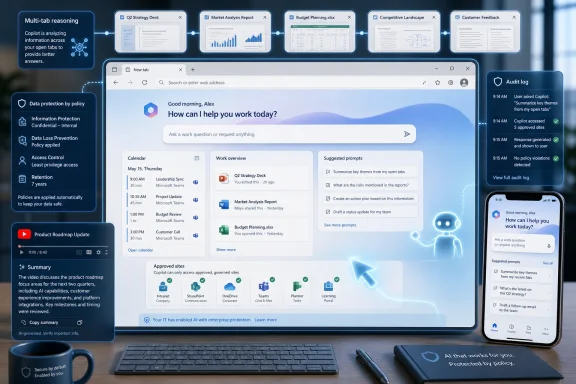
The less dramatic but more immediately visible change is Microsoft’s Copilot-inspired new tab page for Edge for Business, now generally available on desktop and mobile. It brings calendar items, Microsoft 365 files, work cards, and suggested Copilot prompts into the browser’s starting screen. Search and chat share an “intelligent box,” giving users one place to begin.
This is a familiar Microsoft move: take the most frequently opened surface and turn it into a productivity dashboard. The new tab page is valuable real estate because it appears before the user has made an explicit choice. If Microsoft can make that page useful, it can shift daily work habits without asking employees to adopt a separate app.
For users, the benefit is obvious enough. Meetings, recent files, and suggested prompts are the kinds of signals people already hunt for at the start of the workday. Putting them in Edge reduces the friction of moving between Outlook, OneDrive, Teams, SharePoint, and Copilot.
For administrators, the strategic value is different. A Microsoft-controlled new tab page keeps more work inside a managed identity and policy context. The more often employees begin their day in Edge for Business, the easier it becomes for Microsoft to argue that the browser is not just a client application but a secure operating layer for SaaS work.
Multi-Tab Reasoning Is the Feature That Sounds Small Until You Need It
Multi-tab reasoning, now available on mobile as well as desktop, is Microsoft’s most practical AI addition for many users. The feature analyzes open tabs to produce comparisons, summaries, and insights. Microsoft gives examples such as comparing product specifications, summarizing vendor documentation, and extracting differences from multiple pages.
That is exactly the kind of work browser users already perform manually. They open five tabs, skim each one, copy pieces into a note, and try to make a decision before context evaporates. AI that can reason across those tabs does not need to be magical to be useful. It simply needs to be faster than the human tab shuffle.
The enterprise wrinkle is data protection. Microsoft says Purview policies can exclude sensitive content from reasoning. That statement is doing a lot of work because multi-tab analysis becomes risky when the browser has access to both public pages and internal documents. Without classification-aware boundaries, the feature could easily blur lines between confidential and shareable material.
Mobile support is also more significant than it may appear. Business browsing is not confined to managed laptops anymore. Executives review decks on phones, sales teams inspect customer pages between meetings, and field workers consume documentation away from desks. Bringing multi-tab reasoning to mobile suggests Microsoft wants Edge for Business to be the same governed AI surface across endpoints, not merely a desktop browser with extras.
YouTube Summaries Bring the Consumer Web Into the Managed Browser
YouTube summarization is the oddest feature in the announcement and, in some ways, the most revealing. Microsoft frames it around product demos, industry presentations, and webinars, where users may need key takeaways from a 15-minute video without watching the whole thing. That is a reasonable business use case, but it also highlights how much workplace knowledge now lives on consumer platforms.
The modern enterprise is full of unofficial documentation. Vendor walkthroughs, conference talks, troubleshooting videos, analyst briefings, and customer demos often appear on YouTube before they appear in formal documentation portals. Employees already use those materials; the question is whether IT can govern the workflow around them.
By adding YouTube summarization to Edge for Business on mobile and desktop, Microsoft is not pretending that business users live only inside Microsoft 365. Instead, it is trying to make the open web more manageable. The browser becomes the place where consumer content can be interpreted through enterprise controls.
There is a broader competitive point here as well. If employees are going to summarize videos with AI anyway, Microsoft would rather they do it through Edge and Copilot than through random extensions, personal accounts, or public chatbots. Convenience is the first line of defense against shadow AI.
Purview Is the Real Product Under the Product
Microsoft’s announcement repeatedly returns to Purview, data loss prevention, tenant protections, and policy-based enablement. That repetition is not accidental. The AI features may sell the demo, but the compliance story sells the deployment.
The company says Edge for Business can enforce data protections in the browser, keep sensitive interactions within the tenant, and prevent prompts, responses, and files from being used to train models when Microsoft 365 Copilot enterprise data protection applies. It also says protections such as blocking copy and paste of sensitive data continue to apply during AI-assisted workflows.
This is Microsoft’s strongest argument against both consumer AI tools and rival enterprise browsers. The company is saying that AI should not be bolted onto browsing through extensions or left to employee discretion. It should be integrated into the same governance fabric that already handles identity, compliance, endpoint management, and data classification.
That argument will resonate with many IT departments. Security teams do not want to evaluate every clever AI plugin that appears in an employee’s browser. They want controls that map to existing policies. Microsoft is betting that the safest AI feature is the one administrators can manage using tools they already own.
Shadow AI Gives Microsoft Its Best Sales Pitch
The phrase shadow AI is doing for this era what shadow IT did for cloud adoption. It describes a real problem, but it also gives vendors a useful fear-based frame: your employees are already using tools you cannot see, so buy the managed version before something leaks.
Microsoft says Purview-powered protections in Edge for Business can audit or block sensitive prompts and file uploads on common consumer AI apps. When sensitive data is detected, users can receive a policy notification and be redirected to Microsoft 365 Copilot, where enterprise protections apply. Microsoft says this works on managed and unmanaged devices when users are signed into Edge for Business with an eligible Entra ID.
That last point is important. Many organizations have imperfect device control, especially with contractors, bring-your-own-device scenarios, and hybrid work. Browser-level enforcement gives Microsoft a way to extend governance beyond the clean boundary of the corporate laptop.
But this also raises a cultural issue. Employees may see redirection from consumer AI tools as helpful protection or as paternalistic interference, depending on how policies are configured and explained. If organizations deploy these controls clumsily, they may push users toward personal browsers, personal devices, or copy-paste workarounds. The technology can reduce risk, but policy design will determine whether it changes behavior.
Granular Controls Are Microsoft’s Quiet Concession to IT Reality
Microsoft says a single policy can enable AI features such as summarization and multi-tab reasoning, while advanced AI controls are evolving from Copilot Mode into more granular feature-level settings. Existing Copilot Mode configurations will be honored. That sounds like administrative plumbing, but it may be one of the most consequential pieces of the announcement.
Enterprise AI adoption rarely happens through one giant toggle. Legal may approve summarization before form-filling. Security may allow multi-tab reasoning on public web pages but not internal repositories. Business units may want pilots on specific SaaS applications before a companywide rollout. A single “AI on” switch is too blunt for that reality.
Granular controls also give Microsoft a way to move faster without forcing every customer to move at the same speed. New features can appear behind policies, previews can be scoped to willing departments, and riskier capabilities can be withheld from regulated environments. That is how enterprise software absorbs novelty without triggering revolt.
The challenge will be policy sprawl. Every new control creates another setting to document, audit, explain, and troubleshoot. Microsoft will need to make the management experience coherent, or the promise of “AI on your terms” will become yet another administrative maze.
The EEA Exclusion Shows the Limits of Global AI Rollouts
Agentic browsing is available worldwide in limited preview with a Microsoft 365 Copilot license, but Microsoft says the European Economic Area is excluded. The company did not dwell on the reason in the announcement, but the exclusion fits a broader pattern: advanced AI features often reach some markets before others because regulatory, privacy, and product compliance questions vary by region.
That matters for multinational organizations. A global company may be able to pilot agentic browsing in the United States or parts of Asia while leaving European users out of scope. That creates uneven deployment, uneven training, and potentially uneven productivity gains.
It also complicates Microsoft’s “safe from day one” message. Safety is not just a technical property; it is a legal and organizational one. A feature can be considered ready for one jurisdiction and not available in another, even when the code is the same.
For IT leaders, the practical advice is simple: treat availability as a deployment constraint, not an afterthought. AI browser features will not roll out like ordinary UI changes. They will arrive through a matrix of licensing, geography, tenant configuration, identity state, and compliance posture.
The Browser War Moves From Speed to Governance
For most users, browser competition used to be about speed, compatibility, extensions, memory use, and preference. In the enterprise, those factors still matter, but they are no longer the whole contest. The new fight is over governance.
Chrome dominates much of the browser market, and many organizations have standardized around it for years. Microsoft’s strategy with Edge for Business is not to win by saying its browser renders pages better. It is to argue that Edge is where Microsoft 365 work can be protected, automated, summarized, and audited in one place.
That is a more plausible enterprise pitch than asking users to love Edge for its own sake. Microsoft does not need every employee to have an emotional attachment to the browser. It needs security teams and CIOs to decide that Edge is the safer default for work identities.
The risk is that users experience this as another Microsoft funnel. A new tab page pushing Copilot prompts, browser AI tied to Microsoft 365 licensing, redirection from consumer AI apps to Microsoft 365 Copilot, and policy controls bound to Entra ID all reinforce the same ecosystem. That may be efficient for Microsoft customers, but it also deepens dependence on Microsoft’s stack.
The Productivity Claim Still Needs Proof
Microsoft’s examples are plausible: filling out forms, navigating workflows, comparing tabs, summarizing vendor documentation, and extracting takeaways from videos. Any knowledge worker can recognize those chores. The question is whether the features save time reliably enough to survive contact with real business processes.
Agentic browsing is especially vulnerable to edge cases. Web forms change. Login flows vary. Sites throw unexpected modals. Data may be missing or ambiguous. A human can improvise around those moments; an agent may need to stop, ask, retry, or hand control back. The more often that happens, the less magical the feature feels.
That does not mean the feature is doomed. It means the early value will probably come from narrow, repetitive, well-understood workflows rather than broad “do my job” automation. Expense forms, procurement lookups, internal portals, HR updates, and structured vendor sites are more realistic candidates than open-ended research across the web.
The limited preview is therefore the right launch posture. Microsoft needs enterprise feedback not just on model behavior but on workflow suitability. The real test is not whether Copilot can complete a staged demo. It is whether administrators can identify safe, valuable workflows and users trust the agent enough to let it act.
Security Is a Selling Point, Not a Guarantee
Microsoft’s “safe from day one” framing is carefully constructed. It means the features are designed to work inside enterprise controls from the start, not that every deployment is automatically safe. That distinction matters.
Policy-based enablement, tenant protections, Purview enforcement, and user oversight reduce risk. They do not eliminate it. Sensitive data can be misclassified, policies can be misconfigured, users can approve actions too quickly, and automated workflows can produce errors that look legitimate because they happened inside a trusted browser.
The most mature organizations will treat these features like any other privileged productivity tool. They will pilot them, define approved use cases, monitor outcomes, revise policies, and train users on what the agent can and cannot do. They will also establish escalation paths for when Copilot stops at a sensitive action or produces an unexpected result.
Less mature organizations may be tempted to see Microsoft’s controls as a substitute for internal governance. That would be a mistake. The browser can enforce policy, but it cannot decide the organization’s risk appetite.
Edge for Business Becomes the Place Microsoft Wants Work to Happen
There is a throughline across the announcement: Microsoft wants Edge for Business to be the place where work begins, where AI acts, where web content is summarized, where sensitive prompts are controlled, and where users are redirected when they wander into risky AI territory. That is an enormous role for a browser.
It also reflects the reality of modern work. Many employees do not live in one thick client application. They live in tabs: SaaS dashboards, Microsoft 365 files, intranet portals, vendor documentation, support pages, meeting links, and video briefings. If AI is going to assist work across those surfaces, the browser is the natural place to put it.
Microsoft’s advantage is integration. Edge can be tied to Entra ID, Microsoft 365 Copilot, Purview, and enterprise policy in ways that standalone AI tools cannot easily match. That does not automatically make it the best browser for every organization, but it gives Microsoft a coherent story at a moment when IT departments are looking for one.
The company’s disadvantage is trust. Microsoft has spent years nudging Windows users toward Edge, sometimes in ways that irritated people who simply wanted their chosen default browser respected. Enterprise buyers may be more pragmatic, but users remember coercion. If Microsoft wants Edge for Business to become the trusted AI browser, it needs to make the experience feel useful rather than mandatory.
The Admin Console Is Where This Launch Will Succeed or Fail
For WindowsForum readers who manage fleets, the headline feature may be agentic browsing, but the real work starts in configuration. Which users get access? Which sites are approved? Which Purview policies apply? How are unmanaged devices handled? What gets logged, audited, blocked, or redirected?
The announcement gives Microsoft’s preferred answer: roll out deliberately. That is sensible, but it also shifts responsibility to IT. A poorly scoped deployment could either expose too much or frustrate users so badly that they avoid the tool entirely.
The better approach is to begin with workflows where the organization already has process discipline. Internal portals, known SaaS apps, and repeatable browser tasks are more suitable than the open web. Pilot groups should include both enthusiastic users and skeptical administrators, because the failure modes will be as important as the success stories.
Training will also matter. Users need to understand when Copilot is acting, when it is waiting for them, why it cannot enter certain sensitive information, and what happens when a policy blocks an action. If the browser agent is treated as a black box, users will either overtrust it or abandon it.
Microsoft’s Browser AI Bet Comes With Fine Print Worth Reading
The practical message for IT pros is not that Edge for Business suddenly became an autonomous employee. It is that Microsoft is turning the browser into a managed AI execution environment, and the first version is intentionally fenced.
- Agentic browsing with Copilot is in limited preview and is scoped to IT-approved sites rather than the entire web.
- The Copilot-inspired new tab page is generally available on desktop and mobile, putting meetings, files, search, chat, and prompts closer to the start of the workday.
- Multi-tab reasoning and YouTube summarization now extend to mobile, making Edge’s AI features more useful beyond the corporate laptop.
- Purview is central to the pitch because Microsoft wants browser AI to inherit data loss prevention, tenant protections, and policy enforcement.
- Shadow AI controls require the right licensing and configuration, so administrators should treat them as a governed deployment project rather than a default safety net.
- The European Economic Area exclusion for agentic browsing is a reminder that AI feature availability will continue to vary by region, license, and compliance posture.
The feature set is still early, but the direction is clear. Microsoft is trying to make Edge for Business the browser where AI can do real work without escaping enterprise control, and that is both a useful promise and a serious governance challenge. The next phase will depend less on whether Copilot can summarize a tab or fill a form in a demo, and more on whether administrators can shape these tools into reliable, auditable workflows that users actually prefer to the unmanaged alternatives.
References
- New in Edge for Business: AI for work, safe from day one - Windows Blog Windows Blog · Wed, 20 May 2026 16:30:00 GMT