

On May 13, 2026, Microsoft began rolling out a new wave of Copilot features in Edge for desktop and mobile, giving the browser’s AI assistant access to open-tab context, browsing-history-driven suggestions, study tools, voice and vision features, and a successor to the earlier Copilot Mode called Browse with Copilot. The pitch is simple: Edge should no longer be just a Chromium browser with a Microsoft account attached, but a workspace that remembers, compares, summarizes, and nudges. The stakes are larger than one browser update, because Microsoft is trying to normalize a new bargain between convenience and surveillance-shaped computing. Edge is becoming the place where Copilot stops waiting for prompts and starts watching the browsing session itself.
Microsoft has tried to put Copilot almost everywhere: Windows, Office, Teams, Bing, Outlook, Notepad, Paint, and even the hardware keyboard. But the browser is different. It is where work, shopping, research, banking, entertainment, medical searches, corporate dashboards, and private indecision all blur together in the same tab strip.
That makes Edge the most tempting and most dangerous place to embed a context-hungry assistant. A chatbot that knows only what you paste into it is limited by friction. A chatbot that can reason across open tabs, infer what you were doing yesterday, and suggest the next step based on your browsing history is no longer a tool you occasionally consult; it is an ambient layer over the web.
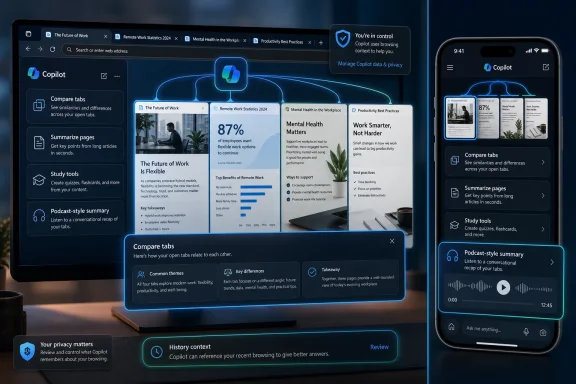
Microsoft’s latest Edge update leans directly into that transformation. Copilot in Edge can now compare information across multiple open tabs, summarize pages, generate answers from browser context, and turn groups of tabs into podcast-style audio summaries. The company is also extending these features beyond desktop to mobile Edge, which matters because the phone browser is often where casual, sensitive, and location-inflected activity happens.
This is not merely Microsoft adding another sidebar button. It is Microsoft arguing that the web has become too fragmented for humans to manage unaided, and that the browser should become a kind of personal research clerk. The argument has force. Anyone who has tried to compare five product pages, three forum threads, two PDFs, and a half-finished travel itinerary understands the appeal.
But the browser has also historically been one of the last general-purpose spaces on the PC. It does not belong to a single app workflow, a single enterprise tenant, or a single productivity suite. By turning Edge into a Copilot-first environment, Microsoft is trying to make the browser less neutral — and more Microsoft-shaped.
Copilot Mode was easier to understand as a switch. You opted into a more AI-centered browser experience, and that mode could be discussed as a feature sitting on top of Edge. Browse with Copilot is fuzzier by design. It suggests that AI is no longer a destination inside the browser, but a way of using the browser.
That distinction matters. When companies move from “AI mode” to “AI built in,” they also move the debate away from whether users want an experimental assistant and toward how much of the assistant should be on by default, visible by default, or trained by default. The boundary between feature and platform begins to dissolve.
Microsoft says users can still access Copilot through a button in the top-right corner of Edge. That continuity is meant to reassure people that Copilot remains a tool they summon. Yet the new capabilities — open-tab reasoning, history-based answers, Journeys-style organization, and proactive recommendations — all point in the opposite direction. They make Copilot more useful precisely by reducing the amount of explicit user instruction it needs.
This is the central tension of modern AI product design. The assistant becomes better as it sees more context. The product becomes creepier for the same reason.
The deeper story is memory. Microsoft is giving Copilot more ways to understand not just a page, but a session; not just a session, but a pattern; not just a pattern, but a user. Browsing history becomes a personalization asset. Past chats become part of the answer. Open tabs become live context.
That makes Edge an especially important front in Microsoft’s AI strategy. Office documents and Teams meetings are valuable, but they mostly live inside work accounts and enterprise permission models. Browsing history is broader, messier, and more intimate. It captures what users are curious about before they have turned that curiosity into a document, purchase, ticket, or meeting.
The new Journeys-style organization feature is a useful example. With permission, it can organize browsing history into meaningful topics, offer summaries, and suggest next steps. In benign form, this is the feature many tab hoarders have wanted for years. It can help reconstruct the thread of a project after a day of interruptions.
But the same feature also demonstrates how thin the line is between helpful recall and behavioral profiling. Once the browser can cluster your history into projects, it can also infer intent. Once it can infer intent, it can recommend. Once it can recommend, it can influence the path through the web.
Microsoft is not alone here. Google has spent years making Chrome and Search more predictive. Perplexity, OpenAI, Arc’s spiritual successors, and various agentic browser startups are all circling the same idea: the browser should not merely render pages but interpret tasks. Microsoft’s advantage is distribution. Edge ships with Windows, sits in front of Bing and Microsoft 365, and can be promoted through the operating system in ways rivals cannot easily match.
For knowledge workers, the new features map to real pain. Comparing procurement options across tabs is tedious. Turning a cluster of research pages into a summary is useful. Asking a browser to generate a study guide from the current page is a plausible student workflow. Having a podcast-style summary of open tabs could be genuinely helpful during a commute or while doing low-attention tasks.
The same applies to IT pros and administrators. Documentation searches often involve Microsoft Learn pages, GitHub issues, vendor advisories, release notes, forum posts, and half-remembered error codes. A browser assistant that can reason across the whole mess could save time, especially if it points back to the source material clearly enough to avoid hallucination-driven troubleshooting.
That last condition is doing a lot of work. AI summaries are helpful only when they reduce the user’s cognitive load without hiding uncertainty. In technical contexts, a confident but wrong summary is worse than no summary at all. A browser that can synthesize open tabs must also make it easy to verify which tab supported which claim.
Microsoft’s challenge is that Edge’s AI features will be judged by different standards in different contexts. A shopping comparison can tolerate some fuzziness. A medical research session, a tax page, a legal document, or a production outage cannot. The more Copilot appears to understand the whole browsing session, the more users may assume it has understood the stakes.
That is where Microsoft’s messaging has to be more precise than ordinary AI marketing. “Smarter browsing” is attractive, but it is not a permission model. “Personalized recommendations” sound useful, but they are not a data governance framework. The browser is too sensitive a surface for vague reassurance to carry the whole burden.
The problem is that users do not experience privacy as a legal category. They experience it as a feeling of control. If an assistant appears to know what is in other tabs, remember prior browsing activity, or suggest products from previous sessions, many users will wonder what exactly it saw, when it saw it, where that context went, and how long it will matter.
This is especially true because the browser tab strip is not curated. People leave things open because they are unfinished, forgotten, embarrassing, sensitive, or simply not ready to be part of a formal workflow. A feature that reasons across all open tabs can be useful precisely because it ignores the artificial boundaries between pages. But those boundaries are also how users maintain practical privacy.
Microsoft has reportedly advised users not to input sensitive information such as financial data, medical records, or government identification details while using AI-assisted features. That advice is sensible, but it also undercuts the dream of an all-purpose assistant. If the web’s most consequential tasks are the ones users should keep away from Copilot, then Copilot’s role must remain bounded.
The risk is not only that Microsoft might mishandle data. It is also that ordinary users will misunderstand the operating model. They may assume that because Copilot is “in Edge,” it is only looking at the page they are viewing. They may not realize when broader tab or history context is available, or what toggles change that behavior.
Enterprise IT will care about this in more concrete terms. Administrators will want policy controls, logging clarity, tenant-level defaults, and defensible explanations for what browser context can be sent to cloud AI services. In regulated environments, “the user clicked the Copilot button” may not be an adequate governance story if the browser session includes customer records, internal dashboards, HR material, or privileged admin consoles.
Browse with Copilot is not the full version of that future, but it is part of the path. Microsoft’s Copilot Actions, now tied to Browse with Copilot for certain Microsoft 365 Premium subscribers in the United States, points toward a browser that does not stop at summarizing. It can become a task surface.
That has enormous implications for security. The web is already full of malicious prompts, deceptive interfaces, lookalike pages, poisoned search results, and social engineering. A browser-based AI agent introduces a new interpretive layer that can be manipulated if it trusts page content too much or fails to distinguish user intent from webpage instruction.
Prompt injection is not an abstract academic problem in this setting. If Copilot reads a page, summarizes it, and takes instructions from the broader browsing context, then hostile content can attempt to influence the assistant. The browser becomes both the attack surface and the execution environment. Microsoft will need to prove that Edge can separate content from command.
There is also the issue of authority. If Copilot recommends a product, fills a form, drafts a reply, or prioritizes one source over another, users may treat the browser’s output as neutral. But recommendations are never neutral. They are shaped by model behavior, ranking systems, personalization data, commercial relationships, and the limits of what the assistant can access.
This is why the Edge update should not be read as a cute convenience release. It is infrastructure for a future in which the browser mediates intention. That future may be more efficient. It may also make the web less legible, because users will increasingly interact with summaries, synthesized answers, and recommended next steps rather than the pages themselves.
Microsoft has also learned from the backlash to earlier AI and telemetry moves. The company knows that forcing AI into every corner of Windows risks fatigue. Edge gives Microsoft a more defensible argument: the browser already handles information overload, so AI can be framed as a solution to a known problem rather than a novelty bolted onto the Start menu.
Still, Microsoft cannot fully escape the history of Edge promotion inside Windows. Users remember default-browser prompts, search redirection, Bing tie-ins, and settings that felt more like persuasion than choice. When Copilot becomes more central to Edge, that history colors the reception.
For Microsoft, the best-case scenario is that Copilot makes Edge meaningfully better at tasks people already do. If the assistant saves users time, helps them resume projects, and makes research less painful, some skepticism will soften. Utility has a way of normalizing data access that would otherwise be controversial.
The worst-case scenario is that Edge becomes another place where Microsoft appears to confuse product ambition with user consent. If Copilot opens too eagerly, summarizes too much, nags too often, or buries controls too deeply, the backlash will not be about one feature. It will be about trust.
That is a meaningful improvement for some workflows. A student can ask for a quiz from a page. A shopper can compare specifications without manually building a spreadsheet. A manager can digest a stack of reports. A sysadmin can keep documentation, changelogs, and forum posts in one active reasoning space.
But the workbench metaphor also clarifies the tradeoff. A workbench accumulates residue. It remembers what was placed on it. It invites tools to interact with material that may not have been meant for them. The smarter the workbench becomes, the more important its boundaries become.
This is where Microsoft should be judged less by launch demos and more by defaults. Are cross-tab features clearly disclosed at the moment of use? Are history-based suggestions easy to turn off? Can users see and delete Copilot browsing context? Can enterprises disable specific capabilities without disabling the entire browser? Does mobile Edge behave differently in ways users understand?
Those details will determine whether Browse with Copilot feels like an assistant or an encroachment. People can accept powerful tools when the bargain is clear. They resent them when the rules are discovered only after the tool reveals what it knows.
Enterprise browsers have become policy engines. They manage identity, data loss prevention, extension permissions, certificate behavior, and access to internal apps. Adding AI context sharing to that mix raises practical questions that cannot be answered with consumer-grade privacy language.
An admin will want to know whether Copilot can see intranet pages, whether sensitive labels carry through, whether browser history is used for personalization under work accounts, and whether Copilot outputs are stored in ways discoverable by compliance tools. They will also want to know how features differ between personal Microsoft accounts, Entra ID accounts, Microsoft 365 subscriptions, and regional availability.
This is the unglamorous side of AI browsing, but it is where adoption will be won or lost in professional environments. A feature that is delightful on a home laptop can become a risk on a privileged workstation. A tab-summary tool that works well for shopping may be unacceptable beside a production database console.
Microsoft has the advantage of an enterprise software machine built for these conversations. It can ship group policies, admin center controls, audit paths, and documentation. But it must resist the consumer-AI habit of moving fast and explaining later. In the browser, surprise is not a virtue.
For Windows enthusiasts, the update is also a reminder that Edge is increasingly Microsoft’s proving ground for AI interfaces. Windows may get the branding. Office may get the enterprise revenue. But the browser is where the company can test whether users will accept an assistant that watches the shape of their web activity and turns it into action.
The concrete implications are already visible:
Source: Tech Times Microsoft Upgrades Edge Browser With Smarter Copilot AI For Personalized Browsing
 Microsoft Turns the Browser Into Copilot’s Natural Habitat
Microsoft has tried to put Copilot almost everywhere: Windows, Office, Teams, Bing, Outlook, Notepad, Paint, and even the hardware keyboard. But the browser is different. It is where work, shopping, research, banking, entertainment, medical searches, corporate dashboards, and private indecision all blur together in the same tab strip.That makes Edge the most tempting and most dangerous place to embed a context-hungry assistant. A chatbot that knows only what you paste into it is limited by friction. A chatbot that can reason across open tabs, infer what you were doing yesterday, and suggest the next step based on your browsing history is no longer a tool you occasionally consult; it is an ambient layer over the web.
Microsoft’s latest Edge update leans directly into that transformation. Copilot in Edge can now compare information across multiple open tabs, summarize pages, generate answers from browser context, and turn groups of tabs into podcast-style audio summaries. The company is also extending these features beyond desktop to mobile Edge, which matters because the phone browser is often where casual, sensitive, and location-inflected activity happens.
This is not merely Microsoft adding another sidebar button. It is Microsoft arguing that the web has become too fragmented for humans to manage unaided, and that the browser should become a kind of personal research clerk. The argument has force. Anyone who has tried to compare five product pages, three forum threads, two PDFs, and a half-finished travel itinerary understands the appeal.
But the browser has also historically been one of the last general-purpose spaces on the PC. It does not belong to a single app workflow, a single enterprise tenant, or a single productivity suite. By turning Edge into a Copilot-first environment, Microsoft is trying to make the browser less neutral — and more Microsoft-shaped.
Copilot Mode Dies So Copilot Can Move In
The most telling part of the update is not the arrival of new AI features. It is the retirement of the older Copilot Mode as a separate concept. Microsoft is replacing that experimental wrapper with Browse with Copilot, a name that sounds softer but implies deeper integration.Copilot Mode was easier to understand as a switch. You opted into a more AI-centered browser experience, and that mode could be discussed as a feature sitting on top of Edge. Browse with Copilot is fuzzier by design. It suggests that AI is no longer a destination inside the browser, but a way of using the browser.
That distinction matters. When companies move from “AI mode” to “AI built in,” they also move the debate away from whether users want an experimental assistant and toward how much of the assistant should be on by default, visible by default, or trained by default. The boundary between feature and platform begins to dissolve.
Microsoft says users can still access Copilot through a button in the top-right corner of Edge. That continuity is meant to reassure people that Copilot remains a tool they summon. Yet the new capabilities — open-tab reasoning, history-based answers, Journeys-style organization, and proactive recommendations — all point in the opposite direction. They make Copilot more useful precisely by reducing the amount of explicit user instruction it needs.
This is the central tension of modern AI product design. The assistant becomes better as it sees more context. The product becomes creepier for the same reason.
Edge’s New Intelligence Is Really a Memory Strategy
The headline features are easy to demo. Ask Copilot to compare products across tabs. Ask it to summarize a dense page. Ask it to quiz you on a topic, create a study guide, or convert your browsing session into a podcast. These are tidy stage moments, and Microsoft has become very good at presenting them as natural extensions of everyday computing.The deeper story is memory. Microsoft is giving Copilot more ways to understand not just a page, but a session; not just a session, but a pattern; not just a pattern, but a user. Browsing history becomes a personalization asset. Past chats become part of the answer. Open tabs become live context.
That makes Edge an especially important front in Microsoft’s AI strategy. Office documents and Teams meetings are valuable, but they mostly live inside work accounts and enterprise permission models. Browsing history is broader, messier, and more intimate. It captures what users are curious about before they have turned that curiosity into a document, purchase, ticket, or meeting.
The new Journeys-style organization feature is a useful example. With permission, it can organize browsing history into meaningful topics, offer summaries, and suggest next steps. In benign form, this is the feature many tab hoarders have wanted for years. It can help reconstruct the thread of a project after a day of interruptions.
But the same feature also demonstrates how thin the line is between helpful recall and behavioral profiling. Once the browser can cluster your history into projects, it can also infer intent. Once it can infer intent, it can recommend. Once it can recommend, it can influence the path through the web.
Microsoft is not alone here. Google has spent years making Chrome and Search more predictive. Perplexity, OpenAI, Arc’s spiritual successors, and various agentic browser startups are all circling the same idea: the browser should not merely render pages but interpret tasks. Microsoft’s advantage is distribution. Edge ships with Windows, sits in front of Bing and Microsoft 365, and can be promoted through the operating system in ways rivals cannot easily match.
The Productivity Case Is Stronger Than the Browser Wars Joke
It is tempting to treat every Edge story as another chapter in Microsoft’s long and often awkward effort to claw share from Chrome. That would miss why this update may matter even if Edge does not suddenly become the world’s dominant browser. Microsoft is not just chasing browser market share; it is trying to make Edge the preferred interface for AI-mediated work.For knowledge workers, the new features map to real pain. Comparing procurement options across tabs is tedious. Turning a cluster of research pages into a summary is useful. Asking a browser to generate a study guide from the current page is a plausible student workflow. Having a podcast-style summary of open tabs could be genuinely helpful during a commute or while doing low-attention tasks.
The same applies to IT pros and administrators. Documentation searches often involve Microsoft Learn pages, GitHub issues, vendor advisories, release notes, forum posts, and half-remembered error codes. A browser assistant that can reason across the whole mess could save time, especially if it points back to the source material clearly enough to avoid hallucination-driven troubleshooting.
That last condition is doing a lot of work. AI summaries are helpful only when they reduce the user’s cognitive load without hiding uncertainty. In technical contexts, a confident but wrong summary is worse than no summary at all. A browser that can synthesize open tabs must also make it easy to verify which tab supported which claim.
Microsoft’s challenge is that Edge’s AI features will be judged by different standards in different contexts. A shopping comparison can tolerate some fuzziness. A medical research session, a tax page, a legal document, or a production outage cannot. The more Copilot appears to understand the whole browsing session, the more users may assume it has understood the stakes.
That is where Microsoft’s messaging has to be more precise than ordinary AI marketing. “Smarter browsing” is attractive, but it is not a permission model. “Personalized recommendations” sound useful, but they are not a data governance framework. The browser is too sensitive a surface for vague reassurance to carry the whole burden.
Privacy Is No Longer a Settings Page Problem
Microsoft says Copilot accesses user data only when activated, collects limited information for personalization, and allows users to adjust privacy settings or disable AI features. Those are necessary claims, and they are better than pretending there is no issue. They are not sufficient.The problem is that users do not experience privacy as a legal category. They experience it as a feeling of control. If an assistant appears to know what is in other tabs, remember prior browsing activity, or suggest products from previous sessions, many users will wonder what exactly it saw, when it saw it, where that context went, and how long it will matter.
This is especially true because the browser tab strip is not curated. People leave things open because they are unfinished, forgotten, embarrassing, sensitive, or simply not ready to be part of a formal workflow. A feature that reasons across all open tabs can be useful precisely because it ignores the artificial boundaries between pages. But those boundaries are also how users maintain practical privacy.
Microsoft has reportedly advised users not to input sensitive information such as financial data, medical records, or government identification details while using AI-assisted features. That advice is sensible, but it also undercuts the dream of an all-purpose assistant. If the web’s most consequential tasks are the ones users should keep away from Copilot, then Copilot’s role must remain bounded.
The risk is not only that Microsoft might mishandle data. It is also that ordinary users will misunderstand the operating model. They may assume that because Copilot is “in Edge,” it is only looking at the page they are viewing. They may not realize when broader tab or history context is available, or what toggles change that behavior.
Enterprise IT will care about this in more concrete terms. Administrators will want policy controls, logging clarity, tenant-level defaults, and defensible explanations for what browser context can be sent to cloud AI services. In regulated environments, “the user clicked the Copilot button” may not be an adequate governance story if the browser session includes customer records, internal dashboards, HR material, or privileged admin consoles.
Agentic Browsing Is the Real Bet
The phrase agentic browsing sounds like product-manager vapor, but it names a real shift. A conventional browser waits. An agentic browser acts, or at least prepares to act. It can read context, remember tasks, organize sessions, and eventually perform steps on the user’s behalf.Browse with Copilot is not the full version of that future, but it is part of the path. Microsoft’s Copilot Actions, now tied to Browse with Copilot for certain Microsoft 365 Premium subscribers in the United States, points toward a browser that does not stop at summarizing. It can become a task surface.
That has enormous implications for security. The web is already full of malicious prompts, deceptive interfaces, lookalike pages, poisoned search results, and social engineering. A browser-based AI agent introduces a new interpretive layer that can be manipulated if it trusts page content too much or fails to distinguish user intent from webpage instruction.
Prompt injection is not an abstract academic problem in this setting. If Copilot reads a page, summarizes it, and takes instructions from the broader browsing context, then hostile content can attempt to influence the assistant. The browser becomes both the attack surface and the execution environment. Microsoft will need to prove that Edge can separate content from command.
There is also the issue of authority. If Copilot recommends a product, fills a form, drafts a reply, or prioritizes one source over another, users may treat the browser’s output as neutral. But recommendations are never neutral. They are shaped by model behavior, ranking systems, personalization data, commercial relationships, and the limits of what the assistant can access.
This is why the Edge update should not be read as a cute convenience release. It is infrastructure for a future in which the browser mediates intention. That future may be more efficient. It may also make the web less legible, because users will increasingly interact with summaries, synthesized answers, and recommended next steps rather than the pages themselves.
Microsoft’s Timing Reveals Its Priorities
The Edge push arrives as Microsoft appears more cautious about expanding Copilot in some other consumer surfaces, including Xbox. That contrast is revealing. Gaming is a culture where intrusive assistance can feel especially unwelcome, and the value of AI overlays is less obvious to many players. Browsing, by comparison, is messy enough that the assistant has a clearer job to do.Microsoft has also learned from the backlash to earlier AI and telemetry moves. The company knows that forcing AI into every corner of Windows risks fatigue. Edge gives Microsoft a more defensible argument: the browser already handles information overload, so AI can be framed as a solution to a known problem rather than a novelty bolted onto the Start menu.
Still, Microsoft cannot fully escape the history of Edge promotion inside Windows. Users remember default-browser prompts, search redirection, Bing tie-ins, and settings that felt more like persuasion than choice. When Copilot becomes more central to Edge, that history colors the reception.
For Microsoft, the best-case scenario is that Copilot makes Edge meaningfully better at tasks people already do. If the assistant saves users time, helps them resume projects, and makes research less painful, some skepticism will soften. Utility has a way of normalizing data access that would otherwise be controversial.
The worst-case scenario is that Edge becomes another place where Microsoft appears to confuse product ambition with user consent. If Copilot opens too eagerly, summarizes too much, nags too often, or buries controls too deeply, the backlash will not be about one feature. It will be about trust.
The Browser Is Becoming a Workbench, Not a Window
For decades, browsers were described as windows onto the web. That metaphor is breaking. Edge’s Copilot features recast the browser as a workbench: a place where information is gathered, sorted, compared, transformed, and repackaged.That is a meaningful improvement for some workflows. A student can ask for a quiz from a page. A shopper can compare specifications without manually building a spreadsheet. A manager can digest a stack of reports. A sysadmin can keep documentation, changelogs, and forum posts in one active reasoning space.
But the workbench metaphor also clarifies the tradeoff. A workbench accumulates residue. It remembers what was placed on it. It invites tools to interact with material that may not have been meant for them. The smarter the workbench becomes, the more important its boundaries become.
This is where Microsoft should be judged less by launch demos and more by defaults. Are cross-tab features clearly disclosed at the moment of use? Are history-based suggestions easy to turn off? Can users see and delete Copilot browsing context? Can enterprises disable specific capabilities without disabling the entire browser? Does mobile Edge behave differently in ways users understand?
Those details will determine whether Browse with Copilot feels like an assistant or an encroachment. People can accept powerful tools when the bargain is clear. They resent them when the rules are discovered only after the tool reveals what it knows.
Edge’s AI Future Will Be Decided in the Settings Nobody Wants to Read
The obvious audience for these features is the user drowning in tabs. The more important audience may be the administrator who has to decide whether Edge with Copilot is acceptable on managed devices. Microsoft’s credibility with that audience depends on control, documentation, and consistency.Enterprise browsers have become policy engines. They manage identity, data loss prevention, extension permissions, certificate behavior, and access to internal apps. Adding AI context sharing to that mix raises practical questions that cannot be answered with consumer-grade privacy language.
An admin will want to know whether Copilot can see intranet pages, whether sensitive labels carry through, whether browser history is used for personalization under work accounts, and whether Copilot outputs are stored in ways discoverable by compliance tools. They will also want to know how features differ between personal Microsoft accounts, Entra ID accounts, Microsoft 365 subscriptions, and regional availability.
This is the unglamorous side of AI browsing, but it is where adoption will be won or lost in professional environments. A feature that is delightful on a home laptop can become a risk on a privileged workstation. A tab-summary tool that works well for shopping may be unacceptable beside a production database console.
Microsoft has the advantage of an enterprise software machine built for these conversations. It can ship group policies, admin center controls, audit paths, and documentation. But it must resist the consumer-AI habit of moving fast and explaining later. In the browser, surprise is not a virtue.
The New Edge Bargain Is Useful, Conditional, and Uneven
The practical lesson from this update is not that users should reject AI browsing outright. It is that Copilot in Edge is becoming powerful enough to deserve the same scrutiny as password managers, extensions, sync, and cloud profiles. It sits close to too much sensitive behavior to be treated as a toy.For Windows enthusiasts, the update is also a reminder that Edge is increasingly Microsoft’s proving ground for AI interfaces. Windows may get the branding. Office may get the enterprise revenue. But the browser is where the company can test whether users will accept an assistant that watches the shape of their web activity and turns it into action.
The concrete implications are already visible:
- Copilot in Edge is moving from a sidebar chatbot toward a context-aware browsing layer that can reason across tabs, pages, history, and prior chats.
- Browse with Copilot signals that Microsoft is retiring the idea of AI as a separate browser mode and making it part of the normal Edge experience.
- The most useful features, including tab comparison, Journeys-style organization, and podcast summaries, depend on access to browsing context that users may consider sensitive.
- Mobile expansion raises the stakes because phone browsing often blends personal, location-based, and private activity more tightly than desktop work sessions.
- Enterprise adoption will depend less on demos than on policy controls, auditability, clear defaults, and the ability to disable narrow features without breaking managed browsing.
- Users who want the productivity gains should review Edge’s Copilot and privacy settings before assuming the assistant sees only the current page.
Source: Tech Times Microsoft Upgrades Edge Browser With Smarter Copilot AI For Personalized Browsing
