

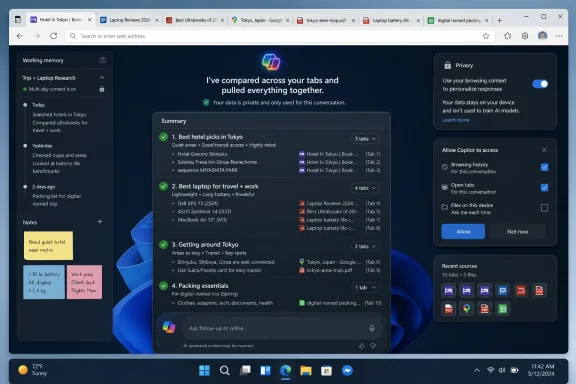
Microsoft has added a Copilot feature to Edge that can read across a user’s open browser tabs, compare information, and produce a consolidated answer from the current browsing session, with optional use of history and past chats for added context. The feature sounds like a small convenience upgrade, but it points to a much larger shift in what browsers are becoming. Edge is no longer just competing on speed, compatibility, or vertical tabs; Microsoft is trying to make the browser the place where AI understands the messy half-finished work users actually do.
The old browser problem was never that tabs were difficult to open. It was that they were too easy to open, too hard to close, and nearly impossible to reason about once a research session sprawled across product pages, PDFs, reviews, booking sites, forums, maps, and forgotten search results.
That is the problem Microsoft is now aiming Copilot at inside Edge. Instead of asking the user to remember which tab contained the hotel cancellation policy or which review mentioned the overheating laptop hinge, Copilot can inspect the set of open pages and answer across them. In practical terms, this turns a pile of tabs into something closer to a temporary knowledge base.
That framing matters because it is one of the first browser AI features that does not feel like a demo looking for a workflow. Summarizing one page is useful, but limited. Summarizing the state of your browsing is closer to how people actually use the web when they are trying to make a decision.
The browser has always been the container for modern work. Microsoft is now betting that the container should understand the contents.
But Copilot gives Edge a different kind of advantage. Microsoft does not need Edge to be beloved by everyone for these features to matter. It needs Edge to be the browser where Microsoft can test what happens when an AI assistant is given permission to see more than a single page.
That permission is the product. Copilot’s ability to compare tabs is not magic; it is access. The assistant becomes useful because it can look at the live workspace that normally exists only in the user’s head.
That makes this a more interesting development than another sidebar chatbot. Browser AI that cannot see your browsing context is basically a search box with better manners. Browser AI that can see your open tabs begins to behave like a research assistant sitting next to you, watching the same evidence pile up.
This is also why the feature will make some users uncomfortable. The same access that makes Copilot useful also raises the obvious question: how much of your browsing life should an assistant be allowed to inspect, even with prompts, toggles, and permission screens?
A tab group is a partial answer. Bookmarks are a longer-term answer. History is a forensic answer. None of them really captures the active, messy, half-decided nature of browsing.
Copilot’s tab intelligence suggests another model: the active browser window as a working document. The user opens a dozen pages, and the AI reads the spread the way a person might glance across papers on a desk. It can compare prices, pull out contradictions, identify missing details, or summarize the trade-offs.
That is a powerful shift because it reduces the penalty for exploration. Today, users often avoid opening yet another source because every new tab adds cognitive overhead. If the browser can digest the sprawl, the sprawl becomes less costly.
This is where Microsoft’s approach feels genuinely aligned with user behavior. People do not research in neat folders. They ricochet. They compare. They forget. They abandon a session and return days later with only a vague memory of what they found. A browser that can preserve and interpret that context is not merely adding AI; it is redesigning the mental model of browsing.
That caution is not surprising. Apple has spent years making privacy a central part of its brand, and browser-level AI is an awkward fit for a company that wants to say as little user data as possible leaves the device. Reading across tabs sounds simple until the tabs include health searches, banking pages, internal company portals, private documents, and half-written forms.
Still, user patience is not infinite. Apple Intelligence was pitched as a systemwide layer of assistance, but Safari remains an obvious place where Apple could deliver immediate value. A Siri that could compare open product pages, summarize a cluster of research tabs, or rebuild the logic of a trip-planning session would feel more useful than many abstract AI promises.
The irony is that Apple is uniquely positioned to do this well. It controls the hardware, operating system, browser, and privacy architecture. If any company can make tab-level intelligence feel local, restrained, and user-respecting, it should be Apple.
Yet Microsoft, not Apple, is pushing the feature into mainstream browser use first. That is becoming a familiar pattern in the current AI cycle: Apple talks about careful integration, while Microsoft ships rougher, faster, more ambitious experiments into the daily workflow.
The more complicated version is just as obvious. A user has open tabs containing medical information, a personal email, an employer’s HR portal, and a half-finished tax form. If Copilot is invited to reason across open tabs, the boundaries between useful context and sensitive context become dangerously fuzzy.
Microsoft says these capabilities are permissioned, and that distinction matters. There is a significant difference between an assistant that automatically reads everything and one that requires user action before using tab context. But permission dialogs are not a complete privacy model. Users often grant access without fully understanding the scope, especially when the reward is immediate convenience.
This is the central tension of browser AI. The feature becomes more useful as it becomes more context-aware. It becomes more sensitive for exactly the same reason.
Enterprise IT will see this differently from consumers. A home user might ask Copilot to compare vacation hotels and shrug at the privacy trade-off. A sysadmin responsible for regulated data, privileged admin portals, legal documents, or confidential internal dashboards will ask where the context goes, how it is stored, what policies control it, and whether users can accidentally expose information by asking a casual question.
That does not make the feature bad. It makes it the sort of feature that needs administrative controls before it becomes normal.
Tab intelligence is a natural stepping stone. Before an assistant can book, buy, schedule, unsubscribe, compare, fill, or negotiate, it needs to understand what the user is doing. The open tabs provide the most immediate signal.
This also explains why history and past chats are part of the story. A single browsing session is useful context, but many tasks stretch across days or weeks. Buying a car, planning a vacation, choosing a new GPU, applying for jobs, comparing insurance, researching a health issue — these are not one-tab or one-day activities.
If Copilot can connect today’s tabs with yesterday’s research and last week’s chat, it becomes more than a summarizer. It becomes a continuity layer. That is where the feature starts to feel less like browser tooling and more like a memory system for the web.
The risk is that continuity can curdle into surveillance if the user does not feel in control. Microsoft has to make the boundaries visible. Users need to know when Copilot is looking, what it can see, what it remembered, and how to make it forget.
The industry has learned, repeatedly, that people are more tolerant of data use when the benefit is clear and the controls are understandable. The problem is that AI systems tend to make both murkier.
But the browser itself has become genuinely capable. Vertical tabs, sleeping tabs, collections, workspaces, PDF handling, and deep Windows integration have given Edge a real feature story beyond “it came with the PC.” Copilot tab intelligence fits that pattern because it solves a recognizable annoyance rather than inventing one.
The question is whether usefulness can overcome resentment. Many Windows enthusiasts are perfectly willing to praise a good Microsoft feature while still objecting to the company’s habit of pushing Edge too aggressively. Those two reactions are not contradictory.
In fact, they are the story of modern Edge. Microsoft has built a browser that often deserves more consideration than it gets, then repeatedly undermines that goodwill by treating user choice as a growth obstacle. Copilot’s tab intelligence is one of the cleaner arguments for Edge because it offers a direct benefit without needing a lecture about ecosystem synergy.
If Microsoft wants this to become a reason people choose Edge, it should resist the urge to turn it into another nag. Let the feature win on merit. A browser that can help users make sense of their own tabs is easier to sell than a browser that keeps asking to be the default.
A Safari version could be quieter. It could work through Siri, Spotlight, or a dedicated page summary panel. It could default to on-device analysis where possible, explicitly exclude sensitive sites, and show a clear list of which tabs are being considered before generating an answer.
That last point is important. One of the best privacy interfaces for tab intelligence may be surprisingly old-fashioned: show the user the inputs. If Siri is going to compare six open tabs, display the six pages and let the user remove two. If the assistant wants to use history, show the time range and topics. If private browsing is excluded, say so plainly.
Apple’s privacy brand gives it both a burden and an opening. It cannot simply say, “trust us, the AI read your tabs responsibly.” It needs to make the data boundary part of the experience.
The payoff could be enormous. Safari users are often deeply embedded in Apple hardware. They move between iPhone, iPad, and Mac all day. A tab intelligence feature that understands cross-device browsing sessions, shared tab groups, reading list items, and local files could be far more cohesive than a browser-only implementation.
But cohesion only matters if the feature ships. Right now, Microsoft has the more tangible browser AI story, and Apple users are left imagining how much better Safari could be if Apple Intelligence were more assertive in the places where people actually work.
Chrome already has AI features, and Google has more AI infrastructure than almost anyone. But Edge’s tab intelligence highlights a specific battleground: not who can answer a standalone question, but who can interpret a user’s active web context.
That distinction matters. Search begins with a query. Tab intelligence begins with behavior. The user has already opened the pages, narrowed the topic, and revealed intent through browsing. The assistant is not starting from zero; it is entering midstream.
For Google, this is both an advantage and a threat. It has long understood web intent better than competitors, but generative browser assistance may reduce the need to return to search results repeatedly. If the browser can synthesize the tabs already open, the user may click fewer links, view fewer result pages, and rely more on generated answers.
Publishers will care about that. Retailers will care. Review sites will care. Any business dependent on repeated pageviews during comparison shopping or research will eventually care about AI that extracts and consolidates information across tabs.
The browser wars used to be about rendering engines and standards. The next browser war may be about who gets to mediate the user’s attention after the pages have already loaded.
Administrators will want to know whether the feature can be disabled, scoped, audited, or restricted by profile. They will want to know whether it behaves differently for work and personal accounts. They will ask how it interacts with Microsoft Purview, data loss prevention, sensitivity labels, enterprise sync, and conditional access.
They will also care about user training. If employees are allowed to use AI across open tabs, they need to understand that “open tabs” may include confidential systems. A user may not think twice about asking Copilot to summarize “everything I have open,” but that prompt could sweep in information from internal dashboards or customer records if safeguards are weak.
This is not theoretical paranoia. Browsers are where SaaS work happens. The modern enterprise desktop is less a collection of installed applications than a web shell around identity, documents, CRM systems, ticketing queues, cloud consoles, analytics tools, and chat apps.
That makes the browser the worst possible place to be vague about data access. It is also the best possible place for AI to save time. The tension is unavoidable.
Microsoft’s enterprise credibility will depend on how clearly it can separate consumer convenience from managed workplace behavior. Edge already has a strong enterprise policy story compared with many browsers. Copilot’s deeper browser integration will test whether those controls can keep pace with the assistant’s ambitions.
A tab can mean “read this later,” “compare this price,” “do not forget this form,” “this might be important,” “I am afraid I will never find this again,” or “I should really close this but not yet.” The browser does not know the difference. It just shows a shrinking strip of rectangles until the titles become useless.
Tab groups helped, but they require discipline. Bookmarks help, but they imply permanence. Reading lists help, but mostly for articles. History helps only when the user remembers enough to search backward.
AI can help because it does not require the user to organize first. It can infer structure after the mess exists.
That may be the most important product insight here. The winning AI features will not be the ones that ask users to adopt a new workflow in order to receive value. They will be the ones that make existing bad workflows less punishing.
Edge’s tab intelligence is not glamorous. It is not a synthetic video generator or a coding agent or a grand reimagining of computing. It is a way to ask, “Which of these six options is best for me?” after you have already opened the six options. That is exactly why it may stick.
That is useful for users, but uncomfortable for publishers and businesses. A travel site wants the user to read its recommendations. A review site wants the user to see its affiliate links. A retailer wants the user inside its comparison flow. A forum wants the user to engage with the thread, not merely extract the consensus.
Tab intelligence does not eliminate those interactions, but it changes the center of gravity. The browser becomes the interpreter, and the page becomes evidence.
This will make accuracy and attribution more important. If Copilot compares several tabs and produces a recommendation, users need some way to trace the reasoning back to the source pages. Otherwise, the assistant becomes a confident middleman that can blur distinctions between a manufacturer claim, a paid placement, a user review, and an independent test.
The same issue already exists in AI search. Browser tab intelligence intensifies it because the sources are not arbitrary web results; they are pages the user intentionally opened. That makes the assistant feel more trustworthy, even when its synthesis may still be incomplete or wrong.
A good implementation should make it easy to jump from an answer back to the relevant tab and passage. Without that, tab intelligence risks becoming another layer of abstraction over a web already struggling with trust.
Every major platform company wants its AI assistant to know what you are doing, what you were doing earlier, and what you are likely to do next. Microsoft wants Copilot there. Google wants Gemini there. Apple wants Apple Intelligence there. OpenAI, Anthropic, Perplexity, and others would happily occupy the same layer if operating systems and browsers let them.
The reason is simple: the assistant with the best context gives the best answer. The assistant with the best answer becomes the default. The default becomes the gateway.
Edge’s tab intelligence is a browser feature, but it is also a strategic move in that larger contest. Microsoft is trying to make Copilot useful at the moment when the user’s intent is richest and most visible. Open tabs are not just pages; they are a map of attention.
That is why this feature should not be dismissed as a convenience for tab hoarders. It is a sign that the AI platform war is moving from chat windows into the surfaces where people already make decisions.
The winner will not necessarily be the assistant with the most charming personality. It will be the one that can enter the user’s workflow with the least friction and the clearest benefit.
Source: Digital Trends Microsoft brings tab intelligence to Edge browser, and I dearly wish Apple would add it to Safari
 Microsoft Turns Tab Chaos Into an AI Use Case
The old browser problem was never that tabs were difficult to open. It was that they were too easy to open, too hard to close, and nearly impossible to reason about once a research session sprawled across product pages, PDFs, reviews, booking sites, forums, maps, and forgotten search results.That is the problem Microsoft is now aiming Copilot at inside Edge. Instead of asking the user to remember which tab contained the hotel cancellation policy or which review mentioned the overheating laptop hinge, Copilot can inspect the set of open pages and answer across them. In practical terms, this turns a pile of tabs into something closer to a temporary knowledge base.
That framing matters because it is one of the first browser AI features that does not feel like a demo looking for a workflow. Summarizing one page is useful, but limited. Summarizing the state of your browsing is closer to how people actually use the web when they are trying to make a decision.
The browser has always been the container for modern work. Microsoft is now betting that the container should understand the contents.
Edge’s Advantage Is Not Market Share, It Is Permission
Edge is still not the browser most people choose by instinct. Chrome dominates the desktop web, Safari owns the Apple default lane, and Firefox remains the principled alternative for users who still treat browser choice as an identity. Edge sits in a stranger position: technically competent, deeply integrated into Windows, aggressively promoted, and often distrusted precisely because Microsoft keeps trying so hard to put it in front of people.But Copilot gives Edge a different kind of advantage. Microsoft does not need Edge to be beloved by everyone for these features to matter. It needs Edge to be the browser where Microsoft can test what happens when an AI assistant is given permission to see more than a single page.
That permission is the product. Copilot’s ability to compare tabs is not magic; it is access. The assistant becomes useful because it can look at the live workspace that normally exists only in the user’s head.
That makes this a more interesting development than another sidebar chatbot. Browser AI that cannot see your browsing context is basically a search box with better manners. Browser AI that can see your open tabs begins to behave like a research assistant sitting next to you, watching the same evidence pile up.
This is also why the feature will make some users uncomfortable. The same access that makes Copilot useful also raises the obvious question: how much of your browsing life should an assistant be allowed to inspect, even with prompts, toggles, and permission screens?
The Open Tab Is Becoming the New Document
For decades, software treated the document as the primary unit of work. Word documents, spreadsheets, PDFs, emails, and slide decks were the artifacts around which productivity suites were built. The web changed that, but browsers never fully caught up with the idea that a research session itself might be the artifact.A tab group is a partial answer. Bookmarks are a longer-term answer. History is a forensic answer. None of them really captures the active, messy, half-decided nature of browsing.
Copilot’s tab intelligence suggests another model: the active browser window as a working document. The user opens a dozen pages, and the AI reads the spread the way a person might glance across papers on a desk. It can compare prices, pull out contradictions, identify missing details, or summarize the trade-offs.
That is a powerful shift because it reduces the penalty for exploration. Today, users often avoid opening yet another source because every new tab adds cognitive overhead. If the browser can digest the sprawl, the sprawl becomes less costly.
This is where Microsoft’s approach feels genuinely aligned with user behavior. People do not research in neat folders. They ricochet. They compare. They forget. They abandon a session and return days later with only a vague memory of what they found. A browser that can preserve and interpret that context is not merely adding AI; it is redesigning the mental model of browsing.
The Safari Envy Is Really About Apple’s AI Gap
The Digital Trends angle lands because it names a frustration many Apple users already feel. Safari is fast, power-efficient, tightly integrated with macOS and iOS, and still one of the best browsers for people who value battery life and platform polish. But when it comes to visible, practical AI features inside the browsing experience, Apple has moved cautiously.That caution is not surprising. Apple has spent years making privacy a central part of its brand, and browser-level AI is an awkward fit for a company that wants to say as little user data as possible leaves the device. Reading across tabs sounds simple until the tabs include health searches, banking pages, internal company portals, private documents, and half-written forms.
Still, user patience is not infinite. Apple Intelligence was pitched as a systemwide layer of assistance, but Safari remains an obvious place where Apple could deliver immediate value. A Siri that could compare open product pages, summarize a cluster of research tabs, or rebuild the logic of a trip-planning session would feel more useful than many abstract AI promises.
The irony is that Apple is uniquely positioned to do this well. It controls the hardware, operating system, browser, and privacy architecture. If any company can make tab-level intelligence feel local, restrained, and user-respecting, it should be Apple.
Yet Microsoft, not Apple, is pushing the feature into mainstream browser use first. That is becoming a familiar pattern in the current AI cycle: Apple talks about careful integration, while Microsoft ships rougher, faster, more ambitious experiments into the daily workflow.
Convenience Always Arrives Before Governance
The most compelling version of Edge’s tab intelligence is obvious. A user shopping for a laptop opens manufacturer pages, reviews, Reddit discussions, spec sheets, and retailer listings. Copilot can compare RAM options, identify which models have user complaints, and warn that one listing is for last year’s processor.The more complicated version is just as obvious. A user has open tabs containing medical information, a personal email, an employer’s HR portal, and a half-finished tax form. If Copilot is invited to reason across open tabs, the boundaries between useful context and sensitive context become dangerously fuzzy.
Microsoft says these capabilities are permissioned, and that distinction matters. There is a significant difference between an assistant that automatically reads everything and one that requires user action before using tab context. But permission dialogs are not a complete privacy model. Users often grant access without fully understanding the scope, especially when the reward is immediate convenience.
This is the central tension of browser AI. The feature becomes more useful as it becomes more context-aware. It becomes more sensitive for exactly the same reason.
Enterprise IT will see this differently from consumers. A home user might ask Copilot to compare vacation hotels and shrug at the privacy trade-off. A sysadmin responsible for regulated data, privileged admin portals, legal documents, or confidential internal dashboards will ask where the context goes, how it is stored, what policies control it, and whether users can accidentally expose information by asking a casual question.
That does not make the feature bad. It makes it the sort of feature that needs administrative controls before it becomes normal.
The Browser Is Becoming an Agentic Surface
Microsoft’s broader Edge strategy is not just about answering questions. It is about turning the browser into an agentic surface, where the assistant can see context, suggest next steps, and eventually act on the user’s behalf.Tab intelligence is a natural stepping stone. Before an assistant can book, buy, schedule, unsubscribe, compare, fill, or negotiate, it needs to understand what the user is doing. The open tabs provide the most immediate signal.
This also explains why history and past chats are part of the story. A single browsing session is useful context, but many tasks stretch across days or weeks. Buying a car, planning a vacation, choosing a new GPU, applying for jobs, comparing insurance, researching a health issue — these are not one-tab or one-day activities.
If Copilot can connect today’s tabs with yesterday’s research and last week’s chat, it becomes more than a summarizer. It becomes a continuity layer. That is where the feature starts to feel less like browser tooling and more like a memory system for the web.
The risk is that continuity can curdle into surveillance if the user does not feel in control. Microsoft has to make the boundaries visible. Users need to know when Copilot is looking, what it can see, what it remembered, and how to make it forget.
The industry has learned, repeatedly, that people are more tolerant of data use when the benefit is clear and the controls are understandable. The problem is that AI systems tend to make both murkier.
Microsoft Is Rehabilitating Edge One Useful Feature at a Time
Edge’s reputation has always been complicated by Microsoft’s distribution tactics. Windows users have seen prompts, defaults, taskbar nudges, search integration, and occasional resistance when trying to use another browser. That history makes it easy to dismiss every Edge feature as another attempt to drag users into Microsoft’s ecosystem.But the browser itself has become genuinely capable. Vertical tabs, sleeping tabs, collections, workspaces, PDF handling, and deep Windows integration have given Edge a real feature story beyond “it came with the PC.” Copilot tab intelligence fits that pattern because it solves a recognizable annoyance rather than inventing one.
The question is whether usefulness can overcome resentment. Many Windows enthusiasts are perfectly willing to praise a good Microsoft feature while still objecting to the company’s habit of pushing Edge too aggressively. Those two reactions are not contradictory.
In fact, they are the story of modern Edge. Microsoft has built a browser that often deserves more consideration than it gets, then repeatedly undermines that goodwill by treating user choice as a growth obstacle. Copilot’s tab intelligence is one of the cleaner arguments for Edge because it offers a direct benefit without needing a lecture about ecosystem synergy.
If Microsoft wants this to become a reason people choose Edge, it should resist the urge to turn it into another nag. Let the feature win on merit. A browser that can help users make sense of their own tabs is easier to sell than a browser that keeps asking to be the default.
Apple’s Best Response Would Not Be a Copy
Safari does not need to clone Edge’s Copilot interface. Apple’s opportunity is to build the same underlying idea into the operating system in a more Apple-like way.A Safari version could be quieter. It could work through Siri, Spotlight, or a dedicated page summary panel. It could default to on-device analysis where possible, explicitly exclude sensitive sites, and show a clear list of which tabs are being considered before generating an answer.
That last point is important. One of the best privacy interfaces for tab intelligence may be surprisingly old-fashioned: show the user the inputs. If Siri is going to compare six open tabs, display the six pages and let the user remove two. If the assistant wants to use history, show the time range and topics. If private browsing is excluded, say so plainly.
Apple’s privacy brand gives it both a burden and an opening. It cannot simply say, “trust us, the AI read your tabs responsibly.” It needs to make the data boundary part of the experience.
The payoff could be enormous. Safari users are often deeply embedded in Apple hardware. They move between iPhone, iPad, and Mac all day. A tab intelligence feature that understands cross-device browsing sessions, shared tab groups, reading list items, and local files could be far more cohesive than a browser-only implementation.
But cohesion only matters if the feature ships. Right now, Microsoft has the more tangible browser AI story, and Apple users are left imagining how much better Safari could be if Apple Intelligence were more assertive in the places where people actually work.
Chrome Cannot Ignore This Either
The Edge-versus-Safari framing is emotionally satisfying, but Chrome is the larger competitive target. Google owns the browser most people use and the search engine that shaped how the web is monetized. If browsers become AI research agents, Google has to decide how much of the old search model it is willing to disrupt inside its own browser.Chrome already has AI features, and Google has more AI infrastructure than almost anyone. But Edge’s tab intelligence highlights a specific battleground: not who can answer a standalone question, but who can interpret a user’s active web context.
That distinction matters. Search begins with a query. Tab intelligence begins with behavior. The user has already opened the pages, narrowed the topic, and revealed intent through browsing. The assistant is not starting from zero; it is entering midstream.
For Google, this is both an advantage and a threat. It has long understood web intent better than competitors, but generative browser assistance may reduce the need to return to search results repeatedly. If the browser can synthesize the tabs already open, the user may click fewer links, view fewer result pages, and rely more on generated answers.
Publishers will care about that. Retailers will care. Review sites will care. Any business dependent on repeated pageviews during comparison shopping or research will eventually care about AI that extracts and consolidates information across tabs.
The browser wars used to be about rendering engines and standards. The next browser war may be about who gets to mediate the user’s attention after the pages have already loaded.
IT Departments Will Ask the Questions Consumers Skip
For managed Windows environments, Copilot tab intelligence is not just a productivity feature. It is a policy object waiting to happen.Administrators will want to know whether the feature can be disabled, scoped, audited, or restricted by profile. They will want to know whether it behaves differently for work and personal accounts. They will ask how it interacts with Microsoft Purview, data loss prevention, sensitivity labels, enterprise sync, and conditional access.
They will also care about user training. If employees are allowed to use AI across open tabs, they need to understand that “open tabs” may include confidential systems. A user may not think twice about asking Copilot to summarize “everything I have open,” but that prompt could sweep in information from internal dashboards or customer records if safeguards are weak.
This is not theoretical paranoia. Browsers are where SaaS work happens. The modern enterprise desktop is less a collection of installed applications than a web shell around identity, documents, CRM systems, ticketing queues, cloud consoles, analytics tools, and chat apps.
That makes the browser the worst possible place to be vague about data access. It is also the best possible place for AI to save time. The tension is unavoidable.
Microsoft’s enterprise credibility will depend on how clearly it can separate consumer convenience from managed workplace behavior. Edge already has a strong enterprise policy story compared with many browsers. Copilot’s deeper browser integration will test whether those controls can keep pace with the assistant’s ambitions.
The Feature Is Useful Because Humans Browse Badly
There is a reason this particular update feels more compelling than many AI announcements: it meets users at a point of failure. People are bad at managing tabs because tabs are an accidental task management system. They were designed as a navigation convenience and became a visual representation of unfinished thought.A tab can mean “read this later,” “compare this price,” “do not forget this form,” “this might be important,” “I am afraid I will never find this again,” or “I should really close this but not yet.” The browser does not know the difference. It just shows a shrinking strip of rectangles until the titles become useless.
Tab groups helped, but they require discipline. Bookmarks help, but they imply permanence. Reading lists help, but mostly for articles. History helps only when the user remembers enough to search backward.
AI can help because it does not require the user to organize first. It can infer structure after the mess exists.
That may be the most important product insight here. The winning AI features will not be the ones that ask users to adopt a new workflow in order to receive value. They will be the ones that make existing bad workflows less punishing.
Edge’s tab intelligence is not glamorous. It is not a synthetic video generator or a coding agent or a grand reimagining of computing. It is a way to ask, “Which of these six options is best for me?” after you have already opened the six options. That is exactly why it may stick.
The Web Will Push Back Against Being Summarized
There is another side to this that browser vendors rarely foreground. If AI assistants increasingly read across tabs and produce consolidated answers, the websites inside those tabs become raw material.That is useful for users, but uncomfortable for publishers and businesses. A travel site wants the user to read its recommendations. A review site wants the user to see its affiliate links. A retailer wants the user inside its comparison flow. A forum wants the user to engage with the thread, not merely extract the consensus.
Tab intelligence does not eliminate those interactions, but it changes the center of gravity. The browser becomes the interpreter, and the page becomes evidence.
This will make accuracy and attribution more important. If Copilot compares several tabs and produces a recommendation, users need some way to trace the reasoning back to the source pages. Otherwise, the assistant becomes a confident middleman that can blur distinctions between a manufacturer claim, a paid placement, a user review, and an independent test.
The same issue already exists in AI search. Browser tab intelligence intensifies it because the sources are not arbitrary web results; they are pages the user intentionally opened. That makes the assistant feel more trustworthy, even when its synthesis may still be incomplete or wrong.
A good implementation should make it easy to jump from an answer back to the relevant tab and passage. Without that, tab intelligence risks becoming another layer of abstraction over a web already struggling with trust.
The Real Competition Is for the User’s Working Memory
The browser’s most valuable real estate used to be the address bar. Then it was the search box. Then it was the new tab page. Now the prize is the user’s working memory.Every major platform company wants its AI assistant to know what you are doing, what you were doing earlier, and what you are likely to do next. Microsoft wants Copilot there. Google wants Gemini there. Apple wants Apple Intelligence there. OpenAI, Anthropic, Perplexity, and others would happily occupy the same layer if operating systems and browsers let them.
The reason is simple: the assistant with the best context gives the best answer. The assistant with the best answer becomes the default. The default becomes the gateway.
Edge’s tab intelligence is a browser feature, but it is also a strategic move in that larger contest. Microsoft is trying to make Copilot useful at the moment when the user’s intent is richest and most visible. Open tabs are not just pages; they are a map of attention.
That is why this feature should not be dismissed as a convenience for tab hoarders. It is a sign that the AI platform war is moving from chat windows into the surfaces where people already make decisions.
The winner will not necessarily be the assistant with the most charming personality. It will be the one that can enter the user’s workflow with the least friction and the clearest benefit.
The Tab Strip Just Became Microsoft’s Best Copilot Demo
The immediate lesson from Edge’s update is not that everyone should switch browsers tomorrow. It is that browser AI is becoming practical when it stops pretending the web is a series of isolated pages.- Microsoft Edge’s new Copilot capability is most useful because it can reason across multiple open tabs rather than only summarizing the active page.
- The feature turns tab clutter into context, which is a better match for how users research purchases, trips, technical problems, and work tasks.
- Optional use of browsing history and past chats could make Copilot more helpful across multi-day projects, but it also raises sharper privacy and governance questions.
- Safari looks increasingly behind in this specific kind of practical browser AI, even though Apple may be well positioned to build a more privacy-forward version.
- Enterprise adoption will depend less on the demo and more on policy controls, data boundaries, account separation, and user visibility.
- The broader browser war is shifting from rendering pages to interpreting the user’s active web workspace.
Source: Digital Trends Microsoft brings tab intelligence to Edge browser, and I dearly wish Apple would add it to Safari
