

Microsoft has begun changing references to Windows 11’s controller-first gaming interface from “Xbox mode” to “XBOX mode” in Insider testing, with the all-caps branding appearing in Experimental Build 26300.8758 released on June 26, 2026, despite the change not being called out in Microsoft’s notes. The rename is tiny in engineering terms and loud in strategy terms. It shows how aggressively Microsoft is trying to weld Windows, handheld PCs, cloud saves, Game Pass, and future Xbox hardware into one recognizable surface. The risk is that a sharper logo cannot, by itself, make Windows feel less like Windows when the user is holding a controller.
The visible change, first spotted by Windows sleuths rather than announced by Microsoft, is the kind of thing that would normally be dismissed as typography. “Xbox mode” becomes “XBOX mode.” The feature does not suddenly gain a new kernel, a new scheduler, or a magical exemption from Windows’ decades of desktop assumptions.
But branding changes inside Windows rarely happen in isolation. They tend to arrive when Microsoft is trying to make a product boundary feel less like a boundary. The all-caps XBOX styling now showing up across web, social, Store, and Windows surfaces is not merely a designer’s preference; it is a signal that the company wants the name to behave less like a console label and more like a platform badge.
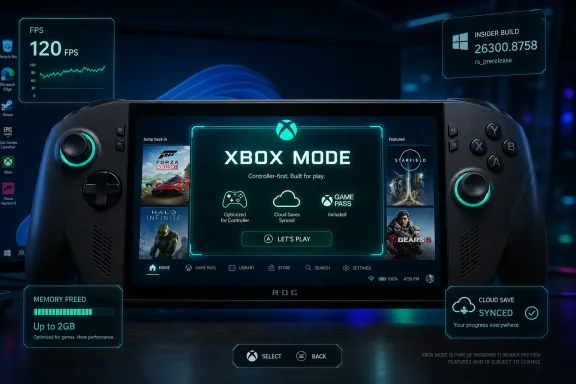
That matters because XBOX mode is not an ordinary app view. It is Microsoft’s attempt to make Windows 11 behave, at least temporarily, like a console operating system. It opens into a controller-friendly gaming surface, pushes the Xbox app toward the front of the experience, and trims background activity so more memory and attention can go to games.
The name change also lands at an awkward moment. XBOX mode only recently reached broader Windows 11 users after months of testing under the more cumbersome “Xbox Fullscreen Experience” name. Renaming a feature twice before many PC owners have even used it is very Microsoft: strategically logical, operationally messy, and strangely revealing.
Steam Deck changed the terms of the argument. Valve did not beat Windows by making Linux universally easier; it beat Windows in that narrow context by hiding complexity when complexity was not wanted. SteamOS made the handheld feel like an appliance first and a PC second.
Windows has the opposite inheritance. Its strength is that it can run almost anything. Its weakness is that it often insists on reminding you of that fact at the worst possible moment. A controller-friendly shell sitting on top of Windows is therefore not cosmetic; it is an attempt to suppress the desktop until the user asks for it.
XBOX mode is Microsoft’s latest answer to that tension. It does not replace Windows, and it does not turn every Windows 11 PC into an Xbox console. Instead, it tries to create a gaming-first session in which the interface, sign-in flow, Game Bar, app switching, and resource usage are tuned for play rather than productivity.
The hard part is that Windows is still underneath. Notifications, launchers, driver prompts, storefronts, overlays, anti-cheat systems, account dialogs, update logic, and input focus all remain part of the experience. Microsoft can make the front door look like a console, but the house behind it is still a sprawling Windows mansion with rooms added over thirty years.
Microsoft has also talked up the performance side. By reducing background tasks, XBOX mode can reportedly free up as much as 2GB of memory. On a high-end desktop with 64GB of RAM, that sounds like housekeeping. On a handheld or budget gaming laptop, it can be the difference between a game feeling merely constrained and feeling actively strangled.
The memory claim is important because it moves XBOX mode beyond vibes. A full-screen gaming interface is nice, but performance headroom is what turns a launcher into part of the platform. If Windows can step out of the way while a game runs, Microsoft has a more credible answer to the criticism that Windows is too heavy for handheld gaming.
Yet the feature’s rough edges remain the story. Sign-in has needed work. Controller navigation has needed work. App behavior has needed work. The Xbox app itself has historically carried enough web-like sluggishness and account friction that building the whole experience around it creates an obvious pressure point.
That is why the all-caps rename is both understandable and slightly absurd. Microsoft is trying to make XBOX mode feel like an official console-class surface. But the test for users will not be whether the letters are uppercase. It will be whether the experience stops breaking the illusion.
All caps gives XBOX a retro-modern flavor. It nods back to the original console while making the brand look less like a proper noun and more like a stamped platform mark. You can imagine it on a handheld boot screen, a Store badge, a controller overlay, a cloud gaming page, and eventually a future console dashboard.
This is not trivial. Microsoft has spent years blurring Xbox across consoles, PCs, cloud streaming, subscriptions, and first-party publishing. The upside is reach. The downside is that “Xbox” has sometimes meant so many things that it risked meaning nothing precise.
XBOX mode gives the brand a job inside Windows. It is not just a marketing umbrella or an app icon. It is a mode of using the operating system. If Microsoft can make that mode reliable, the company gains a bridge between Windows PCs and dedicated gaming hardware that Sony and Nintendo do not need in the same way because their platforms are more tightly controlled.
The irony is that Microsoft’s broadest advantage is also the reason it needs the bridge. Windows runs the games, the stores, the mods, the peripherals, and the weird edge cases. But a console succeeds because it hides edge cases. XBOX mode is Microsoft’s attempt to have both: Windows compatibility with console posture.
That does not mean the next Xbox will simply boot retail Windows 11 and call it a day. A console must be locked down, predictable, secure, and tuned for living-room use. But the industry direction is clear enough: console hardware is becoming more PC-like, PC handhelds are becoming more console-like, and Microsoft is uniquely positioned to collapse some of that distance.
For developers, this could be powerful. A more unified Xbox-and-Windows target reduces friction, at least in theory. If a game can be built, packaged, tested, and surfaced across console-style Windows devices and future Xbox hardware with fewer platform-specific contortions, Microsoft gets to sell scale.
For users, the promise is simpler. Buy a game, sign in, pick up the device in front of you, and keep playing. That is the dream Microsoft has been circling since Xbox Play Anywhere, cloud saves, Game Pass for PC, and the modern Xbox app started pulling the ecosystem together.
But the dream depends on trust. If XBOX mode feels like a launcher skin, users will treat it like one. If it feels like a reliable gaming environment with measurable performance benefits and fewer interruptions, it becomes part of the reason to choose Windows handhelds over SteamOS alternatives.
Build 26300.8758 is not being sold as the great XBOX mode release. Microsoft’s official notes emphasize the usual mix of fixes and improvements. The capitalization change is the sort of detail that only power users, leakers, and obsessive Windows watchers tend to catch.
That is also how many important Windows changes begin. Microsoft tests the plumbing, updates strings, aligns naming, changes icons, revises settings pages, and only later tells a coherent story. By the time the marketing blog arrives, the operating system has already been whispering the strategy for weeks.
The gap between official notes and observed changes is familiar to WindowsForum readers. Microsoft’s release documentation is more reliable than it used to be, but it is still selective. Small UI changes and branding adjustments often go unmentioned, especially when they are part of broader work still in progress.
This creates a weird transparency problem. Enthusiasts see the pieces before the company has assembled the puzzle. That can make Microsoft look evasive even when the change is harmless. In this case, however, the omission is telling mostly because the rebrand is happening across enough surfaces that it is plainly intentional.
The ASUS ROG Ally line, Lenovo Legion Go devices, MSI Claw systems, and other Windows handhelds have all benefited from Windows compatibility while suffering from Windows ergonomics. They can run a wider range of games than Steam Deck in some cases, especially where anti-cheat or launchers are involved. But they have also made ordinary Windows chores feel absurdly visible.
Microsoft cannot afford to leave that problem entirely to OEM overlays. Armoury Crate, Legion Space, and similar utilities can paper over device-specific needs, but they cannot change Windows’ center of gravity. If the OS itself is not better at being controller-first, every Windows handheld starts at a disadvantage.
XBOX mode is therefore defensive as much as ambitious. It protects Windows from the argument that gaming appliances should use something else. It also gives OEMs a common surface to build around, which could make the ecosystem feel less fragmented.
Still, Microsoft must be careful not to confuse standardization with quality. A shared interface that is mediocre merely makes mediocrity consistent. The company needs XBOX mode to become the place where Windows gaming feels more polished than the OEM layer it replaces.
Memory pressure is a persistent problem for handheld PCs. Integrated graphics often share system RAM, modern games are hungry, and Windows itself can be busy even when the user only wants to play. A 16GB handheld does not behave like a 16GB desktop when the GPU, OS, launchers, overlays, and game all want their share.
If XBOX mode consistently reduces that burden, it becomes a functional mode rather than a cosmetic shell. Users may not care which services were paused or which tasks were deferred. They will care if stutter decreases, suspend behavior improves, or a game that previously felt marginal becomes more playable.
There is also a battery angle, though Microsoft has been more cautious there. Fewer background tasks should help power draw in some scenarios, but gaming workloads are dominated by CPU, GPU, display, wireless, and thermal behavior. The best version of XBOX mode would coordinate with power profiles, frame-rate caps, resolution scaling, AutoSR-style features, and device-specific controls rather than merely launching a full-screen app.
That is where Microsoft’s work becomes hard. A console-like mode cannot just be an interface. It has to become an orchestration layer. It needs to know when the user is browsing, when a game is active, when an overlay is needed, when a launcher is misbehaving, and when Windows should simply remain quiet.
The danger is that Microsoft has often been too willing to solve perception before experience. Windows has endured enough Start menu redesigns, Settings migrations, app renames, and partial rebrands to make users skeptical of surface-level polish. A new casing around an old annoyance still feels like an old annoyance.
In gaming, that skepticism is sharper because players can compare against appliances. A Switch does not ask users to think about desktop focus. A PlayStation does not surface a stray productivity notification over a game. A Steam Deck is not perfect, but its default mode knows what kind of device it is trying to be.
Windows, by contrast, has always been a generalist. XBOX mode is an attempt to let Windows specialize on demand. That is a good idea, but specialization has to be ruthless. The mode must suppress the wrong affordances, elevate the right ones, and recover gracefully when a PC game inevitably does something strange.
The name change helps Microsoft present that work as part of the XBOX platform rather than a Windows side quest. But users will decide whether that is earned. A brand can invite confidence only once; after that, the interface has to deliver.
The relevant theme is mode-based computing. Windows is increasingly trying to reshape itself around context: tablet posture, handheld use, gaming sessions, Copilot surfaces, virtual desktops, energy recommendations, and managed update states. XBOX mode is one of the clearest examples because it explicitly changes the user’s relationship with Windows during a session.
For administrators, that raises familiar questions. Can the feature be controlled by policy? Can it be disabled in environments where gaming surfaces are inappropriate? Does it alter background services in ways that affect monitoring, security agents, compliance tooling, or remote support? How does it behave on shared devices?
Most business fleets will never intentionally enable XBOX mode. But education labs, esports programs, creative studios, kiosk-like devices, and mixed-use workstations may encounter it. As Windows becomes more adaptive, IT teams will need clearer documentation about which modes exist, what they change, and how they are governed.
Security-minded users should ask a related question. A mode that reduces background tasks must be precise about what it reduces. Nobody wants gaming performance optimizations that interfere with endpoint protection, patching guarantees, or identity flows. Microsoft can probably thread that needle, but the company should document it plainly rather than leaving power users to infer behavior from benchmarks and process lists.
For gaming, the stakes are immediate. Microsoft owns Windows, Xbox, Game Pass, major studios, and a growing cross-device ecosystem. It should not be in a position where a Windows handheld feels like a great hardware idea running the wrong operating system.
That is the uncomfortable truth XBOX mode is trying to address. Windows remains the most important PC gaming platform in the world, yet it is not always the best gaming appliance interface. Microsoft’s challenge is not game compatibility. It is reducing the operational noise around compatibility.
The company has pieces that could add up to something impressive. AutoSR can help performance on supported hardware. Game Bar can become a better controller-first command center. The Xbox app can become a more credible library surface. Cloud saves and Game Pass can make device switching feel natural. XBOX mode can tie it all together.
But integration is where Microsoft often struggles. The Windows user experience can feel like a federation of teams rather than a single product. XBOX mode will succeed only if the gaming session feels authored end to end, not assembled from semi-related components.
That elevation could be good. Windows needs a first-party gaming mode with authority. OEM utilities cannot carry the whole burden, and the Xbox app alone has not been enough. If Microsoft wants to compete seriously in handhelds and prepare for a more PC-like console future, it needs a recognizable, system-level gaming identity.
Yet the capital letters also expose how much work remains. The company is polishing the sign over the door while users are still testing whether the door opens smoothly. The rename may be justified, but it is not the achievement.
The achievement would be a Windows 11 device that boots into XBOX mode, signs in cleanly, resumes reliably, launches games without input weirdness, manages overlays sanely, preserves battery where possible, frees memory where useful, and returns to the desktop only when the user wants the desktop. That is a tall order. It is also the order Microsoft must fill.
If the next Xbox hardware really leans on this work, the current Insider builds are not a sideshow. They are a rehearsal. Every awkward dialog and every half-controller-friendly surface is a clue about what Microsoft still has to fix before it can claim the living room, the handheld, and the desktop with one platform story.
 Microsoft’s Smallest Rename Says Something Bigger Than Its Patch Notes
The visible change, first spotted by Windows sleuths rather than announced by Microsoft, is the kind of thing that would normally be dismissed as typography. “Xbox mode” becomes “XBOX mode.” The feature does not suddenly gain a new kernel, a new scheduler, or a magical exemption from Windows’ decades of desktop assumptions.But branding changes inside Windows rarely happen in isolation. They tend to arrive when Microsoft is trying to make a product boundary feel less like a boundary. The all-caps XBOX styling now showing up across web, social, Store, and Windows surfaces is not merely a designer’s preference; it is a signal that the company wants the name to behave less like a console label and more like a platform badge.
That matters because XBOX mode is not an ordinary app view. It is Microsoft’s attempt to make Windows 11 behave, at least temporarily, like a console operating system. It opens into a controller-friendly gaming surface, pushes the Xbox app toward the front of the experience, and trims background activity so more memory and attention can go to games.
The name change also lands at an awkward moment. XBOX mode only recently reached broader Windows 11 users after months of testing under the more cumbersome “Xbox Fullscreen Experience” name. Renaming a feature twice before many PC owners have even used it is very Microsoft: strategically logical, operationally messy, and strangely revealing.
The Console Dream Has Always Had a Windows Problem
Microsoft has been chasing this interface for years because the PC gaming market keeps moving toward devices that make the traditional Windows desktop feel exposed. A handheld gaming PC is not a laptop with the lid removed. It is a device people expect to wake, navigate, suspend, resume, and play without hunting for a mouse pointer.Steam Deck changed the terms of the argument. Valve did not beat Windows by making Linux universally easier; it beat Windows in that narrow context by hiding complexity when complexity was not wanted. SteamOS made the handheld feel like an appliance first and a PC second.
Windows has the opposite inheritance. Its strength is that it can run almost anything. Its weakness is that it often insists on reminding you of that fact at the worst possible moment. A controller-friendly shell sitting on top of Windows is therefore not cosmetic; it is an attempt to suppress the desktop until the user asks for it.
XBOX mode is Microsoft’s latest answer to that tension. It does not replace Windows, and it does not turn every Windows 11 PC into an Xbox console. Instead, it tries to create a gaming-first session in which the interface, sign-in flow, Game Bar, app switching, and resource usage are tuned for play rather than productivity.
The hard part is that Windows is still underneath. Notifications, launchers, driver prompts, storefronts, overlays, anti-cheat systems, account dialogs, update logic, and input focus all remain part of the experience. Microsoft can make the front door look like a console, but the house behind it is still a sprawling Windows mansion with rooms added over thirty years.
XBOX Mode Is Really a Negotiation With the Desktop
The practical pitch for XBOX mode is easy to understand. A player should be able to power on a Windows 11 gaming handheld, sign in with minimal friction, browse games with a controller, launch titles, switch between apps, and avoid the usual desktop tax. That pitch is especially compelling on devices with built-in controls, small screens, and no comfortable keyboard.Microsoft has also talked up the performance side. By reducing background tasks, XBOX mode can reportedly free up as much as 2GB of memory. On a high-end desktop with 64GB of RAM, that sounds like housekeeping. On a handheld or budget gaming laptop, it can be the difference between a game feeling merely constrained and feeling actively strangled.
The memory claim is important because it moves XBOX mode beyond vibes. A full-screen gaming interface is nice, but performance headroom is what turns a launcher into part of the platform. If Windows can step out of the way while a game runs, Microsoft has a more credible answer to the criticism that Windows is too heavy for handheld gaming.
Yet the feature’s rough edges remain the story. Sign-in has needed work. Controller navigation has needed work. App behavior has needed work. The Xbox app itself has historically carried enough web-like sluggishness and account friction that building the whole experience around it creates an obvious pressure point.
That is why the all-caps rename is both understandable and slightly absurd. Microsoft is trying to make XBOX mode feel like an official console-class surface. But the test for users will not be whether the letters are uppercase. It will be whether the experience stops breaking the illusion.
The Rebrand Is a Platform Strategy Wearing a Logo
The move from Xbox to XBOX fits a broader shift under Microsoft Gaming CEO Asha Sharma, who took over the gaming organization earlier this year after Phil Spencer’s long tenure. Microsoft has been publicly repositioning Xbox as more than a box under the television, while simultaneously trying to reassure console loyalists that hardware still matters. That is a delicate message, and typography is one of the cheap ways companies try to make a delicate message feel coherent.All caps gives XBOX a retro-modern flavor. It nods back to the original console while making the brand look less like a proper noun and more like a stamped platform mark. You can imagine it on a handheld boot screen, a Store badge, a controller overlay, a cloud gaming page, and eventually a future console dashboard.
This is not trivial. Microsoft has spent years blurring Xbox across consoles, PCs, cloud streaming, subscriptions, and first-party publishing. The upside is reach. The downside is that “Xbox” has sometimes meant so many things that it risked meaning nothing precise.
XBOX mode gives the brand a job inside Windows. It is not just a marketing umbrella or an app icon. It is a mode of using the operating system. If Microsoft can make that mode reliable, the company gains a bridge between Windows PCs and dedicated gaming hardware that Sony and Nintendo do not need in the same way because their platforms are more tightly controlled.
The irony is that Microsoft’s broadest advantage is also the reason it needs the bridge. Windows runs the games, the stores, the mods, the peripherals, and the weird edge cases. But a console succeeds because it hides edge cases. XBOX mode is Microsoft’s attempt to have both: Windows compatibility with console posture.
Project Helix Gives the Rename Real Stakes
The rumored next-generation Xbox effort, widely discussed under the Project Helix codename, is the context that makes this rename feel less disposable. If Microsoft’s next console leans further into Windows compatibility or shares more DNA with Windows gaming PCs, then XBOX mode becomes more than a convenience feature. It becomes a preview of the operating model.That does not mean the next Xbox will simply boot retail Windows 11 and call it a day. A console must be locked down, predictable, secure, and tuned for living-room use. But the industry direction is clear enough: console hardware is becoming more PC-like, PC handhelds are becoming more console-like, and Microsoft is uniquely positioned to collapse some of that distance.
For developers, this could be powerful. A more unified Xbox-and-Windows target reduces friction, at least in theory. If a game can be built, packaged, tested, and surfaced across console-style Windows devices and future Xbox hardware with fewer platform-specific contortions, Microsoft gets to sell scale.
For users, the promise is simpler. Buy a game, sign in, pick up the device in front of you, and keep playing. That is the dream Microsoft has been circling since Xbox Play Anywhere, cloud saves, Game Pass for PC, and the modern Xbox app started pulling the ecosystem together.
But the dream depends on trust. If XBOX mode feels like a launcher skin, users will treat it like one. If it feels like a reliable gaming environment with measurable performance benefits and fewer interruptions, it becomes part of the reason to choose Windows handhelds over SteamOS alternatives.
Insiders Are Seeing the Future Before It Is Finished
The fact that this name change appears in an Experimental build matters. Microsoft’s Insider channels often show where Windows is going before the company is ready to explain why. Features appear, disappear, get renamed, move between channels, and sometimes arrive in retail builds with less fanfare than their strategic importance deserves.Build 26300.8758 is not being sold as the great XBOX mode release. Microsoft’s official notes emphasize the usual mix of fixes and improvements. The capitalization change is the sort of detail that only power users, leakers, and obsessive Windows watchers tend to catch.
That is also how many important Windows changes begin. Microsoft tests the plumbing, updates strings, aligns naming, changes icons, revises settings pages, and only later tells a coherent story. By the time the marketing blog arrives, the operating system has already been whispering the strategy for weeks.
The gap between official notes and observed changes is familiar to WindowsForum readers. Microsoft’s release documentation is more reliable than it used to be, but it is still selective. Small UI changes and branding adjustments often go unmentioned, especially when they are part of broader work still in progress.
This creates a weird transparency problem. Enthusiasts see the pieces before the company has assembled the puzzle. That can make Microsoft look evasive even when the change is harmless. In this case, however, the omission is telling mostly because the rebrand is happening across enough surfaces that it is plainly intentional.
The Handheld PC Market Is Forcing Microsoft to Care About Friction
XBOX mode exists because the handheld PC market exposed Windows in a new way. On a desktop, Windows’ complexity can be tolerated because a keyboard, mouse, monitor, and desk absorb much of the pain. On a seven- or eight-inch device, every dialog box is a betrayal.The ASUS ROG Ally line, Lenovo Legion Go devices, MSI Claw systems, and other Windows handhelds have all benefited from Windows compatibility while suffering from Windows ergonomics. They can run a wider range of games than Steam Deck in some cases, especially where anti-cheat or launchers are involved. But they have also made ordinary Windows chores feel absurdly visible.
Microsoft cannot afford to leave that problem entirely to OEM overlays. Armoury Crate, Legion Space, and similar utilities can paper over device-specific needs, but they cannot change Windows’ center of gravity. If the OS itself is not better at being controller-first, every Windows handheld starts at a disadvantage.
XBOX mode is therefore defensive as much as ambitious. It protects Windows from the argument that gaming appliances should use something else. It also gives OEMs a common surface to build around, which could make the ecosystem feel less fragmented.
Still, Microsoft must be careful not to confuse standardization with quality. A shared interface that is mediocre merely makes mediocrity consistent. The company needs XBOX mode to become the place where Windows gaming feels more polished than the OEM layer it replaces.
The Memory Savings Are the Most Serious Part of the Pitch
The most concrete claim attached to XBOX mode is that it can free up to 2GB of memory by reducing background tasks. That figure has circulated enough to become central to the feature’s reputation. It is also exactly the kind of claim Microsoft will be judged on in real-world testing.Memory pressure is a persistent problem for handheld PCs. Integrated graphics often share system RAM, modern games are hungry, and Windows itself can be busy even when the user only wants to play. A 16GB handheld does not behave like a 16GB desktop when the GPU, OS, launchers, overlays, and game all want their share.
If XBOX mode consistently reduces that burden, it becomes a functional mode rather than a cosmetic shell. Users may not care which services were paused or which tasks were deferred. They will care if stutter decreases, suspend behavior improves, or a game that previously felt marginal becomes more playable.
There is also a battery angle, though Microsoft has been more cautious there. Fewer background tasks should help power draw in some scenarios, but gaming workloads are dominated by CPU, GPU, display, wireless, and thermal behavior. The best version of XBOX mode would coordinate with power profiles, frame-rate caps, resolution scaling, AutoSR-style features, and device-specific controls rather than merely launching a full-screen app.
That is where Microsoft’s work becomes hard. A console-like mode cannot just be an interface. It has to become an orchestration layer. It needs to know when the user is browsing, when a game is active, when an overlay is needed, when a launcher is misbehaving, and when Windows should simply remain quiet.
The Name Is Cleaner Than the Experience
“Xbox Fullscreen Experience” sounded like a feature spec that escaped from a planning document. “Xbox mode” was a better name because it described what users wanted: put this device into the Xbox-like state. “XBOX mode” is not necessarily better language, but it is better brand discipline.The danger is that Microsoft has often been too willing to solve perception before experience. Windows has endured enough Start menu redesigns, Settings migrations, app renames, and partial rebrands to make users skeptical of surface-level polish. A new casing around an old annoyance still feels like an old annoyance.
In gaming, that skepticism is sharper because players can compare against appliances. A Switch does not ask users to think about desktop focus. A PlayStation does not surface a stray productivity notification over a game. A Steam Deck is not perfect, but its default mode knows what kind of device it is trying to be.
Windows, by contrast, has always been a generalist. XBOX mode is an attempt to let Windows specialize on demand. That is a good idea, but specialization has to be ruthless. The mode must suppress the wrong affordances, elevate the right ones, and recover gracefully when a PC game inevitably does something strange.
The name change helps Microsoft present that work as part of the XBOX platform rather than a Windows side quest. But users will decide whether that is earned. A brand can invite confidence only once; after that, the interface has to deliver.
Enterprise IT Should Watch the Consumer Feature Anyway
At first glance, XBOX mode sounds irrelevant to sysadmins. It is a gaming surface for consumers and handheld enthusiasts, not a fleet-management feature. But Windows features built for consumer scenarios often reveal Microsoft’s broader operating-system direction.The relevant theme is mode-based computing. Windows is increasingly trying to reshape itself around context: tablet posture, handheld use, gaming sessions, Copilot surfaces, virtual desktops, energy recommendations, and managed update states. XBOX mode is one of the clearest examples because it explicitly changes the user’s relationship with Windows during a session.
For administrators, that raises familiar questions. Can the feature be controlled by policy? Can it be disabled in environments where gaming surfaces are inappropriate? Does it alter background services in ways that affect monitoring, security agents, compliance tooling, or remote support? How does it behave on shared devices?
Most business fleets will never intentionally enable XBOX mode. But education labs, esports programs, creative studios, kiosk-like devices, and mixed-use workstations may encounter it. As Windows becomes more adaptive, IT teams will need clearer documentation about which modes exist, what they change, and how they are governed.
Security-minded users should ask a related question. A mode that reduces background tasks must be precise about what it reduces. Nobody wants gaming performance optimizations that interfere with endpoint protection, patching guarantees, or identity flows. Microsoft can probably thread that needle, but the company should document it plainly rather than leaving power users to infer behavior from benchmarks and process lists.
Microsoft’s K2 Push Needs More Than a New Badge
The XBOX mode rename arrives alongside Microsoft’s broader push to make Windows 11 feel less clumsy in the places enthusiasts complain about most. The company’s recent Windows work has leaned into performance, interface cleanup, gaming improvements, and long-requested usability fixes. Call it initiative branding if you like; the pattern is real enough.For gaming, the stakes are immediate. Microsoft owns Windows, Xbox, Game Pass, major studios, and a growing cross-device ecosystem. It should not be in a position where a Windows handheld feels like a great hardware idea running the wrong operating system.
That is the uncomfortable truth XBOX mode is trying to address. Windows remains the most important PC gaming platform in the world, yet it is not always the best gaming appliance interface. Microsoft’s challenge is not game compatibility. It is reducing the operational noise around compatibility.
The company has pieces that could add up to something impressive. AutoSR can help performance on supported hardware. Game Bar can become a better controller-first command center. The Xbox app can become a more credible library surface. Cloud saves and Game Pass can make device switching feel natural. XBOX mode can tie it all together.
But integration is where Microsoft often struggles. The Windows user experience can feel like a federation of teams rather than a single product. XBOX mode will succeed only if the gaming session feels authored end to end, not assembled from semi-related components.
The Capital Letters Are Doing More Work Than They Should
There is a reason this tiny rename attracted attention. Enthusiasts have learned to read Microsoft’s casing, icons, and labels as early indicators of strategic weather. A capitalized XBOX inside Windows implies that the gaming brand is being elevated inside the operating system, not merely referenced by it.That elevation could be good. Windows needs a first-party gaming mode with authority. OEM utilities cannot carry the whole burden, and the Xbox app alone has not been enough. If Microsoft wants to compete seriously in handhelds and prepare for a more PC-like console future, it needs a recognizable, system-level gaming identity.
Yet the capital letters also expose how much work remains. The company is polishing the sign over the door while users are still testing whether the door opens smoothly. The rename may be justified, but it is not the achievement.
The achievement would be a Windows 11 device that boots into XBOX mode, signs in cleanly, resumes reliably, launches games without input weirdness, manages overlays sanely, preserves battery where possible, frees memory where useful, and returns to the desktop only when the user wants the desktop. That is a tall order. It is also the order Microsoft must fill.
If the next Xbox hardware really leans on this work, the current Insider builds are not a sideshow. They are a rehearsal. Every awkward dialog and every half-controller-friendly surface is a clue about what Microsoft still has to fix before it can claim the living room, the handheld, and the desktop with one platform story.
What the XBOX Mode Rename Tells Windows Users Right Now
The immediate user impact is modest, but the direction of travel is not. Microsoft is aligning the Windows gaming interface with a broader XBOX identity, and that identity is likely to matter more as handheld PCs and future Xbox hardware converge.- The name change appears in Windows 11 Experimental Build 26300.8758, released on June 26, 2026, and was not highlighted in Microsoft’s official release notes.
- The feature has already moved from “Xbox Fullscreen Experience” to “Xbox mode” and now toward “XBOX mode,” showing that Microsoft is still settling the public shape of the product.
- The underlying goal remains a controller-first Windows session that is better suited to handhelds, TVs, and gaming-focused PCs than the traditional desktop.
- Microsoft’s performance pitch depends heavily on reducing background tasks and freeing memory, with the company claiming gains of up to 2GB in some scenarios.
- The rebrand matters most because XBOX mode is likely part of Microsoft’s preparation for a more unified Windows-and-Xbox gaming platform.
- The feature still needs practical polish in sign-in, app behavior, controller navigation, and system-level consistency before the branding feels fully earned.
References
- Primary source: Windows Central
Published: 2026-06-29T12:47:11.053325
Loading…
www.windowscentral.com - Official source: learn.microsoft.com
Loading…
learn.microsoft.com - Related coverage: tomshardware.com
Microsoft begins rolling out Xbox Mode to Windows 11 desktops and laptops — consolidated storefronts and console-style interface come to PC | Tom's Hardware
The console-style interface, previously limited to handhelds, now works across all Windows 11 PCs.www.tomshardware.com - Official source: blogs.windows.com
Announcing new builds for 26 June 2026, retail launch of new WIP improvements
Hello Windows Insiders, We have new releases today with builds across Beta and Experimental, and are excited to begin rolling out the new Windows Insider experience to retail Windows 11 builds this week! New Windows Insider Program changesblogs.windows.com - Related coverage: pcworld.com
Loading…
www.pcworld.com - Related coverage: techradar.com
If you're wondering why Microsoft's Xbox mode is still missing after installing the latest Windows 11 update, here's why | TechRadar
Hopefully, the rollout will be completed soonwww.techradar.com
- Related coverage: gamespot.com
Xbox Mode, Formerly Xbox Full Screen Experience, Finally Launches On Windows 11 In April - GameSpot
Xbox Mode, formerly known as Xbox Fullscreen Experience, will start shipping on Windows 11 in April.www.gamespot.com - Related coverage: techrepublic.com
Microsoft Plans ‘Xbox Mode’ for Windows 11 PCs Starting in April
Microsoft says Xbox mode is coming to Windows 11 in April, bringing a console-style interface, faster game loading tools, and a unified PC strategy.www.techrepublic.com
- Related coverage: notebookcheck.net
Loading…
www.notebookcheck.net - Related coverage: pcgamer.com
Loading…
www.pcgamer.com - Related coverage: gamesradar.com
Loading…
www.gamesradar.com - Official source: blogs.microsoft.com
Asha Sharma named EVP and CEO, Microsoft Gaming - The Official Microsoft Blog
Satya Nadella, Chairman and CEO, and members of his executive team shared the following communications with employees today. SATYA NADELLA MESSAGE Gaming has been part of Microsoft from the start. Flight Simulator shipped before Windows, and you can practically ray‑trace a line from DirectX in...blogs.microsoft.com - Related coverage: gadgets360.com
Loading…
www.gadgets360.com - Related coverage: gematsu.com
Loading…
www.gematsu.com - Related coverage: livemint.com
Loading…
www.livemint.com - Related coverage: purexbox.com
Loading…
www.purexbox.com - Related coverage: stravoris.com
Loading…
www.stravoris.com