

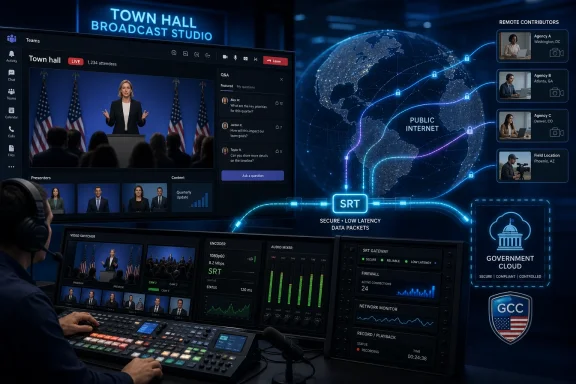
Microsoft updated its Microsoft 365 Roadmap on June 30, 2026, to show Secure Reliable Transport support for Microsoft Teams town halls as rolling out for desktop and Mac clients in worldwide commercial tenants and GCC. The feature, Roadmap ID 554931, gives Teams event producers another ingest protocol for sending high-quality, low-latency video across the public internet. That sounds like a small production-room detail, but it marks a larger shift in how Microsoft wants Teams town halls to compete with purpose-built broadcast platforms. The town hall is no longer just a meeting with more chairs; it is becoming a managed live-streaming product with enterprise collaboration wrapped around it.
For years, the dividing line between “meeting software” and “event software” was easy to spot. Meetings were webcams, screen shares, chat, and the occasional awkward mute incident. Events were encoders, contribution feeds, backup paths, production switchers, audio engineers, and a small army of people watching signal health.
Teams town halls have always sat uncomfortably between those worlds. Microsoft wants them to feel native to Microsoft 365, with familiar scheduling, identity, attendance, moderation, and compliance controls. But the customers running all-hands meetings, investor-style briefings, agency updates, university events, and executive broadcasts often think in the language of live production, not calendar invites.
SRT support is therefore more important than its acronym suggests. It gives production teams a protocol designed for unreliable networks, packet loss, jitter, and contribution over the public internet. That is precisely the environment in which modern corporate video now lives: executives at home, agencies offsite, production partners on hotel Wi-Fi, hybrid crews in multiple cities, and audiences expecting the event to look better than a normal Teams call.
The move also says something about Microsoft’s priorities. Teams won the collaboration layer, but it has not always won the confidence of video engineers. By adding SRT to town halls, Microsoft is acknowledging that reliable enterprise video is not only a licensing feature; it is an engineering problem at the network edge.
But RTMP’s ubiquity is not the same thing as resilience. It emerged in an earlier streaming era, and while it remains useful for contribution workflows, it was not designed around the same assumptions that drive SRT. Corporate networks are messy, remote contributors are common, and the public internet is now the default path for video that used to move through dedicated circuits.
SRT was built to make that path less fragile. It is designed to compensate for packet loss and network instability while keeping latency lower than traditional buffering-heavy approaches. For producers, the attraction is not just better picture quality; it is fewer moments where the entire event team stares at a preview window wondering whether the CEO’s feed is about to collapse.
That distinction matters because Teams town halls are increasingly used for moments that organizations treat as mission-critical. A quarterly all-hands can carry strategic messaging, HR policy changes, crisis communications, acquisition news, or security briefings. In those settings, “good enough for a meeting” is not good enough.
SRT does not magically turn Teams into a broadcast truck. It does, however, make Teams more plausible as the final destination for workflows that already involve broadcast-grade tools upstream. That is the gap Microsoft needed to close.
A communications team may have a production vendor in one city, a keynote speaker in another, a sign-language interpreter in a third, and a Teams tenant governed by an IT department that would prefer no one punch unnecessary holes in the network. The event still has to start on time. The video still has to look clean. The audience still blames “Teams” if anything goes wrong.
SRT is attractive because it meets this reality where it is. It does not assume ideal network conditions. It assumes that the network will misbehave and gives the sender and receiver a more intelligent way to cope.
That makes the feature especially relevant for hybrid production. A town hall no longer needs to be produced entirely inside a corporate campus or entirely inside Teams. A producer can assemble a show with external tools, mix video and graphics upstream, and send the result into Microsoft’s event environment with a protocol better suited to internet contribution.
The practical consequence is that Microsoft is reducing the penalty for using Teams as the enterprise front door while keeping professional production outside it. That is where many organizations already wanted to land.
Public-sector and regulated customers often face exactly the kind of live-event pressure SRT is meant to address. They run public meetings, internal briefings, emergency communications, training events, and leadership updates where the network path may be imperfect but the tolerance for failure is low.
The GCC angle also gives IT teams a reason to pay attention before the first executive producer asks for the feature. Streaming protocols are not just production settings; they can become firewall conversations, security reviews, device procurement questions, and support runbooks. A protocol rollout that looks simple in the Teams client can ripple through network and compliance teams quickly.
That does not mean every government tenant should immediately rebuild its town hall workflow around SRT. It does mean admins should expect the conversation to arrive. Once a feature lands in the roadmap as rolling out, production teams tend to discover it faster than policy teams would like.
For Microsoft, this is the benefit and burden of building collaboration software at enterprise scale. Every media feature becomes an identity feature, a governance feature, and a network feature whether Redmond markets it that way or not.
The vendors and tools that matter here include hardware encoders, cloud switching platforms, captioning systems, production software, video engineers, event agencies, and internal broadcast teams. These are the people and products that decide whether Teams is a safe destination for a high-profile event or merely the place where the calendar invite lives.
When Teams lacks a capability that production teams consider standard, those teams route around it. They may stream to another platform, embed a third-party player, use a dedicated webcast service, or treat Teams as a secondary audience endpoint. That weakens Microsoft’s claim that Teams can be the consolidated place for meetings, webinars, and large-scale internal events.
SRT support helps Microsoft meet the production world on more familiar terms. It says that Teams town halls are not only for presenters clicking “join” from a laptop. They can also receive a produced program feed from the tools professionals already use.
That is strategically important because the enterprise event market is not won only by feature checklists. It is won by confidence. Producers need to know what happens when the network gets bad, when a feed drops, when the backup encoder takes over, and when an executive insists on joining from somewhere no one tested.
An SRT feed can improve contribution into Teams, but it does not eliminate every delay between camera and attendee. Encoding settings, network routes, Teams processing, event configuration, content delivery, attendee device conditions, captions, and browser or client playback can all introduce delay. In a town hall, latency also affects how Q&A feels, how moderators pace transitions, and whether speakers can react naturally to audience feedback.
This is where Microsoft’s messaging needs to be read carefully. The protocol can make the ingest leg more resilient and efficient. It cannot guarantee that every Teams town hall suddenly behaves like a two-way meeting or a sub-second broadcast.
For IT and event teams, the smart approach is to treat SRT as a better pipe, not a miracle. Test it under realistic conditions. Simulate packet loss if possible. Validate the encoder model, firmware, bitrate ladder, audio configuration, captions workflow, and backup path. Then document the setup well enough that the next event is not a heroic act of institutional memory.
The organizations that benefit most from SRT will be the ones that already understand live events as systems. The ones that treat it as another checkbox may simply find new and more interesting ways to fail.
The roadmap entry says the feature is rolling out for Microsoft Teams on desktop and Mac, across General Availability and Targeted Release rings, with availability in June 2026. That tells customers the broad shape of deployment, but not every operational detail an admin will care about. The deeper questions are the ones that always arrive after a roadmap item turns into a real workflow.
Which encoders will be validated? How will SRT appear in meeting or town hall options? Will existing streaming policies govern it in the same way as RTMP? What diagnostic telemetry will admins see when an SRT ingest fails? How will support distinguish between a Teams issue, an encoder issue, a firewall issue, and a bad hotel uplink?
These are not nitpicks. They are the difference between a feature that looks good in a roadmap and one that survives contact with an executive broadcast. Microsoft has improved Teams administration substantially over the years, but live video remains one of the least forgiving domains in enterprise IT.
The company’s challenge is to make the professional workflow possible without making it obscure. If SRT support requires a scavenger hunt through policy settings, client versions, licensing footnotes, and undocumented encoder behavior, its audience will narrow quickly.
SRT support should be read in that context. It is part of making town halls credible as the successor environment for large events, especially where external production is required. Microsoft cannot ask customers to leave older workflows behind while offering fewer contribution options or less reliability than the tools being replaced.
Town halls also reflect Microsoft’s broader preference for integrated experiences. Scheduling, audience management, recording, identity, moderation, compliance, analytics, and attendee engagement all fit neatly into the Microsoft 365 story. But live production has always resisted neat integration because the real world is full of cameras, switchers, encoders, audio desks, graphics machines, and network improvisation.
Adding SRT is a concession to that reality. Microsoft is not saying every town hall should be produced like a television show. It is saying that when a customer does need that kind of workflow, Teams should not be the weakest link.
That is the right direction. The danger is assuming the presence of a broadcast protocol automatically creates a broadcast product. Teams still has to prove itself in the details: monitoring, failover, captions, attendee experience, admin control, and supportability.
Security still matters. Enterprise event feeds can contain confidential financial data, unreleased product information, personnel updates, legal disclosures, or sensitive government communications. A protocol designed with secure transport in mind is a better fit for those scenarios than a casual, consumer-grade streaming path.
But the term “secure” should not be allowed to flatten the security conversation. Admins will still need to understand how SRT is authenticated, what ports and endpoints are involved, how encryption is configured or enforced, and how the Teams service exposes controls. A secure protocol used badly can still create operational risk.
The better way to think about SRT is as one layer in a larger trust model. Microsoft controls the Teams service, the tenant identity plane, policy enforcement, and the event environment. The customer controls the encoder, the network path, the production workflow, and the people operating it. The protocol sits between those worlds.
That shared-responsibility model is familiar to cloud administrators, but it is less familiar to event producers. Successful adoption will require both groups to speak each other’s language.
The real burden lands on Teams administrators, network teams, event producers, and help desks. They will need to know when the feature is available in their tenant, how to enable or restrict it, what client versions are required, and how to support users who see different options based on release rings or policy assignments.
Targeted Release adds another wrinkle. Some organizations use it to validate features early; others avoid it because staggered behavior causes confusion. For a live-event feature, mixed availability can be particularly awkward. A producer planning a high-profile town hall does not want to discover that the option exists for one organizer but not another.
The rollout timing also matters because the roadmap says General Availability is June 2026 and the item was last updated late on June 30, 2026. In Microsoft 365 terms, “rolling out” rarely means every tenant has the feature at the same hour. Admins should expect staged availability rather than a clean global switch.
For WindowsForum readers, the familiar lesson applies: the client UI is not the product. The product is the service state, the policy model, the documentation, the network path, and the operational muscle around it.
Still, engineers will want proof. They will want to know supported modes, latency settings, encryption behavior, reconnection characteristics, codec requirements, audio channel handling, and whether Teams exposes enough preview and health information to trust the feed. They will also want to know what happens when the event starts, stops, or transitions between rehearsal and live phases.
This is where Microsoft’s enterprise culture can clash with production culture. Enterprise software often tolerates ambiguity because admins can file tickets, read documentation, and wait for service health updates. Live production does not tolerate ambiguity because the show happens at 10:00 a.m. whether the root cause has been identified or not.
The best implementation of SRT in Teams would therefore include more than an ingest URL and a passphrase. It would include clear status indicators, meaningful error messages, predictable reconnection behavior, and documentation written for people who understand encoders rather than only Teams policy.
If Microsoft gets that right, SRT could become one of those features that quietly changes buyer behavior. If it gets it wrong, it will be another roadmap checkbox that production teams test once and then avoid.
A Teams town hall sits at the intersection of all of them. When it works, the event feels inevitable. When it fails, everyone discovers how many assumptions were hidden inside the workflow.
SRT support gives those teams a better technical foundation, but it also raises expectations. Once Teams can accept a more resilient professional feed, leadership may expect more polished events. Once production teams can use better contribution workflows, they may push for more advanced routing, backup, and monitoring. Once IT sees external encoders entering the event architecture, it may insist on tighter controls.
That tension is healthy if organizations treat it seriously. The alternative is the classic enterprise pattern: a feature appears, someone uses it for a critical event, and governance catches up only after something goes wrong.
The right response is not to block SRT by default. It is to operationalize it before the first high-stakes use. In live events, preparedness is not bureaucracy. It is uptime.
Organizations that run serious Teams town halls should begin by checking tenant availability, release-ring exposure, and policy dependencies. They should identify which teams are allowed to use external encoders and whether the organization already has approved production vendors or hardware. They should also decide whether SRT is merely permitted or formally supported.
That distinction matters. Permitted means someone can try it. Supported means the organization has tested it, documented it, secured it, and knows who gets called when it breaks.
The arrival of SRT is also a good moment to revisit older assumptions about event architecture. If town halls have been run as glorified meetings, perhaps that remains appropriate. But if they have grown into company-wide broadcasts with reputational stakes, the tooling should match the importance of the moment.
Microsoft is giving customers a more capable ingest option. Customers now have to decide whether their process is mature enough to use it well.
 Microsoft Quietly Moves Teams Town Halls Closer to the Broadcast Booth
For years, the dividing line between “meeting software” and “event software” was easy to spot. Meetings were webcams, screen shares, chat, and the occasional awkward mute incident. Events were encoders, contribution feeds, backup paths, production switchers, audio engineers, and a small army of people watching signal health.Teams town halls have always sat uncomfortably between those worlds. Microsoft wants them to feel native to Microsoft 365, with familiar scheduling, identity, attendance, moderation, and compliance controls. But the customers running all-hands meetings, investor-style briefings, agency updates, university events, and executive broadcasts often think in the language of live production, not calendar invites.
SRT support is therefore more important than its acronym suggests. It gives production teams a protocol designed for unreliable networks, packet loss, jitter, and contribution over the public internet. That is precisely the environment in which modern corporate video now lives: executives at home, agencies offsite, production partners on hotel Wi-Fi, hybrid crews in multiple cities, and audiences expecting the event to look better than a normal Teams call.
The move also says something about Microsoft’s priorities. Teams won the collaboration layer, but it has not always won the confidence of video engineers. By adding SRT to town halls, Microsoft is acknowledging that reliable enterprise video is not only a licensing feature; it is an engineering problem at the network edge.
RTMP Got Teams Into the Encoder World, but It Was Never the Endgame
Microsoft’s existing encoder story for Teams has largely revolved around RTMP or RTMPS ingest. That made sense. RTMP is old, widely supported, and familiar to anyone who has pushed a feed from OBS, Wirecast, vMix, a hardware encoder, or a cloud production tool into a streaming destination.But RTMP’s ubiquity is not the same thing as resilience. It emerged in an earlier streaming era, and while it remains useful for contribution workflows, it was not designed around the same assumptions that drive SRT. Corporate networks are messy, remote contributors are common, and the public internet is now the default path for video that used to move through dedicated circuits.
SRT was built to make that path less fragile. It is designed to compensate for packet loss and network instability while keeping latency lower than traditional buffering-heavy approaches. For producers, the attraction is not just better picture quality; it is fewer moments where the entire event team stares at a preview window wondering whether the CEO’s feed is about to collapse.
That distinction matters because Teams town halls are increasingly used for moments that organizations treat as mission-critical. A quarterly all-hands can carry strategic messaging, HR policy changes, crisis communications, acquisition news, or security briefings. In those settings, “good enough for a meeting” is not good enough.
SRT does not magically turn Teams into a broadcast truck. It does, however, make Teams more plausible as the final destination for workflows that already involve broadcast-grade tools upstream. That is the gap Microsoft needed to close.
The Public Internet Is Now the Contribution Network
The phrase “across the public internet” is doing a lot of work in Microsoft’s roadmap description. In the old model, serious live video contribution depended on controlled paths: satellite, fiber, bonded cellular kits, leased lines, or at least carefully managed corporate networks. The new model is far less tidy.A communications team may have a production vendor in one city, a keynote speaker in another, a sign-language interpreter in a third, and a Teams tenant governed by an IT department that would prefer no one punch unnecessary holes in the network. The event still has to start on time. The video still has to look clean. The audience still blames “Teams” if anything goes wrong.
SRT is attractive because it meets this reality where it is. It does not assume ideal network conditions. It assumes that the network will misbehave and gives the sender and receiver a more intelligent way to cope.
That makes the feature especially relevant for hybrid production. A town hall no longer needs to be produced entirely inside a corporate campus or entirely inside Teams. A producer can assemble a show with external tools, mix video and graphics upstream, and send the result into Microsoft’s event environment with a protocol better suited to internet contribution.
The practical consequence is that Microsoft is reducing the penalty for using Teams as the enterprise front door while keeping professional production outside it. That is where many organizations already wanted to land.
GCC Support Makes This More Than a Corporate Webinar Upgrade
The inclusion of GCC in the rollout is not a throwaway detail. Government Community Cloud customers tend to have stricter requirements, slower change cycles, and more scrutiny around communications tools. If SRT support is rolling out there alongside worldwide standard tenants, Microsoft is signaling that this is part of the mainstream Teams events architecture rather than a commercial-only experiment.Public-sector and regulated customers often face exactly the kind of live-event pressure SRT is meant to address. They run public meetings, internal briefings, emergency communications, training events, and leadership updates where the network path may be imperfect but the tolerance for failure is low.
The GCC angle also gives IT teams a reason to pay attention before the first executive producer asks for the feature. Streaming protocols are not just production settings; they can become firewall conversations, security reviews, device procurement questions, and support runbooks. A protocol rollout that looks simple in the Teams client can ripple through network and compliance teams quickly.
That does not mean every government tenant should immediately rebuild its town hall workflow around SRT. It does mean admins should expect the conversation to arrive. Once a feature lands in the roadmap as rolling out, production teams tend to discover it faster than policy teams would like.
For Microsoft, this is the benefit and burden of building collaboration software at enterprise scale. Every media feature becomes an identity feature, a governance feature, and a network feature whether Redmond markets it that way or not.
The Real Competition Is Not Zoom or Webex, but the Production Stack Around Them
It is tempting to frame every Teams event feature as another skirmish with Zoom, Webex, or Google Meet. That is partly true, but SRT support points to a different battlefield. Microsoft is competing for the trust of the production stack that surrounds enterprise communications.The vendors and tools that matter here include hardware encoders, cloud switching platforms, captioning systems, production software, video engineers, event agencies, and internal broadcast teams. These are the people and products that decide whether Teams is a safe destination for a high-profile event or merely the place where the calendar invite lives.
When Teams lacks a capability that production teams consider standard, those teams route around it. They may stream to another platform, embed a third-party player, use a dedicated webcast service, or treat Teams as a secondary audience endpoint. That weakens Microsoft’s claim that Teams can be the consolidated place for meetings, webinars, and large-scale internal events.
SRT support helps Microsoft meet the production world on more familiar terms. It says that Teams town halls are not only for presenters clicking “join” from a laptop. They can also receive a produced program feed from the tools professionals already use.
That is strategically important because the enterprise event market is not won only by feature checklists. It is won by confidence. Producers need to know what happens when the network gets bad, when a feed drops, when the backup encoder takes over, and when an executive insists on joining from somewhere no one tested.
Low Latency Is a Product Promise With Operational Consequences
Microsoft describes SRT as supporting high-quality, low-latency video. Those words are attractive, but they should make administrators cautious rather than complacent. Low latency is not a single toggle; it is an end-to-end property of the entire production and delivery chain.An SRT feed can improve contribution into Teams, but it does not eliminate every delay between camera and attendee. Encoding settings, network routes, Teams processing, event configuration, content delivery, attendee device conditions, captions, and browser or client playback can all introduce delay. In a town hall, latency also affects how Q&A feels, how moderators pace transitions, and whether speakers can react naturally to audience feedback.
This is where Microsoft’s messaging needs to be read carefully. The protocol can make the ingest leg more resilient and efficient. It cannot guarantee that every Teams town hall suddenly behaves like a two-way meeting or a sub-second broadcast.
For IT and event teams, the smart approach is to treat SRT as a better pipe, not a miracle. Test it under realistic conditions. Simulate packet loss if possible. Validate the encoder model, firmware, bitrate ladder, audio configuration, captions workflow, and backup path. Then document the setup well enough that the next event is not a heroic act of institutional memory.
The organizations that benefit most from SRT will be the ones that already understand live events as systems. The ones that treat it as another checkbox may simply find new and more interesting ways to fail.
Teams Premium, Licensing, and the Confusing Event Feature Map
Teams town halls already live inside a complicated Microsoft event landscape. There are meetings, webinars, town halls, Teams Premium enhancements, live event legacy paths, RTMP-In policies, client differences, and tenant-level controls. Adding SRT makes the product stronger, but it also adds one more variable to an already crowded admin map.The roadmap entry says the feature is rolling out for Microsoft Teams on desktop and Mac, across General Availability and Targeted Release rings, with availability in June 2026. That tells customers the broad shape of deployment, but not every operational detail an admin will care about. The deeper questions are the ones that always arrive after a roadmap item turns into a real workflow.
Which encoders will be validated? How will SRT appear in meeting or town hall options? Will existing streaming policies govern it in the same way as RTMP? What diagnostic telemetry will admins see when an SRT ingest fails? How will support distinguish between a Teams issue, an encoder issue, a firewall issue, and a bad hotel uplink?
These are not nitpicks. They are the difference between a feature that looks good in a roadmap and one that survives contact with an executive broadcast. Microsoft has improved Teams administration substantially over the years, but live video remains one of the least forgiving domains in enterprise IT.
The company’s challenge is to make the professional workflow possible without making it obscure. If SRT support requires a scavenger hunt through policy settings, client versions, licensing footnotes, and undocumented encoder behavior, its audience will narrow quickly.
The Town Hall Is Becoming Microsoft’s Replacement Stage for Live Events
Microsoft has been steering customers toward Teams town halls as the modern destination for large-scale events. That transition has not always been emotionally smooth. Teams live events had their own quirks, but many organizations built processes around them, and production teams do not love being told to change platforms just because a vendor’s product architecture has moved on.SRT support should be read in that context. It is part of making town halls credible as the successor environment for large events, especially where external production is required. Microsoft cannot ask customers to leave older workflows behind while offering fewer contribution options or less reliability than the tools being replaced.
Town halls also reflect Microsoft’s broader preference for integrated experiences. Scheduling, audience management, recording, identity, moderation, compliance, analytics, and attendee engagement all fit neatly into the Microsoft 365 story. But live production has always resisted neat integration because the real world is full of cameras, switchers, encoders, audio desks, graphics machines, and network improvisation.
Adding SRT is a concession to that reality. Microsoft is not saying every town hall should be produced like a television show. It is saying that when a customer does need that kind of workflow, Teams should not be the weakest link.
That is the right direction. The danger is assuming the presence of a broadcast protocol automatically creates a broadcast product. Teams still has to prove itself in the details: monitoring, failover, captions, attendee experience, admin control, and supportability.
Security Is in the Name, but Reliability Is the Selling Point
Secure Reliable Transport has the word “secure” right up front, and that will inevitably make its way into procurement decks. But for many event teams, the most immediate draw is reliability. A stream that stays up under bad conditions is the feature people will notice.Security still matters. Enterprise event feeds can contain confidential financial data, unreleased product information, personnel updates, legal disclosures, or sensitive government communications. A protocol designed with secure transport in mind is a better fit for those scenarios than a casual, consumer-grade streaming path.
But the term “secure” should not be allowed to flatten the security conversation. Admins will still need to understand how SRT is authenticated, what ports and endpoints are involved, how encryption is configured or enforced, and how the Teams service exposes controls. A secure protocol used badly can still create operational risk.
The better way to think about SRT is as one layer in a larger trust model. Microsoft controls the Teams service, the tenant identity plane, policy enforcement, and the event environment. The customer controls the encoder, the network path, the production workflow, and the people operating it. The protocol sits between those worlds.
That shared-responsibility model is familiar to cloud administrators, but it is less familiar to event producers. Successful adoption will require both groups to speak each other’s language.
Windows and Mac Clients Get the Feature, but the Admin Burden Lands Elsewhere
The roadmap lists Desktop and Mac as the supported platforms, which makes sense for production workflows. The people configuring and running town halls are far more likely to be on full desktop clients than on mobile devices. But platform support at the client level is only the surface.The real burden lands on Teams administrators, network teams, event producers, and help desks. They will need to know when the feature is available in their tenant, how to enable or restrict it, what client versions are required, and how to support users who see different options based on release rings or policy assignments.
Targeted Release adds another wrinkle. Some organizations use it to validate features early; others avoid it because staggered behavior causes confusion. For a live-event feature, mixed availability can be particularly awkward. A producer planning a high-profile town hall does not want to discover that the option exists for one organizer but not another.
The rollout timing also matters because the roadmap says General Availability is June 2026 and the item was last updated late on June 30, 2026. In Microsoft 365 terms, “rolling out” rarely means every tenant has the feature at the same hour. Admins should expect staged availability rather than a clean global switch.
For WindowsForum readers, the familiar lesson applies: the client UI is not the product. The product is the service state, the policy model, the documentation, the network path, and the operational muscle around it.
Video Engineers Get a Win, but They Still Need Receipts
Among production professionals, SRT has a strong reputation because it solves a real problem. That reputation will help Teams. If a client says its town hall can accept SRT, a video engineer is more likely to take the workflow seriously than if the answer is limited to older ingest options.Still, engineers will want proof. They will want to know supported modes, latency settings, encryption behavior, reconnection characteristics, codec requirements, audio channel handling, and whether Teams exposes enough preview and health information to trust the feed. They will also want to know what happens when the event starts, stops, or transitions between rehearsal and live phases.
This is where Microsoft’s enterprise culture can clash with production culture. Enterprise software often tolerates ambiguity because admins can file tickets, read documentation, and wait for service health updates. Live production does not tolerate ambiguity because the show happens at 10:00 a.m. whether the root cause has been identified or not.
The best implementation of SRT in Teams would therefore include more than an ingest URL and a passphrase. It would include clear status indicators, meaningful error messages, predictable reconnection behavior, and documentation written for people who understand encoders rather than only Teams policy.
If Microsoft gets that right, SRT could become one of those features that quietly changes buyer behavior. If it gets it wrong, it will be another roadmap checkbox that production teams test once and then avoid.
The Feature’s Biggest Impact May Be Organizational, Not Technical
The most interesting thing about SRT support is that it forces a conversation between groups that often operate separately. Communications teams own the message. IT owns the tenant. Network teams own the path. Production teams own the signal. Executives own the anxiety.A Teams town hall sits at the intersection of all of them. When it works, the event feels inevitable. When it fails, everyone discovers how many assumptions were hidden inside the workflow.
SRT support gives those teams a better technical foundation, but it also raises expectations. Once Teams can accept a more resilient professional feed, leadership may expect more polished events. Once production teams can use better contribution workflows, they may push for more advanced routing, backup, and monitoring. Once IT sees external encoders entering the event architecture, it may insist on tighter controls.
That tension is healthy if organizations treat it seriously. The alternative is the classic enterprise pattern: a feature appears, someone uses it for a critical event, and governance catches up only after something goes wrong.
The right response is not to block SRT by default. It is to operationalize it before the first high-stakes use. In live events, preparedness is not bureaucracy. It is uptime.
The June Roadmap Entry Gives Admins a Short Fuse
The concrete news is simple, but the operational calendar is tight. Microsoft created the roadmap item in February 2026, updated it on June 30, and lists the feature as rolling out with June 2026 general availability. That means this is not a distant preview for admins to file away.Organizations that run serious Teams town halls should begin by checking tenant availability, release-ring exposure, and policy dependencies. They should identify which teams are allowed to use external encoders and whether the organization already has approved production vendors or hardware. They should also decide whether SRT is merely permitted or formally supported.
That distinction matters. Permitted means someone can try it. Supported means the organization has tested it, documented it, secured it, and knows who gets called when it breaks.
The arrival of SRT is also a good moment to revisit older assumptions about event architecture. If town halls have been run as glorified meetings, perhaps that remains appropriate. But if they have grown into company-wide broadcasts with reputational stakes, the tooling should match the importance of the moment.
Microsoft is giving customers a more capable ingest option. Customers now have to decide whether their process is mature enough to use it well.
The SRT Rollout Turns a Teams Town Hall Into a Production Decision
This is not a feature that every user needs to understand, and that is exactly why administrators should. SRT will probably be invisible to most attendees, but it may determine whether the stream they watch is stable, sharp, and on time. The most important consequences are practical rather than promotional.- Microsoft Teams town halls are gaining SRT support for desktop and Mac clients in worldwide commercial tenants and GCC, with the roadmap item marked as rolling out for June 2026 general availability.
- SRT gives event producers a more resilient alternative for sending video into Teams over imperfect public internet connections.
- The feature is most relevant to organizations that use external encoders, production vendors, hybrid event crews, or broadcast-style workflows for large internal and public-facing events.
- Administrators should validate policy controls, network requirements, encoder compatibility, and release-ring availability before relying on SRT for an executive or public event.
- SRT improves the contribution path into Teams, but it does not remove the need to test latency, captions, monitoring, failover, and attendee experience end to end.
- The rollout strengthens Microsoft’s case for Teams town halls as the successor environment for large-scale enterprise events, but the quality of implementation will determine whether production teams trust it.
References
- Primary source: Microsoft 365 Roadmap
Published: 2026-06-30T22:57:58.6723014Z
Loading…
www.microsoft.com - Official source: support.microsoft.com
Loading…
support.microsoft.com - Official source: learn.microsoft.com
Loading…
learn.microsoft.com - Related coverage: blog.apps4.pro
Loading…
blog.apps4.pro - Official source: cdn-dynmedia-1.microsoft.com
- Official source: adoption.microsoft.com
Loading…
adoption.microsoft.com
- Official source: msopenspecs.microsoft.com
Loading…
msopenspecs.microsoft.com