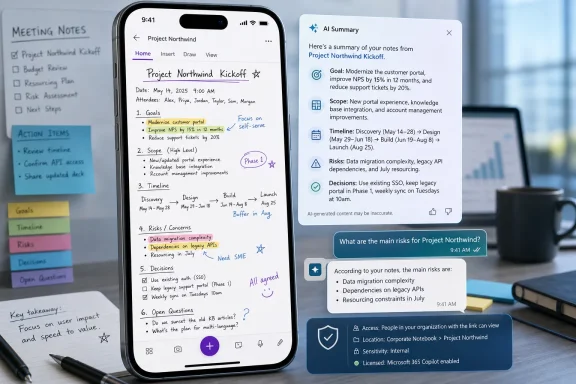
Microsoft’s Microsoft 365 Roadmap entry 422323 says OneNote Mobile for Android is getting Copilot-powered page summaries and in-note question answering, with worldwide General Availability currently targeted for July 2026. The feature is still marked “in development,” but its direction is clear enough: Microsoft wants the phone version of OneNote to stop being merely a place where notes are captured and start becoming a place where they are interpreted. That sounds modest until you remember how much institutional memory, meeting residue, classroom material, and half-finished planning work already lives in OneNote. The Android app is about to become another front in Microsoft’s broader campaign to make Copilot the reading layer for Microsoft 365.
The new Summary feature does exactly what its name suggests: it creates a short, readable summary of longer OneNote pages. The companion Question and Answer feature lets users ask questions directly against the content of their notes and receive answers without leaving the app. Microsoft’s own framing is not about novelty so much as speed — faster consumption, faster retrieval, and faster reuse of information.
That matters because OneNote has always been a strange beast in Microsoft’s productivity stable. Word is where polished documents go, Teams is where conversations happen, Outlook is where obligations arrive, and SharePoint is where organizations pretend to maintain order. OneNote sits in between all of them: a digital drawer for meeting notes, pasted screenshots, lecture fragments, clipped research, handwriting, task lists, and the occasional well-structured notebook that somehow survives contact with real work.
On desktop, Copilot in OneNote already fits naturally into that mess. It can summarize pages, extract tasks, help rewrite notes, and answer questions from notebook content. Bringing the same broad idea to Android is not just a platform checkbox. It puts Microsoft’s AI layer into the place where many users encounter their notes in the least patient context: standing in a hallway, commuting, walking into a meeting, or trying to remember what was decided last week.
The bet is that users do not want to scroll through long pages on a six-inch screen. They want the answer, the gist, or the action item. If Copilot can supply that reliably, OneNote Mobile becomes less of a viewing client and more of a personal search-and-reasoning surface.
For Android users, OneNote has often felt capable but secondary. The app is useful for capture and sync, especially for users who live across Windows PCs and Android phones or tablets, but it has not always matched the richness of the desktop experience. That gap is familiar to anyone who has tried to make OneNote the center of a cross-device workflow. The desktop app is a canvas; the mobile app is often a window.
Copilot changes the value proposition because it does not require mobile parity in the old sense. A phone does not need every ribbon command, every formatting option, or every desktop affordance if it can answer, “What did I promise the client?” or “Summarize the section on deployment risks.” In that model, mobile becomes a consumption and retrieval device powered by AI, while heavier authoring still happens elsewhere.
That is also why this is likely to be more consequential for tablets than the roadmap wording lets on. Android includes phones, but Android also includes devices like Samsung Galaxy Tabs, foldables, rugged field tablets, and managed enterprise hardware. For users who take notes with a stylus or review notebooks away from a PC, Copilot summaries and Q&A could shrink the distance between capture and comprehension.
This OneNote feature belongs to a more practical second wave. It is not asking users to create more material. It is helping them survive the material they already have. That may be less glamorous, but it is often more valuable.
Modern work is not suffering from a shortage of text. It is suffering from too many chats, too many meetings, too many files, and too many places where the important detail might have been captured. A long OneNote page is a microcosm of that problem. It may contain the answer, but the user still has to find it, interpret it, and trust that they did not miss something above or below the fold.
Summarization is Microsoft’s attempt to turn stored information into compressed context. Q&A goes one step further by treating notes as a corpus rather than a page. Instead of scrolling, searching, and scanning, the user asks a question. If the answer is grounded well, the experience feels less like a chatbot and more like a searchable memory.
This is where the feature’s success or failure will be decided. A generic summary is mildly helpful. A precise answer based on the right part of a messy notebook is transformative. A confident answer that ignores nuance, misses handwriting, or invents context is worse than no answer at all.
Still, the metadata tells a story. The item was created in October 2024 and last updated on June 25, 2026, the day before this article’s publication window. That suggests the feature has remained alive in Microsoft’s planning process for a long time rather than appearing as a last-minute experiment. The “in development” status also means tenants should not assume availability until the rollout actually begins.
The General Availability ring matters because Microsoft is not positioning this as an Insider-only curiosity. The target audience is the standard Microsoft 365 commercial base, at least where the necessary Copilot licensing and client requirements are met. The cloud instance is worldwide standard multi-tenant, which is the mainstream Microsoft 365 environment used by most commercial customers.
The exclusions are equally important. The roadmap entry does not say Government Community Cloud, GCC High, DoD, or sovereign clouds. It does not describe iOS in this specific item. It does not say the feature will be available to consumer Microsoft accounts. Those gaps are not necessarily permanent, but admins should resist filling them with optimism.
This means the Android feature may arrive in the app store for everyone while remaining invisible or unavailable to many users. The code can be present, the interface can be updated, and the support page can exist, but the value is gated behind account type, tenant policy, and licensing. For IT pros, that creates the usual Microsoft 365 puzzle: availability is not a binary state.
The relevant questions will be familiar. Which users have Microsoft 365 Copilot assigned? Is OneNote Mobile allowed in the organization’s mobile application management policy? Are Android devices enrolled, unmanaged, or blocked? Are connected experiences and optional cloud-backed services enabled? Are users signing in with work accounts, personal accounts, or both?
This is where consumer enthusiasm and enterprise deployment reality diverge. A student or enthusiast sees “Copilot in OneNote Mobile” and expects a button. An admin sees license assignment, data boundaries, support tickets, mobile app versions, and a new category of user expectation. Microsoft’s roadmap gives the release target; it does not remove the operational work.
OneNote pages are rarely pristine. They contain rough notes, pasted emails, images, web clippings, tables, ink, diagrams, and fragments of thought that made sense at the time. Traditional search helps when users know the word they are looking for. Summarization helps when they do not.
That makes OneNote a natural proving ground for a more grounded Copilot experience. The user is not asking the model to opine on the open internet or synthesize abstract knowledge. The user is asking it to work inside a defined notebook context. The narrower the source material, the better the odds that the answer is useful and auditable.
But the same messiness that makes OneNote valuable also makes it dangerous for AI. A page may include old decisions, superseded plans, contradictory meeting notes, or personal comments never meant to be operationalized. If Copilot compresses that into a fluent summary without signaling uncertainty, the app can turn ambiguity into false clarity.
That creates a trust problem. The more convenient the summary, the less likely users are to inspect the underlying note. The more fluent the answer, the more likely it is to be accepted as a faithful representation. In mobile contexts, speed tends to beat skepticism.
Microsoft can mitigate that with interface design. Answers should make it easy to jump to the relevant part of a note. Summaries should be visibly tied to page content rather than presented as free-floating AI output. If the model is uncertain, the app should say so in plain language instead of polishing uncertainty into corporate prose.
This is not merely a philosophical objection. In regulated industries, education, legal work, healthcare administration, and security operations, notes are often informal but consequential. A Copilot-generated answer may influence a decision even if it is not an official record. That makes traceability essential.
For organizations using Microsoft Intune, OneNote Mobile may already be governed by app protection, conditional access, and data loss prevention expectations. Copilot adds a new dimension because it processes organizational content through a cloud AI service under Microsoft 365 controls. Even when the data boundary is acceptable, admins must still explain what is happening to users and risk teams.
The likely support questions are predictable. Why can one employee see Copilot in OneNote and another cannot? Why does the feature work on desktop but not Android? Why does it appear in one tenant before another? Why does a personal notebook behave differently from a work notebook? Why does a page summary omit an image, a table, or inked content?
Rollout sequencing will amplify those questions. Microsoft 365 features often arrive gradually, sometimes by region, tenant, client version, or service-side enablement. A July 2026 GA target does not mean every eligible Android user will wake up on July 1 with identical behavior. Admins should prepare messaging that says “rolling out” rather than “available today.”
The central issue is not just whether Microsoft trains public models on the content. It is whether users understand the scope of what Copilot can access when they ask a question. In OneNote, boundaries are psychologically blurry. A notebook can feel personal even when it lives in a work tenant. A page can mix client notes, personal reminders, and speculative thinking.
If Q&A operates only against the current page, users need to know that. If it can reason over broader notebook content or connected Microsoft 365 files in some contexts, users need to know that too. The difference matters. “Summarize this page” and “What do my notes say about Project Orion?” are not the same privacy posture.
Organizations should treat this as a user education moment, not just a feature announcement. The best Copilot deployments are not the ones where every button is enabled immediately. They are the ones where users know when to use the button, when not to use it, and when to verify the answer against the source.
That gives Microsoft a structural advantage over standalone note-taking apps. A rival can offer a better editor, a cleaner mobile interface, or a more elegant notebook metaphor. Microsoft can connect the note to the meeting, the file, the task, the calendar, the chat, and the identity system. In enterprise productivity, that integration is the moat.
But integration cuts both ways. OneNote’s charm has always been that it tolerates chaos. It lets users scribble, paste, outline, clip, and collect without demanding that every thought become a database object. The more Microsoft turns it into an AI-readable work substrate, the more pressure there will be to make messy notes legible to machines.
That could improve habits. Users may write clearer notes if they know Copilot will later summarize them. Teams may standardize meeting pages so Q&A works better. Project notebooks may become more valuable because they can be queried rather than browsed.
It could also flatten the experience. The risk is that OneNote becomes another Microsoft 365 surface optimized around Copilot consumption, where the rough edges of human thinking are tolerated only insofar as they can be summarized. The best version of this feature respects the notebook as a messy human artifact. The worst version treats it as raw material for another AI pane.
The consumer version of that battle is about convenience. The enterprise version is about control. Businesses do not just want an AI that can summarize notes; they want one that respects identity, permissions, retention, compliance, and administrative policy. Microsoft’s advantage is that it can wrap Copilot in the same governance story that already sells Microsoft 365.
Android is an interesting battlefield because it is Google’s operating system, but Microsoft’s productivity stack is deeply entrenched on it. A corporate Android phone may run Gmail and Google services, but it may also run Outlook, Teams, OneDrive, Edge, Defender, Company Portal, and Office apps. OneNote with Copilot extends Microsoft’s productivity layer further into that mobile environment.
The move is not flashy. There is no new device, no dramatic redesign, no futuristic demo. But the strategic intent is obvious: wherever work content lands, Copilot should be close enough to summarize it.
Performance matters. If summaries take too long to generate on mobile, users will revert to search and scrolling. Reliability matters. If Copilot fails on large pages, synced notebooks, ink-heavy content, or spotty network connections, the feature will feel brittle. Consistency matters. If the Android answer differs meaningfully from desktop for the same page, trust will erode.
The app experience matters too. Microsoft should avoid burying Copilot behind too many taps or presenting it as an intrusive overlay. OneNote users are already opinionated about workspace, sync, and clutter. A useful AI affordance can quickly become another annoyance if it interrupts capture.
The output style matters more than Microsoft sometimes admits. A good OneNote summary should not sound like a press release. It should sound like a competent colleague who read the page and understood why it exists. It should preserve decisions, open issues, dates, names, and caveats. It should not sand every note into the same bland productivity mush.
Admins should start by identifying who has Microsoft 365 Copilot licensing and who uses OneNote Mobile on Android. That sounds obvious, but many organizations do not have a clean picture of mobile Office usage beyond sign-in logs and app protection reporting. A Copilot feature in a mobile note-taking app is exactly the sort of change that can appear small until a senior user asks why it is missing.
Documentation should also be updated around acceptable use. If employees are already told not to put certain categories of sensitive information into OneNote, Copilot does not change that rule, but it changes the consequences of ignoring it. AI makes buried content easier to surface, summarize, and reuse.
Training should focus on verification. Users do not need a graduate seminar in model behavior. They need simple guidance: use summaries to orient yourself, use Q&A to find likely answers, and check the original note before making commitments based on AI output. That is not anti-AI. It is basic information hygiene.
For users, the immediate win is convenience. Long pages become digestible. Buried details become queryable. OneNote on Android becomes more useful in the moments when reading the whole page is unrealistic.
For administrators, the win is conditional. The feature may improve productivity, but it also introduces new support, training, and governance questions. The responsible posture is not panic; it is preparation.
For Microsoft, the win is strategic. Every Copilot feature that becomes habitual inside a Microsoft 365 app makes the subscription stickier. OneNote is especially valuable because it contains the informal context that rarely makes it into official documents. If Copilot can handle that layer well, Microsoft gets closer to its vision of AI as the interface for work itself.
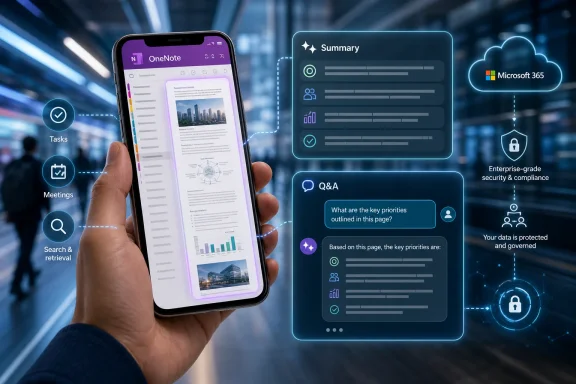 Microsoft Is Turning OneNote Mobile Into a Memory Interface
The new Summary feature does exactly what its name suggests: it creates a short, readable summary of longer OneNote pages. The companion Question and Answer feature lets users ask questions directly against the content of their notes and receive answers without leaving the app. Microsoft’s own framing is not about novelty so much as speed — faster consumption, faster retrieval, and faster reuse of information.That matters because OneNote has always been a strange beast in Microsoft’s productivity stable. Word is where polished documents go, Teams is where conversations happen, Outlook is where obligations arrive, and SharePoint is where organizations pretend to maintain order. OneNote sits in between all of them: a digital drawer for meeting notes, pasted screenshots, lecture fragments, clipped research, handwriting, task lists, and the occasional well-structured notebook that somehow survives contact with real work.
On desktop, Copilot in OneNote already fits naturally into that mess. It can summarize pages, extract tasks, help rewrite notes, and answer questions from notebook content. Bringing the same broad idea to Android is not just a platform checkbox. It puts Microsoft’s AI layer into the place where many users encounter their notes in the least patient context: standing in a hallway, commuting, walking into a meeting, or trying to remember what was decided last week.
The bet is that users do not want to scroll through long pages on a six-inch screen. They want the answer, the gist, or the action item. If Copilot can supply that reliably, OneNote Mobile becomes less of a viewing client and more of a personal search-and-reasoning surface.
The Android Detail Is the Tell
The platform specificity is important. This roadmap item is explicitly for OneNote Mobile on Android, not a broad announcement for all OneNote clients. That may sound like a minor deployment fact, but Microsoft 365 rollouts rarely happen in a vacuum. The company has been threading Copilot through its mobile apps unevenly, feature by feature, platform by platform, as it works through licensing, client readiness, cloud integration, and the awkward reality that mobile Office is not a single product.For Android users, OneNote has often felt capable but secondary. The app is useful for capture and sync, especially for users who live across Windows PCs and Android phones or tablets, but it has not always matched the richness of the desktop experience. That gap is familiar to anyone who has tried to make OneNote the center of a cross-device workflow. The desktop app is a canvas; the mobile app is often a window.
Copilot changes the value proposition because it does not require mobile parity in the old sense. A phone does not need every ribbon command, every formatting option, or every desktop affordance if it can answer, “What did I promise the client?” or “Summarize the section on deployment risks.” In that model, mobile becomes a consumption and retrieval device powered by AI, while heavier authoring still happens elsewhere.
That is also why this is likely to be more consequential for tablets than the roadmap wording lets on. Android includes phones, but Android also includes devices like Samsung Galaxy Tabs, foldables, rugged field tablets, and managed enterprise hardware. For users who take notes with a stylus or review notebooks away from a PC, Copilot summaries and Q&A could shrink the distance between capture and comprehension.
Microsoft’s AI Strategy Has Moved From Creation to Triage
The first wave of Copilot marketing leaned heavily on creation. Draft the email. Generate the document. Build the presentation. Write the recap. It was the familiar generative AI pitch: less blank page, more instant output.This OneNote feature belongs to a more practical second wave. It is not asking users to create more material. It is helping them survive the material they already have. That may be less glamorous, but it is often more valuable.
Modern work is not suffering from a shortage of text. It is suffering from too many chats, too many meetings, too many files, and too many places where the important detail might have been captured. A long OneNote page is a microcosm of that problem. It may contain the answer, but the user still has to find it, interpret it, and trust that they did not miss something above or below the fold.
Summarization is Microsoft’s attempt to turn stored information into compressed context. Q&A goes one step further by treating notes as a corpus rather than a page. Instead of scrolling, searching, and scanning, the user asks a question. If the answer is grounded well, the experience feels less like a chatbot and more like a searchable memory.
This is where the feature’s success or failure will be decided. A generic summary is mildly helpful. A precise answer based on the right part of a messy notebook is transformative. A confident answer that ignores nuance, misses handwriting, or invents context is worse than no answer at all.
The Roadmap Date Is a Promise With an Asterisk
The roadmap currently points to General Availability in July 2026 for the worldwide standard multi-tenant cloud. That gives IT departments a concrete planning window, but not a guarantee carved into stone. Microsoft 365 Roadmap dates are estimates, and admins have learned to treat them as weather forecasts rather than release contracts.Still, the metadata tells a story. The item was created in October 2024 and last updated on June 25, 2026, the day before this article’s publication window. That suggests the feature has remained alive in Microsoft’s planning process for a long time rather than appearing as a last-minute experiment. The “in development” status also means tenants should not assume availability until the rollout actually begins.
The General Availability ring matters because Microsoft is not positioning this as an Insider-only curiosity. The target audience is the standard Microsoft 365 commercial base, at least where the necessary Copilot licensing and client requirements are met. The cloud instance is worldwide standard multi-tenant, which is the mainstream Microsoft 365 environment used by most commercial customers.
The exclusions are equally important. The roadmap entry does not say Government Community Cloud, GCC High, DoD, or sovereign clouds. It does not describe iOS in this specific item. It does not say the feature will be available to consumer Microsoft accounts. Those gaps are not necessarily permanent, but admins should resist filling them with optimism.
Licensing Will Decide Who Actually Sees the Magic Button
Copilot features in Microsoft 365 apps are not the same thing as free AI features in a consumer app. In practice, access usually depends on an eligible Microsoft 365 subscription and the appropriate Copilot license. That is not a footnote; it is the business model.This means the Android feature may arrive in the app store for everyone while remaining invisible or unavailable to many users. The code can be present, the interface can be updated, and the support page can exist, but the value is gated behind account type, tenant policy, and licensing. For IT pros, that creates the usual Microsoft 365 puzzle: availability is not a binary state.
The relevant questions will be familiar. Which users have Microsoft 365 Copilot assigned? Is OneNote Mobile allowed in the organization’s mobile application management policy? Are Android devices enrolled, unmanaged, or blocked? Are connected experiences and optional cloud-backed services enabled? Are users signing in with work accounts, personal accounts, or both?
This is where consumer enthusiasm and enterprise deployment reality diverge. A student or enthusiast sees “Copilot in OneNote Mobile” and expects a button. An admin sees license assignment, data boundaries, support tickets, mobile app versions, and a new category of user expectation. Microsoft’s roadmap gives the release target; it does not remove the operational work.
The Feature Fits OneNote Better Than It Fits Almost Anywhere Else
Some Copilot integrations feel like Microsoft searching for surfaces to justify the brand. OneNote is different. If any Office app was built for AI-assisted interpretation, it is the one where users already dump unstructured information and hope future-them can make sense of it.OneNote pages are rarely pristine. They contain rough notes, pasted emails, images, web clippings, tables, ink, diagrams, and fragments of thought that made sense at the time. Traditional search helps when users know the word they are looking for. Summarization helps when they do not.
That makes OneNote a natural proving ground for a more grounded Copilot experience. The user is not asking the model to opine on the open internet or synthesize abstract knowledge. The user is asking it to work inside a defined notebook context. The narrower the source material, the better the odds that the answer is useful and auditable.
But the same messiness that makes OneNote valuable also makes it dangerous for AI. A page may include old decisions, superseded plans, contradictory meeting notes, or personal comments never meant to be operationalized. If Copilot compresses that into a fluent summary without signaling uncertainty, the app can turn ambiguity into false clarity.
The Small-Screen Problem Is Really a Trust Problem
On a desktop monitor, users can compare a summary with the original page. They can keep the Copilot pane open, scroll the note, and verify the source material. On a phone, verification is more cumbersome. The whole appeal of the feature is that users will not have to read the long page.That creates a trust problem. The more convenient the summary, the less likely users are to inspect the underlying note. The more fluent the answer, the more likely it is to be accepted as a faithful representation. In mobile contexts, speed tends to beat skepticism.
Microsoft can mitigate that with interface design. Answers should make it easy to jump to the relevant part of a note. Summaries should be visibly tied to page content rather than presented as free-floating AI output. If the model is uncertain, the app should say so in plain language instead of polishing uncertainty into corporate prose.
This is not merely a philosophical objection. In regulated industries, education, legal work, healthcare administration, and security operations, notes are often informal but consequential. A Copilot-generated answer may influence a decision even if it is not an official record. That makes traceability essential.
Android Deployment Will Expose the Usual Enterprise Friction
The user story is simple: open OneNote, tap Copilot, summarize or ask. The enterprise story is not simple. Android fleets vary wildly, from personally owned phones under app protection policies to fully managed corporate devices, kiosk tablets, ruggedized field hardware, and mixed work-profile deployments.For organizations using Microsoft Intune, OneNote Mobile may already be governed by app protection, conditional access, and data loss prevention expectations. Copilot adds a new dimension because it processes organizational content through a cloud AI service under Microsoft 365 controls. Even when the data boundary is acceptable, admins must still explain what is happening to users and risk teams.
The likely support questions are predictable. Why can one employee see Copilot in OneNote and another cannot? Why does the feature work on desktop but not Android? Why does it appear in one tenant before another? Why does a personal notebook behave differently from a work notebook? Why does a page summary omit an image, a table, or inked content?
Rollout sequencing will amplify those questions. Microsoft 365 features often arrive gradually, sometimes by region, tenant, client version, or service-side enablement. A July 2026 GA target does not mean every eligible Android user will wake up on July 1 with identical behavior. Admins should prepare messaging that says “rolling out” rather than “available today.”
The Privacy Conversation Is Not Optional
Microsoft will argue, as it usually does with Microsoft 365 Copilot, that enterprise data is protected within the Microsoft 365 trust boundary and that organizational permissions remain in force. That is the right starting point, but it does not end the discussion. Users will be asking questions about private notes, sensitive meeting records, personal devices, and whether Copilot can see more than they expect.The central issue is not just whether Microsoft trains public models on the content. It is whether users understand the scope of what Copilot can access when they ask a question. In OneNote, boundaries are psychologically blurry. A notebook can feel personal even when it lives in a work tenant. A page can mix client notes, personal reminders, and speculative thinking.
If Q&A operates only against the current page, users need to know that. If it can reason over broader notebook content or connected Microsoft 365 files in some contexts, users need to know that too. The difference matters. “Summarize this page” and “What do my notes say about Project Orion?” are not the same privacy posture.
Organizations should treat this as a user education moment, not just a feature announcement. The best Copilot deployments are not the ones where every button is enabled immediately. They are the ones where users know when to use the button, when not to use it, and when to verify the answer against the source.
OneNote Is Becoming a Front Door to Microsoft’s Knowledge Graph
The bigger story is that OneNote is no longer just a notebook. It is becoming one of the entry points into Microsoft’s knowledge graph: the constellation of files, meetings, chats, notes, emails, and permissions that Microsoft 365 uses to understand work context. Copilot is the interface layer on top.That gives Microsoft a structural advantage over standalone note-taking apps. A rival can offer a better editor, a cleaner mobile interface, or a more elegant notebook metaphor. Microsoft can connect the note to the meeting, the file, the task, the calendar, the chat, and the identity system. In enterprise productivity, that integration is the moat.
But integration cuts both ways. OneNote’s charm has always been that it tolerates chaos. It lets users scribble, paste, outline, clip, and collect without demanding that every thought become a database object. The more Microsoft turns it into an AI-readable work substrate, the more pressure there will be to make messy notes legible to machines.
That could improve habits. Users may write clearer notes if they know Copilot will later summarize them. Teams may standardize meeting pages so Q&A works better. Project notebooks may become more valuable because they can be queried rather than browsed.
It could also flatten the experience. The risk is that OneNote becomes another Microsoft 365 surface optimized around Copilot consumption, where the rough edges of human thinking are tolerated only insofar as they can be summarized. The best version of this feature respects the notebook as a messy human artifact. The worst version treats it as raw material for another AI pane.
The Competitive Shadow Is Google, Not Another Notebook App
It is tempting to compare this feature with Notion AI, Evernote AI, Obsidian plugins, or other note-taking assistants. Those comparisons are useful at the feature level, but they miss the strategic backdrop. Microsoft is competing with Google’s effort to make AI a layer over personal and organizational knowledge, especially through products that summarize, answer, and synthesize across user-provided material.The consumer version of that battle is about convenience. The enterprise version is about control. Businesses do not just want an AI that can summarize notes; they want one that respects identity, permissions, retention, compliance, and administrative policy. Microsoft’s advantage is that it can wrap Copilot in the same governance story that already sells Microsoft 365.
Android is an interesting battlefield because it is Google’s operating system, but Microsoft’s productivity stack is deeply entrenched on it. A corporate Android phone may run Gmail and Google services, but it may also run Outlook, Teams, OneDrive, Edge, Defender, Company Portal, and Office apps. OneNote with Copilot extends Microsoft’s productivity layer further into that mobile environment.
The move is not flashy. There is no new device, no dramatic redesign, no futuristic demo. But the strategic intent is obvious: wherever work content lands, Copilot should be close enough to summarize it.
The Feature’s Success Will Depend on the Boring Parts
AI launches often live or die by demos. Enterprise features live or die by edge cases. For OneNote Mobile on Android, the boring parts will decide whether users keep tapping Copilot after the novelty fades.Performance matters. If summaries take too long to generate on mobile, users will revert to search and scrolling. Reliability matters. If Copilot fails on large pages, synced notebooks, ink-heavy content, or spotty network connections, the feature will feel brittle. Consistency matters. If the Android answer differs meaningfully from desktop for the same page, trust will erode.
The app experience matters too. Microsoft should avoid burying Copilot behind too many taps or presenting it as an intrusive overlay. OneNote users are already opinionated about workspace, sync, and clutter. A useful AI affordance can quickly become another annoyance if it interrupts capture.
The output style matters more than Microsoft sometimes admits. A good OneNote summary should not sound like a press release. It should sound like a competent colleague who read the page and understood why it exists. It should preserve decisions, open issues, dates, names, and caveats. It should not sand every note into the same bland productivity mush.
The Admin Checklist Writes Itself
For WindowsForum readers running Microsoft 365 environments, this is the point where the news becomes a deployment note. The feature is not something most organizations need to block preemptively, but it is something they should understand before users discover it on their own.Admins should start by identifying who has Microsoft 365 Copilot licensing and who uses OneNote Mobile on Android. That sounds obvious, but many organizations do not have a clean picture of mobile Office usage beyond sign-in logs and app protection reporting. A Copilot feature in a mobile note-taking app is exactly the sort of change that can appear small until a senior user asks why it is missing.
Documentation should also be updated around acceptable use. If employees are already told not to put certain categories of sensitive information into OneNote, Copilot does not change that rule, but it changes the consequences of ignoring it. AI makes buried content easier to surface, summarize, and reuse.
Training should focus on verification. Users do not need a graduate seminar in model behavior. They need simple guidance: use summaries to orient yourself, use Q&A to find likely answers, and check the original note before making commitments based on AI output. That is not anti-AI. It is basic information hygiene.
The July Rollout Is Small, but the Direction Is Not
The practical significance of this roadmap item can be summarized without inflating it into a revolution. It is one Android feature, still in development, tied to Copilot licensing, aimed at summarizing and querying OneNote pages. But it lands at the intersection of several larger Microsoft bets: mobile productivity, AI-assisted knowledge retrieval, Microsoft 365 governance, and the repositioning of old Office apps as Copilot surfaces.For users, the immediate win is convenience. Long pages become digestible. Buried details become queryable. OneNote on Android becomes more useful in the moments when reading the whole page is unrealistic.
For administrators, the win is conditional. The feature may improve productivity, but it also introduces new support, training, and governance questions. The responsible posture is not panic; it is preparation.
For Microsoft, the win is strategic. Every Copilot feature that becomes habitual inside a Microsoft 365 app makes the subscription stickier. OneNote is especially valuable because it contains the informal context that rarely makes it into official documents. If Copilot can handle that layer well, Microsoft gets closer to its vision of AI as the interface for work itself.
The Notes App Finally Gets to Answer Back
Microsoft’s OneNote Mobile Copilot update is not just another AI button arriving on Android; it is a test of whether Microsoft can make mobile notes feel less like storage and more like usable memory.- OneNote Mobile for Android is currently scheduled to receive Copilot-powered Summary and Q&A features in July 2026 under Microsoft 365 Roadmap ID 422323.
- The feature is listed for General Availability in the worldwide standard multi-tenant cloud, but rollout timing may still vary by tenant, app version, and service-side enablement.
- Access will likely depend on eligible Microsoft 365 and Copilot licensing rather than simply installing the Android app.
- The most useful scenario is not drafting new content, but extracting meaning from long, messy pages when users are away from a desktop.
- IT teams should prepare guidance around licensing, mobile policy, privacy expectations, and verification of AI-generated answers.
- The feature’s long-term value will depend less on the presence of Copilot and more on whether summaries and answers are grounded, fast, and easy to check against the original notes.
References
- Primary source: Microsoft 365 Roadmap
Published: 2026-06-25T23:15:45.5477468Z
Microsoft 365 Roadmap | Microsoft 365
The Microsoft 365 Roadmap lists updates that are currently planned for applicable subscribers. Check here for more information on the status of new features and updates.www.microsoft.com
- Official source: support.microsoft.com
Welcome to Copilot in OneNote | Microsoft Support
Learn about the features and benefits of Microsoft’s AI-powered Copilot in OneNote.support.microsoft.com - Related coverage: m365admin.handsontek.net
Microsoft 365 Copilot: Copilot chat pane and Summary feature in OneNote Mobile (Android) - M365 Admin
Microsoft 365 Copilot introduces a new chat pane and Summary feature in OneNote Mobile (Android) for Premium license users, enabling AI-generated summaries and note queries. Rollout starts mid-May 2026, completing by late June. Existing Copilot policies apply; no admin action needed before...m365admin.handsontek.net - Official source: techcommunity.microsoft.com
Copilot in OneNote now understands more of your notes | Microsoft Community Hub
Copilot in OneNote now understands images, tables, and more to deliver richer, more accurate insights from your notes. techcommunity.microsoft.com
- Related coverage: howtogeek.com
Copilot Is Invading the OneNote Mobile Apps
Turn your voice into notes, or notes into a Q&A. www.howtogeek.com
- Related coverage: windowscentral.com
Copilot can now send reminders to your phone | Windows Central
Copilot is getting a little smarter with reminders, and here's what you need to know, including creating your first alert.www.windowscentral.com
- Official source: cdn-dynmedia-1.microsoft.com
- Official source: news.microsoft.com