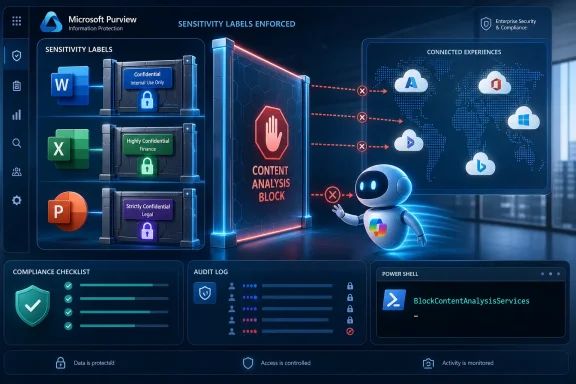
Microsoft is expanding Microsoft Purview sensitivity-label enforcement for commercial Microsoft 365 tenants so protected Word, Excel, PowerPoint, and Outlook content can be blocked from Copilot and other connected experiences that analyze files, with rollout expected to complete by the end of July 2026. The change sounds narrow, almost like plumbing. It is not. It is Microsoft admitting that the AI era has made old information-protection promises newly testable.
For years, the enterprise bargain around Microsoft 365 was that labels, encryption, DLP, and auditing could form a coherent boundary around sensitive work. Copilot complicates that bargain because it does not merely store, sync, or display information; it synthesizes it. A file that was once “opened” by a user may now be summarized, mined for patterns, cited in a response, or used as the context for a newly generated document.
That is why this Purview update matters more than its administrative modesty suggests. Microsoft is not inventing a new security model here. It is taking an existing sensitivity-label switch and making its consequences more visible across the places where AI has become part of the Office workflow.
The center of the change is a Purview sensitivity-label configuration that prevents certain connected experiences from sending labeled content to Microsoft for analysis. In Microsoft’s documentation, this setting is tied to the PowerShell advanced setting
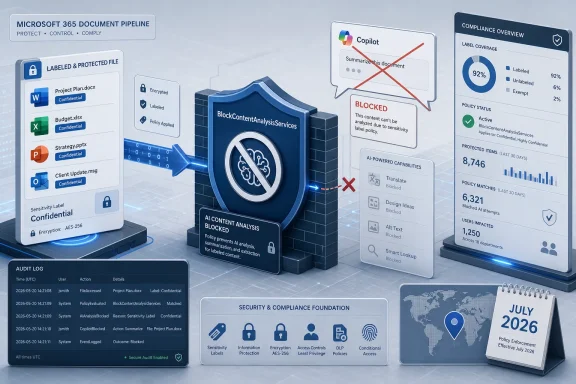
The practical effect is straightforward. If an organization has configured the relevant label to block content-analysis services, then content carrying that label can be excluded from Microsoft 365 Copilot inside supported Office apps. The same setting also affects other connected experiences that depend on analysis, including automatic alt text, automatic or recommended labeling, PowerPoint Designer, similarity checking, Translator, and some Outlook DLP policy tips.
The Message Center notice reported as MC1297982 suggests Microsoft is expanding enforcement of this behavior so that organizations already using the setting get the stronger protection without relabeling existing files. In other words, the label is not changing; Microsoft’s interpretation of the label is. That distinction matters because it avoids a migration project while still changing what users experience.
This is the kind of update that can look invisible on a roadmap and very visible at the helpdesk. Users may discover that Copilot no longer summarizes a confidential spreadsheet, that a PowerPoint design suggestion vanishes for a restricted deck, or that a translation feature behaves differently for a labeled document. The security team may see that as policy finally doing its job. The user may see it as Office becoming inconsistent.
That tension is the story of enterprise AI in miniature. Controls that were once abstract now interrupt a workflow at the moment an employee expects magic.
Copilot raises the bar because the file is no longer the only artifact worth protecting. The summary of a file can be sensitive. The answer generated from five files can be sensitive. The list of citations can disclose that a sensitive file exists. The prompt itself may become a sensitive record, depending on policy and retention settings.
Microsoft’s newer Purview guidance around Copilot leans into this reality by saying Copilot respects existing access controls and protection settings. That is necessary but not always sufficient. If a user can open a file but should not have its contents extracted into an AI-generated answer, “the user has access” is too blunt a rule.
That is where labels become runtime policy rather than filing-cabinet tags. A label can tell Office and Copilot not just who may view content, but whether the content may participate in analysis. That is a more subtle and more useful distinction for regulated environments.
A board memo, acquisition model, source-code review, pre-release earnings deck, or personnel investigation file may be visible to a small group of authorized users. Those users may still be prohibited from using automated analysis tools on the material. The policy goal is not secrecy from the user; it is containment of how the information is processed.
It is a strength because the control is broader than Copilot. Microsoft 365 has long included cloud-backed features that inspect content to provide convenience: design suggestions, translation, similarity checking, automatic alt text, and label recommendations. In a strict compliance environment, those features can raise the same basic question as AI chat: is content leaving the application context for analysis by a service?
It is a weakness because administrators now have to explain a single switch that can disable a bundle of experiences users may not mentally connect. A label intended to keep Copilot away from a confidential spreadsheet may also affect translation or design features. That is defensible, but it is not always intuitive.
Microsoft’s own documentation makes clear that enabling the setting can cause some services not to work as designed. This is not a bug so much as a policy tradeoff. If you block content analysis, features that require content analysis will lose their raw material.
That is why the update will reward tenants with mature label taxonomies and punish those that treated labels as compliance theater. If every second document is Confidential, users will run into broad feature loss. If labels are precise and well governed, the friction will show up where the risk is real.
This means administrators need to distinguish between Copilot inside Word, Excel, PowerPoint, and Outlook, and Copilot experiences that operate across Microsoft 365 data more broadly. The user sees a family of products with the same Copilot branding. The compliance architecture sees different surfaces, data paths, and policy hooks.
There are other knobs too. Microsoft Purview DLP has a Microsoft 365 Copilot and Copilot Chat policy location that can block files and emails with sensitivity labels from being processed in responses. In those cases, items may still appear as citations while their content is not used for summarization. That is a different mechanism from the Office connected-experience setting, but it is pointed at the same governance problem.
Encryption also matters. Where a sensitivity label applies encryption, Copilot’s ability to interact with content can depend on usage rights such as VIEW and EXTRACT. A user may be allowed to view a protected document but not allowed to extract its content, and that distinction can block Copilot from summarizing or generating from it.
The result is not one control but a stack of controls. Sensitivity labels, encryption rights, DLP policies, Office app behavior, SharePoint and OneDrive support, and Copilot-specific processing rules all intersect. That is powerful, but it is also the sort of thing that creates “why did Copilot answer yesterday but not today?” tickets.
Purview is Microsoft’s answer to that anxiety. The company is trying to position its security and compliance stack as the reason enterprises should adopt Microsoft’s AI rather than bolt a separate AI product onto their data estate. The pitch is not just “Copilot is useful.” It is “Copilot is useful because it lives inside the governance model you already bought.”
That pitch depends on enforcement details like this one. Labels must not be advisory stickers. They must change application behavior, AI behavior, audit behavior, and sharing behavior in ways that administrators can predict. If Microsoft cannot make that credible, Copilot becomes another shadow-IT risk wearing a first-party badge.
But the burden is not Microsoft’s alone. Many organizations have messy permissions, stale SharePoint sites, overbroad groups, inherited access nobody has reviewed, and labels that users apply inconsistently because nobody explained the difference between Internal and Confidential. Copilot did not create those problems. It makes them louder.
That is why this update should be read less as a one-off hardening measure and more as another sign that Microsoft 365 governance is moving from background hygiene to foreground infrastructure. In an AI-enabled tenant, information architecture is not paperwork. It is the security perimeter.
That is the right outcome when policy says the file should not be analyzed. It is also a recipe for frustration if users do not understand why. Microsoft can enforce the rule, but the organization has to explain the rule.
The best rollout communications will avoid vague warnings about “AI security changes.” Users need concrete expectations: certain labeled files cannot be summarized by Copilot; some design, translation, or recommendation features may be unavailable; this is intentional; do not remove or downgrade labels to work around it; contact the helpdesk if a label appears wrong. That last point is critical because users under deadline pressure will solve the problem in the least compliant way available.
Helpdesk teams also need a script that separates three common cases. In one case, Copilot is blocked because the label is correct and the policy is working. In another, the label is wrong and should be corrected through an approved process. In a third, the user lacks the necessary rights, such as extraction rights, even though they can view the document.
Without that triage, organizations risk turning a security improvement into a user-hostility event. The difference between governance and obstruction is often documentation.
A document in Word is not only a document in Word. It may be inspected for grammar, compared for similarity, translated, labeled automatically, checked against DLP rules, summarized by Copilot, cited in a chat, transformed into a presentation, or used as the basis for a new file. Each of those actions can be helpful. Each can also be a processing event that a policy may need to allow, block, audit, or constrain.
The Purview update reflects this shift. The point is not merely to stop Copilot from reading a file. The point is to give administrators a way to say that a category of content should not be fed into analysis services at all, at least across the supported Office surfaces.
This is particularly important for organizations that treat confidentiality as contextual rather than absolute. A user may need to read a document to do their job, but the organization may not want automated systems producing derivative text from it. That distinction feels fussy until the derivative text becomes the thing that leaks.
AI makes derived content a first-class compliance concern. A summary can carry the risk of the source without carrying the label of the source unless inheritance and policy are configured correctly. Microsoft has been adding label display and inheritance features around Copilot-generated content, but the safest answer for some data is still simpler: do not process it.
Commercial Microsoft 365 customers are also the ones most likely to have sensitivity labels deployed at scale. They may have label policies published to users, encryption templates mapped to classifications, DLP rules tied to regulated data, and audit workflows in Purview. For them, the update plugs into machinery that already exists.
Small businesses without mature Purview deployments may see less immediate benefit. If labels are absent, poorly scoped, or applied inconsistently, stronger enforcement of a label setting will not magically classify the data estate. Microsoft can only honor the signal it receives.
That makes the Purview license boundary a business reality and a governance reality. The organizations that have paid for Microsoft’s compliance stack get a deeper set of AI controls. Those that have not must either accept lighter governance, buy in, or keep Copilot away from sensitive workflows until they can build another control framework.
There is a broader industry pattern here. Generative AI is becoming another force pushing companies toward premium security SKUs. Vendors will argue that sophisticated controls cost money to build and operate. Customers will argue that basic safety should not feel like an upsell. Both arguments can be true, and Microsoft is not the only vendor caught between them.
References to the recently addressed Copilot SearchLeak vulnerability underscore the point. Even when a specific issue is patched, the larger lesson remains: AI interfaces can combine retrieval, summarization, and user trust in ways that expose weaknesses that looked less dangerous in a traditional search box.
This does not mean Copilot is uniquely reckless. It means Copilot sits on top of decades of enterprise content sprawl, and it is designed to make that sprawl easier to query. A perfect AI assistant in a badly governed tenant will still surface badly governed information.
Purview’s job is to narrow that gap. It cannot make every SharePoint permission sane, but it can make labels more consequential. It cannot eliminate every leakage path, but it can give administrators stronger ways to say that certain content should not be part of AI processing.
That is why the update should not be dismissed as Microsoft locking the barn door after AI has arrived. Enterprise platforms mature through exactly this kind of boundary tightening. The key is whether the boundaries become predictable enough for administrators to trust and usable enough for workers not to bypass.
The second task is to map labels to business intent. A label called Highly Confidential may deserve the block. A broad label called Internal probably does not, unless the organization is prepared to sacrifice a great deal of Copilot and connected-experience functionality. Labels that once worked tolerably as broad categories may need sharper sublabels in an AI-enabled workplace.
The third task is to test across apps. Word, Excel, PowerPoint, Outlook, Teams, Copilot Chat, SharePoint, and OneDrive do not all behave identically. A document blocked from Copilot in an Office app may still be relevant in another Copilot scenario unless additional DLP or Copilot policies apply.
The fourth task is to prepare support teams. A change that requires no action on existing documents can still create many user-visible differences. “No action required” for administrators is not the same as “no communication required” for the business.
Finally, compliance teams should review audit and reporting expectations. If a policy blocks content from analysis, auditors will eventually ask how the organization knows the policy is in place, which labels it covers, and how exceptions are handled. In the AI era, “we configured a label once” is not an evidence package.
For years, the enterprise bargain around Microsoft 365 was that labels, encryption, DLP, and auditing could form a coherent boundary around sensitive work. Copilot complicates that bargain because it does not merely store, sync, or display information; it synthesizes it. A file that was once “opened” by a user may now be summarized, mined for patterns, cited in a response, or used as the context for a newly generated document.
That is why this Purview update matters more than its administrative modesty suggests. Microsoft is not inventing a new security model here. It is taking an existing sensitivity-label switch and making its consequences more visible across the places where AI has become part of the Office workflow.
 Microsoft Moves the AI Boundary Back to the Label
The center of the change is a Purview sensitivity-label configuration that prevents certain connected experiences from sending labeled content to Microsoft for analysis. In Microsoft’s documentation, this setting is tied to the PowerShell advanced setting BlockContentAnalysisServices, not a bright button in the Purview portal. That detail tells you plenty about the feature’s history: it was a privacy and compliance control for specialized admins before Copilot turned it into a mainstream governance question.The practical effect is straightforward. If an organization has configured the relevant label to block content-analysis services, then content carrying that label can be excluded from Microsoft 365 Copilot inside supported Office apps. The same setting also affects other connected experiences that depend on analysis, including automatic alt text, automatic or recommended labeling, PowerPoint Designer, similarity checking, Translator, and some Outlook DLP policy tips.
The Message Center notice reported as MC1297982 suggests Microsoft is expanding enforcement of this behavior so that organizations already using the setting get the stronger protection without relabeling existing files. In other words, the label is not changing; Microsoft’s interpretation of the label is. That distinction matters because it avoids a migration project while still changing what users experience.
This is the kind of update that can look invisible on a roadmap and very visible at the helpdesk. Users may discover that Copilot no longer summarizes a confidential spreadsheet, that a PowerPoint design suggestion vanishes for a restricted deck, or that a translation feature behaves differently for a labeled document. The security team may see that as policy finally doing its job. The user may see it as Office becoming inconsistent.
That tension is the story of enterprise AI in miniature. Controls that were once abstract now interrupt a workflow at the moment an employee expects magic.
Copilot Turns Classification Into Runtime Policy
Sensitivity labels used to be easiest to explain as metadata with consequences. A document marked Confidential could display a watermark, carry a header or footer, apply encryption, restrict who could open it, and feed compliance systems with a classification signal. The label traveled with the file, and in better-run tenants it was not merely decorative.Copilot raises the bar because the file is no longer the only artifact worth protecting. The summary of a file can be sensitive. The answer generated from five files can be sensitive. The list of citations can disclose that a sensitive file exists. The prompt itself may become a sensitive record, depending on policy and retention settings.
Microsoft’s newer Purview guidance around Copilot leans into this reality by saying Copilot respects existing access controls and protection settings. That is necessary but not always sufficient. If a user can open a file but should not have its contents extracted into an AI-generated answer, “the user has access” is too blunt a rule.
That is where labels become runtime policy rather than filing-cabinet tags. A label can tell Office and Copilot not just who may view content, but whether the content may participate in analysis. That is a more subtle and more useful distinction for regulated environments.
A board memo, acquisition model, source-code review, pre-release earnings deck, or personnel investigation file may be visible to a small group of authorized users. Those users may still be prohibited from using automated analysis tools on the material. The policy goal is not secrecy from the user; it is containment of how the information is processed.
The Old Office Privacy Switch Has Become an AI Governance Lever
The slightly awkward part of Microsoft’s implementation is that the relevant setting predates the current Copilot panic. It is framed around preventing connected experiences that analyze content, not solely around generative AI. That older framing is both a strength and a weakness.It is a strength because the control is broader than Copilot. Microsoft 365 has long included cloud-backed features that inspect content to provide convenience: design suggestions, translation, similarity checking, automatic alt text, and label recommendations. In a strict compliance environment, those features can raise the same basic question as AI chat: is content leaving the application context for analysis by a service?
It is a weakness because administrators now have to explain a single switch that can disable a bundle of experiences users may not mentally connect. A label intended to keep Copilot away from a confidential spreadsheet may also affect translation or design features. That is defensible, but it is not always intuitive.
Microsoft’s own documentation makes clear that enabling the setting can cause some services not to work as designed. This is not a bug so much as a policy tradeoff. If you block content analysis, features that require content analysis will lose their raw material.
That is why the update will reward tenants with mature label taxonomies and punish those that treated labels as compliance theater. If every second document is Confidential, users will run into broad feature loss. If labels are precise and well governed, the friction will show up where the risk is real.
The Fine Print Still Leaves Room for Surprise
The most important caveat is that this is not a universal Copilot kill switch for every scenario in Microsoft 365. Microsoft’s documentation for the connected-experience setting says content with the configured label can be excluded from Microsoft 365 Copilot in named Office apps, while remaining available in other scenarios such as Teams and Microsoft 365 Copilot Chat. That is not a minor footnote.This means administrators need to distinguish between Copilot inside Word, Excel, PowerPoint, and Outlook, and Copilot experiences that operate across Microsoft 365 data more broadly. The user sees a family of products with the same Copilot branding. The compliance architecture sees different surfaces, data paths, and policy hooks.
There are other knobs too. Microsoft Purview DLP has a Microsoft 365 Copilot and Copilot Chat policy location that can block files and emails with sensitivity labels from being processed in responses. In those cases, items may still appear as citations while their content is not used for summarization. That is a different mechanism from the Office connected-experience setting, but it is pointed at the same governance problem.
Encryption also matters. Where a sensitivity label applies encryption, Copilot’s ability to interact with content can depend on usage rights such as VIEW and EXTRACT. A user may be allowed to view a protected document but not allowed to extract its content, and that distinction can block Copilot from summarizing or generating from it.
The result is not one control but a stack of controls. Sensitivity labels, encryption rights, DLP policies, Office app behavior, SharePoint and OneDrive support, and Copilot-specific processing rules all intersect. That is powerful, but it is also the sort of thing that creates “why did Copilot answer yesterday but not today?” tickets.
Microsoft Is Selling Trust, but Admins Have to Deliver It
Microsoft’s strategic problem is obvious. It wants Copilot to be the ambient interface for work, but enterprises will not let an ambient interface roam freely through confidential data unless they can prove the boundaries hold. Every Copilot demo that looks like magic to a department head looks like an exposure path to a compliance officer.Purview is Microsoft’s answer to that anxiety. The company is trying to position its security and compliance stack as the reason enterprises should adopt Microsoft’s AI rather than bolt a separate AI product onto their data estate. The pitch is not just “Copilot is useful.” It is “Copilot is useful because it lives inside the governance model you already bought.”
That pitch depends on enforcement details like this one. Labels must not be advisory stickers. They must change application behavior, AI behavior, audit behavior, and sharing behavior in ways that administrators can predict. If Microsoft cannot make that credible, Copilot becomes another shadow-IT risk wearing a first-party badge.
But the burden is not Microsoft’s alone. Many organizations have messy permissions, stale SharePoint sites, overbroad groups, inherited access nobody has reviewed, and labels that users apply inconsistently because nobody explained the difference between Internal and Confidential. Copilot did not create those problems. It makes them louder.
That is why this update should be read less as a one-off hardening measure and more as another sign that Microsoft 365 governance is moving from background hygiene to foreground infrastructure. In an AI-enabled tenant, information architecture is not paperwork. It is the security perimeter.
The User Experience Will Be the First Compliance Test
The first people to notice this change may not be CISOs or records managers. They may be assistants drafting meeting summaries, finance analysts asking Copilot to explain variance in a workbook, lawyers reviewing contract language, or product managers trying to condense a strategy deck. If a file is protected by the relevant label setting, Copilot may simply stop being useful for that file.That is the right outcome when policy says the file should not be analyzed. It is also a recipe for frustration if users do not understand why. Microsoft can enforce the rule, but the organization has to explain the rule.
The best rollout communications will avoid vague warnings about “AI security changes.” Users need concrete expectations: certain labeled files cannot be summarized by Copilot; some design, translation, or recommendation features may be unavailable; this is intentional; do not remove or downgrade labels to work around it; contact the helpdesk if a label appears wrong. That last point is critical because users under deadline pressure will solve the problem in the least compliant way available.
Helpdesk teams also need a script that separates three common cases. In one case, Copilot is blocked because the label is correct and the policy is working. In another, the label is wrong and should be corrected through an approved process. In a third, the user lacks the necessary rights, such as extraction rights, even though they can view the document.
Without that triage, organizations risk turning a security improvement into a user-hostility event. The difference between governance and obstruction is often documentation.
The Real Migration Is From Permission Thinking to Processing Thinking
Traditional access control asks whether a person can open a file. AI governance asks what systems may do with the file after the person opens it. That is a harder question because modern productivity software is full of services that act on behalf of the user.A document in Word is not only a document in Word. It may be inspected for grammar, compared for similarity, translated, labeled automatically, checked against DLP rules, summarized by Copilot, cited in a chat, transformed into a presentation, or used as the basis for a new file. Each of those actions can be helpful. Each can also be a processing event that a policy may need to allow, block, audit, or constrain.
The Purview update reflects this shift. The point is not merely to stop Copilot from reading a file. The point is to give administrators a way to say that a category of content should not be fed into analysis services at all, at least across the supported Office surfaces.
This is particularly important for organizations that treat confidentiality as contextual rather than absolute. A user may need to read a document to do their job, but the organization may not want automated systems producing derivative text from it. That distinction feels fussy until the derivative text becomes the thing that leaks.
AI makes derived content a first-class compliance concern. A summary can carry the risk of the source without carrying the label of the source unless inheritance and policy are configured correctly. Microsoft has been adding label display and inheritance features around Copilot-generated content, but the safest answer for some data is still simpler: do not process it.
Commercial Tenants Get Protection, Consumers Get a Different Conversation
The rollout applies to commercial customers with Microsoft Purview licensing, which is exactly where the feature belongs. Consumer Copilot debates often revolve around privacy expectations and model training fears. Enterprise Copilot debates are more concrete: Which tenant data can be retrieved? Which labels apply? Which rights are honored? Which prompts and responses are audited? Which workloads are covered?Commercial Microsoft 365 customers are also the ones most likely to have sensitivity labels deployed at scale. They may have label policies published to users, encryption templates mapped to classifications, DLP rules tied to regulated data, and audit workflows in Purview. For them, the update plugs into machinery that already exists.
Small businesses without mature Purview deployments may see less immediate benefit. If labels are absent, poorly scoped, or applied inconsistently, stronger enforcement of a label setting will not magically classify the data estate. Microsoft can only honor the signal it receives.
That makes the Purview license boundary a business reality and a governance reality. The organizations that have paid for Microsoft’s compliance stack get a deeper set of AI controls. Those that have not must either accept lighter governance, buy in, or keep Copilot away from sensitive workflows until they can build another control framework.
There is a broader industry pattern here. Generative AI is becoming another force pushing companies toward premium security SKUs. Vendors will argue that sophisticated controls cost money to build and operate. Customers will argue that basic safety should not feel like an upsell. Both arguments can be true, and Microsoft is not the only vendor caught between them.
The SearchLeak Context Makes the Timing Hard to Ignore
The reported Purview expansion arrives in a period when Copilot security has been under unusually close scrutiny. Microsoft has been steadily adding controls for Copilot, agents, and Purview-backed AI governance, while researchers and customers keep probing the seams between search, permissions, prompts, and generated output. That is the normal pattern for a platform this large entering a new risk category.References to the recently addressed Copilot SearchLeak vulnerability underscore the point. Even when a specific issue is patched, the larger lesson remains: AI interfaces can combine retrieval, summarization, and user trust in ways that expose weaknesses that looked less dangerous in a traditional search box.
This does not mean Copilot is uniquely reckless. It means Copilot sits on top of decades of enterprise content sprawl, and it is designed to make that sprawl easier to query. A perfect AI assistant in a badly governed tenant will still surface badly governed information.
Purview’s job is to narrow that gap. It cannot make every SharePoint permission sane, but it can make labels more consequential. It cannot eliminate every leakage path, but it can give administrators stronger ways to say that certain content should not be part of AI processing.
That is why the update should not be dismissed as Microsoft locking the barn door after AI has arrived. Enterprise platforms mature through exactly this kind of boundary tightening. The key is whether the boundaries become predictable enough for administrators to trust and usable enough for workers not to bypass.
The Admin Checklist Hiding Inside the Announcement
The practical work for IT departments is not dramatic, but it is important. The first task is to identify which sensitivity labels, if any, already use the content-analysis blocking setting. Because this configuration is managed through PowerShell rather than the Purview portal, some organizations may not have a clean inventory unless they deliberately check.The second task is to map labels to business intent. A label called Highly Confidential may deserve the block. A broad label called Internal probably does not, unless the organization is prepared to sacrifice a great deal of Copilot and connected-experience functionality. Labels that once worked tolerably as broad categories may need sharper sublabels in an AI-enabled workplace.
The third task is to test across apps. Word, Excel, PowerPoint, Outlook, Teams, Copilot Chat, SharePoint, and OneDrive do not all behave identically. A document blocked from Copilot in an Office app may still be relevant in another Copilot scenario unless additional DLP or Copilot policies apply.
The fourth task is to prepare support teams. A change that requires no action on existing documents can still create many user-visible differences. “No action required” for administrators is not the same as “no communication required” for the business.
Finally, compliance teams should review audit and reporting expectations. If a policy blocks content from analysis, auditors will eventually ask how the organization knows the policy is in place, which labels it covers, and how exceptions are handled. In the AI era, “we configured a label once” is not an evidence package.
July’s Quiet Purview Change Leaves Five Jobs for IT
The safest reading of Microsoft’s move is that Copilot governance is becoming label-driven, policy-heavy, and increasingly dependent on the quality of each tenant’s information-protection groundwork. The July 2026 rollout window gives administrators a short runway to turn a back-end enforcement change into a managed user experience.- Organizations should inventory which sensitivity labels use the
BlockContentAnalysisServicessetting before the rollout reaches their tenant. - Helpdesk teams should be ready to explain why Copilot and some connected Office features may stop working on protected files.
- Compliance teams should review whether their most sensitive labels are too broad, too narrow, or inconsistently applied.
- Security administrators should remember that blocking Copilot inside Office apps is not the same as blocking every Copilot scenario across Microsoft 365.
- Tenant owners should test DLP, encryption rights, and sensitivity-label behavior together instead of treating them as separate controls.
- Business leaders should expect some AI convenience to disappear where policy says confidential content must not be analyzed.
References
- Primary source: Windows Report
Published: 2026-06-20T07:12:07.653079
Microsoft Expands Purview Protections to Block Copilot From Analyzing Confidential Files
Microsoft is expanding Purview sensitivity label protections, preventing Copilot and other AI tools from analyzing protected files. windowsreport.com