

Microsoft added Microsoft 365 Roadmap item 566617 on June 25, 2026, saying Microsoft Purview Endpoint Data Loss Prevention will begin detecting sensitivity labels on files inside archive containers, with preview planned for July 2026 and general availability for August 2026. The change sounds narrow, almost clerical, but it closes a gap that has long mattered in the messy middle between classification and enforcement. If labels are supposed to travel with data, then stuffing that data into a ZIP file should not make the endpoint forget what it already knows. Microsoft’s move is less about a new checkbox than about making Purview behave more like real users, real attackers, and real administrators already do.
Endpoint DLP has always lived with an awkward job: it must enforce centralized data policy at the least centralized point in the estate, the user’s machine. That is where files are renamed, copied, compressed, dragged into browsers, synced to personal storage, attached to unsanctioned apps, and dropped onto removable media. It is also where elegant compliance models encounter the ordinary desktop habit of right-clicking a folder and choosing “Compress to ZIP file.”
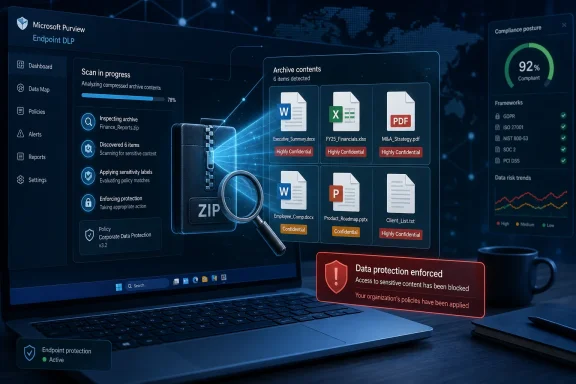
The new roadmap item says Endpoint DLP will detect sensitivity labels on files within archive files such as ZIPs and similar containers. In plain terms, if a user places a labeled confidential spreadsheet inside an archive and then attempts an action covered by DLP policy, Purview should be better able to treat the archive as containing protected content rather than as a generic compressed blob. That is a material improvement for organizations that use labels as policy conditions rather than relying only on pattern matching for credit card numbers, health identifiers, source code, or other sensitive information types.
The important word is labels. Microsoft Purview sensitivity labels are not just decorative metadata in the Office ribbon. In mature deployments, they are the basis for encryption, access control, policy decisions, audit records, retention strategies, and user-facing classification. When DLP can see a label, it can often make a policy decision without needing to fully re-understand the file’s contents from scratch.
Archive handling has been a weak seam because archives are neither ordinary files nor full-blown destinations. They are wrappers around other files, sometimes nested, sometimes encrypted, sometimes huge, and frequently used because they make movement easier. Security teams have always had to decide whether to treat them as high-risk by default, inspect them deeply, or accept blind spots in exchange for performance and usability.
Microsoft’s update nudges Endpoint DLP toward the second path. The endpoint agent is not merely asking, “Is this ZIP file sensitive?” It is being taught to ask, “Are there sensitive labeled files inside this ZIP file, and should that fact change what the user is allowed to do next?”
A DLP policy normally acts on an item. The item might be a Word document, a PDF, an email attachment, or a file being uploaded through a browser. An archive is a container item whose risk may come from one child file buried inside it. That means the policy engine has to translate the sensitivity of the contained file into a decision about the container.
That translation can be controversial. If one confidential document sits beside ten harmless images inside a ZIP, should the whole archive be blocked? Should the user receive a warning? Should only some destinations be restricted? Should an administrator be alerted with evidence? Should the archive be quarantined? In a real organization, the answer depends on the label, the destination, the user, the device, and the business process.
Endpoint DLP already supports a broad set of monitored file types and endpoint activities, including common archive formats. Microsoft’s documentation has also long distinguished between detecting content by sensitive information types, by sensitivity labels, and by other conditions. The new roadmap item matters because it tightens the relationship between archive awareness and label-aware enforcement. It is the difference between noticing a container and understanding why that container is risky.
That distinction will be familiar to anyone who has configured DLP in anger. Policies that overreact to every compressed file become noise machines. Policies that ignore archives invite the obvious workaround. The administrator’s goal is not to ban ZIP files. It is to make a compressed file inherit enough of the risk of its contents that ordinary handling rules still make sense.
This is why the change is best understood as a control-plane improvement. It gives administrators finer control not because it adds another scary block button, but because the signal becomes more precise. A ZIP containing a labeled “Highly Confidential” financial model can be treated differently from a ZIP containing public marketing assets, even if both look similar to a storage layer.
This is more ambitious than old-school DLP, which often centered on content inspection alone. Content inspection is still vital, especially for finding unlabeled data, but it is inherently probabilistic and expensive. A label, when applied correctly, is an explicit assertion that the organization has classified the item. It can encode “Confidential,” “Internal,” “Regulated,” or a custom category that maps to contractual, legal, or operational obligations.
The catch is that labels only become powerful when enforcement points consistently honor them. If a label works in Word but disappears from practical policy the moment the file is compressed, copied, or uploaded, users learn the wrong lesson. They learn that classification is a property of an app experience rather than a durable property of the data.
Endpoint DLP sits at the point where that illusion breaks. A labeled file on a Windows 11 laptop is not safely contained simply because SharePoint permissions are well designed. The file may be copied to USB, attached in a browser, uploaded to a personal cloud service, or moved through a non-Microsoft application. That is precisely why endpoint enforcement exists.
Archive-aware label detection strengthens the label model by making it harder for packaging to interrupt policy. The archive does not need to become a first-class document with its own business classification for DLP to make a sensible decision. It can inherit enforcement relevance from the labeled files inside it.
There is an important caveat: this feature does not magically solve bad labeling. If a sensitive file was never labeled, an archive-aware label rule will not detect a label that is not there. Organizations still need auto-labeling, user education, trainable classifiers, sensitive information types, and periodic audits. But for the large and growing number of enterprises that have already invested in labels, this update reduces a frustrating mismatch between classification strategy and endpoint reality.
Compression is attractive because it reduces friction. It preserves folder structure, bundles many documents into one object, and can sometimes avoid casual inspection by tools that are optimized around individual files. It is also built into Windows and every other mainstream operating system, which means blocking archive creation outright is usually impractical.
That is why this Purview update lands in a useful place. It targets a common behavior without pretending the behavior is inherently malicious. A finance analyst zipping quarter-end files for an auditor may be doing legitimate work. A departing employee zipping a product roadmap and uploading it to personal storage is a different story. Endpoint DLP needs enough context to distinguish between those cases or at least enforce a deliberate approval path.
Sensitivity labels are one of the few signals that can provide that context without forcing every rule to inspect every byte every time. If the files inside an archive carry labels applied by policy, by users, or by previous classification workflows, DLP can use those labels as a compact expression of risk. That should help reduce the need for blunt archive rules that frustrate users and flood administrators with incidents.
The change also matters for incident response. When a DLP alert fires because an archive contains labeled content, the security team can reason about the event in business terms. The question becomes “Why was a file labeled Confidential being moved to this destination?” rather than “Why did a ZIP file trigger a generic archive rule?” Better signals make better investigations.
Still, archive inspection must balance completeness against endpoint performance. Compressed files can be large, nested, corrupted, encrypted, or intentionally hostile to scanners. Microsoft’s existing DLP documentation already recognizes size limits, scan completion states, and protected-file conditions. Administrators should expect archive label detection to live within similar operational boundaries rather than as an unlimited forensic decompressor running on every laptop.
It also arrives at a moment when Purview is carrying more weight inside Microsoft’s enterprise story. Copilot, AI-assisted search, broader data governance concerns, insider risk programs, and regulatory pressure have all pushed organizations to ask harder questions about where sensitive data lives and how policy follows it. The answer Microsoft wants to give is increasingly Purview.
That answer only works if Purview’s controls hold up outside the cleanest Microsoft 365 workflows. A document sitting in SharePoint is the easy case. A document copied to a desktop, renamed, compressed, and uploaded through a browser is the case that decides whether the platform feels credible to security teams.
Endpoint DLP has been Microsoft’s bridge into that messier terrain. It can monitor and restrict activities on onboarded Windows and macOS devices, and Microsoft positions it as an extension of DLP policy to the endpoint rather than a separate product island. That architecture is appealing because administrators can use familiar policy concepts across cloud and device locations.
The archive label update reinforces that strategy. Microsoft is not asking customers to build a separate archive-control regime outside Purview. It is extending the existing sensitivity-label logic deeper into a file-handling pattern that users already rely on. In the long run, that is how platform security wins: not by introducing a spectacular new console, but by making old evasions less effective.
DLP changes can surprise users because they alter the boundary between allowed and blocked work. A team that has always zipped labeled documents for external transfer may suddenly encounter warnings or blocks once the feature reaches the tenant. In a well-governed environment, that may be the desired outcome. In a brittle workflow, it may create a support spike.
The first task for administrators is to identify policies that use sensitivity labels as conditions for endpoint devices. Those policies are the most likely to see behavioral changes. The second task is to map common archive workflows: legal productions, finance packages, engineering handoffs, customer support bundles, HR exports, and vendor deliveries. These are the places where a technically correct block can become a business interruption if exceptions and justifications are not planned.
Pilot rings matter here. Microsoft lists both Preview and General Availability release rings for the roadmap item, which gives organizations a short window to validate behavior before broad rollout. Security teams should use that preview period to test not only whether labeled files are detected inside archives, but also how policy actions surface to users and how incidents appear in Activity Explorer or related audit workflows.
The right tests are not exotic. Put a labeled Word document and an unlabeled text file into a ZIP. Try to upload it to a blocked service, copy it to removable media, attach it in a restricted browser, or move it through whatever channels your policy covers. Repeat with different labels, formats, archive types, file sizes, nested archives, and password-protected containers. The goal is to understand the ordinary edges before users find them in production.
This is also a good time to revisit exception handling. If the organization allows users to override a warning with business justification, archive label detection may increase the number of override events. If the policy blocks outright, help desk and security operations need a path for legitimate transfers. Precision in detection does not eliminate the need for judgment in response.
That unevenness can be politically difficult. Security teams may celebrate the fact that labeled files are now harder to move improperly, while business units notice only that some archives are blocked and others are not. The inconsistency may not be a DLP flaw. It may be a classification flaw that the new capability makes more visible.
This is where Microsoft’s label-first strategy demands organizational maturity. A label taxonomy with too many categories confuses users and produces noisy policy. A taxonomy with too few categories may not distinguish between data that can be shared under contract and data that must never leave the tenant. A label that is merely advisory will not carry the same enforcement implications as one tied to encryption or DLP actions.
Endpoint archive detection also raises familiar questions about ownership. Who decides that a label should block archive transfer? Compliance may own the regulatory requirement, security may own the control, legal may own exceptions, and IT may own endpoint deployment. Without governance, a new detection capability becomes another knob in a console rather than a defensible policy.
The best deployments will use this update as a forcing function. They will ask which labels are meaningful enough to drive endpoint blocks, which should generate audits only, and which should warn users without stopping them. They will also look at whether sensitive unlabeled files are still moving through archives, because that is where content-based DLP and auto-labeling still have work to do.
A label is a policy promise. This feature helps Microsoft keep that promise inside archives, but it cannot decide whether the promise was well written in the first place.
Microsoft’s Endpoint DLP support spans Windows 10, Windows 11, macOS, and certain Windows Server scenarios, with requirements and feature differences depending on platform and configuration. In practice, many enterprises will see the most immediate value on managed Windows 11 devices enrolled into Microsoft’s security and compliance stack. Those are the machines most likely to have the necessary onboarding, policy scope, and telemetry plumbing already in place.
Endpoint scope is not automatic magic. DLP policies for devices depend on both user and device targeting. If the user is in scope but the device is not, or the device is onboarded but the policy does not apply to that user, enforcement may not occur. Archive-aware label detection will not compensate for incomplete deployment architecture.
That point is worth stressing because DLP failures are often blamed on the scanner when the real issue is scoping. A device not onboarded correctly, a user excluded by group design, a policy limited to the wrong location, or a licensing assumption that does not hold can all produce the appearance of a detection gap. New features make those basics more important, not less.
For Windows administrators, the operational checklist is familiar: confirm device onboarding, validate supported OS builds, review policy targeting, test with real user workflows, and watch telemetry after rollout. The novelty is not that those steps change. The novelty is that archives now deserve a more prominent place in the test matrix.
Microsoft’s challenge is to make label detection inside archives useful without turning every compressed file operation into a performance event. Labels may help because metadata-based decisions can sometimes be cheaper than full content extraction. But the endpoint still has to inspect enough of the archive to identify the labeled files within it, and different archive formats vary in how conveniently they expose that information.
The user experience is just as important. If a policy blocks an archive upload because it contains a labeled file, the user needs a comprehensible explanation. “This action is blocked because the archive contains a Confidential file” is a different experience from “Upload blocked by policy.” The former teaches; the latter breeds workarounds.
Microsoft’s DLP policy-tip support varies by workload and scenario, and endpoint interactions have historically been less graceful than in-app Microsoft 365 experiences. That gap matters. A Word policy tip appears where the user is already thinking about a document. An endpoint block may appear during a file operation, browser upload, or app interaction where the user is thinking about a task, not classification.
Admins should therefore evaluate not just enforcement success but user comprehension. If archive detection increases blocks but not understanding, it may reduce leakage while increasing resentment. Good DLP programs treat the user as part of the control loop. Bad ones treat the user as an unpredictable peripheral.
But that is not the right measure. DLP is not a magical membrane around information. It is a set of friction points, audit signals, and policy-enforcement moments designed to reduce accidental leakage, deter casual misuse, and raise the cost of deliberate theft. In that context, closing the archive gap is worthwhile.
The most common losses are not always the most sophisticated. An employee sending the wrong bundle to a vendor, a contractor uploading a project folder to a personal cloud account, or a sales team compressing customer exports for convenience can all create real exposure. Archive-aware label detection addresses precisely those mundane, high-frequency risks.
It also improves the evidentiary value of alerts. A blocked attempt involving a labeled file inside an archive tells a clearer story than a generic file movement event. That clarity helps security teams prioritize investigations and helps compliance teams explain why a control acted.
Attackers will still adapt. Administrators should assume that encrypted or password-protected archives, unsupported formats, nested structures, and oversized files remain relevant edge cases. But security architecture is a game of reducing cheap paths first. ZIP-based label blindness is a cheap path. Microsoft is right to make it less cheap.
Administrators should look first at where sensitivity labels already drive endpoint policy. If those rules are broad, archive detection may widen their reach. If those rules are narrow, the change may be barely visible. Either outcome is useful information, but only if measured before users encounter it during deadline work.
The update also invites a broader conversation about whether archive movement is governed deliberately or accidentally. Many organizations have rules for email attachments and cloud uploads but a fuzzier stance on compressed bundles created locally. Endpoint DLP is where that fuzziness becomes enforceable.
The concrete preparation is straightforward:
Microsoft’s roadmap entry is small, but the direction is unmistakable: Purview is moving toward a world where data protection follows the classified file even when the user wraps it, moves it, and tries to make it look like something else. That will not eliminate leaks, and it will not rescue weak classification programs. But it makes the everyday archive less of a loophole and more of a governed object, which is exactly where enterprise data protection has to go next.
 Microsoft Is Teaching Endpoint DLP to Look Inside the Box
Endpoint DLP has always lived with an awkward job: it must enforce centralized data policy at the least centralized point in the estate, the user’s machine. That is where files are renamed, copied, compressed, dragged into browsers, synced to personal storage, attached to unsanctioned apps, and dropped onto removable media. It is also where elegant compliance models encounter the ordinary desktop habit of right-clicking a folder and choosing “Compress to ZIP file.”The new roadmap item says Endpoint DLP will detect sensitivity labels on files within archive files such as ZIPs and similar containers. In plain terms, if a user places a labeled confidential spreadsheet inside an archive and then attempts an action covered by DLP policy, Purview should be better able to treat the archive as containing protected content rather than as a generic compressed blob. That is a material improvement for organizations that use labels as policy conditions rather than relying only on pattern matching for credit card numbers, health identifiers, source code, or other sensitive information types.
The important word is labels. Microsoft Purview sensitivity labels are not just decorative metadata in the Office ribbon. In mature deployments, they are the basis for encryption, access control, policy decisions, audit records, retention strategies, and user-facing classification. When DLP can see a label, it can often make a policy decision without needing to fully re-understand the file’s contents from scratch.
Archive handling has been a weak seam because archives are neither ordinary files nor full-blown destinations. They are wrappers around other files, sometimes nested, sometimes encrypted, sometimes huge, and frequently used because they make movement easier. Security teams have always had to decide whether to treat them as high-risk by default, inspect them deeply, or accept blind spots in exchange for performance and usability.
Microsoft’s update nudges Endpoint DLP toward the second path. The endpoint agent is not merely asking, “Is this ZIP file sensitive?” It is being taught to ask, “Are there sensitive labeled files inside this ZIP file, and should that fact change what the user is allowed to do next?”
The Old Archive Problem Was a Policy Problem, Not Just a Scanner Problem
It is tempting to describe archive inspection as a technical parsing problem: support ZIP, support RAR, support 7z, extract contents, inspect the files, apply the rule. That framing is incomplete. The harder issue is that archives blur the unit of enforcement.A DLP policy normally acts on an item. The item might be a Word document, a PDF, an email attachment, or a file being uploaded through a browser. An archive is a container item whose risk may come from one child file buried inside it. That means the policy engine has to translate the sensitivity of the contained file into a decision about the container.
That translation can be controversial. If one confidential document sits beside ten harmless images inside a ZIP, should the whole archive be blocked? Should the user receive a warning? Should only some destinations be restricted? Should an administrator be alerted with evidence? Should the archive be quarantined? In a real organization, the answer depends on the label, the destination, the user, the device, and the business process.
Endpoint DLP already supports a broad set of monitored file types and endpoint activities, including common archive formats. Microsoft’s documentation has also long distinguished between detecting content by sensitive information types, by sensitivity labels, and by other conditions. The new roadmap item matters because it tightens the relationship between archive awareness and label-aware enforcement. It is the difference between noticing a container and understanding why that container is risky.
That distinction will be familiar to anyone who has configured DLP in anger. Policies that overreact to every compressed file become noise machines. Policies that ignore archives invite the obvious workaround. The administrator’s goal is not to ban ZIP files. It is to make a compressed file inherit enough of the risk of its contents that ordinary handling rules still make sense.
This is why the change is best understood as a control-plane improvement. It gives administrators finer control not because it adds another scary block button, but because the signal becomes more precise. A ZIP containing a labeled “Highly Confidential” financial model can be treated differently from a ZIP containing public marketing assets, even if both look similar to a storage layer.
Sensitivity Labels Are Becoming the Language Purview Expects Everyone to Speak
Microsoft’s security and compliance stack has spent years trying to make sensitivity labels the common vocabulary for data protection. That strategy is visible across Microsoft 365 apps, SharePoint, OneDrive, Exchange, Teams-adjacent workflows, Endpoint DLP, Defender integrations, and the broader Purview portal. Labels are meant to express business meaning in a way that policy engines can consume.This is more ambitious than old-school DLP, which often centered on content inspection alone. Content inspection is still vital, especially for finding unlabeled data, but it is inherently probabilistic and expensive. A label, when applied correctly, is an explicit assertion that the organization has classified the item. It can encode “Confidential,” “Internal,” “Regulated,” or a custom category that maps to contractual, legal, or operational obligations.
The catch is that labels only become powerful when enforcement points consistently honor them. If a label works in Word but disappears from practical policy the moment the file is compressed, copied, or uploaded, users learn the wrong lesson. They learn that classification is a property of an app experience rather than a durable property of the data.
Endpoint DLP sits at the point where that illusion breaks. A labeled file on a Windows 11 laptop is not safely contained simply because SharePoint permissions are well designed. The file may be copied to USB, attached in a browser, uploaded to a personal cloud service, or moved through a non-Microsoft application. That is precisely why endpoint enforcement exists.
Archive-aware label detection strengthens the label model by making it harder for packaging to interrupt policy. The archive does not need to become a first-class document with its own business classification for DLP to make a sensible decision. It can inherit enforcement relevance from the labeled files inside it.
There is an important caveat: this feature does not magically solve bad labeling. If a sensitive file was never labeled, an archive-aware label rule will not detect a label that is not there. Organizations still need auto-labeling, user education, trainable classifiers, sensitive information types, and periodic audits. But for the large and growing number of enterprises that have already invested in labels, this update reduces a frustrating mismatch between classification strategy and endpoint reality.
The ZIP File Is Still the Simplest Data Exfiltration Tool in the Office
Security vendors love to talk about sophisticated exfiltration. The day-to-day reality is less cinematic. A user collects files, compresses them, and uploads or sends the archive somewhere they should not. Sometimes that user is malicious; often they are merely trying to finish a task through the least resistant path available.Compression is attractive because it reduces friction. It preserves folder structure, bundles many documents into one object, and can sometimes avoid casual inspection by tools that are optimized around individual files. It is also built into Windows and every other mainstream operating system, which means blocking archive creation outright is usually impractical.
That is why this Purview update lands in a useful place. It targets a common behavior without pretending the behavior is inherently malicious. A finance analyst zipping quarter-end files for an auditor may be doing legitimate work. A departing employee zipping a product roadmap and uploading it to personal storage is a different story. Endpoint DLP needs enough context to distinguish between those cases or at least enforce a deliberate approval path.
Sensitivity labels are one of the few signals that can provide that context without forcing every rule to inspect every byte every time. If the files inside an archive carry labels applied by policy, by users, or by previous classification workflows, DLP can use those labels as a compact expression of risk. That should help reduce the need for blunt archive rules that frustrate users and flood administrators with incidents.
The change also matters for incident response. When a DLP alert fires because an archive contains labeled content, the security team can reason about the event in business terms. The question becomes “Why was a file labeled Confidential being moved to this destination?” rather than “Why did a ZIP file trigger a generic archive rule?” Better signals make better investigations.
Still, archive inspection must balance completeness against endpoint performance. Compressed files can be large, nested, corrupted, encrypted, or intentionally hostile to scanners. Microsoft’s existing DLP documentation already recognizes size limits, scan completion states, and protected-file conditions. Administrators should expect archive label detection to live within similar operational boundaries rather than as an unlimited forensic decompressor running on every laptop.
The Timing Fits Microsoft’s Larger Push to Make Purview Less Optional
The preview and general availability timing is notable. A July 2026 preview followed by August 2026 general availability is an aggressive runway for a capability that affects endpoint enforcement logic. It suggests Microsoft sees this as an incremental but important improvement to an existing engine rather than a wholesale redesign.It also arrives at a moment when Purview is carrying more weight inside Microsoft’s enterprise story. Copilot, AI-assisted search, broader data governance concerns, insider risk programs, and regulatory pressure have all pushed organizations to ask harder questions about where sensitive data lives and how policy follows it. The answer Microsoft wants to give is increasingly Purview.
That answer only works if Purview’s controls hold up outside the cleanest Microsoft 365 workflows. A document sitting in SharePoint is the easy case. A document copied to a desktop, renamed, compressed, and uploaded through a browser is the case that decides whether the platform feels credible to security teams.
Endpoint DLP has been Microsoft’s bridge into that messier terrain. It can monitor and restrict activities on onboarded Windows and macOS devices, and Microsoft positions it as an extension of DLP policy to the endpoint rather than a separate product island. That architecture is appealing because administrators can use familiar policy concepts across cloud and device locations.
The archive label update reinforces that strategy. Microsoft is not asking customers to build a separate archive-control regime outside Purview. It is extending the existing sensitivity-label logic deeper into a file-handling pattern that users already rely on. In the long run, that is how platform security wins: not by introducing a spectacular new console, but by making old evasions less effective.
Administrators Gain Precision, But They Also Inherit New Testing Obligations
For admins, the headline benefit is obvious: a DLP policy based on sensitivity labels can become more reliable when users compress labeled files. The practical consequence is that policies may begin matching in scenarios that previously slipped through or required less elegant workaround rules. That is good news, but it is also a change that deserves careful testing.DLP changes can surprise users because they alter the boundary between allowed and blocked work. A team that has always zipped labeled documents for external transfer may suddenly encounter warnings or blocks once the feature reaches the tenant. In a well-governed environment, that may be the desired outcome. In a brittle workflow, it may create a support spike.
The first task for administrators is to identify policies that use sensitivity labels as conditions for endpoint devices. Those policies are the most likely to see behavioral changes. The second task is to map common archive workflows: legal productions, finance packages, engineering handoffs, customer support bundles, HR exports, and vendor deliveries. These are the places where a technically correct block can become a business interruption if exceptions and justifications are not planned.
Pilot rings matter here. Microsoft lists both Preview and General Availability release rings for the roadmap item, which gives organizations a short window to validate behavior before broad rollout. Security teams should use that preview period to test not only whether labeled files are detected inside archives, but also how policy actions surface to users and how incidents appear in Activity Explorer or related audit workflows.
The right tests are not exotic. Put a labeled Word document and an unlabeled text file into a ZIP. Try to upload it to a blocked service, copy it to removable media, attach it in a restricted browser, or move it through whatever channels your policy covers. Repeat with different labels, formats, archive types, file sizes, nested archives, and password-protected containers. The goal is to understand the ordinary edges before users find them in production.
This is also a good time to revisit exception handling. If the organization allows users to override a warning with business justification, archive label detection may increase the number of override events. If the policy blocks outright, help desk and security operations need a path for legitimate transfers. Precision in detection does not eliminate the need for judgment in response.
The Feature Will Expose Weak Labeling Programs Faster Than It Fixes Them
There is a risk that some organizations will overestimate what this update does. Detecting sensitivity labels inside archives is powerful only when the labeling foundation is sound. If users apply labels inconsistently, if auto-labeling is under-tuned, or if critical repositories remain unlabeled, archive-aware detection will produce an uneven picture.That unevenness can be politically difficult. Security teams may celebrate the fact that labeled files are now harder to move improperly, while business units notice only that some archives are blocked and others are not. The inconsistency may not be a DLP flaw. It may be a classification flaw that the new capability makes more visible.
This is where Microsoft’s label-first strategy demands organizational maturity. A label taxonomy with too many categories confuses users and produces noisy policy. A taxonomy with too few categories may not distinguish between data that can be shared under contract and data that must never leave the tenant. A label that is merely advisory will not carry the same enforcement implications as one tied to encryption or DLP actions.
Endpoint archive detection also raises familiar questions about ownership. Who decides that a label should block archive transfer? Compliance may own the regulatory requirement, security may own the control, legal may own exceptions, and IT may own endpoint deployment. Without governance, a new detection capability becomes another knob in a console rather than a defensible policy.
The best deployments will use this update as a forcing function. They will ask which labels are meaningful enough to drive endpoint blocks, which should generate audits only, and which should warn users without stopping them. They will also look at whether sensitive unlabeled files are still moving through archives, because that is where content-based DLP and auto-labeling still have work to do.
A label is a policy promise. This feature helps Microsoft keep that promise inside archives, but it cannot decide whether the promise was well written in the first place.
Windows Endpoints Remain the Center of Gravity
Although the roadmap item lists Microsoft Purview on the web as the platform, the affected capability is Endpoint DLP, which means the endpoint estate remains central. For WindowsForum readers, that matters because Windows clients are still where many enterprise data-handling habits begin. The control may be configured in a browser-based portal, but the moment of truth happens on the device.Microsoft’s Endpoint DLP support spans Windows 10, Windows 11, macOS, and certain Windows Server scenarios, with requirements and feature differences depending on platform and configuration. In practice, many enterprises will see the most immediate value on managed Windows 11 devices enrolled into Microsoft’s security and compliance stack. Those are the machines most likely to have the necessary onboarding, policy scope, and telemetry plumbing already in place.
Endpoint scope is not automatic magic. DLP policies for devices depend on both user and device targeting. If the user is in scope but the device is not, or the device is onboarded but the policy does not apply to that user, enforcement may not occur. Archive-aware label detection will not compensate for incomplete deployment architecture.
That point is worth stressing because DLP failures are often blamed on the scanner when the real issue is scoping. A device not onboarded correctly, a user excluded by group design, a policy limited to the wrong location, or a licensing assumption that does not hold can all produce the appearance of a detection gap. New features make those basics more important, not less.
For Windows administrators, the operational checklist is familiar: confirm device onboarding, validate supported OS builds, review policy targeting, test with real user workflows, and watch telemetry after rollout. The novelty is not that those steps change. The novelty is that archives now deserve a more prominent place in the test matrix.
Performance and User Experience Will Decide Whether the Control Survives Contact
Every endpoint security feature competes for CPU cycles, battery, patience, and trust. Deep archive inspection can be expensive if implemented carelessly. Users may tolerate a block when they understand the reason; they will not tolerate a laptop that feels broken every time a large ZIP file appears in Downloads.Microsoft’s challenge is to make label detection inside archives useful without turning every compressed file operation into a performance event. Labels may help because metadata-based decisions can sometimes be cheaper than full content extraction. But the endpoint still has to inspect enough of the archive to identify the labeled files within it, and different archive formats vary in how conveniently they expose that information.
The user experience is just as important. If a policy blocks an archive upload because it contains a labeled file, the user needs a comprehensible explanation. “This action is blocked because the archive contains a Confidential file” is a different experience from “Upload blocked by policy.” The former teaches; the latter breeds workarounds.
Microsoft’s DLP policy-tip support varies by workload and scenario, and endpoint interactions have historically been less graceful than in-app Microsoft 365 experiences. That gap matters. A Word policy tip appears where the user is already thinking about a document. An endpoint block may appear during a file operation, browser upload, or app interaction where the user is thinking about a task, not classification.
Admins should therefore evaluate not just enforcement success but user comprehension. If archive detection increases blocks but not understanding, it may reduce leakage while increasing resentment. Good DLP programs treat the user as part of the control loop. Bad ones treat the user as an unpredictable peripheral.
Attackers Will Adapt, But That Is Not an Argument Against Closing the Gap
No serious observer should claim that archive label detection ends data exfiltration. A malicious insider can try screenshots, copy-paste, retyping, format conversion, encrypted archives, personal devices, cloud sync tricks, or simply photographing a screen. Every DLP control has bypasses when the attacker has legitimate access to the data.But that is not the right measure. DLP is not a magical membrane around information. It is a set of friction points, audit signals, and policy-enforcement moments designed to reduce accidental leakage, deter casual misuse, and raise the cost of deliberate theft. In that context, closing the archive gap is worthwhile.
The most common losses are not always the most sophisticated. An employee sending the wrong bundle to a vendor, a contractor uploading a project folder to a personal cloud account, or a sales team compressing customer exports for convenience can all create real exposure. Archive-aware label detection addresses precisely those mundane, high-frequency risks.
It also improves the evidentiary value of alerts. A blocked attempt involving a labeled file inside an archive tells a clearer story than a generic file movement event. That clarity helps security teams prioritize investigations and helps compliance teams explain why a control acted.
Attackers will still adapt. Administrators should assume that encrypted or password-protected archives, unsupported formats, nested structures, and oversized files remain relevant edge cases. But security architecture is a game of reducing cheap paths first. ZIP-based label blindness is a cheap path. Microsoft is right to make it less cheap.
The August Rollout Turns Archive Handling Into a Governance Test
The practical message for IT teams is that this roadmap item should not sit unnoticed until it appears in the tenant. A preview in July 2026 and general availability in August 2026 leave little time for organizations with complex DLP policies to test, communicate, and adjust. The change is beneficial, but beneficial controls can still break workflows when they arrive silently.Administrators should look first at where sensitivity labels already drive endpoint policy. If those rules are broad, archive detection may widen their reach. If those rules are narrow, the change may be barely visible. Either outcome is useful information, but only if measured before users encounter it during deadline work.
The update also invites a broader conversation about whether archive movement is governed deliberately or accidentally. Many organizations have rules for email attachments and cloud uploads but a fuzzier stance on compressed bundles created locally. Endpoint DLP is where that fuzziness becomes enforceable.
The concrete preparation is straightforward:
- Organizations should inventory DLP policies that use sensitivity labels as conditions for endpoint devices before the July 2026 preview reaches testing environments.
- Security teams should build test archives that include labeled and unlabeled Office files, PDFs, nested folders, and common archive formats used by employees.
- Administrators should validate policy behavior across the actual egress paths they care about, including browsers, removable storage, restricted apps, and sanctioned transfer workflows.
- Help desk teams should be briefed on the user-facing symptoms of archive-based DLP blocks before general availability in August 2026.
- Compliance owners should decide which labels justify blocking an entire archive and which labels should produce audit-only or warning behavior.
- Organizations should treat unexpected non-matches as a reason to review labeling coverage, device scoping, file support, and archive edge cases rather than assuming the feature has failed.
Microsoft’s roadmap entry is small, but the direction is unmistakable: Purview is moving toward a world where data protection follows the classified file even when the user wraps it, moves it, and tries to make it look like something else. That will not eliminate leaks, and it will not rescue weak classification programs. But it makes the everyday archive less of a loophole and more of a governed object, which is exactly where enterprise data protection has to go next.
References
- Primary source: Microsoft 365 Roadmap
Published: 2026-06-25T23:15:45.5477468Z
Microsoft 365 Roadmap | Microsoft 365
The Microsoft 365 Roadmap lists updates that are currently planned for applicable subscribers. Check here for more information on the status of new features and updates.www.microsoft.com
- Official source: learn.microsoft.com
Automatically apply a sensitivity label to Microsoft 365 data | Microsoft Learn
When you create a sensitivity label, you can automatically assign a label to data stored in Microsoft 365, or you can prompt users to select the label that you recommend.learn.microsoft.com - Related coverage: docs.gimmal.com
Microsoft Purview Sensitivity Labels | Gimmal Docs
Introduction Gimmal Discover supports sensitivity labels that can be created in Microsoft’s Purview Information Protection area. Sensitivity labels allow organ…docs.gimmal.com
- Official source: support.microsoft.com
Label and protect files in File Explorer in Windows | Microsoft Support
Label and protect files in File Explorer in Windows by using the Classify and Protect tool.support.microsoft.com - Official source: techcommunity.microsoft.com
endpoint DLP, Data Loss Prevention
Today we are extremely pleased to announce the general availability of Microsoft Purview Data Loss Prevention for macOS endpoints, enabling... techcommunity.microsoft.com
- Related coverage: geschaeftskunden.telekom.de
Microsoft Purview – Sensitivity Labels and Endpoint DLP | Telekom Business
Find out here how you can use Microsoft Purview to effectively block the upload of classified files to cloud services such as OneDrive, Dropbox or Google Drive.geschaeftskunden.telekom.de
