

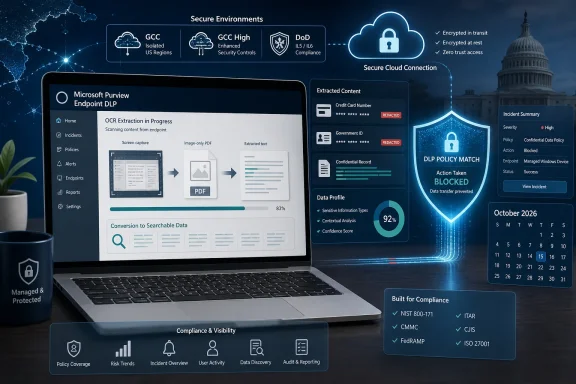
Microsoft has scheduled optical character recognition support for Microsoft Purview Endpoint Data Loss Prevention in US government cloud environments, giving organizations a way to detect sensitive information stored inside images on managed Windows devices. The feature is now targeted for general availability in October 2026 across GCC, GCC High, and Department of Defense cloud instances.
The timing comes from Microsoft 365 Roadmap item 160008, which Microsoft updated on July 13, 2026, and still lists as in development. Once released, Purview will be able to extract text from supported image files, classify that text against existing DLP rules, and apply controls intended to stop users from exfiltrating the underlying image.
That closes an important inspection gap. A credit card number, government identifier, customer record, or other protected value does not become harmless merely because it was captured in a screenshot rather than saved in a Word document.
Traditional content inspection works most naturally with files containing machine-readable text. Screenshots, scanned forms, photographed documents, and image-only PDFs complicate that model because the sensitive text exists as pixels rather than characters that a classification engine can immediately evaluate.
Purview’s optical character recognition process converts those visible characters into text that its classification services can inspect. Microsoft’s documentation says existing sensitive information types and trainable classifiers can then detect content in images without administrators having to build a separate set of image-specific classifiers.
For Endpoint DLP, the practical result is that supported images can participate in the same policy workflow as conventional documents. If a policy detects financial, personal, medical, or classified information, Purview can audit the attempted activity, warn the user, allow an override with justification, or block the action according to the configured rule.
Microsoft lists the following endpoint formats for OCR inspection:
That distinction is significant for regulated organizations that frequently receive Microsoft 365 capabilities later than commercial tenants. Government cloud deployments have additional compliance, operational, and service-boundary requirements, and feature parity often arrives through separate roadmap entries.
The listed platform is “Web” because administrators configure the capability through the Microsoft Purview portal. Enforcement, however, concerns files and user activity on onboarded Windows endpoint devices. The portal designation should therefore not be read as limiting OCR inspection to browser-based content.
Microsoft says Endpoint DLP can monitor actions involving sensitive files, including uploads to restricted cloud services, transfers to removable storage, printing, clipboard use, network-share activity, and access through restricted applications or browsers. The exact response depends on the policy, activity type, endpoint configuration, and enforcement mode selected by the organization.
For government IT teams, OCR adds coverage for one of the easiest ways to move information outside a text-aware control: taking a screenshot. It also helps with legitimate document workflows involving scanned forms, photographed pages, diagrams containing identifiers, and records received as flat image files.
Microsoft also documents pay-as-you-go billing for Purview OCR. Each standalone image counts as a transaction, while each page in a scanned PDF is counted separately. A 20-page image-only PDF can therefore produce 20 OCR transactions rather than one.
Endpoint caching is intended to limit repeated work. According to Microsoft Learn, the OCR cache is maintained locally on each endpoint for 30 days, storing the image hash and detected classifier information rather than the customer image itself. That can reduce repeated scanning charges when the same image is handled several times on one device, but the cache is local and should not be treated as a tenant-wide deduplication mechanism.
OCR also changes endpoint network behavior. Microsoft says enabled Windows and macOS devices send content to the cloud for scanning and imposes a default daily bandwidth limit of 1,024 MB per device. Scanning stops after a device reaches that limit unless administrators raise the allowance.
Image requirements impose further boundaries. Microsoft currently documents a 50 MB maximum for files scanned on Windows and macOS endpoints, along with minimum and maximum image dimensions. Only images introduced after OCR is enabled are scanned, meaning the feature is not automatically a retrospective discovery tool for every screenshot already stored across the organization’s device fleet.
Those details make a controlled pilot preferable to immediate tenant-wide activation. Security teams will need to measure transaction volume, bandwidth use, classification accuracy, false positives, and user disruption before moving blocking policies into broad production.
That does not eliminate the need for validation. OCR accuracy can vary with resolution, contrast, layout, font, image compression, handwriting, and document quality. A policy that performs reliably against clean text files may produce different results when faced with a dimly photographed form or a heavily compressed screenshot.
Administrators should also examine exclusions and network controls before deployment. Microsoft notes that endpoint paths excluded from DLP are not scanned by OCR, while network configurations must permit access to the required Microsoft-hosted storage endpoints. A configuration that blocks the cloud scanning path could leave administrators believing images are protected when evaluation is not completing as expected.
A practical rollout should begin in audit mode with representative image-heavy workflows. Activity Explorer and DLP alerts can then show which images match policies, which actions users attempt, and whether rules are identifying meaningful risk rather than normal business material.
Organizations should pay particular attention to screenshot utilities, scanning stations, case-management exports, virtual desktop sessions, browser downloads, and folders used to stage files for USB or cloud transfer. These are the places where image-based information is most likely to cross a control boundary.
The roadmap remains marked in development, and October 2026 is a planned general-availability month rather than a guaranteed deployment date. For GCC, GCC High, and DoD administrators, the immediate milestone is therefore preparation: confirm endpoint onboarding, review DLP scope and exclusions, establish OCR billing, test required network access, and identify policies that should eventually move from auditing to enforcement.
The timing comes from Microsoft 365 Roadmap item 160008, which Microsoft updated on July 13, 2026, and still lists as in development. Once released, Purview will be able to extract text from supported image files, classify that text against existing DLP rules, and apply controls intended to stop users from exfiltrating the underlying image.
That closes an important inspection gap. A credit card number, government identifier, customer record, or other protected value does not become harmless merely because it was captured in a screenshot rather than saved in a Word document.
 Screenshots Become Policy-Aware Files
Traditional content inspection works most naturally with files containing machine-readable text. Screenshots, scanned forms, photographed documents, and image-only PDFs complicate that model because the sensitive text exists as pixels rather than characters that a classification engine can immediately evaluate.Purview’s optical character recognition process converts those visible characters into text that its classification services can inspect. Microsoft’s documentation says existing sensitive information types and trainable classifiers can then detect content in images without administrators having to build a separate set of image-specific classifiers.
For Endpoint DLP, the practical result is that supported images can participate in the same policy workflow as conventional documents. If a policy detects financial, personal, medical, or classified information, Purview can audit the attempted activity, warn the user, allow an override with justification, or block the action according to the configured rule.
Microsoft lists the following endpoint formats for OCR inspection:
- JPEG and JPG images are supported.
- PNG images are supported.
- BMP images are supported.
- TIFF images are supported.
- Image-only PDF files are supported.
A Government Cloud Rollout, Not a Purview First
The roadmap entry is specifically scoped to GCC, GCC High, and DoD. Microsoft’s current Purview documentation already describes OCR scanning for Windows and macOS endpoints as part of the wider service, so this update is best understood as a government cloud availability milestone rather than the first appearance of Endpoint DLP OCR across Microsoft 365.That distinction is significant for regulated organizations that frequently receive Microsoft 365 capabilities later than commercial tenants. Government cloud deployments have additional compliance, operational, and service-boundary requirements, and feature parity often arrives through separate roadmap entries.
The listed platform is “Web” because administrators configure the capability through the Microsoft Purview portal. Enforcement, however, concerns files and user activity on onboarded Windows endpoint devices. The portal designation should therefore not be read as limiting OCR inspection to browser-based content.
Microsoft says Endpoint DLP can monitor actions involving sensitive files, including uploads to restricted cloud services, transfers to removable storage, printing, clipboard use, network-share activity, and access through restricted applications or browsers. The exact response depends on the policy, activity type, endpoint configuration, and enforcement mode selected by the organization.
For government IT teams, OCR adds coverage for one of the easiest ways to move information outside a text-aware control: taking a screenshot. It also helps with legitimate document workflows involving scanned forms, photographed pages, diagrams containing identifiers, and records received as flat image files.
OCR Adds Cloud Traffic, Cost, and Tuning Work
The feature will not simply switch itself on when the October rollout begins. Microsoft’s Purview documentation describes OCR as an optional, tenant-level capability that administrators must configure, including selecting the locations and groups that should be scanned.Microsoft also documents pay-as-you-go billing for Purview OCR. Each standalone image counts as a transaction, while each page in a scanned PDF is counted separately. A 20-page image-only PDF can therefore produce 20 OCR transactions rather than one.
Endpoint caching is intended to limit repeated work. According to Microsoft Learn, the OCR cache is maintained locally on each endpoint for 30 days, storing the image hash and detected classifier information rather than the customer image itself. That can reduce repeated scanning charges when the same image is handled several times on one device, but the cache is local and should not be treated as a tenant-wide deduplication mechanism.
OCR also changes endpoint network behavior. Microsoft says enabled Windows and macOS devices send content to the cloud for scanning and imposes a default daily bandwidth limit of 1,024 MB per device. Scanning stops after a device reaches that limit unless administrators raise the allowance.
Image requirements impose further boundaries. Microsoft currently documents a 50 MB maximum for files scanned on Windows and macOS endpoints, along with minimum and maximum image dimensions. Only images introduced after OCR is enabled are scanned, meaning the feature is not automatically a retrospective discovery tool for every screenshot already stored across the organization’s device fleet.
Those details make a controlled pilot preferable to immediate tenant-wide activation. Security teams will need to measure transaction volume, bandwidth use, classification accuracy, false positives, and user disruption before moving blocking policies into broad production.
Existing DLP Rules Gain a Wider Field of View
The chief administrative advantage is policy reuse. An organization that already uses a sensitive information type to find payment card numbers, taxpayer identifiers, or internally defined records should not need to recreate the detection logic merely because those characters appear in an image.That does not eliminate the need for validation. OCR accuracy can vary with resolution, contrast, layout, font, image compression, handwriting, and document quality. A policy that performs reliably against clean text files may produce different results when faced with a dimly photographed form or a heavily compressed screenshot.
Administrators should also examine exclusions and network controls before deployment. Microsoft notes that endpoint paths excluded from DLP are not scanned by OCR, while network configurations must permit access to the required Microsoft-hosted storage endpoints. A configuration that blocks the cloud scanning path could leave administrators believing images are protected when evaluation is not completing as expected.
A practical rollout should begin in audit mode with representative image-heavy workflows. Activity Explorer and DLP alerts can then show which images match policies, which actions users attempt, and whether rules are identifying meaningful risk rather than normal business material.
Organizations should pay particular attention to screenshot utilities, scanning stations, case-management exports, virtual desktop sessions, browser downloads, and folders used to stage files for USB or cloud transfer. These are the places where image-based information is most likely to cross a control boundary.
The roadmap remains marked in development, and October 2026 is a planned general-availability month rather than a guaranteed deployment date. For GCC, GCC High, and DoD administrators, the immediate milestone is therefore preparation: confirm endpoint onboarding, review DLP scope and exclusions, establish OCR billing, test required network access, and identify policies that should eventually move from auditing to enforcement.
References
- Primary source: Microsoft 365 Roadmap
Published: 2026-07-13T23:07:14.8221961Z
Microsoft 365 Roadmap | Microsoft 365
The Microsoft 365 Roadmap lists updates that are currently planned for applicable subscribers. Check here for more information on the status of new features and updates.www.microsoft.com
- Official source: learn.microsoft.com
Supported file types in eDiscovery | Microsoft Learn
A list of supported file types in eDiscovery.learn.microsoft.com - Official source: techcommunity.microsoft.com
