

Microsoft is rolling out Microsoft Purview DLP for Microsoft 365 Copilot in GCC, GCC High, and DoD government clouds, expanding prompt-level safeguards so Copilot and published Copilot Studio agents can be blocked from answering or grounding when prompts contain sensitive data. The change is listed under Microsoft 365 Roadmap ID 561892, marked “Rolling out,” and targeted at the Web platform in General Availability with a June 2026 availability window. Its real significance is not that Microsoft has invented DLP for AI; it is that the company is moving one of the most consequential AI controls closer to the point of user intent. For government tenants, where a bad prompt can be as risky as a bad attachment, that is a meaningful shift.
For two decades, enterprise data loss prevention has mostly been a system of gates around documents, emails, endpoints, and sharing actions. A user tries to send a spreadsheet containing regulated data, upload a file to the wrong place, paste a customer record into an unmanaged service, or share a labeled document too broadly; the policy engine inspects the content or metadata and warns, blocks, audits, or allows. That model still matters, but generative AI has exposed a weakness in its center: the sensitive object is no longer always a file.
Sometimes the sensitive object is a prompt.
Microsoft’s roadmap item is aimed directly at that problem. The company says it is expanding Microsoft Purview DLP for Microsoft 365 Copilot to safeguard prompts containing sensitive data, with a real-time control designed to mitigate data leakage and oversharing risks. When configured policies detect sensitive data in a prompt, Microsoft 365 Copilot and agents built in Copilot Studio and published to Microsoft 365 Copilot can be prevented from returning a response or from using that sensitive prompt data for grounding in Microsoft 365 or on the web.
That last clause is the hinge. Copilot is not merely a chatbot that takes a prompt and emits prose. In Microsoft’s own support explanation, Copilot answers by grounding responses in contextual data sources: work data such as emails, files, chats, meetings, and sites through Microsoft Graph, and, where enabled, public web content. A sensitive prompt can therefore become a retrieval instruction, a search seed, a summarization request, or a bridge between internal and external context. DLP at the prompt layer is Microsoft’s attempt to intercept the risky moment before Copilot turns a user’s words into a chain of data operations.
For government clouds, this matters more than it first appears. GCC, GCC High, and DoD tenants are not simply commercial Microsoft 365 tenants with more cautious branding. They exist because agencies, contractors, and public-sector organizations face stricter requirements around data residency, regulated information, defense-related data, and operational isolation. Microsoft Learn describes Microsoft 365 Copilot as available in GCC, GCC High, and DoD, operating within the customer’s U.S. government cloud tenant and inheriting the controls of the underlying environment. But inheritance is not the same as correct configuration, and sovereignty is not a substitute for policy.
The Copilot problem for public-sector IT is therefore brutally practical: users are being encouraged to ask an AI assistant to reason across the same Microsoft 365 estate that security teams have spent years labeling, segmenting, auditing, and remediating. The better Copilot gets, the more likely it is to be used for precisely the workflows that involve sensitive material: contract summaries, case notes, citizen services, procurement, investigations, personnel actions, and operational planning. Prompt-level DLP is Microsoft acknowledging that AI governance cannot live only in the storage layer.
June 2026 — Microsoft listed the feature’s General Availability window for GCC, GCC High, and DoD cloud instances.
July 8, 2026 — Microsoft last updated the roadmap entry and continued to mark the feature as “Rolling out.”
The lack of drama in that roadmap language is typical Microsoft 365. Major security posture changes often arrive not as thunderclaps but as tenant-visible toggles, admin-center policies, documentation updates, and staggered service rollouts. That makes them easy to miss, especially in organizations where Copilot rollout teams, Purview administrators, security operations, records managers, and mission application owners do not all sit in the same meeting.
This is where the roadmap entry’s government-cloud scope becomes important. Microsoft’s commercial Copilot story has moved quickly: broader grounding, more agents, deeper Office integration, more model choice, more long-running work, and tighter links between Copilot Studio and Microsoft 365 Copilot. Government environments traditionally lag commercial releases because isolation and compliance requirements change the engineering, validation, and deployment path. So when a Copilot control lands explicitly for GCC, GCC High, and DoD, it is not just feature parity. It is a signal that Microsoft expects regulated tenants to adopt AI assistants and agents as normal business infrastructure, not as side experiments.
The rollout also lands in the middle of a broader security conversation around enterprise AI. Microsoft’s own security blog has framed Purview DLP for Copilot interactions as a way to restrict processing when prompts contain sensitive information types, halt grounding, and show the user that the request cannot be completed because of policy. Microsoft Learn also documents related controls: restricting web search when prompts contain sensitive information, blocking sensitive prompts from being processed, preventing labeled files and emails from being used in responses, and excluding certain external email content from grounding in preview. The roadmap item for government clouds fits into that larger architecture, but it narrows the focus to one of the riskiest user behaviors: placing sensitive data directly into a prompt.
Security outlets have been covering the uncomfortable flipside of that architecture. Reports about Copilot handling confidential mail, agent-related abuse, and prompt-injection-style data exposure have made clear that AI assistants can become an amplification layer for old governance problems. The most sober reading is not that Copilot is uniquely reckless; it is that Copilot makes stale permissions, weak labeling, and casual prompt behavior much more visible. A search interface may expose one bad document. An AI assistant can summarize it, combine it, rephrase it, and make it actionable.
That is why this roadmap item deserves more attention than a routine Microsoft 365 update. The feature is not glamorous, and it will not sell Copilot licenses by itself. But it addresses the precise gap many cautious IT leaders have been pointing at since Copilot’s enterprise launch: what stops a well-intentioned user from pasting regulated data into a prompt and asking an AI system to “analyze this”?
This table is not a licensing guide, and it should not be read as one. It is a risk map. The more sensitive the tenant’s mission, the less acceptable it is to rely on user training alone.
In a commercial organization, a risky Copilot prompt might expose sales forecasts, customer records, employee data, unreleased product plans, or privileged legal material. In a government or defense-support environment, the categories can be more consequential: controlled information, investigative material, citizen service records, procurement data, law-enforcement-sensitive information, emergency response planning, or operational context. The technology problem is similar, but the tolerance for ambiguity is lower.
Prompt-level DLP gives administrators a way to define certain classes of information as inappropriate for Copilot prompt processing. Microsoft describes the feature as preventing Copilot and published agents from returning a response when prompts contain sensitive data, or from using that sensitive data for grounding in Microsoft 365 or the web. That is not just a confidentiality control. It is also a behavioral control: it teaches users, through friction, that some data should not be handed to an assistant in raw form.
This is especially important because users often misunderstand where the line is. Many employees have absorbed the message that Microsoft 365 Copilot “respects permissions,” which is broadly true in the sense that Copilot grounds in content the user is authorized to access. But access is not the same as appropriateness. A user may have permission to view a file, yet still be barred by policy from copying its contents into a prompt, combining it with other data, or using it to generate a summary for a wider audience.
Government tenants live inside that distinction. Mission workers often need access to sensitive material to do their jobs. That does not mean every downstream transformation of that material is safe. Copilot makes transformation cheap, fast, and conversational. DLP has to follow.
Grounding is why Copilot can be useful. It can draw from Microsoft Graph, identify documents, reason over emails, summarize conversations, and synthesize content that would otherwise require a user to open half a dozen apps. It is also why policy enforcement becomes harder. A prompt is no longer just input text; it is a steering mechanism for retrieval, summarization, and generation.
Microsoft’s DLP documentation separates several related controls. One policy path can restrict external web search when prompts contain sensitive information types, allowing Copilot to continue using permitted internal Microsoft 365 data sources. Another can restrict Copilot from processing sensitive prompts at all, preventing a response when the prompt contains specified sensitive information types. Another can stop Copilot from processing certain files and emails with sensitivity labels. The roadmap item for government clouds is specifically about safeguarding prompts containing sensitive data, and about preventing Copilot and published agents from returning a response or using that sensitive data for grounding in Microsoft 365 or the web.
That distinction matters for administrators. Blocking web grounding is not the same as blocking prompt processing. Blocking processing of a labeled file is not the same as blocking a user from typing sensitive information into the prompt box. Excluding an external email from grounding is not the same as detecting sensitive information types in the user’s prompt. These are complementary controls, not interchangeable ones.
The operational challenge is that users do not think in those categories. They think in tasks. “Summarize this complaint.” “Draft a response using these details.” “Compare this vendor submission with our policy.” “Find related emails and make a timeline.” “Rewrite this incident narrative for leadership.” Those are normal productivity requests. They can also contain Social Security numbers, passport numbers, credit card numbers, case identifiers, health information, personnel details, export-controlled terminology, or organization-specific sensitive information types.
This is why the policy needs to sit close to the prompt. If a user pastes sensitive material into the chat box, the system should not wait until after Copilot has retrieved additional content, grounded against internal files, generated a response, and possibly cited sources. The safest enforcement point is before the assistant turns the prompt into work.
The phrase real-time control is doing important work here. A policy that only discovers risky prompts after the fact is an audit tool. Useful, but late. A policy that blocks a response or grounding at prompt time changes the interaction while the user is still in the decision loop. For regulated tenants, that is the difference between “we can investigate what happened” and “we reduced the chance it happened in the first place.”
Microsoft’s Copilot strategy is no longer limited to a general-purpose assistant in a chat pane. The company is pushing agents into workflows: agents that connect to business systems, operate in Microsoft 365 Copilot, use enterprise data, and help users complete multi-step tasks. Copilot Studio is the low-code and pro-code path for building many of those agents. Once agents are published to Microsoft 365 Copilot, they can become part of the same conversational workspace employees use for everyday work.
That changes the governance problem. A user chatting with Microsoft 365 Copilot is one policy surface. A user invoking a purpose-built agent that can reason over SharePoint content, business data, workflows, or domain-specific instructions is a larger one. The agent may feel narrower and safer because it has a defined job. In practice, narrow agents can create concentrated risk if they are built around sensitive processes.
Consider the difference between a general prompt and an agent-assisted workflow. A user might ask Copilot to summarize a file containing sensitive information. That is a direct interaction. But a Copilot Studio agent might be designed to triage claims, analyze procurement exceptions, draft compliance responses, or prepare internal reports. The sensitive prompt may be wrapped in a business process, enriched by connectors, and grounded against a curated knowledge source. The user may not even think of it as “chatting with AI.” They may think of it as using an internal tool.
Microsoft’s decision to include published Copilot Studio agents in the scope therefore matters. If DLP stopped at the front door of Microsoft 365 Copilot but did not follow agents into the same user experience, agencies would be left with a split-brain governance model: secure the generic assistant, then hope every agent builder independently recreated equivalent controls. That would not scale.
The harder truth is that agent builders are now part of the data governance supply chain. A department that builds an agent is not just automating a workflow; it is creating a new interface to sensitive data. Purview policies can help centralize enforcement, but they do not eliminate the need for agent review, least-privilege design, test data, logging, and change control. DLP can block known sensitive information types in prompts. It cannot decide whether an agency’s entire agent concept is appropriate.
For Windows and Microsoft 365 administrators, this is where the job description expands again. The same teams already juggling endpoint security, identity, SharePoint permissions, Exchange policies, Intune baselines, Defender alerts, and compliance workflows now have to understand how AI agents consume and generate organizational context. The roadmap item is welcome because it gives them another control. It is also a reminder that Copilot governance is becoming a platform discipline, not a feature setting.
DLP is only as good as the data definitions and policies behind it. If an organization has not mapped its sensitive information types, built custom classifiers where needed, deployed sensitivity labels, cleaned up overshared SharePoint sites, and rationalized permissions, prompt-level DLP will catch some obvious problems and miss others. A Social Security number is relatively easy to detect. A sensitive operational nickname, a case-specific phrase, a controlled project codename, or a paragraph whose sensitivity depends on context may require custom work.
Microsoft Purview gives organizations tools for classification, sensitivity labels, data loss prevention, insider risk management, communication compliance, and related controls. Microsoft Learn’s Copilot Studio guidance emphasizes classification as a first step and notes that Purview DLP can help identify sensitive items across Microsoft 365 services and endpoints. That framing is important because Copilot security does not begin with Copilot. It begins with knowing what the organization’s sensitive data is and where it lives.
Many Copilot readiness projects have discovered an ugly truth: the permissions model was technically working before Copilot, but socially broken. Users had access to too much content, sites had accumulated broad groups, old files were still indexed, and “security through obscurity” hid the problem because no one had an easy way to find everything. Copilot changes that. It does not need to break permissions to surface overshared information. It only needs to make permitted discovery easier.
Prompt DLP addresses a different, overlapping risk: sensitive information supplied by the user during the interaction. That could include pasted text, numbers, names, snippets, or structured data. If blocked, the user receives no useful AI output for that request, which is precisely the point. But the control does not retroactively fix the libraries Copilot can access, the labels users failed to apply, or the agents that were built with overly broad knowledge sources.
There is also a user-experience tradeoff. If policies are too loose, they will not reduce enough risk. If they are too strict, users will route around them, sanitize data badly, take work to unmanaged tools, or abandon legitimate AI use cases. Government tenants are familiar with this tension from email DLP and endpoint controls. AI adds a new wrinkle: the user may be in the middle of a complex reasoning task, not a simple send or upload action, when the block occurs.
Good policy design will therefore need stages. Start in simulation where appropriate. Review matches and false positives. Tune sensitive information types. Use custom SITs for mission-specific data. Write user-facing policy messages that explain what happened without training users to evade detection. Coordinate with records, legal, privacy, and mission owners. Then enforce. A Copilot DLP policy is not a one-time switch; it is an operating model.
Internal Microsoft 365 grounding happens within the tenant’s work context and permissions model. That does not make it risk-free, but it sits inside the governance environment administrators can inspect and configure. Web grounding, by contrast, brings public information into the answer and may involve search queries derived from the user’s prompt. Microsoft’s support material explains that work or school Copilot can use web grounding when enabled by the admin, and that admins can turn it off. Microsoft’s DLP documentation separately describes controls to prevent Copilot from sending sensitive information to external web search providers when prompts contain sensitive information types.
For government tenants, that boundary is politically and operationally sensitive. A public-sector user asking Copilot to “compare this internal incident note with public guidance” may be doing a reasonable task. But if the prompt includes sensitive details, those details should not become part of an external grounding pathway. The roadmap feature’s language indicates Microsoft is giving admins a way to stop sensitive prompt data from being used for grounding in Microsoft 365 or the web, and to prevent a response when policy says the prompt should not be processed.
That is stronger than merely trusting users to remove sensitive parts. In real workflows, users paste too much. They include unnecessary names, identifiers, case details, and source text because AI systems reward context. The better the model, the more users learn that “more context” produces better answers. DLP has to counterbalance that incentive by saying: this kind of context cannot be used here.
The web angle also highlights why Copilot governance cannot be reduced to data residency. Microsoft 365 Copilot in government clouds may operate within the government tenant, and prompts, responses, and generated content may remain within that environment according to Microsoft’s government-cloud guidance. But the policy concern around web grounding is about what the assistant is allowed to use as a grounding source and whether sensitive prompt material can influence that process. Residency answers one question. DLP answers another.
This is where security teams should resist simplistic assurances. “Copilot runs in our tenant” is useful. “Copilot respects permissions” is useful. “Copilot does not train public models on our company data” is useful. None of those statements means every prompt is safe, every grounding path is appropriate, or every agent should process every category of sensitive data. The roadmap item exists because Microsoft knows those controls need to be explicit.
The second question is classification maturity. Built-in sensitive information types can catch common regulated data, but government organizations often have local patterns that matter just as much. Contract numbers, case formats, project names, facility identifiers, operational labels, or internal classification conventions may not be adequately represented by default. Purview can support custom sensitive information types, but someone has to define and test them.
The third question is where to enforce versus where to educate. Some prompt categories should be blocked outright. Others might be allowed with internal grounding but not web grounding. Others might be safe only in a dedicated agent with constrained knowledge sources and reviewed outputs. Microsoft’s DLP model provides levers, but policy teams need to map those levers to real workflows rather than abstract risk statements.
The fourth question is agent lifecycle. Published Copilot Studio agents should be treated like applications with data access, not like clever macros. They need owners, approved knowledge sources, testing against DLP policies, documentation, monitoring, and retirement plans. A prompt DLP feature that covers published agents is valuable, but it is only one layer in agent governance.
Finally, organizations should prepare for false positives and user frustration. When Copilot refuses to process a prompt, the user’s immediate reaction may be to remove the detected string and try again. Sometimes that is fine. Sometimes it is an attempted workaround. Policy messages should be clear enough to guide users toward approved alternatives, not vague enough to encourage guessing games.
That is the right architectural direction. It is also messier than marketing suggests. Enterprise AI does not fit cleanly into older security categories. It is partly search, partly automation, partly authoring, partly analytics, partly application platform, and partly user interface. A sensitive prompt may be a data leak, a policy violation, a retrieval instruction, or the beginning of an automated workflow. Sometimes it is all four.
Microsoft Purview is the obvious place for Microsoft to put the control because Purview already carries the company’s compliance and data-governance story. But Purview’s success in Copilot scenarios will depend on whether organizations can translate existing data policies into AI-era behaviors. Traditional DLP might say, “Do not email this data externally.” Copilot DLP has to say, “Do not let this data be used in this kind of reasoning request, by this assistant or this agent, with these grounding sources.”
That is a more nuanced policy universe.
It also changes what “AI readiness” should mean. Many readiness discussions focus on licensing, training, prompt libraries, champion networks, and productivity wins. Those matter. But for government tenants, readiness must also include sensitivity labels, DLP policy coverage, SharePoint permission hygiene, agent governance, audit workflows, and incident response paths for AI interactions. If the organization cannot explain what happens when a user pastes sensitive data into Copilot, it is not ready for broad Copilot deployment.
The roadmap item should therefore be read less as a finish line and more as a control plane expansion. Microsoft is giving government-cloud customers another enforcement point. The burden now shifts to tenants to use it intelligently.
Microsoft’s rollout of Purview DLP safeguards for Microsoft 365 Copilot prompts in government clouds is not the final answer to AI data leakage, but it is the kind of control the platform needs more of: close to the user, aware of sensitive data, applicable to agents, and tied into the governance stack administrators already use. The next phase will be less about whether Microsoft can expose enough switches and more about whether agencies and contractors can build the discipline to operate them before Copilot and its agents become just another assumed part of the workday.
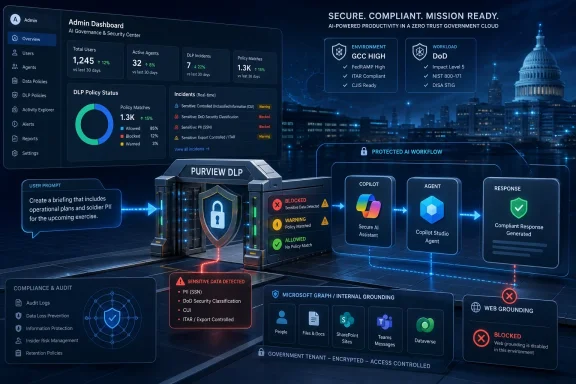 Microsoft Moves the DLP Boundary From Files to Prompts
For two decades, enterprise data loss prevention has mostly been a system of gates around documents, emails, endpoints, and sharing actions. A user tries to send a spreadsheet containing regulated data, upload a file to the wrong place, paste a customer record into an unmanaged service, or share a labeled document too broadly; the policy engine inspects the content or metadata and warns, blocks, audits, or allows. That model still matters, but generative AI has exposed a weakness in its center: the sensitive object is no longer always a file.Sometimes the sensitive object is a prompt.
Microsoft’s roadmap item is aimed directly at that problem. The company says it is expanding Microsoft Purview DLP for Microsoft 365 Copilot to safeguard prompts containing sensitive data, with a real-time control designed to mitigate data leakage and oversharing risks. When configured policies detect sensitive data in a prompt, Microsoft 365 Copilot and agents built in Copilot Studio and published to Microsoft 365 Copilot can be prevented from returning a response or from using that sensitive prompt data for grounding in Microsoft 365 or on the web.
That last clause is the hinge. Copilot is not merely a chatbot that takes a prompt and emits prose. In Microsoft’s own support explanation, Copilot answers by grounding responses in contextual data sources: work data such as emails, files, chats, meetings, and sites through Microsoft Graph, and, where enabled, public web content. A sensitive prompt can therefore become a retrieval instruction, a search seed, a summarization request, or a bridge between internal and external context. DLP at the prompt layer is Microsoft’s attempt to intercept the risky moment before Copilot turns a user’s words into a chain of data operations.
For government clouds, this matters more than it first appears. GCC, GCC High, and DoD tenants are not simply commercial Microsoft 365 tenants with more cautious branding. They exist because agencies, contractors, and public-sector organizations face stricter requirements around data residency, regulated information, defense-related data, and operational isolation. Microsoft Learn describes Microsoft 365 Copilot as available in GCC, GCC High, and DoD, operating within the customer’s U.S. government cloud tenant and inheriting the controls of the underlying environment. But inheritance is not the same as correct configuration, and sovereignty is not a substitute for policy.
The Copilot problem for public-sector IT is therefore brutally practical: users are being encouraged to ask an AI assistant to reason across the same Microsoft 365 estate that security teams have spent years labeling, segmenting, auditing, and remediating. The better Copilot gets, the more likely it is to be used for precisely the workflows that involve sensitive material: contract summaries, case notes, citizen services, procurement, investigations, personnel actions, and operational planning. Prompt-level DLP is Microsoft acknowledging that AI governance cannot live only in the storage layer.
Roadmap ID 561892 Is a Small Entry With a Large Blast Radius
The metadata is spare, but it says a lot. Microsoft 365 Roadmap ID 561892 is a Microsoft Purview feature for the Web platform, in the General Availability release ring, with cloud instances listed as GCC, GCC High, and DoD. Microsoft created the entry on May 11, 2026, listed general availability for June 2026, and last updated it on July 8, 2026. The status is “Rolling out.”Timeline
May 11, 2026 — Microsoft created Roadmap ID 561892 for Microsoft Purview DLP safeguards for Microsoft 365 Copilot prompts in government clouds.June 2026 — Microsoft listed the feature’s General Availability window for GCC, GCC High, and DoD cloud instances.
July 8, 2026 — Microsoft last updated the roadmap entry and continued to mark the feature as “Rolling out.”
The lack of drama in that roadmap language is typical Microsoft 365. Major security posture changes often arrive not as thunderclaps but as tenant-visible toggles, admin-center policies, documentation updates, and staggered service rollouts. That makes them easy to miss, especially in organizations where Copilot rollout teams, Purview administrators, security operations, records managers, and mission application owners do not all sit in the same meeting.
This is where the roadmap entry’s government-cloud scope becomes important. Microsoft’s commercial Copilot story has moved quickly: broader grounding, more agents, deeper Office integration, more model choice, more long-running work, and tighter links between Copilot Studio and Microsoft 365 Copilot. Government environments traditionally lag commercial releases because isolation and compliance requirements change the engineering, validation, and deployment path. So when a Copilot control lands explicitly for GCC, GCC High, and DoD, it is not just feature parity. It is a signal that Microsoft expects regulated tenants to adopt AI assistants and agents as normal business infrastructure, not as side experiments.
The rollout also lands in the middle of a broader security conversation around enterprise AI. Microsoft’s own security blog has framed Purview DLP for Copilot interactions as a way to restrict processing when prompts contain sensitive information types, halt grounding, and show the user that the request cannot be completed because of policy. Microsoft Learn also documents related controls: restricting web search when prompts contain sensitive information, blocking sensitive prompts from being processed, preventing labeled files and emails from being used in responses, and excluding certain external email content from grounding in preview. The roadmap item for government clouds fits into that larger architecture, but it narrows the focus to one of the riskiest user behaviors: placing sensitive data directly into a prompt.
Security outlets have been covering the uncomfortable flipside of that architecture. Reports about Copilot handling confidential mail, agent-related abuse, and prompt-injection-style data exposure have made clear that AI assistants can become an amplification layer for old governance problems. The most sober reading is not that Copilot is uniquely reckless; it is that Copilot makes stale permissions, weak labeling, and casual prompt behavior much more visible. A search interface may expose one bad document. An AI assistant can summarize it, combine it, rephrase it, and make it actionable.
That is why this roadmap item deserves more attention than a routine Microsoft 365 update. The feature is not glamorous, and it will not sell Copilot licenses by itself. But it addresses the precise gap many cautious IT leaders have been pointing at since Copilot’s enterprise launch: what stops a well-intentioned user from pasting regulated data into a prompt and asking an AI system to “analyze this”?
Government Clouds Need Guardrails That Match the Mission
Microsoft’s own government-cloud guidance draws a clear distinction among GCC, GCC High, and DoD. GCC is positioned for organizations that require U.S.-only data residency and FedRAMP Moderate-aligned controls, but do not handle categories such as ITAR, DFARS-regulated CUI, or DoD mission data. GCC High is for organizations handling Controlled Unclassified Information or working under requirements such as FedRAMP High, DFARS, or ITAR/EAR. DoD is for the Department of Defense and organizations supporting it where workloads must meet higher isolation expectations.| Cloud instance | Microsoft’s described fit | Why prompt DLP matters for Copilot |
|---|---|---|
| GCC | U.S. government customers needing U.S.-only data residency and FedRAMP Moderate-aligned controls | Prompts may include citizen, case, procurement, or internal operational data that should not drive unsafe grounding |
| GCC High | Organizations handling CUI or requirements tied to FedRAMP High, DFARS, ITAR/EAR, or stronger isolation | Sensitive prompts may touch regulated contractor, export-controlled, or controlled information workflows |
| DoD | Department of Defense and direct support workloads requiring the highest operational isolation among these environments | Prompt misuse can intersect with mission, operational, and defense-support data where policy enforcement must be explicit |
In a commercial organization, a risky Copilot prompt might expose sales forecasts, customer records, employee data, unreleased product plans, or privileged legal material. In a government or defense-support environment, the categories can be more consequential: controlled information, investigative material, citizen service records, procurement data, law-enforcement-sensitive information, emergency response planning, or operational context. The technology problem is similar, but the tolerance for ambiguity is lower.
Prompt-level DLP gives administrators a way to define certain classes of information as inappropriate for Copilot prompt processing. Microsoft describes the feature as preventing Copilot and published agents from returning a response when prompts contain sensitive data, or from using that sensitive data for grounding in Microsoft 365 or the web. That is not just a confidentiality control. It is also a behavioral control: it teaches users, through friction, that some data should not be handed to an assistant in raw form.
This is especially important because users often misunderstand where the line is. Many employees have absorbed the message that Microsoft 365 Copilot “respects permissions,” which is broadly true in the sense that Copilot grounds in content the user is authorized to access. But access is not the same as appropriateness. A user may have permission to view a file, yet still be barred by policy from copying its contents into a prompt, combining it with other data, or using it to generate a summary for a wider audience.
Government tenants live inside that distinction. Mission workers often need access to sensitive material to do their jobs. That does not mean every downstream transformation of that material is safe. Copilot makes transformation cheap, fast, and conversational. DLP has to follow.
The Real Risk Is Not the Model; It Is Grounding
Public AI debates still obsess over the model: which vendor trained it, whether it hallucinates, whether it memorized data, whether it is “secure.” In Microsoft 365 Copilot, the sharper enterprise risk often sits elsewhere. The powerful part of Copilot is grounding — the system’s ability to use organizational context and the web to produce a relevant answer.Grounding is why Copilot can be useful. It can draw from Microsoft Graph, identify documents, reason over emails, summarize conversations, and synthesize content that would otherwise require a user to open half a dozen apps. It is also why policy enforcement becomes harder. A prompt is no longer just input text; it is a steering mechanism for retrieval, summarization, and generation.
Microsoft’s DLP documentation separates several related controls. One policy path can restrict external web search when prompts contain sensitive information types, allowing Copilot to continue using permitted internal Microsoft 365 data sources. Another can restrict Copilot from processing sensitive prompts at all, preventing a response when the prompt contains specified sensitive information types. Another can stop Copilot from processing certain files and emails with sensitivity labels. The roadmap item for government clouds is specifically about safeguarding prompts containing sensitive data, and about preventing Copilot and published agents from returning a response or using that sensitive data for grounding in Microsoft 365 or the web.
That distinction matters for administrators. Blocking web grounding is not the same as blocking prompt processing. Blocking processing of a labeled file is not the same as blocking a user from typing sensitive information into the prompt box. Excluding an external email from grounding is not the same as detecting sensitive information types in the user’s prompt. These are complementary controls, not interchangeable ones.
The operational challenge is that users do not think in those categories. They think in tasks. “Summarize this complaint.” “Draft a response using these details.” “Compare this vendor submission with our policy.” “Find related emails and make a timeline.” “Rewrite this incident narrative for leadership.” Those are normal productivity requests. They can also contain Social Security numbers, passport numbers, credit card numbers, case identifiers, health information, personnel details, export-controlled terminology, or organization-specific sensitive information types.
This is why the policy needs to sit close to the prompt. If a user pastes sensitive material into the chat box, the system should not wait until after Copilot has retrieved additional content, grounded against internal files, generated a response, and possibly cited sources. The safest enforcement point is before the assistant turns the prompt into work.
The phrase real-time control is doing important work here. A policy that only discovers risky prompts after the fact is an audit tool. Useful, but late. A policy that blocks a response or grounding at prompt time changes the interaction while the user is still in the decision loop. For regulated tenants, that is the difference between “we can investigate what happened” and “we reduced the chance it happened in the first place.”
Agents Make the Policy Surface Bigger
The roadmap entry’s inclusion of agents built in Copilot Studio and published to Microsoft 365 Copilot is not a footnote. It is the future arriving early.Microsoft’s Copilot strategy is no longer limited to a general-purpose assistant in a chat pane. The company is pushing agents into workflows: agents that connect to business systems, operate in Microsoft 365 Copilot, use enterprise data, and help users complete multi-step tasks. Copilot Studio is the low-code and pro-code path for building many of those agents. Once agents are published to Microsoft 365 Copilot, they can become part of the same conversational workspace employees use for everyday work.
That changes the governance problem. A user chatting with Microsoft 365 Copilot is one policy surface. A user invoking a purpose-built agent that can reason over SharePoint content, business data, workflows, or domain-specific instructions is a larger one. The agent may feel narrower and safer because it has a defined job. In practice, narrow agents can create concentrated risk if they are built around sensitive processes.
Consider the difference between a general prompt and an agent-assisted workflow. A user might ask Copilot to summarize a file containing sensitive information. That is a direct interaction. But a Copilot Studio agent might be designed to triage claims, analyze procurement exceptions, draft compliance responses, or prepare internal reports. The sensitive prompt may be wrapped in a business process, enriched by connectors, and grounded against a curated knowledge source. The user may not even think of it as “chatting with AI.” They may think of it as using an internal tool.
Microsoft’s decision to include published Copilot Studio agents in the scope therefore matters. If DLP stopped at the front door of Microsoft 365 Copilot but did not follow agents into the same user experience, agencies would be left with a split-brain governance model: secure the generic assistant, then hope every agent builder independently recreated equivalent controls. That would not scale.
The harder truth is that agent builders are now part of the data governance supply chain. A department that builds an agent is not just automating a workflow; it is creating a new interface to sensitive data. Purview policies can help centralize enforcement, but they do not eliminate the need for agent review, least-privilege design, test data, logging, and change control. DLP can block known sensitive information types in prompts. It cannot decide whether an agency’s entire agent concept is appropriate.
For Windows and Microsoft 365 administrators, this is where the job description expands again. The same teams already juggling endpoint security, identity, SharePoint permissions, Exchange policies, Intune baselines, Defender alerts, and compliance workflows now have to understand how AI agents consume and generate organizational context. The roadmap item is welcome because it gives them another control. It is also a reminder that Copilot governance is becoming a platform discipline, not a feature setting.
The Control Helps, But It Does Not Magically Fix Oversharing
Microsoft’s phrasing is careful: the feature helps organizations mitigate data leakage and oversharing risks. That is the right verb. Mitigate, not solve.DLP is only as good as the data definitions and policies behind it. If an organization has not mapped its sensitive information types, built custom classifiers where needed, deployed sensitivity labels, cleaned up overshared SharePoint sites, and rationalized permissions, prompt-level DLP will catch some obvious problems and miss others. A Social Security number is relatively easy to detect. A sensitive operational nickname, a case-specific phrase, a controlled project codename, or a paragraph whose sensitivity depends on context may require custom work.
Microsoft Purview gives organizations tools for classification, sensitivity labels, data loss prevention, insider risk management, communication compliance, and related controls. Microsoft Learn’s Copilot Studio guidance emphasizes classification as a first step and notes that Purview DLP can help identify sensitive items across Microsoft 365 services and endpoints. That framing is important because Copilot security does not begin with Copilot. It begins with knowing what the organization’s sensitive data is and where it lives.
Many Copilot readiness projects have discovered an ugly truth: the permissions model was technically working before Copilot, but socially broken. Users had access to too much content, sites had accumulated broad groups, old files were still indexed, and “security through obscurity” hid the problem because no one had an easy way to find everything. Copilot changes that. It does not need to break permissions to surface overshared information. It only needs to make permitted discovery easier.
Prompt DLP addresses a different, overlapping risk: sensitive information supplied by the user during the interaction. That could include pasted text, numbers, names, snippets, or structured data. If blocked, the user receives no useful AI output for that request, which is precisely the point. But the control does not retroactively fix the libraries Copilot can access, the labels users failed to apply, or the agents that were built with overly broad knowledge sources.
There is also a user-experience tradeoff. If policies are too loose, they will not reduce enough risk. If they are too strict, users will route around them, sanitize data badly, take work to unmanaged tools, or abandon legitimate AI use cases. Government tenants are familiar with this tension from email DLP and endpoint controls. AI adds a new wrinkle: the user may be in the middle of a complex reasoning task, not a simple send or upload action, when the block occurs.
Good policy design will therefore need stages. Start in simulation where appropriate. Review matches and false positives. Tune sensitive information types. Use custom SITs for mission-specific data. Write user-facing policy messages that explain what happened without training users to evade detection. Coordinate with records, legal, privacy, and mission owners. Then enforce. A Copilot DLP policy is not a one-time switch; it is an operating model.
Web Grounding Is the Awkward Edge of the Enterprise Boundary
The phrase “using that sensitive data for grounding in Microsoft 365 or the web” deserves special scrutiny. Internal grounding and web grounding are both useful, but they create different risk conversations.Internal Microsoft 365 grounding happens within the tenant’s work context and permissions model. That does not make it risk-free, but it sits inside the governance environment administrators can inspect and configure. Web grounding, by contrast, brings public information into the answer and may involve search queries derived from the user’s prompt. Microsoft’s support material explains that work or school Copilot can use web grounding when enabled by the admin, and that admins can turn it off. Microsoft’s DLP documentation separately describes controls to prevent Copilot from sending sensitive information to external web search providers when prompts contain sensitive information types.
For government tenants, that boundary is politically and operationally sensitive. A public-sector user asking Copilot to “compare this internal incident note with public guidance” may be doing a reasonable task. But if the prompt includes sensitive details, those details should not become part of an external grounding pathway. The roadmap feature’s language indicates Microsoft is giving admins a way to stop sensitive prompt data from being used for grounding in Microsoft 365 or the web, and to prevent a response when policy says the prompt should not be processed.
That is stronger than merely trusting users to remove sensitive parts. In real workflows, users paste too much. They include unnecessary names, identifiers, case details, and source text because AI systems reward context. The better the model, the more users learn that “more context” produces better answers. DLP has to counterbalance that incentive by saying: this kind of context cannot be used here.
The web angle also highlights why Copilot governance cannot be reduced to data residency. Microsoft 365 Copilot in government clouds may operate within the government tenant, and prompts, responses, and generated content may remain within that environment according to Microsoft’s government-cloud guidance. But the policy concern around web grounding is about what the assistant is allowed to use as a grounding source and whether sensitive prompt material can influence that process. Residency answers one question. DLP answers another.
This is where security teams should resist simplistic assurances. “Copilot runs in our tenant” is useful. “Copilot respects permissions” is useful. “Copilot does not train public models on our company data” is useful. None of those statements means every prompt is safe, every grounding path is appropriate, or every agent should process every category of sensitive data. The roadmap item exists because Microsoft knows those controls need to be explicit.
What Admins Should Actually Do Before the Rollout Passes Them By
For organizations in GCC, GCC High, and DoD, the worst response to Roadmap ID 561892 would be to wait for a user complaint and then discover that nobody owns Copilot DLP policy design. Rolling out does not mean fully deployed everywhere at the same instant, and Microsoft 365 features can appear across tenants on staggered schedules. But the planning work does not need to wait.Action checklist for admins
- Confirm whether Roadmap ID 561892 has reached the tenant and document the rollout status for GCC, GCC High, or DoD environments in scope.
- Inventory existing Microsoft Purview DLP policies and identify which sensitive information types should block Copilot prompt processing.
- Review custom sensitive information types for agency-specific identifiers, regulated project terms, controlled data patterns, or mission-specific content.
- Test policies against Microsoft 365 Copilot and published Copilot Studio agents before broad enforcement.
- Coordinate with Copilot Studio owners so agents published to Microsoft 365 Copilot are reviewed for sensitive prompt and grounding behavior.
- Create user-facing guidance that explains why certain prompts are blocked and how to request approved workflows for sensitive use cases.
The second question is classification maturity. Built-in sensitive information types can catch common regulated data, but government organizations often have local patterns that matter just as much. Contract numbers, case formats, project names, facility identifiers, operational labels, or internal classification conventions may not be adequately represented by default. Purview can support custom sensitive information types, but someone has to define and test them.
The third question is where to enforce versus where to educate. Some prompt categories should be blocked outright. Others might be allowed with internal grounding but not web grounding. Others might be safe only in a dedicated agent with constrained knowledge sources and reviewed outputs. Microsoft’s DLP model provides levers, but policy teams need to map those levers to real workflows rather than abstract risk statements.
The fourth question is agent lifecycle. Published Copilot Studio agents should be treated like applications with data access, not like clever macros. They need owners, approved knowledge sources, testing against DLP policies, documentation, monitoring, and retirement plans. A prompt DLP feature that covers published agents is valuable, but it is only one layer in agent governance.
Finally, organizations should prepare for false positives and user frustration. When Copilot refuses to process a prompt, the user’s immediate reaction may be to remove the detected string and try again. Sometimes that is fine. Sometimes it is an attempted workaround. Policy messages should be clear enough to guide users toward approved alternatives, not vague enough to encourage guessing games.
Microsoft’s Quiet Admission: AI Security Is Now a Workflow Problem
There is an implicit admission in this rollout. Microsoft is not treating AI safety for Microsoft 365 Copilot as a model-only issue, a privacy FAQ, or a permission inheritance story. It is embedding controls into the workflow where the user, the data, the grounding system, and the agent meet.That is the right architectural direction. It is also messier than marketing suggests. Enterprise AI does not fit cleanly into older security categories. It is partly search, partly automation, partly authoring, partly analytics, partly application platform, and partly user interface. A sensitive prompt may be a data leak, a policy violation, a retrieval instruction, or the beginning of an automated workflow. Sometimes it is all four.
Microsoft Purview is the obvious place for Microsoft to put the control because Purview already carries the company’s compliance and data-governance story. But Purview’s success in Copilot scenarios will depend on whether organizations can translate existing data policies into AI-era behaviors. Traditional DLP might say, “Do not email this data externally.” Copilot DLP has to say, “Do not let this data be used in this kind of reasoning request, by this assistant or this agent, with these grounding sources.”
That is a more nuanced policy universe.
It also changes what “AI readiness” should mean. Many readiness discussions focus on licensing, training, prompt libraries, champion networks, and productivity wins. Those matter. But for government tenants, readiness must also include sensitivity labels, DLP policy coverage, SharePoint permission hygiene, agent governance, audit workflows, and incident response paths for AI interactions. If the organization cannot explain what happens when a user pastes sensitive data into Copilot, it is not ready for broad Copilot deployment.
The roadmap item should therefore be read less as a finish line and more as a control plane expansion. Microsoft is giving government-cloud customers another enforcement point. The burden now shifts to tenants to use it intelligently.
The Practical Read for WindowsForum Admins
For WindowsForum readers who live in the day-to-day world of Microsoft estates, this is the concrete version of the story: Copilot governance is becoming part of normal Microsoft 365 administration, and government-cloud tenants are getting a prompt-level DLP control that should be reviewed immediately rather than discovered during an audit.- Roadmap ID 561892 is for Microsoft Purview DLP safeguards for Microsoft 365 Copilot prompts in GCC, GCC High, and DoD.
- The feature is marked “Rolling out,” with General Availability listed for June 2026 and the last roadmap update on July 8, 2026.
- The control can prevent Microsoft 365 Copilot and eligible published Copilot Studio agents from returning a response when prompts contain sensitive data.
- Microsoft says the same capability can prevent sensitive prompt data from being used for grounding in Microsoft 365 or the web.
- The feature does not replace sensitivity labeling, permission cleanup, agent review, or broader Purview governance.
- Admins should treat prompt-level DLP as a required Copilot deployment control, not an optional compliance enhancement.
Microsoft’s rollout of Purview DLP safeguards for Microsoft 365 Copilot prompts in government clouds is not the final answer to AI data leakage, but it is the kind of control the platform needs more of: close to the user, aware of sensitive data, applicable to agents, and tied into the governance stack administrators already use. The next phase will be less about whether Microsoft can expose enough switches and more about whether agencies and contractors can build the discipline to operate them before Copilot and its agents become just another assumed part of the workday.
References
- Primary source: Microsoft 365 Roadmap
Published: 2026-07-08T23:11:07.7961302Z
Microsoft 365 Roadmap | Microsoft 365
The Microsoft 365 Roadmap lists updates that are currently planned for applicable subscribers. Check here for more information on the status of new features and updates.www.microsoft.com
- Official source: support.microsoft.com
What information does Copilot use to answer my prompt? | Microsoft Support
Learn what information Copilot uses to answer your prompts.support.microsoft.com - Official source: learn.microsoft.com
Understand Microsoft U.S. government cloud environments for Microsoft 365 and Microsoft 365 Copilot | Microsoft Learn
Get an overview of how Microsoft government clouds evolved, why different government cloud environments exist, when to use each environment, and how Microsoft 365 and Microsoft 365 Copilot differ across government cloud subscriptions.learn.microsoft.com - Official source: techcommunity.microsoft.com
- Official source: adoption.microsoft.com
Microsoft 365 Copilot for US Government – Microsoft Adoption
Microsoft 365 Copilot for US Government leverages large language models (LLMs) with your organization’s data to enhance productivity for government entities. It integrates seamlessly with Microsoft 365 apps like Word, Excel, PowerPoint, Outlook, and Teams, offering real-time intelligent...adoption.microsoft.com - Related coverage: techradar.com
Microsoft 365 Copilot can be turned into a one-click data theft tool — inbox, OneDrive, and SharePoint data all at risk, so patch now | TechRadar
Varonis found a way to chain three bugs into one exploitwww.techradar.com
- Related coverage: tomsguide.com
Microsoft confirms Copilot bug let its AI read sensitive and confidential emails | Tom's Guide
Microsoft confirmed a bug in Copilot was letting the AI assistant read and summarize confidential emails.www.tomsguide.com - Related coverage: catalogartifact.azureedge.net
- Official source: pulse.microsoft.com