

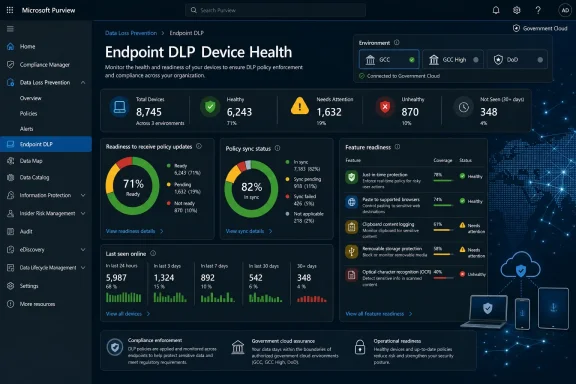
Microsoft is preparing a Microsoft Purview Endpoint Data Loss Prevention device health reporting dashboard for General Availability in July 2026, giving government cloud administrators a web-based view of whether enrolled endpoints are healthy enough to receive and enforce DLP policy updates. The feature, listed under Microsoft 365 Roadmap ID 561033, is small in user-interface terms but significant in operational meaning. Microsoft is not merely adding another compliance chart; it is admitting that endpoint DLP only works when the endpoint estate itself is measurable. For Windows admins, security teams, and compliance officers, that shifts Purview from policy authoring toward fleet readiness.
Endpoint Data Loss Prevention has always sounded like a policy problem. Define sensitive information types, scope users and groups, choose whether to audit or block, and wait for the compliance console to tell you what happened. That description is tidy, reassuring, and incomplete.
The real world is messier. A policy cannot protect data on a laptop that has not checked in, a device with stale Defender components, a machine with broken configuration, or an endpoint that is technically onboarded but not actually ready for a new feature. In those cases, the DLP rule may be correct, the compliance intent may be clear, and the audit report may still leave a blind spot exactly where the organization most needs assurance.
The new dashboard matters because it gives administrators a first-party place to see those weak points before a data protection rollout depends on them. Microsoft describes the dashboard as a way to view device health across all devices, ensure systems are healthy and ready to receive policy updates, and quickly identify devices that are not ready. That language is plain, almost understated, but it marks a useful change in emphasis.
For years, security products have sold themselves on detection and enforcement. Increasingly, the hard work is proving that the control plane can actually reach the devices it claims to govern. The Purview dashboard is part of that larger move from theoretical coverage to operational evidence.
That government-cloud focus is important. GCC, GCC High, and DoD tenants often live with stricter change windows, more conservative feature exposure, and longer internal validation cycles. A dashboard that says which endpoints are ready for policy updates may be useful everywhere, but it is especially valuable in environments where “we deployed the policy” is not enough. Administrators need to show that machines were onboarded, reporting, recently seen, and technically prepared for the enforcement expected of them.
The timing also matters because Microsoft has been expanding Purview from a compliance portal into a broader data security platform. Endpoint DLP is no longer just a checkbox beside Exchange, SharePoint, and Teams. It reaches into user devices, browsers, removable storage, printing, clipboard activity, and application behavior. That expansion makes endpoint health a dependency, not an implementation detail.
The roadmap item was created on April 27, 2026, and last updated on July 1, 2026, just ahead of the listed July 2026 availability window. Roadmap dates can slip, and “General Availability” on a roadmap does not always mean every tenant sees the feature on the first day of the month. Still, the late update suggests Microsoft is actively steering the feature toward release rather than leaving it as a stale placeholder.
Before this kind of dashboard, troubleshooting Endpoint DLP readiness often meant moving between device onboarding views, policy status reports, Defender data, exported device lists, and Advanced Hunting queries. Capable security teams could stitch those signals together, but that work favored mature organizations with KQL skills, dedicated analysts, and time to build their own reporting layer. Smaller teams often discovered readiness issues only after a policy did not behave as expected.
The dashboard appears designed to compress that work into a more direct administrative loop. Microsoft’s documentation describes a centralized view of device onboarding status, policy update readiness, feature readiness, and recent device activity. It also says the dashboard displays devices that reported within the past 30 days and updates hourly. Those two details are crucial: this is not a historical compliance report so much as a near-operational health view.
That does not make it a magic fix. A device appearing as unhealthy still requires someone to remediate the cause. The dashboard will not negotiate with a laptop that has been offline for weeks, fix a broken configuration profile, or update Defender components across a neglected fleet. But it can make failure visible earlier, and in security operations that is often the difference between a controlled rollout and a post-incident scramble.
A modern DLP policy depends on a chain of assumptions. The device must be onboarded. It must be reporting telemetry. It must have required Defender components available and sufficiently current. The signed-in user must be valid and in scope. The device must be able to receive policy changes. If a feature such as just-in-time protection or paste restrictions for supported browsers has version or configuration prerequisites, those prerequisites must be met before the control can be trusted.
This is why policy sync is not an administrative footnote. In Microsoft’s Endpoint DLP model, policy sync status tells whether a device has received the latest policy version or whether the relevant policies have synced successfully. Configuration status indicates whether the device is correctly configured and, for Windows devices, includes dependencies such as Defender Antivirus always-on protection and behavior monitoring. A DLP deployment that ignores those signals is measuring intent rather than enforcement.
For WindowsForum readers, this is familiar territory. The most painful endpoint problems are rarely the spectacular ones. They are the dull mismatches between what the cloud console thinks exists and what the device fleet is actually doing. Endpoint DLP simply raises the stakes, because the gap is not only an inventory problem; it is a data protection problem.
That matters in hybrid and remote work environments. A laptop can be legitimately assigned, occasionally used, and still be absent from the network often enough to miss policy updates. A contractor machine may appear in inventory but not behave like a managed corporate endpoint. A field device may have intermittent connectivity that turns DLP enforcement into a best-effort proposition.
The last-seen data does not prove noncompliance by itself. A machine offline for a week may be in a drawer, in repair, or assigned to an employee on leave. But as a risk signal, it is hard to beat. A policy rollout scheduled for Friday afternoon looks very different if a meaningful percentage of the target fleet has not reported since Monday.
This is where the dashboard could help bridge security and endpoint management teams. Compliance administrators may own the DLP policy, but endpoint administrators often own the state that makes the policy work. A shared view of stale devices, invalid configurations, and readiness blockers gives both sides a common operational language.
Earlier generations of DLP were largely about content inspection and policy action. Does the file contain sensitive data? Is the user trying to send it somewhere prohibited? Should the system audit, warn, or block? Endpoint DLP now has to account for richer behaviors, browser support, local file activity, user prompts, classification, and integrations with other Microsoft security components.
That makes readiness more granular. A device may be ready for baseline monitoring but not ready for a newer enforcement feature. Another may be onboarded and syncing policies but blocked from using a specific capability because a component version is too old. Treating the device as simply “covered” or “not covered” no longer captures the operational truth.
The dashboard’s feature-readiness view should help admins avoid the classic rollout trap: enabling a new control because the policy interface allows it, only to discover that a chunk of the fleet cannot support it. In highly regulated tenants, that discovery is not merely annoying. It can undermine an entire control narrative.
The device health dashboard reinforces that convergence. Endpoint DLP health depends on signals and components familiar to Defender administrators: device telemetry, Defender Antivirus versions, behavior monitoring, device IDs, and Advanced Hunting data. Microsoft’s documentation for troubleshooting Endpoint DLP points admins toward the DeviceInfo table and the DlpInfo column, where DLP-related device attributes can be queried at scale.
That is a healthy direction, but it also reveals Microsoft’s platform complexity. A compliance administrator may start in Purview, follow device health evidence into Defender, use KQL to inspect device attributes, and then depend on Intune or another management path to remediate the endpoint. The dashboard does not erase those boundaries. It gives the admin a better starting map.
For large Microsoft 365 estates, that map is valuable. For smaller teams, it may still feel like a tour of Microsoft’s administrative sprawl. The ideal outcome would be a dashboard that not only identifies unhealthy devices but also makes the remediation path obvious, with enough detail to prevent a support ticket from becoming a scavenger hunt.
Admins should resist the urge to turn the dashboard into a green-check compliance artifact without context. Endpoint DLP is probabilistic in the operational sense. It depends on device state, user context, supported applications, browser behavior, classification fidelity, policy design, and enforcement mode. The dashboard can improve confidence in the endpoint foundation, but it cannot validate the entire data-loss-prevention program.
There is also a reporting risk. Dashboards tend to create pressure for executive-friendly metrics, and executive-friendly metrics tend to flatten nuance. “Ninety-six percent of devices are ready” sounds excellent until the missing four percent belong to high-risk users, privileged administrators, finance staff, legal teams, or developers with access to sensitive repositories.
The right use of the dashboard is therefore not just percentage watching. It should become part of a risk-based operating rhythm: which devices are unhealthy, who uses them, what data do they touch, and what policy changes are coming next? That is where the dashboard can move from telemetry to governance.
Consider a tenant preparing to enable stricter controls around copying sensitive content into browsers or moving labeled files to removable media. In a commercial environment, a team might pilot with a group, watch alerts, and tune. In a government tenant, the same change may require more formal pre-deployment evidence: affected devices, readiness gaps, known exceptions, and remediation status.
That is where device health reporting can become a procedural asset. It gives administrators a way to say not only “the policy exists,” but “the target devices were checked for readiness before enforcement was expanded.” The difference matters to auditors, but it also matters to the help desk, because unsupported or unhealthy endpoints are where user disruption tends to concentrate.
The dashboard may also reduce the tendency to over-delay DLP deployments. Security teams sometimes postpone stronger enforcement because they do not trust endpoint readiness. Better visibility can cut both ways: it exposes risk, but it also identifies where the risk is bounded enough to proceed.
The strongest version of this feature would let admins filter by device group, platform, policy scope, user risk, last-seen interval, Defender version, configuration state, and feature readiness. It would preserve context when moving from aggregate chart to device list. It would make it easy to export or query the same dataset for reporting. It would distinguish between devices that are temporarily offline and devices that are chronically unhealthy.
The weaker version would be a pleasant portal view that confirms what Advanced Hunting could already reveal, but with less flexibility. That would still help less mature tenants, but it would underserve enterprise teams that need automation and integration. Microsoft’s documentation suggests the underlying attributes are available through Defender Advanced Hunting, which is encouraging. The best administrative experiences let the portal and query layer reinforce each other.
There is also the question of macOS visibility. Microsoft’s Endpoint DLP story includes both Windows and macOS, but Windows dependencies remain especially prominent because of Defender and operating-system integration. Admins will need to verify how evenly the dashboard represents mixed fleets and whether feature readiness has platform-specific caveats. In many organizations, the highest-risk data users are not neatly confined to one operating system.
Microsoft has an advantage here because so much of the enterprise endpoint and productivity stack sits under its roof. It can correlate Purview policy, Defender telemetry, Entra identity, Intune management, and Microsoft 365 activity in ways that third-party tools may struggle to match. But that advantage comes with responsibility. If Microsoft is the platform of record for data security, administrators need clear, timely, and explainable signals when the platform cannot enforce what it promised.
The device health dashboard is a modest answer to that responsibility. It does not redesign Endpoint DLP. It does not simplify Purview licensing. It does not eliminate the need for testing, pilots, communication, or exception handling. What it does is bring readiness into the same conversation as policy.
That is exactly where readiness belongs. A DLP policy that cannot reach a device is not a policy in any meaningful operational sense. It is an aspiration stored in the cloud.
 Microsoft Turns DLP Into an Operations Problem
Endpoint Data Loss Prevention has always sounded like a policy problem. Define sensitive information types, scope users and groups, choose whether to audit or block, and wait for the compliance console to tell you what happened. That description is tidy, reassuring, and incomplete.The real world is messier. A policy cannot protect data on a laptop that has not checked in, a device with stale Defender components, a machine with broken configuration, or an endpoint that is technically onboarded but not actually ready for a new feature. In those cases, the DLP rule may be correct, the compliance intent may be clear, and the audit report may still leave a blind spot exactly where the organization most needs assurance.
The new dashboard matters because it gives administrators a first-party place to see those weak points before a data protection rollout depends on them. Microsoft describes the dashboard as a way to view device health across all devices, ensure systems are healthy and ready to receive policy updates, and quickly identify devices that are not ready. That language is plain, almost understated, but it marks a useful change in emphasis.
For years, security products have sold themselves on detection and enforcement. Increasingly, the hard work is proving that the control plane can actually reach the devices it claims to govern. The Purview dashboard is part of that larger move from theoretical coverage to operational evidence.
The July 2026 Date Puts Government Tenants First
The roadmap entry is marked “In development,” with General Availability planned for July 2026. The listed cloud instances are GCC, GCC High, and DoD, which makes the audience unusually specific. This is not being framed first as a commercial tenant convenience feature; it is aimed at the parts of Microsoft 365 where auditability, policy readiness, and administrative evidence tend to carry extra weight.That government-cloud focus is important. GCC, GCC High, and DoD tenants often live with stricter change windows, more conservative feature exposure, and longer internal validation cycles. A dashboard that says which endpoints are ready for policy updates may be useful everywhere, but it is especially valuable in environments where “we deployed the policy” is not enough. Administrators need to show that machines were onboarded, reporting, recently seen, and technically prepared for the enforcement expected of them.
The timing also matters because Microsoft has been expanding Purview from a compliance portal into a broader data security platform. Endpoint DLP is no longer just a checkbox beside Exchange, SharePoint, and Teams. It reaches into user devices, browsers, removable storage, printing, clipboard activity, and application behavior. That expansion makes endpoint health a dependency, not an implementation detail.
The roadmap item was created on April 27, 2026, and last updated on July 1, 2026, just ahead of the listed July 2026 availability window. Roadmap dates can slip, and “General Availability” on a roadmap does not always mean every tenant sees the feature on the first day of the month. Still, the late update suggests Microsoft is actively steering the feature toward release rather than leaving it as a stale placeholder.
A Dashboard Is Not a Control, but It Changes the Control
There is a temptation to dismiss administrative dashboards as cosmetic. Many Microsoft 365 admins have seen enough portal cards, health widgets, and “improved experience” rollouts to greet another dashboard with a shrug. But visibility changes behavior when the thing being measured was previously hard to confirm at scale.Before this kind of dashboard, troubleshooting Endpoint DLP readiness often meant moving between device onboarding views, policy status reports, Defender data, exported device lists, and Advanced Hunting queries. Capable security teams could stitch those signals together, but that work favored mature organizations with KQL skills, dedicated analysts, and time to build their own reporting layer. Smaller teams often discovered readiness issues only after a policy did not behave as expected.
The dashboard appears designed to compress that work into a more direct administrative loop. Microsoft’s documentation describes a centralized view of device onboarding status, policy update readiness, feature readiness, and recent device activity. It also says the dashboard displays devices that reported within the past 30 days and updates hourly. Those two details are crucial: this is not a historical compliance report so much as a near-operational health view.
That does not make it a magic fix. A device appearing as unhealthy still requires someone to remediate the cause. The dashboard will not negotiate with a laptop that has been offline for weeks, fix a broken configuration profile, or update Defender components across a neglected fleet. But it can make failure visible earlier, and in security operations that is often the difference between a controlled rollout and a post-incident scramble.
Endpoint DLP Lives or Dies on Boring Prerequisites
The most interesting part of the feature is not the dashboard itself. It is what Microsoft has chosen to surface. Device onboarding, readiness to receive policy updates, last-seen-online data, and feature readiness are all mundane compared with the dramatic language of data exfiltration and insider risk. They are also exactly where DLP programs tend to fail.A modern DLP policy depends on a chain of assumptions. The device must be onboarded. It must be reporting telemetry. It must have required Defender components available and sufficiently current. The signed-in user must be valid and in scope. The device must be able to receive policy changes. If a feature such as just-in-time protection or paste restrictions for supported browsers has version or configuration prerequisites, those prerequisites must be met before the control can be trusted.
This is why policy sync is not an administrative footnote. In Microsoft’s Endpoint DLP model, policy sync status tells whether a device has received the latest policy version or whether the relevant policies have synced successfully. Configuration status indicates whether the device is correctly configured and, for Windows devices, includes dependencies such as Defender Antivirus always-on protection and behavior monitoring. A DLP deployment that ignores those signals is measuring intent rather than enforcement.
For WindowsForum readers, this is familiar territory. The most painful endpoint problems are rarely the spectacular ones. They are the dull mismatches between what the cloud console thinks exists and what the device fleet is actually doing. Endpoint DLP simply raises the stakes, because the gap is not only an inventory problem; it is a data protection problem.
The New View Makes Stale Devices Harder to Ignore
The dashboard’s “last time devices were seen online” view may prove more valuable than it sounds. Devices are reportedly grouped by recency, including those seen in the last 24 hours, past three days, past seven days, and past 30 days. That framing nudges administrators away from a binary onboarded/not-onboarded mindset and toward a more useful question: how fresh is the signal?That matters in hybrid and remote work environments. A laptop can be legitimately assigned, occasionally used, and still be absent from the network often enough to miss policy updates. A contractor machine may appear in inventory but not behave like a managed corporate endpoint. A field device may have intermittent connectivity that turns DLP enforcement into a best-effort proposition.
The last-seen data does not prove noncompliance by itself. A machine offline for a week may be in a drawer, in repair, or assigned to an employee on leave. But as a risk signal, it is hard to beat. A policy rollout scheduled for Friday afternoon looks very different if a meaningful percentage of the target fleet has not reported since Monday.
This is where the dashboard could help bridge security and endpoint management teams. Compliance administrators may own the DLP policy, but endpoint administrators often own the state that makes the policy work. A shared view of stale devices, invalid configurations, and readiness blockers gives both sides a common operational language.
Feature Readiness Is Microsoft’s Quiet Admission That DLP Is Becoming Modular
One of the dashboard’s more forward-looking elements is feature readiness. Microsoft says the dashboard will show readiness for supported Endpoint DLP features, including just-in-time protection and paste to supported browsers, with additional features expected later. That is more than a convenience widget; it reflects the way Endpoint DLP is evolving.Earlier generations of DLP were largely about content inspection and policy action. Does the file contain sensitive data? Is the user trying to send it somewhere prohibited? Should the system audit, warn, or block? Endpoint DLP now has to account for richer behaviors, browser support, local file activity, user prompts, classification, and integrations with other Microsoft security components.
That makes readiness more granular. A device may be ready for baseline monitoring but not ready for a newer enforcement feature. Another may be onboarded and syncing policies but blocked from using a specific capability because a component version is too old. Treating the device as simply “covered” or “not covered” no longer captures the operational truth.
The dashboard’s feature-readiness view should help admins avoid the classic rollout trap: enabling a new control because the policy interface allows it, only to discover that a chunk of the fleet cannot support it. In highly regulated tenants, that discovery is not merely annoying. It can undermine an entire control narrative.
Purview Is Moving Closer to Defender’s Operational Model
Microsoft Purview and Microsoft Defender have long overlapped in practice, even when Microsoft presents them as distinct pillars. Purview owns compliance, information protection, records, eDiscovery, and DLP. Defender owns endpoint security, detection, response, and hunting. Endpoint DLP sits awkwardly but productively across that boundary.The device health dashboard reinforces that convergence. Endpoint DLP health depends on signals and components familiar to Defender administrators: device telemetry, Defender Antivirus versions, behavior monitoring, device IDs, and Advanced Hunting data. Microsoft’s documentation for troubleshooting Endpoint DLP points admins toward the DeviceInfo table and the DlpInfo column, where DLP-related device attributes can be queried at scale.
That is a healthy direction, but it also reveals Microsoft’s platform complexity. A compliance administrator may start in Purview, follow device health evidence into Defender, use KQL to inspect device attributes, and then depend on Intune or another management path to remediate the endpoint. The dashboard does not erase those boundaries. It gives the admin a better starting map.
For large Microsoft 365 estates, that map is valuable. For smaller teams, it may still feel like a tour of Microsoft’s administrative sprawl. The ideal outcome would be a dashboard that not only identifies unhealthy devices but also makes the remediation path obvious, with enough detail to prevent a support ticket from becoming a scavenger hunt.
The Risk Is Mistaking Visibility for Assurance
Microsoft’s phrasing is careful: the dashboard helps identify devices that may not be ready to receive future policy updates. That distinction matters. A readiness warning is not the same as proof that a policy failed, and a healthy dashboard tile is not the same as proof that every sensitive data movement will be stopped.Admins should resist the urge to turn the dashboard into a green-check compliance artifact without context. Endpoint DLP is probabilistic in the operational sense. It depends on device state, user context, supported applications, browser behavior, classification fidelity, policy design, and enforcement mode. The dashboard can improve confidence in the endpoint foundation, but it cannot validate the entire data-loss-prevention program.
There is also a reporting risk. Dashboards tend to create pressure for executive-friendly metrics, and executive-friendly metrics tend to flatten nuance. “Ninety-six percent of devices are ready” sounds excellent until the missing four percent belong to high-risk users, privileged administrators, finance staff, legal teams, or developers with access to sensitive repositories.
The right use of the dashboard is therefore not just percentage watching. It should become part of a risk-based operating rhythm: which devices are unhealthy, who uses them, what data do they touch, and what policy changes are coming next? That is where the dashboard can move from telemetry to governance.
Government Clouds Need Evidence, Not Just Enforcement
The GCC, GCC High, and DoD listing makes this feature particularly interesting. These environments often place a premium on controlled rollout, documented readiness, and defensible audit trails. A dashboard that shows policy update readiness and feature readiness gives admins a better basis for change management.Consider a tenant preparing to enable stricter controls around copying sensitive content into browsers or moving labeled files to removable media. In a commercial environment, a team might pilot with a group, watch alerts, and tune. In a government tenant, the same change may require more formal pre-deployment evidence: affected devices, readiness gaps, known exceptions, and remediation status.
That is where device health reporting can become a procedural asset. It gives administrators a way to say not only “the policy exists,” but “the target devices were checked for readiness before enforcement was expanded.” The difference matters to auditors, but it also matters to the help desk, because unsupported or unhealthy endpoints are where user disruption tends to concentrate.
The dashboard may also reduce the tendency to over-delay DLP deployments. Security teams sometimes postpone stronger enforcement because they do not trust endpoint readiness. Better visibility can cut both ways: it exposes risk, but it also identifies where the risk is bounded enough to proceed.
The Admin Experience Still Needs to Prove Itself
The roadmap description is promising, but the final experience will live or die by the details. Microsoft admin portals have a habit of offering useful data in ways that are almost, but not quite, operationally satisfying. A dashboard that requires too many clicks, hides export options, limits filtering, or fails to connect health findings to remediation guidance will become another occasional check rather than a daily tool.The strongest version of this feature would let admins filter by device group, platform, policy scope, user risk, last-seen interval, Defender version, configuration state, and feature readiness. It would preserve context when moving from aggregate chart to device list. It would make it easy to export or query the same dataset for reporting. It would distinguish between devices that are temporarily offline and devices that are chronically unhealthy.
The weaker version would be a pleasant portal view that confirms what Advanced Hunting could already reveal, but with less flexibility. That would still help less mature tenants, but it would underserve enterprise teams that need automation and integration. Microsoft’s documentation suggests the underlying attributes are available through Defender Advanced Hunting, which is encouraging. The best administrative experiences let the portal and query layer reinforce each other.
There is also the question of macOS visibility. Microsoft’s Endpoint DLP story includes both Windows and macOS, but Windows dependencies remain especially prominent because of Defender and operating-system integration. Admins will need to verify how evenly the dashboard represents mixed fleets and whether feature readiness has platform-specific caveats. In many organizations, the highest-risk data users are not neatly confined to one operating system.
A Small Roadmap Item Points to a Larger Compliance Shift
The Purview dashboard is part of a broader industry trend: compliance tools are becoming operational tools because static policy is no longer enough. Regulators, insurers, boards, and customers increasingly want to know not just whether controls exist, but whether they are deployed, current, monitored, and functioning. That creates pressure for security platforms to expose the health of the control plane itself.Microsoft has an advantage here because so much of the enterprise endpoint and productivity stack sits under its roof. It can correlate Purview policy, Defender telemetry, Entra identity, Intune management, and Microsoft 365 activity in ways that third-party tools may struggle to match. But that advantage comes with responsibility. If Microsoft is the platform of record for data security, administrators need clear, timely, and explainable signals when the platform cannot enforce what it promised.
The device health dashboard is a modest answer to that responsibility. It does not redesign Endpoint DLP. It does not simplify Purview licensing. It does not eliminate the need for testing, pilots, communication, or exception handling. What it does is bring readiness into the same conversation as policy.
That is exactly where readiness belongs. A DLP policy that cannot reach a device is not a policy in any meaningful operational sense. It is an aspiration stored in the cloud.
The July Dashboard Gives Admins a New Failure Surface to Watch
This release should be read less as a flashy feature and more as a practical maintenance instrument for Purview tenants preparing to rely on Endpoint DLP at scale. The concrete value is in reducing surprises before policy changes land on real devices.- The dashboard is scheduled for General Availability in July 2026 for GCC, GCC High, and DoD tenants.
- It is intended to show whether Endpoint DLP devices are onboarded, reporting, and ready to receive policy updates.
- It should help administrators identify devices at risk because of connectivity, configuration, or outdated component issues.
- Its feature-readiness view matters because newer Endpoint DLP capabilities may require specific device versions or settings before they can be trusted.
- It should be treated as an operational health signal, not as standalone proof that a DLP program is complete or effective.
- The most mature tenants will pair the dashboard with Advanced Hunting, endpoint management remediation, and change-management evidence.
References
- Primary source: Microsoft 365 Roadmap
Published: 2026-07-01T23:03:18.2442931Z
Microsoft 365 Roadmap | Microsoft 365
The Microsoft 365 Roadmap lists updates that are currently planned for applicable subscribers. Check here for more information on the status of new features and updates.www.microsoft.com
- Official source: learn.microsoft.com
Monitor Endpoint DLP Device Health in Microsoft Purview | Microsoft Learn
Use the Microsoft Purview device health reports dashboard to monitor device onboarding status, policy update readiness, and feature readiness for Endpoint DLP.learn.microsoft.com - Official source: cdn-dynmedia-1.microsoft.com
- Official source: techcommunity.microsoft.com
