

Microsoft has added a September 2026 target to a Microsoft 365 Roadmap entry for a Microsoft Purview Data Loss Prevention action that starts a custom Power Automate workflow when a DLP rule is matched. Roadmap ID 380721 remains listed as “In development,” with General Availability and Preview release phases for GCC, GCC High, and DoD tenants.
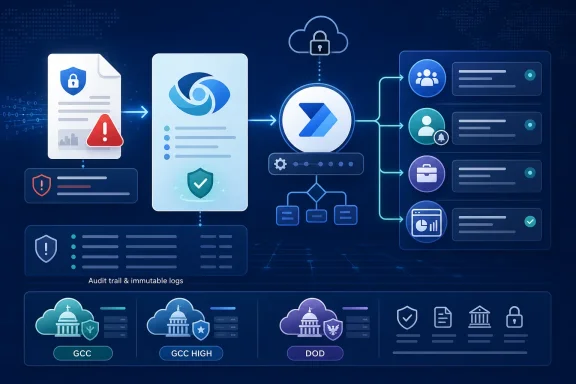
The change is aimed at turning a DLP detection into an operational workflow rather than limiting the response to blocking, policy tips, alerts, or incident reports. An organization could, for example, route a violation to a compliance queue, notify a manager, open a service-management case, or trigger a bespoke review and approval process.
Microsoft’s roadmap description is narrow: the new capability is a DLP rule action. It does not introduce new sensitive-information types, new endpoint controls, or a different way to classify content. Administrators will still define the policy conditions and locations in Purview; the matched rule can then invoke a selected Power Automate flow.
Microsoft’s Purview documentation already describes a similar Power Automate integration in which admins add Start a Power Automate workflow to a DLP rule, either selecting a template or using a custom flow built with the Microsoft Purview connector. Microsoft’s published template notifies the violating user’s manager and includes the user and policy name, while custom flows can use additional Power Automate connectors for downstream processes.
That documentation makes the roadmap timing somewhat unusual. The September 2026 date likely reflects availability or rollout work specifically for the government cloud instances named in the listing, rather than the first appearance of the integration across every Microsoft 365 tenant. Microsoft has not provided further public detail on the distinction in the roadmap entry.
There are constraints to account for before treating flows as a universal remediation mechanism:
Microsoft’s roadmap dates are targets rather than release commitments, so affected government-cloud tenants should expect further rollout detail closer to September 2026.
The change is aimed at turning a DLP detection into an operational workflow rather than limiting the response to blocking, policy tips, alerts, or incident reports. An organization could, for example, route a violation to a compliance queue, notify a manager, open a service-management case, or trigger a bespoke review and approval process.
 A rule action, not a new detection engine
Microsoft’s roadmap description is narrow: the new capability is a DLP rule action. It does not introduce new sensitive-information types, new endpoint controls, or a different way to classify content. Administrators will still define the policy conditions and locations in Purview; the matched rule can then invoke a selected Power Automate flow.Microsoft’s Purview documentation already describes a similar Power Automate integration in which admins add Start a Power Automate workflow to a DLP rule, either selecting a template or using a custom flow built with the Microsoft Purview connector. Microsoft’s published template notifies the violating user’s manager and includes the user and policy name, while custom flows can use additional Power Automate connectors for downstream processes.
That documentation makes the roadmap timing somewhat unusual. The September 2026 date likely reflects availability or rollout work specifically for the government cloud instances named in the listing, rather than the first appearance of the integration across every Microsoft 365 tenant. Microsoft has not provided further public detail on the distinction in the roadmap entry.
What admins should plan for
The practical value is in reducing manual triage after a DLP event. A rule can provide the signal, while Power Automate handles the organization-specific follow-up that Purview cannot know by itself. That can be useful where a DLP match requires a business owner’s review rather than an automatic hard block.There are constraints to account for before treating flows as a universal remediation mechanism:
- Power Automate workflows must be created and shared appropriately so other compliance administrators can select and manage them.
- For SharePoint and OneDrive, Microsoft says flows execute for newly created or modified content; existing files that already match a rule do not trigger the workflow.
- DLP rule ordering and enforcement still matter. Purview evaluates rules in priority order, and a workflow should complement—not replace—blocking, audit, notification, and incident-reporting decisions.
Microsoft’s roadmap dates are targets rather than release commitments, so affected government-cloud tenants should expect further rollout detail closer to September 2026.
References
- Primary source: Microsoft 365 Roadmap
Published: 2026-07-15T22:55:27.6639110Z
Loading…
www.microsoft.com - Official source: learn.microsoft.com
Loading…
learn.microsoft.com - Official source: cdn-dynmedia-1.microsoft.com
Slide 1: Microsoft Purview Data Governance Roadmap H1 CY2025
PDF documentcdn-dynmedia-1.microsoft.com