

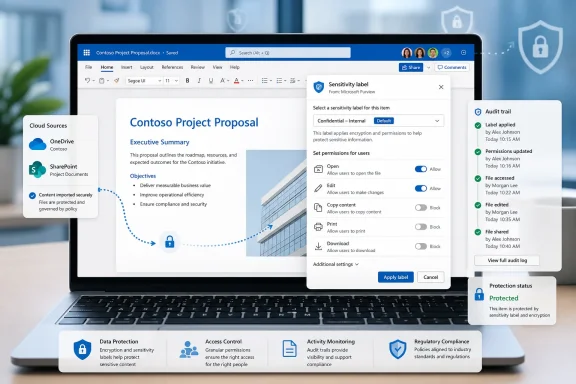
Microsoft has launched Microsoft Purview support for applying sensitivity labels with user-defined permissions in Office for the web across Word, Excel, and PowerPoint, bringing the feature to General Availability in April 2026 for commercial, GCC, GCC High, and DoD Microsoft 365 tenants. The change sounds narrow, almost administrative, but it closes one of the more awkward gaps in Microsoft’s long campaign to make browser-based Office a first-class workplace. Until now, a user could be trusted to edit a sensitive document in the web app, yet still be forced back to the desktop client to apply a label that asked them who should get access. That was not just a workflow nuisance; it was a governance contradiction.
For years, Microsoft’s cloud productivity pitch has rested on a simple promise: the document follows the user, the policy follows the document, and the experience should not collapse when the user switches devices. Sensitivity labels have been central to that story because they bind business meaning to data: confidential, internal, regulated, highly restricted, or whatever taxonomy an organization has built in Microsoft Purview.
The problem was that the Office web apps did not always let users complete the same protection decisions they could make in desktop Office. Labels that used administrator-defined permissions were already a cleaner fit for centralized policy. Labels that used user-defined permissions were trickier because they require the person applying the label to decide who can open, edit, copy, print, or otherwise use the file.
That distinction matters in the real world. A finance analyst sharing a forecast with a deal team, a lawyer sending a draft agreement to a limited review group, or an engineer circulating a pre-release design may not know the final recipient list when an administrator designs the label. They need a label that says, in effect, “this is protected, but let the author choose the audience.”
Office for the web now supports that application path directly. In practical terms, Word, Excel, and PowerPoint in the browser can prompt users for permissions when they select a sensitivity label configured in Purview to let users assign those permissions at the moment of labeling. The web app is no longer merely a place where protected files can be viewed or edited; it becomes a place where protection intent can be created.
The issue was not that desktop Office lacked capability. It was that organizations were training users to treat the browser as the everyday collaboration surface, then interrupting that surface when the document needed a certain kind of protection. Every interruption is a moment where the user can choose a workaround: download a file, delay the label, pick a less restrictive label, or send the document another way.
Compliance programs rarely fail because one control is absent. They fail because the secure path is less convenient than the insecure one. When the label picker says “not here, use the desktop app,” the product is teaching the user that security is a place you go later, not a thing embedded in the work itself.
That is why this roadmap item deserves more attention than its short description suggests. It is not just another checkbox in the Microsoft 365 admin center. It is Microsoft reducing the number of moments where a user must leave the governed cloud workspace to comply with the organization’s own data-handling rules.
User-defined permissions exist because not all sensitive work maps cleanly to standing groups. Project teams form and dissolve. External counsel changes. M&A workstreams are intentionally compartmentalized. A document may need to be protected for three named people today and a different set of reviewers next week.
That flexibility is also the risk. If users can define permissions, they can define them poorly. They can add the wrong person, over-broaden access, or create support headaches when someone who needs the file is not included. Purview does not magically remove the human element; it gives administrators a way to channel that human decision through a labeled, auditable, policy-aware mechanism.
The launch in Office for the web therefore shifts the center of gravity. Instead of forcing flexible permission decisions into desktop-only moments, Microsoft is acknowledging that modern collaboration often begins in the browser. The control must meet users there, even if the underlying information-protection model remains complex.
That dependency is important for administrators. Sensitivity labels for Office files in SharePoint and OneDrive need to be enabled, and organizations need labels configured in Purview that allow user-defined permissions. The feature is “launched,” but it is not self-activating magic for every tenant with a vague compliance ambition.
There are still edge cases. Microsoft’s documentation has long warned that encrypted Office files can run into limitations when they contain certain embedded data, custom XML, add-ins, or features that complicate server-side processing. That is not a reason to avoid the feature, but it is a reason to test it with the ugly files users actually rely on, not just with pristine demo documents.
This is where the announcement intersects with WindowsForum’s core audience. Sysadmins know that Office compatibility is not defined by the happy path. It is defined by the spreadsheet with Power Query connections, the board deck cloned from a ten-year-old template, and the Word document carrying legacy metadata from three mergers ago.
Government and regulated customers have historically been asked to accept delayed or partial feature parity in cloud productivity suites. Microsoft has improved that cadence over time, but every security feature still needs to be judged by where it lands. A compliance capability that launches only in commercial tenants can be interesting; one that reaches GCC High and DoD is operationally more consequential.
The inclusion of those cloud instances also reinforces Microsoft’s broader Purview strategy. The company wants sensitivity labels to be a common policy fabric across documents, email, Teams, SharePoint, OneDrive, and increasingly other data estates. If government tenants are left out of that fabric, the story weakens at precisely the point where Microsoft wants to be seen as a serious compliance platform.
Still, support on the roadmap does not eliminate deployment caution. Government tenants often have more conservative change controls, more customized label taxonomies, and more brittle external-sharing assumptions. The feature arriving in those environments is the start of a rollout conversation, not the end of one.
That shift has consequences for Windows itself. A Windows PC remains the most capable Office endpoint, especially for heavy Excel users and document automation scenarios. But the governance perimeter is no longer the installed application on a domain-joined device. It is the identity, the document, the storage service, and the policy engine.
For users, this reduces friction. They can open a document from SharePoint, apply the right label, choose the permitted audience, and keep working without a desktop handoff. For administrators, it means more sensitive actions are happening in a web session that must be governed through conditional access, session controls, browser restrictions, device compliance, and audit logging.
That is a trade Microsoft appears comfortable making. The company’s bet is that cloud policy enforcement, integrated with Entra ID and Purview, can provide a more consistent control plane than relying on whether a user has the right desktop build installed. The Office web apps are no longer thin companions; they are policy enforcement surfaces.
User-defined permissions add another layer. They empower users who understand the data and the audience, but they also introduce variability. Two employees working on similar documents may choose different permission scopes. One may restrict access tightly; another may add a broad group because it is faster.
Microsoft’s answer is not to eliminate discretion but to wrap it in policy. Administrators can decide which labels exist, who sees them, and which labels allow users to define permissions. That gives IT and compliance teams a governance lever, but it does not absolve them of designing the human workflow.
The danger is that organizations will treat the feature as a security upgrade by default. It is better understood as a capability upgrade. Whether it improves security depends on how well labels are named, how clearly users understand permission choices, and how consistently administrators review outcomes.
Microsoft is closing that gap because the distinction has become harder to defend. Office for the web is no longer a lightweight viewer for occasional edits. It is the daily Office experience for students, contractors, frontline workers, shared-device users, and many enterprise employees who move between managed and unmanaged endpoints.
That does not mean every advanced Office feature belongs in the browser. Desktop Office still matters, and it will continue to matter for complex workbooks, offline work, automation, and deep Windows integration. But information protection is too central to be treated as a desktop-only luxury.
The better principle is that the browser should support the controls required for safe collaboration in the browser. With user-defined permissions for sensitivity labels, Microsoft is aligning the security model with the collaboration model it has already sold to customers.
Testing should include cross-platform scenarios. A file labeled in Word for the web should be opened in desktop Word, mobile Office, and by another authorized user. A user who is not authorized should be denied cleanly. A relabeling scenario should be tested, especially when moving from an encrypted label to a non-encrypted one.
Organizations should also look at audit and eDiscovery expectations. One reason to use sensitivity labels instead of ad hoc file-sharing restrictions is that labels become part of the compliance story. If user-defined permissions are now being applied more often because the workflow is easier, compliance teams should know where to look for that activity and how to interpret it.
The best deployment plan will not be a tenant-wide celebration email. It will be a quiet validation exercise followed by targeted communication to the groups that actually use these labels. If the feature is working well, the main user-facing message is simple: the web apps can now do what you previously needed desktop Office to do.
The catch is that tangible controls must be consistent. If a label works in desktop Word but not Word for the web, or appears in PowerPoint but behaves differently in Excel, users stop thinking of it as policy and start thinking of it as product weirdness. Inconsistent controls erode trust faster than missing controls because they encourage folk theories and workarounds.
This launch is therefore part of a less glamorous but necessary phase of Microsoft 365 maturity. The company is sanding down the seams between Office clients, SharePoint, OneDrive, and Purview. That work rarely produces a keynote moment, but it determines whether compliance tooling survives contact with daily work.
For Microsoft, the competitive stakes are also clear. Google Workspace, Box, Adobe, and specialized data-security vendors all want pieces of the collaboration-governance market. Microsoft’s advantage is integration, but integration is only persuasive when the same policy behaves predictably across surfaces.
When users can apply labels with custom permissions inside the web apps, the protected document can remain where Microsoft wants it: in SharePoint or OneDrive, governed by tenant policy, visible to compliance tooling, and accessible through managed identity controls. That is the architecture Microsoft has been building toward for years.
There is still a cultural challenge. Users often think of labels as bureaucratic friction rather than as part of the document’s security model. If the browser workflow is smoother, organizations have a better chance of making labeling feel like a normal part of authorship rather than a separate compliance chore.
That normalization may be the real breakthrough. Security features succeed when they become boring. A sensitivity label with user-defined permissions should not be an event; it should be a routine choice made at the point where the user already understands the document’s audience.
 Microsoft Finally Lets the Browser Finish the Compliance Job
For years, Microsoft’s cloud productivity pitch has rested on a simple promise: the document follows the user, the policy follows the document, and the experience should not collapse when the user switches devices. Sensitivity labels have been central to that story because they bind business meaning to data: confidential, internal, regulated, highly restricted, or whatever taxonomy an organization has built in Microsoft Purview.The problem was that the Office web apps did not always let users complete the same protection decisions they could make in desktop Office. Labels that used administrator-defined permissions were already a cleaner fit for centralized policy. Labels that used user-defined permissions were trickier because they require the person applying the label to decide who can open, edit, copy, print, or otherwise use the file.
That distinction matters in the real world. A finance analyst sharing a forecast with a deal team, a lawyer sending a draft agreement to a limited review group, or an engineer circulating a pre-release design may not know the final recipient list when an administrator designs the label. They need a label that says, in effect, “this is protected, but let the author choose the audience.”
Office for the web now supports that application path directly. In practical terms, Word, Excel, and PowerPoint in the browser can prompt users for permissions when they select a sensitivity label configured in Purview to let users assign those permissions at the moment of labeling. The web app is no longer merely a place where protected files can be viewed or edited; it becomes a place where protection intent can be created.
The Desktop Detour Was a Governance Smell
The old limitation created a familiar enterprise antipattern: Microsoft encouraged users to work in the cloud, while compliance edge cases quietly pulled them back to the installed client. That may sound acceptable to IT departments that standardize on managed Windows machines, but it becomes brittle in hybrid work, frontline work, contractor scenarios, and government environments where web access often becomes the lowest-friction path.The issue was not that desktop Office lacked capability. It was that organizations were training users to treat the browser as the everyday collaboration surface, then interrupting that surface when the document needed a certain kind of protection. Every interruption is a moment where the user can choose a workaround: download a file, delay the label, pick a less restrictive label, or send the document another way.
Compliance programs rarely fail because one control is absent. They fail because the secure path is less convenient than the insecure one. When the label picker says “not here, use the desktop app,” the product is teaching the user that security is a place you go later, not a thing embedded in the work itself.
That is why this roadmap item deserves more attention than its short description suggests. It is not just another checkbox in the Microsoft 365 admin center. It is Microsoft reducing the number of moments where a user must leave the governed cloud workspace to comply with the organization’s own data-handling rules.
User-Defined Permissions Are Messy Because Business Is Messy
Administrator-defined labels are tidy. They map neatly to groups, departments, or broad business classifications. “Confidential — Finance” can be designed to grant finance staff access; “Highly Confidential — Executives” can be locked to a smaller set of identities.User-defined permissions exist because not all sensitive work maps cleanly to standing groups. Project teams form and dissolve. External counsel changes. M&A workstreams are intentionally compartmentalized. A document may need to be protected for three named people today and a different set of reviewers next week.
That flexibility is also the risk. If users can define permissions, they can define them poorly. They can add the wrong person, over-broaden access, or create support headaches when someone who needs the file is not included. Purview does not magically remove the human element; it gives administrators a way to channel that human decision through a labeled, auditable, policy-aware mechanism.
The launch in Office for the web therefore shifts the center of gravity. Instead of forcing flexible permission decisions into desktop-only moments, Microsoft is acknowledging that modern collaboration often begins in the browser. The control must meet users there, even if the underlying information-protection model remains complex.
SharePoint and OneDrive Are the Quiet Infrastructure Beneath the Feature
This feature is not just about the ribbon in Word, Excel, or PowerPoint. It depends on the deeper work Microsoft has done to make SharePoint and OneDrive understand encrypted, labeled Office files well enough for cloud collaboration. If the storage layer cannot process the document, the web app cannot provide a smooth labeling and editing experience.That dependency is important for administrators. Sensitivity labels for Office files in SharePoint and OneDrive need to be enabled, and organizations need labels configured in Purview that allow user-defined permissions. The feature is “launched,” but it is not self-activating magic for every tenant with a vague compliance ambition.
There are still edge cases. Microsoft’s documentation has long warned that encrypted Office files can run into limitations when they contain certain embedded data, custom XML, add-ins, or features that complicate server-side processing. That is not a reason to avoid the feature, but it is a reason to test it with the ugly files users actually rely on, not just with pristine demo documents.
This is where the announcement intersects with WindowsForum’s core audience. Sysadmins know that Office compatibility is not defined by the happy path. It is defined by the spreadsheet with Power Query connections, the board deck cloned from a ten-year-old template, and the Word document carrying legacy metadata from three mergers ago.
Government Cloud Support Makes This More Than a Commercial Convenience
The roadmap entry lists availability not only for standard worldwide Microsoft 365 tenants but also for GCC, GCC High, and DoD. That matters because the organizations most likely to care about controlled document access are often the same ones operating under stricter cloud boundaries, procurement rules, and identity governance constraints.Government and regulated customers have historically been asked to accept delayed or partial feature parity in cloud productivity suites. Microsoft has improved that cadence over time, but every security feature still needs to be judged by where it lands. A compliance capability that launches only in commercial tenants can be interesting; one that reaches GCC High and DoD is operationally more consequential.
The inclusion of those cloud instances also reinforces Microsoft’s broader Purview strategy. The company wants sensitivity labels to be a common policy fabric across documents, email, Teams, SharePoint, OneDrive, and increasingly other data estates. If government tenants are left out of that fabric, the story weakens at precisely the point where Microsoft wants to be seen as a serious compliance platform.
Still, support on the roadmap does not eliminate deployment caution. Government tenants often have more conservative change controls, more customized label taxonomies, and more brittle external-sharing assumptions. The feature arriving in those environments is the start of a rollout conversation, not the end of one.
The Browser Is Becoming the Policy Boundary
The Office desktop apps used to be the natural place for advanced document controls because they had the fullest feature set and the most mature integration with Windows. That hierarchy is changing. Microsoft 365 increasingly treats the browser as the default collaboration client and the desktop app as one of several endpoints.That shift has consequences for Windows itself. A Windows PC remains the most capable Office endpoint, especially for heavy Excel users and document automation scenarios. But the governance perimeter is no longer the installed application on a domain-joined device. It is the identity, the document, the storage service, and the policy engine.
For users, this reduces friction. They can open a document from SharePoint, apply the right label, choose the permitted audience, and keep working without a desktop handoff. For administrators, it means more sensitive actions are happening in a web session that must be governed through conditional access, session controls, browser restrictions, device compliance, and audit logging.
That is a trade Microsoft appears comfortable making. The company’s bet is that cloud policy enforcement, integrated with Entra ID and Purview, can provide a more consistent control plane than relying on whether a user has the right desktop build installed. The Office web apps are no longer thin companions; they are policy enforcement surfaces.
This Does Not Make Labeling Simple
Sensitivity labeling remains one of those Microsoft 365 features that looks straightforward in a product demo and becomes political in production. The hard part is rarely finding the label button. The hard part is agreeing on the taxonomy, educating users, designing exceptions, avoiding overclassification, and making sure labels map to actual business risk.User-defined permissions add another layer. They empower users who understand the data and the audience, but they also introduce variability. Two employees working on similar documents may choose different permission scopes. One may restrict access tightly; another may add a broad group because it is faster.
Microsoft’s answer is not to eliminate discretion but to wrap it in policy. Administrators can decide which labels exist, who sees them, and which labels allow users to define permissions. That gives IT and compliance teams a governance lever, but it does not absolve them of designing the human workflow.
The danger is that organizations will treat the feature as a security upgrade by default. It is better understood as a capability upgrade. Whether it improves security depends on how well labels are named, how clearly users understand permission choices, and how consistently administrators review outcomes.
The Office Web Gap Was Always About Trust
There is a symbolic dimension here. If an organization permits users to draft, edit, coauthor, and share sensitive documents in Office for the web, then withholding key protection controls from that same environment sends a mixed signal. It implies the browser is good enough for productivity but not quite trusted for governance.Microsoft is closing that gap because the distinction has become harder to defend. Office for the web is no longer a lightweight viewer for occasional edits. It is the daily Office experience for students, contractors, frontline workers, shared-device users, and many enterprise employees who move between managed and unmanaged endpoints.
That does not mean every advanced Office feature belongs in the browser. Desktop Office still matters, and it will continue to matter for complex workbooks, offline work, automation, and deep Windows integration. But information protection is too central to be treated as a desktop-only luxury.
The better principle is that the browser should support the controls required for safe collaboration in the browser. With user-defined permissions for sensitivity labels, Microsoft is aligning the security model with the collaboration model it has already sold to customers.
Admins Should Test the Decision Points, Not Just the Button
The rollout should prompt a practical review of label design. Administrators should confirm which labels are configured for user-defined permissions, which users can see them, and whether the permission dialog in Office for the web matches training materials built around the desktop apps. Small wording differences can produce large helpdesk volumes when users are already nervous about restricting access.Testing should include cross-platform scenarios. A file labeled in Word for the web should be opened in desktop Word, mobile Office, and by another authorized user. A user who is not authorized should be denied cleanly. A relabeling scenario should be tested, especially when moving from an encrypted label to a non-encrypted one.
Organizations should also look at audit and eDiscovery expectations. One reason to use sensitivity labels instead of ad hoc file-sharing restrictions is that labels become part of the compliance story. If user-defined permissions are now being applied more often because the workflow is easier, compliance teams should know where to look for that activity and how to interpret it.
The best deployment plan will not be a tenant-wide celebration email. It will be a quiet validation exercise followed by targeted communication to the groups that actually use these labels. If the feature is working well, the main user-facing message is simple: the web apps can now do what you previously needed desktop Office to do.
Microsoft’s Purview Strategy Depends on Boring Consistency
Purview is a sprawling brand, covering information protection, data governance, insider risk, audit, eDiscovery, compliance management, and more. That sprawl can make the platform feel abstract. Sensitivity labels are one of the places where Purview becomes tangible to ordinary users because a label appears directly inside the tools they use every day.The catch is that tangible controls must be consistent. If a label works in desktop Word but not Word for the web, or appears in PowerPoint but behaves differently in Excel, users stop thinking of it as policy and start thinking of it as product weirdness. Inconsistent controls erode trust faster than missing controls because they encourage folk theories and workarounds.
This launch is therefore part of a less glamorous but necessary phase of Microsoft 365 maturity. The company is sanding down the seams between Office clients, SharePoint, OneDrive, and Purview. That work rarely produces a keynote moment, but it determines whether compliance tooling survives contact with daily work.
For Microsoft, the competitive stakes are also clear. Google Workspace, Box, Adobe, and specialized data-security vendors all want pieces of the collaboration-governance market. Microsoft’s advantage is integration, but integration is only persuasive when the same policy behaves predictably across surfaces.
The Real Win Is Fewer Reasons to Break the Chain
The most important thing about the new capability is not that it adds a dialog box to Office for the web. It is that it removes a reason to break the chain of custody around sensitive files. Every download, reupload, desktop detour, and alternate sharing path is an opportunity for data to drift away from policy.When users can apply labels with custom permissions inside the web apps, the protected document can remain where Microsoft wants it: in SharePoint or OneDrive, governed by tenant policy, visible to compliance tooling, and accessible through managed identity controls. That is the architecture Microsoft has been building toward for years.
There is still a cultural challenge. Users often think of labels as bureaucratic friction rather than as part of the document’s security model. If the browser workflow is smoother, organizations have a better chance of making labeling feel like a normal part of authorship rather than a separate compliance chore.
That normalization may be the real breakthrough. Security features succeed when they become boring. A sensitivity label with user-defined permissions should not be an event; it should be a routine choice made at the point where the user already understands the document’s audience.
The April Launch Gives IT a Short Checklist With Long Consequences
This is a compact change with a larger operational footprint. It deserves attention from Microsoft 365 administrators, records managers, security teams, and anyone responsible for making Office collaboration less leaky without making it unusable.- Office for the web can now apply Purview sensitivity labels that prompt users to define permissions in Word, Excel, and PowerPoint.
- The feature reached General Availability in April 2026 and is listed for worldwide commercial tenants as well as GCC, GCC High, and DoD.
- Tenants still need the right Purview licensing, sensitivity labels configured for user-defined permissions, and sensitivity labels enabled for Office files in SharePoint and OneDrive.
- Administrators should test real documents, especially complex Excel workbooks and legacy Office files, before assuming every scenario behaves cleanly.
- The user impact is mainly a reduction in desktop-client detours when protecting files stored and edited through Microsoft 365.
- The governance impact depends on label design, user training, audit expectations, and how carefully organizations limit who can apply flexible permission labels.
References
- Primary source: Microsoft 365 Roadmap
Published: 2026-06-22T23:00:47.0315291Z
Microsoft 365 Roadmap | Microsoft 365
The Microsoft 365 Roadmap lists updates that are currently planned for applicable subscribers. Check here for more information on the status of new features and updates.www.microsoft.com
- Official source: techcommunity.microsoft.com
Apply sensitivity labels with custom permissions in Office for the web | Microsoft Community Hub
We’re excited to announce that support for applying sensitivity labels with user-defined permissions is now rolling out in Word, Excel, and PowerPoint for... techcommunity.microsoft.com
- Official source: learn.microsoft.com
Enable sensitivity labels for files in SharePoint and OneDrive | Microsoft Learn
Administrators can enable sensitivity label support for Word, Excel, PowerPoint, and PDF files in SharePoint and OneDrive.learn.microsoft.com - Related coverage: blog-en.topedia.com
Office for the web now supports applying sensitivity labels with user-defined permissions | Topedia Blog
Office for the web now supports applying sensitivity labels with user-defined permissions in Word, Excel, and PowerPoint, closing a gap for previously required desktop clients.blog-en.topedia.com - Official source: support.microsoft.com
Apply sensitivity labels to your files | Microsoft Support
You can apply sensitivity labels to your files and emails to keep them compliant with your organization's information protection policies.support.microsoft.com - Related coverage: m365admin.handsontek.net
Microsoft Purview compliance portal: Apply sensitivity labels with user-defined permissions in Office for the web in Microsoft 365 - M365 Admin
Office for the web in Microsoft 365 supports the application of sensitivity labels with user-defined permissions. Product Word Release phase General Availability Release date March CY2025 Platform Web Cloud Instance Worldwide (Standard Multi-Tenant), GCC, DoD, GCC High Created 2024-11-19 Roadmap...m365admin.handsontek.net
- Related coverage: windowsreport.com
Office Web Apps Now Support Sensitivity Labels with User-Defined Permissions
Microsoft is rolling out support for sensitivity labels with custom permissions in Word, Excel, and PowerPoint for the web. windowsreport.com
