

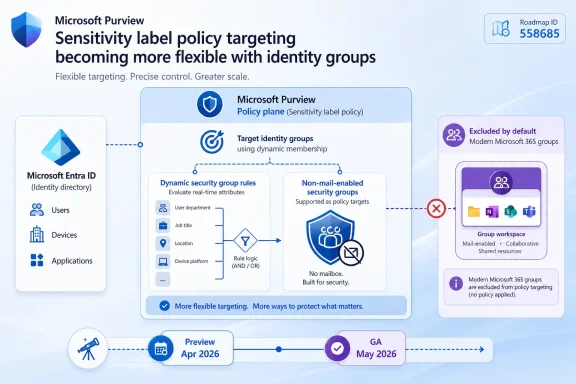
Microsoft added broader targeting controls for Microsoft Purview sensitivity label policies in 2026, allowing admins to exclude modern Microsoft 365 groups and include dynamic and non-mail-enabled security groups, with preview beginning in April and general availability listed for May 2026. The change, recorded under Microsoft 365 Roadmap ID 558685 and last updated on July 7, 2026, is not the flashiest Purview feature Microsoft will ship this year. But for administrators who live in the messy overlap between Entra ID groups, Teams sprawl, SharePoint permissions, and compliance policy inheritance, it is the kind of small targeting fix that can reshape how labels are actually deployed. Microsoft is not reinventing sensitivity labels here; it is admitting that the old scoping model was too narrow for the way enterprises now organize people and data.
Sensitivity labels have always promised a clean abstraction: classify the thing, apply the protection, let policy do the rest. In practice, the “who gets which labels” part has often been more brittle than the labels themselves. Microsoft’s previous scoping options worked well enough for relatively static deployments, but they were less elegant in tenants where access and policy are driven by modern Microsoft 365 groups, dynamic membership rules, and security groups that do not exist to receive mail.
Roadmap item 558685 changes that by widening the set of group objects Purview can understand when publishing sensitivity label policies. According to Microsoft’s roadmap entry, admins can now exclude modern Microsoft 365 groups and scope sensitivity label policies to dynamic and non-mail-enabled security groups. That means policy targeting is no longer confined to a world of individual users and mail-enabled groups.
This is the sort of feature that reads like a line-item improvement until you have had to manage labels in a large tenant. A finance department does not remain a tidy distribution list forever. A merger group may be populated dynamically from employee attributes. A privileged engineering cohort may exist as a security group precisely because nobody wants it to be a mailbox. Purview policy scoping that cannot follow those realities forces administrators into workarounds, duplication, or overbroad publishing.
Microsoft’s framing is “more flexibility,” and that is accurate as far as it goes. The deeper story is that Purview is being pulled closer to Entra ID’s operational model. Information protection cannot remain a compliance island if every other identity and access control decision is increasingly group-driven, dynamic, and automated.
That policy layer is where targeting matters. A label taxonomy may be global, but label availability rarely should be. HR may need labels with strict encryption templates. Legal may need labels that trigger retention or external sharing constraints. Engineers may need labels that protect source-adjacent documentation without breaking collaboration. Executives may need labels that ordinary users should never see, not because the users are untrusted, but because cluttered label menus lead to bad choices.
When the only practical scoping units are users and certain mail-enabled groups, administrators tend to make compromises. They may publish too many labels to too many people because maintaining precise assignments is painful. They may create extra mail-enabled groups just to satisfy a Purview limitation, even if those groups have no communications purpose. They may avoid dynamic targeting altogether and fall back to manual updates, which is exactly the kind of administrative drift that policy automation is supposed to prevent.
The new support does not eliminate the need for a coherent label strategy. It does, however, remove a structural mismatch. If an organization already uses dynamic security groups to represent departments, locations, risk tiers, or employment types, Purview can now participate in that same logic rather than requiring a parallel targeting model.
Modern Microsoft 365 groups underpin much of Microsoft 365’s collaboration fabric. They sit behind Teams, group-connected SharePoint sites, Planner plans, shared mailboxes in some scenarios, and a growing number of Microsoft 365 experiences. They are not just distribution containers; they are collaboration identities with data, membership, and application context attached.
That makes them powerful, but it also makes them awkward in compliance policy design. A tenant-wide or department-wide sensitivity label policy may be broadly correct, yet wrong for a specific group-backed workspace. A legal hold project, a merger clean room, a highly restricted executive Team, or a cross-functional incident response group may need different label availability from the users who belong to it.
Exclusion support gives administrators a cleaner way to preserve broad policy intent without flattening every exception into the same model. Instead of carving users out one by one or creating duplicate policies with fragile ordering assumptions, admins can account for the modern group object itself. That is closer to how collaboration actually works in Microsoft 365, where the workspace often matters as much as the person.
There is also a governance benefit. Exceptions become visible policy design choices rather than undocumented accidents. In a mature Purview deployment, being able to explain why a group is excluded from a label policy is just as important as being able to prove that a label exists.
For sensitivity label policies, dynamic targeting changes the administrative rhythm. A user who moves into a regulated business unit can become eligible for the right labels because their directory attributes changed. A contractor population can receive a narrower set of labels because the organization already identifies them through group rules. A regional workforce can receive labels aligned with local handling requirements without asking a compliance admin to edit Purview assignments every week.
This is not magic. Dynamic groups are only as reliable as the attributes and rules behind them. If the HR feed is wrong, if departments are inconsistently named, or if guest and contractor attributes are poorly governed, label scoping will inherit those flaws. Automation multiplies good hygiene and bad hygiene with equal enthusiasm.
Still, this is the right architectural direction. Information protection policy should not depend on an administrator remembering to add a person to a mail-enabled group because they changed jobs. It should follow identity signals that are already authoritative elsewhere in the tenant. Microsoft’s update makes that less theoretical.
It also reduces one of the quiet tensions in Microsoft 365 administration: the difference between groups created for people to use and groups created for systems to target. Mail-enabled groups are useful when email distribution is part of the design. They are awkward when they exist solely to placate a policy engine. Support for non-mail-enabled security groups lets admins use cleaner directory objects for policy scoping, without manufacturing a mailbox-shaped artifact for a non-mail purpose.
This roadmap item is notable because it addresses that unevenness at the identity boundary. Labels are not useful merely because they exist in Purview. They become useful when they reach the right people, files, sites, groups, and workflows at the right time. Targeting is the connective tissue between policy intention and user behavior.
In that sense, support for dynamic and non-mail-enabled security groups is less a niche admin convenience than a sign of where Microsoft’s compliance stack is heading. The more Purview depends on Microsoft Graph, Entra ID, SharePoint, Exchange, Teams, and endpoint signals, the more it needs to respect the structures those systems already use. A policy plane that cannot understand modern identity objects will always force customers into translation layers.
The timing also matters. Microsoft has been steadily modernizing sensitivity label infrastructure, including changes around label organization and support for security groups in related areas. Microsoft Learn documentation for assigning sensitivity labels to Microsoft Entra security groups, for example, describes a preview model for applying labels to cloud security groups while also noting behavioral differences from Microsoft 365 groups. The broader pattern is clear: Microsoft wants labels to attach not only to documents and emails, but to containers, groups, and policy scopes across the service.
That expansion creates power and complexity in equal measure. The more places labels can go, the more administrators need predictable scoping tools. Roadmap 558685 is a small but necessary step toward that predictability.
The hardest part of sensitivity labeling remains organizational, not technical. Users need to understand what labels mean. Administrators need to know which labels should be published to which audiences. Security teams need to decide where enforcement is required and where guidance is enough. Legal and compliance teams need to align labels with real regulatory, contractual, and business obligations rather than treating the label menu as a filing cabinet for every anxiety.
The new scoping controls help because they make cleaner design more practical. A central team can maintain a common label baseline while publishing specialized labels only to dynamic populations that need them. A pilot group can be included through a non-mail-enabled security group without creating communication noise. A modern Microsoft 365 group can be excluded from a broad policy when it has a distinct governance model.
But precision also creates responsibility. If label access now depends on dynamic group rules, then change management for those rules becomes part of the information protection program. A directory team altering group logic may inadvertently change which labels users can apply. A compliance team updating a policy may depend on group semantics it does not own. Those boundaries need documentation.
In mature environments, this should push Purview administration closer to identity governance. The same review discipline that applies to privileged access groups should increasingly apply to groups used for label policy scoping. They may not grant admin rights, but they influence how sensitive data can be classified, protected, shared, and retained.
Expanded scoping can support that restraint by reducing label clutter. Instead of publishing specialized labels tenant-wide because only a subset of users need them, admins can make those labels visible to the right dynamic security group. Instead of relying on broad policies and asking users to ignore irrelevant options, Purview can present a narrower set of choices.
That matters because label fatigue is real. When users see too many options, they either choose the default, pick the most restrictive label to be safe, or treat the whole system as bureaucratic wallpaper. Overclassification can be just as damaging as underclassification if it breaks collaboration, triggers unnecessary encryption, or leads users to route around the system.
The new targeting controls are therefore not just an admin-side improvement. If used well, they can make the label experience less noisy for end users. That is where compliance tooling either succeeds or becomes theater: not in the elegance of the portal, but in whether users can make the right decision during the ordinary flow of work.
This is the moment to inventory those choices. Which sensitivity label policies exist because the organization wanted them, and which exist because the previous scoping model forced them? Which mail-enabled groups serve a real collaboration or distribution purpose, and which are merely policy handles? Which high-value Microsoft 365 groups require exceptions from broad label publishing? Which dynamic security groups are trustworthy enough to become compliance targeting objects?
The answer will vary by tenant, but the direction is the same. Purview policy design should become less artisanal. The fewer one-off user assignments and workaround groups a tenant needs, the easier it is to audit and explain the system later.
Administrators should also test the feature with attention to propagation behavior and edge cases. Microsoft’s roadmap entry says the capability is launched, but “launched” in Microsoft 365 does not always mean every tenant will see identical behavior at the same moment. Policy changes in Microsoft’s cloud services can depend on rollout sequencing, portal updates, backend synchronization, licensing, and preview-versus-GA availability. For production environments, the only safe assumption is to validate in a controlled scope before redesigning the label estate around it.
Sensitivity labels can enforce encryption, watermarking, access restrictions, privacy settings for groups and sites, and other controls depending on how they are configured and where they are applied. But the first question is always whether the right users can apply the right labels in the right context. Bad targeting undermines everything downstream.
The inclusion of dynamic and non-mail-enabled security groups makes it easier to align labels with populations that already reflect risk or responsibility. A regulated operations team, a product security group, or a regional legal cohort can be targeted without bending the directory into a mail-centric shape. Excluding modern groups allows broad policy to coexist with exceptional collaboration spaces.
The security benefit is therefore indirect but real. Cleaner targeting reduces the pressure to overpublish labels, lowers the chance of users selecting inappropriate labels, and improves the explainability of policy design. In audits, incident reviews, and internal governance discussions, explainability is not a luxury. It is how organizations prove that controls were intentional rather than accidental.
Expanded group support helps, but it also adds more dependency on directory state. Admins will need clear portal feedback showing why a user is in scope, why a group is excluded, and how policy conflicts resolve. Without that transparency, more flexible targeting can become another source of “why did this user see that label?” tickets.
Microsoft’s documentation and admin UX have improved over time, but Purview still carries the burden of being both a policy engine and a detective story. When a label appears or fails to appear, administrators often have to mentally traverse policy publication, group membership, licensing, client support, replication delay, and service-specific behavior. The more Microsoft expands Purview, the more it needs to invest in policy simulation, effective access views, and change impact analysis.
That is especially important for dynamic groups. A static group can at least be inspected as a list. A dynamic group is a rule, and rules have edge cases. If Purview is going to rely more heavily on dynamic scoping, admins need confidence that they can see not just the configured policy, but the effective policy.
 Microsoft Finally Lets Purview Follow the Directory
Sensitivity labels have always promised a clean abstraction: classify the thing, apply the protection, let policy do the rest. In practice, the “who gets which labels” part has often been more brittle than the labels themselves. Microsoft’s previous scoping options worked well enough for relatively static deployments, but they were less elegant in tenants where access and policy are driven by modern Microsoft 365 groups, dynamic membership rules, and security groups that do not exist to receive mail.Roadmap item 558685 changes that by widening the set of group objects Purview can understand when publishing sensitivity label policies. According to Microsoft’s roadmap entry, admins can now exclude modern Microsoft 365 groups and scope sensitivity label policies to dynamic and non-mail-enabled security groups. That means policy targeting is no longer confined to a world of individual users and mail-enabled groups.
This is the sort of feature that reads like a line-item improvement until you have had to manage labels in a large tenant. A finance department does not remain a tidy distribution list forever. A merger group may be populated dynamically from employee attributes. A privileged engineering cohort may exist as a security group precisely because nobody wants it to be a mailbox. Purview policy scoping that cannot follow those realities forces administrators into workarounds, duplication, or overbroad publishing.
Microsoft’s framing is “more flexibility,” and that is accurate as far as it goes. The deeper story is that Purview is being pulled closer to Entra ID’s operational model. Information protection cannot remain a compliance island if every other identity and access control decision is increasingly group-driven, dynamic, and automated.
The Old Targeting Model Made Clean Label Design Harder Than It Needed to Be
Sensitivity labels are deceptively simple from the user’s point of view. In Word, Outlook, Teams, SharePoint, or OneDrive, a label looks like a choice: Public, General, Confidential, Highly Confidential, or whatever taxonomy the organization has chosen. Behind that choice sits a policy publication model that determines which labels users can see, whether defaults apply, whether justification is required for downgrades, and whether protection such as encryption or content marking follows the file or container.That policy layer is where targeting matters. A label taxonomy may be global, but label availability rarely should be. HR may need labels with strict encryption templates. Legal may need labels that trigger retention or external sharing constraints. Engineers may need labels that protect source-adjacent documentation without breaking collaboration. Executives may need labels that ordinary users should never see, not because the users are untrusted, but because cluttered label menus lead to bad choices.
When the only practical scoping units are users and certain mail-enabled groups, administrators tend to make compromises. They may publish too many labels to too many people because maintaining precise assignments is painful. They may create extra mail-enabled groups just to satisfy a Purview limitation, even if those groups have no communications purpose. They may avoid dynamic targeting altogether and fall back to manual updates, which is exactly the kind of administrative drift that policy automation is supposed to prevent.
The new support does not eliminate the need for a coherent label strategy. It does, however, remove a structural mismatch. If an organization already uses dynamic security groups to represent departments, locations, risk tiers, or employment types, Purview can now participate in that same logic rather than requiring a parallel targeting model.
Exclusions Matter Because Real Tenants Are Full of Exceptions
The ability to exclude modern Microsoft 365 groups may prove just as important as the ability to include more security group types. Policy scoping is not merely about saying “apply this here.” It is also about saying “do not apply this there,” especially when broad policies collide with special-purpose collaboration spaces.Modern Microsoft 365 groups underpin much of Microsoft 365’s collaboration fabric. They sit behind Teams, group-connected SharePoint sites, Planner plans, shared mailboxes in some scenarios, and a growing number of Microsoft 365 experiences. They are not just distribution containers; they are collaboration identities with data, membership, and application context attached.
That makes them powerful, but it also makes them awkward in compliance policy design. A tenant-wide or department-wide sensitivity label policy may be broadly correct, yet wrong for a specific group-backed workspace. A legal hold project, a merger clean room, a highly restricted executive Team, or a cross-functional incident response group may need different label availability from the users who belong to it.
Exclusion support gives administrators a cleaner way to preserve broad policy intent without flattening every exception into the same model. Instead of carving users out one by one or creating duplicate policies with fragile ordering assumptions, admins can account for the modern group object itself. That is closer to how collaboration actually works in Microsoft 365, where the workspace often matters as much as the person.
There is also a governance benefit. Exceptions become visible policy design choices rather than undocumented accidents. In a mature Purview deployment, being able to explain why a group is excluded from a label policy is just as important as being able to prove that a label exists.
Dynamic Security Groups Move Label Policy Toward Automation
Dynamic group support is the most forward-looking part of the change. Dynamic security groups in Microsoft Entra ID allow membership to be calculated from attributes rather than maintained manually. That model is already common in access control and device management, and it is increasingly central to any tenant that wants policy to reflect business state without a ticket queue.For sensitivity label policies, dynamic targeting changes the administrative rhythm. A user who moves into a regulated business unit can become eligible for the right labels because their directory attributes changed. A contractor population can receive a narrower set of labels because the organization already identifies them through group rules. A regional workforce can receive labels aligned with local handling requirements without asking a compliance admin to edit Purview assignments every week.
This is not magic. Dynamic groups are only as reliable as the attributes and rules behind them. If the HR feed is wrong, if departments are inconsistently named, or if guest and contractor attributes are poorly governed, label scoping will inherit those flaws. Automation multiplies good hygiene and bad hygiene with equal enthusiasm.
Still, this is the right architectural direction. Information protection policy should not depend on an administrator remembering to add a person to a mail-enabled group because they changed jobs. It should follow identity signals that are already authoritative elsewhere in the tenant. Microsoft’s update makes that less theoretical.
It also reduces one of the quiet tensions in Microsoft 365 administration: the difference between groups created for people to use and groups created for systems to target. Mail-enabled groups are useful when email distribution is part of the design. They are awkward when they exist solely to placate a policy engine. Support for non-mail-enabled security groups lets admins use cleaner directory objects for policy scoping, without manufacturing a mailbox-shaped artifact for a non-mail purpose.
Purview Is Becoming Less of a Compliance Portal and More of a Policy Plane
Microsoft Purview has spent the past few years absorbing more of Microsoft’s compliance and data protection story. Sensitivity labels, data loss prevention, retention, eDiscovery, insider risk, audit, and data governance have all been folded into a broader Purview narrative. The challenge is that the portal can look unified while the underlying control surfaces remain uneven.This roadmap item is notable because it addresses that unevenness at the identity boundary. Labels are not useful merely because they exist in Purview. They become useful when they reach the right people, files, sites, groups, and workflows at the right time. Targeting is the connective tissue between policy intention and user behavior.
In that sense, support for dynamic and non-mail-enabled security groups is less a niche admin convenience than a sign of where Microsoft’s compliance stack is heading. The more Purview depends on Microsoft Graph, Entra ID, SharePoint, Exchange, Teams, and endpoint signals, the more it needs to respect the structures those systems already use. A policy plane that cannot understand modern identity objects will always force customers into translation layers.
The timing also matters. Microsoft has been steadily modernizing sensitivity label infrastructure, including changes around label organization and support for security groups in related areas. Microsoft Learn documentation for assigning sensitivity labels to Microsoft Entra security groups, for example, describes a preview model for applying labels to cloud security groups while also noting behavioral differences from Microsoft 365 groups. The broader pattern is clear: Microsoft wants labels to attach not only to documents and emails, but to containers, groups, and policy scopes across the service.
That expansion creates power and complexity in equal measure. The more places labels can go, the more administrators need predictable scoping tools. Roadmap 558685 is a small but necessary step toward that predictability.
The Feature Solves Targeting, Not Taxonomy
No one should mistake this update for a cure-all. Better scoping makes good label programs easier to run, but it does not make bad label programs good. If an organization has twenty overlapping labels with unclear names, inconsistent encryption settings, and no user training, dynamic group support will simply deliver that confusion more efficiently.The hardest part of sensitivity labeling remains organizational, not technical. Users need to understand what labels mean. Administrators need to know which labels should be published to which audiences. Security teams need to decide where enforcement is required and where guidance is enough. Legal and compliance teams need to align labels with real regulatory, contractual, and business obligations rather than treating the label menu as a filing cabinet for every anxiety.
The new scoping controls help because they make cleaner design more practical. A central team can maintain a common label baseline while publishing specialized labels only to dynamic populations that need them. A pilot group can be included through a non-mail-enabled security group without creating communication noise. A modern Microsoft 365 group can be excluded from a broad policy when it has a distinct governance model.
But precision also creates responsibility. If label access now depends on dynamic group rules, then change management for those rules becomes part of the information protection program. A directory team altering group logic may inadvertently change which labels users can apply. A compliance team updating a policy may depend on group semantics it does not own. Those boundaries need documentation.
In mature environments, this should push Purview administration closer to identity governance. The same review discipline that applies to privileged access groups should increasingly apply to groups used for label policy scoping. They may not grant admin rights, but they influence how sensitive data can be classified, protected, shared, and retained.
The User Experience Still Depends on Restraint
The best sensitivity label deployments are usually the boring ones. Users see a short, comprehensible set of labels. Defaults handle obvious cases. Warnings appear when they are meaningful. Encryption is used where necessary but not sprayed across every document in the name of caution. Admins resist the urge to turn a policy taxonomy into an org chart.Expanded scoping can support that restraint by reducing label clutter. Instead of publishing specialized labels tenant-wide because only a subset of users need them, admins can make those labels visible to the right dynamic security group. Instead of relying on broad policies and asking users to ignore irrelevant options, Purview can present a narrower set of choices.
That matters because label fatigue is real. When users see too many options, they either choose the default, pick the most restrictive label to be safe, or treat the whole system as bureaucratic wallpaper. Overclassification can be just as damaging as underclassification if it breaks collaboration, triggers unnecessary encryption, or leads users to route around the system.
The new targeting controls are therefore not just an admin-side improvement. If used well, they can make the label experience less noisy for end users. That is where compliance tooling either succeeds or becomes theater: not in the elegance of the portal, but in whether users can make the right decision during the ordinary flow of work.
Enterprise Admins Should Treat This as a Refactoring Moment
For organizations already using Purview sensitivity labels, the arrival of broader scoping support is an invitation to revisit old compromises. Many tenants carry legacy policy structures that were designed around earlier limitations. Groups may have been mail-enabled only because Purview required it. Policies may be broader than intended because exclusions were clumsy. Pilot and exception handling may depend on manual user lists that nobody wants to own.This is the moment to inventory those choices. Which sensitivity label policies exist because the organization wanted them, and which exist because the previous scoping model forced them? Which mail-enabled groups serve a real collaboration or distribution purpose, and which are merely policy handles? Which high-value Microsoft 365 groups require exceptions from broad label publishing? Which dynamic security groups are trustworthy enough to become compliance targeting objects?
The answer will vary by tenant, but the direction is the same. Purview policy design should become less artisanal. The fewer one-off user assignments and workaround groups a tenant needs, the easier it is to audit and explain the system later.
Administrators should also test the feature with attention to propagation behavior and edge cases. Microsoft’s roadmap entry says the capability is launched, but “launched” in Microsoft 365 does not always mean every tenant will see identical behavior at the same moment. Policy changes in Microsoft’s cloud services can depend on rollout sequencing, portal updates, backend synchronization, licensing, and preview-versus-GA availability. For production environments, the only safe assumption is to validate in a controlled scope before redesigning the label estate around it.
The Security Win Is Governance, Not Drama
It is tempting to oversell every Purview update as a security breakthrough. This one is more prosaic and more useful than that. It gives administrators better levers to express intent, which is the foundation of governance but not the same thing as protection by itself.Sensitivity labels can enforce encryption, watermarking, access restrictions, privacy settings for groups and sites, and other controls depending on how they are configured and where they are applied. But the first question is always whether the right users can apply the right labels in the right context. Bad targeting undermines everything downstream.
The inclusion of dynamic and non-mail-enabled security groups makes it easier to align labels with populations that already reflect risk or responsibility. A regulated operations team, a product security group, or a regional legal cohort can be targeted without bending the directory into a mail-centric shape. Excluding modern groups allows broad policy to coexist with exceptional collaboration spaces.
The security benefit is therefore indirect but real. Cleaner targeting reduces the pressure to overpublish labels, lowers the chance of users selecting inappropriate labels, and improves the explainability of policy design. In audits, incident reviews, and internal governance discussions, explainability is not a luxury. It is how organizations prove that controls were intentional rather than accidental.
Microsoft Still Needs to Make Purview Easier to Reason About
The larger criticism remains: Purview is powerful, but it is not always easy to reason about. Sensitivity labels intersect with apps, locations, containers, policies, clients, and identity objects. A change in one layer may have consequences that are visible only after a user opens Outlook, creates a Team, saves a file, or attempts to share a document externally.Expanded group support helps, but it also adds more dependency on directory state. Admins will need clear portal feedback showing why a user is in scope, why a group is excluded, and how policy conflicts resolve. Without that transparency, more flexible targeting can become another source of “why did this user see that label?” tickets.
Microsoft’s documentation and admin UX have improved over time, but Purview still carries the burden of being both a policy engine and a detective story. When a label appears or fails to appear, administrators often have to mentally traverse policy publication, group membership, licensing, client support, replication delay, and service-specific behavior. The more Microsoft expands Purview, the more it needs to invest in policy simulation, effective access views, and change impact analysis.
That is especially important for dynamic groups. A static group can at least be inspected as a list. A dynamic group is a rule, and rules have edge cases. If Purview is going to rely more heavily on dynamic scoping, admins need confidence that they can see not just the configured policy, but the effective policy.
Roadmap 558685 Is a Small Switch With Tenant-Wide Consequences
The most concrete reading of Microsoft’s update is straightforward: Purview sensitivity label policies can now target more of the group types that Microsoft 365 tenants actually use. The more strategic reading is that Microsoft is reducing the gap between compliance policy and identity reality. For admins planning their next Purview cleanup, a few points stand out.- Microsoft lists Roadmap ID 558685 as launched for Microsoft Purview on the web, with preview availability in April 2026 and general availability in May 2026.
- Administrators can now exclude modern Microsoft 365 groups from sensitivity label policies, giving them a cleaner way to handle group-backed collaboration exceptions.
- Sensitivity label policies can now be scoped to dynamic security groups, which allows policy availability to follow directory-driven membership rules.
- Support for non-mail-enabled security groups reduces the need to create mail-enabled groups solely as Purview targeting objects.
- The feature improves policy precision, but it also makes directory hygiene, group ownership, and change management more important to information protection.
- Organizations should review legacy label policies and workaround groups before assuming the existing design is still the right one.
References
- Primary source: Microsoft 365 Roadmap
Published: 2026-07-07T23:01:01.6729014Z
Loading…
www.microsoft.com - Official source: learn.microsoft.com
Automatically apply a sensitivity label to Microsoft 365 data | Microsoft Learn
When you create a sensitivity label, you can automatically assign a label to data stored in Microsoft 365, or you can prompt users to select the label that you recommend.learn.microsoft.com - Related coverage: m365admin.handsontek.net
Loading…
m365admin.handsontek.net - Related coverage: thepurviewpractitioner.com
Sensitivity label groups are replacing parent labels - what you need to do | The Purview Practitioner | The Purview Practitioner
Microsoft is replacing the parent-sublabel hierarchy with label groups. The migration is irreversible and rolling out now. Here is what changed, why it matters, and how to prepare.www.thepurviewpractitioner.com - Related coverage: office365itpros.com
Loading…
office365itpros.com - Official source: cdn-dynmedia-1.microsoft.com