

Microsoft is preparing a Microsoft Teams Facilitator upgrade for general availability in late August 2026 that can monitor meeting conversation in real time, detect explicit or implied knowledge gaps, search the web, and post contextual answers into the meeting chat. That is the sort of feature that sounds delightful in a demo and unsettling in a compliance review. The point is not merely that Teams is getting another AI convenience; it is that Microsoft is teaching the meeting client to intervene before a human asks for help. For organizations already trying to decide where Copilot belongs in the workplace, Facilitator turns the meeting itself into the next frontier.
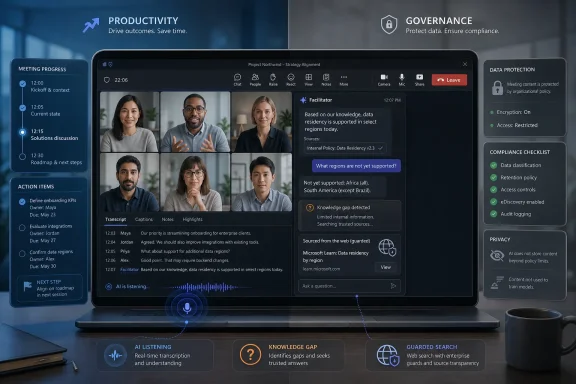
The basic pitch is elegant. A participant says something, another participant sounds uncertain, and Facilitator infers that the room has hit a knowledge gap. Instead of waiting for someone to interrupt the conversation with, “What does that mean?”, the AI agent can provide an explanation in chat, grounded in the meeting agenda, the live conversation, and web search.
That is a meaningful shift from the first wave of AI meeting features. Summaries, action items, and catch-up prompts mostly operate after the fact or at the user’s request. This version of Facilitator is more ambient: it listens for confusion, decides whether the confusion is material, and tries to resolve it while the meeting is still in motion.
Microsoft’s framing is that the agent is not supposed to become a know-it-all participant. The company says responses should be limited to the meeting’s agenda and discussion, and that the feature will likely generate fewer than one answer per meeting on average. In other words, Microsoft is trying to make the agent feel like a quiet aide, not a second presenter.
But that restraint is also the tell. If the company has to reassure customers that the AI will not speak too often, it knows the central risk is not search accuracy alone. The central risk is whether people want a machine making live judgments about who understands what.
That distinction matters. A private assistant can be wrong, annoying, or overly curious without necessarily changing the social dynamics of the room. A shared assistant changes the meeting for everyone, because its interventions become public artifacts. When it answers an unasked question, it may save time — or it may reveal that someone appeared confused.
Microsoft is careful to describe the feature as detecting “knowledge gaps,” not identifying underprepared employees. Still, workplaces have a way of turning ambient signals into performance signals. Tone, hesitation, repeated questions, and conversational uncertainty are precisely the sorts of cues humans already overinterpret in meetings. Adding an AI layer does not remove that ambiguity; it formalizes it.
The privacy concern is therefore not just, “Is Teams listening?” Teams meetings with transcription, Copilot, or AI-generated notes already involve machine processing of spoken content. The sharper concern is, “What inferences is Teams making from the way people participate, and who can see the result?”
For many IT departments, that will not end the conversation. Meetings are where strategy, personnel decisions, legal issues, sales negotiations, product roadmaps, and incident response discussions collide. Even if the search query is stripped down, the organization still has to decide whether it is comfortable with an AI system deciding that external information is needed during a live business conversation.
There is also the problem of context collapse. A web answer that is broadly correct may be locally wrong. An explanation of “large language models” may be harmless in a generic strategy meeting, but a web-grounded answer about regulatory exposure, pricing strategy, or a competitor’s product could steer the conversation with information that has not been vetted.
Microsoft’s guardrails reduce the obvious failure modes. They do not eliminate the deeper governance question: whether a meeting assistant should autonomously bring outside material into an internal discussion at all.
Those controls are necessary, but they are not magical. In real enterprises, policy is rarely binary. Legal may be comfortable with AI in internal planning sessions but not in board meetings. Security may allow AI notes but not web-grounded answers. HR may worry less about data leakage than about employees feeling watched.
The tension is that Teams meetings do not map neatly to one sensitivity category. A routine status call can drift into a discussion of layoffs, vulnerabilities, customer escalations, or acquisition rumors. Once an AI agent is present, the meeting’s risk profile changes dynamically, but the policy decision was usually made before the invite went out.
That is why the tenant-level kill switch will appeal to conservative organizations. It is blunt, but blunt is often what governance teams prefer when a feature blends live speech analysis, shared AI output, and web access.
This matters because the most skeptical organizations may never test it. Companies that have already bought Microsoft 365 Copilot are, by definition, further along in trusting Microsoft’s AI stack with workplace data. The feature is therefore likely to debut among customers that have already accepted at least some of Copilot’s governance model.
That creates a feedback loop. Microsoft ships more ambitious AI features to the customers most likely to tolerate them, then cites adoption and low incident rates as evidence that the model works. The cautious middle — organizations interested in AI productivity but wary of broad workplace surveillance — may be slower to appear in the success metrics.
It also sharpens the divide between users in the same meeting. One licensed participant can bring an AI agent into a shared workspace, while others may have limited ability to interrogate how it works. In theory, transparency in chat helps. In practice, many users will experience the feature as something the organization or a more privileged colleague enabled on their behalf.
Meetings are full of hidden confusion. People do not ask basic questions because they fear looking uninformed. New hires sit quietly through jargon. Cross-functional teams use the same words differently. Executives assume everyone has read the pre-read. In that environment, an agent that gently explains terms could genuinely improve participation.
But the same mechanism can be patronizing. If Facilitator answers a question nobody asked, it may imply that somebody should have asked it. If it explains a concept to the room after one person hesitates, it may turn a private uncertainty into a public moment. Even without naming the confused participant, the timing may make the inference obvious.
Microsoft is trying to solve a real collaboration problem with a tool that introduces a new social problem. That is the pattern of enterprise AI in 2026: the productivity upside is plausible, but the human boundary is still fuzzy.
Facilitator also fits Microsoft’s larger move toward agents rather than prompts. The user does not need to ask for every output. The agent watches a workflow, detects a condition, and suggests or performs the next step. In a meeting, that might mean tracking time, generating notes, identifying tasks, drafting follow-up documents, or now answering apparent knowledge gaps.
That is powerful precisely because meetings are messy. They contain decisions before they are formal decisions, tasks before they are tickets, and confusion before it becomes a blocker. An agent that can structure that mess has obvious business value.
It also means Teams is no longer just a communications client. It is becoming an instrumented workplace surface, where conversational behavior can be processed, summarized, classified, and acted upon. That may be the future of productivity software, but it is not a small upgrade.
Facilitator outputs can become records. AI-generated notes may live in Loop-backed files, chat responses may fall under Teams retention policies, and compliance teams may need to preserve or search interactions. For regulated industries, that means the agent is not just helping the meeting; it is creating discoverable material.
That can be a benefit. Better notes and clearer answers can improve auditability, especially when decisions are otherwise buried in half-remembered conversations. But it can also create records that are incomplete, misleading, or generated from misunderstood context. Anyone who has used meeting summaries knows that AI can sound most confident when it is compressing nuance.
The safe deployment path is therefore not “turn it on and trust the model.” It is to decide which meetings are eligible, which users can initiate it, whether web search is allowed, how outputs are retained, and what guidance participants receive before the agent joins the room.
The estimated response rate also matters. Fewer than one response per meeting, on average, is Microsoft’s way of promising scarcity. If the agent were constantly jumping in, it would become Clippy with a transcript and a web connection. Scarcity is part of the product design because too much helpfulness would feel invasive.
The ability to add or remove Facilitator during a meeting is equally important. A meeting can begin as a routine planning session and become sensitive five minutes later. The feature needs a visible off-ramp because the meeting’s context can change faster than any admin policy.
Still, the presence of an off switch does not guarantee good behavior. Users need to know when to use it. Organizers need norms. Admins need defaults. Without that operational layer, the feature will be governed by whoever happens to click first.
In those settings, Facilitator could reduce friction. It could define internal jargon if grounded appropriately, explain external concepts, or surface relevant context without forcing a junior employee to interrupt a senior-heavy room. The best case is not that AI replaces questions; it is that AI lowers the cost of asking them.
But the feature should not be treated like spellcheck. It is closer to inviting a semi-autonomous assistant into the room. That assistant can observe the conversation, generate shared text, and potentially use web information to shape what the group sees next.
The right default for serious organizations is staged deployment. Start with opt-in pilots, restrict it to low-sensitivity meeting types, disable web search where the risk is not worth the benefit, and train organizers to announce when Facilitator is active. If a company cannot explain the feature simply to its employees, it probably should not enable it broadly.
Microsoft’s challenge is that the feature sits at the intersection of two narratives. One narrative says AI can make meetings less wasteful by capturing context and answering questions at the moment they arise. The other says workplace software is becoming too comfortable with continuous inference about employees’ behavior.
Both narratives can be true. A feature can save time and still be culturally risky. It can be technically governed and still feel creepy. It can avoid obvious data leakage and still alter the social contract of a meeting.
That is why Facilitator’s success may depend less on model quality than on restraint. The best AI meeting agent may be the one that proves it knows when not to speak.
Microsoft’s bet is that the modern meeting has become too fast, too jargon-heavy, and too expensive to leave unsupported by AI. That bet is probably right. But as Teams gains the ability to listen for uncertainty and answer before anyone raises a hand, the companies that benefit most will be the ones that treat the feature not as magic, but as machinery — useful, powerful, and safest when everyone in the room knows exactly when it is running.
 Microsoft Wants the Meeting to Explain Itself
The basic pitch is elegant. A participant says something, another participant sounds uncertain, and Facilitator infers that the room has hit a knowledge gap. Instead of waiting for someone to interrupt the conversation with, “What does that mean?”, the AI agent can provide an explanation in chat, grounded in the meeting agenda, the live conversation, and web search.That is a meaningful shift from the first wave of AI meeting features. Summaries, action items, and catch-up prompts mostly operate after the fact or at the user’s request. This version of Facilitator is more ambient: it listens for confusion, decides whether the confusion is material, and tries to resolve it while the meeting is still in motion.
Microsoft’s framing is that the agent is not supposed to become a know-it-all participant. The company says responses should be limited to the meeting’s agenda and discussion, and that the feature will likely generate fewer than one answer per meeting on average. In other words, Microsoft is trying to make the agent feel like a quiet aide, not a second presenter.
But that restraint is also the tell. If the company has to reassure customers that the AI will not speak too often, it knows the central risk is not search accuracy alone. The central risk is whether people want a machine making live judgments about who understands what.
The Magic Trick Depends on a Very Corporate Kind of Listening
Facilitator already occupies an unusual role inside Teams. Unlike a private Copilot prompt, where one user asks a question and receives an answer, Facilitator behaves more like a visible assistant in the meeting. Its messages appear in the shared meeting context, and its output becomes part of the collaboration record.That distinction matters. A private assistant can be wrong, annoying, or overly curious without necessarily changing the social dynamics of the room. A shared assistant changes the meeting for everyone, because its interventions become public artifacts. When it answers an unasked question, it may save time — or it may reveal that someone appeared confused.
Microsoft is careful to describe the feature as detecting “knowledge gaps,” not identifying underprepared employees. Still, workplaces have a way of turning ambient signals into performance signals. Tone, hesitation, repeated questions, and conversational uncertainty are precisely the sorts of cues humans already overinterpret in meetings. Adding an AI layer does not remove that ambiguity; it formalizes it.
The privacy concern is therefore not just, “Is Teams listening?” Teams meetings with transcription, Copilot, or AI-generated notes already involve machine processing of spoken content. The sharper concern is, “What inferences is Teams making from the way people participate, and who can see the result?”
The Web Search Piece Is Small Technically and Large Politically
The web-search component is easy to underplay. Copilot features across Microsoft 365 already use web grounding when enabled, and administrators have policy controls to disable web search for Copilot experiences. Microsoft also says generated search queries are not supposed to include full prompts, full documents, or identifying tenant information.For many IT departments, that will not end the conversation. Meetings are where strategy, personnel decisions, legal issues, sales negotiations, product roadmaps, and incident response discussions collide. Even if the search query is stripped down, the organization still has to decide whether it is comfortable with an AI system deciding that external information is needed during a live business conversation.
There is also the problem of context collapse. A web answer that is broadly correct may be locally wrong. An explanation of “large language models” may be harmless in a generic strategy meeting, but a web-grounded answer about regulatory exposure, pricing strategy, or a competitor’s product could steer the conversation with information that has not been vetted.
Microsoft’s guardrails reduce the obvious failure modes. They do not eliminate the deeper governance question: whether a meeting assistant should autonomously bring outside material into an internal discussion at all.
Admins Get Controls, But Controls Are Not the Same as Trust
Microsoft appears to understand that this feature will live or die by administrative confidence. Facilitator is not enabled by default in the sense that it does not simply appear in every meeting and start talking. A participant with the right license can add or remove it, and administrators can block the Facilitator app or disable Copilot web search at the tenant level.Those controls are necessary, but they are not magical. In real enterprises, policy is rarely binary. Legal may be comfortable with AI in internal planning sessions but not in board meetings. Security may allow AI notes but not web-grounded answers. HR may worry less about data leakage than about employees feeling watched.
The tension is that Teams meetings do not map neatly to one sensitivity category. A routine status call can drift into a discussion of layoffs, vulnerabilities, customer escalations, or acquisition rumors. Once an AI agent is present, the meeting’s risk profile changes dynamically, but the policy decision was usually made before the invite went out.
That is why the tenant-level kill switch will appeal to conservative organizations. It is blunt, but blunt is often what governance teams prefer when a feature blends live speech analysis, shared AI output, and web access.
Licensing Makes This a Feature for the Already Converted
Facilitator’s new capability is not aimed at casual Teams users. Microsoft says a Microsoft 365 Copilot license is required to initiate Facilitator, though other participants may be able to see the shared outputs depending on the meeting context and organization settings. That places the feature inside the expensive, enterprise-oriented Copilot adoption story.This matters because the most skeptical organizations may never test it. Companies that have already bought Microsoft 365 Copilot are, by definition, further along in trusting Microsoft’s AI stack with workplace data. The feature is therefore likely to debut among customers that have already accepted at least some of Copilot’s governance model.
That creates a feedback loop. Microsoft ships more ambitious AI features to the customers most likely to tolerate them, then cites adoption and low incident rates as evidence that the model works. The cautious middle — organizations interested in AI productivity but wary of broad workplace surveillance — may be slower to appear in the success metrics.
It also sharpens the divide between users in the same meeting. One licensed participant can bring an AI agent into a shared workspace, while others may have limited ability to interrogate how it works. In theory, transparency in chat helps. In practice, many users will experience the feature as something the organization or a more privileged colleague enabled on their behalf.
The Feature Is Less About Answers Than Meeting Authority
The most interesting part of Facilitator is not whether it can define an acronym. Any competent search engine or chatbot can do that. The interesting part is that Microsoft is experimenting with AI as a live manager of conversational friction.Meetings are full of hidden confusion. People do not ask basic questions because they fear looking uninformed. New hires sit quietly through jargon. Cross-functional teams use the same words differently. Executives assume everyone has read the pre-read. In that environment, an agent that gently explains terms could genuinely improve participation.
But the same mechanism can be patronizing. If Facilitator answers a question nobody asked, it may imply that somebody should have asked it. If it explains a concept to the room after one person hesitates, it may turn a private uncertainty into a public moment. Even without naming the confused participant, the timing may make the inference obvious.
Microsoft is trying to solve a real collaboration problem with a tool that introduces a new social problem. That is the pattern of enterprise AI in 2026: the productivity upside is plausible, but the human boundary is still fuzzy.
Teams Is Becoming the Place Where Copilot Learns to Behave
Teams is the obvious test bed for this kind of AI. It already contains chat, voice, video, files, agendas, transcripts, Loop components, Planner tasks, and organizational identity. If Microsoft wants Copilot to become a working layer across Microsoft 365 rather than a chatbot pinned to the side of Office apps, meetings are where the promise becomes visible.Facilitator also fits Microsoft’s larger move toward agents rather than prompts. The user does not need to ask for every output. The agent watches a workflow, detects a condition, and suggests or performs the next step. In a meeting, that might mean tracking time, generating notes, identifying tasks, drafting follow-up documents, or now answering apparent knowledge gaps.
That is powerful precisely because meetings are messy. They contain decisions before they are formal decisions, tasks before they are tickets, and confusion before it becomes a blocker. An agent that can structure that mess has obvious business value.
It also means Teams is no longer just a communications client. It is becoming an instrumented workplace surface, where conversational behavior can be processed, summarized, classified, and acted upon. That may be the future of productivity software, but it is not a small upgrade.
The Privacy Alarm Is Really a Governance Alarm
Calling this a privacy issue is accurate but incomplete. The word “privacy” can make the concern sound personal and emotional, as if the problem is merely that employees dislike being monitored. The enterprise issue is broader: accountability, data handling, consent, retention, discovery, and policy scope.Facilitator outputs can become records. AI-generated notes may live in Loop-backed files, chat responses may fall under Teams retention policies, and compliance teams may need to preserve or search interactions. For regulated industries, that means the agent is not just helping the meeting; it is creating discoverable material.
That can be a benefit. Better notes and clearer answers can improve auditability, especially when decisions are otherwise buried in half-remembered conversations. But it can also create records that are incomplete, misleading, or generated from misunderstood context. Anyone who has used meeting summaries knows that AI can sound most confident when it is compressing nuance.
The safe deployment path is therefore not “turn it on and trust the model.” It is to decide which meetings are eligible, which users can initiate it, whether web search is allowed, how outputs are retained, and what guidance participants receive before the agent joins the room.
Microsoft’s Own Guardrails Show Where the Risks Are
The limitations around Facilitator are revealing. It is not for every Teams interaction. It is not supported in all meeting formats, and Microsoft is excluding calls, town halls, and webinars from this specific knowledge-gap feature. That suggests the company knows the interaction model works best in smaller, more collaborative meetings.The estimated response rate also matters. Fewer than one response per meeting, on average, is Microsoft’s way of promising scarcity. If the agent were constantly jumping in, it would become Clippy with a transcript and a web connection. Scarcity is part of the product design because too much helpfulness would feel invasive.
The ability to add or remove Facilitator during a meeting is equally important. A meeting can begin as a routine planning session and become sensitive five minutes later. The feature needs a visible off-ramp because the meeting’s context can change faster than any admin policy.
Still, the presence of an off switch does not guarantee good behavior. Users need to know when to use it. Organizers need norms. Admins need defaults. Without that operational layer, the feature will be governed by whoever happens to click first.
The Sensible Deployment Is Narrow, Visible, and Reversible
There is a version of this feature that many organizations should want. In onboarding meetings, training sessions, technical design reviews, and cross-functional planning, implicit knowledge gaps are a constant tax on productivity. People waste time pretending to understand things, then follow up privately or make decisions based on partial comprehension.In those settings, Facilitator could reduce friction. It could define internal jargon if grounded appropriately, explain external concepts, or surface relevant context without forcing a junior employee to interrupt a senior-heavy room. The best case is not that AI replaces questions; it is that AI lowers the cost of asking them.
But the feature should not be treated like spellcheck. It is closer to inviting a semi-autonomous assistant into the room. That assistant can observe the conversation, generate shared text, and potentially use web information to shape what the group sees next.
The right default for serious organizations is staged deployment. Start with opt-in pilots, restrict it to low-sensitivity meeting types, disable web search where the risk is not worth the benefit, and train organizers to announce when Facilitator is active. If a company cannot explain the feature simply to its employees, it probably should not enable it broadly.
The August Rollout Will Test More Than Microsoft’s AI
The late-August general availability target gives IT departments a narrow window to decide whether this belongs in their environment. For some, the answer will be yes, because the organization already uses Copilot heavily and wants Teams meetings to become more structured. For others, the answer will be no, at least until legal, security, and employee-relations teams have worked through the implications.Microsoft’s challenge is that the feature sits at the intersection of two narratives. One narrative says AI can make meetings less wasteful by capturing context and answering questions at the moment they arise. The other says workplace software is becoming too comfortable with continuous inference about employees’ behavior.
Both narratives can be true. A feature can save time and still be culturally risky. It can be technically governed and still feel creepy. It can avoid obvious data leakage and still alter the social contract of a meeting.
That is why Facilitator’s success may depend less on model quality than on restraint. The best AI meeting agent may be the one that proves it knows when not to speak.
The Copilot Meeting Room Now Has a Door That Needs a Lock
The practical reading for WindowsForum readers is straightforward: this is not a gimmick, but it is also not a feature to rubber-stamp. It belongs in the same review bucket as transcription, recording, intelligent recap, and third-party meeting bots — with extra attention paid to web grounding and shared AI output.- Organizations should decide in advance which meeting categories are appropriate for Facilitator, rather than relying on users to make judgment calls in the moment.
- Administrators should review Teams app permissions, Facilitator availability, Loop requirements, retention behavior, and Copilot web-search policy before the feature reaches general availability.
- Meeting organizers should disclose when Facilitator is active, because silent AI assistance in a collaborative meeting will be read as surveillance even when the intent is productivity.
- Security and compliance teams should treat Facilitator responses and AI-generated notes as business records that may need retention, review, or eDiscovery handling.
- Users should assume that anything discussed while Facilitator is active may be processed into shared meeting artifacts, even if the agent only posts rarely.
- Microsoft’s promise of low intervention frequency reduces annoyance, but it does not remove the need for policy, training, and cultural norms.
Microsoft’s bet is that the modern meeting has become too fast, too jargon-heavy, and too expensive to leave unsupported by AI. That bet is probably right. But as Teams gains the ability to listen for uncertainty and answer before anyone raises a hand, the companies that benefit most will be the ones that treat the feature not as magic, but as machinery — useful, powerful, and safest when everyone in the room knows exactly when it is running.
References
- Primary source: Neowin
Published: 2026-07-01T18:12:11.666909
Loading…
www.neowin.net - Official source: support.microsoft.com
Facilitator in Microsoft Teams meetings | Microsoft Support
AI-generated notes automate note-taking during Teams meetings to capture the discussion in real-time with action items and follow-up tasks.support.microsoft.com - Official source: microsoft.com
Microsoft 365 Roadmap | Microsoft 365
The Microsoft 365 Roadmap lists updates that are currently planned for applicable subscribers. Check here for more information on the status of new features and updates.www.microsoft.com
- Related coverage: windowsforum.com
Microsoft Teams Facilitator (Aug 2026): Answers Unanswered Questions with Web Search | Windows Forum
Microsoft plans to add an August 2026 Teams Facilitator feature that detects unanswered questions during meetings and offers to search the web for an answer...windowsforum.com - Official source: learn.microsoft.com
Set up Facilitator in Microsoft Teams - Microsoft Teams | Microsoft Learn
Learn about how Facilitator in Microsoft Teams enables group collaboration powered by Copilot.learn.microsoft.com - Related coverage: workgpt.com
Loading…
workgpt.com
- Related coverage: nubis365.com
</rdf:Alt> </dc:title> <dc:description> <rdf:Alt> <rdf:li xml:lang="x-default"/> </rdf:Alt> </dc:description> <dc:creator> <rdf:Seq> <rdf:li>Mike Wi
</rdf:Alt> </dc:description> <dc:creator> <rdf:Seq> <rdf:li>Mike Windsornubis365.com
- Official source: cdn-dynmedia-1.microsoft.com
- Related coverage: davyntt.com
- Official source: adoption.microsoft.com