

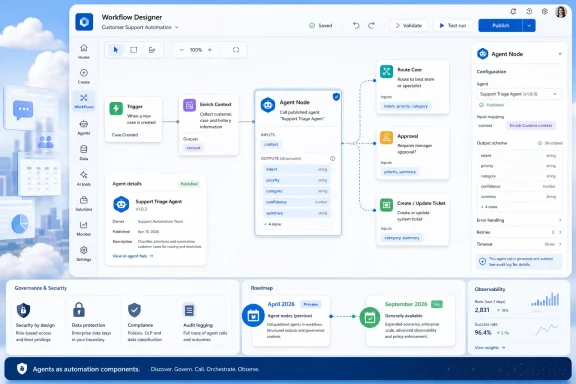
Microsoft added Microsoft 365 Roadmap item 566998 on July 1, 2026, saying Copilot Studio will let makers invoke published agents as workflow steps through a new agent node, with preview availability listed for April 2026 and general availability planned for September 2026. The date oddity is its own small lesson in the Microsoft cloud era: roadmap entries often arrive after preview bits and documentation have already started shaping customer expectations. The larger story is that Microsoft is turning agents from conversational sidecars into callable automation components. That is a bigger shift than another Copilot button in another pane.
For the first two years of enterprise generative AI, the dominant user interface was a chat box. Ask a question, get a summary, draft an email, rewrite a paragraph, query a document, then decide what to do next. That model was useful, but it preserved a very human bottleneck: the person remained the scheduler, interpreter, approver, and courier between systems.
The agent node points in a different direction. Instead of asking an agent for advice and then copying its answer into another tool, a workflow can call the agent in the middle of a process and hand its output to the next step. Microsoft’s examples are deliberately mundane: review an expense report against policy, prepare a briefing from CRM data, triage a support ticket, send a message, update a data source, or branch a flow based on the agent’s result.
That mundanity matters. The enterprise automation market is not waiting for a synthetic executive to run the company. It is waiting for software that can handle the fuzzy middle of routine work: the parts too judgment-heavy for brittle if-this-then-that logic, but too repetitive to justify human attention every time.
Copilot Studio’s agent node is Microsoft’s answer to that middle layer. It keeps the workflow as the spine of the process while allowing an agent to handle an interpretive step inside it. In Microsoft’s framing, the flow owns sequencing and reliability, while the agent owns reasoning, tool use, and knowledge retrieval.
This is typical of Microsoft 365 Roadmap behavior, but it is still useful for IT readers because roadmap publication is often when a feature becomes budget-conversation material. A preview buried in docs can be dismissed as experimentation. A roadmap item with a GA month becomes something tenant administrators, automation owners, and compliance teams have to put on a calendar.
The product scope is also revealing. Microsoft lists the affected products as Microsoft Copilot for Microsoft 365 and Microsoft Copilot Studio, the platform as web, the cloud instance as Worldwide standard multi-tenant, and release rings as Preview and General Availability. This is not a Windows client feature, and it is not a niche developer SDK. It is part of the Microsoft 365 control plane where business users already build automations and where administrators already fight sprawl.
That placement is the point. Microsoft wants agentic AI to land where work is already defined: in workflows, connectors, approvals, SharePoint lists, Dataverse tables, Teams messages, emails, CRM records, and line-of-business processes. The agent node is not a new destination. It is a new kind of step.
A published agent can have instructions, knowledge sources, tools, and governance expectations around it. If that agent can be invoked from many workflows, it becomes reusable business logic with a natural-language interface. The same policy-review agent might support an expense process, a procurement intake process, and a manager-assistance workflow without being rebuilt three times.
This is where Copilot Studio starts to resemble the low-code layer Microsoft has wanted Power Platform to be for years. Traditional workflows are good at repeatability but bad at ambiguity. Agents are good at interpreting ambiguity but risky when they are allowed to improvise without boundaries. The agent node attempts to combine the two by letting the workflow decide when the agent runs and what happens after it responds.
The downstream output is the practical breakthrough. Microsoft’s documentation describes agent responses becoming dynamic content that later workflow steps can consume. In the simplest case, that is just text dropped into an email or Teams message. In the more important case, the agent returns structured fields that a workflow can use to branch, write to a table, or call another system.
That is the difference between “AI helped me write something” and “AI changed the state of a business process.” The first is productivity theater unless it saves real time. The second is automation, and automation is where both the savings and the risks compound.
A prompt node is useful when the task is narrow: summarize this text, classify this request, draft this reply, extract these fields. An agent node is built for work that needs context and a toolkit. The agent may need to consult a SharePoint policy, reason over a customer history, call a connector, or decide whether the case belongs in a human escalation path.
The price of that power is complexity. Prompt calls are easier to reason about because the blast radius is smaller. Agents can contain more assumptions, more permissions, more connected tools, and more opportunities to be wrong in interesting ways.
That is why the agent node should not be read as a replacement for conventional workflow design. It is a pressure valve for steps where deterministic logic becomes expensive or unmaintainable. If a condition can be expressed as a simple rule, it probably should be. If it takes six meetings, three nested switch statements, and a policy analyst to encode the rule, an agent might be the better abstraction.
That is the right default, but it does not eliminate governance problems. A process can be permission-correct and still be operationally dangerous. If a user has access to an agent that can interpret sensitive records and a workflow that can email results externally, the administrator’s concern is not merely identity; it is data movement, decision quality, and auditability.
Microsoft also says administrators can restrict use through data loss prevention policies. That is essential because the agent node is enabled by default for makers. In Power Platform environments, “enabled by default” is both a productivity accelerant and an administrative warning label.
DLP policies can help determine which connectors and capabilities are allowed to coexist, but DLP does not write good prompts, validate policies, or decide whether an agent’s answer should be trusted. For IT teams, the first governance question is not “Can we turn this off?” It is “Which environments are allowed to build processes where probabilistic reasoning affects records, customers, money, or compliance posture?”
The arrival of human escalation is therefore more than a safety nicety. Microsoft describes an option for cases where the agent cannot proceed on its own, with the workflow waiting for human input before continuing. That is the right shape for high-stakes exception handling, but organizations will need to define when escalation is required rather than leaving it to the optimism of the maker who built the flow.
A workflow that sends a weekly summary is low risk. A workflow that triages customer tickets, updates priority, notifies account teams, and writes back to a system of record is a production service in everything but name. Add an agent node, and the process now depends on prompt quality, knowledge freshness, tool behavior, model output, permissions, and error handling.
This is not an argument against the feature. It is an argument for treating it honestly. The low-code label often hides the fact that many business-critical Power Platform solutions already run without the operational discipline applied to traditional software. Agentic steps will widen that gap if organizations do not impose lifecycle controls.
Versioning becomes particularly important. If a published agent is reused across multiple workflows, a change to its instructions or tools can alter the behavior of several processes at once. That is efficient when managed and chaotic when improvised. The platform needs makers to think more like API owners: publish intentionally, document dependencies, test changes, and know who consumes the component.
There is also the problem of observability. When a deterministic workflow branches, an administrator can inspect the condition and the data. When an agent makes a recommendation or returns structured output, the organization needs to know what context it used, what tools it called, what confidence threshold applied, and why it escalated or did not escalate. Without that, incident review becomes archaeology.
A procurement request needs to be checked against policy, but the relevant policy is spread across documents and exceptions. A support ticket needs triage, but the severity depends on customer history, contract tier, and the meaning of a vague complaint. A meeting briefing needs to pull from CRM and prior correspondence, but the useful summary depends on what kind of meeting it is.
These are not science-fiction tasks. They are everyday administrative friction. They are also where classic robotic process automation and low-code flows often become brittle. The agent node gives Microsoft a way to say: keep the process structured, but let an agent handle the unstructured interpretation.
That framing is more credible than the “autonomous agent” hype that has surrounded the industry. Enterprises do not generally want unsupervised AI wandering through systems. They want scoped intelligence inserted at points where human work is slow, expensive, or inconsistent. The agent node is a small product surface for a large architectural bet.
Agent nodes will likely appear first in workflows that look like office productivity: emails, tickets, approvals, summaries, and records. But the same pattern can reach IT operations. Imagine workflows that classify help desk requests, prepare device remediation notes, summarize Defender incidents, check knowledge-base articles, or draft user communications after service degradation.
Those scenarios can be valuable if bounded. They can also produce a new class of shadow IT: agentic workflows created by departments that do not understand tenant-wide risk. The same user who would never be allowed to deploy a script to thousands of machines may be able to build a workflow that moves sensitive operational data across Microsoft 365 services.
For administrators, the practical response is not panic. It is inventory. Know which environments allow Copilot Studio makers, which DLP policies apply, which connectors are grouped together, which agents are published, and which workflows can invoke them. The feature’s value depends on reuse, but reuse without visibility is just hidden coupling.
The preview-to-GA path is especially important because Microsoft’s AI platform is changing quickly. Copilot Studio now sits amid a growing Microsoft agent stack that includes Microsoft 365 Copilot, Power Platform workflows, connectors, knowledge grounding, Model Context Protocol integrations, and broader agent governance initiatives. Customers are not evaluating the agent node in isolation. They are asking whether Microsoft can make the whole agent ecosystem governable.
The most successful deployments will probably be boring. A finance team reduces manual review for routine expenses but escalates ambiguous cases. A support organization improves first-pass triage without letting the agent close sensitive tickets. A sales operations team generates account briefings without letting the agent invent CRM facts.
The failures will also be predictable. Someone will over-trust free-form text. Someone will let an agent update a record without sufficient validation. Someone will reuse a published agent across workflows and then change its behavior without realizing who depends on it. None of these are exotic AI risks. They are ordinary automation risks amplified by software that can sound confident while being wrong.
A workflow step is easier to measure. Did the process complete faster? How often did the agent escalate? How often did humans override the result? Did ticket routing improve? Did exceptions shrink? Did downstream teams spend less time correcting bad classifications?
That measurement cuts both ways. If the agent node works, it will give Microsoft stronger evidence that Copilot can reduce operational overhead. If it does not, the gap between AI promise and business value will become harder to hide. A failed chat answer is annoying. A failed workflow step is an incident.
This is why Microsoft’s insistence that the workflow remains in control is more than positioning. The workflow is the accountability structure. It defines inputs, outputs, sequence, retries, logging, and escalation. The agent is powerful precisely because it is contained.
Microsoft has made the feature attractive by reducing development effort. That same reduction means more people can create consequential automations. The next few months should be used to decide where agent nodes belong, who can use them, and which business processes are too sensitive for unsupervised reasoning.
 Microsoft Is Moving the Agent From Chat Window to Assembly Line
For the first two years of enterprise generative AI, the dominant user interface was a chat box. Ask a question, get a summary, draft an email, rewrite a paragraph, query a document, then decide what to do next. That model was useful, but it preserved a very human bottleneck: the person remained the scheduler, interpreter, approver, and courier between systems.The agent node points in a different direction. Instead of asking an agent for advice and then copying its answer into another tool, a workflow can call the agent in the middle of a process and hand its output to the next step. Microsoft’s examples are deliberately mundane: review an expense report against policy, prepare a briefing from CRM data, triage a support ticket, send a message, update a data source, or branch a flow based on the agent’s result.
That mundanity matters. The enterprise automation market is not waiting for a synthetic executive to run the company. It is waiting for software that can handle the fuzzy middle of routine work: the parts too judgment-heavy for brittle if-this-then-that logic, but too repetitive to justify human attention every time.
Copilot Studio’s agent node is Microsoft’s answer to that middle layer. It keeps the workflow as the spine of the process while allowing an agent to handle an interpretive step inside it. In Microsoft’s framing, the flow owns sequencing and reliability, while the agent owns reasoning, tool use, and knowledge retrieval.
The Roadmap Entry Is Late, but the Strategy Is Not
The roadmap item lists preview availability as April 2026 and general availability as September 2026, yet it was created and updated on July 1, 2026. That means Microsoft is not so much previewing a theoretical feature as formalizing something already visible in its Copilot Studio documentation and release planning.This is typical of Microsoft 365 Roadmap behavior, but it is still useful for IT readers because roadmap publication is often when a feature becomes budget-conversation material. A preview buried in docs can be dismissed as experimentation. A roadmap item with a GA month becomes something tenant administrators, automation owners, and compliance teams have to put on a calendar.
The product scope is also revealing. Microsoft lists the affected products as Microsoft Copilot for Microsoft 365 and Microsoft Copilot Studio, the platform as web, the cloud instance as Worldwide standard multi-tenant, and release rings as Preview and General Availability. This is not a Windows client feature, and it is not a niche developer SDK. It is part of the Microsoft 365 control plane where business users already build automations and where administrators already fight sprawl.
That placement is the point. Microsoft wants agentic AI to land where work is already defined: in workflows, connectors, approvals, SharePoint lists, Dataverse tables, Teams messages, emails, CRM records, and line-of-business processes. The agent node is not a new destination. It is a new kind of step.
A Single Node Turns Agents Into Reusable Business Logic
The most important design choice is that the node can call a published Copilot Studio agent. That sounds like a small implementation detail, but it changes the lifecycle of an agent from “thing someone chats with” to “thing other processes depend on.”A published agent can have instructions, knowledge sources, tools, and governance expectations around it. If that agent can be invoked from many workflows, it becomes reusable business logic with a natural-language interface. The same policy-review agent might support an expense process, a procurement intake process, and a manager-assistance workflow without being rebuilt three times.
This is where Copilot Studio starts to resemble the low-code layer Microsoft has wanted Power Platform to be for years. Traditional workflows are good at repeatability but bad at ambiguity. Agents are good at interpreting ambiguity but risky when they are allowed to improvise without boundaries. The agent node attempts to combine the two by letting the workflow decide when the agent runs and what happens after it responds.
The downstream output is the practical breakthrough. Microsoft’s documentation describes agent responses becoming dynamic content that later workflow steps can consume. In the simplest case, that is just text dropped into an email or Teams message. In the more important case, the agent returns structured fields that a workflow can use to branch, write to a table, or call another system.
That is the difference between “AI helped me write something” and “AI changed the state of a business process.” The first is productivity theater unless it saves real time. The second is automation, and automation is where both the savings and the risks compound.
The Prompt Node Was the Warm-Up Act
Copilot Studio workflows already have a prompt node, which makes a single AI call inside a workflow. The agent node is more ambitious because it invokes an agent with its own instructions, tools, and knowledge sources. That distinction will matter to makers who are tempted to treat every AI step as a prompt with better branding.A prompt node is useful when the task is narrow: summarize this text, classify this request, draft this reply, extract these fields. An agent node is built for work that needs context and a toolkit. The agent may need to consult a SharePoint policy, reason over a customer history, call a connector, or decide whether the case belongs in a human escalation path.
The price of that power is complexity. Prompt calls are easier to reason about because the blast radius is smaller. Agents can contain more assumptions, more permissions, more connected tools, and more opportunities to be wrong in interesting ways.
That is why the agent node should not be read as a replacement for conventional workflow design. It is a pressure valve for steps where deterministic logic becomes expensive or unmaintainable. If a condition can be expressed as a simple rule, it probably should be. If it takes six meetings, three nested switch statements, and a policy analyst to encode the rule, an agent might be the better abstraction.
Microsoft’s Governance Story Is Necessary, but Not Sufficient
Microsoft says the agent node runs using the credentials of the user who triggers the workflow. If that user lacks access to the referenced agent, the action fails at runtime. In theory, that preserves existing permission boundaries and avoids turning a workflow into a privilege-escalation tunnel.That is the right default, but it does not eliminate governance problems. A process can be permission-correct and still be operationally dangerous. If a user has access to an agent that can interpret sensitive records and a workflow that can email results externally, the administrator’s concern is not merely identity; it is data movement, decision quality, and auditability.
Microsoft also says administrators can restrict use through data loss prevention policies. That is essential because the agent node is enabled by default for makers. In Power Platform environments, “enabled by default” is both a productivity accelerant and an administrative warning label.
DLP policies can help determine which connectors and capabilities are allowed to coexist, but DLP does not write good prompts, validate policies, or decide whether an agent’s answer should be trusted. For IT teams, the first governance question is not “Can we turn this off?” It is “Which environments are allowed to build processes where probabilistic reasoning affects records, customers, money, or compliance posture?”
The arrival of human escalation is therefore more than a safety nicety. Microsoft describes an option for cases where the agent cannot proceed on its own, with the workflow waiting for human input before continuing. That is the right shape for high-stakes exception handling, but organizations will need to define when escalation is required rather than leaving it to the optimism of the maker who built the flow.
Low-Code Makers Are About to Inherit Production Engineering Problems
The agent node is aimed at makers, not just developers. That is consistent with Copilot Studio’s premise, but it should make experienced administrators sit up straighter. Low-code tools democratize automation; they also democratize outages.A workflow that sends a weekly summary is low risk. A workflow that triages customer tickets, updates priority, notifies account teams, and writes back to a system of record is a production service in everything but name. Add an agent node, and the process now depends on prompt quality, knowledge freshness, tool behavior, model output, permissions, and error handling.
This is not an argument against the feature. It is an argument for treating it honestly. The low-code label often hides the fact that many business-critical Power Platform solutions already run without the operational discipline applied to traditional software. Agentic steps will widen that gap if organizations do not impose lifecycle controls.
Versioning becomes particularly important. If a published agent is reused across multiple workflows, a change to its instructions or tools can alter the behavior of several processes at once. That is efficient when managed and chaotic when improvised. The platform needs makers to think more like API owners: publish intentionally, document dependencies, test changes, and know who consumes the component.
There is also the problem of observability. When a deterministic workflow branches, an administrator can inspect the condition and the data. When an agent makes a recommendation or returns structured output, the organization needs to know what context it used, what tools it called, what confidence threshold applied, and why it escalated or did not escalate. Without that, incident review becomes archaeology.
The Real Target Is the Manual Handoff
Microsoft’s roadmap language emphasizes fewer manual handoffs, faster processing times, nuanced decisions, and lower operational overhead. That is marketing phrasing, but it accurately identifies the expensive seam in enterprise work. Most business processes do not fail because nobody can write an automation. They fail because the automation reaches a judgment point and punts to a human queue.A procurement request needs to be checked against policy, but the relevant policy is spread across documents and exceptions. A support ticket needs triage, but the severity depends on customer history, contract tier, and the meaning of a vague complaint. A meeting briefing needs to pull from CRM and prior correspondence, but the useful summary depends on what kind of meeting it is.
These are not science-fiction tasks. They are everyday administrative friction. They are also where classic robotic process automation and low-code flows often become brittle. The agent node gives Microsoft a way to say: keep the process structured, but let an agent handle the unstructured interpretation.
That framing is more credible than the “autonomous agent” hype that has surrounded the industry. Enterprises do not generally want unsupervised AI wandering through systems. They want scoped intelligence inserted at points where human work is slow, expensive, or inconsistent. The agent node is a small product surface for a large architectural bet.
Windows Pros Should Care Because Microsoft 365 Is the New Automation Perimeter
This is not a Windows 11 feature, but WindowsForum readers should still pay attention. The modern Windows estate is managed through Microsoft 365, Entra ID, Intune, Defender, Purview, Power Platform, Teams, SharePoint, and the admin center ecosystem. The boundary between endpoint administration and business automation has been dissolving for years.Agent nodes will likely appear first in workflows that look like office productivity: emails, tickets, approvals, summaries, and records. But the same pattern can reach IT operations. Imagine workflows that classify help desk requests, prepare device remediation notes, summarize Defender incidents, check knowledge-base articles, or draft user communications after service degradation.
Those scenarios can be valuable if bounded. They can also produce a new class of shadow IT: agentic workflows created by departments that do not understand tenant-wide risk. The same user who would never be allowed to deploy a script to thousands of machines may be able to build a workflow that moves sensitive operational data across Microsoft 365 services.
For administrators, the practical response is not panic. It is inventory. Know which environments allow Copilot Studio makers, which DLP policies apply, which connectors are grouped together, which agents are published, and which workflows can invoke them. The feature’s value depends on reuse, but reuse without visibility is just hidden coupling.
The September GA Window Will Test Microsoft’s Trust Pitch
By listing general availability for September 2026, Microsoft is giving itself a near-term deadline to make the agent node feel less like a demo and more like an enterprise primitive. That means reliability, clear failure modes, usable admin controls, and documentation that distinguishes preview caveats from production commitments.The preview-to-GA path is especially important because Microsoft’s AI platform is changing quickly. Copilot Studio now sits amid a growing Microsoft agent stack that includes Microsoft 365 Copilot, Power Platform workflows, connectors, knowledge grounding, Model Context Protocol integrations, and broader agent governance initiatives. Customers are not evaluating the agent node in isolation. They are asking whether Microsoft can make the whole agent ecosystem governable.
The most successful deployments will probably be boring. A finance team reduces manual review for routine expenses but escalates ambiguous cases. A support organization improves first-pass triage without letting the agent close sensitive tickets. A sales operations team generates account briefings without letting the agent invent CRM facts.
The failures will also be predictable. Someone will over-trust free-form text. Someone will let an agent update a record without sufficient validation. Someone will reuse a published agent across workflows and then change its behavior without realizing who depends on it. None of these are exotic AI risks. They are ordinary automation risks amplified by software that can sound confident while being wrong.
The Agent Node Makes Microsoft’s AI Bet Measurable
One reason this feature matters is that it pushes Copilot closer to measurable process outcomes. Chat productivity is notoriously hard to quantify. Users may feel faster, but the organization struggles to know whether the tool changed cycle time, reduced backlog, improved accuracy, or merely generated more polished internal prose.A workflow step is easier to measure. Did the process complete faster? How often did the agent escalate? How often did humans override the result? Did ticket routing improve? Did exceptions shrink? Did downstream teams spend less time correcting bad classifications?
That measurement cuts both ways. If the agent node works, it will give Microsoft stronger evidence that Copilot can reduce operational overhead. If it does not, the gap between AI promise and business value will become harder to hide. A failed chat answer is annoying. A failed workflow step is an incident.
This is why Microsoft’s insistence that the workflow remains in control is more than positioning. The workflow is the accountability structure. It defines inputs, outputs, sequence, retries, logging, and escalation. The agent is powerful precisely because it is contained.
The Part IT Should Put on the Change Calendar
The safe reading of Roadmap ID 566998 is not that every tenant should rush to deploy agentic workflows in September. It is that the platform is crossing from assistive AI into composable automation, and organizations need policy before enthusiasm fills the vacuum.Microsoft has made the feature attractive by reducing development effort. That same reduction means more people can create consequential automations. The next few months should be used to decide where agent nodes belong, who can use them, and which business processes are too sensitive for unsupervised reasoning.
- Microsoft’s roadmap lists the Copilot Studio agent node as in development, with preview availability in April 2026 and general availability planned for September 2026.
- The feature lets workflows call published Copilot Studio agents as steps, then use the agent’s response in later workflow actions.
- The agent node is best understood as a way to insert reasoning into structured automation, not as a replacement for deterministic workflow logic.
- Administrators should review environment strategy, DLP policies, maker permissions, published agents, and workflow dependencies before broad rollout.
- The highest-value early use cases are likely to be bounded judgment tasks such as triage, briefing, policy review, and exception handling.
- The biggest operational risk is not that an agent talks to users, but that its output quietly changes records, routes work, or triggers downstream actions.
References
- Primary source: Microsoft 365 Roadmap
Published: 2026-07-01T23:03:18.2442931Z
Loading…
www.microsoft.com - Official source: learn.microsoft.com
Loading…
learn.microsoft.com - Official source: support.microsoft.com
Loading…
support.microsoft.com - Official source: blogs.microsoft.com
Introducing the First Frontier Suite built on Intelligence + Trust - The Official Microsoft Blog
Today Microsoft is announcing: Wave 3 of Microsoft 365 Copilot Expanded model diversity with Claude and next-gen OpenAI models available today General availability of Agent 365 on May 1 for $15 per user General availability of the new Microsoft 365 E7: The Frontier Suite on May 1 for $99 per...blogs.microsoft.com - Official source: adoption.microsoft.com
Loading…
adoption.microsoft.com - Related coverage: sougataroy.com
Copilot Studio April 2026 Releases Analytics Viewer Role, Agent Nodes in Workflows, and MCP Tools
Copilot Studio April 2026 separates analytics from control — while MCP connectivity quietly expands the permission boundary beyond the original governance scope.sougataroy.com
- Official source: techcommunity.microsoft.com
Loading…
techcommunity.microsoft.com - Related coverage: cloudmagazin.com
Loading…
www.cloudmagazin.com - Related coverage: techradar.com
Microsoft makes Copilot Cowork open to everyone, and wants to help you tackle even the trickiest work tasks | TechRadar
Copilot Cowork gets an upgrade as it opens to all userswww.techradar.com - Official source: cdn-dynmedia-1.microsoft.com
- Related coverage: windowscentral.com
Microsoft doubles down on agentic AI — Agent 365 prepares for a future with over 1 billion agents | Windows Central
Microsoft kicked off Ignite with a major push into agentic AI, unveiling Agent 365 as its newest tool for automating workflows.www.windowscentral.com - Related coverage: tomsguide.com
Biggest Microsoft Build 2026 announcements — agentic AI, RTX Spark Dev Box, GitHub Copilot app, new MAI models, and more | Tom's Guide
All the big news from Microsoft's AI-focused eventwww.tomsguide.com