

Microsoft began rolling out a new Teams admin center experience in July 2026 that lets administrators manage built-in Teams agents across chats, channels, and meetings for licensed users in Worldwide and GCC tenants. The change sounds like another admin-console checkbox, but it is really Microsoft drawing a governance line around AI features that are moving from optional novelty to default workplace infrastructure. Built-in agents are no longer being treated merely as apps. They are becoming part of the Teams fabric, and Microsoft is asking IT to govern them before users normalize them.
The important phrase in this roadmap item is not “agents.” It is “enabled by default.” Microsoft is making built-in Teams agents available to licensed users unless administrators intervene, while also giving those administrators a dedicated place to manage availability for users and groups.
That is a familiar Microsoft 365 pattern. Redmond often pushes new productivity features into the product first, then matures the management surface as customer pressure builds. With Teams agents, however, the stakes are higher because the feature category is not another meeting button or chat layout tweak. Agents are software actors that can summarize, answer, facilitate, and participate inside workstreams where sensitive business information already lives.
The dedicated Teams admin center experience is therefore both a concession and an escalation. It concedes that organizations need more granular control than broad Microsoft app settings can provide. It also escalates Teams from being a communications client with AI features to being a place where AI participants are expected to appear across everyday collaboration.
For end users, default-on features create the impression that the product simply got smarter overnight. For administrators, default-on features create inventory work. Someone has to determine which agents exist, which user groups should see them, which regions or regulated departments need exceptions, and whether policies match internal AI governance rules.
Microsoft’s bet is obvious: adoption rises when AI is placed directly in the flow of work. If agents are available in chats, channels, and meetings, users do not need to visit a separate AI portal or learn a new workflow. They encounter the agent where the work already happens.
That convenience is also the governance problem. Teams is where organizations discuss legal matters, personnel issues, customer escalations, sales forecasts, intellectual property, incident response, and executive planning. An AI feature that is casually available in those spaces requires more than casual administration.
This is not just about turning agents on or off. The roadmap language points to availability controls for users and groups, which is the level at which most real organizations operate. A law firm may want agents available to internal operations teams before litigation teams. A hospital may approve them for administrative departments before clinical workflows. A manufacturer may enable them for headquarters while holding back in export-controlled engineering groups.
That group-based model is where this feature becomes useful rather than symbolic. A tenant-wide toggle would have been too blunt. A dedicated availability surface gives admins a chance to stage adoption, test with pilot cohorts, and document why some populations receive the feature before others.
Still, the arrival of a control surface does not mean the governance work is done. It means the governance work now has a place to happen.
A conventional app usually exposes a function: polls, approvals, ticketing, CRM lookup, project management, or workflow automation. An agent can be conversational, contextual, and ambient. It may participate in a meeting, summarize a channel, help draft follow-ups, or answer questions based on shared content. That makes it harder for users to understand where the boundary sits between “tool” and “participant.”
Microsoft’s decision to manage built-in agents independently from org-wide Microsoft app settings suggests the company sees the same boundary problem. If an agent is part of core Teams, burying it among ordinary app controls would invite confusion. A separate governance experience helps signal that these features deserve their own review cycle.
The challenge is that many organizations still do not have a mature vocabulary for AI agents. They may have policies for SaaS apps, browser extensions, data loss prevention, and external sharing. They may not yet have policies for an AI actor that can appear in the same collaborative spaces as employees.
Those are not theatrical AI risks. They are normal enterprise risks with an AI multiplier attached. A bad meeting summary can mislead a project team. A poorly governed agent rollout can undermine confidence in IT. A feature enabled for the wrong population can create a compliance headache even if nothing dramatic happens.
The arrival of dedicated controls helps, but it also makes inaction harder to defend. Once Microsoft provides a management surface, organizations that leave defaults untouched are making a policy choice, whether they call it one or not.
That is the shift administrators should notice. The question is no longer whether Teams will contain AI agents. The question is whether the organization has deliberately decided where those agents belong.
The Teams agent rollout fits that rhythm, but AI makes the cadence feel more consequential. A new button in Teams can be annoying if it appears before training. A new AI participant in core collaboration spaces can become a policy issue, a helpdesk issue, and a leadership issue at the same time.
The roadmap says the feature applies to Android, desktop, iOS, and Mac, which means Microsoft is not positioning this as a narrow desktop-only admin improvement. It is meant to span the Teams estate. That matters for organizations where frontline workers, executives, hybrid staff, and mobile users all live in Teams through different devices.
Platform breadth is good product design, but it increases the rollout surface. If agents are visible in mobile chat, desktop meetings, and channel experiences, administrators need communications that match how users actually encounter the feature. A PDF policy buried on an intranet will not be enough.
GCC customers tend to care deeply about compliance posture, data handling, auditing, and administrative control. Including GCC in the rollout does not automatically answer every governance question, but it does show Microsoft intends built-in Teams agents to be part of mainstream Microsoft 365 operations, not a commercial-only experiment.
For public-sector and government-adjacent organizations, the key issue will be whether internal AI review processes move quickly enough to match Microsoft’s service cadence. Teams features can arrive faster than procurement boards, security committees, and records-management teams can comfortably evaluate them.
That mismatch is not new, but agents sharpen it. If a feature can influence meeting workflows, summarize communications, or appear in collaborative contexts, approval is no longer just an IT operations matter. Legal, security, privacy, HR, and business leadership may all want a say.
That matters because users do not experience Teams as an application catalog. They experience it as the place where colleagues ask questions, managers assign work, customers join calls, and projects either move or stall. An agent that lives there can quickly become part of the team’s routine, even if the official policy language still calls it a feature.
This is why default availability carries cultural weight. If users see an agent available in a meeting, they may assume it has been approved for meeting content. If they see it in a channel, they may assume it is appropriate for channel history. If they see it in chat, they may assume it is safe for informal work discussions.
Administrators should not expect users to infer subtle governance boundaries. If an agent is available, users will generally treat availability as permission. That is why the new control experience should be paired with explicit internal messaging, not just silent configuration.
A sensible enterprise approach starts with cohorts. Enable agents for IT, productivity champions, or a business unit with low regulatory exposure. Watch support tickets, meeting behavior, user confusion, and policy exceptions. Then widen availability based on observed use rather than vendor optimism.
This is especially important because Teams is not one workload. It is meetings, chat, files, channels, telephony, webinars, external collaboration, and increasingly Copilot-era AI workflows. An agent that is harmless in a project channel may be more sensitive in a legal matter workspace or executive meeting.
The dedicated admin center controls make that segmentation possible. Whether organizations use them well is another matter.
That placement says Microsoft believes the future of workplace AI is not a destination app. It is ambient software inside collaboration. Users will not “go to AI” as much as AI will be waiting inside the conversation, the meeting, and the shared workspace.
This is strategically powerful because Teams already has the attention Microsoft needs. The company does not have to persuade users to open a new productivity environment. It only has to add agents to the environment many organizations already require employees to use every day.
But the same strategy makes Teams a more sensitive control plane. If Microsoft keeps putting AI into the core collaboration path, the Teams admin center becomes one of the most important AI governance consoles in Microsoft 365.
Many Microsoft 365 tenants carry years of accumulated configuration decisions. Some settings were made during the early Teams rollout. Some were emergency decisions during remote-work transitions. Some were inherited from previous admins. Some are simply defaults that nobody revisited.
When Microsoft introduces a new class of feature outside those existing org-wide app settings, old assumptions break. An organization that previously restricted certain apps may still need to review agent availability. A tenant that standardized app governance may need a separate AI agent review. A policy document that says “Microsoft apps are governed centrally” may not be specific enough.
That is the administrative trap in this announcement. The new controls are welcome, but only if admins know they need to look for them.
That means knowing which agents are available, which groups can use them, what licensing enables them, what audit signals exist, and what data boundaries apply. It also means documenting decisions before a regulator, auditor, customer, or internal review board asks for them.
Microsoft’s admin experience can help with the first part, but every organization must still supply the second. A toggle is not a control unless it is tied to policy, ownership, monitoring, and review. Otherwise it is just a user-interface state.
The practical advice is simple: treat the July 2026 rollout as a change-management event. Record the default state. Decide whether to keep it. Assign an owner. Revisit the decision after real usage data appears.
Small tenants often have less formal data classification, fewer internal policies, and more permissive collaboration habits. That can make AI features feel frictionless in the short term while creating confusion later. If everyone is an exception, nobody knows the rule.
The answer is not to bury small businesses in enterprise bureaucracy. It is to make a few clear decisions. Decide whether built-in agents are allowed for all staff, whether sensitive departments should wait, and who is responsible for reviewing Microsoft 365 AI changes.
The new Teams admin center experience gives even lean IT teams a place to make those decisions. The risk is not that small tenants lack a giant governance program. The risk is that they confuse Microsoft’s default with their own intent.
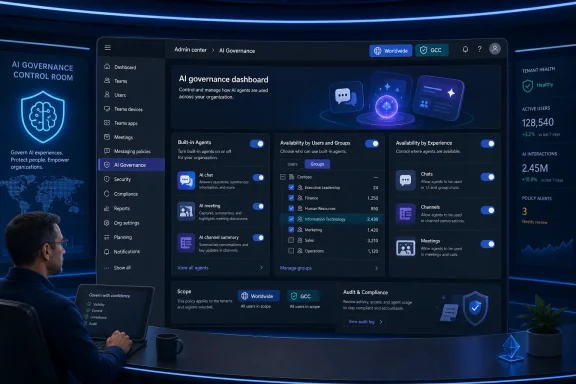 Microsoft Moves Teams Agents From Curiosity to Control Plane
The important phrase in this roadmap item is not “agents.” It is “enabled by default.” Microsoft is making built-in Teams agents available to licensed users unless administrators intervene, while also giving those administrators a dedicated place to manage availability for users and groups.That is a familiar Microsoft 365 pattern. Redmond often pushes new productivity features into the product first, then matures the management surface as customer pressure builds. With Teams agents, however, the stakes are higher because the feature category is not another meeting button or chat layout tweak. Agents are software actors that can summarize, answer, facilitate, and participate inside workstreams where sensitive business information already lives.
The dedicated Teams admin center experience is therefore both a concession and an escalation. It concedes that organizations need more granular control than broad Microsoft app settings can provide. It also escalates Teams from being a communications client with AI features to being a place where AI participants are expected to appear across everyday collaboration.
Default-On AI Is a Product Strategy, Not an Accident
Microsoft’s roadmap entry says built-in Teams agents will be enabled by default for licensed users and managed independently from org-wide Microsoft app settings. That separation matters because it prevents administrators from assuming that existing Microsoft app controls automatically govern every new Teams-native agent experience.For end users, default-on features create the impression that the product simply got smarter overnight. For administrators, default-on features create inventory work. Someone has to determine which agents exist, which user groups should see them, which regions or regulated departments need exceptions, and whether policies match internal AI governance rules.
Microsoft’s bet is obvious: adoption rises when AI is placed directly in the flow of work. If agents are available in chats, channels, and meetings, users do not need to visit a separate AI portal or learn a new workflow. They encounter the agent where the work already happens.
That convenience is also the governance problem. Teams is where organizations discuss legal matters, personnel issues, customer escalations, sales forecasts, intellectual property, incident response, and executive planning. An AI feature that is casually available in those spaces requires more than casual administration.
The Admin Center Becomes the Front Door for AI Governance
The Teams admin center has long been the place where IT manages policies, apps, meetings, messaging, voice, devices, and security-related settings. Moving built-in agent management into a dedicated Teams admin experience reflects the practical reality that Teams administrators are now AI administrators, whether or not their job descriptions have caught up.This is not just about turning agents on or off. The roadmap language points to availability controls for users and groups, which is the level at which most real organizations operate. A law firm may want agents available to internal operations teams before litigation teams. A hospital may approve them for administrative departments before clinical workflows. A manufacturer may enable them for headquarters while holding back in export-controlled engineering groups.
That group-based model is where this feature becomes useful rather than symbolic. A tenant-wide toggle would have been too blunt. A dedicated availability surface gives admins a chance to stage adoption, test with pilot cohorts, and document why some populations receive the feature before others.
Still, the arrival of a control surface does not mean the governance work is done. It means the governance work now has a place to happen.
Built-In Agents Are Not Just Another Teams App
Microsoft has spent years building app governance into Teams, including app permission policies, setup policies, integrated app management, and organization-level controls. Agents complicate that model because they can look like apps in the admin interface while behaving more like collaborators in the user experience.A conventional app usually exposes a function: polls, approvals, ticketing, CRM lookup, project management, or workflow automation. An agent can be conversational, contextual, and ambient. It may participate in a meeting, summarize a channel, help draft follow-ups, or answer questions based on shared content. That makes it harder for users to understand where the boundary sits between “tool” and “participant.”
Microsoft’s decision to manage built-in agents independently from org-wide Microsoft app settings suggests the company sees the same boundary problem. If an agent is part of core Teams, burying it among ordinary app controls would invite confusion. A separate governance experience helps signal that these features deserve their own review cycle.
The challenge is that many organizations still do not have a mature vocabulary for AI agents. They may have policies for SaaS apps, browser extensions, data loss prevention, and external sharing. They may not yet have policies for an AI actor that can appear in the same collaborative spaces as employees.
The Real Risk Is Not Science Fiction Autonomy
It is tempting to talk about agents as though the main concern is runaway autonomy. In the Teams context, the more immediate risk is mundane and administrative. Who can use the agent? What information can it access? What logs exist? How does the organization explain the feature to employees? What happens when a user relies on an agent-generated summary that omits a key caveat?Those are not theatrical AI risks. They are normal enterprise risks with an AI multiplier attached. A bad meeting summary can mislead a project team. A poorly governed agent rollout can undermine confidence in IT. A feature enabled for the wrong population can create a compliance headache even if nothing dramatic happens.
The arrival of dedicated controls helps, but it also makes inaction harder to defend. Once Microsoft provides a management surface, organizations that leave defaults untouched are making a policy choice, whether they call it one or not.
That is the shift administrators should notice. The question is no longer whether Teams will contain AI agents. The question is whether the organization has deliberately decided where those agents belong.
Microsoft’s AI Expansion Keeps Colliding With Enterprise Change Control
There is a rhythm to Microsoft 365 change that every administrator knows. A roadmap item appears. A Message Center post follows. Rollout dates shift. Features arrive unevenly across tenants, platforms, and release rings. Documentation catches up, sometimes before deployment and sometimes after.The Teams agent rollout fits that rhythm, but AI makes the cadence feel more consequential. A new button in Teams can be annoying if it appears before training. A new AI participant in core collaboration spaces can become a policy issue, a helpdesk issue, and a leadership issue at the same time.
The roadmap says the feature applies to Android, desktop, iOS, and Mac, which means Microsoft is not positioning this as a narrow desktop-only admin improvement. It is meant to span the Teams estate. That matters for organizations where frontline workers, executives, hybrid staff, and mobile users all live in Teams through different devices.
Platform breadth is good product design, but it increases the rollout surface. If agents are visible in mobile chat, desktop meetings, and channel experiences, administrators need communications that match how users actually encounter the feature. A PDF policy buried on an intranet will not be enough.
GCC Inclusion Shows Microsoft Wants Government Buyers in the Agent Era
The roadmap lists both Worldwide Standard Multi-Tenant and GCC. That is notable because government cloud availability is often a signal that Microsoft is trying to normalize a feature beyond the commercial early-adopter base.GCC customers tend to care deeply about compliance posture, data handling, auditing, and administrative control. Including GCC in the rollout does not automatically answer every governance question, but it does show Microsoft intends built-in Teams agents to be part of mainstream Microsoft 365 operations, not a commercial-only experiment.
For public-sector and government-adjacent organizations, the key issue will be whether internal AI review processes move quickly enough to match Microsoft’s service cadence. Teams features can arrive faster than procurement boards, security committees, and records-management teams can comfortably evaluate them.
That mismatch is not new, but agents sharpen it. If a feature can influence meeting workflows, summarize communications, or appear in collaborative contexts, approval is no longer just an IT operations matter. Legal, security, privacy, HR, and business leadership may all want a say.
Users Will Treat Agents as Coworkers Before Policy Does
The most interesting thing about Teams agents is not their branding. It is their location. By appearing in chats, channels, and meetings, they enter the social layer of work.That matters because users do not experience Teams as an application catalog. They experience it as the place where colleagues ask questions, managers assign work, customers join calls, and projects either move or stall. An agent that lives there can quickly become part of the team’s routine, even if the official policy language still calls it a feature.
This is why default availability carries cultural weight. If users see an agent available in a meeting, they may assume it has been approved for meeting content. If they see it in a channel, they may assume it is appropriate for channel history. If they see it in chat, they may assume it is safe for informal work discussions.
Administrators should not expect users to infer subtle governance boundaries. If an agent is available, users will generally treat availability as permission. That is why the new control experience should be paired with explicit internal messaging, not just silent configuration.
The First Job Is Segmentation, Not Blanket Enthusiasm
The worst response to this rollout would be panic. The second-worst response would be tenant-wide enthusiasm without segmentation. Built-in agents may be useful, and Microsoft is clearly investing in them, but usefulness does not remove the need for staged deployment.A sensible enterprise approach starts with cohorts. Enable agents for IT, productivity champions, or a business unit with low regulatory exposure. Watch support tickets, meeting behavior, user confusion, and policy exceptions. Then widen availability based on observed use rather than vendor optimism.
This is especially important because Teams is not one workload. It is meetings, chat, files, channels, telephony, webinars, external collaboration, and increasingly Copilot-era AI workflows. An agent that is harmless in a project channel may be more sensitive in a legal matter workspace or executive meeting.
The dedicated admin center controls make that segmentation possible. Whether organizations use them well is another matter.
The Setting Microsoft Chose Says Everything
Microsoft could have made built-in Teams agents primarily a Copilot portal experience. It could have kept them behind a separate agent store flow. Instead, this roadmap item emphasizes core Teams experiences: chats, channels, and meetings.That placement says Microsoft believes the future of workplace AI is not a destination app. It is ambient software inside collaboration. Users will not “go to AI” as much as AI will be waiting inside the conversation, the meeting, and the shared workspace.
This is strategically powerful because Teams already has the attention Microsoft needs. The company does not have to persuade users to open a new productivity environment. It only has to add agents to the environment many organizations already require employees to use every day.
But the same strategy makes Teams a more sensitive control plane. If Microsoft keeps putting AI into the core collaboration path, the Teams admin center becomes one of the most important AI governance consoles in Microsoft 365.
The Separation From Org-Wide App Settings Is a Warning Label
The roadmap note that built-in agents are managed independently from org-wide Microsoft app settings may sound like implementation trivia. It is not. It is a warning to administrators who believe their existing settings already express their AI policy.Many Microsoft 365 tenants carry years of accumulated configuration decisions. Some settings were made during the early Teams rollout. Some were emergency decisions during remote-work transitions. Some were inherited from previous admins. Some are simply defaults that nobody revisited.
When Microsoft introduces a new class of feature outside those existing org-wide app settings, old assumptions break. An organization that previously restricted certain apps may still need to review agent availability. A tenant that standardized app governance may need a separate AI agent review. A policy document that says “Microsoft apps are governed centrally” may not be specific enough.
That is the administrative trap in this announcement. The new controls are welcome, but only if admins know they need to look for them.
Security Teams Need Evidence, Not Just Toggles
For security and compliance teams, the central question will not be whether the Teams admin center has a switch. It will be whether the organization can understand and prove how agents are governed.That means knowing which agents are available, which groups can use them, what licensing enables them, what audit signals exist, and what data boundaries apply. It also means documenting decisions before a regulator, auditor, customer, or internal review board asks for them.
Microsoft’s admin experience can help with the first part, but every organization must still supply the second. A toggle is not a control unless it is tied to policy, ownership, monitoring, and review. Otherwise it is just a user-interface state.
The practical advice is simple: treat the July 2026 rollout as a change-management event. Record the default state. Decide whether to keep it. Assign an owner. Revisit the decision after real usage data appears.
Small Tenants Should Not Ignore the Governance Signal
Large enterprises will instinctively see this as a governance issue. Smaller organizations may be tempted to let defaults ride, especially if they already trust Microsoft 365 as their productivity platform. That would be understandable, but not necessarily wise.Small tenants often have less formal data classification, fewer internal policies, and more permissive collaboration habits. That can make AI features feel frictionless in the short term while creating confusion later. If everyone is an exception, nobody knows the rule.
The answer is not to bury small businesses in enterprise bureaucracy. It is to make a few clear decisions. Decide whether built-in agents are allowed for all staff, whether sensitive departments should wait, and who is responsible for reviewing Microsoft 365 AI changes.
The new Teams admin center experience gives even lean IT teams a place to make those decisions. The risk is not that small tenants lack a giant governance program. The risk is that they confuse Microsoft’s default with their own intent.
The July Rollout Turns Agent Governance Into a Teams Admin Habit
The concrete work now is less glamorous than the AI demos, but more important for real deployments. Administrators should inventory, segment, communicate, monitor, and revisit. That is not a one-time project; it is the shape of Teams administration in the agent era.- Microsoft is rolling out a dedicated Teams admin center experience in July 2026 for managing built-in Teams agents across chats, channels, and meetings.
- Built-in Teams agents are enabled by default for licensed users, so doing nothing may still result in user availability.
- The new controls are separate from org-wide Microsoft app settings, which means existing assumptions about app governance may not apply.
- Availability can be managed for users and groups, making staged deployment and departmental exceptions practical.
- Worldwide Standard Multi-Tenant and GCC inclusion signals that Microsoft sees Teams agents as mainstream collaboration infrastructure, not a limited experiment.
- Administrators should pair configuration changes with user communications, because users usually interpret visible features as approved features.
References
- Primary source: Microsoft 365 Roadmap
Published: 2026-07-01T23:03:18.2442931Z
Microsoft 365 Roadmap | Microsoft 365
The Microsoft 365 Roadmap lists updates that are currently planned for applicable subscribers. Check here for more information on the status of new features and updates.www.microsoft.com
- Official source: learn.microsoft.com
Unified agent and app availability management across Microsoft 365 and Teams Admin Centers - Microsoft Teams | Microsoft Learn
Streamline agent and app availability across Teams, Outlook, and Microsoft 365 Copilotlearn.microsoft.com - Official source: support.microsoft.com
Frequently asked questions about agents in Microsoft Teams | Microsoft Support
Get answers to frequently asked questions about using Facilitator and Channel Agent in Microsoft Teams, including how artificial intelligence (AI) helps you automate notetaking in chats and meetings.support.microsoft.com - Related coverage: techradar.com
Microsoft is working on a "new class” of AI agents that could change everything in your workforce | TechRadar
Microsoft wants humans to work closer with AI colleagueswww.techradar.com - Official source: techcommunity.microsoft.com
- Related coverage: petri.com
- Related coverage: windowscentral.com
Microsoft 365 Copilot AI agents expand to more apps | Windows Central
Microsoft expands Copilot with collaborative agents in Teams, SharePoint and more to boost productivity and reshape teamwork.www.windowscentral.com - Related coverage: itpro.com
Microsoft's new Agent 365 platform is a one-stop shop for deploying, securing, and keeping tabs on AI agents | IT Pro
The new platform looks to shore up visibility and security for enterprises using AI agentswww.itpro.com