

Microsoft Teams organizers in the Worldwide standard multi-tenant cloud can now bulk-assign breakout room participants from a CSV file on desktop clients after Roadmap item 559387 reached general availability in May 2026, with Microsoft marking the feature launched and updating the listing on July 1, 2026. It is a small feature with an outsized target: the administrative drag that turns otherwise polished virtual classes, workshops, and enterprise meetings into frantic roster surgery. Microsoft is not reinventing breakout rooms here; it is admitting that at scale, clicking names into rooms one by one was never a serious workflow.
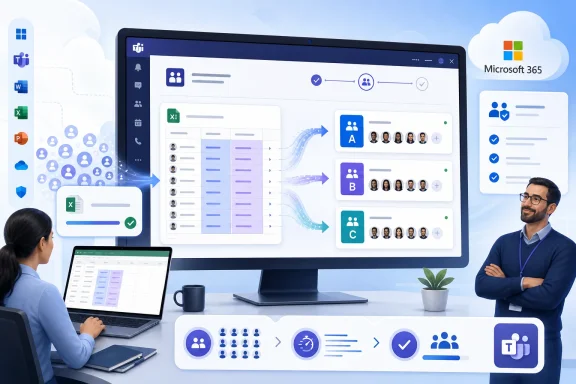
The new capability lets meeting organizers import participant-to-room assignments using a CSV file, rather than building every breakout roster manually inside the Teams interface. For small meetings, that distinction barely matters. For a 12-person project retrospective, manual assignment is tolerable; for a 300-person training session split across departments, cohorts, or customer accounts, it is a tax on everyone’s patience.
This is the kind of feature that tends to look boring in a roadmap database and essential the first time it saves a facilitator from 40 minutes of pre-meeting clerical work. Teams has long treated breakout rooms as a live meeting feature first and an event-planning feature second. Bulk CSV assignment moves it closer to how large organizations actually prepare meetings: in spreadsheets, registration exports, learning management systems, HR lists, and program rosters.
The timing is also notable. Teams is no longer fighting merely to prove that it can host remote meetings. That battle was fought in the pandemic era and then absorbed into the default plumbing of hybrid work. The current competition is about reducing friction in repeatable workflows, especially the ones run by trainers, educators, HR teams, customer success groups, and internal comms departments.
A university instructor may already have section lists. A corporate trainer may already have enrollment data. A sales kickoff organizer may already have regional groups. A professional services firm may already have client teams mapped in a spreadsheet. Asking those people to recreate the same structure by clicking through a meeting roster is not collaboration software; it is punishment with a fluent design skin.
CSV import is powerful precisely because it does not pretend to be sophisticated. It lets Teams meet organizers where their operational data already lives. That is often Excel, but just as often it is a CSV export from Workday, Salesforce, Eventbrite, a learning platform, a registration form, or a homegrown database.
The most important detail is matching. Participants are assigned when the email address used in the CSV corresponds to the attendee who joins the meeting. That makes the feature practical, but it also exposes the recurring weak point in every identity-adjacent meeting workflow: if the email address is wrong, duplicated, aliased, personal instead of corporate, or used by a guest account in an unexpected way, the room assignment may not land as intended.
The feature is less glamorous than AI-generated notes and less visible than a redesigned meeting stage. But for event operators, it may be more valuable. The best meeting tool is not the one with the flashiest stage effects; it is the one that lets the organizer avoid embarrassing dead air while hundreds of people wait to be sorted.
This is especially true in structured meetings where breakout composition is not random. Training groups may need balanced skill levels. Classroom discussions may need preassigned cohorts. Compliance exercises may need regional groups. Customer workshops may need each client in a separate room with dedicated staff. Random assignment solves none of those cases.
The spreadsheet import model also makes rehearsal easier. Organizers can prepare a roster, inspect it, hand it to a colleague, revise it, and keep it as a record. That gives Teams a workflow artifact outside the meeting itself. In operational terms, that matters: the meeting becomes something that can be staged, audited, and repeated.
Breakout rooms were a classic example. The manual interface is fine until the moment it is not. Once a meeting crosses a certain threshold, assignment becomes too slow, too error-prone, and too dependent on the organizer’s attention during a moment when that organizer is also supposed to be welcoming attendees, checking audio, briefing presenters, answering chat questions, and watching the clock.
That is where CSV import changes the psychology of the feature. It turns breakout setup from a live-meeting scramble into a pre-meeting data task. The former is stressful and brittle. The latter is mundane and automatable.
The change also acknowledges that Teams organizers are not always the same people who own the data. An admin assistant, program coordinator, teaching assistant, or operations analyst may prepare the CSV, while the meeting organizer runs the session. That division of labor is how large organizations actually function. Software that ignores it forces people into awkward workarounds.
Guest users may join with a different address from the one used during registration. Employees may have aliases after name changes or mergers. Contractors may appear as external identities in Entra ID. Students may use institutional addresses for class but personal Microsoft accounts on their devices. Attendees forwarded a meeting invitation may arrive under an identity the organizer did not plan for.
This does not make the feature bad. It makes it honest. Bulk assignment cannot fix identity hygiene; it can only reveal it earlier. If the CSV import preview or resulting assignment shows gaps, that is a signal that the meeting’s participant data is not as clean as the organizer assumed.
For IT teams, the lesson is familiar. Any workflow that depends on email matching should be tested with the same kinds of users who will attend the actual session. Internal employees are the easy case. Federated guests, anonymous attendees, external presenters, and people joining from unmanaged accounts are where support tickets are born.
That platform boundary also reinforces a broader truth about Teams: the client surface still matters. Microsoft’s cloud services may underpin the meeting, but the practical experience depends heavily on which client the organizer uses, which features have reached that client, and whether the tenant is in the right cloud and release ring.
For WindowsForum readers, that should sound familiar. The modern Microsoft stack is full of features that are “in the cloud” until the moment a user discovers they also need the right client, the right account type, the right policy, and the right rollout wave. Teams is no exception.
The roadmap entry indicates support for General Availability and Targeted Release rings in the Worldwide standard multi-tenant cloud. That is good news for mainstream commercial tenants, but it also means admins in specialized clouds should not assume parity unless Microsoft separately confirms it. GCC, GCC High, DoD, and other sovereign or regulated environments often move on different schedules.
Education is the obvious example. Instructors frequently organize students by project team, discussion section, lab group, skill level, or presentation order. A CSV import lets that structure come from a roster rather than a frantic in-meeting selection process.
Corporate learning teams may benefit even more. A global training event might need participants grouped by region, language, manager, product line, certification track, or customer segment. Manual assignment in those cases is not merely slow; it increases the chance that the learning experience starts with visible disorganization.
Customer-facing workshops are another strong fit. Consulting teams often need to split attendees into confidential client groups or role-based rooms. A spreadsheet-driven setup lets organizers build those groups from the engagement plan rather than relying on memory and drag-and-drop discipline during the call.
That matters in regulated or sensitive contexts. A healthcare training session, legal workshop, financial services exercise, or internal investigation briefing may require careful control over who sees whom and who participates in which discussion. Breakout rooms are not security boundaries in the way that separate meetings or channels are, but assignment discipline still matters.
The CSV file becomes a planning artifact. It can be checked by another organizer. It can be generated from approved data. It can be versioned. It can be corrected before the meeting begins. Those are small operational advantages, but they are exactly the advantages that separate a professional event from a chaotic one.
IT departments should still be careful not to oversell the feature as access control. Breakout room assignment is meeting orchestration, not a substitute for permission design, sensitivity labels, lobby settings, or attendee role management. But better orchestration reduces accidental exposure and organizer error, and that has governance value.
That gap mattered because Teams competes not only feature by feature, but habit by habit. If a trainer learned to build breakout assignments from a spreadsheet in another platform, Teams needed an equivalent workflow or risk being seen as clumsy for serious facilitation. The CSV import feature is therefore defensive as much as innovative.
It is also a reminder that Microsoft’s strength is not always inventing the meeting pattern. Often, its strength is absorbing a pattern into the Microsoft 365 substrate until it becomes available under enterprise identity, compliance, administration, and licensing models. That may not excite product watchers, but it is often what customers actually buy.
The danger for Microsoft is that catch-up features can feel late even when they are useful. Users do not grade enterprise software on a roadmap curve. They remember the sessions where they had to manually sort attendees while everyone watched.
The practical recommendation is to treat the CSV as part of the meeting runbook. Build it from a reliable source. Validate email addresses. Use the same addresses that attendees are expected to use when joining. Test the workflow with a small pilot meeting before relying on it for a high-stakes event.
Organizers should also decide how they will handle exceptions. Someone will join late. Someone will use a different account. Someone will not appear in the CSV. Someone will need to move rooms after the discussion starts. CSV import reduces the bulk work, but it does not eliminate the need for a human operator who understands the meeting design.
That is not a weakness unique to Teams. It is the reality of live collaboration software. Automation works best when it handles the predictable 90 percent and leaves the facilitator enough attention to manage the remaining 10 percent.
That guidance should explain who can create and manage breakout rooms, when assignments can be prepared, how email matching works, and what to do with guests or external attendees. It should also clarify that the feature is for the desktop Teams experience and may not appear uniformly across every client or cloud environment.
The most useful internal documentation will include a sample CSV and a known-good naming convention for rooms. Consistent room names matter more than people think. “Room 1,” “Room 2,” and “Room 3” may be fine for a small discussion; they are not ideal for a multinational training program where facilitators need to know which room belongs to which region or cohort.
Admins should also consider whether meeting organizers need coaching on privacy. A CSV containing participant names, emails, and group assignments may itself be sensitive. If the assignment reflects performance level, health category, disciplinary status, union group, customer account, or other sensitive segmentation, the file should be handled accordingly.
CSV breakout assignment belongs to the quieter category. It is not the kind of feature that will headline a keynote. But it directly affects whether a meeting starts on time, whether a facilitator looks prepared, and whether participants spend their first five minutes wondering why the platform feels harder than it should.
This is where Microsoft’s product strategy is often most effective. Teams does not have to win every meeting by being delightful. In enterprise settings, it wins by being integrated, manageable, familiar, and sufficiently competent across thousands of recurring scenarios. Every friction point removed makes it harder for a department to justify running its own parallel meeting stack.
Still, Microsoft should not confuse incremental workflow repair with completion. Breakout rooms remain a complicated area because they sit at the intersection of identity, scheduling, real-time media, chat, roles, devices, and human facilitation. CSV import fixes one stubborn setup problem. It does not settle the broader design challenge.
Instead of asking, “Can I make the rooms quickly enough?” the organizer can ask, “What is the correct room model for this session?” That is a better question. It encourages intentional design: balanced groups, appropriate facilitators, language matching, customer separation, or rotation plans.
The file also creates the possibility of repeatability. A leadership program that meets weekly can start with last week’s assignments. A course can generate rooms from enrollment data. A company can produce breakout rosters from HR attributes. A conference can derive rooms from registration fields.
Microsoft has not announced a grand automation story around this specific feature, and it does not need to. CSV is the automation story. It is the lowest common denominator that lets Power Automate flows, scripts, spreadsheets, databases, and registration tools all feed the same workflow without Teams needing a custom connector for every source system.
For users, the visible benefit is simple: less time spent assigning people manually. For IT, the value is a little broader: fewer ad hoc workarounds, fewer organizer panic moments, and a more supportable pattern for large meetings. For Microsoft, the feature closes a credibility gap in a part of Teams that matters disproportionately to educators and trainers.
The risk is that organizations assume the feature is more automatic than it is. It depends on good data. It depends on the right client. It depends on participants joining with matching identities. It also depends on organizers understanding that breakout rooms remain a live meeting construct, not a perfect proxy for prebuilt group membership.
That is the proper lens for this launch: useful, overdue, and operationally meaningful, but not magical. CSV import makes the best version of an existing workflow easier to execute. It does not remove the need to design the workflow well.
 Microsoft Finally Gives Breakout Rooms a Spreadsheet-Shaped Escape Hatch
The new capability lets meeting organizers import participant-to-room assignments using a CSV file, rather than building every breakout roster manually inside the Teams interface. For small meetings, that distinction barely matters. For a 12-person project retrospective, manual assignment is tolerable; for a 300-person training session split across departments, cohorts, or customer accounts, it is a tax on everyone’s patience.This is the kind of feature that tends to look boring in a roadmap database and essential the first time it saves a facilitator from 40 minutes of pre-meeting clerical work. Teams has long treated breakout rooms as a live meeting feature first and an event-planning feature second. Bulk CSV assignment moves it closer to how large organizations actually prepare meetings: in spreadsheets, registration exports, learning management systems, HR lists, and program rosters.
The timing is also notable. Teams is no longer fighting merely to prove that it can host remote meetings. That battle was fought in the pandemic era and then absorbed into the default plumbing of hybrid work. The current competition is about reducing friction in repeatable workflows, especially the ones run by trainers, educators, HR teams, customer success groups, and internal comms departments.
The Feature Is Simple Because the Problem Was Never Complicated
Breakout room assignment has always had a deceptively plain requirement: put the right people in the right rooms before the session starts. The difficulty is not conceptual. The difficulty is that the “right people” often come from systems outside Teams.A university instructor may already have section lists. A corporate trainer may already have enrollment data. A sales kickoff organizer may already have regional groups. A professional services firm may already have client teams mapped in a spreadsheet. Asking those people to recreate the same structure by clicking through a meeting roster is not collaboration software; it is punishment with a fluent design skin.
CSV import is powerful precisely because it does not pretend to be sophisticated. It lets Teams meet organizers where their operational data already lives. That is often Excel, but just as often it is a CSV export from Workday, Salesforce, Eventbrite, a learning platform, a registration form, or a homegrown database.
The most important detail is matching. Participants are assigned when the email address used in the CSV corresponds to the attendee who joins the meeting. That makes the feature practical, but it also exposes the recurring weak point in every identity-adjacent meeting workflow: if the email address is wrong, duplicated, aliased, personal instead of corporate, or used by a guest account in an unexpected way, the room assignment may not land as intended.
CSV Import Turns Teams Into a Better Event Tool, Not Just a Meeting App
Microsoft has spent years nudging Teams beyond “video calls with chat” and into a broader collaboration surface. Webinars, town halls, channel meetings, avatars, meeting recaps, Copilot summaries, Teams Premium controls, and room device improvements all fit that direction. Bulk breakout assignment belongs to the same arc, but it is more grounded than most of the marketing.The feature is less glamorous than AI-generated notes and less visible than a redesigned meeting stage. But for event operators, it may be more valuable. The best meeting tool is not the one with the flashiest stage effects; it is the one that lets the organizer avoid embarrassing dead air while hundreds of people wait to be sorted.
This is especially true in structured meetings where breakout composition is not random. Training groups may need balanced skill levels. Classroom discussions may need preassigned cohorts. Compliance exercises may need regional groups. Customer workshops may need each client in a separate room with dedicated staff. Random assignment solves none of those cases.
The spreadsheet import model also makes rehearsal easier. Organizers can prepare a roster, inspect it, hand it to a colleague, revise it, and keep it as a record. That gives Teams a workflow artifact outside the meeting itself. In operational terms, that matters: the meeting becomes something that can be staged, audited, and repeated.
The Old Workflow Failed Exactly Where Teams Is Supposed to Scale
Microsoft Teams is sold into organizations where scale is the point. A tenant may have tens of thousands of users, centralized identity, policy controls, compliance logging, and administrators who think in groups rather than individuals. Yet many Teams meeting experiences still betray their consumer-app ancestry: the organizer is expected to manipulate people one by one in a UI optimized for human-scale interaction.Breakout rooms were a classic example. The manual interface is fine until the moment it is not. Once a meeting crosses a certain threshold, assignment becomes too slow, too error-prone, and too dependent on the organizer’s attention during a moment when that organizer is also supposed to be welcoming attendees, checking audio, briefing presenters, answering chat questions, and watching the clock.
That is where CSV import changes the psychology of the feature. It turns breakout setup from a live-meeting scramble into a pre-meeting data task. The former is stressful and brittle. The latter is mundane and automatable.
The change also acknowledges that Teams organizers are not always the same people who own the data. An admin assistant, program coordinator, teaching assistant, or operations analyst may prepare the CSV, while the meeting organizer runs the session. That division of labor is how large organizations actually function. Software that ignores it forces people into awkward workarounds.
The Email Match Is Both the Magic and the Trap
The support model for CSV assignment hinges on the attendee’s email address matching the CSV entry. In a clean Microsoft 365 tenant, that sounds straightforward. In the real world, it is where edge cases breed.Guest users may join with a different address from the one used during registration. Employees may have aliases after name changes or mergers. Contractors may appear as external identities in Entra ID. Students may use institutional addresses for class but personal Microsoft accounts on their devices. Attendees forwarded a meeting invitation may arrive under an identity the organizer did not plan for.
This does not make the feature bad. It makes it honest. Bulk assignment cannot fix identity hygiene; it can only reveal it earlier. If the CSV import preview or resulting assignment shows gaps, that is a signal that the meeting’s participant data is not as clean as the organizer assumed.
For IT teams, the lesson is familiar. Any workflow that depends on email matching should be tested with the same kinds of users who will attend the actual session. Internal employees are the easy case. Federated guests, anonymous attendees, external presenters, and people joining from unmanaged accounts are where support tickets are born.
Desktop-First Availability Keeps the Feature in the Organizer’s Chair
The roadmap lists the platform as desktop, which is unsurprising and sensible. Bulk setup is not a mobile-first activity. Nobody wants to wrangle a CSV import for a 40-room training program from a phone.That platform boundary also reinforces a broader truth about Teams: the client surface still matters. Microsoft’s cloud services may underpin the meeting, but the practical experience depends heavily on which client the organizer uses, which features have reached that client, and whether the tenant is in the right cloud and release ring.
For WindowsForum readers, that should sound familiar. The modern Microsoft stack is full of features that are “in the cloud” until the moment a user discovers they also need the right client, the right account type, the right policy, and the right rollout wave. Teams is no exception.
The roadmap entry indicates support for General Availability and Targeted Release rings in the Worldwide standard multi-tenant cloud. That is good news for mainstream commercial tenants, but it also means admins in specialized clouds should not assume parity unless Microsoft separately confirms it. GCC, GCC High, DoD, and other sovereign or regulated environments often move on different schedules.
The Best Use Cases Are the Ones Nobody Wants to Build by Hand
The feature’s natural home is not the casual staff meeting. It is the structured session where the room assignment itself carries meaning. The more deliberate the grouping, the more value CSV import provides.Education is the obvious example. Instructors frequently organize students by project team, discussion section, lab group, skill level, or presentation order. A CSV import lets that structure come from a roster rather than a frantic in-meeting selection process.
Corporate learning teams may benefit even more. A global training event might need participants grouped by region, language, manager, product line, certification track, or customer segment. Manual assignment in those cases is not merely slow; it increases the chance that the learning experience starts with visible disorganization.
Customer-facing workshops are another strong fit. Consulting teams often need to split attendees into confidential client groups or role-based rooms. A spreadsheet-driven setup lets organizers build those groups from the engagement plan rather than relying on memory and drag-and-drop discipline during the call.
This Is Also a Governance Feature, Whether Microsoft Says So or Not
Microsoft’s positioning emphasizes time savings, which is true but incomplete. Bulk assignment also creates a cleaner governance trail. A CSV file can be reviewed before the meeting, stored with planning materials, compared against registration, and reused for follow-up sessions.That matters in regulated or sensitive contexts. A healthcare training session, legal workshop, financial services exercise, or internal investigation briefing may require careful control over who sees whom and who participates in which discussion. Breakout rooms are not security boundaries in the way that separate meetings or channels are, but assignment discipline still matters.
The CSV file becomes a planning artifact. It can be checked by another organizer. It can be generated from approved data. It can be versioned. It can be corrected before the meeting begins. Those are small operational advantages, but they are exactly the advantages that separate a professional event from a chaotic one.
IT departments should still be careful not to oversell the feature as access control. Breakout room assignment is meeting orchestration, not a substitute for permission design, sensitivity labels, lobby settings, or attendee role management. But better orchestration reduces accidental exposure and organizer error, and that has governance value.
Zoom Set the Expectation, and Teams Had to Close the Gap
Teams breakout rooms have existed for years, but expectations were shaped by the broader video meeting market. Zoom popularized many of the workflows educators and event organizers came to expect, including preassignment patterns that made sense for large synchronous sessions. Microsoft has been steadily filling in Teams’ gaps, but the lived experience often lagged the enterprise promise.That gap mattered because Teams competes not only feature by feature, but habit by habit. If a trainer learned to build breakout assignments from a spreadsheet in another platform, Teams needed an equivalent workflow or risk being seen as clumsy for serious facilitation. The CSV import feature is therefore defensive as much as innovative.
It is also a reminder that Microsoft’s strength is not always inventing the meeting pattern. Often, its strength is absorbing a pattern into the Microsoft 365 substrate until it becomes available under enterprise identity, compliance, administration, and licensing models. That may not excite product watchers, but it is often what customers actually buy.
The danger for Microsoft is that catch-up features can feel late even when they are useful. Users do not grade enterprise software on a roadmap curve. They remember the sessions where they had to manually sort attendees while everyone watched.
The CSV Workflow Will Reward Clean Operations and Punish Wishful Thinking
A CSV import feature sounds like a universal simplifier, but it will work best for organizations that already manage participant data well. If the meeting invitee list is messy, the registration data is stale, or external attendees join with unpredictable identities, the import will not magically impose order.The practical recommendation is to treat the CSV as part of the meeting runbook. Build it from a reliable source. Validate email addresses. Use the same addresses that attendees are expected to use when joining. Test the workflow with a small pilot meeting before relying on it for a high-stakes event.
Organizers should also decide how they will handle exceptions. Someone will join late. Someone will use a different account. Someone will not appear in the CSV. Someone will need to move rooms after the discussion starts. CSV import reduces the bulk work, but it does not eliminate the need for a human operator who understands the meeting design.
That is not a weakness unique to Teams. It is the reality of live collaboration software. Automation works best when it handles the predictable 90 percent and leaves the facilitator enough attention to manage the remaining 10 percent.
IT Admins Should Document the Workflow Before Users Invent Their Own
For tenant administrators and support teams, this feature is a good candidate for internal guidance. It is simple enough that users will discover it, but specific enough that they may misuse it without a template. A short internal article can prevent avoidable confusion.That guidance should explain who can create and manage breakout rooms, when assignments can be prepared, how email matching works, and what to do with guests or external attendees. It should also clarify that the feature is for the desktop Teams experience and may not appear uniformly across every client or cloud environment.
The most useful internal documentation will include a sample CSV and a known-good naming convention for rooms. Consistent room names matter more than people think. “Room 1,” “Room 2,” and “Room 3” may be fine for a small discussion; they are not ideal for a multinational training program where facilitators need to know which room belongs to which region or cohort.
Admins should also consider whether meeting organizers need coaching on privacy. A CSV containing participant names, emails, and group assignments may itself be sensitive. If the assignment reflects performance level, health category, disciplinary status, union group, customer account, or other sensitive segmentation, the file should be handled accordingly.
The Feature Fits Microsoft’s Quiet War on Meeting Friction
The Teams story of the last several years has been a story of removing meeting friction in layers. Some of that has been highly visible, such as avatars, layouts, and AI summaries. Much of it has been quieter: presenter controls, lobby options, attendance reports, webinar registration, room device support, and organizer role improvements.CSV breakout assignment belongs to the quieter category. It is not the kind of feature that will headline a keynote. But it directly affects whether a meeting starts on time, whether a facilitator looks prepared, and whether participants spend their first five minutes wondering why the platform feels harder than it should.
This is where Microsoft’s product strategy is often most effective. Teams does not have to win every meeting by being delightful. In enterprise settings, it wins by being integrated, manageable, familiar, and sufficiently competent across thousands of recurring scenarios. Every friction point removed makes it harder for a department to justify running its own parallel meeting stack.
Still, Microsoft should not confuse incremental workflow repair with completion. Breakout rooms remain a complicated area because they sit at the intersection of identity, scheduling, real-time media, chat, roles, devices, and human facilitation. CSV import fixes one stubborn setup problem. It does not settle the broader design challenge.
The Room Assignment File Becomes Part of the Meeting Infrastructure
The most interesting consequence of CSV import is cultural rather than technical. It moves breakout planning into a file that can be owned, reviewed, and generated. That changes how organizers think about the meeting.Instead of asking, “Can I make the rooms quickly enough?” the organizer can ask, “What is the correct room model for this session?” That is a better question. It encourages intentional design: balanced groups, appropriate facilitators, language matching, customer separation, or rotation plans.
The file also creates the possibility of repeatability. A leadership program that meets weekly can start with last week’s assignments. A course can generate rooms from enrollment data. A company can produce breakout rosters from HR attributes. A conference can derive rooms from registration fields.
Microsoft has not announced a grand automation story around this specific feature, and it does not need to. CSV is the automation story. It is the lowest common denominator that lets Power Automate flows, scripts, spreadsheets, databases, and registration tools all feed the same workflow without Teams needing a custom connector for every source system.
The CSV Button Is Small, but the Operational Signal Is Large
This update says something important about where Teams is maturing. The product is increasingly being judged not by whether it can host a meeting, but by whether it can support the operational work around the meeting. That includes preparation, delegation, repeatability, error handling, and post-event records.For users, the visible benefit is simple: less time spent assigning people manually. For IT, the value is a little broader: fewer ad hoc workarounds, fewer organizer panic moments, and a more supportable pattern for large meetings. For Microsoft, the feature closes a credibility gap in a part of Teams that matters disproportionately to educators and trainers.
The risk is that organizations assume the feature is more automatic than it is. It depends on good data. It depends on the right client. It depends on participants joining with matching identities. It also depends on organizers understanding that breakout rooms remain a live meeting construct, not a perfect proxy for prebuilt group membership.
That is the proper lens for this launch: useful, overdue, and operationally meaningful, but not magical. CSV import makes the best version of an existing workflow easier to execute. It does not remove the need to design the workflow well.
The Spreadsheet Wins Because the Meeting Is Bigger Than the Meeting
Before organizations roll this out casually, they should treat it as a chance to tighten their entire breakout-room process. The payoff is not just a faster import; it is a cleaner handoff between registration, planning, facilitation, and support.- Teams organizers in eligible commercial tenants can now use a CSV file to bulk-assign breakout room participants on desktop clients.
- The feature is most valuable for large, structured meetings where room membership is predetermined rather than random.
- Email-address matching is the critical dependency, so guest users and attendees with multiple identities deserve extra testing.
- CSV files should be treated as meeting planning artifacts, especially when group assignments reveal sensitive information.
- IT teams should publish a short internal template and support note before high-volume organizers build inconsistent local practices.
- The update reduces manual setup work, but organizers still need a live exception plan for late arrivals, mismatched accounts, and room changes.
References
- Primary source: Microsoft 365 Roadmap
Published: 2026-07-01T23:03:18.2442931Z
Loading…
www.microsoft.com - Official source: support.microsoft.com
Loading…
support.microsoft.com - Official source: learn.microsoft.com
Loading…
learn.microsoft.com - Related coverage: websites.uta.edu
Loading…
websites.uta.edu - Related coverage: allthings.how
Loading…
allthings.how - Related coverage: information-services.ed.ac.uk
Loading…
information-services.ed.ac.uk
- Official source: techcommunity.microsoft.com
Loading…
techcommunity.microsoft.com - Related coverage: services.xavier.edu
Loading…
services.xavier.edu - Related coverage: cumming.ucalgary.ca
Loading…
cumming.ucalgary.ca - Related coverage: mbtelehealth.ca
Loading…
mbtelehealth.ca - Related coverage: office365.delaware.gov
Loading…
office365.delaware.gov - Related coverage: choc.org
Loading…
www.choc.org