

Microsoft Teams is rolling out synced recently used emojis and reactions across desktop, web, Mac, iOS, and Android in July 2026 for commercial and government tenants, according to Microsoft 365 Roadmap item 554927. The change sounds almost comically small, the sort of update that disappears beneath admin-center noise and Copilot headlines. But it lands in a place where modern work actually happens: the tiny, repeated gestures people use to acknowledge, soften, accelerate, and sometimes avoid communication. Microsoft is not just synchronizing a picker; it is admitting that Teams is now a multi-device habit, and habits break when the same app feels different everywhere.
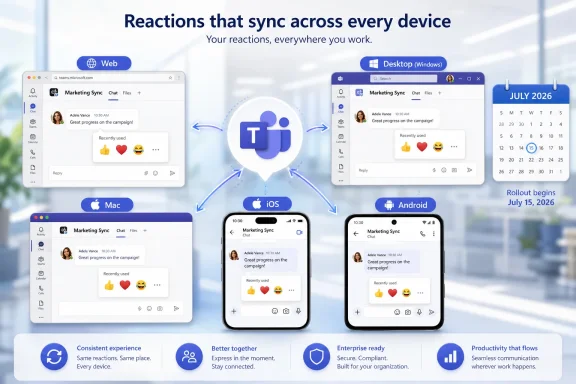
The official description is spare: recently used emojis and reactions will sync across Teams on desktop and mobile, making it easier to express yourself wherever you work. The affected platforms are broad enough to matter: Android, desktop, iOS, Mac, and web. The rollout is listed for General Availability and Targeted Release, with availability across Worldwide commercial tenants as well as GCC, GCC High, and DoD.
That breadth is the point. This is not a consumer flourish bolted onto an enterprise app. It is a cross-platform consistency fix for an application that now follows workers from a managed Windows laptop to a personal phone, from a browser tab to a meeting-room-adjacent tablet, and from a government tenant to a multinational corporate deployment.
The feature’s July 2026 timing also matters because Teams has spent the past few years becoming less like a meeting client and more like a workplace operating layer. Chat, channels, meetings, calls, webinars, files, agents, apps, and Copilot all compete inside the same shell. In that environment, even small interaction mismatches become friction because users encounter them dozens of times a day.
Emoji sync will not change Teams governance, licensing, retention, or compliance posture by itself. It will, however, make the application feel a little less like five clients wearing the same logo. That is a more important product goal than it sounds.
A thumbs-up in Teams is not just decoration. It can mean “approved,” “seen,” “I agree,” “I am ending this thread without adding another notification,” or “please do not schedule another meeting about this.” A check mark can become a lightweight workflow signal. A laughing face can keep a correction from reading like a rebuke. A heart can mean warmth in one culture and awkward overreach in another.
That ambiguity is exactly why reactions spread. They compress social meaning into something fast enough for modern work. They also let people participate without escalating every exchange into prose, which matters in organizations where attention is the scarcest resource.
Teams did not invent that behavior, and in some respects it has been chasing the norms that Slack, Discord, iMessage, and consumer social platforms made ordinary. But Teams has a harder job: it must make expressive communication work inside regulated enterprises, public-sector environments, and conservative IT estates where the wrong kind of informality can become a policy issue.
Syncing recently used emojis is therefore not about novelty. It is about preserving the user’s informal vocabulary across contexts. If a worker has developed a set of reactions that signal “done,” “blocked,” “thanks,” “urgent,” and “acknowledged,” losing that set when moving from phone to laptop is a small but real interruption.
The “recently used” list is a particularly revealing piece of state. It is not a formal setting, not a tenant policy, not a document, not a calendar entry. It is personal, behavioral, and ephemeral. Syncing it says Microsoft increasingly understands that continuity is not limited to files and chats.
That is the same design pressure behind features like roaming preferences, persistent meeting settings, synced read states, and cross-device notifications. If the user has to rebuild muscle memory on every device, the app feels unfinished. If the app remembers too much in the wrong place, it feels intrusive. The trick is to make state follow the user without making the user feel tracked.
For most people, synced emoji recents will simply mean the reaction they reached for yesterday on mobile is waiting on desktop today. For administrators, the more interesting question is how far Microsoft intends to take this idea. Teams already contains a growing mix of organization-wide controls and personal experience data; the seam between the two keeps getting more important.
Microsoft’s inclusion of government cloud instances suggests the company views this as a low-risk usability improvement rather than a feature requiring special compliance hesitation. That is probably right, but government availability is also a reminder that Teams changes cannot be evaluated only through a consumer-product lens. Even the fun picker lives inside systems that may be subject to retention, eDiscovery, conduct policy, and accessibility review.
Microsoft has narrowed that gap over time. Teams has added richer emoji and reaction options, custom emoji support in managed environments, and multiple reactions per message. The newly synced recents fit into that longer campaign to make Teams less stiff and more conversational without giving up enterprise control.
That is a delicate balancing act. Slack can often move faster on expressive features because its brand was built around the idea that work chat should feel playful. Teams inherited a Microsoft 365 audience that includes schools, hospitals, agencies, banks, defense contractors, and companies that still debate whether GIFs belong in professional channels. Microsoft cannot simply copy the vibe; it has to productize the vibe.
This is why the sync feature is more interesting than it first appears. It does not add a new expressive capability so much as it reduces the cost of using existing ones. That kind of polish is what mature platforms need when the obvious feature gaps have narrowed.
A product can have every checkbox and still feel clumsy. Conversely, a small piece of continuity can make an app feel more coherent than a splashy new capability that only works in one client or one license tier. Microsoft has learned this lesson the hard way across Windows, Office, OneDrive, and Teams: users remember the places where the ecosystem stutters.
Teams has been steadily expanding expressive and lightweight communication features while also giving organizations controls over areas such as custom emoji. That matters because reactions can become part of business communication. In some workplaces, a reaction is effectively an approval. In others, it is informal and non-binding. The technology does not distinguish those meanings; the organization does.
This is where IT and HR often discover that the same feature means different things to different departments. End users see convenience. Legal sees discoverable communications. Compliance sees policy scope. Security sees data residency and access boundaries. Accessibility teams see whether meaning is conveyed only through visual symbols. Managers see a faster way to keep work moving, until a misunderstanding proves otherwise.
The sync of recently used emojis does not introduce those tensions, but it makes expressive communication more consistent and therefore more habitual. The more reliable a reaction system becomes, the more likely teams are to lean on it for actual work signals.
That is not a reason to resist the update. It is a reason to be honest about how people already use Teams. If an organization’s informal workflows depend on reactions, the right response is not pretending they do not. It is documenting norms where they matter and training managers not to confuse a convenient emoji with a controlled approval process.
The likely practical risk here is low. Teams already synchronizes far more consequential information: chats, meeting artifacts, files, calendars, presence, and notification state. Compared with that, a synced emoji recents list is small beer.
Yet the pattern is worth watching. Every cross-device convenience depends on deciding what user state belongs in the cloud and how broadly it should roam. The industry has generally answered “almost everything,” because continuity sells. But enterprise users do not always know which preferences are local, which are account-based, and which are visible or inferable elsewhere.
Microsoft could help itself by keeping this category boring and predictable. Personal recents should behave like personal recents, not organizational analytics. They should be easy to clear if users want a reset. They should respect account and tenant boundaries, especially for people who operate across multiple organizations.
The good news is that the feature’s basic function is easy to understand. The risk would come from opacity, not from the synchronization itself. In enterprise software, even harmless data movement can create suspicion when the user cannot tell what is moving and why.
Microsoft has done work around inclusivity in emoji and reaction experiences, including skin tone preferences and broader customization. Syncing recently used items should reinforce those choices rather than flatten them. If a user has tuned their reaction habits to fit their identity or communication style, those choices should follow them.
Accessibility is the other test. Reactions must be legible to screen readers, understandable in context, and not used as the sole carrier of critical meaning. The faster a reaction becomes, the easier it is for teams to forget that not everyone experiences the interface visually or culturally in the same way.
This is not a Microsoft-only problem. It is a workplace-design problem. The best collaboration tools make lightweight signals available without making them mandatory. They let people acknowledge quickly, but they do not force important business meaning into a tiny icon with inconsistent interpretation.
The synced recents feature can help here if it reduces search friction for users who rely on a stable set of accessible, familiar reactions. But organizations should still be careful about turning emoji into process. A check mark may be fine for “I saw this.” It may not be enough for “I approve this production change.”
This is the normal rhythm of Microsoft 365, and it is also one of the reasons help desks sometimes dread small updates. A user sees a feature on their phone, not on the desktop. A colleague in another tenant has it, but they do not. A web session behaves differently from a managed client that updates on a slower channel. The feature is “available,” but availability is not the same as universal arrival.
For this update, the confusion should be manageable because the behavioral change is narrow. But IT teams should still expect a short period where users compare devices and wonder why the same emoji list has not appeared everywhere. That is particularly true in organizations with locked-down mobile app deployment, virtual desktop environments, or strict change windows.
The best admin posture is simple: treat it as a low-impact experience update, mention it in regular Teams change communications, and avoid over-documenting it into absurdity. Nobody needs a 12-page PDF on synced emoji recents. But a sentence in the monthly Microsoft 365 change digest can prevent unnecessary tickets.
That distinction matters. The Teams criticism from power users has rarely been that Microsoft lacks ambition. If anything, Teams has too much ambition: meetings, chat, files, apps, communities, webinars, telephony, AI, and workplace management all crowd into the same interface. The product’s challenge is coherence.
Synced recently used emojis are a coherence feature. They do not ask users to learn anything. They do not introduce a new pane, a new license, or a new admin acronym. They simply make a common action behave the way people expected it to behave already.
That is the kind of update mature software needs more often. In 2026, enterprise users are saturated with AI announcements and productivity claims. They are less impressed by another assistant button than by an app that remembers what they were doing, respects their habits, and does not make them hunt for the same symbol on every device.
Microsoft’s messaging frames the feature around expression, but the deeper value is continuity. The company is building a Teams experience where the user’s communication patterns roam with them. That is useful for emoji today, and it points toward a broader expectation for every part of Teams tomorrow.
 Microsoft Ships a Small Feature Into a Very Large Behavior
The official description is spare: recently used emojis and reactions will sync across Teams on desktop and mobile, making it easier to express yourself wherever you work. The affected platforms are broad enough to matter: Android, desktop, iOS, Mac, and web. The rollout is listed for General Availability and Targeted Release, with availability across Worldwide commercial tenants as well as GCC, GCC High, and DoD.That breadth is the point. This is not a consumer flourish bolted onto an enterprise app. It is a cross-platform consistency fix for an application that now follows workers from a managed Windows laptop to a personal phone, from a browser tab to a meeting-room-adjacent tablet, and from a government tenant to a multinational corporate deployment.
The feature’s July 2026 timing also matters because Teams has spent the past few years becoming less like a meeting client and more like a workplace operating layer. Chat, channels, meetings, calls, webinars, files, agents, apps, and Copilot all compete inside the same shell. In that environment, even small interaction mismatches become friction because users encounter them dozens of times a day.
Emoji sync will not change Teams governance, licensing, retention, or compliance posture by itself. It will, however, make the application feel a little less like five clients wearing the same logo. That is a more important product goal than it sounds.
The Reaction Picker Became Workplace Infrastructure by Accident
Enterprise software has always had an uneasy relationship with informality. The tools are procured by committees, governed by policies, and audited by legal teams, but they are used by human beings trying not to type “sounds good” 47 times a week. Emojis and reactions fill that gap.A thumbs-up in Teams is not just decoration. It can mean “approved,” “seen,” “I agree,” “I am ending this thread without adding another notification,” or “please do not schedule another meeting about this.” A check mark can become a lightweight workflow signal. A laughing face can keep a correction from reading like a rebuke. A heart can mean warmth in one culture and awkward overreach in another.
That ambiguity is exactly why reactions spread. They compress social meaning into something fast enough for modern work. They also let people participate without escalating every exchange into prose, which matters in organizations where attention is the scarcest resource.
Teams did not invent that behavior, and in some respects it has been chasing the norms that Slack, Discord, iMessage, and consumer social platforms made ordinary. But Teams has a harder job: it must make expressive communication work inside regulated enterprises, public-sector environments, and conservative IT estates where the wrong kind of informality can become a policy issue.
Syncing recently used emojis is therefore not about novelty. It is about preserving the user’s informal vocabulary across contexts. If a worker has developed a set of reactions that signal “done,” “blocked,” “thanks,” “urgent,” and “acknowledged,” losing that set when moving from phone to laptop is a small but real interruption.
Cross-Device Consistency Is Where Teams Still Has to Earn Trust
Teams has long carried the burden of being everywhere. It is a Windows app, a Mac app, a web app, a mobile app, a meeting client, a telephony surface, and an app platform. Users expect all of those surfaces to behave as one product, even when they are built under very different technical and platform constraints.The “recently used” list is a particularly revealing piece of state. It is not a formal setting, not a tenant policy, not a document, not a calendar entry. It is personal, behavioral, and ephemeral. Syncing it says Microsoft increasingly understands that continuity is not limited to files and chats.
That is the same design pressure behind features like roaming preferences, persistent meeting settings, synced read states, and cross-device notifications. If the user has to rebuild muscle memory on every device, the app feels unfinished. If the app remembers too much in the wrong place, it feels intrusive. The trick is to make state follow the user without making the user feel tracked.
For most people, synced emoji recents will simply mean the reaction they reached for yesterday on mobile is waiting on desktop today. For administrators, the more interesting question is how far Microsoft intends to take this idea. Teams already contains a growing mix of organization-wide controls and personal experience data; the seam between the two keeps getting more important.
Microsoft’s inclusion of government cloud instances suggests the company views this as a low-risk usability improvement rather than a feature requiring special compliance hesitation. That is probably right, but government availability is also a reminder that Teams changes cannot be evaluated only through a consumer-product lens. Even the fun picker lives inside systems that may be subject to retention, eDiscovery, conduct policy, and accessibility review.
The Emoji Drawer Is Now Part of Microsoft’s Competitive Debt
Teams competes with Slack not just on features, but on feel. Slack’s long-standing advantage has been its fluency as a chat-native environment: reactions, custom emoji, lightweight acknowledgement, and channel culture are not add-ons there. They are part of the product’s grammar.Microsoft has narrowed that gap over time. Teams has added richer emoji and reaction options, custom emoji support in managed environments, and multiple reactions per message. The newly synced recents fit into that longer campaign to make Teams less stiff and more conversational without giving up enterprise control.
That is a delicate balancing act. Slack can often move faster on expressive features because its brand was built around the idea that work chat should feel playful. Teams inherited a Microsoft 365 audience that includes schools, hospitals, agencies, banks, defense contractors, and companies that still debate whether GIFs belong in professional channels. Microsoft cannot simply copy the vibe; it has to productize the vibe.
This is why the sync feature is more interesting than it first appears. It does not add a new expressive capability so much as it reduces the cost of using existing ones. That kind of polish is what mature platforms need when the obvious feature gaps have narrowed.
A product can have every checkbox and still feel clumsy. Conversely, a small piece of continuity can make an app feel more coherent than a splashy new capability that only works in one client or one license tier. Microsoft has learned this lesson the hard way across Windows, Office, OneDrive, and Teams: users remember the places where the ecosystem stutters.
The Governance Story Is Quiet, but It Is Not Absent
There is no indication that synced recently used emojis creates a new administrative control surface on its own. It is a user-experience improvement, not a new compliance feature. Still, admins should not ignore the broader category it belongs to.Teams has been steadily expanding expressive and lightweight communication features while also giving organizations controls over areas such as custom emoji. That matters because reactions can become part of business communication. In some workplaces, a reaction is effectively an approval. In others, it is informal and non-binding. The technology does not distinguish those meanings; the organization does.
This is where IT and HR often discover that the same feature means different things to different departments. End users see convenience. Legal sees discoverable communications. Compliance sees policy scope. Security sees data residency and access boundaries. Accessibility teams see whether meaning is conveyed only through visual symbols. Managers see a faster way to keep work moving, until a misunderstanding proves otherwise.
The sync of recently used emojis does not introduce those tensions, but it makes expressive communication more consistent and therefore more habitual. The more reliable a reaction system becomes, the more likely teams are to lean on it for actual work signals.
That is not a reason to resist the update. It is a reason to be honest about how people already use Teams. If an organization’s informal workflows depend on reactions, the right response is not pretending they do not. It is documenting norms where they matter and training managers not to confuse a convenient emoji with a controlled approval process.
The Privacy Question Is Less Dramatic Than the Pattern
A recently used emoji list is not the same as a message history. It does not reveal the full context of a conversation. But it is still behavioral data, and modern users have become more sensitive to the quiet accumulation of behavioral traces across devices.The likely practical risk here is low. Teams already synchronizes far more consequential information: chats, meeting artifacts, files, calendars, presence, and notification state. Compared with that, a synced emoji recents list is small beer.
Yet the pattern is worth watching. Every cross-device convenience depends on deciding what user state belongs in the cloud and how broadly it should roam. The industry has generally answered “almost everything,” because continuity sells. But enterprise users do not always know which preferences are local, which are account-based, and which are visible or inferable elsewhere.
Microsoft could help itself by keeping this category boring and predictable. Personal recents should behave like personal recents, not organizational analytics. They should be easy to clear if users want a reset. They should respect account and tenant boundaries, especially for people who operate across multiple organizations.
The good news is that the feature’s basic function is easy to understand. The risk would come from opacity, not from the synchronization itself. In enterprise software, even harmless data movement can create suspicion when the user cannot tell what is moving and why.
Accessibility and Culture Decide Whether Reactions Help or Hurt
Emoji features often arrive wrapped in the language of self-expression, but workplace expression is never evenly distributed. A reaction that feels natural to one employee can feel risky to another. A symbol that reads as friendly in one team can read as dismissive in another. A default skin tone or commonly used gesture can carry more meaning than the sender intended.Microsoft has done work around inclusivity in emoji and reaction experiences, including skin tone preferences and broader customization. Syncing recently used items should reinforce those choices rather than flatten them. If a user has tuned their reaction habits to fit their identity or communication style, those choices should follow them.
Accessibility is the other test. Reactions must be legible to screen readers, understandable in context, and not used as the sole carrier of critical meaning. The faster a reaction becomes, the easier it is for teams to forget that not everyone experiences the interface visually or culturally in the same way.
This is not a Microsoft-only problem. It is a workplace-design problem. The best collaboration tools make lightweight signals available without making them mandatory. They let people acknowledge quickly, but they do not force important business meaning into a tiny icon with inconsistent interpretation.
The synced recents feature can help here if it reduces search friction for users who rely on a stable set of accessible, familiar reactions. But organizations should still be careful about turning emoji into process. A check mark may be fine for “I saw this.” It may not be enough for “I approve this production change.”
The Rollout Calendar Is a Reminder That Teams Is a Service, Not a Version
The roadmap entry lists the feature as rolling out, with General Availability in July 2026. That language is now standard for Microsoft 365, but it still creates a familiar support problem: not everyone gets the same experience on the same day. Targeted Release users may see it before the broader population. Government clouds may follow their own cadence. Mobile clients may need app updates or service-side enablement before behavior looks consistent.This is the normal rhythm of Microsoft 365, and it is also one of the reasons help desks sometimes dread small updates. A user sees a feature on their phone, not on the desktop. A colleague in another tenant has it, but they do not. A web session behaves differently from a managed client that updates on a slower channel. The feature is “available,” but availability is not the same as universal arrival.
For this update, the confusion should be manageable because the behavioral change is narrow. But IT teams should still expect a short period where users compare devices and wonder why the same emoji list has not appeared everywhere. That is particularly true in organizations with locked-down mobile app deployment, virtual desktop environments, or strict change windows.
The best admin posture is simple: treat it as a low-impact experience update, mention it in regular Teams change communications, and avoid over-documenting it into absurdity. Nobody needs a 12-page PDF on synced emoji recents. But a sentence in the monthly Microsoft 365 change digest can prevent unnecessary tickets.
Microsoft’s Real Teams Strategy Is Hidden in the Polish
It is tempting to treat this as filler in the endless churn of Microsoft 365 roadmap items. That would miss the strategic direction. Teams is not just trying to become more powerful; it is trying to become less annoying.That distinction matters. The Teams criticism from power users has rarely been that Microsoft lacks ambition. If anything, Teams has too much ambition: meetings, chat, files, apps, communities, webinars, telephony, AI, and workplace management all crowd into the same interface. The product’s challenge is coherence.
Synced recently used emojis are a coherence feature. They do not ask users to learn anything. They do not introduce a new pane, a new license, or a new admin acronym. They simply make a common action behave the way people expected it to behave already.
That is the kind of update mature software needs more often. In 2026, enterprise users are saturated with AI announcements and productivity claims. They are less impressed by another assistant button than by an app that remembers what they were doing, respects their habits, and does not make them hunt for the same symbol on every device.
Microsoft’s messaging frames the feature around expression, but the deeper value is continuity. The company is building a Teams experience where the user’s communication patterns roam with them. That is useful for emoji today, and it points toward a broader expectation for every part of Teams tomorrow.
The July Emoji Sync Says More Than Its Roadmap Line Allows
This is a tiny update with a narrow release note, but it belongs to a larger story about how Teams is being normalized as the default workplace interface. The most important details are practical rather than dramatic.- Recently used emojis and reactions are set to sync across Teams desktop, web, Mac, iOS, and Android clients during the July 2026 rollout window.
- The feature is listed for both General Availability and Targeted Release, so tenants may not see identical behavior at the same moment.
- Microsoft plans availability across Worldwide commercial tenants and government clouds, including GCC, GCC High, and DoD.
- The change should reduce cross-device friction for users who rely on reactions as quick acknowledgements in chats and channels.
- Administrators should treat the update as low-risk, but they should remember that reactions often become informal workflow signals inside real organizations.
- The feature is best understood as part of Microsoft’s broader effort to make Teams feel consistent and conversational across every endpoint.
References
- Primary source: Microsoft 365 Roadmap
Published: 2026-07-01T23:03:18.2442931Z
Microsoft 365 Roadmap | Microsoft 365
The Microsoft 365 Roadmap lists updates that are currently planned for applicable subscribers. Check here for more information on the status of new features and updates.www.microsoft.com
- Related coverage: m365admin.handsontek.net
Microsoft Teams: Recently used emojis sync across devices - M365 Admin
Recently used emojis and reactions sync across Teams on desktop and mobile, making it easier to express yourself wherever you work. Product Microsoft Teams Release phase General Availability Release date March CY2026 Platform Desktop Cloud Instance Worldwide (Standard Multi-Tenant) Created...m365admin.handsontek.net - Related coverage: techradar.com
Microsoft Teams will now let your company add its own branded reactions, and I can't possibly foresee this going wrong at all | TechRadar
'Branded Meeting Reactions' are coming to Microsoft Teamswww.techradar.com - Related coverage: linkedin.com
Microsoft Teams Syncs Recently Used Emojis Across Devices | Modern Workplace Pro posted on the topic | LinkedIn
Microsoft Teams: Recently used emojis sync across devices [MC1256307] - Message ID: MC1256307 [Introduction] We’re releasing an improvement to Microsoft Teams that syncs your recently used emojis and reactions across devices. With this update, users will see the same set of “recently used”...www.linkedin.com
- Related coverage: teams.handsontek.net
What’s new for Microsoft Teams – February 2026 - HANDS ON Teams
A look at what’s new in Microsoft Teams for February 2026, from Teams Rooms updates and digital signage on Android to the redesigned Events experience and productivity improvements.teams.handsontek.net - Related coverage: windowscentral.com
Microsoft Teams is adding branded reactions to video meetings | Windows Central
Microsoft will soon allow companies to add their own "visual identity" in video meetings with branded emoji reactions.www.windowscentral.com
- Official source: learn.microsoft.com
Custom emojis in Microsoft Teams - Microsoft Teams | Microsoft Learn
Learn about adding custom emojis to Microsoft Teams chats.learn.microsoft.com