

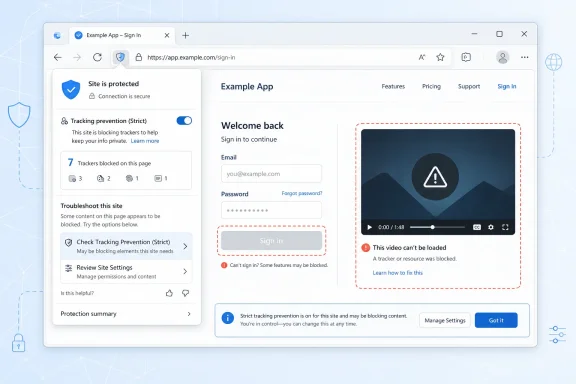
Microsoft Edge is scheduled to add in-context website troubleshooting controls in August 2026, giving users prompts for actions such as changing tracking prevention behavior or reviewing site settings when a page breaks. The feature is small on paper, but it points to a larger shift in browser design: compatibility problems are no longer being treated as mysteries for users to solve in Settings. Microsoft is trying to make Edge diagnose the consequences of its own privacy and site-control machinery at the moment the user feels the pain. That is both overdue and more politically interesting than the roadmap entry makes it sound.
The modern browser has become a privacy tool, a security boundary, a password manager, an app runtime, a PDF reader, an enterprise policy endpoint, and a compatibility layer for a web that never stopped mutating. That makes the old model of troubleshooting — search the web, clear cookies, disable extensions, try another browser — feel increasingly absurd. Users do not experience a broken embedded video, a failed sign-in button, or an empty payment frame as a policy interaction. They experience it as “this website does not work.”
Microsoft’s new Edge roadmap item is aimed squarely at that disconnect. When a site misbehaves, Edge may surface relevant troubleshooting options directly in context, including suggestions around tracking prevention settings such as Strict mode and site-specific configurations. The goal is not to invent a new compatibility mode so much as to expose existing levers at the moment they matter.
That timing matters. Edge already allows users to make exceptions for tracking prevention, inspect blocked trackers from the page information flyout, and adjust per-site settings. But buried controls are not the same as usable controls, particularly when the user has no reason to suspect that a privacy feature is what broke the page. Microsoft is essentially admitting that discoverability is now part of compatibility.
The roadmap places the feature in development, targets General Availability for August 2026, and lists Microsoft Edge on the web platform for worldwide standard multi-tenant customers. It was created on May 4, 2026, and updated on July 2, 2026. That makes it a near-term feature, not a speculative design exercise.
That is the trade that privacy advocates and browser vendors have been negotiating for years. A setting that blocks more third-party scripts, storage access, pixels, iframes, and classified trackers can reduce surveillance and unwanted cross-site data collection. The same setting can also break parts of the web that outsourced authentication, analytics, comments, embeds, payments, personalization, or content delivery to third parties.
To users, those categories are invisible. A “tracker” might be an ad-tech script nobody wants, or it might be a social login dependency the site unwisely made essential. A cross-site request might be invasive telemetry, or it might be a vendor-hosted checkout widget. The browser sees enforcement categories; the user sees a dead button.
This is why in-context troubleshooting is not just convenience polish. It is a recognition that browser privacy controls have become operational features. If the browser offers stronger privacy defaults or stronger privacy options, it also inherits the responsibility to explain the side effects without forcing users into guesswork.
Microsoft’s language is careful: users “may be guided” to “relevant troubleshooting options.” That suggests Edge is not necessarily going to offer a single blunt “turn off protection for this site” button in every case. It may instead connect symptoms to a short menu of likely causes, such as tracking prevention, cookies, permissions, pop-ups, or other site-specific controls.
The most useful version of this feature would distinguish between temporary diagnosis and durable trust. A user should be able to test whether tracking prevention is responsible before permanently exempting a site. Edge should also explain the privacy consequence in plain English, not merely say that changing a setting may improve compatibility.
There is a familiar enterprise lesson here. Administrators have spent decades translating technical policy into user-facing behavior: why a macro will not run, why a login is blocked, why a website opens in one mode but not another. Edge is now trying to perform a miniature version of that translation for ordinary browsing.
For home users, that may mean fewer ritualistic fixes. “Clear cache and cookies” has become the duct tape of browser support, frequently suggested because nobody knows what else to try. In many cases it works only because it resets state broadly enough to bulldoze the actual cause. A guided site-specific fix is cleaner and less destructive.
For IT departments, the implications are more complicated. A user-facing repair flow can reduce tickets for routine website breakage, but it can also create a new class of exceptions that admins need to understand, audit, or restrict. If a user bypasses tracking prevention for a line-of-business portal, that may be perfectly reasonable. If they do it for a sketchy site because a prompt promised restored functionality, that is a governance problem.
Edge for Business already exists in a world of policies, managed favorites, security baselines, data-loss controls, and compatibility rules. A troubleshooting UI must coexist with that policy stack. The enterprise version of “helpful” is not always “let the user decide.”
A faster browser cadence raises the value of self-explanatory controls. If users see smaller but more frequent changes, the number of moments where a site feels “different” may increase, even when each individual change is modest. In that environment, diagnostics are not a luxury. They are part of change management.
This is especially true for compatibility. Browser vendors like to frame rapid updates as security and standards progress, and often they are. But the web is full of old assumptions, brittle dependencies, and vendor-specific workarounds. A small enforcement change in tracking prevention, cookies, storage access, or embedded content can have an outsized effect on a site that was already skating near the edge.
Microsoft has lived this history more painfully than most. Internet Explorer’s long shadow was defined by compatibility promises that became technical debt. Chromium-based Edge was supposed to escape that trap by aligning with the modern web. But alignment with Chromium does not eliminate compatibility problems; it moves them into privacy controls, enterprise policy, web standards churn, and the endless improvisation of real websites.
The new compatibility story is less tidy. A site can be modern and still break because it relies on third-party identity, cross-site storage, embedded content, or scripts that look indistinguishable from tracking infrastructure. The user is not choosing between old and new. They are choosing between protection and functionality, often without knowing that choice exists.
That shift is why the word “troubleshooting” undersells the roadmap item. This feature is about trust mediation. Edge is being asked to tell the user when the browser’s protective behavior may be the reason a site is not working — and then to help the user make an informed exception without making exceptions feel harmless.
The browser vendor has a conflict of incentives here. Microsoft wants Edge to be seen as private, secure, compatible, and easy. In the real world, those qualities sometimes collide. Surfacing a compatibility fix is easy; preserving user understanding while doing so is harder.
Developers have had years to adapt to tighter browser privacy models, including changes around third-party cookies, storage access, fingerprinting defenses, and cross-site tracking controls. Yet the web remains full of dependencies that assume third-party resources can be loaded, scripted, and stateful without friction. When those assumptions fail, users blame the browser first, but the site is not innocent.
The best version of this Edge feature could indirectly pressure sites to behave better. If users repeatedly see compatibility prompts for a given service, the service may find itself explaining why basic functions require weakened privacy settings. That is reputational friction, and reputational friction is sometimes what moves web engineering faster than standards documents do.
Still, Microsoft must be careful not to normalize the idea that broken sites should be fixed by reducing protection. A browser-level prompt can become a crutch for lazy site design. If developers learn that Edge will guide users around bad architecture, the incentive to fix root causes weakens.
But administrators will also want policy clarity. Can organizations suppress these prompts? Can they allow diagnostic messaging while blocking user-created exceptions? Will Edge respect managed settings and clearly tell users when a fix is unavailable because their organization controls it? Those details will determine whether this is an enterprise-friendly improvement or another variable in the support matrix.
The problem is not hypothetical. In managed environments, browser behavior is security posture. A per-site exception may affect data leakage, sign-in flows, compliance boundaries, or exposure to malicious third-party code. Users who only want the expense portal to load are not positioned to evaluate those trade-offs.
Microsoft’s Edge enterprise story has increasingly leaned on the idea that the browser is a controllable business surface, not merely a user preference. This feature needs to reinforce that claim. If it works cleanly with policy, it becomes a useful support-layer feature. If it sidesteps policy or explains it poorly, admins will resent it even if users like it.
There is a risk, however, that users will read any browser prompt as an instruction rather than a choice. If Edge says changing a setting could restore functionality, many users will change it. That makes wording and interface hierarchy important. The browser should not bury the privacy cost in a secondary dialog or euphemize it as “improving compatibility.”
The better pattern is reversible, narrow, and explicit. Apply the change only to the current site. Explain what protection is being relaxed. Provide a way to undo it. Make the temporary test path as easy as the permanent exception path.
That is not just privacy purism. It is good product design. Users are more likely to trust a browser that admits trade-offs plainly than one that hides them behind a green check mark and a vague promise of restored functionality.
Browser vendors have spent the last few years chasing visible differentiation in a market where rendering engines and standards support are increasingly shared. Edge has leaned into vertical tabs, sleeping tabs, shopping tools, enterprise controls, PDF features, sidebar apps, and AI integration. Some of those are useful; some feel like clutter depending on the user. But compatibility troubleshooting is different because it addresses a failure mode every browser user understands.
It also fits Microsoft’s broader pattern of making Edge a management and productivity surface rather than just a Chromium shell. The browser is where Microsoft can apply policy, identity, data protection, search, Copilot, and web app behavior in one place. A site troubleshooting layer adds supportability to that stack.
The danger is that Edge becomes too talkative. Modern Microsoft products often struggle with restraint, surfacing recommendations, banners, account nudges, and feature prompts until useful guidance becomes noise. This feature will succeed only if it appears when it is genuinely relevant and stays quiet when it is not.
False negatives matter too. If the browser only surfaces troubleshooting help in obvious cases, the feature may feel random. Users will still fall back to old habits when Edge stays silent during a real compatibility failure. The sweet spot is narrow: helpful enough to be noticed, conservative enough to be trusted.
The browser has some signals it can use. It can observe blocked resource loads, storage access denials, permission states, mixed content restrictions, pop-up blocking, cookie behavior, and perhaps repeated failed interactions. But inferring user intent from page behavior is hard. A script blocked for good reason can look similar to a script the site foolishly requires.
This is where Microsoft’s experience with telemetry may help and worry users in equal measure. Aggregated compatibility data can improve suggestions, but the browser must avoid making people feel that their browsing problems are being watched too closely. As always with Edge, Microsoft’s technical competence is not the only issue. Trust is part of the feature.
But a privacy feature that breaks sites without explanation is not durable. Users who cannot understand or manage the trade-off will either turn the feature off globally or switch browsers when enough sites fail. In-context troubleshooting, done well, can preserve stronger defaults by making exceptions narrow and understandable.
The key phrase is done well. Edge should not frame privacy as the obstacle and compatibility as the goal. It should frame the choice honestly: this site may rely on something your browser is blocking; allowing it may make the site work, but it may also permit more tracking or site access than your current settings allow.
That kind of transparency is rare because it is uncomfortable. It tells the user that the web is messy and that no browser can make every choice cost-free. But users are already living with those costs. They deserve to see them.
The concrete points are straightforward:
 Microsoft Moves the Fix Closer to the Failure
The modern browser has become a privacy tool, a security boundary, a password manager, an app runtime, a PDF reader, an enterprise policy endpoint, and a compatibility layer for a web that never stopped mutating. That makes the old model of troubleshooting — search the web, clear cookies, disable extensions, try another browser — feel increasingly absurd. Users do not experience a broken embedded video, a failed sign-in button, or an empty payment frame as a policy interaction. They experience it as “this website does not work.”Microsoft’s new Edge roadmap item is aimed squarely at that disconnect. When a site misbehaves, Edge may surface relevant troubleshooting options directly in context, including suggestions around tracking prevention settings such as Strict mode and site-specific configurations. The goal is not to invent a new compatibility mode so much as to expose existing levers at the moment they matter.
That timing matters. Edge already allows users to make exceptions for tracking prevention, inspect blocked trackers from the page information flyout, and adjust per-site settings. But buried controls are not the same as usable controls, particularly when the user has no reason to suspect that a privacy feature is what broke the page. Microsoft is essentially admitting that discoverability is now part of compatibility.
The roadmap places the feature in development, targets General Availability for August 2026, and lists Microsoft Edge on the web platform for worldwide standard multi-tenant customers. It was created on May 4, 2026, and updated on July 2, 2026. That makes it a near-term feature, not a speculative design exercise.
Strict Privacy Has Always Carried a Compatibility Tax
The most obvious trigger named in the roadmap entry is tracking prevention, especially Strict mode. Edge’s tracking prevention tiers are designed to let users choose how aggressively the browser blocks trackers, with Basic, Balanced, and Strict offering different trade-offs. Microsoft’s own support material has long warned that Strict can cause some sites not to behave as expected, including problems with video playback or sign-in.That is the trade that privacy advocates and browser vendors have been negotiating for years. A setting that blocks more third-party scripts, storage access, pixels, iframes, and classified trackers can reduce surveillance and unwanted cross-site data collection. The same setting can also break parts of the web that outsourced authentication, analytics, comments, embeds, payments, personalization, or content delivery to third parties.
To users, those categories are invisible. A “tracker” might be an ad-tech script nobody wants, or it might be a social login dependency the site unwisely made essential. A cross-site request might be invasive telemetry, or it might be a vendor-hosted checkout widget. The browser sees enforcement categories; the user sees a dead button.
This is why in-context troubleshooting is not just convenience polish. It is a recognition that browser privacy controls have become operational features. If the browser offers stronger privacy defaults or stronger privacy options, it also inherits the responsibility to explain the side effects without forcing users into guesswork.
Edge Is Trying to Translate Browser Internals into User Decisions
The hard part is not showing a prompt. The hard part is showing the right prompt without training users to disable protections reflexively. If every broken site becomes a nudge to weaken tracking prevention, then the feature becomes a privacy backslide dressed up as support. If the browser is too cautious, users still end up searching forums and toggling random settings.Microsoft’s language is careful: users “may be guided” to “relevant troubleshooting options.” That suggests Edge is not necessarily going to offer a single blunt “turn off protection for this site” button in every case. It may instead connect symptoms to a short menu of likely causes, such as tracking prevention, cookies, permissions, pop-ups, or other site-specific controls.
The most useful version of this feature would distinguish between temporary diagnosis and durable trust. A user should be able to test whether tracking prevention is responsible before permanently exempting a site. Edge should also explain the privacy consequence in plain English, not merely say that changing a setting may improve compatibility.
There is a familiar enterprise lesson here. Administrators have spent decades translating technical policy into user-facing behavior: why a macro will not run, why a login is blocked, why a website opens in one mode but not another. Edge is now trying to perform a miniature version of that translation for ordinary browsing.
The Browser Is Becoming Its Own Help Desk
The interesting strategic move is that Microsoft is putting help desk logic into the browser chrome. That is where the user already looks when something goes wrong: the address bar, the lock icon, the site information pane, the shield, the permissions popover. If the browser can say “this site may be affected by a setting you control,” the support loop shortens dramatically.For home users, that may mean fewer ritualistic fixes. “Clear cache and cookies” has become the duct tape of browser support, frequently suggested because nobody knows what else to try. In many cases it works only because it resets state broadly enough to bulldoze the actual cause. A guided site-specific fix is cleaner and less destructive.
For IT departments, the implications are more complicated. A user-facing repair flow can reduce tickets for routine website breakage, but it can also create a new class of exceptions that admins need to understand, audit, or restrict. If a user bypasses tracking prevention for a line-of-business portal, that may be perfectly reasonable. If they do it for a sketchy site because a prompt promised restored functionality, that is a governance problem.
Edge for Business already exists in a world of policies, managed favorites, security baselines, data-loss controls, and compatibility rules. A troubleshooting UI must coexist with that policy stack. The enterprise version of “helpful” is not always “let the user decide.”
Microsoft’s Timing Is Not Accidental
The August 2026 target lands just as Edge’s release rhythm is becoming faster. Microsoft has announced a move to a two-week Stable release cycle beginning with Edge 152, while keeping Extended Stable on an eight-week cadence. That means features and behavioral tweaks will reach many users more frequently, even if enterprises can still choose a slower lane.A faster browser cadence raises the value of self-explanatory controls. If users see smaller but more frequent changes, the number of moments where a site feels “different” may increase, even when each individual change is modest. In that environment, diagnostics are not a luxury. They are part of change management.
This is especially true for compatibility. Browser vendors like to frame rapid updates as security and standards progress, and often they are. But the web is full of old assumptions, brittle dependencies, and vendor-specific workarounds. A small enforcement change in tracking prevention, cookies, storage access, or embedded content can have an outsized effect on a site that was already skating near the edge.
Microsoft has lived this history more painfully than most. Internet Explorer’s long shadow was defined by compatibility promises that became technical debt. Chromium-based Edge was supposed to escape that trap by aligning with the modern web. But alignment with Chromium does not eliminate compatibility problems; it moves them into privacy controls, enterprise policy, web standards churn, and the endless improvisation of real websites.
The Old Compatibility Story Was About Legacy; the New One Is About Trust
For years, “site compatibility” in Microsoft browser land mostly meant legacy enterprise apps, old document modes, ActiveX, and eventually IE mode. That story was about preserving access to old workflows while moving the platform forward. It was messy, but the categories were relatively clear: modern web here, legacy dependency there.The new compatibility story is less tidy. A site can be modern and still break because it relies on third-party identity, cross-site storage, embedded content, or scripts that look indistinguishable from tracking infrastructure. The user is not choosing between old and new. They are choosing between protection and functionality, often without knowing that choice exists.
That shift is why the word “troubleshooting” undersells the roadmap item. This feature is about trust mediation. Edge is being asked to tell the user when the browser’s protective behavior may be the reason a site is not working — and then to help the user make an informed exception without making exceptions feel harmless.
The browser vendor has a conflict of incentives here. Microsoft wants Edge to be seen as private, secure, compatible, and easy. In the real world, those qualities sometimes collide. Surfacing a compatibility fix is easy; preserving user understanding while doing so is harder.
Website Developers Should Read This as a Warning Shot
There is another audience for this feature: website owners. If Edge starts telling users that a site may require relaxed tracking prevention or special site settings to function, that is not a great look for the site. It turns an invisible architectural decision into a visible trust prompt.Developers have had years to adapt to tighter browser privacy models, including changes around third-party cookies, storage access, fingerprinting defenses, and cross-site tracking controls. Yet the web remains full of dependencies that assume third-party resources can be loaded, scripted, and stateful without friction. When those assumptions fail, users blame the browser first, but the site is not innocent.
The best version of this Edge feature could indirectly pressure sites to behave better. If users repeatedly see compatibility prompts for a given service, the service may find itself explaining why basic functions require weakened privacy settings. That is reputational friction, and reputational friction is sometimes what moves web engineering faster than standards documents do.
Still, Microsoft must be careful not to normalize the idea that broken sites should be fixed by reducing protection. A browser-level prompt can become a crutch for lazy site design. If developers learn that Edge will guide users around bad architecture, the incentive to fix root causes weakens.
The Admin View Is Relief Mixed With Suspicion
For sysadmins, the appeal is obvious. Anything that reduces vague “the website is broken” tickets has value. If Edge can point users to a site permission, tracking prevention exception, or configuration mismatch before they file a ticket, that is time saved.But administrators will also want policy clarity. Can organizations suppress these prompts? Can they allow diagnostic messaging while blocking user-created exceptions? Will Edge respect managed settings and clearly tell users when a fix is unavailable because their organization controls it? Those details will determine whether this is an enterprise-friendly improvement or another variable in the support matrix.
The problem is not hypothetical. In managed environments, browser behavior is security posture. A per-site exception may affect data leakage, sign-in flows, compliance boundaries, or exposure to malicious third-party code. Users who only want the expense portal to load are not positioned to evaluate those trade-offs.
Microsoft’s Edge enterprise story has increasingly leaned on the idea that the browser is a controllable business surface, not merely a user preference. This feature needs to reinforce that claim. If it works cleanly with policy, it becomes a useful support-layer feature. If it sidesteps policy or explains it poorly, admins will resent it even if users like it.
The Consumer View Is Less Theory, More “Make the Page Work”
Outside managed fleets, the calculus is simpler. Most users do not want to study tracking prevention models. They want to know why a video will not play, why a login loop keeps looping, or why a checkout button does nothing. A contextual repair suggestion is exactly the kind of browser assistance that feels obvious once it exists.There is a risk, however, that users will read any browser prompt as an instruction rather than a choice. If Edge says changing a setting could restore functionality, many users will change it. That makes wording and interface hierarchy important. The browser should not bury the privacy cost in a secondary dialog or euphemize it as “improving compatibility.”
The better pattern is reversible, narrow, and explicit. Apply the change only to the current site. Explain what protection is being relaxed. Provide a way to undo it. Make the temporary test path as easy as the permanent exception path.
That is not just privacy purism. It is good product design. Users are more likely to trust a browser that admits trade-offs plainly than one that hides them behind a green check mark and a vague promise of restored functionality.
The Feature’s Smallness Is the Point
There is no grand platform launch here, no Copilot banner, no attempt to rebrand the browser as an AI agent. The roadmap entry describes a practical improvement to an everyday annoyance. In 2026, that almost makes it stand out.Browser vendors have spent the last few years chasing visible differentiation in a market where rendering engines and standards support are increasingly shared. Edge has leaned into vertical tabs, sleeping tabs, shopping tools, enterprise controls, PDF features, sidebar apps, and AI integration. Some of those are useful; some feel like clutter depending on the user. But compatibility troubleshooting is different because it addresses a failure mode every browser user understands.
It also fits Microsoft’s broader pattern of making Edge a management and productivity surface rather than just a Chromium shell. The browser is where Microsoft can apply policy, identity, data protection, search, Copilot, and web app behavior in one place. A site troubleshooting layer adds supportability to that stack.
The danger is that Edge becomes too talkative. Modern Microsoft products often struggle with restraint, surfacing recommendations, banners, account nudges, and feature prompts until useful guidance becomes noise. This feature will succeed only if it appears when it is genuinely relevant and stays quiet when it is not.
The Real Test Will Be False Positives
The roadmap description sounds sensible, but the quality of the underlying detection will decide everything. If Edge suggests tracking prevention changes for problems caused by a server outage, a bad deployment, an extension, a captive portal, or a flaky network, users will lose confidence quickly. Worse, they may weaken privacy settings without solving the problem.False negatives matter too. If the browser only surfaces troubleshooting help in obvious cases, the feature may feel random. Users will still fall back to old habits when Edge stays silent during a real compatibility failure. The sweet spot is narrow: helpful enough to be noticed, conservative enough to be trusted.
The browser has some signals it can use. It can observe blocked resource loads, storage access denials, permission states, mixed content restrictions, pop-up blocking, cookie behavior, and perhaps repeated failed interactions. But inferring user intent from page behavior is hard. A script blocked for good reason can look similar to a script the site foolishly requires.
This is where Microsoft’s experience with telemetry may help and worry users in equal measure. Aggregated compatibility data can improve suggestions, but the browser must avoid making people feel that their browsing problems are being watched too closely. As always with Edge, Microsoft’s technical competence is not the only issue. Trust is part of the feature.
A Privacy Feature That Explains Itself Is Stronger, Not Weaker
Some privacy advocates may instinctively dislike any UI that helps users disable or relax protections. That concern is understandable. The web has a long history of wearing users down until they click “allow,” “accept,” or “continue” simply to get on with their day.But a privacy feature that breaks sites without explanation is not durable. Users who cannot understand or manage the trade-off will either turn the feature off globally or switch browsers when enough sites fail. In-context troubleshooting, done well, can preserve stronger defaults by making exceptions narrow and understandable.
The key phrase is done well. Edge should not frame privacy as the obstacle and compatibility as the goal. It should frame the choice honestly: this site may rely on something your browser is blocking; allowing it may make the site work, but it may also permit more tracking or site access than your current settings allow.
That kind of transparency is rare because it is uncomfortable. It tells the user that the web is messy and that no browser can make every choice cost-free. But users are already living with those costs. They deserve to see them.
The August Roadmap Item Worth Watching
Microsoft’s improved website compatibility controls are not the loudest Edge feature on the roadmap, but they may be one of the more consequential for daily use. The browser is moving from passive enforcement to guided remediation, and that changes how users understand broken websites.The concrete points are straightforward:
- Microsoft Edge is targeting August 2026 general availability for in-context website troubleshooting controls tied to site compatibility problems.
- The feature is designed to surface relevant actions when a site fails, including adjustments related to tracking prevention settings such as Strict mode.
- The improvement should reduce the need for users to dig through settings or rely on broad fixes such as clearing all browsing data.
- Enterprise value will depend on how well the experience respects managed policies and limits user-created exceptions where organizations require control.
- The privacy value will depend on whether Edge presents narrow, reversible, clearly explained changes rather than nudging users to weaken protections casually.
- Website developers should treat these prompts as a signal that privacy-hostile or brittle dependencies are becoming more visible to users.
References
- Primary source: Microsoft 365 Roadmap
Published: 2026-07-02T23:12:48.2177075Z
Loading…
www.microsoft.com - Official source: support.microsoft.com
Loading…
support.microsoft.com - Official source: learn.microsoft.com
Loading…
learn.microsoft.com - Official source: devblogs.microsoft.com
Loading…
devblogs.microsoft.com - Related coverage: xalabuda.com
Microsoft Edge поможет исправлять проблемы с сайтами - Xalabuda
Microsoft Edge получит подсказки для решения проблем с сайтами: браузер предложит настройки tracking prevention и разрешений.xalabuda.com - Official source: blogs.windows.com
Faster updates, enterprise-friendly schedule: the new Microsoft Edge release cycle
Microsoft Edge is moving to a two-week release cycle, bringing new features and improvements to users and organizations faster than ever. This is great news for teams that thrive on innovation: instead of waiting a full month for the next update, youblogs.windows.com
- Related coverage: windowsreport.com
Microsoft Edge Will Soon Help Users Fix Broken Websites Automatically
Microsoft Edge will soon detect broken websites and suggest fixes directly inside the browser UI for easier troubleshooting. windowsreport.com
- Official source: cdn-dynmedia-1.microsoft.com
- Official source: techcommunity.microsoft.com