

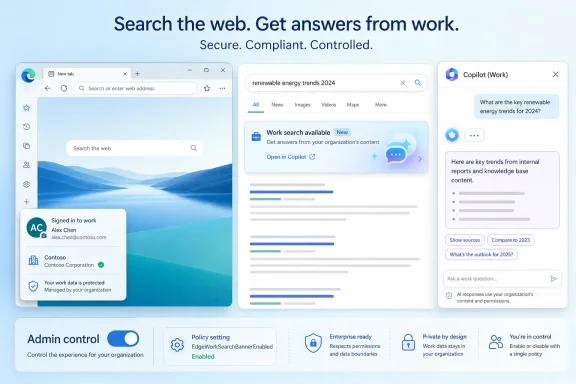
Microsoft is developing an Edge feature that will show work-search banners on Google Search results for signed-in work profiles, with Microsoft 365 Roadmap ID 560823 listing worldwide general availability for August 2026 and admin control through the EdgeWorkSearchBannerEnabled policy. The move sounds small, almost cosmetic: a browser banner, a link, a Copilot destination. But it reveals the next stage of Microsoft’s enterprise browser strategy, where Edge becomes less a neutral window onto the web and more a managed routing layer between public search, tenant data, and Microsoft 365 Copilot.
For years, Microsoft’s search problem has been easy to describe and hard to solve. Bing has become better, richer, and deeply wired into Windows and Microsoft 365, yet Google remains the search muscle memory for a huge share of users, including the employees Microsoft most wants to reach at work. Enterprises can standardize on Edge, enforce profiles, configure policies, and deploy Microsoft 365 everywhere, but the moment a user types a query into google.com, the old web habit reasserts itself.
The new Work Search Banner for Google is Microsoft’s admission that changing the default search engine is not the only path to influence. If users will not always go to Bing for work discovery, Edge can meet them where they already are. The browser can notice a work-profile search on Google, determine whether organizational results exist, and present a banner that sends the user into Microsoft 365 Copilot for work-aware results.
That is not the same as replacing Google results. It is subtler, and probably more acceptable in managed environments. Microsoft is not saying Google cannot answer the query; it is saying the organization may have answers Google cannot see.
This distinction matters. The browser is not merely promoting Bing, at least as described in the roadmap entry. It is promoting work search as a separate category of retrieval, one that lives in the Microsoft 365 tenant and increasingly terminates in Copilot rather than a classic search results page.
That modesty is the point. Enterprise software adoption often fails at the last mile not because the platform lacks capability, but because the workflow asks users to remember a separate place to go. Microsoft Search, SharePoint search, Teams search, Outlook search, OneDrive search, and Copilot each promise some version of “find your work,” but employees still start with whatever search box is closest.
Edge is the only Microsoft-controlled surface that can observe the start of that journey when it happens on the open web. In a work profile, the browser knows the user is operating in an organizational context. It can mediate without needing Google to integrate Microsoft’s work graph.
That makes the Work Search Banner less like an ad and more like a routing hint. The value proposition is not “use Microsoft instead of Google.” It is “this query may have an internal answer, and your browser knows enough to tell you before you waste time spelunking through public results.”
That is the larger bet. Microsoft does not want Copilot to sit beside work as an optional chatbot. It wants Copilot to become the front door to organizational knowledge, even when the user begins outside Microsoft’s own search engine.
This is also where the feature may prove controversial. A banner that says relevant internal results exist is useful; a banner that nudges every ambiguous query toward Copilot could feel like yet another Microsoft prompt competing for user attention. The difference will depend on how selective the detection is, how clearly the UI explains what is happening, and whether admins can tune or disable the experience cleanly.
The roadmap says admins can control access using EdgeWorkSearchBannerEnabled. That is essential. In enterprise browsers, seemingly minor user-interface prompts can become help-desk tickets, privacy questions, legal review items, or simply noise that organizations do not want to introduce during a controlled Copilot rollout.
It means Microsoft is no longer confining enterprise search affordances to Microsoft-owned destinations. Edge becomes the enforcement and discovery point. That is a familiar Microsoft pattern: when the company cannot own the whole workflow, it owns the layer where the workflow passes through.
For Windows administrators, that should sound both powerful and familiar. Microsoft has used identity, device management, Defender, compliance labels, and browser policies to wrap corporate controls around a web that Microsoft does not own. The Work Search Banner fits that same model, but for knowledge retrieval rather than security enforcement.
There is a defensive logic here, too. If users begin with Google and stay there, Microsoft 365 Copilot has fewer chances to prove its value. If Edge can surface the possibility of work results at the moment of intent, Microsoft gets another opportunity to turn Copilot from a licensed feature into a daily habit.
The work profile is Microsoft’s browser-era equivalent of the domain-joined desktop. It gives IT a place to apply policy and gives Microsoft a place to attach services. It also gives the browser a defensible reason to behave differently when the user is doing company work.
That matters because a browser that watches searches is a sensitive idea. Users may tolerate work-aware suggestions when they are clearly inside a work profile and signed in with an organizational account. They may be less forgiving if the boundary between personal and work contexts feels blurry.
Microsoft’s challenge is therefore not merely technical. It must make the profile boundary legible. If the banner appears in the right place, at the right time, with the right account context, it can feel helpful. If it appears unexpectedly, it will be interpreted as surveillance or advertising, even if the underlying data handling is more constrained than users assume.
There are several reasons an organization might disable or delay this feature. Some companies have not deployed Microsoft 365 Copilot broadly and may not want users clicking into an experience they cannot use, are not licensed for, or are not trained to interpret. Others may have strict communications plans around AI adoption and do not want browser prompts to get ahead of policy.
Security and compliance teams will also want to understand what “detect whether organization-specific results are available” means in practice. The roadmap description does not fully explain the detection flow. It does not say how much of the query is evaluated locally, what service receives it, whether Google’s results page content is involved, or how Microsoft determines that the tenant has relevant internal material.
Those details may be documented closer to release, but IT will not wait until August 2026 to ask the questions. A feature that connects public search behavior to internal data discovery sits squarely at the intersection of productivity, privacy, and governance.
Edge’s address bar already supports work-related suggestions in enterprise contexts, including files, people, bookmarks, and other Microsoft 365-powered results. That helps when the user searches from the browser chrome. But many users do not treat the address bar as a universal work search tool; they go to google.com, type a phrase, and trust habit.
The Work Search Banner acknowledges that product design cannot simply lecture users into a new starting point. It has to intercept familiar behavior with a relevant next step. That is a more pragmatic approach than trying to make every employee love Bing or remember a Copilot entry point.
The risk is that Microsoft turns every doorway into a Copilot doorway. The opportunity is that it finally makes work search visible at the moment employees are already looking for something.
That history will shape how this feature is received. A work-search banner on Google can be genuinely useful if it appears sparingly and with high confidence. It can become yet another reason users complain that Edge is too busy if it fires too often or feels like a Microsoft 365 upsell.
The distinction between relevance and promotion is especially important for Copilot. Microsoft is under pressure to justify Copilot licensing, and surfacing Copilot throughout the workflow is part of that strategy. But users quickly learn to ignore prompts that seem motivated by vendor goals rather than their own task.
For admins, the safest initial posture may be controlled experimentation. Pilot the feature with users who already have Copilot access and who perform knowledge-heavy work. Watch support feedback, measure whether users actually click through, and determine whether the banner reduces search friction or simply adds another visual interruption.
That may be perfectly reasonable in an enterprise work profile, especially where the organization has chosen Edge and Microsoft 365 as managed work tools. Still, the optics are delicate. Browser vendors have enormous power over the surfaces users see before, during, and after navigation. When that power is used to promote adjacent services, competitors and regulators tend to pay attention.
The key distinction will be administrative intent. If the feature is controlled by enterprise policy and limited to work profiles, Microsoft can argue that it is serving organizational productivity rather than consumer search steering. If it feels like a default promotional layer that organizations must discover and turn off, the criticism will be sharper.
Microsoft has learned this lesson repeatedly in Windows and Edge. Enterprise customers like integration, but they want agency. They do not want surprises disguised as productivity enhancements.
The early Copilot pitch was about asking questions, drafting documents, summarizing meetings, and generating content. The next phase is quieter: inserting Copilot into the seams between applications. Search is one of those seams because it is not an app so much as a recurring act of intent.
Edge is becoming one of Microsoft’s most important Copilot distribution channels. The browser can host Copilot, expose toolbar entry points, participate in policy enforcement, and now redirect work-search intent from Google into the Microsoft 365 knowledge layer. That does not make Edge an AI browser in the consumer-marketing sense. It makes Edge a controlled enterprise shell for AI-assisted work.
For Windows shops, that evolution should change how Edge is evaluated. It is no longer just the Chromium browser Microsoft ships with Windows. It is a policy-bearing Microsoft 365 endpoint.
Employees increasingly understand that workplace tools log activity. They also increasingly worry that AI features expand the scope of what is analyzed. A banner that appears after a Google search may prompt a simple user question: “Who saw what I just searched?”
IT departments will need a clear answer. They will need to know whether the query is sent to Microsoft services, how it is processed, whether it is retained, whether it is associated with the user, and how tenant permissions affect the results that Copilot can surface. They will also need to explain that Google already receives the query when the user searches google.com, but that does not settle the separate question of Microsoft’s role.
Permission trimming is another critical issue. If Copilot exposes work results from files, chats, sites, or people data, it must respect the organization’s existing access controls. Microsoft’s broader Microsoft 365 search and Copilot architecture is designed around that principle, but every new entry point creates another place where users will test trust.
The banner itself may reveal less than the destination it opens. A subtle message that relevant work results exist is probably low risk. The Copilot session that follows is where governance, oversharing, sensitivity labels, retention, and user training become real.
For organizations that already have strong Microsoft 365 information architecture, clean permissions, mature sensitivity labeling, and Copilot adoption programs, the banner could be a useful accelerant. It may help employees find HR policies, project documents, internal subject-matter experts, and meeting-related artifacts without needing to know which Microsoft 365 app holds the answer.
For organizations with messy permissions and sprawling SharePoint sites, the feature may surface the same uncomfortable truth as Copilot itself: AI-assisted retrieval is only as trustworthy as the tenant’s information hygiene. If too many employees have access to too much old content, better discovery can become a liability.
That is why the August 2026 date should be treated as a planning marker. Admins should watch for policy documentation, test channel behavior, message center posts, and any licensing requirements tied to the Copilot destination. They should also decide whether the feature belongs in their Copilot rollout narrative or outside it.
By extending the work-search banner to Google, Microsoft is choosing coexistence over pure substitution. That is strategically smart. It lets Edge remain useful even when Bing is not the user’s preferred search engine, and it lets Microsoft 365 compete on the value of internal context rather than the politics of defaults.
This does not mean Microsoft has stopped caring about Bing. It means the company understands that enterprise search and web search are diverging. Google may be the public-web reflex, while Microsoft wants Copilot to be the private-work reflex. Edge sits between the two.
That framing may make the feature more palatable to users. They can keep Google for the open web and use Copilot when the answer is likely inside the company. The browser becomes a bridge instead of a scold.
 Microsoft Takes the Long Way Around the Search Engine War
For years, Microsoft’s search problem has been easy to describe and hard to solve. Bing has become better, richer, and deeply wired into Windows and Microsoft 365, yet Google remains the search muscle memory for a huge share of users, including the employees Microsoft most wants to reach at work. Enterprises can standardize on Edge, enforce profiles, configure policies, and deploy Microsoft 365 everywhere, but the moment a user types a query into google.com, the old web habit reasserts itself.The new Work Search Banner for Google is Microsoft’s admission that changing the default search engine is not the only path to influence. If users will not always go to Bing for work discovery, Edge can meet them where they already are. The browser can notice a work-profile search on Google, determine whether organizational results exist, and present a banner that sends the user into Microsoft 365 Copilot for work-aware results.
That is not the same as replacing Google results. It is subtler, and probably more acceptable in managed environments. Microsoft is not saying Google cannot answer the query; it is saying the organization may have answers Google cannot see.
This distinction matters. The browser is not merely promoting Bing, at least as described in the roadmap entry. It is promoting work search as a separate category of retrieval, one that lives in the Microsoft 365 tenant and increasingly terminates in Copilot rather than a classic search results page.
The Banner Is a Small UI With a Large Strategic Payload
A banner is one of the least dramatic interface elements Microsoft could have chosen. It does not block Google, hijack the query, or force a full-page redirect. It appears only when relevant work results are detected, and it gives the user a link to explore those results with Microsoft 365 Copilot.That modesty is the point. Enterprise software adoption often fails at the last mile not because the platform lacks capability, but because the workflow asks users to remember a separate place to go. Microsoft Search, SharePoint search, Teams search, Outlook search, OneDrive search, and Copilot each promise some version of “find your work,” but employees still start with whatever search box is closest.
Edge is the only Microsoft-controlled surface that can observe the start of that journey when it happens on the open web. In a work profile, the browser knows the user is operating in an organizational context. It can mediate without needing Google to integrate Microsoft’s work graph.
That makes the Work Search Banner less like an ad and more like a routing hint. The value proposition is not “use Microsoft instead of Google.” It is “this query may have an internal answer, and your browser knows enough to tell you before you waste time spelunking through public results.”
Copilot Becomes the Destination, Not Just the Assistant
The most telling phrase in the roadmap description is not “Google.” It is “Microsoft 365 Copilot.” Microsoft could have linked the banner to a traditional Microsoft Search results page, or to Bing’s work tab, or to a SharePoint-centric search interface. Instead, the user is sent toward Copilot, where retrieval is increasingly framed as a conversational, synthesized, permission-aware experience.That is the larger bet. Microsoft does not want Copilot to sit beside work as an optional chatbot. It wants Copilot to become the front door to organizational knowledge, even when the user begins outside Microsoft’s own search engine.
This is also where the feature may prove controversial. A banner that says relevant internal results exist is useful; a banner that nudges every ambiguous query toward Copilot could feel like yet another Microsoft prompt competing for user attention. The difference will depend on how selective the detection is, how clearly the UI explains what is happening, and whether admins can tune or disable the experience cleanly.
The roadmap says admins can control access using EdgeWorkSearchBannerEnabled. That is essential. In enterprise browsers, seemingly minor user-interface prompts can become help-desk tickets, privacy questions, legal review items, or simply noise that organizations do not want to introduce during a controlled Copilot rollout.
Google Search Is the Battlefield Microsoft Can No Longer Ignore
Microsoft already had a version of this experience on Bing, which was the obvious place to start. If a user searches Bing while signed into a work context, Microsoft can blend public search and work-aware discovery with relatively little political or technical friction. Extending the experience to Google changes the significance.It means Microsoft is no longer confining enterprise search affordances to Microsoft-owned destinations. Edge becomes the enforcement and discovery point. That is a familiar Microsoft pattern: when the company cannot own the whole workflow, it owns the layer where the workflow passes through.
For Windows administrators, that should sound both powerful and familiar. Microsoft has used identity, device management, Defender, compliance labels, and browser policies to wrap corporate controls around a web that Microsoft does not own. The Work Search Banner fits that same model, but for knowledge retrieval rather than security enforcement.
There is a defensive logic here, too. If users begin with Google and stay there, Microsoft 365 Copilot has fewer chances to prove its value. If Edge can surface the possibility of work results at the moment of intent, Microsoft gets another opportunity to turn Copilot from a licensed feature into a daily habit.
Work Profiles Are Becoming the Real Enterprise Boundary
The feature applies when a user searches google.com from a work profile. That condition is more important than it first appears. Microsoft has spent years pushing Edge profiles as the dividing line between personal and professional browsing, especially in Edge for Business, where enterprise identity, policy, branding, and data controls can follow the work profile across managed and unmanaged devices.The work profile is Microsoft’s browser-era equivalent of the domain-joined desktop. It gives IT a place to apply policy and gives Microsoft a place to attach services. It also gives the browser a defensible reason to behave differently when the user is doing company work.
That matters because a browser that watches searches is a sensitive idea. Users may tolerate work-aware suggestions when they are clearly inside a work profile and signed in with an organizational account. They may be less forgiving if the boundary between personal and work contexts feels blurry.
Microsoft’s challenge is therefore not merely technical. It must make the profile boundary legible. If the banner appears in the right place, at the right time, with the right account context, it can feel helpful. If it appears unexpectedly, it will be interpreted as surveillance or advertising, even if the underlying data handling is more constrained than users assume.
The Admin Toggle Is Not a Footnote
The EdgeWorkSearchBannerEnabled policy is the difference between a potentially useful enterprise feature and an unwanted browser behavior. Microsoft’s roadmap entry explicitly says admins can control access, which is the right design instinct. In managed environments, discovery features must be governed because they affect user experience, data exposure, and support expectations.There are several reasons an organization might disable or delay this feature. Some companies have not deployed Microsoft 365 Copilot broadly and may not want users clicking into an experience they cannot use, are not licensed for, or are not trained to interpret. Others may have strict communications plans around AI adoption and do not want browser prompts to get ahead of policy.
Security and compliance teams will also want to understand what “detect whether organization-specific results are available” means in practice. The roadmap description does not fully explain the detection flow. It does not say how much of the query is evaluated locally, what service receives it, whether Google’s results page content is involved, or how Microsoft determines that the tenant has relevant internal material.
Those details may be documented closer to release, but IT will not wait until August 2026 to ask the questions. A feature that connects public search behavior to internal data discovery sits squarely at the intersection of productivity, privacy, and governance.
Microsoft Search Has Always Needed a Better Doorway
Microsoft’s enterprise search story has long suffered from fragmentation. The company has indexed files, people, messages, sites, bookmarks, and organizational entities across Microsoft 365, but the access points have shifted over time: Bing, Office.com, SharePoint, Teams, Windows Search, Edge’s address bar, and now Copilot. The corpus may be unified in theory, but the user experience has often felt scattered.Edge’s address bar already supports work-related suggestions in enterprise contexts, including files, people, bookmarks, and other Microsoft 365-powered results. That helps when the user searches from the browser chrome. But many users do not treat the address bar as a universal work search tool; they go to google.com, type a phrase, and trust habit.
The Work Search Banner acknowledges that product design cannot simply lecture users into a new starting point. It has to intercept familiar behavior with a relevant next step. That is a more pragmatic approach than trying to make every employee love Bing or remember a Copilot entry point.
The risk is that Microsoft turns every doorway into a Copilot doorway. The opportunity is that it finally makes work search visible at the moment employees are already looking for something.
The Feature’s Success Will Depend on Restraint
Microsoft has a mixed record with browser prompts. Edge has often been praised for performance, enterprise manageability, sleeping tabs, vertical tabs, and compatibility. It has also irritated users with prompts, sidebars, shopping features, default-browser friction, and aggressive service integration. The same company that builds excellent enterprise controls sometimes struggles to resist promotional UI.That history will shape how this feature is received. A work-search banner on Google can be genuinely useful if it appears sparingly and with high confidence. It can become yet another reason users complain that Edge is too busy if it fires too often or feels like a Microsoft 365 upsell.
The distinction between relevance and promotion is especially important for Copilot. Microsoft is under pressure to justify Copilot licensing, and surfacing Copilot throughout the workflow is part of that strategy. But users quickly learn to ignore prompts that seem motivated by vendor goals rather than their own task.
For admins, the safest initial posture may be controlled experimentation. Pilot the feature with users who already have Copilot access and who perform knowledge-heavy work. Watch support feedback, measure whether users actually click through, and determine whether the banner reduces search friction or simply adds another visual interruption.
The Google Extension Raises Competitive and Regulatory Questions
Because this feature appears on google.com while using Microsoft Edge, it sits in an interesting competitive space. Microsoft is not modifying Google’s search index, and it is not preventing access to Google. But it is using browser-level awareness to present a Microsoft 365 Copilot path alongside a rival search engine’s results experience.That may be perfectly reasonable in an enterprise work profile, especially where the organization has chosen Edge and Microsoft 365 as managed work tools. Still, the optics are delicate. Browser vendors have enormous power over the surfaces users see before, during, and after navigation. When that power is used to promote adjacent services, competitors and regulators tend to pay attention.
The key distinction will be administrative intent. If the feature is controlled by enterprise policy and limited to work profiles, Microsoft can argue that it is serving organizational productivity rather than consumer search steering. If it feels like a default promotional layer that organizations must discover and turn off, the criticism will be sharper.
Microsoft has learned this lesson repeatedly in Windows and Edge. Enterprise customers like integration, but they want agency. They do not want surprises disguised as productivity enhancements.
The Roadmap Timing Points to a Copilot-Native Edge
The roadmap lists the feature as in development, created in April 2026, updated on July 2, 2026, and targeted for general availability in August 2026 for worldwide standard multi-tenant cloud customers. That timing places it in the broader maturation phase of Microsoft 365 Copilot, as Microsoft shifts from marquee demos to workflow embedding.The early Copilot pitch was about asking questions, drafting documents, summarizing meetings, and generating content. The next phase is quieter: inserting Copilot into the seams between applications. Search is one of those seams because it is not an app so much as a recurring act of intent.
Edge is becoming one of Microsoft’s most important Copilot distribution channels. The browser can host Copilot, expose toolbar entry points, participate in policy enforcement, and now redirect work-search intent from Google into the Microsoft 365 knowledge layer. That does not make Edge an AI browser in the consumer-marketing sense. It makes Edge a controlled enterprise shell for AI-assisted work.
For Windows shops, that evolution should change how Edge is evaluated. It is no longer just the Chromium browser Microsoft ships with Windows. It is a policy-bearing Microsoft 365 endpoint.
The Privacy Conversation Will Happen Whether Microsoft Leads It or Not
The roadmap language is careful but incomplete. It says Edge can detect whether organization-specific results are available for a query. It does not explain the data path. In 2026, that omission will not be ignored.Employees increasingly understand that workplace tools log activity. They also increasingly worry that AI features expand the scope of what is analyzed. A banner that appears after a Google search may prompt a simple user question: “Who saw what I just searched?”
IT departments will need a clear answer. They will need to know whether the query is sent to Microsoft services, how it is processed, whether it is retained, whether it is associated with the user, and how tenant permissions affect the results that Copilot can surface. They will also need to explain that Google already receives the query when the user searches google.com, but that does not settle the separate question of Microsoft’s role.
Permission trimming is another critical issue. If Copilot exposes work results from files, chats, sites, or people data, it must respect the organization’s existing access controls. Microsoft’s broader Microsoft 365 search and Copilot architecture is designed around that principle, but every new entry point creates another place where users will test trust.
The banner itself may reveal less than the destination it opens. A subtle message that relevant work results exist is probably low risk. The Copilot session that follows is where governance, oversharing, sensitivity labels, retention, and user training become real.
IT Should Treat This as Change Management, Not Just Browser Policy
It will be tempting to reduce this feature to a single policy setting. Turn it on, turn it off, move on. That would miss the larger operational question: whether the organization is ready for employees to discover internal information through Copilot from the context of public web search.For organizations that already have strong Microsoft 365 information architecture, clean permissions, mature sensitivity labeling, and Copilot adoption programs, the banner could be a useful accelerant. It may help employees find HR policies, project documents, internal subject-matter experts, and meeting-related artifacts without needing to know which Microsoft 365 app holds the answer.
For organizations with messy permissions and sprawling SharePoint sites, the feature may surface the same uncomfortable truth as Copilot itself: AI-assisted retrieval is only as trustworthy as the tenant’s information hygiene. If too many employees have access to too much old content, better discovery can become a liability.
That is why the August 2026 date should be treated as a planning marker. Admins should watch for policy documentation, test channel behavior, message center posts, and any licensing requirements tied to the Copilot destination. They should also decide whether the feature belongs in their Copilot rollout narrative or outside it.
The Edge-Google Compromise Is More Honest Than a Bing Mandate
The most interesting thing about this feature is that it does not pretend enterprises can standardize user instinct by decree. Many organizations set defaults. Many users change them. Many users search from habits formed long before Copilot, Edge for Business, or Microsoft Search existed.By extending the work-search banner to Google, Microsoft is choosing coexistence over pure substitution. That is strategically smart. It lets Edge remain useful even when Bing is not the user’s preferred search engine, and it lets Microsoft 365 compete on the value of internal context rather than the politics of defaults.
This does not mean Microsoft has stopped caring about Bing. It means the company understands that enterprise search and web search are diverging. Google may be the public-web reflex, while Microsoft wants Copilot to be the private-work reflex. Edge sits between the two.
That framing may make the feature more palatable to users. They can keep Google for the open web and use Copilot when the answer is likely inside the company. The browser becomes a bridge instead of a scold.
The August Banner Is Really a Test of Trust
The concrete facts are simple, but the implications are not. Microsoft is preparing to show work-search banners on Google Search inside Edge work profiles, routing relevant queries toward Microsoft 365 Copilot, with general availability currently listed for August 2026. The feature is small enough to miss and important enough for IT to plan around.- The feature applies to searches on google.com made from a Microsoft Edge work profile, not to every browser session a user opens.
- The banner appears only when Edge detects that organization-specific results are available for the query.
- The destination is Microsoft 365 Copilot, signaling Microsoft’s preference for Copilot as the front end for work knowledge.
- The experience extends an existing Bing-oriented work search pattern to Google, which is the more strategically significant part of the change.
- Administrators can control the feature through the EdgeWorkSearchBannerEnabled policy.
- Organizations should evaluate licensing, privacy messaging, permissions hygiene, and user training before enabling it broadly.
References
- Primary source: Microsoft 365 Roadmap
Published: 2026-07-02T23:12:48.2177075Z
Microsoft 365 Roadmap | Microsoft 365
The Microsoft 365 Roadmap lists updates that are currently planned for applicable subscribers. Check here for more information on the status of new features and updates.www.microsoft.com
- Official source: learn.microsoft.com
Microsoft Edge Browser Policy Documentation AddressBarWorkSearchResultsEnabled | Microsoft Learn
Windows and Mac documentation for supported Microsoft Edge Browser policy: Enable Work Search suggestions in the address barlearn.microsoft.com - Official source: support.microsoft.com
Change your default search engine in Microsoft Edge | Microsoft Support
Learn how to change your default search engine in Microsoft Edge.support.microsoft.com - Related coverage: windowsreport.com
Microsoft Edge Will Bring Work Search Banner to Google Results
Microsoft Edge will add a work search banner to Google and Bing, improving access to internal company data. windowsreport.com
- Official source: cdn-dynmedia-1.microsoft.com
- Official source: wwps.microsoft.com
- Official source: info.microsoft.com