

Google fixed CVE-2026-13814 in Chrome 150.0.7871.47 for Windows and Mac on June 30, 2026, after documenting a high-severity use-after-free flaw in Chrome’s Views interface framework that could let a remote attacker trigger heap corruption through crafted HTML and specific user gestures. The bug is not described as a zero-day, and CISA’s ADP record lists exploitation as “none,” but the combination of browser UI interaction, memory corruption, and delayed technical disclosure makes it the kind of Chrome issue administrators should treat as operationally urgent rather than academically interesting. As detailed in Google’s Chrome Releases post and expanded in the National Vulnerability Database entry, this is another reminder that the modern browser attack surface is no longer just JavaScript engines and media codecs; it is the whole user experience.
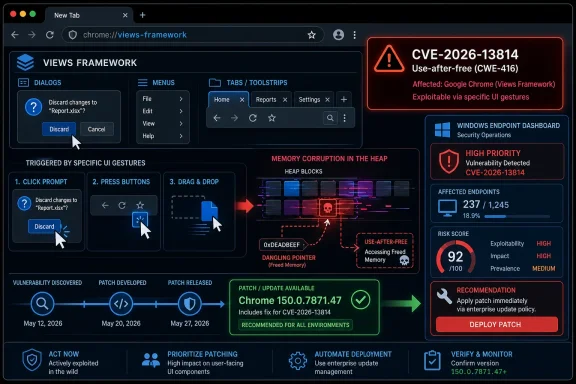
The most important phrase in CVE-2026-13814 is not “crafted HTML page.” We see that language constantly in browser advisories, and it has become almost invisible through repetition. The phrase that should make defenders pause is “specific UI gestures.”
Chrome’s Views framework is part of the machinery that renders and manages user-interface elements across Chromium-based applications. In ordinary terms, it is closer to the browser’s chrome than the web content itself: windows, controls, dialogs, menus, and the interactions around them. A use-after-free vulnerability there means an object was still reachable after its memory should have been retired, opening the door to heap corruption if an attacker can force the right timing and state.
That is why this bug sits in an uncomfortable middle ground. It is not the cleanest nightmare scenario, where merely loading a page detonates an exploit. But it is also not comforting, because “convince a user to engage in specific UI gestures” is a very low bar in the phishing era. Attackers have spent years training users to click prompts, dismiss overlays, drag files, approve sign-ins, accept notifications, and interact with fake support workflows.
Google’s own Chrome Releases post for June 30 says Chrome 150 was promoted to stable for Windows, Mac, and Linux and would roll out over the following days or weeks. It also says the release contains hundreds of security fixes and that bug details may remain restricted until most users have received the patch. That is normal Chrome security practice, but it leaves defenders with an oddly familiar asymmetry: enough information to know they must patch, not enough information to model the exploit path with precision.
The NVD page for CVE-2026-13814 lists the weakness as CWE-416, the long-running category for use-after-free errors. CISA’s ADP scoring gives it a CVSS 3.1 base score of 7.5, with network attack vector, no privileges required, user interaction required, high attack complexity, unchanged scope, and high impacts to confidentiality, integrity, and availability. NIST had not yet supplied its own CVSS score at the time the record was last modified on July 2.
That distinction matters for vulnerability management teams that still treat the NVD score as the first and last sorting mechanism. Here, the government record is partially enriched but not fully scored by NIST, while CISA has already contributed an assessment. The absence of a NIST base score is not the absence of risk; it is a reminder that modern CVE records often arrive in stages.
The CPE history is similarly instructive. NIST’s change log shows a CPE configuration added on July 2 for Google Chrome versions before 150.0.7871.47. For automated scanners, that kind of enrichment is not cosmetic. Without the right product mapping, a vulnerability can exist in the database while still slipping past asset matching, dashboards, and compliance reports.
CVE-2026-13814 is just one entry in that flood, but its placement is revealing. The same release includes multiple Views-related use-after-free bugs, including critical entries earlier in the list and this high-severity issue reported by Google on May 10. In other words, Views was not a one-off footnote in Chrome 150. It was part of a broader memory-safety cleanup across the browser’s interface and platform layers.
For Windows users, the relevant fixed version is Chrome 150.0.7871.46 or 150.0.7871.47 depending on platform and channel details, with NVD specifically drawing the vulnerable boundary at versions prior to 150.0.7871.47. Linux received 150.0.7871.46 in the same release announcement. That version nuance is exactly why administrators should verify against vendor guidance and actual browser inventory, not rely on a vague “Chrome 150” label.
The practical point is simpler: if Chrome reports a version older than 150.0.7871.47 on Windows or Mac, it should be considered exposed to this CVE. For mixed fleets, especially those with delayed update rings, frozen VDI images, kiosks, or packaged enterprise browser deployments, the version check matters more than the marketing milestone.
A malicious page does not need to say “please exploit your browser.” It can impersonate a document portal, a cloud-storage preview, a collaboration prompt, a CAPTCHA, an authentication recovery page, or a fake browser warning. If the vulnerable state depends on a sequence of interface actions, social engineering is the bridge between the crafted page and the memory bug.
This is one reason browser UI vulnerabilities deserve more attention than they often receive. Users are rightly trained to distrust downloaded executables, macros, unsigned installers, and suspicious attachments. They are not trained to distrust clicking a browser prompt, interacting with a tab, moving through a dialog, or performing a seemingly harmless gesture on a page that looks like a normal web application.
The modern attack chain also does not require every bug to do everything. A UI-triggered heap corruption flaw can be paired with sandbox escapes, credential theft flows, OAuth abuse, malicious extensions, or post-compromise tooling. Google has not said CVE-2026-13814 is being exploited in the wild, and CISA’s SSVC data says exploitation is not observed, but defenders should avoid equating that with “unlikely ever to matter.”
But it also complicates enterprise risk analysis. Security teams want to know whether the bug crosses a process boundary, whether it needs a rare UI state, whether mitigations such as site isolation change the outcome, whether exploitability differs across platforms, and whether Chromium-based browsers inherit the same exposure on the same timeline. The public advisory does not answer those questions.
That ambiguity should not paralyze patching. If anything, it argues against waiting. Chrome’s release cadence is designed around rapid replacement, not long-form administrator debate. By the time a detailed write-up appears, the defender’s best window may already have closed.
For WindowsForum readers, the restriction also creates a familiar community challenge. Enthusiasts and admins want to know whether Edge, Brave, Vivaldi, Opera, and other Chromium-based browsers are affected. The safe assumption is that Chromium-derived browsers need attention unless their maintainers have confirmed integration of the relevant upstream fix. Chrome’s CVE entry names Google Chrome, but the underlying component is Chromium code.
That is the operational reality for Windows shops. Chrome may be the first browser named in the advisory, but the dependency graph reaches across the Chromium ecosystem. On managed Windows endpoints, many organizations run Edge by default, Chrome for compatibility, WebView2 for application embedding, and third-party Chromium browsers for user preference or testing. A flaw in a shared UI layer can therefore become an inventory problem, not just a browser problem.
The harder part is timing. Google’s release post says Chrome 150 stable would roll out over days or weeks. Other Chromium vendors may lag depending on their build, validation, and release processes. Enterprises that pin versions or disable automatic updates for stability can lag even further, sometimes by policy rather than accident.
This is where browser governance has to mature. Treating browsers as consumer apps that happen to be installed on corporate machines is no longer defensible. Browsers are privileged productivity platforms, identity brokers, document viewers, password managers, extension hosts, and increasingly AI front ends. Their patch posture belongs in the same conversation as operating system updates and endpoint detection coverage.
CPE mappings are how many scanners and asset systems connect a CVE to installed software. If a record lacks CPE data, or if the mapping arrives late, tools may fail to flag affected systems even when the CVE is public. In this case, NIST’s change history shows that a CPE configuration for Google Chrome versions before 150.0.7871.47 was added on July 2, two days after the CVE was received from Chrome on June 30.
That is not a scandal; it is how enrichment pipelines often work. But it does mean that organizations watching CVE feeds in near real time may see an incomplete record first and a more actionable record later. The initial absence of a visible CPE should not be read as evidence that there is no affected software. The Chrome advisory and the affected-version statement already provided the substance.
The better workflow is to combine vendor advisories, CVE feeds, endpoint inventory, and browser management telemetry. If your process waits for a perfect NVD entry before you care about a Chrome memory-corruption bug, your process is slower than the platform it is trying to protect.
Chrome has invested heavily in mitigations, sandboxing, fuzzing, site isolation, MiraclePtr-style memory safety work, and broader hardening. Those investments matter. They can turn reliable exploitation into difficult exploitation, or reduce the blast radius when a renderer bug is triggered. But CVE-2026-13814 shows the stubborn persistence of lifecycle bugs outside the glamorous parts of the engine.
Views is a particularly interesting place for this fight because UI frameworks are state machines dressed up as pixels. They respond to focus changes, input events, window activation, drag-and-drop, accessibility hooks, dialogs, menus, animations, and platform-specific behavior. Those interactions create object lifetimes that are harder to reason about than a neat parser test case.
The security industry often talks about memory safety as if it were only a language migration story: rewrite everything in Rust and the bug class disappears. That is directionally right but operationally incomplete. Browsers are enormous, layered, cross-platform systems. The transition will be measured in years, and in the meantime, the patch train is the mitigation strategy users actually have.
That last point is chronically underestimated. Chrome can download updates in the background, but the old vulnerable binary may continue running until the browser restarts. Users who keep dozens of tabs open for weeks are often the users most in need of the update and least likely to complete it.
For households, the risk is not limited to the primary desktop. Check secondary laptops, shared family PCs, old machines used for banking or printing, and browser profiles on work-from-home systems. Chrome’s update system is good, but abandoned devices and rarely restarted machines are where “automatic” becomes aspirational.
There is no public indication from Google or CISA that CVE-2026-13814 is being actively exploited. That should lower panic, not urgency. The best browser patch is the one installed before exploit code circulates.
Chrome Enterprise policies, endpoint management tools, software inventory platforms, and EDR telemetry can all help, but only if the organization has a reliable browser version source of truth. In many environments, the installed version, the running version, and the package repository version are not the same thing. A browser may be updated on disk while a vulnerable process remains alive in a user session.
This is especially relevant for persistent VDI, kiosk deployments, call-center machines, lab computers, and shared workstations that are rarely rebooted. Browser patch SLAs should include restart enforcement or at least restart detection. Otherwise, dashboards turn green while users continue running the old code.
Administrators should also pay attention to extension governance. CVE-2026-13814 itself is not an extension bug, but the broader Chrome 150 release includes a large number of security fixes across browser subsystems, including Extensions and other components that interact with enterprise policy. The more powerful the browser becomes as an application platform, the more extension inventory and update discipline matter.
The impact values are all high: confidentiality, integrity, and availability. That does not guarantee arbitrary code execution in every scenario, but it signals that successful exploitation could be serious. The unchanged scope value suggests the impact remains within the same security authority rather than crossing into another component’s privilege domain by itself.
This is why “requires user interaction” is often overused as a comfort blanket. Nearly all phishing works by requiring user interaction. The question is not whether a click is needed; the question is whether attackers can plausibly obtain that click. In browser-based social engineering, the answer is usually yes.
The high attack complexity is more meaningful. It may indicate timing sensitivity, state dependency, platform specificity, or hard-to-shape memory conditions. But exploit complexity can drop after researchers or attackers study a patch. A bug that is hard to exploit on June 30 can be easier to exploit once enough diffing and reverse engineering has happened.
Patch diffing changes the clock. Once a fixed version is public, attackers can compare old and new code, identify the relevant change, and infer the vulnerability. Restricted bug tracker entries slow that process, but they do not stop it. A public binary update is itself a clue.
This is especially true for high-volume releases like Chrome 150. Hundreds of fixes create noise, but they also create opportunity. Attackers do not need every bug. They need one useful path that exists on enough unpatched machines to justify the work.
For defenders, the lesson is to avoid treating the disclosure date as the start of a leisurely review. The more interesting date is the release date of the patched binary. CVE-2026-13814 was received by NVD on June 30, modified by CISA on July 1 and July 2, and enriched by NIST on July 2. The patch train was already moving while the public metadata was still settling.
It is not a V8 headline bug. It is not currently tagged as exploited in the wild. It does not come with a splashy named campaign. It is a use-after-free in a UI framework, triggered through crafted content and user gestures, fixed inside a release that also patches hundreds of other issues. That is the normal shape of browser security in 2026.
For Windows administrators, the work is therefore unglamorous but concrete:
 The Browser UI Is Now Part of the Attack Surface
The most important phrase in CVE-2026-13814 is not “crafted HTML page.” We see that language constantly in browser advisories, and it has become almost invisible through repetition. The phrase that should make defenders pause is “specific UI gestures.”Chrome’s Views framework is part of the machinery that renders and manages user-interface elements across Chromium-based applications. In ordinary terms, it is closer to the browser’s chrome than the web content itself: windows, controls, dialogs, menus, and the interactions around them. A use-after-free vulnerability there means an object was still reachable after its memory should have been retired, opening the door to heap corruption if an attacker can force the right timing and state.
That is why this bug sits in an uncomfortable middle ground. It is not the cleanest nightmare scenario, where merely loading a page detonates an exploit. But it is also not comforting, because “convince a user to engage in specific UI gestures” is a very low bar in the phishing era. Attackers have spent years training users to click prompts, dismiss overlays, drag files, approve sign-ins, accept notifications, and interact with fake support workflows.
Google’s own Chrome Releases post for June 30 says Chrome 150 was promoted to stable for Windows, Mac, and Linux and would roll out over the following days or weeks. It also says the release contains hundreds of security fixes and that bug details may remain restricted until most users have received the patch. That is normal Chrome security practice, but it leaves defenders with an oddly familiar asymmetry: enough information to know they must patch, not enough information to model the exploit path with precision.
“High” Does Not Mean Harmless
CVE labels have a way of flattening risk. A “critical” Chrome bug gets attention. A “high” Chrome bug gets filed into a queue. A high-severity memory-corruption vulnerability in a browser UI framework, however, is not background noise.The NVD page for CVE-2026-13814 lists the weakness as CWE-416, the long-running category for use-after-free errors. CISA’s ADP scoring gives it a CVSS 3.1 base score of 7.5, with network attack vector, no privileges required, user interaction required, high attack complexity, unchanged scope, and high impacts to confidentiality, integrity, and availability. NIST had not yet supplied its own CVSS score at the time the record was last modified on July 2.
That distinction matters for vulnerability management teams that still treat the NVD score as the first and last sorting mechanism. Here, the government record is partially enriched but not fully scored by NIST, while CISA has already contributed an assessment. The absence of a NIST base score is not the absence of risk; it is a reminder that modern CVE records often arrive in stages.
The CPE history is similarly instructive. NIST’s change log shows a CPE configuration added on July 2 for Google Chrome versions before 150.0.7871.47. For automated scanners, that kind of enrichment is not cosmetic. Without the right product mapping, a vulnerability can exist in the database while still slipping past asset matching, dashboards, and compliance reports.
Chrome 150 Was Not a Normal Patch Tuesday
Google’s June 30 Chrome 150 stable release was unusually heavy. The Chrome Releases post says the update includes 433 security fixes, a number that should make even hardened patch managers blink. The advisory lists a dense run of critical and high-severity vulnerabilities across Extensions, GPU, ANGLE, Dawn, WebUSB, Chromoting, Browser, Views, Skia, Bluetooth, Ozone, Fullscreen, Blink, Canvas, Passwords, Settings, Autofill, Enterprise, and many other components.CVE-2026-13814 is just one entry in that flood, but its placement is revealing. The same release includes multiple Views-related use-after-free bugs, including critical entries earlier in the list and this high-severity issue reported by Google on May 10. In other words, Views was not a one-off footnote in Chrome 150. It was part of a broader memory-safety cleanup across the browser’s interface and platform layers.
For Windows users, the relevant fixed version is Chrome 150.0.7871.46 or 150.0.7871.47 depending on platform and channel details, with NVD specifically drawing the vulnerable boundary at versions prior to 150.0.7871.47. Linux received 150.0.7871.46 in the same release announcement. That version nuance is exactly why administrators should verify against vendor guidance and actual browser inventory, not rely on a vague “Chrome 150” label.
The practical point is simpler: if Chrome reports a version older than 150.0.7871.47 on Windows or Mac, it should be considered exposed to this CVE. For mixed fleets, especially those with delayed update rings, frozen VDI images, kiosks, or packaged enterprise browser deployments, the version check matters more than the marketing milestone.
The Exploit Path Runs Through Human Behavior
The attacker model in this CVE is not silent drive-by exploitation. The description says a remote attacker would need to convince a user to engage in specific UI gestures. That sounds reassuring until you remember that the web’s commercial design language already teaches users to follow choreographed gestures.A malicious page does not need to say “please exploit your browser.” It can impersonate a document portal, a cloud-storage preview, a collaboration prompt, a CAPTCHA, an authentication recovery page, or a fake browser warning. If the vulnerable state depends on a sequence of interface actions, social engineering is the bridge between the crafted page and the memory bug.
This is one reason browser UI vulnerabilities deserve more attention than they often receive. Users are rightly trained to distrust downloaded executables, macros, unsigned installers, and suspicious attachments. They are not trained to distrust clicking a browser prompt, interacting with a tab, moving through a dialog, or performing a seemingly harmless gesture on a page that looks like a normal web application.
The modern attack chain also does not require every bug to do everything. A UI-triggered heap corruption flaw can be paired with sandbox escapes, credential theft flows, OAuth abuse, malicious extensions, or post-compromise tooling. Google has not said CVE-2026-13814 is being exploited in the wild, and CISA’s SSVC data says exploitation is not observed, but defenders should avoid equating that with “unlikely ever to matter.”
Restricted Bug Details Are a Feature and a Frustration
Google’s Chrome advisory repeats the familiar line that bug details and links may remain restricted until a majority of users are updated. This policy is sensible. Publishing proof-of-concept-grade detail before the patch has reached the installed base would turn responsible disclosure into attacker enablement.But it also complicates enterprise risk analysis. Security teams want to know whether the bug crosses a process boundary, whether it needs a rare UI state, whether mitigations such as site isolation change the outcome, whether exploitability differs across platforms, and whether Chromium-based browsers inherit the same exposure on the same timeline. The public advisory does not answer those questions.
That ambiguity should not paralyze patching. If anything, it argues against waiting. Chrome’s release cadence is designed around rapid replacement, not long-form administrator debate. By the time a detailed write-up appears, the defender’s best window may already have closed.
For WindowsForum readers, the restriction also creates a familiar community challenge. Enthusiasts and admins want to know whether Edge, Brave, Vivaldi, Opera, and other Chromium-based browsers are affected. The safe assumption is that Chromium-derived browsers need attention unless their maintainers have confirmed integration of the relevant upstream fix. Chrome’s CVE entry names Google Chrome, but the underlying component is Chromium code.
Edge Admins Should Read This as a Chromium Story
Microsoft Edge is not named in the CVE record supplied by Chrome, and that distinction matters. A CVE entry for Google Chrome is not automatically a Microsoft advisory. But Edge is built on Chromium, and vulnerabilities in shared Chromium components routinely flow downstream into Edge updates once Microsoft integrates the relevant patches.That is the operational reality for Windows shops. Chrome may be the first browser named in the advisory, but the dependency graph reaches across the Chromium ecosystem. On managed Windows endpoints, many organizations run Edge by default, Chrome for compatibility, WebView2 for application embedding, and third-party Chromium browsers for user preference or testing. A flaw in a shared UI layer can therefore become an inventory problem, not just a browser problem.
The harder part is timing. Google’s release post says Chrome 150 stable would roll out over days or weeks. Other Chromium vendors may lag depending on their build, validation, and release processes. Enterprises that pin versions or disable automatic updates for stability can lag even further, sometimes by policy rather than accident.
This is where browser governance has to mature. Treating browsers as consumer apps that happen to be installed on corporate machines is no longer defensible. Browsers are privileged productivity platforms, identity brokers, document viewers, password managers, extension hosts, and increasingly AI front ends. Their patch posture belongs in the same conversation as operating system updates and endpoint detection coverage.
The CPE Question Is Not Bureaucratic Trivia
The user-facing question embedded in the NVD page — “Are we missing a CPE here?” — looks like database housekeeping. For vulnerability managers, it is closer to a warning light.CPE mappings are how many scanners and asset systems connect a CVE to installed software. If a record lacks CPE data, or if the mapping arrives late, tools may fail to flag affected systems even when the CVE is public. In this case, NIST’s change history shows that a CPE configuration for Google Chrome versions before 150.0.7871.47 was added on July 2, two days after the CVE was received from Chrome on June 30.
That is not a scandal; it is how enrichment pipelines often work. But it does mean that organizations watching CVE feeds in near real time may see an incomplete record first and a more actionable record later. The initial absence of a visible CPE should not be read as evidence that there is no affected software. The Chrome advisory and the affected-version statement already provided the substance.
The better workflow is to combine vendor advisories, CVE feeds, endpoint inventory, and browser management telemetry. If your process waits for a perfect NVD entry before you care about a Chrome memory-corruption bug, your process is slower than the platform it is trying to protect.
Memory Safety Keeps Winning the Agenda
Use-after-free bugs remain one of the defining classes of browser security work. They are old, well understood, and still stubbornly effective. The problem is not that browser engineers do not know what they are; the problem is that large C++ codebases with complex object lifetimes produce them at scale.Chrome has invested heavily in mitigations, sandboxing, fuzzing, site isolation, MiraclePtr-style memory safety work, and broader hardening. Those investments matter. They can turn reliable exploitation into difficult exploitation, or reduce the blast radius when a renderer bug is triggered. But CVE-2026-13814 shows the stubborn persistence of lifecycle bugs outside the glamorous parts of the engine.
Views is a particularly interesting place for this fight because UI frameworks are state machines dressed up as pixels. They respond to focus changes, input events, window activation, drag-and-drop, accessibility hooks, dialogs, menus, animations, and platform-specific behavior. Those interactions create object lifetimes that are harder to reason about than a neat parser test case.
The security industry often talks about memory safety as if it were only a language migration story: rewrite everything in Rust and the bug class disappears. That is directionally right but operationally incomplete. Browsers are enormous, layered, cross-platform systems. The transition will be measured in years, and in the meantime, the patch train is the mitigation strategy users actually have.
For Home Users, the Fix Is Boring by Design
For individual Windows users, the advice is straightforward: open Chrome’s About page and let it update. If the browser is already on 150.0.7871.47 or later, the specific Chrome exposure identified by NVD is addressed. If it is not, restart the browser after the update downloads, because a pending browser update is not the same as a running patched process.That last point is chronically underestimated. Chrome can download updates in the background, but the old vulnerable binary may continue running until the browser restarts. Users who keep dozens of tabs open for weeks are often the users most in need of the update and least likely to complete it.
For households, the risk is not limited to the primary desktop. Check secondary laptops, shared family PCs, old machines used for banking or printing, and browser profiles on work-from-home systems. Chrome’s update system is good, but abandoned devices and rarely restarted machines are where “automatic” becomes aspirational.
There is no public indication from Google or CISA that CVE-2026-13814 is being actively exploited. That should lower panic, not urgency. The best browser patch is the one installed before exploit code circulates.
For IT, Browser Patching Is Now Change Management
Enterprise administrators have a different problem. They cannot simply say “update Chrome” and assume success. They need proof across managed and unmanaged endpoints, across user contexts, and across the awkward corners where browser binaries hide.Chrome Enterprise policies, endpoint management tools, software inventory platforms, and EDR telemetry can all help, but only if the organization has a reliable browser version source of truth. In many environments, the installed version, the running version, and the package repository version are not the same thing. A browser may be updated on disk while a vulnerable process remains alive in a user session.
This is especially relevant for persistent VDI, kiosk deployments, call-center machines, lab computers, and shared workstations that are rarely rebooted. Browser patch SLAs should include restart enforcement or at least restart detection. Otherwise, dashboards turn green while users continue running the old code.
Administrators should also pay attention to extension governance. CVE-2026-13814 itself is not an extension bug, but the broader Chrome 150 release includes a large number of security fixes across browser subsystems, including Extensions and other components that interact with enterprise policy. The more powerful the browser becomes as an application platform, the more extension inventory and update discipline matter.
The CVSS Vector Tells a More Nuanced Story Than the Score
CISA’s ADP vector for CVE-2026-13814 is worth reading in plain English. Network exploitable means the attacker can operate remotely. No privileges required means the attacker does not need an account on the target system. User interaction required means a person must do something. High attack complexity means exploitation likely depends on conditions beyond simple page load.The impact values are all high: confidentiality, integrity, and availability. That does not guarantee arbitrary code execution in every scenario, but it signals that successful exploitation could be serious. The unchanged scope value suggests the impact remains within the same security authority rather than crossing into another component’s privilege domain by itself.
This is why “requires user interaction” is often overused as a comfort blanket. Nearly all phishing works by requiring user interaction. The question is not whether a click is needed; the question is whether attackers can plausibly obtain that click. In browser-based social engineering, the answer is usually yes.
The high attack complexity is more meaningful. It may indicate timing sensitivity, state dependency, platform specificity, or hard-to-shape memory conditions. But exploit complexity can drop after researchers or attackers study a patch. A bug that is hard to exploit on June 30 can be easier to exploit once enough diffing and reverse engineering has happened.
The Real Deadline Is Before the Patch Diff Becomes a Roadmap
Chrome’s security model depends heavily on speed. Google patches, rolls out, restricts details, and counts on the installed base moving quickly enough that attackers cannot profitably weaponize every fixed bug. That model works best when users and enterprises accept the premise.Patch diffing changes the clock. Once a fixed version is public, attackers can compare old and new code, identify the relevant change, and infer the vulnerability. Restricted bug tracker entries slow that process, but they do not stop it. A public binary update is itself a clue.
This is especially true for high-volume releases like Chrome 150. Hundreds of fixes create noise, but they also create opportunity. Attackers do not need every bug. They need one useful path that exists on enough unpatched machines to justify the work.
For defenders, the lesson is to avoid treating the disclosure date as the start of a leisurely review. The more interesting date is the release date of the patched binary. CVE-2026-13814 was received by NVD on June 30, modified by CISA on July 1 and July 2, and enriched by NIST on July 2. The patch train was already moving while the public metadata was still settling.
Chrome’s Quiet Fix Is a Loud Signal
There is a tendency to treat a single CVE in a massive Chrome release as too small to deserve much attention. That instinct is understandable but wrong. CVE-2026-13814 is useful precisely because it shows how much browser risk now lives in the spaces between obvious categories.It is not a V8 headline bug. It is not currently tagged as exploited in the wild. It does not come with a splashy named campaign. It is a use-after-free in a UI framework, triggered through crafted content and user gestures, fixed inside a release that also patches hundreds of other issues. That is the normal shape of browser security in 2026.
For Windows administrators, the work is therefore unglamorous but concrete:
- Chrome versions older than 150.0.7871.47 should be treated as vulnerable to CVE-2026-13814 on platforms where that fixed boundary applies.
- CISA’s ADP score of 7.5 high and “no observed exploitation” status should reduce panic, not delay patching.
- The bug’s requirement for specific UI gestures still fits realistic phishing and social-engineering patterns.
- NVD’s CPE enrichment arriving after the initial CVE publication shows why vendor advisories must be monitored alongside vulnerability databases.
- Chromium-based browser fleets should be inventoried separately, because upstream fixes do not protect users until each vendor ships and each endpoint restarts.
- Browser update compliance should include running-process verification, not just installed-package reporting.
References
- Primary source: NVD / Chromium
Published: 2026-07-03T07:00:30-07:00
NVD - CVE-2026-13814
 nvd.nist.gov
- Security advisory: MSRC
Published: 2026-07-03T07:00:30-07:00
Original feed URL
Security Update Guide - Microsoft Security Response Center
 msrc.microsoft.com
- Related coverage: cvefeed.io
CVE-2026-13814 - Google Chrome Use After Free
Use after free in Views in Google Chrome prior to 150.0.7871.47 allowed a remote attacker who convinced a user to engage in specific UI gestures to potentially exploit heap corruption via a crafted HTML page. (Chromium security severity: High)cvefeed.io - Official source: nist.gov
National Vulnerability Database
NIST maintains the National Vulnerability Database (NVD), a repository of information on software and hardware flaws that can compromise computer security. This is a key piece of the nation’s cybersecurity infrastructure.www.nist.gov - Related coverage: security.snyk.io
Use After Free in chromium | CVE-2026-13789 | Snyk
High severity (8.7) Use After Free in chromium | CVE-2026-13789security.snyk.io - Related coverage: labs.cloudsecurityalliance.org
NVD Enrichment Triage: Enterprise Vulnerability Programs Must Adapt
PDF documentlabs.cloudsecurityalliance.org
- Official source: nvlpubs.nist.gov
Technical Specification for the Security Content Automation Protocol (SCAP): SCAP Version 1.4
The Security Content Automation Protocol (SCAP) is a suite of specifications that standardize the format and nomenclature by which software flaw and security configuration information is communicated, both to machines and humans. This publication, along with its annex (NIST Special Publication...nvlpubs.nist.gov