

Google Chrome CVE-2026-13957 was published by NVD on June 30, 2026, modified by CISA-ADP on July 1, and initially analyzed by NIST on July 2 as an Extensions security-UI flaw affecting Chrome versions before 150.0.7871.47. The short answer to the CPE question is: probably not, at least not for Google Chrome itself. NIST’s change history says it added the expected vulnerable configuration,
The phrase “CPEs loading, please wait” on an NVD page has become a small ritual of vulnerability triage: reload, check the configurations, decide whether scanners will light up correctly. In this case, the user-facing page may look incomplete at first glance, but the change history tells the story NVD intended to tell. On July 2, NIST added a CPE configuration for Google Chrome, covering versions before 150.0.7871.47.
That matters because CVE-2026-13957 is not a generic “Chromium” product entry in NVD’s visible configuration history. It is sourced from Chrome and attached to Google Chrome. The official Chrome Releases post for June 30 promoted Chrome 150 to stable and listed 433 security fixes, including this medium-severity issue in Extensions.
This is where administrators can get tripped up. Chrome is a product. Chromium is a codebase. Microsoft Edge, Brave, Vivaldi, Opera, Electron-based apps, embedded WebViews, and Linux distribution Chromium packages may all share some ancestry, but NVD does not always model that inheritance automatically or consistently in a single CVE record.
So the answer is narrow but important: if you are asking whether the NVD entry is missing the ordinary Google Chrome CPE, the record says NIST added it. If you are asking whether every Chromium-derived product that may have inherited the bug is listed, that is a different and much harder question.
That is why CISA-ADP’s CVSS 3.1 score lands at 4.2, medium severity. The vector includes network access, high attack complexity, no privileges required, and required user interaction. Confidentiality and integrity impacts are marked low, with no availability impact.
Those words can make the bug sound almost academic. It is not a drive-by remote-code-execution crisis, and CISA’s SSVC enrichment says exploitation was “none,” automatable “no,” and technical impact “partial” as of July 1. But browser-extension vulnerabilities deserve a more skeptical reading than their numeric scores often receive.
Extensions live in the trust boundary between the user, the browser, and the web. A malicious extension is already a compromise of user trust, but not every malicious extension automatically gets carte blanche over every page, every origin, and every security prompt. A flaw in security UI can collapse the difference between “the user granted this” and “the user was shown something misleading enough that the browser’s permission model stopped doing its job.”
Chrome’s extension model relies on prompts, permission surfaces, origin boundaries, install flows, warning strings, and visible indicators to translate technical policy into decisions a user can actually make. When that translation is wrong, attackers do not need to break the model in the traditional sense. They can route around it by making the user believe the browser is saying one thing while the underlying security state says another.
That is the significance of the “incorrect security UI” language. We do not have public exploit details from the Chromium issue tracker, and Google’s release notes repeat the standard warning that bug details may remain restricted until most users have updated. But the class is familiar: UI that misrepresents an extension’s authority can make a permission boundary porous.
The UXSS angle raises the stakes. Cross-site scripting normally belongs to a site. Universal cross-site scripting is more dangerous because it suggests script or HTML injection across boundaries the browser itself is expected to enforce. Even with required user interaction and a malicious extension prerequisite, that is not the sort of bug enterprise IT should wave away.
That is the CPE you would expect for the product named in the CVE description. The entry identifies the vendor as Google and the product as Chrome. The source is Chrome. The vendor advisory is Google’s Chrome Releases post. On the facts available in the public record, that CPE is not missing.
The oddity is in the “Affected” JSON shown in the change history. It lists vendor Google, product Chrome, and a version object with
The Chrome Releases post complicates the version picture slightly because Linux is listed at 150.0.7871.46, while Windows and Mac are listed as 150.0.7871.46/.47. That does not automatically mean Linux remained vulnerable to this particular CVE; Chrome’s platform-specific build numbering often differs. It does mean scanners and administrators should avoid over-reading a single version number without checking the platform and vendor advisory.
Chrome is the obvious target for patch management. Edge has its own release cadence and its own vendor advisories. Brave, Vivaldi, Opera, Chromium packages from Linux distributions, and application-embedded Chromium frameworks all have separate update paths. NVD CPEs are useful, but they are not a magical bill of materials for the Chromium ecosystem.
This is especially relevant for extension bugs. Some Chromium-derived browsers support the Chrome Web Store, their own extension stores, or partial compatibility layers. Some enterprises allow Chrome extensions in Edge through policy. Some lock extension installation down tightly on paper but still have legacy exceptions for password managers, conferencing tools, security products, developer utilities, or line-of-business add-ons.
If a downstream browser inherited the vulnerable Extensions component and shipped an affected build, that product ideally needs its own advisory, fixed version, and CPE mapping. But the absence of that mapping on the Chrome CVE page is not proof of safety. It may simply mean the downstream vendor has not been modeled in that CVE record.
This is the recurring weakness of vulnerability management in browser land. The CVE names the disease, but the CPE tells only part of the patient list.
The old advice was simple: do not install suspicious extensions. That advice has aged poorly. Attackers can buy legitimate extensions, clone popular ones, impersonate productivity tools, abuse affiliate and ad ecosystems, or target users with fake internal tooling. Even benign extensions can become dangerous after a supply-chain compromise or ownership transfer.
A browser extension does not need kernel privileges to create business damage. It can observe web sessions, alter page content, steal tokens from poorly isolated workflows, interfere with identity-provider pages, or manipulate what a user sees during a transaction. The browser is now the front end for email, CRM, source control, cloud consoles, payroll, banking, and administrative dashboards.
That is why an Extensions security-UI flaw matters even at medium severity. The prerequisite is not “attacker already owns the machine.” The prerequisite is “attacker persuades the user to install something in the place where users are routinely asked to install things.”
For managed Windows fleets, the work is less glamorous and more important. Admins should verify browser versions through their management platform, confirm that Chrome’s update service is healthy, and check whether restart deferrals are leaving vulnerable browser processes alive. Browser patch compliance is not just installation state; it is running-state hygiene.
Extension governance deserves the same attention. The cleanest defense is an allowlist model, where only approved extensions can be installed and risky permissions are reviewed before deployment. In many organizations that is politically harder than patching, because extensions often arrive as convenience tools championed by business units.
But this is where CVE-2026-13957 is useful as a forcing function. It gives security teams a concrete example of why extension policy cannot be treated as browser personalization. If the extension layer can influence security UI and enable script or HTML injection under certain conditions, then extension inventory belongs in the same conversation as endpoint inventory.
In this case, NIST’s July 2 initial analysis appears to have added the expected Google Chrome CPE. That should allow scanners using NVD data to identify vulnerable Chrome versions before 150.0.7871.47. Whether scanners correctly handle platform-specific Chrome builds, delayed restarts, and enterprise update channels is a separate matter.
The harder cases are downstream Chromium products. A scanner might not flag them under CVE-2026-13957 unless the vendor publishes an advisory or the scanner vendor writes its own detection logic. Conversely, some tools may overgeneralize and flag every Chromium-based product without confirming exploitability.
Neither failure mode is good. Over-flagging creates noise; under-flagging creates false comfort. The right answer is boring but effective: pair CPE-driven scanning with vendor release tracking and software inventory that can identify Chromium-derived runtimes.
That context changes the urgency calculus. An administrator should not patch Chrome 150 merely because of this medium Extensions UI flaw. They should patch because this release is a broad browser hardening drop that includes many higher-severity issues, some in components reachable through ordinary web content or browser features.
The security industry tends to over-focus on the named CVE at hand. That is understandable; tickets, advisories, and dashboards are CVE-shaped. But browsers are patched as ecosystems, not as isolated bug specimens. A machine running an old Chrome build is not carrying one risk; it is carrying a bundle.
This is also why waiting for perfect CPE enrichment is a bad browser strategy. If Chrome is behind, update it. If Edge is behind, update it. If embedded Chromium is buried inside a business app, ask the vendor how it tracks Chromium security releases. The CVE record helps prioritize; it should not be the only trigger for action.
What we do know is enough for practical triage. The vulnerability affects Google Chrome before 150.0.7871.47. It lives in Extensions. It involves incorrect security UI. It requires a malicious extension and a crafted HTML page. It can lead to arbitrary script or HTML injection categorized as UXSS. Chromium rates it medium, and CISA-ADP assigns a 4.2 medium CVSS 3.1 score.
What we do not know publicly is whether the bug was exploitable in common extension configurations, whether it required specific permissions, whether it affected all desktop platforms equally, or whether downstream Chromium browsers inherited it unchanged. Those are not small details, but their absence should not paralyze response. They should shape the scope of follow-up.
For security teams, the right posture is to separate known affected from possibly inherited. Google Chrome before the fixed version is known affected by the public record. Other Chromium-derived products are candidates for vendor verification, not automatic assumptions.
The extension install step may arrive through phishing. The crafted page may be delivered after the extension is in place. The payload may target a cloud console, an SSO flow, a cryptocurrency wallet page, a webmail session, or an internal SaaS app. None of that requires malware in the traditional Windows sense.
This does not mean CVE-2026-13957 should be hyped as a disaster. It means the severity label should be read in context. A medium Extensions UI flaw is not the same operational object as a medium bug in an obscure parser no one uses. It sits where user trust, browser trust, and enterprise identity often meet.
The modern browser has become the operating system for enterprise workflows. Security UI is its access-control language for humans. When that language is wrong, the consequences can travel farther than the score suggests.
Microsoft typically publishes Edge security updates separately and maps Chromium vulnerabilities into its own release notes when applicable. Administrators should therefore check Edge’s current stable version and Microsoft’s Edge release documentation rather than waiting for a Chrome CPE to speak for Edge. The same logic applies to WebView2 Runtime, which many Windows applications depend on without users thinking of it as “a browser.”
This distinction matters in vulnerability management systems. A Chrome CPE hit is a Chrome hit. An Edge deployment needs Edge detection. WebView2 needs WebView2 detection. An Electron app needs the application vendor’s update, not a Chrome update.
The Chromium monoculture makes code reuse efficient, but it also makes asset identification more important. The question is no longer “Do we run Chrome?” It is “Where do we run Chromium, who updates each copy, and how quickly?”
The broader lesson is that CPE completeness is not the same as exposure completeness. NVD modeled the named product. Your environment may contain related products that need separate verification.
That is particularly true in browser security because Chromium vulnerabilities can ripple outward unevenly. Some bugs are Chrome-specific. Some are Chromium-generic. Some affect only certain platforms. Some matter only if a downstream browser ships the relevant component or feature. Without vendor confirmation, guessing can be both too broad and too narrow.
So yes, report a missing CPE if you see a product with confirmed exposure that NVD has not modeled. But do not treat the Chrome page as the authoritative map of every Chromium consumer. It is a starting point, not a finished inventory.
cpe:2.3:a:google:chrome:*:*:*:*:*:*:*:*, with versions up to but excluding 150.0.7871.47. The more interesting question is whether downstream Chromium-based browsers should be represented separately, and that answer depends on vendor confirmation rather than on the Chrome CVE record alone.
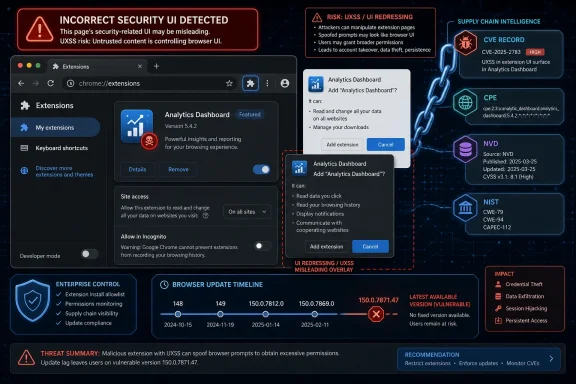 The Missing-CPE Alarm Is Really a Supply-Chain Alarm
The phrase “CPEs loading, please wait” on an NVD page has become a small ritual of vulnerability triage: reload, check the configurations, decide whether scanners will light up correctly. In this case, the user-facing page may look incomplete at first glance, but the change history tells the story NVD intended to tell. On July 2, NIST added a CPE configuration for Google Chrome, covering versions before 150.0.7871.47.That matters because CVE-2026-13957 is not a generic “Chromium” product entry in NVD’s visible configuration history. It is sourced from Chrome and attached to Google Chrome. The official Chrome Releases post for June 30 promoted Chrome 150 to stable and listed 433 security fixes, including this medium-severity issue in Extensions.
This is where administrators can get tripped up. Chrome is a product. Chromium is a codebase. Microsoft Edge, Brave, Vivaldi, Opera, Electron-based apps, embedded WebViews, and Linux distribution Chromium packages may all share some ancestry, but NVD does not always model that inheritance automatically or consistently in a single CVE record.
So the answer is narrow but important: if you are asking whether the NVD entry is missing the ordinary Google Chrome CPE, the record says NIST added it. If you are asking whether every Chromium-derived product that may have inherited the bug is listed, that is a different and much harder question.
A Medium Bug With an Uncomfortable Shape
CVE-2026-13957 is described by NVD as “incorrect security UI in Extensions” in Google Chrome before 150.0.7871.47. The attack path requires convincing a user to install a malicious extension, then using a crafted HTML page to inject arbitrary scripts or HTML, a class of issue commonly summarized as universal cross-site scripting, or UXSS.That is why CISA-ADP’s CVSS 3.1 score lands at 4.2, medium severity. The vector includes network access, high attack complexity, no privileges required, and required user interaction. Confidentiality and integrity impacts are marked low, with no availability impact.
Those words can make the bug sound almost academic. It is not a drive-by remote-code-execution crisis, and CISA’s SSVC enrichment says exploitation was “none,” automatable “no,” and technical impact “partial” as of July 1. But browser-extension vulnerabilities deserve a more skeptical reading than their numeric scores often receive.
Extensions live in the trust boundary between the user, the browser, and the web. A malicious extension is already a compromise of user trust, but not every malicious extension automatically gets carte blanche over every page, every origin, and every security prompt. A flaw in security UI can collapse the difference between “the user granted this” and “the user was shown something misleading enough that the browser’s permission model stopped doing its job.”
Security UI Is Not Decoration
Security UI bugs are often treated as lesser cousins of memory corruption bugs. They should not be. In browsers, the interface is part of the security architecture.Chrome’s extension model relies on prompts, permission surfaces, origin boundaries, install flows, warning strings, and visible indicators to translate technical policy into decisions a user can actually make. When that translation is wrong, attackers do not need to break the model in the traditional sense. They can route around it by making the user believe the browser is saying one thing while the underlying security state says another.
That is the significance of the “incorrect security UI” language. We do not have public exploit details from the Chromium issue tracker, and Google’s release notes repeat the standard warning that bug details may remain restricted until most users have updated. But the class is familiar: UI that misrepresents an extension’s authority can make a permission boundary porous.
The UXSS angle raises the stakes. Cross-site scripting normally belongs to a site. Universal cross-site scripting is more dangerous because it suggests script or HTML injection across boundaries the browser itself is expected to enforce. Even with required user interaction and a malicious extension prerequisite, that is not the sort of bug enterprise IT should wave away.
NVD’s Record Is Narrow, but Not Obviously Wrong
The NVD record’s “Known Affected Software Configurations” area may show a loading message in some views, but its change history is clearer. NIST added a CPE configuration for Google Chrome with versions up to, but excluding, 150.0.7871.47.That is the CPE you would expect for the product named in the CVE description. The entry identifies the vendor as Google and the product as Chrome. The source is Chrome. The vendor advisory is Google’s Chrome Releases post. On the facts available in the public record, that CPE is not missing.
The oddity is in the “Affected” JSON shown in the change history. It lists vendor Google, product Chrome, and a version object with
version and lessThan both set to 150.0.7871.47 while marking status as affected. In CVE data, this style can look confusing because the meaningful part is the “lessThan” boundary: versions before 150.0.7871.47 are affected, while 150.0.7871.47 is the fixed threshold for Windows and Mac in Google’s stable-channel release.The Chrome Releases post complicates the version picture slightly because Linux is listed at 150.0.7871.46, while Windows and Mac are listed as 150.0.7871.46/.47. That does not automatically mean Linux remained vulnerable to this particular CVE; Chrome’s platform-specific build numbering often differs. It does mean scanners and administrators should avoid over-reading a single version number without checking the platform and vendor advisory.
Chromium-Based Browsers Are the Shadow Inventory
The larger operational problem is not whethergoogle:chrome appears in NVD. It is whether organizations know where Chromium code exists in their estate.Chrome is the obvious target for patch management. Edge has its own release cadence and its own vendor advisories. Brave, Vivaldi, Opera, Chromium packages from Linux distributions, and application-embedded Chromium frameworks all have separate update paths. NVD CPEs are useful, but they are not a magical bill of materials for the Chromium ecosystem.
This is especially relevant for extension bugs. Some Chromium-derived browsers support the Chrome Web Store, their own extension stores, or partial compatibility layers. Some enterprises allow Chrome extensions in Edge through policy. Some lock extension installation down tightly on paper but still have legacy exceptions for password managers, conferencing tools, security products, developer utilities, or line-of-business add-ons.
If a downstream browser inherited the vulnerable Extensions component and shipped an affected build, that product ideally needs its own advisory, fixed version, and CPE mapping. But the absence of that mapping on the Chrome CVE page is not proof of safety. It may simply mean the downstream vendor has not been modeled in that CVE record.
This is the recurring weakness of vulnerability management in browser land. The CVE names the disease, but the CPE tells only part of the patient list.
The Extension Threat Model Has Outgrown “Don’t Install Weird Stuff”
CVE-2026-13957 requires a malicious extension, which is the sentence most likely to make desktop teams relax. It should do the opposite. Extension installation is not a fringe behavior; it is a normal part of how knowledge workers customize the browser.The old advice was simple: do not install suspicious extensions. That advice has aged poorly. Attackers can buy legitimate extensions, clone popular ones, impersonate productivity tools, abuse affiliate and ad ecosystems, or target users with fake internal tooling. Even benign extensions can become dangerous after a supply-chain compromise or ownership transfer.
A browser extension does not need kernel privileges to create business damage. It can observe web sessions, alter page content, steal tokens from poorly isolated workflows, interfere with identity-provider pages, or manipulate what a user sees during a transaction. The browser is now the front end for email, CRM, source control, cloud consoles, payroll, banking, and administrative dashboards.
That is why an Extensions security-UI flaw matters even at medium severity. The prerequisite is not “attacker already owns the machine.” The prerequisite is “attacker persuades the user to install something in the place where users are routinely asked to install things.”
The Enterprise Fix Is Policy, Not Panic
For home users, the practical instruction is simple: update Chrome and remove extensions you do not recognize or no longer use. Chrome normally updates itself, but a browser that has not been restarted may still be running an older build. The fixed threshold identified by NVD is 150.0.7871.47 for the affected Chrome line.For managed Windows fleets, the work is less glamorous and more important. Admins should verify browser versions through their management platform, confirm that Chrome’s update service is healthy, and check whether restart deferrals are leaving vulnerable browser processes alive. Browser patch compliance is not just installation state; it is running-state hygiene.
Extension governance deserves the same attention. The cleanest defense is an allowlist model, where only approved extensions can be installed and risky permissions are reviewed before deployment. In many organizations that is politically harder than patching, because extensions often arrive as convenience tools championed by business units.
But this is where CVE-2026-13957 is useful as a forcing function. It gives security teams a concrete example of why extension policy cannot be treated as browser personalization. If the extension layer can influence security UI and enable script or HTML injection under certain conditions, then extension inventory belongs in the same conversation as endpoint inventory.
Scanners Will Lag the Reality of the Fleet
The CPE question is not academic for vulnerability scanners. CPE mappings determine whether a product is flagged, whether an exception is needed, and whether a dashboard turns red or stays quiet. When NVD data is incomplete, delayed, or narrow, the operational result is inconsistent exposure reporting.In this case, NIST’s July 2 initial analysis appears to have added the expected Google Chrome CPE. That should allow scanners using NVD data to identify vulnerable Chrome versions before 150.0.7871.47. Whether scanners correctly handle platform-specific Chrome builds, delayed restarts, and enterprise update channels is a separate matter.
The harder cases are downstream Chromium products. A scanner might not flag them under CVE-2026-13957 unless the vendor publishes an advisory or the scanner vendor writes its own detection logic. Conversely, some tools may overgeneralize and flag every Chromium-based product without confirming exploitability.
Neither failure mode is good. Over-flagging creates noise; under-flagging creates false comfort. The right answer is boring but effective: pair CPE-driven scanning with vendor release tracking and software inventory that can identify Chromium-derived runtimes.
The Chrome 150 Release Was Bigger Than This One CVE
CVE-2026-13957 sits inside a much larger Chrome 150 security release. Google’s June 30 stable-channel post said Chrome 150 included 433 security fixes, a strikingly large number even by modern browser standards. The release included critical vulnerabilities in Extensions, GPU, ANGLE, Dawn, WebUSB, Chromoting, Views, Bluetooth, Ozone, Skia, and other components.That context changes the urgency calculus. An administrator should not patch Chrome 150 merely because of this medium Extensions UI flaw. They should patch because this release is a broad browser hardening drop that includes many higher-severity issues, some in components reachable through ordinary web content or browser features.
The security industry tends to over-focus on the named CVE at hand. That is understandable; tickets, advisories, and dashboards are CVE-shaped. But browsers are patched as ecosystems, not as isolated bug specimens. A machine running an old Chrome build is not carrying one risk; it is carrying a bundle.
This is also why waiting for perfect CPE enrichment is a bad browser strategy. If Chrome is behind, update it. If Edge is behind, update it. If embedded Chromium is buried inside a business app, ask the vendor how it tracks Chromium security releases. The CVE record helps prioritize; it should not be the only trigger for action.
The Version Boundary Is Clearer Than the Exploit Story
Public details about CVE-2026-13957 remain limited, and that is normal for a fresh browser vulnerability. Google routinely restricts bug details until a majority of users have received the fix. The referenced Chromium issue requires permissions, which prevents casual inspection of the technical root cause.What we do know is enough for practical triage. The vulnerability affects Google Chrome before 150.0.7871.47. It lives in Extensions. It involves incorrect security UI. It requires a malicious extension and a crafted HTML page. It can lead to arbitrary script or HTML injection categorized as UXSS. Chromium rates it medium, and CISA-ADP assigns a 4.2 medium CVSS 3.1 score.
What we do not know publicly is whether the bug was exploitable in common extension configurations, whether it required specific permissions, whether it affected all desktop platforms equally, or whether downstream Chromium browsers inherited it unchanged. Those are not small details, but their absence should not paralyze response. They should shape the scope of follow-up.
For security teams, the right posture is to separate known affected from possibly inherited. Google Chrome before the fixed version is known affected by the public record. Other Chromium-derived products are candidates for vendor verification, not automatic assumptions.
The “Medium” Label Hides a Trust-Boundary Failure
CVSS is useful, but it can flatten browser reality. A medium score with user interaction and high complexity may look like a low-priority item next to a critical RCE. Yet in the browser, a UI deception bug can be the missing link in an attack chain.The extension install step may arrive through phishing. The crafted page may be delivered after the extension is in place. The payload may target a cloud console, an SSO flow, a cryptocurrency wallet page, a webmail session, or an internal SaaS app. None of that requires malware in the traditional Windows sense.
This does not mean CVE-2026-13957 should be hyped as a disaster. It means the severity label should be read in context. A medium Extensions UI flaw is not the same operational object as a medium bug in an obscure parser no one uses. It sits where user trust, browser trust, and enterprise identity often meet.
The modern browser has become the operating system for enterprise workflows. Security UI is its access-control language for humans. When that language is wrong, the consequences can travel farther than the score suggests.
Microsoft Shops Should Watch Edge Without Assuming Chrome’s CPE Covers It
For WindowsForum readers, the natural follow-up is Microsoft Edge. Edge is Chromium-based, supports extensions, and is deeply present on Windows 10 and Windows 11. But the Chrome CVE page’s Google Chrome CPE does not by itself establish Edge exposure or remediation status.Microsoft typically publishes Edge security updates separately and maps Chromium vulnerabilities into its own release notes when applicable. Administrators should therefore check Edge’s current stable version and Microsoft’s Edge release documentation rather than waiting for a Chrome CPE to speak for Edge. The same logic applies to WebView2 Runtime, which many Windows applications depend on without users thinking of it as “a browser.”
This distinction matters in vulnerability management systems. A Chrome CPE hit is a Chrome hit. An Edge deployment needs Edge detection. WebView2 needs WebView2 detection. An Electron app needs the application vendor’s update, not a Chrome update.
The Chromium monoculture makes code reuse efficient, but it also makes asset identification more important. The question is no longer “Do we run Chrome?” It is “Where do we run Chromium, who updates each copy, and how quickly?”
The Practical Answer for This CVE Is Smaller Than the Lesson
The concrete answer is straightforward: the NVD record does not appear to be missing the main Google Chrome CPE, because NIST’s July 2 change history shows thegoogle:chrome CPE added for versions before 150.0.7871.47. The page may present awkwardly, but the enrichment record is there.The broader lesson is that CPE completeness is not the same as exposure completeness. NVD modeled the named product. Your environment may contain related products that need separate verification.
That is particularly true in browser security because Chromium vulnerabilities can ripple outward unevenly. Some bugs are Chrome-specific. Some are Chromium-generic. Some affect only certain platforms. Some matter only if a downstream browser ships the relevant component or feature. Without vendor confirmation, guessing can be both too broad and too narrow.
So yes, report a missing CPE if you see a product with confirmed exposure that NVD has not modeled. But do not treat the Chrome page as the authoritative map of every Chromium consumer. It is a starting point, not a finished inventory.
Chrome’s Extension Bug Leaves Admins With a Short, Sharp Checklist
This CVE is not a reason to panic, but it is a reason to tighten the browser-management loop. The most useful response is concrete and immediate.- Google Chrome installations should be updated to 150.0.7871.47 or later where that version applies, with attention to systems waiting on browser restart.
- The NVD record already shows the expected Google Chrome CPE for versions before 150.0.7871.47, so the apparent CPE concern is likely a display or timing issue rather than a missing Chrome mapping.
- Chromium-based browsers and embedded Chromium runtimes should be checked through their own vendor advisories, not inferred solely from the Chrome CPE.
- Extension installation should be governed by policy, preferably with allowlists and periodic review of permissions and ownership changes.
- Vulnerability scanners should be validated against real browser versions and running processes, because CPE matching alone can miss restart debt and downstream Chromium exposure.
- The medium severity score should not obscure the fact that the flaw touches browser security UI, extension trust, and UXSS-style injection.
References
- Primary source: NVD / Chromium
Published: 2026-07-03T07:00:03-07:00
Loading…
nvd.nist.gov - Security advisory: MSRC
Published: 2026-07-03T07:00:03-07:00
Original feed URL
Loading…
msrc.microsoft.com - Related coverage: radar.offseq.com
Loading…
radar.offseq.com - Related coverage: malwarebytes.com
Chrome needs another whopper update to fix 382 security bugs | Malwarebytes
Google released a huge update of 382 security fixes, 15 of which were rated as critical. So, it's time to update againwww.malwarebytes.com - Related coverage: techradar.com
Update Chrome now — Google patches new zero-day flaw already being exploited | TechRadar
A new bug could allow crooks to execute arbitrary code in Chromewww.techradar.com - Related coverage: crowe.com
Loading…
www.crowe.com
- Related coverage: edelivery.windriver.com
Loading…
edelivery.windriver.com