

Google Chrome CVE-2026-14142 is a low-severity Chromium Extensions flaw fixed before Chrome 150.0.7871.47, published by NVD on June 30, 2026, and modified July 1 after enrichment, allowing UI spoofing only after an attacker has already compromised the renderer process. That phrasing matters because this is not a drive-by “visit a page and lose the machine” bug. It is a post-compromise browser trust problem: the kind of flaw that rarely dominates headlines but still belongs in every serious patch-management queue. As detailed by the NVD record and Google’s Chrome Releases entry for the desktop stable channel, the real story is not panic; it is how much modern browser security now depends on the thin line between rendered web content and trusted browser interface.
CVE-2026-14142 sits in the Extensions component, one of the browser’s most awkward security neighborhoods. Extensions are supposed to be more powerful than ordinary web pages, less powerful than the browser itself, and legible enough that users can tell when they are interacting with Chrome, a site, or an add-on. That middle ground has always been difficult to defend.
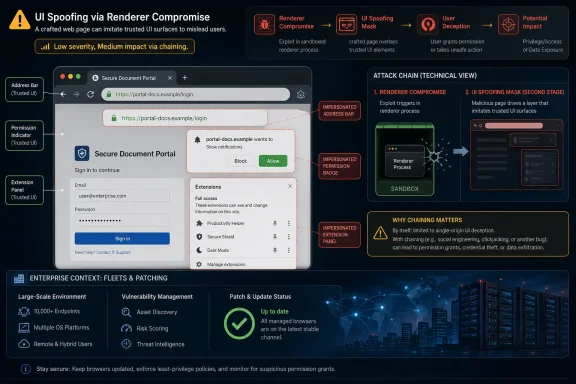
The CVE description says the bug allowed a remote attacker, after compromising the renderer process, to perform UI spoofing through a crafted HTML page. In plain terms, the attacker does not start with full browser control. They first need to get inside the renderer, the sandboxed process that handles web content, and then use this weakness to make something on screen look more trustworthy than it is.
That is why Chromium rates the issue Low while NVD’s CVSS 3.1 score lands at 5.4 Medium and CISA’s ADP score lands slightly lower at 4.3 Medium. The discrepancy is not scandalous. It reflects different scoring systems trying to describe a bug whose impact depends heavily on chaining, user perception, and whether spoofed UI can help the attacker move from technical foothold to human mistake.
For WindowsForum readers, the practical answer is simple: Chrome versions before 150.0.7871.47 should be treated as vulnerable, and managed fleets should verify that the desktop stable update has landed. The more interesting answer is that browser security is now less about one catastrophic bug and more about the accumulation of small trust failures that become powerful when chained together.
That condition lowers the urgency compared with a zero-click or widely exploited memory corruption vulnerability. It does not make the issue irrelevant. Browser exploitation has long been a chain business: one bug gets code running in a constrained place, another weakens a boundary, and a third nudges the user or browser into granting more access than intended.
Chrome’s renderer sandbox is designed precisely because web content is hostile territory. The browser assumes JavaScript, HTML, media parsers, fonts, graphics paths, and document formats will be fed malicious input. The renderer is where much of that risk is contained.
A UI-spoofing flaw after renderer compromise is therefore a second-stage weakness. It may not break the house door open, but it can help an intruder put on a convincing uniform once inside the lobby. That is a different class of danger from code execution, yet it still attacks one of the browser’s core promises: that users can distinguish browser chrome, web content, extension surfaces, and security prompts.
This is why low-severity UI bugs often deserve more respect than their labels suggest. The damage is not always measured in memory corruption or privilege escalation. Sometimes it is measured in whether a user believes a fake prompt, a misleading permission surface, or a counterfeit browser-adjacent interface.
That makes the Extensions component a natural home for UI misrepresentation bugs. A page pretending to be a browser prompt is usually easy to dismiss in theory, but the theory weakens when extensions are allowed to inject UI, request permissions, interact with tabs, and present surfaces that users already associate with privileged behavior.
CVE-2026-14142’s weakness mappings point in that direction. NIST associated the issue with improper restriction of rendered UI layers or frames, while CISA ADP associated it with UI misrepresentation of critical information. Those labels are dry, but the idea is straightforward: if untrusted content can visually impersonate something trusted, the security boundary has partly moved from code to eyesight.
That is not where defenders want the boundary to live. Users are bad at parsing browser surfaces under pressure, and attackers are very good at exploiting visual habits. The best browser security work reduces the number of moments when the user must decide whether a box, badge, permission prompt, extension panel, or toolbar-like element is genuine.
Google has spent years tightening extension behavior, especially through Manifest V3 and more restrictive extension APIs. Those moves have been controversial, particularly among developers and power users who see lost flexibility. But CVE-2026-14142 is a reminder that the extension model is not just a platform debate; it is a recurring security compromise between capability and impersonation risk.
The caller’s question — whether a CPE is missing — is still worth taking seriously. CPE data is not just metadata trivia. Vulnerability scanners, exposure dashboards, compliance tools, and procurement-driven risk systems all rely on this machinery to decide what is vulnerable and what is not.
For Chrome itself, the CPE appears to be the expected one:
That is where the CPE model often strains. A Chrome CVE can be technically relevant to Chromium-derived products before those products ship their own fix, but the NVD record may only name Google Chrome unless vendors publish their own advisories or affected-product statements. Automated tools can then under-report exposure in Chromium-based environments, especially where the installed product is not literally Google Chrome.
In other words, the Chrome CPE does not look missing; the ecosystem mapping may be incomplete. That distinction matters. The NVD record can be correct about Google Chrome and still insufficient for an administrator responsible for every Chromium-based browser on a Windows estate.
On unmanaged Windows desktops, Chrome’s automatic updater will handle most of the work. But “most” is not a policy. Anyone who has managed browsers at scale knows that stale sessions, blocked update services, gold images, kiosk modes, VDI pools, application control tooling, and user resistance can all leave machines stranded below the safe line.
The practical check remains the same: open Chrome’s About page or inspect enterprise inventory for the installed version. If it is below 150.0.7871.47, update. If the organization manages Chrome via policy, verify that update policies are not pinning users to an older major version without a compensating extended-stable plan.
The Linux and macOS picture may differ slightly by package channel and build numbering, but the security principle holds. Do not assume Chromium-derived products are protected merely because Chrome has shipped a patch. Each vendor has to ingest, test, and release the relevant fix.
For Windows-heavy shops, Microsoft Edge deserves special attention even when the CVE record names Chrome. Edge rides Chromium but ships on Microsoft’s cadence and versioning. Administrators should check Microsoft’s release notes or enterprise update channels rather than treating a Google Chrome version number as proof of Edge status.
That is a sober profile. It says the bug is reachable remotely and not technically complex once the preconditions are met, but it requires user interaction and does not directly crash systems or break availability. It is a phishing-adjacent browser trust issue, not a ransomware-grade remote code execution headline.
The catch is that CVSS does not capture exploit chains especially well. A UI-spoofing bug may be unimpressive alone but meaningful after another vulnerability compromises a renderer. Security teams should therefore resist two bad instincts: treating every Chrome CVE as an emergency, and treating every Low Chromium severity as ignorable.
The better approach is prioritization by chainability. A bug that helps an attacker turn renderer access into user deception can matter more during periods when renderer bugs are actively exploited. Conversely, in isolation, it may be a routine patch-cycle item rather than an all-hands incident.
CISA’s SSVC-style enrichment reportedly lists no known exploitation, no automation, and partial technical impact. That is useful context. It supports a measured response: patch promptly, verify coverage, but do not pretend this is a confirmed in-the-wild zero-day unless new evidence emerges.
Every one of those surfaces teaches users a pattern. Attackers study those patterns. A convincing fake does not need to fool everyone; it only needs to fool enough people at the right moment after a technical foothold has already been gained.
Extensions complicate this because users already expect third-party code to add browser-adjacent functionality. A password manager pop-up is normal. A grammar tool overlay is normal. An enterprise security agent banner is normal. A shopping coupon box is normal. The boundary between “web page” and “browser-assisted interface” becomes visually noisy.
That noise is a security liability. If a compromised renderer can exploit an implementation mistake to misrepresent UI layers, the user’s mental model may collapse. They may approve something, disclose something, or trust something that the browser intended to keep separate from the page.
The fix, then, is not merely a patch for one CVE. It is part of a broader design campaign: reduce ambiguity, harden privileged UI, and make sure rendered content cannot convincingly masquerade as browser-controlled state.
The first task is inventory. Determine which Windows endpoints are running Chrome below 150.0.7871.47, and separately determine which Chromium-based browsers may be waiting for vendor-specific fixes. If your vulnerability scanner relies strictly on NVD CPEs, validate that it is not blind to non-Chrome Chromium exposure.
The second task is policy verification. Chrome update controls are sometimes configured years earlier and then forgotten. A policy designed to hold back feature disruption can accidentally hold back security fixes if it is too rigid or misunderstood.
The third task is user-session reality. Chrome updates often require a restart to complete. A browser can download the patch and still leave users effectively unpatched until relaunch. In environments where users keep browser sessions alive for weeks, update compliance should measure completed restarts, not merely update availability.
The fourth task is extension hygiene. CVE-2026-14142 does not say that a malicious extension is required, but because the affected component is Extensions, it is a useful moment to revisit extension allowlists, enterprise extension policies, and whether users can install arbitrary add-ons. A well-maintained extension policy will not prevent every browser bug, but it reduces the clutter and trust ambiguity attackers love.
That is how vulnerability intelligence increasingly works: the CVE arrives first, then multiple enrichment layers add machine-readable meaning. The record is not static at birth. It becomes more useful over hours or days as scoring, affected-product mapping, weakness classification, and decision-support metadata appear.
The warning that the CVE was modified after NVD enrichment is therefore not unusual, but it is important. Automated systems may ingest an early version of a record and miss later corrections. If the CPE or scoring changes, dashboards can shift without the underlying vulnerability changing at all.
Security teams should treat fresh CVEs as living records, particularly during the first 48 hours. A scan result generated immediately after publication may not match one generated after NVD and CISA enrichment. That does not mean anyone is hiding the ball; it means the vulnerability data supply chain has latency.
This is also why administrators should read vendor release notes alongside NVD. Google’s Chrome Releases post tells you what shipped. NVD tells you how the vulnerability is normalized for ecosystem tooling. CISA ADP adds prioritization context. None of those views is complete by itself.
Scale changes the risk equation. A bug requiring a renderer compromise may be low probability on any one machine, but the number of machines is enormous. Attackers do not need universal success when the install base is measured in hundreds of millions or more.
The Windows ecosystem intensifies this because browsers are now application platforms. Many organizations run core workflows in Chrome or Edge all day. If browser trust surfaces are spoofed, the target is not “web browsing” in the old sense; it may be SSO, HR, finance, source control, cloud consoles, admin portals, or privileged SaaS.
That is why UI integrity matters. A spoofed browser-adjacent surface can be a bridge between technical compromise and credential theft, policy bypass, or user-approved access. The exploit may begin in a renderer, but the business impact can land in identity systems.
The defensive lesson is familiar but still neglected: browser patching is endpoint security. It should be measured with the same seriousness as operating system patching, EDR health, disk encryption, and identity policy. Chrome is not an accessory on Windows fleets; it is part of the attack surface of work.
The unresolved part is downstream coverage. NVD’s record naming Chrome does not automatically guarantee complete visibility for every Chromium-based browser, Linux package, or embedded runtime that may share the affected code. That gap is common across browser vulnerabilities and is one reason vendor advisories remain essential.
The safest formulation is this: the Chrome CPE is present, but organizations should not equate “CPE present for Chrome” with “all affected Chromium consumers have been modeled.” If your environment includes Edge, Brave, Vivaldi, Opera, Chromium packages, or app-embedded Chromium, track those products through their own update channels.
This distinction is especially important for vulnerability-management teams that report based on CPE matching alone. A dashboard can look clean because it understands Google Chrome while ignoring a Chromium-derived application with a different product identity. Clean data is not the same as clean exposure.
The remedy is not to manually panic-add every Chromium product to the Chrome CVE. It is to maintain an asset inventory that knows which products embed Chromium and to monitor vendor-specific advisories when Chromium security releases land.
 A Low-Severity Chrome Bug Still Carries a High-Trust Lesson
CVE-2026-14142 sits in the Extensions component, one of the browser’s most awkward security neighborhoods. Extensions are supposed to be more powerful than ordinary web pages, less powerful than the browser itself, and legible enough that users can tell when they are interacting with Chrome, a site, or an add-on. That middle ground has always been difficult to defend.The CVE description says the bug allowed a remote attacker, after compromising the renderer process, to perform UI spoofing through a crafted HTML page. In plain terms, the attacker does not start with full browser control. They first need to get inside the renderer, the sandboxed process that handles web content, and then use this weakness to make something on screen look more trustworthy than it is.
That is why Chromium rates the issue Low while NVD’s CVSS 3.1 score lands at 5.4 Medium and CISA’s ADP score lands slightly lower at 4.3 Medium. The discrepancy is not scandalous. It reflects different scoring systems trying to describe a bug whose impact depends heavily on chaining, user perception, and whether spoofed UI can help the attacker move from technical foothold to human mistake.
For WindowsForum readers, the practical answer is simple: Chrome versions before 150.0.7871.47 should be treated as vulnerable, and managed fleets should verify that the desktop stable update has landed. The more interesting answer is that browser security is now less about one catastrophic bug and more about the accumulation of small trust failures that become powerful when chained together.
The Renderer Compromise Is the Catch, Not the Comfort
The phrase “who had compromised the renderer process” is doing a lot of work. It means CVE-2026-14142 is not described as an initial-entry vulnerability. An attacker needs some other way to break or abuse the renderer before this bug becomes useful.That condition lowers the urgency compared with a zero-click or widely exploited memory corruption vulnerability. It does not make the issue irrelevant. Browser exploitation has long been a chain business: one bug gets code running in a constrained place, another weakens a boundary, and a third nudges the user or browser into granting more access than intended.
Chrome’s renderer sandbox is designed precisely because web content is hostile territory. The browser assumes JavaScript, HTML, media parsers, fonts, graphics paths, and document formats will be fed malicious input. The renderer is where much of that risk is contained.
A UI-spoofing flaw after renderer compromise is therefore a second-stage weakness. It may not break the house door open, but it can help an intruder put on a convincing uniform once inside the lobby. That is a different class of danger from code execution, yet it still attacks one of the browser’s core promises: that users can distinguish browser chrome, web content, extension surfaces, and security prompts.
This is why low-severity UI bugs often deserve more respect than their labels suggest. The damage is not always measured in memory corruption or privilege escalation. Sometimes it is measured in whether a user believes a fake prompt, a misleading permission surface, or a counterfeit browser-adjacent interface.
Extensions Remain Chrome’s Most Productive Attack Surface for Confusion
Extensions are not merely plug-ins anymore. They are password managers, ad blockers, identity agents, enterprise compliance tools, shopping assistants, developer utilities, accessibility overlays, and increasingly AI-adjacent helpers. They sit close to the browser’s trust model because users intentionally grant them reach.That makes the Extensions component a natural home for UI misrepresentation bugs. A page pretending to be a browser prompt is usually easy to dismiss in theory, but the theory weakens when extensions are allowed to inject UI, request permissions, interact with tabs, and present surfaces that users already associate with privileged behavior.
CVE-2026-14142’s weakness mappings point in that direction. NIST associated the issue with improper restriction of rendered UI layers or frames, while CISA ADP associated it with UI misrepresentation of critical information. Those labels are dry, but the idea is straightforward: if untrusted content can visually impersonate something trusted, the security boundary has partly moved from code to eyesight.
That is not where defenders want the boundary to live. Users are bad at parsing browser surfaces under pressure, and attackers are very good at exploiting visual habits. The best browser security work reduces the number of moments when the user must decide whether a box, badge, permission prompt, extension panel, or toolbar-like element is genuine.
Google has spent years tightening extension behavior, especially through Manifest V3 and more restrictive extension APIs. Those moves have been controversial, particularly among developers and power users who see lost flexibility. But CVE-2026-14142 is a reminder that the extension model is not just a platform debate; it is a recurring security compromise between capability and impersonation risk.
The CPE Confusion Is More Than Database Housekeeping
The NVD entry includes a familiar line: “Are we missing a CPE here? Please let us know.” In this case, NIST’s change history added a CPE configuration for Google Chrome versions up to, but excluding, 150.0.7871.47. That means the obvious affected product entry is present in the enriched record.The caller’s question — whether a CPE is missing — is still worth taking seriously. CPE data is not just metadata trivia. Vulnerability scanners, exposure dashboards, compliance tools, and procurement-driven risk systems all rely on this machinery to decide what is vulnerable and what is not.
For Chrome itself, the CPE appears to be the expected one:
cpe:2.3:a:google:chrome:*:*:*:*:*:*:*:* with versions before 150.0.7871.47 affected. The more complicated question is whether downstream Chromium-based browsers should appear in the same vulnerability record. Microsoft Edge, Brave, Vivaldi, Opera, Chromium packages in Linux distributions, and embedded Chromium runtimes may inherit Chromium vulnerabilities, but they do not always share identical version numbers, release timing, component exposure, or patch status.That is where the CPE model often strains. A Chrome CVE can be technically relevant to Chromium-derived products before those products ship their own fix, but the NVD record may only name Google Chrome unless vendors publish their own advisories or affected-product statements. Automated tools can then under-report exposure in Chromium-based environments, especially where the installed product is not literally Google Chrome.
In other words, the Chrome CPE does not look missing; the ecosystem mapping may be incomplete. That distinction matters. The NVD record can be correct about Google Chrome and still insufficient for an administrator responsible for every Chromium-based browser on a Windows estate.
Version 150.0.7871.47 Is the Line Administrators Should Draw
The fixed threshold is clear: Chrome prior to 150.0.7871.47 is vulnerable according to the CVE description and NVD’s enriched CPE configuration. Google’s stable channel update for desktop is the operational source administrators should align with, while the NVD record supplies the normalized vulnerability view used by scanners and dashboards.On unmanaged Windows desktops, Chrome’s automatic updater will handle most of the work. But “most” is not a policy. Anyone who has managed browsers at scale knows that stale sessions, blocked update services, gold images, kiosk modes, VDI pools, application control tooling, and user resistance can all leave machines stranded below the safe line.
The practical check remains the same: open Chrome’s About page or inspect enterprise inventory for the installed version. If it is below 150.0.7871.47, update. If the organization manages Chrome via policy, verify that update policies are not pinning users to an older major version without a compensating extended-stable plan.
The Linux and macOS picture may differ slightly by package channel and build numbering, but the security principle holds. Do not assume Chromium-derived products are protected merely because Chrome has shipped a patch. Each vendor has to ingest, test, and release the relevant fix.
For Windows-heavy shops, Microsoft Edge deserves special attention even when the CVE record names Chrome. Edge rides Chromium but ships on Microsoft’s cadence and versioning. Administrators should check Microsoft’s release notes or enterprise update channels rather than treating a Google Chrome version number as proof of Edge status.
CVSS Scores Tell You Impact, Not Exploit Story
NVD’s 5.4 Medium score and CISA ADP’s 4.3 Medium score differ mainly because of how they score confidentiality impact. NVD records low confidentiality and integrity impact. CISA’s ADP entry records no confidentiality impact and low integrity impact. Both agree on the larger shape: network attack vector, low attack complexity, no privileges required, user interaction required, unchanged scope, and no availability impact.That is a sober profile. It says the bug is reachable remotely and not technically complex once the preconditions are met, but it requires user interaction and does not directly crash systems or break availability. It is a phishing-adjacent browser trust issue, not a ransomware-grade remote code execution headline.
The catch is that CVSS does not capture exploit chains especially well. A UI-spoofing bug may be unimpressive alone but meaningful after another vulnerability compromises a renderer. Security teams should therefore resist two bad instincts: treating every Chrome CVE as an emergency, and treating every Low Chromium severity as ignorable.
The better approach is prioritization by chainability. A bug that helps an attacker turn renderer access into user deception can matter more during periods when renderer bugs are actively exploited. Conversely, in isolation, it may be a routine patch-cycle item rather than an all-hands incident.
CISA’s SSVC-style enrichment reportedly lists no known exploitation, no automation, and partial technical impact. That is useful context. It supports a measured response: patch promptly, verify coverage, but do not pretend this is a confirmed in-the-wild zero-day unless new evidence emerges.
UI Spoofing Is the Browser’s Oldest New Problem
Browsers have been fighting spoofed interfaces since the earliest fake login pages and pop-up tricks. What has changed is the density of browser UI. Modern Chrome is not just an address bar and a page. It is identity state, extension state, payment surfaces, password prompts, permission chips, WebAuthn flows, profile switching, enterprise notices, translation prompts, install banners, and side panels.Every one of those surfaces teaches users a pattern. Attackers study those patterns. A convincing fake does not need to fool everyone; it only needs to fool enough people at the right moment after a technical foothold has already been gained.
Extensions complicate this because users already expect third-party code to add browser-adjacent functionality. A password manager pop-up is normal. A grammar tool overlay is normal. An enterprise security agent banner is normal. A shopping coupon box is normal. The boundary between “web page” and “browser-assisted interface” becomes visually noisy.
That noise is a security liability. If a compromised renderer can exploit an implementation mistake to misrepresent UI layers, the user’s mental model may collapse. They may approve something, disclose something, or trust something that the browser intended to keep separate from the page.
The fix, then, is not merely a patch for one CVE. It is part of a broader design campaign: reduce ambiguity, harden privileged UI, and make sure rendered content cannot convincingly masquerade as browser-controlled state.
Enterprises Should Track the Patch, Not the Panic
For enterprise IT, CVE-2026-14142 should land in the standard browser patch workflow rather than the crisis channel. The absence of known exploitation and the renderer-compromise prerequisite reduce immediate emergency pressure. The affected-version threshold, however, is concrete enough that there is little excuse for drift.The first task is inventory. Determine which Windows endpoints are running Chrome below 150.0.7871.47, and separately determine which Chromium-based browsers may be waiting for vendor-specific fixes. If your vulnerability scanner relies strictly on NVD CPEs, validate that it is not blind to non-Chrome Chromium exposure.
The second task is policy verification. Chrome update controls are sometimes configured years earlier and then forgotten. A policy designed to hold back feature disruption can accidentally hold back security fixes if it is too rigid or misunderstood.
The third task is user-session reality. Chrome updates often require a restart to complete. A browser can download the patch and still leave users effectively unpatched until relaunch. In environments where users keep browser sessions alive for weeks, update compliance should measure completed restarts, not merely update availability.
The fourth task is extension hygiene. CVE-2026-14142 does not say that a malicious extension is required, but because the affected component is Extensions, it is a useful moment to revisit extension allowlists, enterprise extension policies, and whether users can install arbitrary add-ons. A well-maintained extension policy will not prevent every browser bug, but it reduces the clutter and trust ambiguity attackers love.
The NVD Change History Shows the Lag Between Disclosure and Usability
The record’s timeline is short but instructive. Chrome submitted the CVE on June 30, 2026. NVD performed initial enrichment on July 1, adding CVSS, CWE, CPE, and reference typing. CISA ADP modified the record later that day with its own CVSS vector, CWE mapping, and SSVC data.That is how vulnerability intelligence increasingly works: the CVE arrives first, then multiple enrichment layers add machine-readable meaning. The record is not static at birth. It becomes more useful over hours or days as scoring, affected-product mapping, weakness classification, and decision-support metadata appear.
The warning that the CVE was modified after NVD enrichment is therefore not unusual, but it is important. Automated systems may ingest an early version of a record and miss later corrections. If the CPE or scoring changes, dashboards can shift without the underlying vulnerability changing at all.
Security teams should treat fresh CVEs as living records, particularly during the first 48 hours. A scan result generated immediately after publication may not match one generated after NVD and CISA enrichment. That does not mean anyone is hiding the ball; it means the vulnerability data supply chain has latency.
This is also why administrators should read vendor release notes alongside NVD. Google’s Chrome Releases post tells you what shipped. NVD tells you how the vulnerability is normalized for ecosystem tooling. CISA ADP adds prioritization context. None of those views is complete by itself.
Chromium’s Scale Makes Small Bugs Operationally Large
One reason Chrome vulnerabilities draw so much attention is not that each one is catastrophic. It is that Chromium is everywhere. A low-severity Chrome bug can touch consumer laptops, enterprise desktops, managed kiosks, browser-based line-of-business apps, Electron-style runtimes, and downstream browsers.Scale changes the risk equation. A bug requiring a renderer compromise may be low probability on any one machine, but the number of machines is enormous. Attackers do not need universal success when the install base is measured in hundreds of millions or more.
The Windows ecosystem intensifies this because browsers are now application platforms. Many organizations run core workflows in Chrome or Edge all day. If browser trust surfaces are spoofed, the target is not “web browsing” in the old sense; it may be SSO, HR, finance, source control, cloud consoles, admin portals, or privileged SaaS.
That is why UI integrity matters. A spoofed browser-adjacent surface can be a bridge between technical compromise and credential theft, policy bypass, or user-approved access. The exploit may begin in a renderer, but the business impact can land in identity systems.
The defensive lesson is familiar but still neglected: browser patching is endpoint security. It should be measured with the same seriousness as operating system patching, EDR health, disk encryption, and identity policy. Chrome is not an accessory on Windows fleets; it is part of the attack surface of work.
The CPE Answer Is Yes for Chrome, Maybe for Everyone Else
So, are we missing a CPE here? For Google Chrome itself, the NVD enrichment appears to include the expected vulnerable software configuration: Google Chrome versions before 150.0.7871.47. If a scanner is looking for that CPE and the installed Chrome version is below the threshold, it should have enough information to flag the issue.The unresolved part is downstream coverage. NVD’s record naming Chrome does not automatically guarantee complete visibility for every Chromium-based browser, Linux package, or embedded runtime that may share the affected code. That gap is common across browser vulnerabilities and is one reason vendor advisories remain essential.
The safest formulation is this: the Chrome CPE is present, but organizations should not equate “CPE present for Chrome” with “all affected Chromium consumers have been modeled.” If your environment includes Edge, Brave, Vivaldi, Opera, Chromium packages, or app-embedded Chromium, track those products through their own update channels.
This distinction is especially important for vulnerability-management teams that report based on CPE matching alone. A dashboard can look clean because it understands Google Chrome while ignoring a Chromium-derived application with a different product identity. Clean data is not the same as clean exposure.
The remedy is not to manually panic-add every Chromium product to the Chrome CVE. It is to maintain an asset inventory that knows which products embed Chromium and to monitor vendor-specific advisories when Chromium security releases land.
The Patch Is Small; the Inventory Lesson Is Not
CVE-2026-14142 is not the Chrome bug that should keep administrators awake by itself. It is the Chrome bug that should remind them how quickly browser security becomes an inventory, trust, and update-completion problem.- Chrome versions before 150.0.7871.47 are the affected population named in the NVD-enriched record for CVE-2026-14142.
- The vulnerability requires a compromised renderer process, which makes it more relevant as part of an exploit chain than as a standalone initial-access bug.
- The core impact is UI spoofing in the Extensions component, meaning the risk sits at the boundary between rendered web content and trusted browser or extension surfaces.
- The Google Chrome CPE appears to be present in NVD, but downstream Chromium-based products may require separate vendor tracking.
- Enterprise administrators should verify completed browser restarts, not just update availability, before counting endpoints as remediated.
- Extension allowlists and browser update policies deserve review whenever an Extensions-component vulnerability ships, even when the individual CVE is rated Low by Chromium.
References
- Primary source: NVD / Chromium
Published: 2026-07-03T07:00:59-07:00
NVD - CVE-2026-14142
 nvd.nist.gov
- Security advisory: MSRC
Published: 2026-07-03T07:00:59-07:00
Original feed URL
Security Update Guide - Microsoft Security Response Center
 msrc.microsoft.com
- Related coverage: cvefeed.io
CVE-2026-14142 - Google Chrome UI Spoofing
Inappropriate implementation in Extensions in Google Chrome prior to 150.0.7871.47 allowed a remote attacker who had compromised the renderer process to perform UI spoofing via a crafted HTML page. (Chromium security severity: Low)cvefeed.io