

Google Chrome users on Windows, macOS, Linux, and downstream Chromium browsers should treat CVE-2026-14006 as patched only after updating past Chrome 150.0.7871.47, because the flaw is a use-after-free bug in Navigation that could let a remote attacker run code through a crafted HTML page. Google’s Chrome release notes, the National Vulnerability Database, CISA’s enrichment data, and follow-up reporting from Malwarebytes and Born’s IT and Windows Blog all point to the same practical conclusion: the label “Medium” understates the operational urgency.
The interesting part is not that Chrome had another memory-safety bug. Chrome always has another memory-safety bug. The interesting part is how a browser vulnerability that Chrome classifies as Medium can still earn a high CVSS score, touch one of the browser’s most security-sensitive pathways, and force administrators to make a familiar decision under pressure: trust auto-update, or go prove every endpoint has actually moved.
CVE-2026-14006 is described by NVD as a use after free in Chrome’s Navigation component before version 150.0.7871.47. The attack scenario is the classic browser nightmare: a remote attacker prepares a malicious HTML page, a user visits or is lured to it, and the vulnerable browser mishandles memory in a way that can lead to arbitrary code execution.
That does not automatically mean every exposed machine is one click away from full system compromise. Modern Chrome isolates sites, sandboxes renderer processes, applies exploit mitigations, and forces attackers to chain bugs when they want durable control of the host. But “requires chaining” is not the same thing as “safe,” especially in an ecosystem where browser exploits are routinely paired with sandbox escapes, privilege escalations, token theft, or post-exploitation tooling.
The severity split is worth noticing. Chromium’s own security severity is listed as Medium, while CISA’s ADP CVSS 3.1 vector gives the issue an 8.8 High score: network attack vector, low attack complexity, no privileges required, user interaction required, and high impact to confidentiality, integrity, and availability. NVD had not yet provided its own CVSS assessment when the entry was last modified on July 2, 2026, but it had already added the affected Chrome CPE range: Google Chrome versions before 150.0.7871.47.
This is not a contradiction so much as a reminder that scoring systems answer different questions. Chromium’s severity rating reflects Google’s internal view of exploitability and architectural context. CVSS is trying to describe impact in a standardized way across vendors and products. Administrators should read both, then patch according to the more boring reality: arbitrary code execution in a browser engine is not something to leave for the next maintenance window if the update is already available.
That makes memory lifetime bugs in this neighborhood particularly uncomfortable. A use-after-free occurs when software continues to reference memory after it has been released. If an attacker can influence what gets placed into that freed memory, the stale pointer becomes more than a crash trigger; it can become a route to controlled behavior.
Browsers are exposed to hostile input by design. Every page load, redirect, iframe, script, pop-up, document transition, and embedded resource is a negotiation between untrusted web content and privileged browser code. The navigation stack is where many of those negotiations converge.
That is why “crafted HTML page” matters. The phrase is easy to skim past because CVE descriptions use it constantly, but it means the attack can be delivered through web content rather than local access. A successful exploit still depends on details Google has restricted, and there is no public indication in the NVD entry that this specific CVE is being exploited in the wild. But the shape of the bug is familiar enough that defenders do not need a proof-of-concept to justify moving quickly.
The versioning wrinkle should not distract from the real check. On Windows, the defensive question is whether Chrome reports itself as 150.0.7871.47 or later. For administrators managing mixed fleets, the same logic applies to Chromium-derived browsers, but the version numbers may not map one-to-one. Edge, Brave, Vivaldi, Opera, and other Chromium browsers usually need their own vendor updates even when the underlying Chromium fix has landed upstream.
That creates a lag problem. Chrome users may receive Google’s patch quickly through the browser’s built-in updater, but Chromium-based browsers depend on each vendor’s integration, testing, and release pipeline. In ordinary consumer use, that delay may be invisible. In enterprise fleets, it is a risk register item.
NVD’s change history also answers the user’s CPE concern. The entry initially arrived from Chrome on June 30, 2026, and NIST’s initial analysis on July 1 added a CPE configuration for Google Chrome versions up to, but excluding, 150.0.7871.47. If the live NVD page briefly appeared to be missing CPE data or showed a “loading” state, that looks more like page rendering or enrichment timing than absence of a configuration. The relevant CPE is present in the change record.
That scale changes how defenders experience Chrome security. A single CVE with a clean description is easy to explain to a help desk, a security steering committee, or a skeptical business unit. A browser release with hundreds of fixes becomes less a patch note and more a weather system.
The temptation is to search for the scariest CVE and ignore the rest. That is understandable, but it is not how browser exploitation works in practice. Attackers often combine primitives: one bug to corrupt memory, another to escape a sandbox, another to bypass a mitigation, another to gain persistence or steal data once code execution is achieved.
In that context, CVE-2026-14006 is best understood as one exposed edge in a larger attack surface. It may not be the most dramatic bug in the release, and it may never become a household-name vulnerability. But it lives in the exact class of defects that has historically mattered in browser compromise: memory corruption reachable from web content.
The weak point is restart behavior. Chrome can download an update and still run old code until the browser is relaunched. On heavily used workstations, shared machines, kiosks, VDI sessions, and developer systems with dozens of persistent tabs, “updated” and “running the patched build” are not always the same thing.
For Windows administrators, the practical response is verification. Management tooling should inventory installed browser versions, running process versions, and update channel status. Security teams should assume that some endpoints will lag because users do not close browsers, because update services are disabled, because third-party packaging trails Google’s release, or because enterprise policy intentionally pins versions.
That last case deserves special scrutiny. Version pinning can be reasonable for compatibility testing, but browsers are hostile-input parsers sitting between every user and the public Internet. A long browser deferral is not like delaying a minor line-of-business application update. It is a decision to keep a large remote attack surface open.
Microsoft typically publishes its own Edge release notes and security updates when Chromium fixes are incorporated. Administrators should check Edge’s reported version and Microsoft’s release channel rather than assuming Chrome’s build number applies directly. In mixed-browser environments, Chrome compliance and Edge compliance need separate reporting.
That matters because Edge is deeply entrenched in Windows workflows. It opens web links from Outlook and Teams, renders enterprise portals, supports WebView2-dependent applications, and often remains installed even in organizations that standardize on another browser. A fleet can be “not a Chrome shop” and still be exposed to Chromium engine risk through Edge or embedded web components.
The WebView2 question is especially important for line-of-business software. Many Windows applications now rely on Microsoft’s Chromium-based WebView2 runtime for embedded web content. A browser patching program that ignores WebView2 is no longer complete.
For CVE-2026-14006, NVD’s change history says NIST added the Google Chrome CPE configuration on July 1: Chrome versions up to, excluding, 150.0.7871.47. That is the machine-readable hinge many tools need. If a scanner ingested the CVE before enrichment completed, it may have temporarily missed affected assets or classified the CVE as unmapped.
That timing problem is common. CVEs often arrive first with a description and references, then accumulate CVSS data, CPEs, CWE mappings, vendor advisories, and secondary analysis over hours or days. Security teams that treat the first database snapshot as final can end up with blind spots.
The better approach is to let vulnerability tooling refresh enrichment data and to write detection logic that does not depend exclusively on NVD’s first pass. For a browser issue like this one, installed version checks are more reliable than waiting for every feed to agree.
The user-interaction requirement is another nuance that should not be overvalued. Browser exploits almost always need some user action, but clicking a link, opening a page, following a search result, reading webmail, or visiting a compromised legitimate site are not high barriers. “User interaction required” is not a meaningful comfort in a world built around user interaction.
The absence of public exploit details is also by design. Google commonly restricts bug details until enough users have received updates, especially when disclosure would help attackers more than defenders. That policy is sensible, but it leaves administrators with an evidence gap: they must patch before they can fully understand what they are patching.
That asymmetry is frustrating but normal. Browser security is a race in which defenders often see only the patch and the CVE description, while exploit developers reverse-engineer the diff. Waiting for a polished write-up is a good way to turn a manageable update into an avoidable incident.
For organizations, the answer is less glamorous but more important. Confirm the Chrome version across the fleet, identify machines below 150.0.7871.47, force browser restarts where policy permits, and check Chromium-derived browsers separately. If users are allowed to install multiple browsers, the inventory must reflect that reality rather than the preferred standard image.
Security teams should also watch for stale portable Chromium builds, developer-installed test channels, unmanaged browser copies inside user profiles, and application-bundled runtimes. Attackers do not care which browser procurement approved. They care which vulnerable executable is reachable.
The patch should be treated as routine emergency hygiene, not panic. There is no public evidence in the NVD material that CVE-2026-14006 is under active exploitation. But the combination of remote web delivery, arbitrary code execution language, memory corruption, and browser ubiquity puts it firmly in the “verify quickly” category.
The interesting part is not that Chrome had another memory-safety bug. Chrome always has another memory-safety bug. The interesting part is how a browser vulnerability that Chrome classifies as Medium can still earn a high CVSS score, touch one of the browser’s most security-sensitive pathways, and force administrators to make a familiar decision under pressure: trust auto-update, or go prove every endpoint has actually moved.
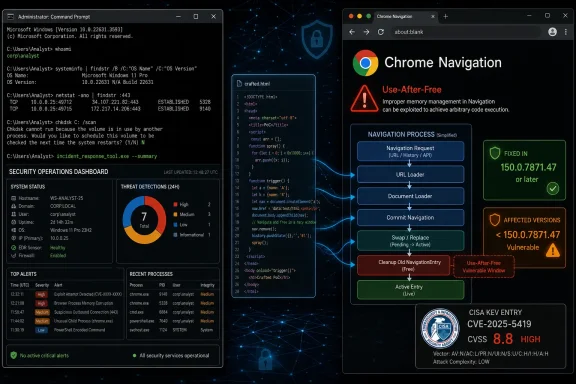 A Medium Chrome Bug Can Still Be a High-Risk Browser Event
CVE-2026-14006 is described by NVD as a use after free in Chrome’s Navigation component before version 150.0.7871.47. The attack scenario is the classic browser nightmare: a remote attacker prepares a malicious HTML page, a user visits or is lured to it, and the vulnerable browser mishandles memory in a way that can lead to arbitrary code execution.That does not automatically mean every exposed machine is one click away from full system compromise. Modern Chrome isolates sites, sandboxes renderer processes, applies exploit mitigations, and forces attackers to chain bugs when they want durable control of the host. But “requires chaining” is not the same thing as “safe,” especially in an ecosystem where browser exploits are routinely paired with sandbox escapes, privilege escalations, token theft, or post-exploitation tooling.
The severity split is worth noticing. Chromium’s own security severity is listed as Medium, while CISA’s ADP CVSS 3.1 vector gives the issue an 8.8 High score: network attack vector, low attack complexity, no privileges required, user interaction required, and high impact to confidentiality, integrity, and availability. NVD had not yet provided its own CVSS assessment when the entry was last modified on July 2, 2026, but it had already added the affected Chrome CPE range: Google Chrome versions before 150.0.7871.47.
This is not a contradiction so much as a reminder that scoring systems answer different questions. Chromium’s severity rating reflects Google’s internal view of exploitability and architectural context. CVSS is trying to describe impact in a standardized way across vendors and products. Administrators should read both, then patch according to the more boring reality: arbitrary code execution in a browser engine is not something to leave for the next maintenance window if the update is already available.
Navigation Is Not Just a Browser Convenience Layer
The word “Navigation” sounds pedestrian, almost harmless. It evokes address bars, back buttons, redirects, tab changes, and page loads. In a modern browser, however, navigation is part of the machinery that decides which process handles a document, which origin owns a page, which security policy applies, and how old state is torn down as new state arrives.That makes memory lifetime bugs in this neighborhood particularly uncomfortable. A use-after-free occurs when software continues to reference memory after it has been released. If an attacker can influence what gets placed into that freed memory, the stale pointer becomes more than a crash trigger; it can become a route to controlled behavior.
Browsers are exposed to hostile input by design. Every page load, redirect, iframe, script, pop-up, document transition, and embedded resource is a negotiation between untrusted web content and privileged browser code. The navigation stack is where many of those negotiations converge.
That is why “crafted HTML page” matters. The phrase is easy to skim past because CVE descriptions use it constantly, but it means the attack can be delivered through web content rather than local access. A successful exploit still depends on details Google has restricted, and there is no public indication in the NVD entry that this specific CVE is being exploited in the wild. But the shape of the bug is familiar enough that defenders do not need a proof-of-concept to justify moving quickly.
The Patch Is Clearer Than the Public Exploit Story
The fix line is straightforward: Chrome prior to 150.0.7871.47 is affected. Google’s late-June Stable Channel update moved Windows and Mac systems to the 150.0.7871.46/.47 line, with Linux receiving a corresponding 150.0.7871.46 build, according to Google’s release channel information as summarized by Malwarebytes and Born’s IT and Windows Blog.The versioning wrinkle should not distract from the real check. On Windows, the defensive question is whether Chrome reports itself as 150.0.7871.47 or later. For administrators managing mixed fleets, the same logic applies to Chromium-derived browsers, but the version numbers may not map one-to-one. Edge, Brave, Vivaldi, Opera, and other Chromium browsers usually need their own vendor updates even when the underlying Chromium fix has landed upstream.
That creates a lag problem. Chrome users may receive Google’s patch quickly through the browser’s built-in updater, but Chromium-based browsers depend on each vendor’s integration, testing, and release pipeline. In ordinary consumer use, that delay may be invisible. In enterprise fleets, it is a risk register item.
NVD’s change history also answers the user’s CPE concern. The entry initially arrived from Chrome on June 30, 2026, and NIST’s initial analysis on July 1 added a CPE configuration for Google Chrome versions up to, but excluding, 150.0.7871.47. If the live NVD page briefly appeared to be missing CPE data or showed a “loading” state, that looks more like page rendering or enrichment timing than absence of a configuration. The relevant CPE is present in the change record.
The Big Chrome Update Makes the Single CVE Harder to Triage
CVE-2026-14006 did not arrive alone. Reporting from Malwarebytes described the late-June Chrome release as another unusually large security update, with hundreds of fixes and a set of internally discovered issues. Born’s IT and Windows Blog likewise noted a very large number of resolved vulnerabilities in the Chrome 150 update train.That scale changes how defenders experience Chrome security. A single CVE with a clean description is easy to explain to a help desk, a security steering committee, or a skeptical business unit. A browser release with hundreds of fixes becomes less a patch note and more a weather system.
The temptation is to search for the scariest CVE and ignore the rest. That is understandable, but it is not how browser exploitation works in practice. Attackers often combine primitives: one bug to corrupt memory, another to escape a sandbox, another to bypass a mitigation, another to gain persistence or steal data once code execution is achieved.
In that context, CVE-2026-14006 is best understood as one exposed edge in a larger attack surface. It may not be the most dramatic bug in the release, and it may never become a household-name vulnerability. But it lives in the exact class of defects that has historically mattered in browser compromise: memory corruption reachable from web content.
Windows Admins Should Care Even When Chrome Updates Itself
Chrome’s updater is good enough that many users rarely think about browser patching. That is both a success and a trap. Auto-update reduces exposure for unmanaged users, but it also creates false confidence in organizations where browser state is not continuously measured.The weak point is restart behavior. Chrome can download an update and still run old code until the browser is relaunched. On heavily used workstations, shared machines, kiosks, VDI sessions, and developer systems with dozens of persistent tabs, “updated” and “running the patched build” are not always the same thing.
For Windows administrators, the practical response is verification. Management tooling should inventory installed browser versions, running process versions, and update channel status. Security teams should assume that some endpoints will lag because users do not close browsers, because update services are disabled, because third-party packaging trails Google’s release, or because enterprise policy intentionally pins versions.
That last case deserves special scrutiny. Version pinning can be reasonable for compatibility testing, but browsers are hostile-input parsers sitting between every user and the public Internet. A long browser deferral is not like delaying a minor line-of-business application update. It is a decision to keep a large remote attack surface open.
The Microsoft Edge Angle Is Obvious but Not Automatic
WindowsForum readers will naturally ask about Microsoft Edge, because Edge is Chromium-based and ships as the default browser on Windows. The right answer is cautious: Chromium vulnerabilities often affect downstream browsers, but the presence of a Chrome CVE does not automatically prove that a given Edge build is vulnerable or patched on the same version number.Microsoft typically publishes its own Edge release notes and security updates when Chromium fixes are incorporated. Administrators should check Edge’s reported version and Microsoft’s release channel rather than assuming Chrome’s build number applies directly. In mixed-browser environments, Chrome compliance and Edge compliance need separate reporting.
That matters because Edge is deeply entrenched in Windows workflows. It opens web links from Outlook and Teams, renders enterprise portals, supports WebView2-dependent applications, and often remains installed even in organizations that standardize on another browser. A fleet can be “not a Chrome shop” and still be exposed to Chromium engine risk through Edge or embedded web components.
The WebView2 question is especially important for line-of-business software. Many Windows applications now rely on Microsoft’s Chromium-based WebView2 runtime for embedded web content. A browser patching program that ignores WebView2 is no longer complete.
The CPE Record Is a Small Database Detail With Real Consequences
CPE metadata looks like bureaucratic plumbing until it breaks an organization’s vulnerability management workflow. Scanners, dashboards, software bills of materials, ticketing automation, and compliance reports often depend on CPE mappings to decide whether an asset is vulnerable.For CVE-2026-14006, NVD’s change history says NIST added the Google Chrome CPE configuration on July 1: Chrome versions up to, excluding, 150.0.7871.47. That is the machine-readable hinge many tools need. If a scanner ingested the CVE before enrichment completed, it may have temporarily missed affected assets or classified the CVE as unmapped.
That timing problem is common. CVEs often arrive first with a description and references, then accumulate CVSS data, CPEs, CWE mappings, vendor advisories, and secondary analysis over hours or days. Security teams that treat the first database snapshot as final can end up with blind spots.
The better approach is to let vulnerability tooling refresh enrichment data and to write detection logic that does not depend exclusively on NVD’s first pass. For a browser issue like this one, installed version checks are more reliable than waiting for every feed to agree.
“No Exploitation Known” Is Not a Reason to Wait
CISA’s SSVC enrichment for CVE-2026-14006 listed exploitation as “none,” automatable as “no,” and technical impact as “total.” That is a nuanced assessment. It suggests there was no known exploitation at the time of the entry, but also that successful exploitation could have severe consequences.The user-interaction requirement is another nuance that should not be overvalued. Browser exploits almost always need some user action, but clicking a link, opening a page, following a search result, reading webmail, or visiting a compromised legitimate site are not high barriers. “User interaction required” is not a meaningful comfort in a world built around user interaction.
The absence of public exploit details is also by design. Google commonly restricts bug details until enough users have received updates, especially when disclosure would help attackers more than defenders. That policy is sensible, but it leaves administrators with an evidence gap: they must patch before they can fully understand what they are patching.
That asymmetry is frustrating but normal. Browser security is a race in which defenders often see only the patch and the CVE description, while exploit developers reverse-engineer the diff. Waiting for a polished write-up is a good way to turn a manageable update into an avoidable incident.
The Operational Fix Is Boring, Which Is Why It Works
For individual users, the answer is simple: open Chrome’s About page, let it check for updates, and restart the browser. The restart is not optional theater; it is what replaces the running vulnerable code with the patched build.For organizations, the answer is less glamorous but more important. Confirm the Chrome version across the fleet, identify machines below 150.0.7871.47, force browser restarts where policy permits, and check Chromium-derived browsers separately. If users are allowed to install multiple browsers, the inventory must reflect that reality rather than the preferred standard image.
Security teams should also watch for stale portable Chromium builds, developer-installed test channels, unmanaged browser copies inside user profiles, and application-bundled runtimes. Attackers do not care which browser procurement approved. They care which vulnerable executable is reachable.
The patch should be treated as routine emergency hygiene, not panic. There is no public evidence in the NVD material that CVE-2026-14006 is under active exploitation. But the combination of remote web delivery, arbitrary code execution language, memory corruption, and browser ubiquity puts it firmly in the “verify quickly” category.
Chrome 150 Turns Patch Hygiene Into a Browser Inventory Test
The lesson of CVE-2026-14006 is not that Chrome is uniquely unsafe. It is that browsers have become operating-system-scale attack surfaces with consumer-grade update expectations and enterprise-grade consequences. The organizations that handle this well will be the ones that can answer, quickly and empirically, which browser builds are actually running.- CVE-2026-14006 affects Google Chrome versions before 150.0.7871.47 and is tied to a use-after-free flaw in Navigation.
- The attack path described by NVD requires a crafted HTML page and user interaction, but it does not require local access or prior privileges.
- CISA’s ADP scoring rates the issue as CVSS 8.8 High even though Chromium’s own security severity is Medium.
- NVD’s change history shows that a Chrome CPE configuration was added for versions up to, but excluding, 150.0.7871.47.
- Chrome auto-update helps, but administrators still need to verify installed and running versions, especially where browsers remain open for long periods.
- Edge and other Chromium-based browsers should be checked through their own vendor release channels rather than assumed safe because Chrome has been updated.
References
- Primary source: NVD / Chromium
Published: 2026-07-03T07:00:44-07:00
NVD - CVE-2026-14006
 nvd.nist.gov
- Security advisory: MSRC
Published: 2026-07-03T07:00:44-07:00
Original feed URL
Security Update Guide - Microsoft Security Response Center
 msrc.microsoft.com
- Related coverage: cvefeed.io
CVE-2026-14006 - Google Chrome Use-After-Free in Navigation
Use after free in Navigation in Google Chrome prior to 150.0.7871.47 allowed a remote attacker to execute arbitrary code via a crafted HTML page. (Chromium security severity: Medium)cvefeed.io