

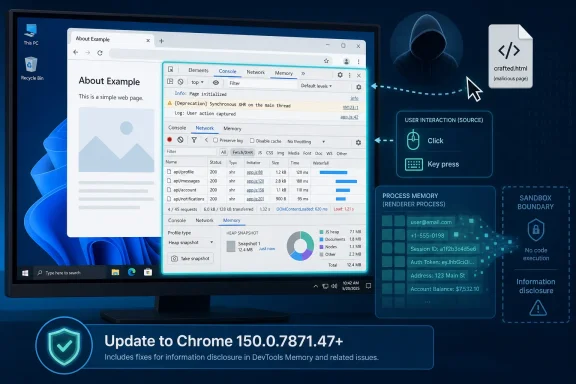
Google patched CVE-2026-13961 in Chrome 150.0.7871.47 for Windows after disclosing that a crafted HTML page, paired with specific user interface gestures, could let a remote attacker obtain potentially sensitive information from process memory through DevTools. The bug is rated Medium by Chromium and scored 5.3 by CISA’s ADP enrichment, but the label undersells the lesson: browser debugging surfaces are no longer niche developer-only corners of the platform. As documented by Google’s Chrome Releases blog and the National Vulnerability Database, this is not a drive-by code execution emergency; it is a reminder that the browser’s tools for seeing inside the web can themselves become part of the attack surface.
CVE-2026-13961 sits in an awkward space between “patch promptly” and “do not panic.” The NVD description says the flaw affected Google Chrome on Windows before version 150.0.7871.47, and the attack required a user to be convinced into specific UI gestures. That combination matters: the attacker does not merely send a victim a packet and win, but neither is the weakness confined to a local machine with administrator access.
The affected component is DevTools, Chrome’s built-in inspection, debugging, profiling, and instrumentation environment. For developers, DevTools is muscle memory: right-click, inspect, watch the DOM, inspect network calls, chase a memory leak, reproduce a console warning. For ordinary users, it is invisible until a support scammer, malicious tutorial, or “paste this into your console” trick drags it into view.
That is why the Windows qualifier is more than bookkeeping. Chrome is cross-platform, but the CVE record narrows this issue to Chrome on Windows, which is where the browser has its deepest enterprise footprint, its largest consumer base, and its richest mix of managed and unmanaged endpoints. A Medium bug in that environment is still a bug that belongs in the next patch window, not in the “interesting but irrelevant” pile.
Google’s June 30 Chrome 150 stable-channel post also shows the broader release context. Chrome 150 shipped with hundreds of security fixes, including a long list of Critical, High, Medium, and Low severity issues. CVE-2026-13961 is one line in a very long ledger, but its component choice makes it unusually instructive.
That intuition is increasingly wrong. DevTools is a privileged observation layer for the browser’s interaction with a page. It can inspect page state, expose network traffic, show storage, manipulate execution, profile memory, and bridge a human operator into browser internals in ways ordinary web content cannot.
The CVE does not say that any website could automatically open DevTools and dump memory. It says a remote attacker needed to persuade the user to perform specific UI gestures, after which a crafted page could obtain potentially sensitive information from process memory. That difference is why the severity is Medium rather than catastrophic. It is also why defenders should not dismiss the flaw outright.
Modern attacks often thrive in the gap between technical exploit and social manipulation. A vulnerability that requires gestures may still be viable if the gestures can be dressed up as troubleshooting, account recovery, coupon activation, cryptocurrency wallet repair, CAPTCHA bypass, browser performance testing, or “developer mode” enablement. Security teams have spent years training users not to run unknown executables; attackers have spent the same years learning how much damage can be done inside trusted applications.
DevTools has already been a favorite prop in social-engineering scripts. The classic “paste this code into the console” scam survives because users can be persuaded that a complicated-looking interface is proof of legitimacy. CVE-2026-13961 belongs to that same family of risk, even if the specific bug was in Chrome’s validation of untrusted input rather than in the user’s judgment.
For administrators, the most important part is the “C:H” component. Confidentiality impact is high in the ADP vector, even though the overall score lands in Medium territory because of the required interaction and high complexity. A memory disclosure vulnerability is not the same as remote code execution, but leaked memory can be useful in exactly the places defenders dislike: bypassing mitigations, exposing tokens, revealing sensitive page data, or helping chain attacks.
The public record does not establish that CVE-2026-13961 was exploited in the wild. CISA’s SSVC data in the NVD entry lists exploitation as “none” and automatable as “no,” with partial technical impact. That is reassuring, but it is not a reason to wait for exploit chatter before updating.
The more useful reading is this: the bug does not appear to be wormable, does not appear to be an automatic mass-exploitation vehicle, and does not deserve emergency theatrics in most environments. But on managed Windows fleets, Chrome updates are cheap compared with incident response, and this one closes a path to process-memory exposure in a component that users can be tricked into opening.
That scale creates a familiar problem for enterprise vulnerability management. When one browser release contains hundreds of fixes, the question “which CVE matters?” becomes less useful than “how fast can we safely move the browser baseline?” A single Medium information disclosure bug may not trigger the same alerting as a zero-day, but it arrives bundled with Critical and High issues that make the overall update harder to defer.
The sheer number of Chrome CVEs also blurs component-level risk. DevTools, ANGLE, V8, Skia, Dawn, GPU, USB, Blink, PDF, Passwords, Extensions, and UI components all appear across modern Chrome advisories. The browser is not a monolith; it is a stack of parsers, renderers, hardware interfaces, compatibility layers, developer instruments, and policy machinery. A vulnerability in any one of those layers may be constrained, but the operational answer is usually the same: get to the fixed build.
This is where Chrome’s rapid update model helps and complicates life at the same time. For consumers, the browser often updates itself with minimal ceremony. For enterprises, update rings, compatibility testing, extension validation, kiosk-mode constraints, and regulated-change processes can slow the rollout. CVE-2026-13961 is not the bug that should blow up a change-control board, but Chrome 150 as a whole is a strong argument against letting browser updates drift.
The NVD entry says the CVE was received from Chrome on June 30, 2026, modified by CISA-ADP later that day, and initially analyzed by NIST on July 1. NVD added CWE-20, Improper Input Validation, and associated the issue with Chrome on Windows. The CPE configuration shown in the NVD change history combines Google Chrome versions up to, but excluding, a fixed version with Microsoft Windows.
That CPE detail is the sort of thing that looks tedious until a scanner gets it wrong. If an organization inventories Chrome by application version but not by operating system, it may flag Mac or Linux systems unnecessarily. If it inventories Windows but misses per-user Chrome installations, portable Chromium-based browsers, or unmanaged side channels, it may undercount exposure. If it reads the version boundary incorrectly, it may report stale risk after patching.
There is also a small but important versioning wrinkle in the material. The plain CVE description says Chrome on Windows prior to 150.0.7871.47 is affected. The NVD change-history text supplied in the prompt says NIST added a CPE configuration for Chrome versions up to, but excluding, 150.0.7871.46 in combination with Windows, while Google’s release post lists Windows/Mac as 150.0.7871.46/.47. That inconsistency is exactly why administrators should anchor remediation on the vendor’s fixed Windows build and the CVE description: for this Windows-specific issue, the safe target is 150.0.7871.47 or later.
This is not pedantry. Vulnerability management systems often behave as if version numbers are pristine facts descending from the heavens. In reality, they are stitched together from vendor advisories, CVE records, enrichment pipelines, CPE matching, and scanner logic. When a bug is platform-specific and the release has adjacent build numbers, administrators should expect a little noise.
CVE-2026-13961 specifically requires the attacker to convince the user to engage in certain UI gestures. That wording suggests the attack depends on the human using Chrome in a way that opens or manipulates the vulnerable DevTools path. It also suggests that ordinary passive browsing is not enough.
But attackers do not need every victim. They need enough victims, and they prefer workflows where users already expect strange instructions. Developers, help-desk staff, power users, crypto users, gamers installing mods, and employees following support chat instructions all make better targets than a random reader browsing recipes. The relevant question is not “would a normal user ever do this?” but “could a motivated attacker wrap this in a believable task for a valuable user?”
That framing changes the risk profile for WindowsForum’s core audience. Enthusiasts and IT pros are more likely than average users to open DevTools, test flags, inspect pages, paste console snippets, and follow debugging instructions. The very habits that make someone technically capable can make this class of vulnerability less theoretical.
Yet memory disclosures are valuable because modern exploitation is often about defeating layers. Address Space Layout Randomization, sandboxing, site isolation, heap hardening, and process separation all raise the cost of exploitation. Information leaks can lower that cost by revealing pointers, memory layouts, tokens, fragments of documents, or other secrets that should not cross a boundary.
The CVE description says “potentially sensitive information from process memory,” which is deliberately broad. Public advisories rarely spell out the juicy details while patches are still rolling out. Google’s Chrome Releases post also repeats its standard warning that access to bug details and links may remain restricted until most users are updated.
That opacity is frustrating for defenders who want to know whether a bug threatens cookies, passwords, page contents, cross-origin data, local files, or exploit mitigations. But the lack of detail is also normal for Chrome. The browser ecosystem has learned the hard way that publishing exploit primitives too early can turn patch lag into attacker opportunity.
For enterprise environments, the answer is less romantic and more important. Inventory Chrome versions across Windows endpoints, confirm that managed update policies are not pinning vulnerable builds, and make sure exception rings have a time limit. The fact that the CVE is Medium should not tempt teams into letting Chrome 149 or early Chrome 150 builds linger for weeks.
DevTools policy is worth revisiting too. Chrome Enterprise policies can restrict developer tools in managed environments, and some organizations already disable DevTools for standard users except where development or support workflows require it. That is not a universal recommendation—blocking DevTools for developers is self-sabotage—but it is a reasonable control for call-center desktops, kiosks, shared workstations, and high-risk user populations.
User education should be narrow rather than grandiose. “Never open DevTools” is unrealistic for technical staff and unnecessary for most users. “Do not open DevTools or paste console commands because a website, ad, chat message, or support stranger told you to” is more actionable, and it maps directly to the kind of interaction-dependent browser bug this CVE represents.
Still, Windows administrators should treat Chromium component bugs as a prompt to check derivative update status. Microsoft Edge shares much of Chromium’s codebase but ships through Microsoft’s own release process, with its own version numbers, policies, and enterprise channels. The right conclusion is not “Edge is vulnerable because Chrome is,” but “if your fleet uses Chromium-based browsers, verify that each vendor has integrated the relevant Chromium fixes.”
That nuance matters because overbroad scanner findings can create fatigue. Security teams that declare every Chromium CVE universally applicable without evidence will eventually be ignored by desktop teams who know better. Conversely, teams that only patch “Google Chrome” while leaving a Chromium-based secondary browser unmanaged may leave practical exposure untouched.
The same principle applies to developer tools embedded in Electron-based applications and WebView-based software, although CVE-2026-13961 is specifically about Chrome’s DevTools on Windows. The larger lesson is that browser-derived attack surfaces often appear in places users do not call “the browser.” Inventory remains the unglamorous foundation of browser security.
Researchers and administrators sometimes bristle at that model. It makes independent risk assessment harder, encourages generic patch advice, and leaves defenders guessing about exploitability. In a perfect world, every advisory would include enough technical detail to support precise detection and compensating controls without helping attackers.
The real world is less accommodating. Chrome has billions of users, a rapid release cadence, and a long tail of machines that do not relaunch promptly. Publishing a crisp exploit recipe on day one would not make defenders meaningfully faster in most organizations, but it could make attackers faster immediately.
So the bargain is imperfect but understandable. Google ships the fix, withholds the dangerous details, and asks the ecosystem to move. For most Chrome vulnerabilities, especially those not known to be exploited in the wild, that is the least-bad disclosure model.
CPE is a blunt instrument for a modern browser. Chrome can be installed system-wide or per-user, managed or unmanaged, stable or extended stable, branded or Chromium-derived. Windows itself is not the vulnerable product, but it is part of the vulnerable configuration because the Chrome flaw is described as Windows-specific. That kind of AND relationship is correct in concept and fragile in tooling.
If a scanner supports platform-aware application detection, it should flag Windows machines running Chrome before 150.0.7871.47 and suppress non-Windows systems for this CVE. If it only performs generic CPE matching against “google:chrome” without platform context, expect false positives. If it only sees OS CPEs and not application versions, expect false negatives.
This is where good vulnerability management looks less like buying a scanner and more like maintaining a translation layer. Vendor advisory language, CVE affected-product data, CPE matching, package evidence, browser auto-update state, and endpoint telemetry all need to converge. CVE-2026-13961 is a useful test case because it is specific enough to expose sloppy matching but common enough to matter.
They do not argue for complacency. Browser vulnerabilities age quickly. Once a patch is public, attackers can compare builds, inspect changes, and look for ways to weaponize fixed bugs against lagging users. Even a Medium bug can become more attractive if it can be paired with another flaw or a reliable social-engineering flow.
The sane enterprise response is a short, disciplined patch window. Push Chrome 150.0.7871.47 or later through normal rapid browser-update rings, monitor failures, and close exceptions quickly. If your organization freezes browser updates for compatibility reasons, this is another reminder that browser compatibility testing should be continuous, not an excuse for month-long exposure.
For individuals, the recommendation is even simpler. Open Chrome’s About page, let it check for updates, and relaunch. If the version remains below 150.0.7871.47 on Windows, something is blocking the update and needs attention.
Browsers have spent two decades hardening the obvious paths. The web page runs in a sandbox. Cross-origin data is guarded. Memory corruption mitigations multiply. Dangerous APIs require permissions. Site isolation contains entire categories of attacks.
The pressure then moves to the seams. UI confusion, developer tools, extension surfaces, file pickers, password managers, passkeys, WebUSB, WebHID, GPU stacks, PDF viewers, and enterprise policy paths all become places where the browser’s promise of safety depends on validation, isolation, and user comprehension holding at the same time.
That is why “insufficient validation of untrusted input in DevTools” is more than a dry CWE entry. It is a description of a seam. Untrusted web content should not be able to influence privileged browser tooling in ways that expose memory, even if the user has been coaxed into gestures. The patch closes one such seam; the release notes show there are many more.
 A Medium Chrome Bug With a Very Windows-Shaped Edge
CVE-2026-13961 sits in an awkward space between “patch promptly” and “do not panic.” The NVD description says the flaw affected Google Chrome on Windows before version 150.0.7871.47, and the attack required a user to be convinced into specific UI gestures. That combination matters: the attacker does not merely send a victim a packet and win, but neither is the weakness confined to a local machine with administrator access.The affected component is DevTools, Chrome’s built-in inspection, debugging, profiling, and instrumentation environment. For developers, DevTools is muscle memory: right-click, inspect, watch the DOM, inspect network calls, chase a memory leak, reproduce a console warning. For ordinary users, it is invisible until a support scammer, malicious tutorial, or “paste this into your console” trick drags it into view.
That is why the Windows qualifier is more than bookkeeping. Chrome is cross-platform, but the CVE record narrows this issue to Chrome on Windows, which is where the browser has its deepest enterprise footprint, its largest consumer base, and its richest mix of managed and unmanaged endpoints. A Medium bug in that environment is still a bug that belongs in the next patch window, not in the “interesting but irrelevant” pile.
Google’s June 30 Chrome 150 stable-channel post also shows the broader release context. Chrome 150 shipped with hundreds of security fixes, including a long list of Critical, High, Medium, and Low severity issues. CVE-2026-13961 is one line in a very long ledger, but its component choice makes it unusually instructive.
DevTools Is Not Just a Developer Convenience Anymore
The browser security conversation usually revolves around the renderer, V8, WebAssembly, GPU acceleration, media codecs, sandbox boundaries, and the recurring nightmare of use-after-free bugs. DevTools sounds softer by comparison. It feels like a workshop, not a public entrance.That intuition is increasingly wrong. DevTools is a privileged observation layer for the browser’s interaction with a page. It can inspect page state, expose network traffic, show storage, manipulate execution, profile memory, and bridge a human operator into browser internals in ways ordinary web content cannot.
The CVE does not say that any website could automatically open DevTools and dump memory. It says a remote attacker needed to persuade the user to perform specific UI gestures, after which a crafted page could obtain potentially sensitive information from process memory. That difference is why the severity is Medium rather than catastrophic. It is also why defenders should not dismiss the flaw outright.
Modern attacks often thrive in the gap between technical exploit and social manipulation. A vulnerability that requires gestures may still be viable if the gestures can be dressed up as troubleshooting, account recovery, coupon activation, cryptocurrency wallet repair, CAPTCHA bypass, browser performance testing, or “developer mode” enablement. Security teams have spent years training users not to run unknown executables; attackers have spent the same years learning how much damage can be done inside trusted applications.
DevTools has already been a favorite prop in social-engineering scripts. The classic “paste this code into the console” scam survives because users can be persuaded that a complicated-looking interface is proof of legitimacy. CVE-2026-13961 belongs to that same family of risk, even if the specific bug was in Chrome’s validation of untrusted input rather than in the user’s judgment.
The Severity Score Tells Only Half the Story
CISA’s ADP assessment gives the vulnerability a CVSS 3.1 base score of 5.3, with network attack vector, high attack complexity, no privileges required, required user interaction, unchanged scope, high confidentiality impact, and no integrity or availability impact. That vector is a compact way of saying the bug is hard to exploit reliably, needs a participating user, and appears focused on information disclosure.For administrators, the most important part is the “C:H” component. Confidentiality impact is high in the ADP vector, even though the overall score lands in Medium territory because of the required interaction and high complexity. A memory disclosure vulnerability is not the same as remote code execution, but leaked memory can be useful in exactly the places defenders dislike: bypassing mitigations, exposing tokens, revealing sensitive page data, or helping chain attacks.
The public record does not establish that CVE-2026-13961 was exploited in the wild. CISA’s SSVC data in the NVD entry lists exploitation as “none” and automatable as “no,” with partial technical impact. That is reassuring, but it is not a reason to wait for exploit chatter before updating.
The more useful reading is this: the bug does not appear to be wormable, does not appear to be an automatic mass-exploitation vehicle, and does not deserve emergency theatrics in most environments. But on managed Windows fleets, Chrome updates are cheap compared with incident response, and this one closes a path to process-memory exposure in a component that users can be tricked into opening.
Chrome 150’s Patch Flood Makes Individual Bugs Harder to Triage
Google’s Chrome 150 stable release is notable because CVE-2026-13961 arrived inside a massive security update, not as a single-issue advisory. The Chrome Releases post says the update includes 433 security fixes, with Chrome 150.0.7871.46 for Linux and 150.0.7871.46/.47 for Windows and Mac rolling out over the following days and weeks.That scale creates a familiar problem for enterprise vulnerability management. When one browser release contains hundreds of fixes, the question “which CVE matters?” becomes less useful than “how fast can we safely move the browser baseline?” A single Medium information disclosure bug may not trigger the same alerting as a zero-day, but it arrives bundled with Critical and High issues that make the overall update harder to defer.
The sheer number of Chrome CVEs also blurs component-level risk. DevTools, ANGLE, V8, Skia, Dawn, GPU, USB, Blink, PDF, Passwords, Extensions, and UI components all appear across modern Chrome advisories. The browser is not a monolith; it is a stack of parsers, renderers, hardware interfaces, compatibility layers, developer instruments, and policy machinery. A vulnerability in any one of those layers may be constrained, but the operational answer is usually the same: get to the fixed build.
This is where Chrome’s rapid update model helps and complicates life at the same time. For consumers, the browser often updates itself with minimal ceremony. For enterprises, update rings, compatibility testing, extension validation, kiosk-mode constraints, and regulated-change processes can slow the rollout. CVE-2026-13961 is not the bug that should blow up a change-control board, but Chrome 150 as a whole is a strong argument against letting browser updates drift.
The NVD Record Shows the Plumbing Behind the Alert
The user-facing version of this story is simple: update Chrome on Windows to 150.0.7871.47 or later. The machine-readable version is messier, and that mess matters because vulnerability scanners, asset systems, and patch dashboards depend on it.The NVD entry says the CVE was received from Chrome on June 30, 2026, modified by CISA-ADP later that day, and initially analyzed by NIST on July 1. NVD added CWE-20, Improper Input Validation, and associated the issue with Chrome on Windows. The CPE configuration shown in the NVD change history combines Google Chrome versions up to, but excluding, a fixed version with Microsoft Windows.
That CPE detail is the sort of thing that looks tedious until a scanner gets it wrong. If an organization inventories Chrome by application version but not by operating system, it may flag Mac or Linux systems unnecessarily. If it inventories Windows but misses per-user Chrome installations, portable Chromium-based browsers, or unmanaged side channels, it may undercount exposure. If it reads the version boundary incorrectly, it may report stale risk after patching.
There is also a small but important versioning wrinkle in the material. The plain CVE description says Chrome on Windows prior to 150.0.7871.47 is affected. The NVD change-history text supplied in the prompt says NIST added a CPE configuration for Chrome versions up to, but excluding, 150.0.7871.46 in combination with Windows, while Google’s release post lists Windows/Mac as 150.0.7871.46/.47. That inconsistency is exactly why administrators should anchor remediation on the vendor’s fixed Windows build and the CVE description: for this Windows-specific issue, the safe target is 150.0.7871.47 or later.
This is not pedantry. Vulnerability management systems often behave as if version numbers are pristine facts descending from the heavens. In reality, they are stitched together from vendor advisories, CVE records, enrichment pipelines, CPE matching, and scanner logic. When a bug is platform-specific and the release has adjacent build numbers, administrators should expect a little noise.
The UI-Gesture Requirement Is a Speed Bump, Not a Wall
Security advisories often use “user interaction required” as a quieting phrase. It should be read more carefully. User interaction can mean clicking a link, accepting a prompt, dragging a file, pasting text, opening DevTools, pressing a shortcut, or performing a sequence that seems absurd in a sterile lab but plausible in a social-engineering script.CVE-2026-13961 specifically requires the attacker to convince the user to engage in certain UI gestures. That wording suggests the attack depends on the human using Chrome in a way that opens or manipulates the vulnerable DevTools path. It also suggests that ordinary passive browsing is not enough.
But attackers do not need every victim. They need enough victims, and they prefer workflows where users already expect strange instructions. Developers, help-desk staff, power users, crypto users, gamers installing mods, and employees following support chat instructions all make better targets than a random reader browsing recipes. The relevant question is not “would a normal user ever do this?” but “could a motivated attacker wrap this in a believable task for a valuable user?”
That framing changes the risk profile for WindowsForum’s core audience. Enthusiasts and IT pros are more likely than average users to open DevTools, test flags, inspect pages, paste console snippets, and follow debugging instructions. The very habits that make someone technically capable can make this class of vulnerability less theoretical.
Information Disclosure Bugs Are Often Chain-Building Bugs
A memory disclosure vulnerability does not usually give an attacker the satisfying drama of code execution. There is no instant shell, no ransomware payload, no visible browser crash that proves control. That makes it easy to underweight.Yet memory disclosures are valuable because modern exploitation is often about defeating layers. Address Space Layout Randomization, sandboxing, site isolation, heap hardening, and process separation all raise the cost of exploitation. Information leaks can lower that cost by revealing pointers, memory layouts, tokens, fragments of documents, or other secrets that should not cross a boundary.
The CVE description says “potentially sensitive information from process memory,” which is deliberately broad. Public advisories rarely spell out the juicy details while patches are still rolling out. Google’s Chrome Releases post also repeats its standard warning that access to bug details and links may remain restricted until most users are updated.
That opacity is frustrating for defenders who want to know whether a bug threatens cookies, passwords, page contents, cross-origin data, local files, or exploit mitigations. But the lack of detail is also normal for Chrome. The browser ecosystem has learned the hard way that publishing exploit primitives too early can turn patch lag into attacker opportunity.
The Browser Patch Is the Fix, but Policy Still Matters
For home users, the practical instruction is straightforward: let Chrome update, relaunch it, and verify that the version is 150.0.7871.47 or later on Windows. Chrome’s self-update mechanism usually handles this, but the relaunch step remains the classic weak link. A browser can download an update and still run old code until the user restarts.For enterprise environments, the answer is less romantic and more important. Inventory Chrome versions across Windows endpoints, confirm that managed update policies are not pinning vulnerable builds, and make sure exception rings have a time limit. The fact that the CVE is Medium should not tempt teams into letting Chrome 149 or early Chrome 150 builds linger for weeks.
DevTools policy is worth revisiting too. Chrome Enterprise policies can restrict developer tools in managed environments, and some organizations already disable DevTools for standard users except where development or support workflows require it. That is not a universal recommendation—blocking DevTools for developers is self-sabotage—but it is a reasonable control for call-center desktops, kiosks, shared workstations, and high-risk user populations.
User education should be narrow rather than grandiose. “Never open DevTools” is unrealistic for technical staff and unnecessary for most users. “Do not open DevTools or paste console commands because a website, ad, chat message, or support stranger told you to” is more actionable, and it maps directly to the kind of interaction-dependent browser bug this CVE represents.
Edge and Chromium Derivatives Live in the Blast Radius, Even When the CVE Names Chrome
The CVE names Google Chrome, not every Chromium-based browser. That distinction matters legally and operationally. A CVE record describes affected products as reported and enriched; it does not automatically prove that Microsoft Edge, Brave, Vivaldi, Opera, Arc, or embedded Chromium frameworks are affected in the same way.Still, Windows administrators should treat Chromium component bugs as a prompt to check derivative update status. Microsoft Edge shares much of Chromium’s codebase but ships through Microsoft’s own release process, with its own version numbers, policies, and enterprise channels. The right conclusion is not “Edge is vulnerable because Chrome is,” but “if your fleet uses Chromium-based browsers, verify that each vendor has integrated the relevant Chromium fixes.”
That nuance matters because overbroad scanner findings can create fatigue. Security teams that declare every Chromium CVE universally applicable without evidence will eventually be ignored by desktop teams who know better. Conversely, teams that only patch “Google Chrome” while leaving a Chromium-based secondary browser unmanaged may leave practical exposure untouched.
The same principle applies to developer tools embedded in Electron-based applications and WebView-based software, although CVE-2026-13961 is specifically about Chrome’s DevTools on Windows. The larger lesson is that browser-derived attack surfaces often appear in places users do not call “the browser.” Inventory remains the unglamorous foundation of browser security.
Google’s Restricted Bug Links Are Annoying—and Usually Sensible
Chrome advisories often link to Chromium issue tracker entries that are restricted at publication time. CVE-2026-13961 follows that pattern. The public receives the component, severity, affected version, and short description, while the exploit mechanics stay behind a curtain until enough users have updated.Researchers and administrators sometimes bristle at that model. It makes independent risk assessment harder, encourages generic patch advice, and leaves defenders guessing about exploitability. In a perfect world, every advisory would include enough technical detail to support precise detection and compensating controls without helping attackers.
The real world is less accommodating. Chrome has billions of users, a rapid release cadence, and a long tail of machines that do not relaunch promptly. Publishing a crisp exploit recipe on day one would not make defenders meaningfully faster in most organizations, but it could make attackers faster immediately.
So the bargain is imperfect but understandable. Google ships the fix, withholds the dangerous details, and asks the ecosystem to move. For most Chrome vulnerabilities, especially those not known to be exploited in the wild, that is the least-bad disclosure model.
The CPE Question Is a Warning About Automation’s Blind Spots
The prompt asks whether a CPE is missing. Based on the NVD material, the entry is not simply missing all CPE data; NIST added a configuration tying Google Chrome to Microsoft Windows. The more subtle issue is whether that CPE configuration and version boundary precisely capture the affected population.CPE is a blunt instrument for a modern browser. Chrome can be installed system-wide or per-user, managed or unmanaged, stable or extended stable, branded or Chromium-derived. Windows itself is not the vulnerable product, but it is part of the vulnerable configuration because the Chrome flaw is described as Windows-specific. That kind of AND relationship is correct in concept and fragile in tooling.
If a scanner supports platform-aware application detection, it should flag Windows machines running Chrome before 150.0.7871.47 and suppress non-Windows systems for this CVE. If it only performs generic CPE matching against “google:chrome” without platform context, expect false positives. If it only sees OS CPEs and not application versions, expect false negatives.
This is where good vulnerability management looks less like buying a scanner and more like maintaining a translation layer. Vendor advisory language, CVE affected-product data, CPE matching, package evidence, browser auto-update state, and endpoint telemetry all need to converge. CVE-2026-13961 is a useful test case because it is specific enough to expose sloppy matching but common enough to matter.
The Patch Window Should Be Short, Even If the Panic Level Is Low
There is no public indication that CVE-2026-13961 is being exploited in the wild. Its attack complexity is high, it requires user interaction, and CISA’s SSVC enrichment marks it as not automatable. Those facts argue against emergency all-hands response for most organizations.They do not argue for complacency. Browser vulnerabilities age quickly. Once a patch is public, attackers can compare builds, inspect changes, and look for ways to weaponize fixed bugs against lagging users. Even a Medium bug can become more attractive if it can be paired with another flaw or a reliable social-engineering flow.
The sane enterprise response is a short, disciplined patch window. Push Chrome 150.0.7871.47 or later through normal rapid browser-update rings, monitor failures, and close exceptions quickly. If your organization freezes browser updates for compatibility reasons, this is another reminder that browser compatibility testing should be continuous, not an excuse for month-long exposure.
For individuals, the recommendation is even simpler. Open Chrome’s About page, let it check for updates, and relaunch. If the version remains below 150.0.7871.47 on Windows, something is blocking the update and needs attention.
The Real Risk Is the Expanding Surface Around the Page
CVE-2026-13961 is not the most severe Chrome bug in the June 30 release, and it may never become famous. Its value as a story is that it points to a broader architectural truth: the dangerous boundary is no longer just between a web page and native code. It is also between the page and the browser’s own instruments, prompts, policies, permission surfaces, debugging views, and user-mediated workflows.Browsers have spent two decades hardening the obvious paths. The web page runs in a sandbox. Cross-origin data is guarded. Memory corruption mitigations multiply. Dangerous APIs require permissions. Site isolation contains entire categories of attacks.
The pressure then moves to the seams. UI confusion, developer tools, extension surfaces, file pickers, password managers, passkeys, WebUSB, WebHID, GPU stacks, PDF viewers, and enterprise policy paths all become places where the browser’s promise of safety depends on validation, isolation, and user comprehension holding at the same time.
That is why “insufficient validation of untrusted input in DevTools” is more than a dry CWE entry. It is a description of a seam. Untrusted web content should not be able to influence privileged browser tooling in ways that expose memory, even if the user has been coaxed into gestures. The patch closes one such seam; the release notes show there are many more.
Chrome 150.0.7871.47 Is the Line Windows Admins Should Draw
The practical reading of CVE-2026-13961 is neither alarmist nor dismissive. It is a Medium-severity Windows Chrome information disclosure bug in DevTools, fixed in the Chrome 150 stable update, with enough social-engineering dependency to lower mass-exploitation risk and enough confidentiality impact to justify fast remediation.- Windows systems running Google Chrome before 150.0.7871.47 should be updated to 150.0.7871.47 or later.
- The vulnerability requires user interaction and specific UI gestures, so passive browsing alone is not the scenario described in the public advisory.
- The affected component is DevTools, which makes technically inclined users, developers, and support workflows more relevant to the risk model than the average casual browser session.
- The public record does not show known exploitation in the wild, and CISA’s SSVC enrichment lists exploitation as none and automation as no.
- Vulnerability scanners may need careful tuning because the issue is platform-specific to Chrome on Windows and because Chrome 150’s adjacent build numbers can confuse simple version matching.
- Organizations that manage Chrome should verify update policies, relaunch compliance, exception rings, and any policy choices around DevTools availability on non-developer endpoints.
References
- Primary source: NVD / Chromium
Published: 2026-07-03T07:00:40-07:00
Loading…
nvd.nist.gov - Security advisory: MSRC
Published: 2026-07-03T07:00:40-07:00
Original feed URL
Loading…
msrc.microsoft.com - Related coverage: cvefeed.io
Loading…
cvefeed.io - Official source: nist.gov
National Vulnerability Database
NIST maintains the National Vulnerability Database (NVD), a repository of information on software and hardware flaws that can compromise computer security. This is a key piece of the nation’s cybersecurity infrastructure.www.nist.gov - Related coverage: cve.imfht.com
Loading…
cve.imfht.com - Related coverage: labs.cloudsecurityalliance.org
CSA research note ai vuln discovery velocity disclosure crisis 20260524 csa styled
PDF documentlabs.cloudsecurityalliance.org