

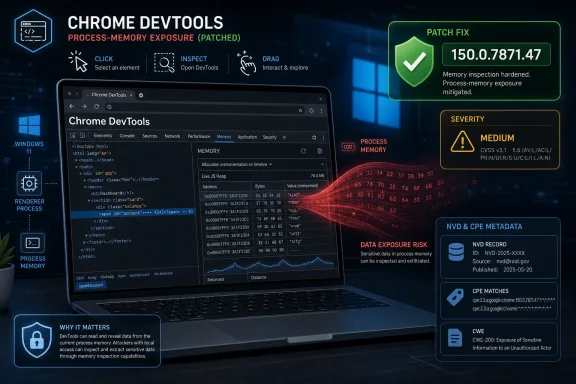
Google’s Chrome team fixed CVE-2026-14117 in the June 30, 2026 Stable Channel desktop update, addressing a Windows-only DevTools input-validation flaw in Chrome versions before 150.0.7871.47 that could leak sensitive process-memory data after user interaction with a crafted web page. The National Vulnerability Database published the entry the same day and later added a Windows-specific CPE configuration, while CISA’s enrichment rated the issue medium despite Chromium’s own low-severity label. That mismatch is the story: not a panic-grade browser emergency, but a useful reminder that “low” in a browser advisory can still mean “data exposure from memory” in the right workflow. For WindowsForum readers, the practical answer is simple: if Chrome on Windows is below 150.0.7871.47, update it; if your scanner missed the CPE, check whether it consumed NVD’s July 1 enrichment rather than only the initial Chrome CNA record.
CVE-2026-14117 sits in a part of Chrome that most ordinary users never intentionally open: DevTools. That fact is why Chromium classified the flaw as low severity. A vulnerability that requires a user to engage in “specific UI gestures” is not the same class of risk as a drive-by renderer exploit that fires when someone merely lands on a malicious page.
But DevTools is not an irrelevant corner of the browser. It is a privileged inspection surface where the browser exposes live page state, execution context, network detail, storage, memory tooling, and debugging affordances that ordinary page JavaScript is supposed to be walled off from. A validation bug there is not just another UI bug; it is a crack in the interface between untrusted web content and the browser’s own diagnostic machinery.
NVD’s description says the flaw involved insufficient validation of untrusted input in DevTools on Windows and could allow a remote attacker, after persuading the user to perform particular UI gestures, to obtain potentially sensitive information from process memory. That is a carefully bounded sentence, but it still contains three words administrators should never gloss over: sensitive information and memory.
The absence of a public exploit claim matters. CISA’s SSVC enrichment lists exploitation as “none” and automation as “no,” which is exactly what you would expect from a bug that depends on human interaction with DevTools. Still, “not automatable” is not the same as “not useful.” Social engineering has always been the bridge between theoretical browser flaws and real-world compromise.
In that kind of release, CVE-2026-14117 does not leap off the page. Google’s advisory included critical and high-severity issues across components such as Extensions, GPU, ANGLE, Dawn, WebUSB, Views, Skia, Bluetooth, V8, and more. Against that backdrop, a low-severity DevTools issue looks like background noise.
That would be a mistake, not because this particular CVE is secretly catastrophic, but because release-note severity is optimized for the vendor’s exploitability model. Enterprise risk is messier. A low-severity information disclosure in a developer-heavy environment can matter more than a higher-severity bug in a component disabled by policy or irrelevant to the workload.
This is especially true on Windows endpoints used by developers, support engineers, QA testers, browser-extension maintainers, web-app administrators, and anyone who routinely opens DevTools while examining unfamiliar pages. The affected audience is narrower than “everyone who uses Chrome,” but it is not exotic. In many organizations, it maps directly to staff with broad access to internal apps, staging systems, credentials, cookies, logs, and customer data.
That distinction matters because the Chrome CNA record initially describes the affected product as Google Chrome before 150.0.7871.47, while the prose description narrows the issue to Chrome on Windows. NVD’s enrichment reconciles that by creating an AND configuration: vulnerable Chrome version, running on Windows. If a scanner consumes only the CNA “affected” block and not NVD’s enriched configuration, it may over-report the issue on non-Windows systems or fail to express the platform condition correctly.
This is not just bureaucratic taxonomy. CPE logic drives dashboards, service-level agreements, exception handling, patch windows, and sometimes executive risk reports. If the vulnerability is Windows-specific but the scanner treats it as generic Chrome, Linux fleets may show false positives. If the scanner ignores the Windows condition entirely, Windows endpoints may not be prioritized properly when the organization is filtering by platform.
The “Are we missing a CPE?” prompt on NVD pages can be misleading because it appears as part of the site interface even when CPE configurations are present or still loading. In this case, the change history is the better evidence. It shows NIST adding the Chrome application CPE up to but excluding 150.0.7871.47 and the Microsoft Windows operating-system CPE as the platform condition.
For IT teams, the right interpretation is: the CPE is not absent, but your tooling may not have caught up. Check when your vulnerability-management platform last synchronized NVD metadata, whether it parses AND configurations correctly, and whether it distinguishes CNA-provided affected-product data from NVD-enriched CPE data.
DevTools is particularly awkward because it is supposed to help trusted users inspect untrusted pages. A malicious page can shape what the user sees, where the user clicks, and what the user is encouraged to investigate. If the flaw is in how DevTools validates untrusted input, then the boundary being tested is not just browser code; it is the workflow by which a person investigates suspicious or broken content.
That makes this a different class of risk from the usual “visit a crafted HTML page” phrasing. Here, the crafted page is paired with a behavioral requirement. The attacker must convince the user to interact with the page and the browser UI in a particular way, likely making the exploit path more brittle but also more plausible against technically curious users.
Developers are trained to open DevTools when something does not work. Support staff are trained to reproduce customer issues. Security analysts are trained to inspect weird pages. These are not reckless behaviors; they are job duties. A bug in DevTools therefore has a disproportionate relationship with the people most likely to poke at hostile or malformed content.
That does not make CVE-2026-14117 a reason to ban DevTools or lock down every developer machine. It does mean browser DevTools should be treated as privileged tooling, not as a harmless pane that happens to live inside the browser window. The same mental model organizations apply to PowerShell, terminal emulators, packet analyzers, and debuggers belongs here too.
That combination produces a useful middle ground. The bug is not trivial, because confidentiality impact is high in the CVSS vector. It is not easily weaponized at scale, because attack complexity is high and user interaction is required. It is exactly the sort of issue that gets lost when organizations sort vulnerability queues by severity label alone.
This is where mature patching policy beats dashboard panic. A Windows Chrome endpoint below 150.0.7871.47 should be updated promptly because Chrome updates are routine, well-supported, and cumulative. But the CVE does not justify emergency weekend change control by itself unless the affected environment has a specific exposure: developer workstations, security research systems, or users who regularly inspect untrusted web content.
The most important operational point is that Chrome 150’s update carries far more than this one CVE. Google’s advisory listed 433 security fixes, including critical issues in components with broader exploit implications. Even if CVE-2026-14117 were irrelevant to your environment, the release itself is not optional hygiene. Browser patching has become one of the highest-frequency maintenance loops in endpoint security.
Microsoft Edge uses its own build numbers, and Microsoft’s release channels do not always mirror Chrome’s visible version scheme. The correct operational move is not to force Chrome CPEs onto Edge; it is to check Microsoft’s Edge security release notes, verify current Stable and Extended Stable builds, and make sure Edge update policies are not lagging behind Chromium security baselines.
This is especially important because many Windows environments have both browsers installed. Chrome may be user-installed for web compatibility, while Edge remains the default browser, the PDF handler, the WebView-adjacent corporate standard, or the browser embedded in workflows users barely notice. A Chrome-only patch report can create a false sense of closure if Edge and WebView2 governance are handled elsewhere.
For managed fleets, Chrome’s own enterprise policies and Microsoft’s browser-management stack should be treated as part of the same endpoint-control problem. The browser is now an application runtime, identity broker, document viewer, password-adjacent surface, extension platform, and debugging environment. A memory-disclosure flaw in DevTools is a small tile in that larger mosaic.
NVD’s record illustrates the latency problem. The CVE arrived from Chrome on June 30. CISA added its enrichment later that day. NIST added the CPE configuration on July 1. That is a short timeline by historical standards, but it is still long enough for automated systems to ingest partial data, generate noisy findings, or miss the Windows-only condition.
This is where vulnerability management has become less about simply “having the CVE” and more about knowing which source supplied which piece of truth. The CNA gives the initial description and affected product. CISA may add prioritization metadata. NVD adds CPE configuration and normalization. Commercial scanners then interpret all of it, sometimes imperfectly.
Administrators should be skeptical of both empty and overbroad results in the first 24 to 72 hours after a browser CVE lands. An empty result may mean your fleet is safe, or it may mean the scanner does not yet have the enriched CPE. A broad result may mean widespread exposure, or it may mean platform conditions were flattened. In either case, the fastest source of truth is often direct browser-version inventory.
For unmanaged systems, the instruction remains familiar: open Chrome’s About page, let it check for updates, and relaunch. For managed systems, administrators should verify policy-driven update cadence, update suppression settings, relaunch notification behavior, and any controls that defer browser restarts during business hours. A fixed package sitting behind a months-long “please relaunch” prompt is not a fixed endpoint.
The threshold here is Chrome for Windows 150.0.7871.47. Anything below that remains in scope for CVE-2026-14117 according to the NVD description. Because Google’s June 30 Stable Channel update is cumulative, updating past that build is sufficient; teams should not chase this one fix independently from the rest of the Chrome 150 security payload.
There is no public indication in the NVD record that exploitation has been observed in the wild, and CISA’s SSVC data says exploitation is none. That should shape response tempo, not patch eligibility. Browser fixes are cheap compared with the cost of leaving known memory-disclosure bugs on developer workstations.
But the flaw also should not be waved away. It is an information-disclosure bug tied to process memory. It lives in a tool used by technical users who are more likely than average to inspect strange pages. It appeared in a giant Chrome security release where individual CVEs can blur together. And its metadata path shows why CPE handling still matters in real vulnerability programs.
The smartest response is boring: update Chrome, validate inventory, check scanner logic, and make sure Windows-specific CPE conditions are being honored. Security maturity often looks like refusing both extremes — neither panic nor apathy, just a clean read of the facts and a fast close of the exposure window.
 The Bug Is Small, but the Boundary It Touches Is Not
CVE-2026-14117 sits in a part of Chrome that most ordinary users never intentionally open: DevTools. That fact is why Chromium classified the flaw as low severity. A vulnerability that requires a user to engage in “specific UI gestures” is not the same class of risk as a drive-by renderer exploit that fires when someone merely lands on a malicious page.But DevTools is not an irrelevant corner of the browser. It is a privileged inspection surface where the browser exposes live page state, execution context, network detail, storage, memory tooling, and debugging affordances that ordinary page JavaScript is supposed to be walled off from. A validation bug there is not just another UI bug; it is a crack in the interface between untrusted web content and the browser’s own diagnostic machinery.
NVD’s description says the flaw involved insufficient validation of untrusted input in DevTools on Windows and could allow a remote attacker, after persuading the user to perform particular UI gestures, to obtain potentially sensitive information from process memory. That is a carefully bounded sentence, but it still contains three words administrators should never gloss over: sensitive information and memory.
The absence of a public exploit claim matters. CISA’s SSVC enrichment lists exploitation as “none” and automation as “no,” which is exactly what you would expect from a bug that depends on human interaction with DevTools. Still, “not automatable” is not the same as “not useful.” Social engineering has always been the bridge between theoretical browser flaws and real-world compromise.
Google’s 433-Fix Release Makes One CVE Easy to Miss
The Chrome Releases blog framed the June 30 update as the promotion of Chrome 150 to the stable channel for Windows, macOS, and Linux. Google listed Windows and Mac builds as 150.0.7871.46/.47 and Linux as 150.0.7871.46, and said the update contained 433 security fixes. That is a huge number for defenders to ingest, triage, and translate into patch policy.In that kind of release, CVE-2026-14117 does not leap off the page. Google’s advisory included critical and high-severity issues across components such as Extensions, GPU, ANGLE, Dawn, WebUSB, Views, Skia, Bluetooth, V8, and more. Against that backdrop, a low-severity DevTools issue looks like background noise.
That would be a mistake, not because this particular CVE is secretly catastrophic, but because release-note severity is optimized for the vendor’s exploitability model. Enterprise risk is messier. A low-severity information disclosure in a developer-heavy environment can matter more than a higher-severity bug in a component disabled by policy or irrelevant to the workload.
This is especially true on Windows endpoints used by developers, support engineers, QA testers, browser-extension maintainers, web-app administrators, and anyone who routinely opens DevTools while examining unfamiliar pages. The affected audience is narrower than “everyone who uses Chrome,” but it is not exotic. In many organizations, it maps directly to staff with broad access to internal apps, staging systems, credentials, cookies, logs, and customer data.
The Windows-Only CPE Is a Feature, Not a Formatting Error
The user-facing question here is whether a CPE is missing. Based on the NVD record as modified on July 1, the answer appears to be no: NIST added a configuration that combines Google Chrome versions before 150.0.7871.47 with Microsoft Windows. In CPE terms, the vulnerable application is Chrome, and the operating-system condition is Windows.That distinction matters because the Chrome CNA record initially describes the affected product as Google Chrome before 150.0.7871.47, while the prose description narrows the issue to Chrome on Windows. NVD’s enrichment reconciles that by creating an AND configuration: vulnerable Chrome version, running on Windows. If a scanner consumes only the CNA “affected” block and not NVD’s enriched configuration, it may over-report the issue on non-Windows systems or fail to express the platform condition correctly.
This is not just bureaucratic taxonomy. CPE logic drives dashboards, service-level agreements, exception handling, patch windows, and sometimes executive risk reports. If the vulnerability is Windows-specific but the scanner treats it as generic Chrome, Linux fleets may show false positives. If the scanner ignores the Windows condition entirely, Windows endpoints may not be prioritized properly when the organization is filtering by platform.
The “Are we missing a CPE?” prompt on NVD pages can be misleading because it appears as part of the site interface even when CPE configurations are present or still loading. In this case, the change history is the better evidence. It shows NIST adding the Chrome application CPE up to but excluding 150.0.7871.47 and the Microsoft Windows operating-system CPE as the platform condition.
For IT teams, the right interpretation is: the CPE is not absent, but your tooling may not have caught up. Check when your vulnerability-management platform last synchronized NVD metadata, whether it parses AND configurations correctly, and whether it distinguishes CNA-provided affected-product data from NVD-enriched CPE data.
DevTools Turns User Interaction Into an Attack Surface
The phrase “specific UI gestures” is easy to dismiss until you remember how many attacks depend on getting users to click, drag, inspect, approve, paste, or open something. Browser vendors have spent years hardening against simple drive-by attacks, which has pushed attackers toward workflows that blend technical flaws with human choreography.DevTools is particularly awkward because it is supposed to help trusted users inspect untrusted pages. A malicious page can shape what the user sees, where the user clicks, and what the user is encouraged to investigate. If the flaw is in how DevTools validates untrusted input, then the boundary being tested is not just browser code; it is the workflow by which a person investigates suspicious or broken content.
That makes this a different class of risk from the usual “visit a crafted HTML page” phrasing. Here, the crafted page is paired with a behavioral requirement. The attacker must convince the user to interact with the page and the browser UI in a particular way, likely making the exploit path more brittle but also more plausible against technically curious users.
Developers are trained to open DevTools when something does not work. Support staff are trained to reproduce customer issues. Security analysts are trained to inspect weird pages. These are not reckless behaviors; they are job duties. A bug in DevTools therefore has a disproportionate relationship with the people most likely to poke at hostile or malformed content.
That does not make CVE-2026-14117 a reason to ban DevTools or lock down every developer machine. It does mean browser DevTools should be treated as privileged tooling, not as a harmless pane that happens to live inside the browser window. The same mental model organizations apply to PowerShell, terminal emulators, packet analyzers, and debuggers belongs here too.
Chromium’s “Low” and CISA’s “Medium” Are Both Telling the Truth
Chromium’s low-severity rating and CISA-ADP’s CVSS 3.1 score of 5.3 medium are not necessarily in conflict. They are answering different questions. Chromium is assessing the bug in the context of its exploit chain requirements and browser security model; CISA’s vector captures network reachability, no privileges required, required user interaction, high confidentiality impact, and no integrity or availability impact.That combination produces a useful middle ground. The bug is not trivial, because confidentiality impact is high in the CVSS vector. It is not easily weaponized at scale, because attack complexity is high and user interaction is required. It is exactly the sort of issue that gets lost when organizations sort vulnerability queues by severity label alone.
This is where mature patching policy beats dashboard panic. A Windows Chrome endpoint below 150.0.7871.47 should be updated promptly because Chrome updates are routine, well-supported, and cumulative. But the CVE does not justify emergency weekend change control by itself unless the affected environment has a specific exposure: developer workstations, security research systems, or users who regularly inspect untrusted web content.
The most important operational point is that Chrome 150’s update carries far more than this one CVE. Google’s advisory listed 433 security fixes, including critical issues in components with broader exploit implications. Even if CVE-2026-14117 were irrelevant to your environment, the release itself is not optional hygiene. Browser patching has become one of the highest-frequency maintenance loops in endpoint security.
Windows Admins Should Look Past Chrome Alone
Although the NVD entry names Google Chrome, Windows shops rarely run Chrome in isolation. Chromium code flows into Microsoft Edge and other Chromium-based browsers on their own schedules, with vendor-specific versioning and release notes. That does not mean every Chrome CVE automatically maps one-to-one to Edge at the same version number, but it does mean administrators should avoid thinking of Chromium advisories as “Google-only” events.Microsoft Edge uses its own build numbers, and Microsoft’s release channels do not always mirror Chrome’s visible version scheme. The correct operational move is not to force Chrome CPEs onto Edge; it is to check Microsoft’s Edge security release notes, verify current Stable and Extended Stable builds, and make sure Edge update policies are not lagging behind Chromium security baselines.
This is especially important because many Windows environments have both browsers installed. Chrome may be user-installed for web compatibility, while Edge remains the default browser, the PDF handler, the WebView-adjacent corporate standard, or the browser embedded in workflows users barely notice. A Chrome-only patch report can create a false sense of closure if Edge and WebView2 governance are handled elsewhere.
For managed fleets, Chrome’s own enterprise policies and Microsoft’s browser-management stack should be treated as part of the same endpoint-control problem. The browser is now an application runtime, identity broker, document viewer, password-adjacent surface, extension platform, and debugging environment. A memory-disclosure flaw in DevTools is a small tile in that larger mosaic.
The Real Risk Is Slow Metadata, Not Slow Patching
Most consumer Chrome users will receive the fix through automatic updates, assuming the browser is restarted. The harder problem is enterprise visibility. Security teams need to know which endpoints are below 150.0.7871.47, which platforms are affected, and whether their scanners are interpreting the CPE correctly.NVD’s record illustrates the latency problem. The CVE arrived from Chrome on June 30. CISA added its enrichment later that day. NIST added the CPE configuration on July 1. That is a short timeline by historical standards, but it is still long enough for automated systems to ingest partial data, generate noisy findings, or miss the Windows-only condition.
This is where vulnerability management has become less about simply “having the CVE” and more about knowing which source supplied which piece of truth. The CNA gives the initial description and affected product. CISA may add prioritization metadata. NVD adds CPE configuration and normalization. Commercial scanners then interpret all of it, sometimes imperfectly.
Administrators should be skeptical of both empty and overbroad results in the first 24 to 72 hours after a browser CVE lands. An empty result may mean your fleet is safe, or it may mean the scanner does not yet have the enriched CPE. A broad result may mean widespread exposure, or it may mean platform conditions were flattened. In either case, the fastest source of truth is often direct browser-version inventory.
The Patch Is Easy; the Restart Is the Catch
Chrome’s update mechanism is one of the better pieces of consumer security infrastructure in the software world, but it still runs into the oldest problem in endpoint management: users do not restart things. A browser can download an update and remain vulnerable until it relaunches into the fixed build.For unmanaged systems, the instruction remains familiar: open Chrome’s About page, let it check for updates, and relaunch. For managed systems, administrators should verify policy-driven update cadence, update suppression settings, relaunch notification behavior, and any controls that defer browser restarts during business hours. A fixed package sitting behind a months-long “please relaunch” prompt is not a fixed endpoint.
The threshold here is Chrome for Windows 150.0.7871.47. Anything below that remains in scope for CVE-2026-14117 according to the NVD description. Because Google’s June 30 Stable Channel update is cumulative, updating past that build is sufficient; teams should not chase this one fix independently from the rest of the Chrome 150 security payload.
There is no public indication in the NVD record that exploitation has been observed in the wild, and CISA’s SSVC data says exploitation is none. That should shape response tempo, not patch eligibility. Browser fixes are cheap compared with the cost of leaving known memory-disclosure bugs on developer workstations.
The Practical Reading of CVE-2026-14117 Is Narrow but Not Comfortable
This CVE should not be inflated into the next browser apocalypse. It requires Windows, a vulnerable Chrome build, a crafted HTML page, and user gestures. It affects DevTools, not the ordinary browsing path most users follow all day. It has no NVD-issued CVSS score yet, and Chromium marked it low.But the flaw also should not be waved away. It is an information-disclosure bug tied to process memory. It lives in a tool used by technical users who are more likely than average to inspect strange pages. It appeared in a giant Chrome security release where individual CVEs can blur together. And its metadata path shows why CPE handling still matters in real vulnerability programs.
The smartest response is boring: update Chrome, validate inventory, check scanner logic, and make sure Windows-specific CPE conditions are being honored. Security maturity often looks like refusing both extremes — neither panic nor apathy, just a clean read of the facts and a fast close of the exposure window.
Chrome 150 Leaves Windows Teams With a Short Checklist
For Windows administrators, CVE-2026-14117 is a reminder that browser security work is now equal parts patching, metadata interpretation, and workflow awareness. The fix is straightforward, but the surrounding details determine whether the organization actually knows it is fixed.- Chrome on Windows should be updated to 150.0.7871.47 or later to close CVE-2026-14117.
- Vulnerability scanners should be checked for NVD’s July 1 CPE enrichment, which ties the affected Chrome application versions to Microsoft Windows.
- Findings that flag Linux or macOS for this specific CVE should be reviewed for possible overbroad CPE matching.
- Developer, QA, support, and security-analysis workstations deserve particular attention because those users are more likely to open DevTools on untrusted or malformed pages.
- Microsoft Edge and other Chromium-based browsers should be tracked through their own vendor release notes rather than assumed safe or vulnerable solely from Chrome’s version number.
References
- Primary source: NVD / Chromium
Published: 2026-07-03T07:00:46-07:00
NVD - CVE-2026-14117
 nvd.nist.gov
- Security advisory: MSRC
Published: 2026-07-03T07:00:46-07:00
Original feed URL
Security Update Guide - Microsoft Security Response Center
 msrc.microsoft.com
- Related coverage: cvefeed.io
CVE-2026-14117 - Google Chrome DevTools Information Disclosure
Insufficient validation of untrusted input in DevTools in Google Chrome on Windows prior to 150.0.7871.47 allowed a remote attacker who convinced a user to engage in specific UI gestures to obtain potentially sensitive information from process memory via a crafted HTML page. (Chromium security...cvefeed.io - Related coverage: labs.cloudsecurityalliance.org
CSA research note nist nvd riskbased enrichment governance 20260426 csa styled
PDF documentlabs.cloudsecurityalliance.org