

Google fixed CVE-2026-14038 in Chrome 150.0.7871.47 for Windows and Mac on June 30, 2026, addressing a low-severity New Tab Page input-validation flaw that could help an attacker escape Chrome’s sandbox after already compromising the renderer process with a crafted HTML page. The oddity is not that Chrome had another bug; Chrome is a vast, fast-moving platform and bugs are its weather. The oddity is the mismatch between Google’s “Low” Chromium severity and CISA’s ADP CVSS 3.1 score of 9.3, a split that makes this CVE look either trivial or terrifying depending on which dashboard an administrator reads first. For Windows users and IT teams, the lesson is familiar but sharper this time: browser risk is no longer measured only by the first click, but by what happens after the first layer of isolation fails.
Google’s Chrome Releases blog placed CVE-2026-14038 deep inside the enormous Chrome 150 stable update, which promoted Chrome 150 to the stable channel for Windows, Mac, and Linux on June 30, 2026. The desktop builds listed by Google were 150.0.7871.46 for Linux and 150.0.7871.46/.47 for Windows and Mac, with the familiar warning that rollout would proceed over the following days and weeks.
The National Vulnerability Database entry, sourced from Chrome and published June 30, describes the flaw as “insufficient validation of untrusted input” in the New Tab Page. In plain English, some data crossing into a privileged or semi-privileged browser surface was not checked as strictly as it should have been. That alone does not mean a drive-by website can instantly take over a machine.
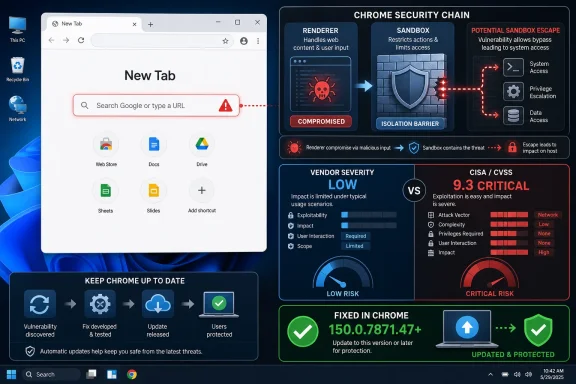
The important qualifier is the one that keeps this from being a simple “panic now” story: the attacker first needs to have compromised the renderer process. Chrome’s renderer is the part of the browser that handles web content, and it is deliberately treated as hostile territory. The renderer is supposed to be trapped inside a sandbox, with tight limits on what it can do to the operating system.
CVE-2026-14038 matters because it sits on the second step of a browser exploit chain. A renderer compromise is bad, but a renderer compromise plus a sandbox escape is how a web bug starts to look like host compromise. That is why a low-severity Chrome label can coexist with a critical CVSS score without either side necessarily being incoherent.
The browser’s security model depends on strict separation between ordinary web pages and browser-controlled pages. Chrome has long treated internal pages, browser UI, extension surfaces, settings pages, and privileged components differently from arbitrary websites. A validation failure in one of those seams may not be flashy, but it can be useful to an attacker who has already gained code execution in the renderer and is looking for a door into a more privileged process.
This is why the component name is more interesting than the severity label. “New Tab Page” does not sound like the place where serious security boundaries live, but browsers have become operating systems in miniature. Every surface that blends local state, remote content, user interaction, and privileged browser behavior becomes part of the attack surface.
Google’s public advisory does not provide exploit detail, which is normal at this stage. The Chrome team routinely restricts bug links until most users have received a fix, and the Chromium issue referenced for this CVE is not something administrators should expect to use as a step-by-step technical map. That secrecy is frustrating for defenders, but it is also part of the patch-disclosure bargain: ship the fix first, let the population update, then let the research details breathe.
The difference comes from what each system is trying to describe. A vendor severity rating often reflects exploit preconditions, the likelihood of practical exploitation, the component’s role in a chain, and the vendor’s internal triage framework. A CVSS score, by contrast, can amplify the final impact if the vulnerability is assumed to be reachable under its stated conditions.
Here, the phrase “who had compromised the renderer process” does a lot of work. If an attacker already has renderer compromise, CVE-2026-14038 may provide a path toward breaking containment. If the attacker does not have renderer compromise, this CVE alone is not the whole attack. CVSS can struggle with that distinction because chained browser exploitation does not always fit cleanly into a single vulnerability’s score.
That does not make the CVSS score useless. It tells security teams that the consequence of successful exploitation could be severe. But it should not be read as proof that every vulnerable Chrome installation is exposed to a one-click standalone remote-code-execution bug. The practical risk lives in the chain, not in the CVE entry as a standalone sentence.
For consumer Windows users, the answer is easy: update Chrome and restart the browser. Chrome’s auto-update pipeline is generally reliable, but pending restarts are still the graveyard where patches wait to become real. The build number matters here: for this CVE, the clean line is Chrome prior to 150.0.7871.47 on Windows and Mac.
For enterprise IT, the calculus is not merely “patch fast.” It is “patch fast without breaking critical workflows, extensions, identity controls, or line-of-business web apps.” That tension is why Chrome releases can look deceptively simple from the outside. A browser update is not just a browser update when the browser is the front end for payroll, case management, SaaS admin consoles, remote support, and internal dashboards.
Still, CVE-2026-14038 is a poor candidate for delay. Sandbox-escape-adjacent flaws are exactly the sort of issue that can become more interesting after exploit writers study the patch. Even if Google’s own severity label is Low, the role of the bug in a potential chain makes “we will get to it next week” a risky default.
A phrase like “attacker who had compromised the renderer process” is not a comfort blanket. It is a statement about dependency. It says the CVE is probably not the first domino, but it may be a valuable later domino.
That matters because renderer bugs are not rare. Memory corruption flaws in V8, Blink, WebRTC, GPU handling, graphics libraries, and parsing components regularly appear in Chrome security updates. A low-rated sandbox escape may become high-value when paired with a separate high-rated renderer vulnerability, especially if both are patched in the same release or in adjacent releases.
This is where exploit chains punish organizations that triage too literally. A single “Low” vulnerability may not trigger emergency change control. A “Low” vulnerability that helps turn renderer code execution into a sandbox escape deserves more respect. The exploit writer is not bound by the columns in your vulnerability scanner.
That is the enterprise implication hiding behind CVE-2026-14038. The New Tab Page is not the sensitive business asset; the browser session is. Cookies, tokens, synchronized identity state, extensions, local files exposed through upload workflows, and single sign-on sessions are the prizes.
Security teams should therefore avoid treating Chrome CVEs as commodity desktop hygiene only. Browser patch latency should be tracked with the same seriousness as VPN, endpoint protection, remote management, and identity-agent patch latency. The fact that Chrome updates frequently is not a reason to pay less attention; it is a reason to automate measurement.
On managed Windows devices, that means confirming actual installed versions rather than assuming Google Update has done its job. Devices that are offline, frozen by app-control policy, pinned by compatibility rules, or blocked by update misconfiguration can remain exposed long after the release note has faded from the news cycle.
The user-facing question — “Are we missing a CPE here?” — is exactly the kind of practical concern that vulnerability management teams run into every week. If a scanner, CMDB, SBOM platform, or exposure-management tool does not map the CVE cleanly to the right product and version range, the risk may disappear from dashboards or appear in the wrong place. Neither failure mode is harmless.
For this CVE, the affected software statement is straightforward at the human level: Google Chrome versions before 150.0.7871.47 are affected for the described issue. The CPE mapping should reflect Google Chrome as the vulnerable application and exclude 150.0.7871.47 and later. But the broader lesson is that CVE metadata should be treated as a starting point, not an oracle.
This is especially true for Chromium-based browsers. Chrome’s fix may land first, while Edge, Brave, Vivaldi, Opera, and embedded Chromium consumers follow their own release cadences. A CPE that only names Google Chrome may be accurate for the CVE entry as issued, but it may not capture downstream Chromium exposure in the way defenders actually care about it.
That distinction is important. Administrators should not blindly paste Chrome’s version number into an Edge compliance rule. They should instead track Microsoft Edge stable releases and confirm whether the relevant Chromium security fixes have been incorporated. For Windows fleets, Edge is not just an alternate browser; it is the default browser on many systems and a managed enterprise application in its own right.
The same caution applies to other Chromium-based browsers. A CVE assigned to Chrome may describe a flaw in shared Chromium code, Chrome-specific UI, or a component that downstream browsers modify or do not use. The New Tab Page is a particularly tricky component because Chromium provides foundations, while browser vendors often customize the user-facing experience.
In practice, the safest operational posture is simple: update every Chromium-based browser in the fleet, not just Chrome. The exploit ecosystem does not care whether an organization standardized on one browser in policy if users have three installed in reality.
User interaction is a meaningful distinction for automated wormability, but it is not a strong defense against phishing, malvertising, compromised websites, poisoned search results, or targeted watering-hole attacks. If a crafted HTML page is enough once the attacker has the right chain, then the barrier is not a technical wall; it is the ordinary human act of browsing.
The NVD record also notes CISA’s SSVC fields indicating no known exploitation, non-automatable exploitation, and total technical impact. That is a useful triage signal. As of the enrichment reflected in the record, this was not being flagged as exploited in the wild. But absence of known exploitation is not a reason to ignore a browser patch that is already available.
The better reading is proportional urgency. This is not a “shut down the internet” event. It is a “do not let Chrome updates drift” event, especially on machines used by administrators, developers, finance staff, executives, and anyone with privileged SaaS access.
In managed environments, the harder task is verification at scale. Inventory should capture installed Chrome versions from reliable endpoint telemetry, not merely infer patch status from update policy. A policy that allows updates is not the same as a browser that has restarted into the updated build.
Restart behavior is often the weak link. Chrome can download updates silently, but the running browser process must restart to complete the transition. Users who live for weeks with dozens of pinned tabs can be unknowingly parked on vulnerable code while the patched build waits in the background.
Administrators should also watch for update suppression. Enterprises sometimes delay Chrome updates because of extension compatibility, kiosk workflows, virtual desktop images, or brittle internal applications. Those exceptions should be documented, time-limited, and visible to security teams. Silent exceptions are where browser risk accumulates.
The New Tab Page is a liminal space. It is not quite a normal web page, not quite a settings page, and not quite a native app screen. It can reflect user preferences, remote services, search provider behavior, thumbnails, shortcuts, profile state, and enterprise policy. That mixture is convenient for users and attractive to attackers.
When a browser surface accepts or transforms untrusted input, validation errors can become privilege problems. The security promise of Chrome’s sandbox depends not only on isolating web content, but also on ensuring that compromised web content cannot trick privileged browser surfaces into doing something they should not. That is the conceptual center of this CVE.
The irony is that users may never think about the New Tab Page as a feature. It is the page between pages, the place one sees for a moment before typing something else. But in browser engineering, transitional surfaces often carry real complexity, and complexity is where vulnerabilities breed.
The practical reading is narrow but urgent. Patch Chrome, validate the version, restart the browser, and keep an eye on downstream Chromium browsers. Do not overstate the issue as a standalone unauthenticated takeover bug, but do not dismiss it because the Chromium severity line says Low.
There is also a communications lesson here. Security teams should explain exploit chains in plain language to leadership and helpdesks. “Low severity” does not always mean “low priority,” and “Critical CVSS” does not always mean “active internet apocalypse.” The truth is messier: this is a chain-enabling flaw in a browser component that should be patched promptly because the browser is now one of the most privileged userland applications on the machine.
 A Low-Severity Bug Walks Into a Critical-Risk Dashboard
Google’s Chrome Releases blog placed CVE-2026-14038 deep inside the enormous Chrome 150 stable update, which promoted Chrome 150 to the stable channel for Windows, Mac, and Linux on June 30, 2026. The desktop builds listed by Google were 150.0.7871.46 for Linux and 150.0.7871.46/.47 for Windows and Mac, with the familiar warning that rollout would proceed over the following days and weeks.The National Vulnerability Database entry, sourced from Chrome and published June 30, describes the flaw as “insufficient validation of untrusted input” in the New Tab Page. In plain English, some data crossing into a privileged or semi-privileged browser surface was not checked as strictly as it should have been. That alone does not mean a drive-by website can instantly take over a machine.
The important qualifier is the one that keeps this from being a simple “panic now” story: the attacker first needs to have compromised the renderer process. Chrome’s renderer is the part of the browser that handles web content, and it is deliberately treated as hostile territory. The renderer is supposed to be trapped inside a sandbox, with tight limits on what it can do to the operating system.
CVE-2026-14038 matters because it sits on the second step of a browser exploit chain. A renderer compromise is bad, but a renderer compromise plus a sandbox escape is how a web bug starts to look like host compromise. That is why a low-severity Chrome label can coexist with a critical CVSS score without either side necessarily being incoherent.
The New Tab Page Is Not Just Blank Space
The New Tab Page looks like a convenience screen: search box, shortcuts, thumbnails, maybe promotional or account-linked content, depending on settings and profile state. But in modern Chromium, surfaces that appear simple often sit at the intersection of web content, browser UI, sync state, local profile data, enterprise policy, and privileged internal code. That is exactly the kind of boundary where “untrusted input” becomes a loaded phrase.The browser’s security model depends on strict separation between ordinary web pages and browser-controlled pages. Chrome has long treated internal pages, browser UI, extension surfaces, settings pages, and privileged components differently from arbitrary websites. A validation failure in one of those seams may not be flashy, but it can be useful to an attacker who has already gained code execution in the renderer and is looking for a door into a more privileged process.
This is why the component name is more interesting than the severity label. “New Tab Page” does not sound like the place where serious security boundaries live, but browsers have become operating systems in miniature. Every surface that blends local state, remote content, user interaction, and privileged browser behavior becomes part of the attack surface.
Google’s public advisory does not provide exploit detail, which is normal at this stage. The Chrome team routinely restricts bug links until most users have received a fix, and the Chromium issue referenced for this CVE is not something administrators should expect to use as a step-by-step technical map. That secrecy is frustrating for defenders, but it is also part of the patch-disclosure bargain: ship the fix first, let the population update, then let the research details breathe.
The Severity Split Is the Real Story
Chromium rated CVE-2026-14038 as Low. CISA’s ADP enrichment, reflected in the NVD record, assigned a CVSS 3.1 base score of 9.3 Critical with a vector that includes network attack vector, low complexity, no privileges required, required user interaction, changed scope, high confidentiality impact, high integrity impact, and no availability impact. That is a dramatic gap.The difference comes from what each system is trying to describe. A vendor severity rating often reflects exploit preconditions, the likelihood of practical exploitation, the component’s role in a chain, and the vendor’s internal triage framework. A CVSS score, by contrast, can amplify the final impact if the vulnerability is assumed to be reachable under its stated conditions.
Here, the phrase “who had compromised the renderer process” does a lot of work. If an attacker already has renderer compromise, CVE-2026-14038 may provide a path toward breaking containment. If the attacker does not have renderer compromise, this CVE alone is not the whole attack. CVSS can struggle with that distinction because chained browser exploitation does not always fit cleanly into a single vulnerability’s score.
That does not make the CVSS score useless. It tells security teams that the consequence of successful exploitation could be severe. But it should not be read as proof that every vulnerable Chrome installation is exposed to a one-click standalone remote-code-execution bug. The practical risk lives in the chain, not in the CVE entry as a standalone sentence.
Chrome 150’s Patch Volume Turns Triage Into Noise Management
The June 30 Chrome 150 update included 433 security fixes, according to Google’s release notes. That number is enormous even by Chrome standards, and it creates an operational problem: when hundreds of CVEs and internal fixes land together, individual flaws blur into an undifferentiated patch mass. Administrators do not get the luxury of hand-curating each browser bug as if it were a monthly server advisory.For consumer Windows users, the answer is easy: update Chrome and restart the browser. Chrome’s auto-update pipeline is generally reliable, but pending restarts are still the graveyard where patches wait to become real. The build number matters here: for this CVE, the clean line is Chrome prior to 150.0.7871.47 on Windows and Mac.
For enterprise IT, the calculus is not merely “patch fast.” It is “patch fast without breaking critical workflows, extensions, identity controls, or line-of-business web apps.” That tension is why Chrome releases can look deceptively simple from the outside. A browser update is not just a browser update when the browser is the front end for payroll, case management, SaaS admin consoles, remote support, and internal dashboards.
Still, CVE-2026-14038 is a poor candidate for delay. Sandbox-escape-adjacent flaws are exactly the sort of issue that can become more interesting after exploit writers study the patch. Even if Google’s own severity label is Low, the role of the bug in a potential chain makes “we will get to it next week” a risky default.
Renderer Compromise Is the Assumption Defenders Hate
Modern browser exploitation is layered by design. Attackers often need one bug to get execution in a renderer and another bug to escape the sandbox or cross into a privileged browser process. This architecture has made browsers vastly harder to exploit than they were in the old monoculture days, but it has also changed how defenders should read vulnerability descriptions.A phrase like “attacker who had compromised the renderer process” is not a comfort blanket. It is a statement about dependency. It says the CVE is probably not the first domino, but it may be a valuable later domino.
That matters because renderer bugs are not rare. Memory corruption flaws in V8, Blink, WebRTC, GPU handling, graphics libraries, and parsing components regularly appear in Chrome security updates. A low-rated sandbox escape may become high-value when paired with a separate high-rated renderer vulnerability, especially if both are patched in the same release or in adjacent releases.
This is where exploit chains punish organizations that triage too literally. A single “Low” vulnerability may not trigger emergency change control. A “Low” vulnerability that helps turn renderer code execution into a sandbox escape deserves more respect. The exploit writer is not bound by the columns in your vulnerability scanner.
Windows Admins Should Treat the Browser as Tier-Zero Adjacent
Chrome is not part of Windows, but on many Windows fleets it is effectively part of the operating environment. It handles authentication flows, password managers, SaaS control planes, admin portals, device enrollment pages, helpdesk tools, and privileged cloud consoles. A browser compromise on an administrator workstation can be far more damaging than a compromise on a lightly used endpoint.That is the enterprise implication hiding behind CVE-2026-14038. The New Tab Page is not the sensitive business asset; the browser session is. Cookies, tokens, synchronized identity state, extensions, local files exposed through upload workflows, and single sign-on sessions are the prizes.
Security teams should therefore avoid treating Chrome CVEs as commodity desktop hygiene only. Browser patch latency should be tracked with the same seriousness as VPN, endpoint protection, remote management, and identity-agent patch latency. The fact that Chrome updates frequently is not a reason to pay less attention; it is a reason to automate measurement.
On managed Windows devices, that means confirming actual installed versions rather than assuming Google Update has done its job. Devices that are offline, frozen by app-control policy, pinned by compatibility rules, or blocked by update misconfiguration can remain exposed long after the release note has faded from the news cycle.
The CPE Confusion Is a Symptom of a Bigger Metadata Problem
The NVD change history for CVE-2026-14038 shows enrichment activity after the initial CVE publication, including an affected Chrome CPE configuration for versions up to but excluding 150.0.7871.47. It also shows later modification activity from CISA-ADP, including the removal of the CWE entry after it had previously been added. That kind of churn is not unusual, but it is painful for organizations that depend on machine-readable vulnerability data.The user-facing question — “Are we missing a CPE here?” — is exactly the kind of practical concern that vulnerability management teams run into every week. If a scanner, CMDB, SBOM platform, or exposure-management tool does not map the CVE cleanly to the right product and version range, the risk may disappear from dashboards or appear in the wrong place. Neither failure mode is harmless.
For this CVE, the affected software statement is straightforward at the human level: Google Chrome versions before 150.0.7871.47 are affected for the described issue. The CPE mapping should reflect Google Chrome as the vulnerable application and exclude 150.0.7871.47 and later. But the broader lesson is that CVE metadata should be treated as a starting point, not an oracle.
This is especially true for Chromium-based browsers. Chrome’s fix may land first, while Edge, Brave, Vivaldi, Opera, and embedded Chromium consumers follow their own release cadences. A CPE that only names Google Chrome may be accurate for the CVE entry as issued, but it may not capture downstream Chromium exposure in the way defenders actually care about it.
Edge and the Chromium Ecosystem Complicate the Patch Story
WindowsForum readers are likely to ask the obvious follow-up: what about Microsoft Edge? Edge is Chromium-based, but Microsoft ships it on its own channel, with its own release notes and versioning. A Chrome CVE does not automatically mean Edge is vulnerable in the exact same way, but Chromium security fixes often matter to Edge once merged and shipped.That distinction is important. Administrators should not blindly paste Chrome’s version number into an Edge compliance rule. They should instead track Microsoft Edge stable releases and confirm whether the relevant Chromium security fixes have been incorporated. For Windows fleets, Edge is not just an alternate browser; it is the default browser on many systems and a managed enterprise application in its own right.
The same caution applies to other Chromium-based browsers. A CVE assigned to Chrome may describe a flaw in shared Chromium code, Chrome-specific UI, or a component that downstream browsers modify or do not use. The New Tab Page is a particularly tricky component because Chromium provides foundations, while browser vendors often customize the user-facing experience.
In practice, the safest operational posture is simple: update every Chromium-based browser in the fleet, not just Chrome. The exploit ecosystem does not care whether an organization standardized on one browser in policy if users have three installed in reality.
“User Interaction Required” Is Not Much of a Barrier
The CVSS vector supplied by CISA-ADP marks user interaction as required. In browser security, that usually means the attacker needs the target to visit or interact with crafted content. That sounds reassuring until one remembers that visiting web content is the browser’s entire job.User interaction is a meaningful distinction for automated wormability, but it is not a strong defense against phishing, malvertising, compromised websites, poisoned search results, or targeted watering-hole attacks. If a crafted HTML page is enough once the attacker has the right chain, then the barrier is not a technical wall; it is the ordinary human act of browsing.
The NVD record also notes CISA’s SSVC fields indicating no known exploitation, non-automatable exploitation, and total technical impact. That is a useful triage signal. As of the enrichment reflected in the record, this was not being flagged as exploited in the wild. But absence of known exploitation is not a reason to ignore a browser patch that is already available.
The better reading is proportional urgency. This is not a “shut down the internet” event. It is a “do not let Chrome updates drift” event, especially on machines used by administrators, developers, finance staff, executives, and anyone with privileged SaaS access.
The Patch Is Easy; Proving It Landed Is the Work
For individual users, Chrome’s version check remains the fastest path: open the browser’s About Chrome page, let it check for updates, and restart when prompted. The fix line for CVE-2026-14038 is Chrome 150.0.7871.47 or later on affected desktop platforms. If the browser is still below that threshold, it is not patched for this CVE.In managed environments, the harder task is verification at scale. Inventory should capture installed Chrome versions from reliable endpoint telemetry, not merely infer patch status from update policy. A policy that allows updates is not the same as a browser that has restarted into the updated build.
Restart behavior is often the weak link. Chrome can download updates silently, but the running browser process must restart to complete the transition. Users who live for weeks with dozens of pinned tabs can be unknowingly parked on vulnerable code while the patched build waits in the background.
Administrators should also watch for update suppression. Enterprises sometimes delay Chrome updates because of extension compatibility, kiosk workflows, virtual desktop images, or brittle internal applications. Those exceptions should be documented, time-limited, and visible to security teams. Silent exceptions are where browser risk accumulates.
The New Tab Page Bug Is a Reminder That UI Is Attack Surface
Security teams often focus on engines: V8, Blink, WebRTC, GPU, Skia, ANGLE. Those components deserve attention because they process complex, attacker-controlled input at scale. But CVE-2026-14038 points to another recurring theme: browser user interface and browser-adjacent surfaces can also become meaningful security boundaries.The New Tab Page is a liminal space. It is not quite a normal web page, not quite a settings page, and not quite a native app screen. It can reflect user preferences, remote services, search provider behavior, thumbnails, shortcuts, profile state, and enterprise policy. That mixture is convenient for users and attractive to attackers.
When a browser surface accepts or transforms untrusted input, validation errors can become privilege problems. The security promise of Chrome’s sandbox depends not only on isolating web content, but also on ensuring that compromised web content cannot trick privileged browser surfaces into doing something they should not. That is the conceptual center of this CVE.
The irony is that users may never think about the New Tab Page as a feature. It is the page between pages, the place one sees for a moment before typing something else. But in browser engineering, transitional surfaces often carry real complexity, and complexity is where vulnerabilities breed.
The Signal Inside Chrome 150’s Security Flood
The Chrome 150 update is too large to interpret one CVE at a time, yet CVE-2026-14038 still gives Windows administrators a useful lens. It shows how a low-severity component bug can become strategically important when attached to sandbox escape semantics. It also shows why vulnerability scoring, vendor severity, and operational risk often diverge.The practical reading is narrow but urgent. Patch Chrome, validate the version, restart the browser, and keep an eye on downstream Chromium browsers. Do not overstate the issue as a standalone unauthenticated takeover bug, but do not dismiss it because the Chromium severity line says Low.
There is also a communications lesson here. Security teams should explain exploit chains in plain language to leadership and helpdesks. “Low severity” does not always mean “low priority,” and “Critical CVSS” does not always mean “active internet apocalypse.” The truth is messier: this is a chain-enabling flaw in a browser component that should be patched promptly because the browser is now one of the most privileged userland applications on the machine.
The Chrome 150 Lesson for Windows Fleets
Chrome 150’s New Tab Page flaw is not the loudest vulnerability of the year, but it is a useful test of whether an organization’s browser security program can distinguish label noise from operational risk. The right response is neither panic nor complacency. It is fast verification.- Chrome versions before 150.0.7871.47 should be treated as vulnerable to CVE-2026-14038 on affected desktop systems.
- The flaw is best understood as a potential sandbox-escape link after renderer compromise, not as a complete standalone attack chain by itself.
- Google rated the Chromium issue Low, while CISA’s ADP CVSS 3.1 enrichment scored it Critical, reflecting a difference between vendor triage and modeled impact.
- Windows administrators should confirm actual browser versions and completed restarts rather than assuming auto-update has fully remediated endpoints.
- Chromium-based browsers beyond Google Chrome should be reviewed through their own vendor release channels because shared code does not always translate into identical version numbers.
References
- Primary source: NVD / Chromium
Published: 2026-07-03T07:00:18-07:00
NVD - CVE-2026-14038
 nvd.nist.gov
- Security advisory: MSRC
Published: 2026-07-03T07:00:18-07:00
Original feed URL
Security Update Guide - Microsoft Security Response Center
 msrc.microsoft.com