

Google Chrome before version 150.0.7871.47 contains CVE-2026-14026, a SplitView security-interface flaw disclosed on June 30, 2026, that can let a remote attacker use a crafted HTML page and user gestures to spoof browser UI on Windows, macOS, and Linux. The bug is not a drive-by code execution panic, and Chromium rates it Low. But that rating should not lull administrators into ignoring it, because UI spoofing bugs attack the thing browsers are supposed to make legible: trust. In an age of passkeys, enterprise SSO, hardware-backed credentials, and browser-mediated identity, a wrong signal in the chrome around the page can be more useful to an attacker than another noisy memory-corruption crash.
As documented by the National Vulnerability Database and Chrome’s own advisory trail, CVE-2026-14026 sits in SplitView and is categorized as CWE-451, “User Interface Misrepresentation of Critical Information.” CISA’s ADP enrichment gives it a CVSS 3.1 score of 4.2, with network attack vector, high attack complexity, no privileges required, required user interaction, and limited integrity and availability impact. That sounds modest, and technically it is. The problem is that browser UI bugs often live below the threshold of emergency patching while still being useful in the messy middle of phishing, help-desk scams, fake login flows, and social engineering.
Chrome’s security model is not just V8, WebRTC, sandboxing, and process isolation. It is also the address bar, permission prompts, lock indicators, page information panels, tab states, downloads warnings, and all the small bits of browser chrome that tell users where they are and what they are allowed to trust. CVE-2026-14026 is interesting because it lands in that second category.
The flaw’s description is narrow: incorrect security UI in SplitView allowed UI spoofing through a crafted HTML page, provided the attacker could convince the user to perform specific gestures. That phrasing matters. The vulnerability does not say an attacker can silently execute code, escape the sandbox, or read files. It says the attacker can manipulate how security-relevant interface information appears under certain conditions.
For some readers, that will sound like a nuisance bug. For defenders, it should sound like the kind of bug that rarely wins a campaign by itself but can sharpen another attack. A convincing spoofed interface can make a fake sign-in step look more native, make a malicious flow feel like part of the browser, or trick a user into believing they are interacting with Chrome rather than content controlled by a remote page.
Google’s Stable Channel update for desktop, published through the Chrome Releases blog, lists the fix in the broader Chrome 150 line. The NVD entry records Chrome as the source, with vulnerable software described as Google Chrome before 150.0.7871.47. NIST’s initial analysis also added a CPE configuration covering Chrome on Windows, Linux, and macOS, which is the practical answer for administrators trying to map exposure.
Security UI depends on a clean mental model. Users are trained, imperfectly, to distinguish the page from the browser. The page can lie; the browser is supposed to arbitrate. If a crafted page can blur that line inside a split interface, even briefly or conditionally, the browser has allowed content to borrow trust from the frame that contains it.
That is why CWE-451 is more revealing than the CVSS number. “Misrepresentation of critical information” is not about raw exploit power. It is about deception at the point where a human makes a security decision. The vulnerability exists because the browser exposed or arranged interface state in a way that could be misunderstood.
This is also why user interaction does not make the bug irrelevant. Many successful browser-based attacks are interaction-heavy. Phishing kits do not merely wait for accidents; they instruct, cajole, and choreograph. A required gesture is a barrier, but it is not a wall when the attacker controls the surrounding narrative.
The SSVC data recorded by CISA is similarly restrained: no known exploitation, not automatable, partial technical impact. That is good news. There is no public signal in the provided NVD change history that CVE-2026-14026 is being exploited in the wild, and nothing in the official description turns it into a zero-day fire drill.
But UI spoofing bugs do not need to be automatable at scale to matter. They matter when they give a high-value phishing page a better costume. They matter when they help defeat user skepticism at the precise moment the browser is supposed to provide a trustworthy signal. And they matter because administrators often struggle to measure this kind of risk in asset inventories built for missing patches, open ports, and vulnerable services.
Chrome’s own Low severity label is not wrong. It is a statement about the bug’s standalone technical impact inside Chromium’s severity taxonomy. The editorial point is narrower and more uncomfortable: a low-severity browser UI bug can still be strategically useful when paired with credential theft, OAuth consent abuse, fake support flows, or device-enrollment trickery.
This is where the CPE detail becomes operationally useful. NIST’s analysis ties the vulnerable application to Google Chrome versions before 150.0.7871.47 and places it across Windows, Linux, and macOS operating environments. That does not mean the operating systems are vulnerable in the same way Chrome is; it means the affected application configuration exists on those platforms. For Windows administrators, the practical inventory question is not whether Windows itself needs a patch, but whether installed Chrome builds have crossed the fixed version boundary.
The Chrome 150 update also lands in a period when browser patch volumes have been unusually visible. Google has shipped large batches of Chrome security fixes in recent stable releases, and security outlets have repeatedly warned users to keep Chrome current after high-severity and actively exploited flaws earlier in the year. CVE-2026-14026 is not the headline-grabbing member of that family, but it benefits from the same patch discipline.
That discipline should be boring by design. Enterprises should not need a special exception process for a 4.2 CVSS browser UI bug. If browsers are treated as evergreen internet-facing applications, the update should flow through normal channels, pause only for documented breakage, and leave behind telemetry proving version adoption.
But it would be equally sloppy for Windows shops to stop thinking at Chrome. Microsoft Edge, Brave, Vivaldi, Opera, and other Chromium-based browsers often inherit classes of Chromium fixes, though their exposure and release timing can vary. For Microsoft Edge in particular, enterprise administrators should track Edge release notes and security baselines rather than assuming Chrome version numbers map one-to-one onto Edge builds.
This is a recurring headache in Chromium security. The upstream project produces the vulnerability language and fixes, Google ships Chrome, downstream vendors integrate and release on their own schedules, and scanners may lag or overgeneralize. The result is a gray zone where some tools flag Chromium CVEs broadly while vendor advisories remain product-specific.
For WindowsForum readers, the safe approach is practical rather than theoretical. Confirm Chrome is at least 150.0.7871.47 where Chrome is installed. Then check each Chromium-based browser against its own vendor’s security release channel. If a browser is not managed, inventoried, or patched with the same seriousness as Chrome or Edge, it is part of the attack surface whether or not it appears in the first NVD CPE block.
UI spoofing is different. It targets the visible layer. It works by making a dangerous action feel normal, official, or browser-mediated. In that sense, it sits closer to phishing than exploit development, even when the underlying issue is a genuine browser vulnerability.
That makes it harder to communicate. Telling users “do not trust fake browser UI” is not a complete defense, because the whole point of the vulnerability is that the browser may render a misleading state. Telling users to inspect the URL is useful but not sufficient if the deception involves adjacent panels, SplitView context, permission surfaces, or page-controlled mimicry.
The better lesson is that browsers must continue reducing ambiguity. Security indicators need to be hard for pages to imitate, stable across layouts, and resistant to being occluded or visually borrowed by web content. As browsers become richer productivity shells, the old distinction between “the site” and “the browser” becomes less obvious to ordinary users. That ambiguity is exactly where CVE-2026-14026 lives.
Attackers are good at designing rituals. A high-complexity UI spoofing bug may require an unnatural sequence in a lab, but a polished lure can make that sequence feel like troubleshooting, verification, or onboarding. The more enterprise workflows move into browsers, the more plausible these rituals become.
The required gestures also suggest why Google and Chromium may rate the issue Low. If a bug needs a narrow state and careful choreography, it is less broadly exploitable than a memory corruption flaw triggered by page load. But defensive triage should ask a different question: could this help an attacker defeat a user’s final moment of hesitation?
For credential-heavy environments, the answer may be yes. A spoofed security surface can be enough to convince a user that a login, permission grant, or recovery step is legitimate. Even if CVE-2026-14026 cannot steal anything by itself, it can make another theft more convincing.
There is still room for nuance. CPEs are not perfect asset-management truth. They are normalization artifacts, and browser vulnerabilities often expose the gap between upstream Chromium, Google Chrome, and downstream Chromium-derived products. A scanner that only looks for
The oddity in the CVE “affected” JSON is also worth noticing. The supplied record says the affected version object has
So, are we missing a CPE? For Google Chrome desktop, probably not in the basic sense: NIST added a Chrome CPE with platform context. For Chromium-based browsers other than Google Chrome, the correct answer depends on vendor advisories and downstream patch integration. Those should not be inferred solely from this NVD entry.
That matters especially in Windows environments where Chrome coexists with Edge and where users may move between managed and unmanaged browser profiles. A fake or misleading UI element does not need to fool a security engineer. It only needs to fool a busy employee during a plausible workflow. The attack surface is not just code; it is attention.
Security teams should therefore fold CVE-2026-14026 into browser hygiene rather than treating it as an isolated emergency. Confirm update coverage. Check whether auto-update policies are functioning. Review whether users can install unmanaged browsers. Make sure phishing-resistant authentication is actually phishing-resistant in practice, not merely present in procurement slides.
The long-term lesson is architectural. If critical trust signals are visually close to page content, they will be pressured by spoofing research. If new browser layouts create more places where content and browser UI can meet, those seams need threat modeling. Split views, side panels, and assistant panes are productivity features, but they are also trust-boundary experiments.
Home users can reach that line through Chrome’s normal update mechanism. Managed environments should verify it through endpoint inventory, browser management consoles, vulnerability scanners, or software deployment tools. The key is not merely that Chrome can update; it is that it has updated everywhere that matters.
Administrators should also beware of browser update complacency after a successful rollout. Chrome’s fast release cadence means a machine can be compliant today and stale a few weeks later. The browser is not a quarterly patch artifact. It is an always-on runtime for untrusted code and user decision-making.
That is why CVE-2026-14026 belongs in the same operational bucket as more dramatic Chrome flaws, even if it does not deserve the same alarm. The cadence is the control. If the cadence works, this vulnerability disappears into routine hygiene. If the cadence fails, even low-severity bugs become permanent attack ingredients.
As documented by the National Vulnerability Database and Chrome’s own advisory trail, CVE-2026-14026 sits in SplitView and is categorized as CWE-451, “User Interface Misrepresentation of Critical Information.” CISA’s ADP enrichment gives it a CVSS 3.1 score of 4.2, with network attack vector, high attack complexity, no privileges required, required user interaction, and limited integrity and availability impact. That sounds modest, and technically it is. The problem is that browser UI bugs often live below the threshold of emergency patching while still being useful in the messy middle of phishing, help-desk scams, fake login flows, and social engineering.
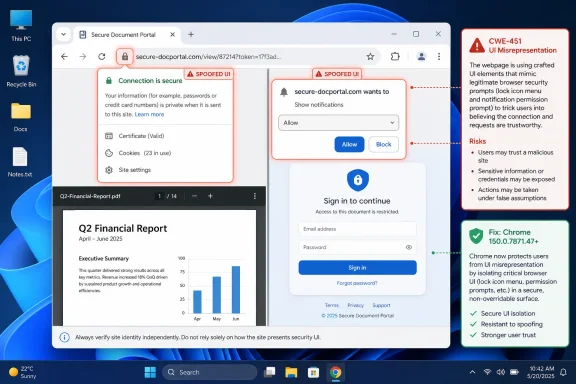 A Low-Severity Chrome Bug Lands in a High-Stakes Part of the Browser
Chrome’s security model is not just V8, WebRTC, sandboxing, and process isolation. It is also the address bar, permission prompts, lock indicators, page information panels, tab states, downloads warnings, and all the small bits of browser chrome that tell users where they are and what they are allowed to trust. CVE-2026-14026 is interesting because it lands in that second category.The flaw’s description is narrow: incorrect security UI in SplitView allowed UI spoofing through a crafted HTML page, provided the attacker could convince the user to perform specific gestures. That phrasing matters. The vulnerability does not say an attacker can silently execute code, escape the sandbox, or read files. It says the attacker can manipulate how security-relevant interface information appears under certain conditions.
For some readers, that will sound like a nuisance bug. For defenders, it should sound like the kind of bug that rarely wins a campaign by itself but can sharpen another attack. A convincing spoofed interface can make a fake sign-in step look more native, make a malicious flow feel like part of the browser, or trick a user into believing they are interacting with Chrome rather than content controlled by a remote page.
Google’s Stable Channel update for desktop, published through the Chrome Releases blog, lists the fix in the broader Chrome 150 line. The NVD entry records Chrome as the source, with vulnerable software described as Google Chrome before 150.0.7871.47. NIST’s initial analysis also added a CPE configuration covering Chrome on Windows, Linux, and macOS, which is the practical answer for administrators trying to map exposure.
SplitView Turns Browser Layout Into a Security Boundary
SplitView sounds like a usability feature, and that is exactly why it deserves security scrutiny. The more browsers embrace split panes, side panels, tab groups, embedded previews, reader modes, pinned web apps, and AI assistants living next to page content, the more the browser window becomes a layered workspace rather than a simple page container. Every layer creates a new opportunity for confusion.Security UI depends on a clean mental model. Users are trained, imperfectly, to distinguish the page from the browser. The page can lie; the browser is supposed to arbitrate. If a crafted page can blur that line inside a split interface, even briefly or conditionally, the browser has allowed content to borrow trust from the frame that contains it.
That is why CWE-451 is more revealing than the CVSS number. “Misrepresentation of critical information” is not about raw exploit power. It is about deception at the point where a human makes a security decision. The vulnerability exists because the browser exposed or arranged interface state in a way that could be misunderstood.
This is also why user interaction does not make the bug irrelevant. Many successful browser-based attacks are interaction-heavy. Phishing kits do not merely wait for accidents; they instruct, cajole, and choreograph. A required gesture is a barrier, but it is not a wall when the attacker controls the surrounding narrative.
The CVSS Score Understates the Social-Engineering Value
CISA’s ADP score of 4.2 Medium is useful as a triage signal, but it captures only part of the operational picture. The vector says attack complexity is high and user interaction is required. It also says no privileges are needed and the attack is remote. That combination describes a bug that is unlikely to be wormable but plausible inside a guided attack.The SSVC data recorded by CISA is similarly restrained: no known exploitation, not automatable, partial technical impact. That is good news. There is no public signal in the provided NVD change history that CVE-2026-14026 is being exploited in the wild, and nothing in the official description turns it into a zero-day fire drill.
But UI spoofing bugs do not need to be automatable at scale to matter. They matter when they give a high-value phishing page a better costume. They matter when they help defeat user skepticism at the precise moment the browser is supposed to provide a trustworthy signal. And they matter because administrators often struggle to measure this kind of risk in asset inventories built for missing patches, open ports, and vulnerable services.
Chrome’s own Low severity label is not wrong. It is a statement about the bug’s standalone technical impact inside Chromium’s severity taxonomy. The editorial point is narrower and more uncomfortable: a low-severity browser UI bug can still be strategically useful when paired with credential theft, OAuth consent abuse, fake support flows, or device-enrollment trickery.
The Patch Is Simple; the Fleet Reality Is Not
For individual users, the answer is straightforward: update Chrome to 150.0.7871.47 or later. On managed Windows endpoints, the answer is more complicated because Chrome’s update state is a fleet property, not a single browser setting. Some machines auto-update quickly, some are pinned for compatibility, some are offline, and some run Chromium-derived browsers whose patch timing follows a different vendor calendar.This is where the CPE detail becomes operationally useful. NIST’s analysis ties the vulnerable application to Google Chrome versions before 150.0.7871.47 and places it across Windows, Linux, and macOS operating environments. That does not mean the operating systems are vulnerable in the same way Chrome is; it means the affected application configuration exists on those platforms. For Windows administrators, the practical inventory question is not whether Windows itself needs a patch, but whether installed Chrome builds have crossed the fixed version boundary.
The Chrome 150 update also lands in a period when browser patch volumes have been unusually visible. Google has shipped large batches of Chrome security fixes in recent stable releases, and security outlets have repeatedly warned users to keep Chrome current after high-severity and actively exploited flaws earlier in the year. CVE-2026-14026 is not the headline-grabbing member of that family, but it benefits from the same patch discipline.
That discipline should be boring by design. Enterprises should not need a special exception process for a 4.2 CVSS browser UI bug. If browsers are treated as evergreen internet-facing applications, the update should flow through normal channels, pause only for documented breakage, and leave behind telemetry proving version adoption.
Microsoft Edge and Other Chromium Browsers Sit in the Shadow
The user-provided NVD detail is explicitly about Google Chrome, and the affected vendor/product listing names Google Chrome. That matters. It would be sloppy to declare every Chromium-based browser vulnerable unless its vendor confirms the affected component and patch state.But it would be equally sloppy for Windows shops to stop thinking at Chrome. Microsoft Edge, Brave, Vivaldi, Opera, and other Chromium-based browsers often inherit classes of Chromium fixes, though their exposure and release timing can vary. For Microsoft Edge in particular, enterprise administrators should track Edge release notes and security baselines rather than assuming Chrome version numbers map one-to-one onto Edge builds.
This is a recurring headache in Chromium security. The upstream project produces the vulnerability language and fixes, Google ships Chrome, downstream vendors integrate and release on their own schedules, and scanners may lag or overgeneralize. The result is a gray zone where some tools flag Chromium CVEs broadly while vendor advisories remain product-specific.
For WindowsForum readers, the safe approach is practical rather than theoretical. Confirm Chrome is at least 150.0.7871.47 where Chrome is installed. Then check each Chromium-based browser against its own vendor’s security release channel. If a browser is not managed, inventoried, or patched with the same seriousness as Chrome or Edge, it is part of the attack surface whether or not it appears in the first NVD CPE block.
UI Spoofing Is the Browser Security Problem Users Actually See
The industry tends to narrate browser security through spectacular bugs: use-after-free, type confusion, heap corruption, sandbox escape, renderer compromise. Those bugs deserve attention because they can lead to code execution and full compromise chains. But users rarely perceive those attacks directly.UI spoofing is different. It targets the visible layer. It works by making a dangerous action feel normal, official, or browser-mediated. In that sense, it sits closer to phishing than exploit development, even when the underlying issue is a genuine browser vulnerability.
That makes it harder to communicate. Telling users “do not trust fake browser UI” is not a complete defense, because the whole point of the vulnerability is that the browser may render a misleading state. Telling users to inspect the URL is useful but not sufficient if the deception involves adjacent panels, SplitView context, permission surfaces, or page-controlled mimicry.
The better lesson is that browsers must continue reducing ambiguity. Security indicators need to be hard for pages to imitate, stable across layouts, and resistant to being occluded or visually borrowed by web content. As browsers become richer productivity shells, the old distinction between “the site” and “the browser” becomes less obvious to ordinary users. That ambiguity is exactly where CVE-2026-14026 lives.
The User-Gesture Requirement Is a Speed Bump, Not a Get-Out-of-Patch Card
The NVD description says exploitation requires convincing a user to engage in specific UI gestures. That phrase should reduce panic, but not urgency. Modern phishing already depends on guided gestures: click this button, open this document, approve this prompt, drag this file, scan this QR code, copy this code, sign in again.Attackers are good at designing rituals. A high-complexity UI spoofing bug may require an unnatural sequence in a lab, but a polished lure can make that sequence feel like troubleshooting, verification, or onboarding. The more enterprise workflows move into browsers, the more plausible these rituals become.
The required gestures also suggest why Google and Chromium may rate the issue Low. If a bug needs a narrow state and careful choreography, it is less broadly exploitable than a memory corruption flaw triggered by page load. But defensive triage should ask a different question: could this help an attacker defeat a user’s final moment of hesitation?
For credential-heavy environments, the answer may be yes. A spoofed security surface can be enough to convince a user that a login, permission grant, or recovery step is legitimate. Even if CVE-2026-14026 cannot steal anything by itself, it can make another theft more convincing.
NVD’s CPE Trail Answers the Inventory Question, Mostly
The user asks whether a CPE is missing, and the change history points to NIST having added a configuration after initial receipt. According to the provided NVD record, the configuration includes Google Chrome versions up to but excluding 150.0.7871.47, with operating-system nodes for Microsoft Windows, Linux kernel, and Apple macOS. That is a reasonable way for NVD to represent Chrome as the vulnerable application across supported desktop environments.There is still room for nuance. CPEs are not perfect asset-management truth. They are normalization artifacts, and browser vulnerabilities often expose the gap between upstream Chromium, Google Chrome, and downstream Chromium-derived products. A scanner that only looks for
google:chrome may miss another affected Chromium-based browser if that vendor has not issued or mapped its own advisory. A scanner that flags every Chromium derivative may produce noise before vendor confirmation.The oddity in the CVE “affected” JSON is also worth noticing. The supplied record says the affected version object has
version set to 150.0.7871.47 while also using lessThan 150.0.7871.47 and status affected. That is not how a human would phrase the vulnerable range; the meaningful part is the less-than boundary. In plain English, Chrome before 150.0.7871.47 is affected, and 150.0.7871.47 is the fixed threshold.So, are we missing a CPE? For Google Chrome desktop, probably not in the basic sense: NIST added a Chrome CPE with platform context. For Chromium-based browsers other than Google Chrome, the correct answer depends on vendor advisories and downstream patch integration. Those should not be inferred solely from this NVD entry.
Enterprise Defenders Should Treat Browser UI Bugs as Identity Risk
The browser is now the front door to enterprise identity. It brokers SSO, conditional access, passkey ceremonies, device compliance checks, OAuth consent screens, admin portals, password managers, and SaaS dashboards. A browser UI spoofing bug may not compromise memory, but it can compromise confidence.That matters especially in Windows environments where Chrome coexists with Edge and where users may move between managed and unmanaged browser profiles. A fake or misleading UI element does not need to fool a security engineer. It only needs to fool a busy employee during a plausible workflow. The attack surface is not just code; it is attention.
Security teams should therefore fold CVE-2026-14026 into browser hygiene rather than treating it as an isolated emergency. Confirm update coverage. Check whether auto-update policies are functioning. Review whether users can install unmanaged browsers. Make sure phishing-resistant authentication is actually phishing-resistant in practice, not merely present in procurement slides.
The long-term lesson is architectural. If critical trust signals are visually close to page content, they will be pressured by spoofing research. If new browser layouts create more places where content and browser UI can meet, those seams need threat modeling. Split views, side panels, and assistant panes are productivity features, but they are also trust-boundary experiments.
Chrome 150 Is the Line Administrators Should Draw
This bug is not a reason to shut down browsing or issue dramatic warnings. It is a reason to draw a clean version line and make sure the fleet crosses it. The fixed build identified in the NVD record is Chrome 150.0.7871.47, and anything below that should be treated as exposed for CVE-2026-14026.Home users can reach that line through Chrome’s normal update mechanism. Managed environments should verify it through endpoint inventory, browser management consoles, vulnerability scanners, or software deployment tools. The key is not merely that Chrome can update; it is that it has updated everywhere that matters.
Administrators should also beware of browser update complacency after a successful rollout. Chrome’s fast release cadence means a machine can be compliant today and stale a few weeks later. The browser is not a quarterly patch artifact. It is an always-on runtime for untrusted code and user decision-making.
That is why CVE-2026-14026 belongs in the same operational bucket as more dramatic Chrome flaws, even if it does not deserve the same alarm. The cadence is the control. If the cadence works, this vulnerability disappears into routine hygiene. If the cadence fails, even low-severity bugs become permanent attack ingredients.
The Small Chrome Bug With the Big Trust Lesson
The concrete lessons from CVE-2026-14026 are modest, but they are not trivial. This is a small bug in the sense that it carries limited direct technical impact. It is a big reminder because it sits at the boundary between what the web page controls and what the browser promises.- Chrome installations should be updated to 150.0.7871.47 or later to address CVE-2026-14026.
- The vulnerability affects Google Chrome before the fixed version on desktop platforms, with NIST’s configuration covering Windows, Linux, and macOS environments.
- The bug requires user interaction and has no public indication of exploitation in the provided NVD and CISA enrichment data.
- The risk is best understood as UI spoofing that can strengthen social-engineering attacks, not as a standalone remote-code-execution flaw.
- Chromium-based browsers other than Google Chrome should be checked against their own vendor advisories rather than assumed safe or vulnerable solely from the Chrome CVE entry.
- Browser update telemetry is the real control, because low-severity web-facing bugs become more dangerous when stale builds linger.
References
- Primary source: NVD / Chromium
Published: 2026-07-03T07:00:06-07:00
NVD - CVE-2026-14026
 nvd.nist.gov
- Security advisory: MSRC
Published: 2026-07-03T07:00:06-07:00
Original feed URL
Security Update Guide - Microsoft Security Response Center
 msrc.microsoft.com
- Related coverage: cvefeed.io
CVE-2026-14026 - Google Chrome SplitView UI Spoofing
Incorrect security UI in SplitView in Google Chrome prior to 150.0.7871.47 allowed a remote attacker who convinced a user to engage in specific UI gestures to perform UI spoofing via a crafted HTML page. (Chromium security severity: Low)cvefeed.io - Related coverage: ubuntu.com
- Related coverage: techradar.com
Update Chrome now — Google patches new zero-day flaw already being exploited | TechRadar
A new bug could allow crooks to execute arbitrary code in Chromewww.techradar.com - Related coverage: edelivery.windriver.com
Wind River Linux End-April 2016 Security Bulletin
Wind River Linux End-April 2016 Security Bulletinedelivery.windriver.com