

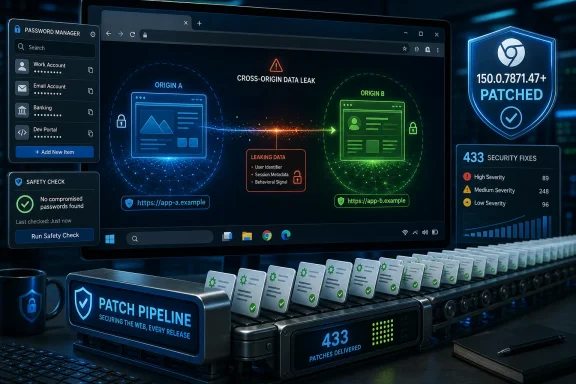
Google patched CVE-2026-14019 in Chrome 150.0.7871.47 for Windows and Mac on June 30, 2026, fixing a medium-severity Passwords-component flaw that could let a remote attacker leak cross-origin data through a crafted HTML page if a user visited it. The National Vulnerability Database entry, fed by Chrome’s own CVE submission and later enriched by CISA’s automated analysis, gives the bug an unusually plain description for a browser weakness: the password manager touched data it should have kept sealed away. Google’s Chrome Releases blog places the fix inside a much larger Chrome 150 stable-channel update, one that shipped hundreds of security fixes and will roll out over days or weeks. That scale is the real story: CVE-2026-14019 is not a spectacular zero-day, but it is another reminder that the modern browser’s “convenience” layer has become part of the security boundary.
For years, password managers were discussed as a user habit, not a browser subsystem. The advice was behavioral: stop reusing passwords, stop typing them into phishing sites, stop saving them in text files on the desktop. Chrome, Edge, Safari, Firefox, and third-party managers helped turn that advice into infrastructure by inserting themselves between identity, origin, form fields, sync services, and user prompts.
CVE-2026-14019 sits exactly in that space. The vulnerability is described as an “inappropriate implementation in Passwords,” which is Chromium’s deliberately compressed way of saying the code that handles saved credentials or password-related browser behavior failed to enforce a security invariant. According to the NVD description, the practical effect was a cross-origin data leak from a crafted HTML page.
That phrase, cross-origin, is not a bureaucratic label. It is one of the foundational assumptions of the web. A page loaded from one origin should not be able to read sensitive data belonging to another origin, because if that rule collapses, every tab becomes a potential window into every other account a user has authenticated.
The important nuance is that this CVE is not described as arbitrary code execution, a sandbox escape, or a direct password dump. CISA’s ADP scoring gives it a medium 6.5 CVSS 3.1 score, with network attack vector, low complexity, no privileges required, and required user interaction. The impact is confidentiality-only, but the confidentiality impact is marked high.
That combination should sound familiar to defenders. It is the shape of many web-era compromises: no malware installer, no kernel exploit, no flashing red warning, just a page that convinces the browser to reveal something one origin had no right to see.
The release notes say the update includes 433 security fixes. Malwarebytes, covering the same release, characterized it as another “whopper” Chrome update, while noting the enormous volume of fixes in recent Chrome releases. However one phrases it, the cadence is now clear: Chrome’s stable channel has become a high-volume security conveyor belt, and the practical burden has shifted from “read every CVE” to “make sure nothing blocks the browser update pipeline.”
That does not mean individual CVEs are meaningless. CVE-2026-14019 is worth isolating precisely because it involves the Passwords component rather than a more familiar memory-safety bucket such as GPU, V8, Skia, ANGLE, or Dawn. Chrome 150’s release notes are packed with use-after-free bugs, validation failures, UI spoofing flaws, and policy enforcement mistakes. A password-manager cross-origin leak is different because it connects exploit mechanics to user trust.
The bug was reported by Google on May 28, 2026, according to the Chrome release notes. That origin matters. This was not, at least in the public record, a flashy external researcher disclosure accompanied by a reward amount and a proof-of-concept write-up. It appears in the release stream as an internal Google-found issue, and the linked Chromium issue remains permission-restricted, consistent with Google’s normal practice of keeping bug details closed until most users have updated.
The restricted issue is frustrating for researchers, but it is defensible. If a crafted HTML page can leak cross-origin data through password-handling behavior, publishing trigger details before the patched build saturates the installed base would hand attackers a roadmap. The tradeoff is that admins have to act on metadata: component, severity, affected versions, and impact.
But browser severity labels are context-sensitive. A medium browser bug may be more operationally relevant than a high-severity vulnerability in a niche package that is not exposed to users. Chrome is the workplace front door for identity providers, SaaS apps, admin portals, webmail, collaboration suites, password autofill, payment forms, and internal dashboards.
CISA’s vector for CVE-2026-14019 says exploitation requires user interaction. That is not comforting in browser land. User interaction can mean visiting a malicious page, clicking a link in a chat message, opening a poisoned search result, or landing on a compromised legitimate site. In the browser threat model, “UI:R” often describes the normal act of using the web.
The ADP entry also says exploitation is not automatable under its SSVC assessment and lists no known exploitation at the time of enrichment. That is useful triage information. It suggests this is not, based on public government metadata, a known live-fire emergency. It does not suggest the bug is harmless.
The more precise reading is this: CVE-2026-14019 is a patch-now, panic-never vulnerability. It deserves fast update deployment because the affected component sits near credentials and origin isolation. It does not, based on public information, justify incident-response theater unless an organization has signs of exploitation, unusually exposed browser populations, or delayed patch adoption.
The same-origin policy is the web’s basic containment rule. It allows users to remain signed in to multiple services while browsing arbitrary sites, because those arbitrary sites are not supposed to read data from the services. Cookies, local storage, frames, credentials, form state, and browser-managed identity features all depend on a strict separation between “this site” and “that site.”
A cross-origin data leak means the browser has created, exposed, inferred, or reflected information across that separation. Sometimes the leaked data is obvious. Sometimes it is a side channel. Sometimes it is not the password itself but a signal about whether a credential exists, whether a form was filled, whether a user is logged in, or whether a protected page contained particular content.
The public CVE text does not say which of those applies here. That absence should restrain speculation. The phrase “Passwords” does not automatically mean plaintext password theft, and the NVD description does not claim saved passwords could be directly read. The assigned CWE, CWE-522 for insufficiently protected credentials, indicates credential-related protection failure, but CWE mappings can be broad and sometimes imprecise in early vulnerability enrichment.
Still, the Passwords component is sensitive even when the leak is indirect. A browser password manager makes decisions based on origins, form fields, credential stores, sync state, account identity, and user gestures. If a crafted page can learn something it should not about that machinery, an attacker may be able to refine phishing, target session theft, or chain the information with other bugs.
Modern attacks increasingly look like chains of “not quite catastrophic” weaknesses. A UI spoof here, an origin leak there, a compromised renderer elsewhere, and suddenly the browser’s layered defenses are doing more work than the bug titles suggest. CVE-2026-14019 belongs in that category: not the whole breach, but potentially a useful link.
In unmanaged consumer Chrome, the path is familiar: Chrome updates itself, and users eventually relaunch. In managed Windows environments, reality is messier. Browser processes linger for days. Virtual desktops revert to old images. Kiosks freeze on pinned builds. App compatibility teams ask for deferrals. Security dashboards may report installed versions but not whether the running process has restarted into the patched build.
That last detail matters. Chrome can download an update without fully applying it to every active session. If users keep windows open indefinitely, the vulnerable process can remain alive. For a browser flaw reachable through a crafted HTML page, “installed but not relaunched” is not an academic distinction.
Microsoft Edge complicates the story in a familiar way. Edge is Chromium-based, but Chrome CVEs do not always map one-to-one to Edge exposure or Edge patch timing. Administrators should watch Microsoft’s Edge release notes and security update guidance rather than assuming Google’s Chrome version number is the authoritative marker for Edge. The prudent stance is to treat Chromium password-manager and origin-isolation bugs as likely relevant to the broader Chromium ecosystem until each downstream vendor says otherwise or ships its own fixed build.
There is also the issue of third-party Chromium browsers. Brave, Vivaldi, Opera, Electron-based apps, embedded Chromium runtimes, and WebView2-dependent software may all sit somewhere downstream of Chromium. CVE-2026-14019’s public affected-product entry is Google Chrome, but the component name should prompt teams to inventory where Chromium password-handling code is actually present.
For most Windows shops, the immediate checklist is boring but important: verify Chrome 150.0.7871.47 or later on Windows and Mac, enforce relaunch deadlines, check update channels, and confirm that endpoint management tools see the version actually running. The danger is not that admins do not know how to patch Chrome. It is that Chrome updates arrive so often, and with so many CVEs, that the process becomes background noise.
CPE data is the bridge between a vulnerability description and automated vulnerability management. If a scanner can map a CVE to a product and version range, it can flag assets. If the mapping is missing, late, ambiguous, or wrong, organizations either miss exposure or drown in false positives. Browser CVEs are especially awkward because Chromium is a project, Chrome is a product, and the code flows into many downstream products that may use different version numbers.
In this case, the NVD change history indicates a Chrome CPE was added after the CVE arrived. That is normal. The CVE was received from Chrome on June 30, and NIST’s initial analysis followed on July 1. CISA-ADP also enriched the record on July 1 with a CVSS vector, CWE mapping, and SSVC assessment.
The timing underscores a recurring problem: vulnerability intelligence is not born complete. It accrues. The first public CVE record may have the description and references, but not a final NVD score. The vendor release note may have component and severity, but not exploitability details. CISA enrichment may add triage signals, but not the private technical root cause.
That means defenders should resist both extremes. Do not ignore a CVE because NVD has not yet provided its own CVSS score. Do not overstate it because a third-party vulnerability database adds dramatic phrasing. The best reading comes from aligning the vendor advisory, NVD change history, CISA enrichment, and observable product version.
The CPE question also matters for compliance reporting. A missing or delayed CPE can create a gap between actual exposure and dashboard exposure. Security teams should not wait for a scanner to light up if they already know their Chrome fleet is below 150.0.7871.47.
That pattern should not be surprising. Password managers are complicated because they automate security decisions on behalf of users in a hostile document environment. They must decide when a field is a password field, whether the page is the right origin, whether a frame is trustworthy, whether a credential should be offered, whether a prompt is legitimate, and whether enterprise policy changes the behavior.
Each of those decisions is a surface. Attackers can manipulate markup, frames, redirects, timing, focus, UI gestures, storage state, and browser heuristics. The password manager is not simply a vault; it is an active interpreter of web pages.
Chrome’s Password Manager also increasingly intersects with passkeys, sync, Google Account state, breach warnings, enterprise controls, Android integration, and platform credential stores. That integration improves usability, but it also means a bug in password-related logic may have consequences beyond a single form-fill event.
This is the bargain browser vendors have made. They want the browser to be the user’s identity cockpit. They want it to remember credentials, generate stronger ones, warn about leaks, mediate passkeys, sync secrets, and reduce phishing risk. Once the browser does all of that, the Passwords component must be treated like core security infrastructure.
For enterprises, that should change how password-manager policy is discussed. The debate should not be “browser password manager bad, standalone password manager good,” because both models have tradeoffs. The better question is whether the chosen credential workflow is patchable, monitorable, policy-controlled, and resilient when a browser component has a medium-severity information leak.
The security community has long argued about this balance. Full disclosure accelerates defensive understanding and pressures vendors. Coordinated disclosure reduces the chance that attackers gain a working exploit before patches are widely installed. Browser vendors, especially those with billions of users, tend to err on the side of temporary restriction.
For admins, the lack of technical detail means compensating controls are limited. You cannot write a reliable network signature for a bug whose trigger is unknown. You cannot meaningfully tell users which sites to avoid beyond the usual warning about untrusted pages. You cannot assume disabling a visible password-manager feature mitigates the exact condition unless Google documents that mitigation.
That leaves the oldest browser defense: update the browser. It is unsatisfying, but it is also the control most likely to work. Chrome’s security architecture is designed around rapid patch propagation, and Google’s public notes explicitly say the release will roll out over coming days or weeks.
The rollout language is important. “Available” is not the same as “deployed.” If an organization has machines below the fixed version while waiting for staged rollout, it remains exposed. Managed environments should force the update through enterprise tooling rather than relying on users to happen into it.
The restricted bug also means analysts should avoid overclaiming. We do not know from public data whether the leaked cross-origin data included password values, password metadata, origin existence, autofill state, or some other credential-adjacent signal. What we know is enough to patch; it is not enough to write a postmortem for a hypothetical breach.
The uncomfortable part is that success looks like an endless stream of vulnerabilities. A healthy vulnerability pipeline produces noise. A dead one produces silence, which may be worse. Chrome’s problem is not that it finds too many bugs; it is that users and enterprises have to operationalize the fixes without becoming numb.
CVE-2026-14019 illustrates that tension perfectly. On paper, it is one medium entry among hundreds. In practice, it touches credentials and origin isolation, two areas where ordinary users have almost no independent defense. The only realistic protection is vendor correctness plus rapid deployment.
This is why browser patch management now belongs in the same mental category as identity-provider configuration and endpoint detection. The browser is where authentication happens, where privileged SaaS sessions live, and where users encounter hostile content. A vulnerability in password handling is not just a client-side nuisance; it is part of the identity attack surface.
Windows environments are particularly exposed to this concentration because Chrome and Edge dominate daily workflow. Even organizations that lock down local admin rights and harden Windows Defender can still have users spending eight hours inside a browser connected to every business-critical system. The browser has become the operating environment inside the operating system.
That does not mean the answer is to abandon browser password managers or disable every convenience feature. Security that users route around is not security. It means the browser’s identity features should be governed with the same seriousness as endpoint agents, VPN clients, and SSO plugins.
The concrete lessons are straightforward:
 The Password Manager Is Now Part of the Attack Surface
For years, password managers were discussed as a user habit, not a browser subsystem. The advice was behavioral: stop reusing passwords, stop typing them into phishing sites, stop saving them in text files on the desktop. Chrome, Edge, Safari, Firefox, and third-party managers helped turn that advice into infrastructure by inserting themselves between identity, origin, form fields, sync services, and user prompts.CVE-2026-14019 sits exactly in that space. The vulnerability is described as an “inappropriate implementation in Passwords,” which is Chromium’s deliberately compressed way of saying the code that handles saved credentials or password-related browser behavior failed to enforce a security invariant. According to the NVD description, the practical effect was a cross-origin data leak from a crafted HTML page.
That phrase, cross-origin, is not a bureaucratic label. It is one of the foundational assumptions of the web. A page loaded from one origin should not be able to read sensitive data belonging to another origin, because if that rule collapses, every tab becomes a potential window into every other account a user has authenticated.
The important nuance is that this CVE is not described as arbitrary code execution, a sandbox escape, or a direct password dump. CISA’s ADP scoring gives it a medium 6.5 CVSS 3.1 score, with network attack vector, low complexity, no privileges required, and required user interaction. The impact is confidentiality-only, but the confidentiality impact is marked high.
That combination should sound familiar to defenders. It is the shape of many web-era compromises: no malware installer, no kernel exploit, no flashing red warning, just a page that convinces the browser to reveal something one origin had no right to see.
Chrome 150’s Giant Patch Drop Makes the Single CVE Harder to Ignore
Google’s June 30 Chrome Releases post announced the promotion of Chrome 150 to the stable channel for Windows, Mac, and Linux. The desktop version numbers were not perfectly uniform: Linux moved to 150.0.7871.46, while Windows and Mac received 150.0.7871.46/.47. CVE-2026-14019 is fixed in Chrome prior to 150.0.7871.47, which makes the .47 build the version administrators should use as the minimum safe line for Windows and macOS fleets.The release notes say the update includes 433 security fixes. Malwarebytes, covering the same release, characterized it as another “whopper” Chrome update, while noting the enormous volume of fixes in recent Chrome releases. However one phrases it, the cadence is now clear: Chrome’s stable channel has become a high-volume security conveyor belt, and the practical burden has shifted from “read every CVE” to “make sure nothing blocks the browser update pipeline.”
That does not mean individual CVEs are meaningless. CVE-2026-14019 is worth isolating precisely because it involves the Passwords component rather than a more familiar memory-safety bucket such as GPU, V8, Skia, ANGLE, or Dawn. Chrome 150’s release notes are packed with use-after-free bugs, validation failures, UI spoofing flaws, and policy enforcement mistakes. A password-manager cross-origin leak is different because it connects exploit mechanics to user trust.
The bug was reported by Google on May 28, 2026, according to the Chrome release notes. That origin matters. This was not, at least in the public record, a flashy external researcher disclosure accompanied by a reward amount and a proof-of-concept write-up. It appears in the release stream as an internal Google-found issue, and the linked Chromium issue remains permission-restricted, consistent with Google’s normal practice of keeping bug details closed until most users have updated.
The restricted issue is frustrating for researchers, but it is defensible. If a crafted HTML page can leak cross-origin data through password-handling behavior, publishing trigger details before the patched build saturates the installed base would hand attackers a roadmap. The tradeoff is that admins have to act on metadata: component, severity, affected versions, and impact.
“Medium” Is Not a Synonym for “Ignore”
Security teams are conditioned to chase criticals first, and for good reason. Chrome 150 includes a long list of critical and high-severity flaws, many in memory-management-heavy areas that have historically mattered in exploit chains. CVE-2026-14019, tagged medium by Chromium and scored medium by CISA-ADP, will not top every vulnerability dashboard.But browser severity labels are context-sensitive. A medium browser bug may be more operationally relevant than a high-severity vulnerability in a niche package that is not exposed to users. Chrome is the workplace front door for identity providers, SaaS apps, admin portals, webmail, collaboration suites, password autofill, payment forms, and internal dashboards.
CISA’s vector for CVE-2026-14019 says exploitation requires user interaction. That is not comforting in browser land. User interaction can mean visiting a malicious page, clicking a link in a chat message, opening a poisoned search result, or landing on a compromised legitimate site. In the browser threat model, “UI:R” often describes the normal act of using the web.
The ADP entry also says exploitation is not automatable under its SSVC assessment and lists no known exploitation at the time of enrichment. That is useful triage information. It suggests this is not, based on public government metadata, a known live-fire emergency. It does not suggest the bug is harmless.
The more precise reading is this: CVE-2026-14019 is a patch-now, panic-never vulnerability. It deserves fast update deployment because the affected component sits near credentials and origin isolation. It does not, based on public information, justify incident-response theater unless an organization has signs of exploitation, unusually exposed browser populations, or delayed patch adoption.
Cross-Origin Leaks Are the Browser’s Quiet Failure Mode
Remote code execution is easy to dramatize. Cross-origin leakage is quieter, and therefore easier to underplay. Yet much of browser security exists to prevent exactly this class of violation.The same-origin policy is the web’s basic containment rule. It allows users to remain signed in to multiple services while browsing arbitrary sites, because those arbitrary sites are not supposed to read data from the services. Cookies, local storage, frames, credentials, form state, and browser-managed identity features all depend on a strict separation between “this site” and “that site.”
A cross-origin data leak means the browser has created, exposed, inferred, or reflected information across that separation. Sometimes the leaked data is obvious. Sometimes it is a side channel. Sometimes it is not the password itself but a signal about whether a credential exists, whether a form was filled, whether a user is logged in, or whether a protected page contained particular content.
The public CVE text does not say which of those applies here. That absence should restrain speculation. The phrase “Passwords” does not automatically mean plaintext password theft, and the NVD description does not claim saved passwords could be directly read. The assigned CWE, CWE-522 for insufficiently protected credentials, indicates credential-related protection failure, but CWE mappings can be broad and sometimes imprecise in early vulnerability enrichment.
Still, the Passwords component is sensitive even when the leak is indirect. A browser password manager makes decisions based on origins, form fields, credential stores, sync state, account identity, and user gestures. If a crafted page can learn something it should not about that machinery, an attacker may be able to refine phishing, target session theft, or chain the information with other bugs.
Modern attacks increasingly look like chains of “not quite catastrophic” weaknesses. A UI spoof here, an origin leak there, a compromised renderer elsewhere, and suddenly the browser’s layered defenses are doing more work than the bug titles suggest. CVE-2026-14019 belongs in that category: not the whole breach, but potentially a useful link.
Windows Admins Should Treat Chrome Like an Identity Client
For WindowsForum readers, the operational question is not whether Google fixed the bug. It did. The question is whether Windows environments are set up to absorb this class of Chrome update quickly enough.In unmanaged consumer Chrome, the path is familiar: Chrome updates itself, and users eventually relaunch. In managed Windows environments, reality is messier. Browser processes linger for days. Virtual desktops revert to old images. Kiosks freeze on pinned builds. App compatibility teams ask for deferrals. Security dashboards may report installed versions but not whether the running process has restarted into the patched build.
That last detail matters. Chrome can download an update without fully applying it to every active session. If users keep windows open indefinitely, the vulnerable process can remain alive. For a browser flaw reachable through a crafted HTML page, “installed but not relaunched” is not an academic distinction.
Microsoft Edge complicates the story in a familiar way. Edge is Chromium-based, but Chrome CVEs do not always map one-to-one to Edge exposure or Edge patch timing. Administrators should watch Microsoft’s Edge release notes and security update guidance rather than assuming Google’s Chrome version number is the authoritative marker for Edge. The prudent stance is to treat Chromium password-manager and origin-isolation bugs as likely relevant to the broader Chromium ecosystem until each downstream vendor says otherwise or ships its own fixed build.
There is also the issue of third-party Chromium browsers. Brave, Vivaldi, Opera, Electron-based apps, embedded Chromium runtimes, and WebView2-dependent software may all sit somewhere downstream of Chromium. CVE-2026-14019’s public affected-product entry is Google Chrome, but the component name should prompt teams to inventory where Chromium password-handling code is actually present.
For most Windows shops, the immediate checklist is boring but important: verify Chrome 150.0.7871.47 or later on Windows and Mac, enforce relaunch deadlines, check update channels, and confirm that endpoint management tools see the version actually running. The danger is not that admins do not know how to patch Chrome. It is that Chrome updates arrive so often, and with so many CVEs, that the process becomes background noise.
The CPE Confusion Is a Symptom of Vulnerability Data Growing Up
The user-facing NVD page for CVE-2026-14019 includes the familiar “Are we missing a CPE here?” prompt, and the change history says NIST added a CPE configuration for Google Chrome versions up to but excluding 150.0.7871.47 on July 1, 2026. That small administrative detail is worth more attention than it usually gets.CPE data is the bridge between a vulnerability description and automated vulnerability management. If a scanner can map a CVE to a product and version range, it can flag assets. If the mapping is missing, late, ambiguous, or wrong, organizations either miss exposure or drown in false positives. Browser CVEs are especially awkward because Chromium is a project, Chrome is a product, and the code flows into many downstream products that may use different version numbers.
In this case, the NVD change history indicates a Chrome CPE was added after the CVE arrived. That is normal. The CVE was received from Chrome on June 30, and NIST’s initial analysis followed on July 1. CISA-ADP also enriched the record on July 1 with a CVSS vector, CWE mapping, and SSVC assessment.
The timing underscores a recurring problem: vulnerability intelligence is not born complete. It accrues. The first public CVE record may have the description and references, but not a final NVD score. The vendor release note may have component and severity, but not exploitability details. CISA enrichment may add triage signals, but not the private technical root cause.
That means defenders should resist both extremes. Do not ignore a CVE because NVD has not yet provided its own CVSS score. Do not overstate it because a third-party vulnerability database adds dramatic phrasing. The best reading comes from aligning the vendor advisory, NVD change history, CISA enrichment, and observable product version.
The CPE question also matters for compliance reporting. A missing or delayed CPE can create a gap between actual exposure and dashboard exposure. Security teams should not wait for a scanner to light up if they already know their Chrome fleet is below 150.0.7871.47.
The Passwords Component Keeps Reappearing for a Reason
CVE-2026-14019 is not the only password-related Chrome issue in the Chrome 150 release notes. Nearby entries include other Passwords-component flaws, including insufficient data validation, policy enforcement issues, and low-severity password-related bugs. Chrome’s release stream in recent months has also included password-handling and autofill-adjacent vulnerabilities.That pattern should not be surprising. Password managers are complicated because they automate security decisions on behalf of users in a hostile document environment. They must decide when a field is a password field, whether the page is the right origin, whether a frame is trustworthy, whether a credential should be offered, whether a prompt is legitimate, and whether enterprise policy changes the behavior.
Each of those decisions is a surface. Attackers can manipulate markup, frames, redirects, timing, focus, UI gestures, storage state, and browser heuristics. The password manager is not simply a vault; it is an active interpreter of web pages.
Chrome’s Password Manager also increasingly intersects with passkeys, sync, Google Account state, breach warnings, enterprise controls, Android integration, and platform credential stores. That integration improves usability, but it also means a bug in password-related logic may have consequences beyond a single form-fill event.
This is the bargain browser vendors have made. They want the browser to be the user’s identity cockpit. They want it to remember credentials, generate stronger ones, warn about leaks, mediate passkeys, sync secrets, and reduce phishing risk. Once the browser does all of that, the Passwords component must be treated like core security infrastructure.
For enterprises, that should change how password-manager policy is discussed. The debate should not be “browser password manager bad, standalone password manager good,” because both models have tradeoffs. The better question is whether the chosen credential workflow is patchable, monitorable, policy-controlled, and resilient when a browser component has a medium-severity information leak.
The Bug Details Are Restricted, and That Is Both Annoying and Sensible
Google’s release notes include the standard warning that access to bug details and links may remain restricted until most users are updated. For CVE-2026-14019, the Chromium issue is listed but not publicly readable without appropriate permission. This frustrates independent validation, but it also prevents immediate copycat exploitation.The security community has long argued about this balance. Full disclosure accelerates defensive understanding and pressures vendors. Coordinated disclosure reduces the chance that attackers gain a working exploit before patches are widely installed. Browser vendors, especially those with billions of users, tend to err on the side of temporary restriction.
For admins, the lack of technical detail means compensating controls are limited. You cannot write a reliable network signature for a bug whose trigger is unknown. You cannot meaningfully tell users which sites to avoid beyond the usual warning about untrusted pages. You cannot assume disabling a visible password-manager feature mitigates the exact condition unless Google documents that mitigation.
That leaves the oldest browser defense: update the browser. It is unsatisfying, but it is also the control most likely to work. Chrome’s security architecture is designed around rapid patch propagation, and Google’s public notes explicitly say the release will roll out over coming days or weeks.
The rollout language is important. “Available” is not the same as “deployed.” If an organization has machines below the fixed version while waiting for staged rollout, it remains exposed. Managed environments should force the update through enterprise tooling rather than relying on users to happen into it.
The restricted bug also means analysts should avoid overclaiming. We do not know from public data whether the leaked cross-origin data included password values, password metadata, origin existence, autofill state, or some other credential-adjacent signal. What we know is enough to patch; it is not enough to write a postmortem for a hypothetical breach.
Chrome’s Security Model Is Winning and Losing at the Same Time
It is tempting to look at 433 security fixes and conclude that Chrome is insecure. That is too simple. The modern browser is one of the most attacked pieces of software in the world, and Chrome’s public release notes reflect both bug volume and a mature bug-finding machine. Internal fuzzing, code audits, sanitizer tooling, external researchers, bug bounties, and automated testing all turn latent defects into patched CVEs.The uncomfortable part is that success looks like an endless stream of vulnerabilities. A healthy vulnerability pipeline produces noise. A dead one produces silence, which may be worse. Chrome’s problem is not that it finds too many bugs; it is that users and enterprises have to operationalize the fixes without becoming numb.
CVE-2026-14019 illustrates that tension perfectly. On paper, it is one medium entry among hundreds. In practice, it touches credentials and origin isolation, two areas where ordinary users have almost no independent defense. The only realistic protection is vendor correctness plus rapid deployment.
This is why browser patch management now belongs in the same mental category as identity-provider configuration and endpoint detection. The browser is where authentication happens, where privileged SaaS sessions live, and where users encounter hostile content. A vulnerability in password handling is not just a client-side nuisance; it is part of the identity attack surface.
Windows environments are particularly exposed to this concentration because Chrome and Edge dominate daily workflow. Even organizations that lock down local admin rights and harden Windows Defender can still have users spending eight hours inside a browser connected to every business-critical system. The browser has become the operating environment inside the operating system.
That does not mean the answer is to abandon browser password managers or disable every convenience feature. Security that users route around is not security. It means the browser’s identity features should be governed with the same seriousness as endpoint agents, VPN clients, and SSO plugins.
What Chrome 150.0.7871.47 Demands from Windows Shops
CVE-2026-14019 should be treated as a practical maintenance test, not a theoretical browser-security debate. The fix is known, the affected version boundary is clear for Chrome, and the exploit conditions are plausible enough for ordinary web use. The organizations that handle this well are the ones that already know where Chrome is installed, how quickly it updates, and how long users can postpone relaunch.The concrete lessons are straightforward:
- Organizations should verify that Chrome on Windows and macOS is at 150.0.7871.47 or later, because CVE-2026-14019 affects versions prior to that build.
- Administrators should treat “Chrome has downloaded the update” as insufficient until the browser has relaunched into the patched version.
- Security teams should not wait for NVD to provide its own final CVSS score when vendor release notes and CISA enrichment already define the affected product, impact, and update path.
- Edge and other Chromium-based browser deployments should be tracked separately, because Google’s Chrome build number is not a universal patch-status indicator for every Chromium downstream.
- Password-manager and autofill policies should be reviewed as part of browser hardening, not as an afterthought in user-awareness training.
- Vulnerability dashboards should be checked for CPE mapping delays or blind spots, especially when a newly published CVE is already actionable from the vendor advisory.
References
- Primary source: NVD / Chromium
Published: 2026-07-03T07:00:58-07:00
NVD - CVE-2026-14019
 nvd.nist.gov
- Security advisory: MSRC
Published: 2026-07-03T07:00:58-07:00
Original feed URL
Security Update Guide - Microsoft Security Response Center
 msrc.microsoft.com
- Related coverage: cvefeed.io
CVE-2026-14019 - Google Chrome Cross-Origin Data Leak
Inappropriate implementation in Passwords in Google Chrome prior to 150.0.7871.47 allowed a remote attacker to leak cross-origin data via a crafted HTML page. (Chromium security severity: Medium)cvefeed.io