

Microsoft disclosed CVE-2026-57986 on July 3, 2026, as an Important-rated remote code execution vulnerability in Microsoft Edge Chromium-based, fixed in Edge Stable version 150.0.4078.48 and tied to Chromium 150.0.7871.47. The vulnerability is not, at least by Microsoft’s current accounting, publicly disclosed or known to be exploited in the wild. That should not lull anyone into treating it as routine browser paperwork. The more interesting story is that Microsoft’s own advisory describes a high-confidence memory-safety flaw whose exploitation depends less on brute technical reach than on the increasingly messy border between browser UI, autofill, and user trust.
CVE-2026-57986 is the kind of browser vulnerability that looks almost modest until you read the conditions carefully. Microsoft’s Security Response Center describes it as a use-after-free issue in Microsoft Edge Chromium-based that could allow an unauthorized attacker to execute code over a network. The advisory assigns it a CVSS 3.1 base score of 7.5, with high impact to confidentiality, integrity, and availability.
That combination is worth pausing over. A 7.5 “Important” Edge bug is not the same operational emergency as an actively exploited zero-day in Windows Server, Exchange, or SharePoint. But remote code execution in a browser remains one of the most consequential classes of client-side vulnerabilities, because the browser is where enterprise identity, cloud administration, intranet access, SaaS workflows, password managers, and user attention all converge.
Microsoft’s advisory says exploitation is “less likely,” and the CVSS vector explains why. The attack complexity is high, user interaction is required, and Microsoft says the attacker must convince a user to visit attacker-controlled content or open a specially crafted file. That means this is not a wormable browser bug, and it is not described as a drive-by compromise in the old, terrifying sense of simply rendering a hostile page and losing the machine.
But the advisory also gives defenders the part they cannot ignore: Microsoft marks report confidence as confirmed, the remediation level as official fix, and the root weakness as CWE-416, use after free. In plain English, the vendor is saying the bug is real, the technical class is known, and a patch exists. The unknowns are not whether the vulnerability exists; the unknowns are how easily attackers can turn it into reliable exploitation at scale.
CVE-2026-57986 sits closer to the solid end of that spectrum. Microsoft is the issuing CNA, the advisory names the weakness category, the affected product line, the fixed Edge version, the CVSS vector, and the exploitation constraints. That is not a rumor, and it is not a “researchers believe” entry waiting for vendor acknowledgement.
This is where the language of risk can become misleading. “Exploitation unlikely” does not mean “vulnerability doubtful.” It means Microsoft, based on its assessment at publication time, does not expect exploitation to be straightforward or prevalent. Those are very different judgments.
For administrators, that distinction changes the triage conversation. If a vulnerability is speculative, the right move may be monitoring. If it is confirmed but exploitation is judged difficult, the right move is still patching, just without burning down the weekend change calendar unless local exposure demands it.
The browser is no longer just a document renderer. It is a credential broker, form filler, passkey interface, identity selector, PDF viewer, download manager, policy enforcement point, and thin-client runtime for enterprise apps. Every convenience layer added to reduce friction also creates new combinations of state, trust, and UI behavior.
The important phrase here is not only “use after free.” It is “autofill.” Autofill is supposed to make web interaction safer and faster by reducing repeated manual entry. But if a flaw appears at the intersection of autofill activation, deceptive form elements, and memory lifetime handling, then exploitation depends on both software state and human choreography.
That makes this vulnerability a useful reminder that browser security cannot be reduced to sandboxing alone. Memory safety bugs remain dangerous, but the path to reaching them increasingly winds through UI surfaces that users have been trained to trust. A user does not need to understand heap allocation to be placed into a dangerous browser state; they only need to tap where the page persuades them to tap.
The trade-off is that Edge participates in Chromium’s relentless security rhythm. Browser updates are not monthly ceremonies anymore; they are a near-continuous supply chain of engine fixes, feature changes, upstream patches, and vendor-specific additions. Microsoft’s Edge security release notes for July 2 say version 150.0.4078.48 incorporates the latest security updates from the Chromium project, while the MSRC entry for CVE-2026-57986 was published the following day.
That one-day gap is not surprising. Browser vendors frequently ship binaries and advisory details on slightly different clocks, especially when CVE metadata is still being finalized. But it reinforces the operational reality: the version number is the defense. If the fleet is below Edge 150.0.4078.48, it should be treated as needing the fix.
Edge’s Chromium lineage also means administrators should resist an old Windows-centric instinct: waiting for Patch Tuesday as the only meaningful security event. Browser security moves faster than Windows cumulative updates. A managed Edge fleet that lags by even a few days may be carrying vulnerabilities that have already been fixed upstream, described publicly, and folded into exploit developers’ watchlists.
The attacker does not need an account on the victim system, and the attack can be delivered through network content. But the attacker does need the user to participate, and Microsoft indicates that the required interaction is more specific than a single accidental page load. This is why the score lands at 7.5 rather than in the critical range.
For home users, that distinction may feel academic. A malicious page, an attachment, and a couple of taps are not exotic requirements in a world of phishing campaigns, social-media lures, fake invoices, QR-code scams, and messaging-app spam. Attackers are very good at manufacturing user interaction.
For enterprises, the calculus is sharper. A vulnerability that needs two taps may be “high complexity” in CVSS terms, but an attacker targeting help-desk staff, payroll workers, recruiters, or administrators can design lures around exactly those gestures. The question is not whether random mass exploitation is easy. The question is whether the bug gives a motivated attacker another route through a high-value user’s browser session.
That category is familiar enough that it can sound boring. It is not. Browser engines are large, asynchronous, and full of lifetime-sensitive interactions among rendering, scripting, input handling, networking, extensions, GPU acceleration, storage, form controls, and accessibility layers. A stale pointer in the right place can become a bridge from ordinary web content to a powerful exploit chain.
Modern browsers make exploitation harder than it used to be. Sandboxes, control-flow protections, site isolation, memory allocators, exploit mitigations, and platform hardening all raise the cost. But none of those defenses make memory lifetime bugs harmless. They turn many bugs into partial chains rather than complete compromises.
That matters for how defenders should read CVE-2026-57986. Microsoft is not saying attackers can necessarily jump straight from a web page to total system ownership. It is saying the vulnerability can allow code execution in the target context. In real-world exploitation, attackers often chain browser bugs with sandbox escapes, credential theft, extension abuse, or post-compromise tooling. The first foothold still counts.
That makes autofill a sensitive UI boundary. The browser must decide what a form is, what fields correspond to stored data, when a user action is meaningful, and how much hidden or visually manipulated page structure should count. Attackers have long experimented with invisible fields, clickjacking, overlay tricks, and fake form flows. CVE-2026-57986 appears, from Microsoft’s limited public description, to involve a dangerous condition reachable through deceptive form construction and user gestures.
The lesson is not that autofill is bad. The lesson is that convenience features sit on top of complex heuristics, and heuristics become security-sensitive when they mediate stored user data or privileged browser behavior. Enterprises that treat browser features as mere user-experience settings are missing part of the security model.
This is especially relevant for Edge because Microsoft has spent years positioning the browser as an enterprise-managed productivity layer, not just a renderer. Edge integrates with Microsoft 365, Entra ID, Defender, Intune, WebView2, Workspaces, sidebar experiences, and admin dashboards. That makes feature governance inseparable from security governance.
That context matters because browser updates increasingly bundle security fixes with policy shifts and feature behavior changes. Administrators who delay updates to avoid user-facing change can inadvertently prolong exposure to known vulnerabilities. Administrators who update blindly can trip over new defaults, rollouts, or enterprise features they have not evaluated.
The WebView2 policy change is particularly relevant for WindowsForum readers. WebView2 has quietly become one of the most important runtimes on Windows, powering embedded web experiences inside desktop applications. Microsoft’s new enterprise downgrade capability is framed as a way to mitigate critical regressions by rolling specific applications back to N-1 or N-2 runtime versions on managed devices.
That is useful, but it also underscores a hard truth: the browser engine is now infrastructure. Edge is not confined to the Edge icon on the taskbar. Chromium-based components are inside business applications, management consoles, sign-in flows, and vendor software. A vulnerability in the browser stack can matter even to users who insist they “don’t use Edge.”
But Windows administrators know why the question arises. WebView2 Evergreen Runtime updates independently, shares much of the Edge platform, and is embedded across modern Windows software. When Microsoft ships Edge security fixes, many organizations reasonably ask whether WebView2 runtimes are also updated and whether line-of-business applications that host web content inherit related risk.
The practical answer is disciplined inventory. Check Edge versions, check WebView2 runtime versions, and verify update channels. Do not assume that patching Windows cumulative updates handles Chromium-based runtime exposure. Do not assume a browser that auto-updates on consumer machines is equally current across VDI pools, kiosks, lab systems, restricted networks, gold images, or machines with broken updater services.
This is where vulnerability management tends to fail quietly. The systems that miss browser updates are often not the obvious laptops used by engineers and executives. They are shared workstations, jump boxes, packaged-app hosts, test environments, and machines where someone disabled auto-update years ago to stop a regression and never came back.
But vulnerability status fields age quickly. Once a CVE is public, attackers can diff patches, examine Chromium commits where available, compare binary changes, and test paths hinted at by advisory language. The mention of deceptive form elements, two taps, and autofill activation gives researchers and attackers a starting shape, even if it does not provide exploit code.
That does not mean every disclosed browser RCE becomes a working exploit. Many do not. High attack complexity is real friction. Browser exploit development is specialized and expensive, especially when mitigations must be bypassed reliably across versions and platforms.
Still, defenders should treat the “not exploited” field as a reason to patch calmly, not a reason to delay indefinitely. The best time to deploy a browser fix is before the exploit appears in telemetry, not after threat-intel feeds start lighting up.
The browser is now a tier-one application because it is the front end for tier-one services. Microsoft 365 admin centers, Azure portals, EDR dashboards, HR platforms, CRM systems, code repositories, remote access tools, password vaults, and financial systems all run through it. A browser RCE is not just a browser problem; it is a potential identity, data, and lateral-movement problem.
For managed Windows environments, Edge update posture should be visible in the same way endpoint protection and OS patch posture are visible. Admins should be able to answer basic questions quickly: which machines are below 150.0.4078.48, which update channels are in use, which devices have failed EdgeUpdate tasks, which WebView2 versions are deployed, and which policies might delay updates.
Microsoft’s own Edge management service is moving in this direction. The Edge 150 notes describe security update alerts that allow administrators to choose severity thresholds and receive notifications when Edge updates include security fixes, including zero-day fixes. That is a tacit admission that browser security has become operationally important enough to deserve its own alerting layer.
CVE-2026-57986 is a good example of why. Microsoft’s advisory says exploitation requires convincing user interaction, but the interaction described is not obviously absurd. Visiting a page and performing taps that activate autofill is normal web behavior. If a malicious page is designed well enough, the user may believe they are completing a legitimate form, signing in, confirming an address, or dismissing an overlay.
Security that depends on users detecting invisible form elements is not security. It is wishful thinking. The durable defenses are patched browsers, controlled autofill policies where appropriate, phishing-resistant authentication, least-privilege browsing, site isolation, application control, and monitoring for suspicious post-browser behavior.
That does not mean user behavior is irrelevant. It means the user should not be the only boundary between a browser memory bug and code execution. Training can reduce exposure. Patching removes the known vulnerable condition.
For administrators, the hard part is not knowing the target version. It is proving that the target version is everywhere it needs to be. Edge Stable, Extended Stable, Beta, Dev, Canary, mobile builds, WebView2 runtimes, packaged offline installers, and application dependencies can create a patch map that looks simple only from a distance.
The CVE’s release timing adds a small wrinkle. Microsoft Learn’s Edge security release note lists the Stable update on July 2, 2026, while the MSRC CVE entry is dated July 3, 2026. That is not a contradiction worth obsessing over; it is normal release machinery. The operational takeaway is that Edge 150.0.4078.48 is the fixed Stable build Microsoft names for the release.
Where organizations should be more cautious is with exceptions. If a business unit asks to hold Edge below 150 because an app regressed, that decision now carries security weight. Temporary deferral may be defensible. Untracked deferral is not.
Edge 150 also arrives as Microsoft says this is the last Edge version supporting macOS 12 Monterey, with Edge 151 and later requiring macOS 13 Ventura or newer. That is not directly part of CVE-2026-57986, but it matters for planning. Systems stranded on older operating systems often become systems stranded on older browsers.
In Windows shops, the risk is slightly different. Edge is deeply integrated into the platform, but that does not guarantee every device receives browser updates at the same time. Group Policy, MDM settings, firewall egress rules, update rings, third-party patch tools, and frozen images can all interrupt the expected flow.
The uncomfortable truth is that “we use Edge” tells you almost nothing about your exposure. “We have verified Edge 150.0.4078.48 or later across all managed endpoints and checked exceptions” tells you something useful.
Administrators should read this as a browser patch with elevated importance rather than a crisis bulletin. It is a good candidate for accelerated standard deployment, especially on systems used for email, webmail, collaboration tools, admin portals, payment processing, HR workflows, or external browsing. It is also a good reason to check whether Edge update telemetry is actually reaching the people who own endpoint risk.
For Windows enthusiasts and power users, the story is simpler. If Edge is installed, keep it current even if it is not your primary browser. Edge components and WebView2-adjacent experiences are part of the modern Windows software environment, and an unmaintained browser is not made safe by neglect.
The practical moves are not glamorous, but they are concrete:
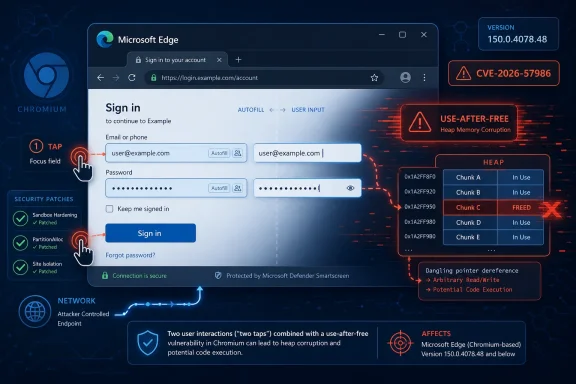 Microsoft’s Quiet Edge Patch Carries a Loud Browser-Security Lesson
CVE-2026-57986 is the kind of browser vulnerability that looks almost modest until you read the conditions carefully. Microsoft’s Security Response Center describes it as a use-after-free issue in Microsoft Edge Chromium-based that could allow an unauthorized attacker to execute code over a network. The advisory assigns it a CVSS 3.1 base score of 7.5, with high impact to confidentiality, integrity, and availability.That combination is worth pausing over. A 7.5 “Important” Edge bug is not the same operational emergency as an actively exploited zero-day in Windows Server, Exchange, or SharePoint. But remote code execution in a browser remains one of the most consequential classes of client-side vulnerabilities, because the browser is where enterprise identity, cloud administration, intranet access, SaaS workflows, password managers, and user attention all converge.
Microsoft’s advisory says exploitation is “less likely,” and the CVSS vector explains why. The attack complexity is high, user interaction is required, and Microsoft says the attacker must convince a user to visit attacker-controlled content or open a specially crafted file. That means this is not a wormable browser bug, and it is not described as a drive-by compromise in the old, terrifying sense of simply rendering a hostile page and losing the machine.
But the advisory also gives defenders the part they cannot ignore: Microsoft marks report confidence as confirmed, the remediation level as official fix, and the root weakness as CWE-416, use after free. In plain English, the vendor is saying the bug is real, the technical class is known, and a patch exists. The unknowns are not whether the vulnerability exists; the unknowns are how easily attackers can turn it into reliable exploitation at scale.
The “Confidence” Metric Is Doing More Work Than the Severity Label
The user-facing prompt around this advisory highlights a metric that is often overlooked outside vulnerability-management teams: confidence in the existence of the vulnerability and the credibility of known technical details. That metric matters because CVE listings can range from vendor-confirmed bugs with patches to thin public claims where the impact is plausible but the mechanism is murky.CVE-2026-57986 sits closer to the solid end of that spectrum. Microsoft is the issuing CNA, the advisory names the weakness category, the affected product line, the fixed Edge version, the CVSS vector, and the exploitation constraints. That is not a rumor, and it is not a “researchers believe” entry waiting for vendor acknowledgement.
This is where the language of risk can become misleading. “Exploitation unlikely” does not mean “vulnerability doubtful.” It means Microsoft, based on its assessment at publication time, does not expect exploitation to be straightforward or prevalent. Those are very different judgments.
For administrators, that distinction changes the triage conversation. If a vulnerability is speculative, the right move may be monitoring. If it is confirmed but exploitation is judged difficult, the right move is still patching, just without burning down the weekend change calendar unless local exposure demands it.
The Attack Path Runs Through Human Behavior, Not Just Memory Corruption
Microsoft’s advisory says successful exploitation requires the attacker to craft deceptive or invisible form elements and get the user to perform two sequential taps. It also says the user must visit an attacker-controlled webpage and perform the gestures that cause autofill to activate. That is an unusually specific clue for a browser RCE advisory, and it points toward the modern shape of browser exploitation.The browser is no longer just a document renderer. It is a credential broker, form filler, passkey interface, identity selector, PDF viewer, download manager, policy enforcement point, and thin-client runtime for enterprise apps. Every convenience layer added to reduce friction also creates new combinations of state, trust, and UI behavior.
The important phrase here is not only “use after free.” It is “autofill.” Autofill is supposed to make web interaction safer and faster by reducing repeated manual entry. But if a flaw appears at the intersection of autofill activation, deceptive form elements, and memory lifetime handling, then exploitation depends on both software state and human choreography.
That makes this vulnerability a useful reminder that browser security cannot be reduced to sandboxing alone. Memory safety bugs remain dangerous, but the path to reaching them increasingly winds through UI surfaces that users have been trained to trust. A user does not need to understand heap allocation to be placed into a dangerous browser state; they only need to tap where the page persuades them to tap.
Edge Inherits Chromium’s Speed and Chromium’s Exposure
Microsoft Edge’s Chromium base is a strategic success by most practical measures. It gave Microsoft a modern engine, better compatibility, and a seat at the same web-platform table as Chrome, Brave, Opera, Vivaldi, and a large share of embedded browser runtimes. For enterprise IT, it also made Edge less of an exception and more of a manageable Chromium browser with Microsoft identity and policy hooks.The trade-off is that Edge participates in Chromium’s relentless security rhythm. Browser updates are not monthly ceremonies anymore; they are a near-continuous supply chain of engine fixes, feature changes, upstream patches, and vendor-specific additions. Microsoft’s Edge security release notes for July 2 say version 150.0.4078.48 incorporates the latest security updates from the Chromium project, while the MSRC entry for CVE-2026-57986 was published the following day.
That one-day gap is not surprising. Browser vendors frequently ship binaries and advisory details on slightly different clocks, especially when CVE metadata is still being finalized. But it reinforces the operational reality: the version number is the defense. If the fleet is below Edge 150.0.4078.48, it should be treated as needing the fix.
Edge’s Chromium lineage also means administrators should resist an old Windows-centric instinct: waiting for Patch Tuesday as the only meaningful security event. Browser security moves faster than Windows cumulative updates. A managed Edge fleet that lags by even a few days may be carrying vulnerabilities that have already been fixed upstream, described publicly, and folded into exploit developers’ watchlists.
“Remote Code Execution” Still Means What It Says, Even With Friction
The advisory’s CVSS vector is a study in tension. Attack vector is network. Privileges required are none. User interaction is required. Attack complexity is high. Scope is unchanged. Confidentiality, integrity, and availability impacts are all high. That is not a contradiction; it is the shape of many serious browser bugs.The attacker does not need an account on the victim system, and the attack can be delivered through network content. But the attacker does need the user to participate, and Microsoft indicates that the required interaction is more specific than a single accidental page load. This is why the score lands at 7.5 rather than in the critical range.
For home users, that distinction may feel academic. A malicious page, an attachment, and a couple of taps are not exotic requirements in a world of phishing campaigns, social-media lures, fake invoices, QR-code scams, and messaging-app spam. Attackers are very good at manufacturing user interaction.
For enterprises, the calculus is sharper. A vulnerability that needs two taps may be “high complexity” in CVSS terms, but an attacker targeting help-desk staff, payroll workers, recruiters, or administrators can design lures around exactly those gestures. The question is not whether random mass exploitation is easy. The question is whether the bug gives a motivated attacker another route through a high-value user’s browser session.
Use-After-Free Bugs Are Old, But the Surface Keeps Moving
Use-after-free vulnerabilities are among the classic memory-safety failures. Software frees a chunk of memory and later continues to use a stale reference to it. Under the right conditions, an attacker can influence what occupies that memory afterward and bend program behavior toward code execution, data corruption, or controlled crashes.That category is familiar enough that it can sound boring. It is not. Browser engines are large, asynchronous, and full of lifetime-sensitive interactions among rendering, scripting, input handling, networking, extensions, GPU acceleration, storage, form controls, and accessibility layers. A stale pointer in the right place can become a bridge from ordinary web content to a powerful exploit chain.
Modern browsers make exploitation harder than it used to be. Sandboxes, control-flow protections, site isolation, memory allocators, exploit mitigations, and platform hardening all raise the cost. But none of those defenses make memory lifetime bugs harmless. They turn many bugs into partial chains rather than complete compromises.
That matters for how defenders should read CVE-2026-57986. Microsoft is not saying attackers can necessarily jump straight from a web page to total system ownership. It is saying the vulnerability can allow code execution in the target context. In real-world exploitation, attackers often chain browser bugs with sandbox escapes, credential theft, extension abuse, or post-compromise tooling. The first foothold still counts.
Autofill Has Become Part of the Attack Surface
The most striking detail in Microsoft’s FAQ is the reference to deceptive or invisible form elements and autofill activation. Browser autofill is not a niche feature. It is one of the everyday bridges between human intent and stored identity data. Users rely on it for names, addresses, payment fields, usernames, and sometimes enterprise credentials depending on configuration and password-management choices.That makes autofill a sensitive UI boundary. The browser must decide what a form is, what fields correspond to stored data, when a user action is meaningful, and how much hidden or visually manipulated page structure should count. Attackers have long experimented with invisible fields, clickjacking, overlay tricks, and fake form flows. CVE-2026-57986 appears, from Microsoft’s limited public description, to involve a dangerous condition reachable through deceptive form construction and user gestures.
The lesson is not that autofill is bad. The lesson is that convenience features sit on top of complex heuristics, and heuristics become security-sensitive when they mediate stored user data or privileged browser behavior. Enterprises that treat browser features as mere user-experience settings are missing part of the security model.
This is especially relevant for Edge because Microsoft has spent years positioning the browser as an enterprise-managed productivity layer, not just a renderer. Edge integrates with Microsoft 365, Entra ID, Defender, Intune, WebView2, Workspaces, sidebar experiences, and admin dashboards. That makes feature governance inseparable from security governance.
Edge 150 Is More Than a Patch Vehicle
Microsoft’s Edge Stable 150 release is not only a security drop. Microsoft Learn’s release notes list a set of administrative and feature changes around the same version, including new policies, non-Microsoft account sign-in support, stricter MIME checking for worker scripts, security update alerts in the Edge management service, WebView2 downgrade controls, and additional validation for the “View in File Explorer” feature.That context matters because browser updates increasingly bundle security fixes with policy shifts and feature behavior changes. Administrators who delay updates to avoid user-facing change can inadvertently prolong exposure to known vulnerabilities. Administrators who update blindly can trip over new defaults, rollouts, or enterprise features they have not evaluated.
The WebView2 policy change is particularly relevant for WindowsForum readers. WebView2 has quietly become one of the most important runtimes on Windows, powering embedded web experiences inside desktop applications. Microsoft’s new enterprise downgrade capability is framed as a way to mitigate critical regressions by rolling specific applications back to N-1 or N-2 runtime versions on managed devices.
That is useful, but it also underscores a hard truth: the browser engine is now infrastructure. Edge is not confined to the Edge icon on the taskbar. Chromium-based components are inside business applications, management consoles, sign-in flows, and vendor software. A vulnerability in the browser stack can matter even to users who insist they “don’t use Edge.”
The WebView2 Shadow Complicates Patch Thinking
The CVE entry names Microsoft Edge Chromium-based, and the fixed version is Edge Stable 150.0.4078.48. The advisory does not, in the public text available at publication time, expand into a detailed discussion of WebView2 exposure for CVE-2026-57986. That absence should be handled carefully: defenders should not invent affected products beyond Microsoft’s advisory.But Windows administrators know why the question arises. WebView2 Evergreen Runtime updates independently, shares much of the Edge platform, and is embedded across modern Windows software. When Microsoft ships Edge security fixes, many organizations reasonably ask whether WebView2 runtimes are also updated and whether line-of-business applications that host web content inherit related risk.
The practical answer is disciplined inventory. Check Edge versions, check WebView2 runtime versions, and verify update channels. Do not assume that patching Windows cumulative updates handles Chromium-based runtime exposure. Do not assume a browser that auto-updates on consumer machines is equally current across VDI pools, kiosks, lab systems, restricted networks, gold images, or machines with broken updater services.
This is where vulnerability management tends to fail quietly. The systems that miss browser updates are often not the obvious laptops used by engineers and executives. They are shared workstations, jump boxes, packaged-app hosts, test environments, and machines where someone disabled auto-update years ago to stop a regression and never came back.
The “No Exploitation” Line Is a Snapshot, Not a Warranty
Microsoft marks CVE-2026-57986 as not publicly disclosed and not exploited at the time of publication. That is good news. It means defenders are not, based on Microsoft’s current advisory, racing an already confirmed campaign.But vulnerability status fields age quickly. Once a CVE is public, attackers can diff patches, examine Chromium commits where available, compare binary changes, and test paths hinted at by advisory language. The mention of deceptive form elements, two taps, and autofill activation gives researchers and attackers a starting shape, even if it does not provide exploit code.
That does not mean every disclosed browser RCE becomes a working exploit. Many do not. High attack complexity is real friction. Browser exploit development is specialized and expensive, especially when mitigations must be bypassed reliably across versions and platforms.
Still, defenders should treat the “not exploited” field as a reason to patch calmly, not a reason to delay indefinitely. The best time to deploy a browser fix is before the exploit appears in telemetry, not after threat-intel feeds start lighting up.
Enterprise IT Should Patch the Browser Like a Tier-One Application
In many organizations, browser patching is still treated as a background hygiene task. Edge updates itself, Chrome updates itself, and administrators mostly notice when a feature breaks. That posture is increasingly inadequate.The browser is now a tier-one application because it is the front end for tier-one services. Microsoft 365 admin centers, Azure portals, EDR dashboards, HR platforms, CRM systems, code repositories, remote access tools, password vaults, and financial systems all run through it. A browser RCE is not just a browser problem; it is a potential identity, data, and lateral-movement problem.
For managed Windows environments, Edge update posture should be visible in the same way endpoint protection and OS patch posture are visible. Admins should be able to answer basic questions quickly: which machines are below 150.0.4078.48, which update channels are in use, which devices have failed EdgeUpdate tasks, which WebView2 versions are deployed, and which policies might delay updates.
Microsoft’s own Edge management service is moving in this direction. The Edge 150 notes describe security update alerts that allow administrators to choose severity thresholds and receive notifications when Edge updates include security fixes, including zero-day fixes. That is a tacit admission that browser security has become operationally important enough to deserve its own alerting layer.
Users Need Fewer Warnings and Better Defaults
It is tempting to respond to every browser vulnerability with another round of user awareness training. Do not click strange links. Do not open suspicious attachments. Do not trust unexpected forms. Do not tap twice on a sketchy page. All of that is true, and all of it is insufficient.CVE-2026-57986 is a good example of why. Microsoft’s advisory says exploitation requires convincing user interaction, but the interaction described is not obviously absurd. Visiting a page and performing taps that activate autofill is normal web behavior. If a malicious page is designed well enough, the user may believe they are completing a legitimate form, signing in, confirming an address, or dismissing an overlay.
Security that depends on users detecting invisible form elements is not security. It is wishful thinking. The durable defenses are patched browsers, controlled autofill policies where appropriate, phishing-resistant authentication, least-privilege browsing, site isolation, application control, and monitoring for suspicious post-browser behavior.
That does not mean user behavior is irrelevant. It means the user should not be the only boundary between a browser memory bug and code execution. Training can reduce exposure. Patching removes the known vulnerable condition.
The Patch Is Simple; Proving Coverage Is Not
For individual Windows users, the advice is straightforward: update Microsoft Edge and confirm the browser is at version 150.0.4078.48 or later. Edge generally updates automatically, but automatic does not mean immediate, and it does not mean successful. Opening the browser’s About page remains the simplest way to force and verify the update on a single machine.For administrators, the hard part is not knowing the target version. It is proving that the target version is everywhere it needs to be. Edge Stable, Extended Stable, Beta, Dev, Canary, mobile builds, WebView2 runtimes, packaged offline installers, and application dependencies can create a patch map that looks simple only from a distance.
The CVE’s release timing adds a small wrinkle. Microsoft Learn’s Edge security release note lists the Stable update on July 2, 2026, while the MSRC CVE entry is dated July 3, 2026. That is not a contradiction worth obsessing over; it is normal release machinery. The operational takeaway is that Edge 150.0.4078.48 is the fixed Stable build Microsoft names for the release.
Where organizations should be more cautious is with exceptions. If a business unit asks to hold Edge below 150 because an app regressed, that decision now carries security weight. Temporary deferral may be defensible. Untracked deferral is not.
The Real Risk Is the Fleet You Forgot
Every browser security story eventually becomes an inventory story. The machines most likely to remain vulnerable are often the least visible. They are not always the CEO’s laptop or the SOC analyst’s workstation. They may be signage PCs, warehouse terminals, lab controllers, training-room devices, nonpersistent VDI images, old macOS systems near support cutoffs, and build machines whose browser exists only because some installer brought it along.Edge 150 also arrives as Microsoft says this is the last Edge version supporting macOS 12 Monterey, with Edge 151 and later requiring macOS 13 Ventura or newer. That is not directly part of CVE-2026-57986, but it matters for planning. Systems stranded on older operating systems often become systems stranded on older browsers.
In Windows shops, the risk is slightly different. Edge is deeply integrated into the platform, but that does not guarantee every device receives browser updates at the same time. Group Policy, MDM settings, firewall egress rules, update rings, third-party patch tools, and frozen images can all interrupt the expected flow.
The uncomfortable truth is that “we use Edge” tells you almost nothing about your exposure. “We have verified Edge 150.0.4078.48 or later across all managed endpoints and checked exceptions” tells you something useful.
The Edge 150 Fix Belongs in This Week’s Change Window
CVE-2026-57986 does not demand panic, but it does demand completion. Microsoft has confirmed the vulnerability, published the fix, and described enough of the exploitation path to make delay hard to justify. The absence of known exploitation is an opportunity, not a permission slip.Administrators should read this as a browser patch with elevated importance rather than a crisis bulletin. It is a good candidate for accelerated standard deployment, especially on systems used for email, webmail, collaboration tools, admin portals, payment processing, HR workflows, or external browsing. It is also a good reason to check whether Edge update telemetry is actually reaching the people who own endpoint risk.
For Windows enthusiasts and power users, the story is simpler. If Edge is installed, keep it current even if it is not your primary browser. Edge components and WebView2-adjacent experiences are part of the modern Windows software environment, and an unmaintained browser is not made safe by neglect.
The practical moves are not glamorous, but they are concrete:
- Confirm Microsoft Edge Stable is updated to version 150.0.4078.48 or later on systems where Edge is installed.
- Treat Microsoft’s “not exploited” status as a temporary snapshot and patch before that status changes.
- Review managed browser policies that delay, pin, or disable Edge updates, especially on kiosks, VDI images, and shared workstations.
- Check WebView2 runtime update posture where business applications depend on embedded Chromium-based content, while staying within Microsoft’s published product scope for this CVE.
- Consider tightening autofill and form-handling policies for high-risk user groups, particularly administrators and staff who handle sensitive workflows.
- Use this release to validate that browser security updates are visible in endpoint reporting, not merely assumed because auto-update exists.
References
- Primary source: MSRC
Published: 2026-07-03T07:00:00-07:00
Security Update Guide - Microsoft Security Response Center
 msrc.microsoft.com
- Related coverage: techspot.com
Microsoft Edge Download Free - 150.0.4078.48 | TechSpot
Download Microsoft Edge - Edge browser lets you enjoy extended battery life and get to what you are looking for quickly.www.techspot.com - Official source: learn.microsoft.com
Microsoft Edge release notes for Stable Channel | Microsoft Learn
Microsoft Edge release note for the Stable Channellearn.microsoft.com - Official source: developer.microsoft.com

Microsoft Edge WebDriver | Microsoft Edge Developer
developer.microsoft.com
- Related coverage: securityvulnerability.io
CVE-2026-58292 : Remote Code Execution Vulnerability in Microsoft Edge by Microsoft
Learn about the vulnerability in Microsoft Edge affecting code execution via improper input validation. Stay protected with CVE-2026-58292.securityvulnerability.io - Related coverage: softexia.com
Microsoft Edge 150.0.4078.48 | Download Free
Discover the browsing experience across all your devices with Microsoft Edge - the advanced AI web browser for Windows, macOS, Android, iOS.www.softexia.com
- Related coverage: computerbase.de
Microsoft Edge Download - ComputerBase
Der Nachfolger des alten Microsoft Edge nun auf Chromium-Basis für Windows, Linux und macOS. Deutsch, Freeware, kostenloser Download!www.computerbase.de
- Related coverage: www2.gov.bc.ca
- Related coverage: aha.org
h isac tlp white microsoft edge addresses exploited zero day vulnerability cve 2024 7971 8 23 2024
PDF documentwww.aha.org