

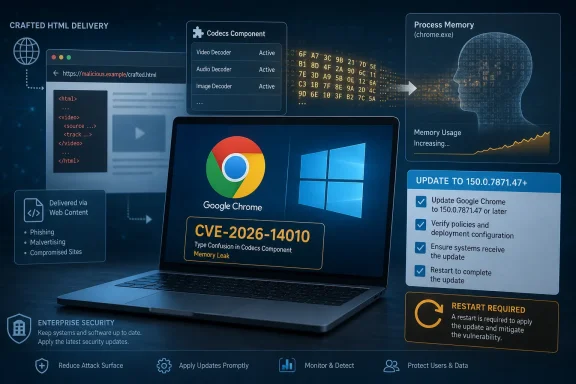
Google’s June 30, 2026 Chrome 150 desktop update fixed CVE-2026-14010, a medium-severity Windows-only information disclosure flaw in Chrome’s Codecs component that affected versions before 150.0.7871.47 and could expose process memory through a crafted HTML page. The bug is not a browser apocalypse, and Google has not said it is being exploited in the wild. But for Windows administrators, it is exactly the kind of quiet memory-safety issue that turns patch hygiene from a checkbox into a security boundary. The danger is less that this one CVE will dominate headlines than that it sits inside the most exposed application on most corporate desktops.
As documented by NVD and CISA’s ADP enrichment, CVE-2026-14010 is classified as CWE-457, use of an uninitialized variable, with a CVSS 3.1 score of 6.5 and a high confidentiality impact. Google’s Chrome Releases blog placed the issue among the security fixes in the Chrome 150 stable-channel desktop release, while the underlying Chromium issue remains restricted, as is common before broad update adoption. That leaves defenders with a familiar bargain: act on sparse public detail now, or wait for more clarity after attackers and researchers have had more time with the patch.
The word “medium” does too much calming work in browser security. In many enterprise risk dashboards, medium-severity vulnerabilities get batched, deferred, and consumed by monthly maintenance cycles. That approach is defensible for some software, but it is less convincing for Chrome on Windows, where the attack surface is deliberately designed to ingest hostile content all day.
CVE-2026-14010 requires user interaction, according to the CISA ADP vector, because the victim must reach a crafted HTML page. That sounds like a meaningful limitation until it is translated into ordinary work: clicking a link in email, opening a vendor portal, visiting a compromised site, or loading attacker-controlled content through an ad network. In browser terms, “user interaction required” often means “someone used the web.”
The confidentiality impact is the detail that deserves attention. This is not described as a direct remote-code-execution flaw, nor as a sandbox escape. It is an information disclosure bug that could reveal potentially sensitive process memory. In modern exploit chains, that kind of leak can be a helper, not the finale.
Memory disclosure can expose data that is sensitive in its own right, but it can also weaken mitigations meant to make exploitation harder. Address Space Layout Randomization, sandboxing, process isolation, and site isolation all assume that attackers have imperfect knowledge. A memory leak can turn imperfect knowledge into a map.
Codec code has long been a productive bug class across browsers, operating systems, and media frameworks because it combines complexity with attacker-controlled input. The web made image, audio, and video handling ambient. A user does not think they are “opening a file” when a page embeds media or exercises a decoder through HTML, but the browser still must interpret structured data supplied by someone else.
That is why a crafted HTML page matters. The phrase sounds almost quaint, but HTML is the delivery wrapper for a great deal of active, nested, and media-rich behavior. If a page can trigger a code path in the browser that reads from uninitialized memory, the user’s perception of safety is largely irrelevant.
On Windows, this also intersects with the realities of endpoint sprawl. Chrome is often present even where Edge is the managed default, and Chromium-derived browsers may sit beside it. Consumer convenience, developer tooling, legacy web app compatibility, and user preference all conspire to make browser inventories messier than policy documents admit.
In a browser, that mistake is more serious than it sounds because the browser is a broker of secrets. It handles cookies, tokens, page data, credentials in memory, enterprise identity flows, intranet sessions, and the scaffolding of modern cloud work. Not every memory disclosure exposes something valuable, but defenders do not get to assume the leaked bytes are harmless.
Google’s public wording says a remote attacker could obtain “potentially sensitive information from process memory.” That phrasing is careful, but it is not empty. It means the bug is plausibly reachable from web content and that the security consequence is not merely a crash or a cosmetic failure.
The restricted Chromium issue also matters. Google routinely limits access to bug details until most users have updated, and that is good operational security. But it also means defenders should not expect a complete exploitability picture before deciding whether to patch. The most useful signal is that Google shipped a fix and assigned a CVE.
Vulnerability scanners depend on clean product matching. If the CPE data is late, incomplete, or interpreted too broadly, dashboards can either miss exposed systems or flood teams with irrelevant findings. In this case, the NVD change history shows CPE configuration was added during initial NIST analysis on July 1, after the CVE was received from Chrome on June 30.
That sequence is normal enough, but it highlights the lag between vendor disclosure, CVE publication, NVD enrichment, and enterprise scanner reality. A Chrome release may already be rolling through the stable channel before all third-party tools agree on exactly how to represent the risk. The browser updates first; the governance machinery catches up.
The user-facing question, “Are we missing a CPE here?” is not just a database housekeeping note. It is a reminder that vulnerability management still rests on brittle identity systems. A patch can exist, a CVE can be public, and a scanner can still struggle to map the problem cleanly to the software estate.
That distinction matters in mixed fleets. A Linux system on 150.0.7871.46 is not automatically in the same state as a Windows system on 150.0.7871.46 for this CVE, because the public affected-version boundary is Windows-specific and points to .47. Security teams should resist the urge to flatten platform nuance into one generic “Chrome 150 fixed” line.
The Chrome update mechanism is generally good, but enterprise controls can slow it. Managed environments may pin versions, stage rollouts, delay restarts, or rely on users to relaunch the browser. Chrome can download an update and still leave the old executable running until restart, which is the oldest browser-patching footgun in the book.
That is why administrators should measure the running version, not merely the installed package or update policy. A machine that “has the update” but has not relaunched is not meaningfully remediated from the perspective of an active browsing session. Browser patch management is partly software distribution and partly behavior management.
But SSVC is not a hall pass to ignore the bug. It is a prioritization language, not a dismissal mechanism. “No known exploitation” can change, and browser vulnerabilities become more interesting after patches land because the diff itself becomes research material.
The right operational stance is urgency without theatrics. This is not the same category as an actively exploited Chrome zero-day, and it should not trigger the same emergency communications unless local risk warrants it. But it also should not wait for a quarterly cycle merely because the label says medium.
For most organizations, the policy answer is simple: push Chrome to the fixed build through normal expedited browser channels, verify relaunch, and watch for lagging systems. The extra effort belongs in validation, not in dramatic incident-room theater.
That messiness makes CVE-2026-14010 a Windows asset-management story as much as a Chrome story. The vulnerable product is not “the default browser.” It is any affected Chrome installation capable of being used to visit hostile content. If Chrome is present and launchable, it belongs in the patch scope.
Sysadmins should also remember that Chrome’s presence can be indirect. Some systems have Chrome installed for automation, kiosk use, web testing, application compatibility, or bundled workflows. Those machines may not look like ordinary user workstations, but they can still process attacker-controlled pages depending on their role.
VDI and persistent browser sessions add another wrinkle. If users keep sessions alive for days or weeks, the patch state seen in inventory may not reflect the process actually handling content. Restart enforcement is unpopular because it interrupts work, but a browser update without a browser restart is a promise, not a fix.
This is a recurring tension in browser security. Enterprises want exploit details for prioritization, but vendors want to minimize weaponization before patch saturation. In practice, defenders often must make decisions from metadata: component, impact, affected versions, severity, and whether exploitation is known.
For CVE-2026-14010, that metadata is enough to justify action. It is a remote, web-reachable information disclosure issue in Chrome’s Codecs component on Windows, fixed in a stable-channel update. The absence of public proof-of-concept code should reduce panic, not reduce patching.
The healthiest approach is to separate two questions that are too often merged. “Do we understand the exploit in detail?” is a research question. “Do we need the fixed browser build deployed?” is an operations question. For this CVE, the second answer is yes even if the first remains incomplete.
That does not mean every Chromium browser is automatically vulnerable in the same way or on the same schedule. Vendors may integrate patches at different times, compile components differently, or ship platform-specific changes. But it does mean Chrome’s fix cadence often becomes the starting gun for broader patch tracking.
This is especially relevant for Windows shops with Edge, Chrome, Brave, Vivaldi, Electron-based apps, and custom Chromium shells in the same estate. The CVE may be recorded against Chrome, while the underlying code pattern may prompt other vendors to move. Security teams should follow vendor advisories rather than extrapolate blindly.
The wider lesson is that browser security has become supply-chain security. The browser is no longer merely an application on the desktop; it is a runtime, a media stack, an identity surface, a document viewer, and an application platform. A medium bug in one component can ripple across workflows far beyond “someone clicked a website.”
CVE-2026-14010 is not necessarily the most severe issue in the Chrome 150 bundle. Google’s advisory listed higher-severity vulnerabilities elsewhere, and other reporting around the release has emphasized the volume of fixes. But medium-severity confidentiality bugs deserve attention because they can be chained with more dramatic primitives.
Attack chains often need a leak before they need a leap. An information disclosure issue may help an attacker defeat memory protections, identify useful objects, or stabilize exploitation of a separate bug. On its own, it may be partial impact; in combination, it may be enabling infrastructure.
That is why mature patch programs do not remediate only the top-scored CVE in a release. They move to the fixed build because the build is the unit of security. The CVE list explains why the update matters, but the version number is what closes the door.
The better approach is to combine vendor advisories, CVE records, CISA enrichment, endpoint telemetry, and actual software versions. Chrome’s own release channel is the most direct source for the existence of the fix. NVD and scanner plugins are essential for scale, but they are not magic.
This distinction matters in the first 24 to 72 hours after publication. That is when defenders are most likely to have partial metadata, incomplete scanner coverage, and an update already available. Waiting for every field to fill in may produce a prettier report and a worse security posture.
For WindowsForum readers managing smaller environments, the advice is simpler: open Chrome’s About page or go to the browser’s update screen, let it update, and relaunch. For larger environments, confirm policy deployment and query fleet versions. Either way, do not let a missing score become a reason to keep a vulnerable browser open.
The uncertainty is part of the risk. Defenders cannot know in advance which users would expose which data if they hit a malicious page. A developer logged into internal dashboards presents a different memory environment than a kiosk user reading public news.
Modern browser architecture tries to contain this through process isolation and sandboxing. Those controls matter, and they are why CVE-2026-14010 is not automatically a full-system compromise. But isolation is not the same as irrelevance; leaking from the wrong process at the wrong time can still matter.
This is especially true in enterprise SaaS environments, where the browser is the front door to everything. Email, source code, HR systems, ticketing, password managers, dashboards, and cloud consoles all converge in tabs. The desktop browser has become the richest target on the workstation precisely because work moved into it.
Administrators should pay special attention to machines that do not follow the normal update path. Shared workstations, lab systems, kiosks, VDI images, developer machines, and long-running browser sessions are the usual outliers. Those are the systems that make a neat compliance percentage lie.
There is also a communications angle. Users do not need a deep explanation of uninitialized memory, but they do need to understand why browser relaunch prompts matter. A short, clear message beats a dramatic warning that trains people to ignore the next one.
The correct lesson from CVE-2026-14010 is not that every medium Chrome bug is a crisis. It is that the browser update channel is part of the security perimeter, and perimeter controls fail when restart debt accumulates. Patching the browser is not maintenance downtime; it is exposure reduction.
As documented by NVD and CISA’s ADP enrichment, CVE-2026-14010 is classified as CWE-457, use of an uninitialized variable, with a CVSS 3.1 score of 6.5 and a high confidentiality impact. Google’s Chrome Releases blog placed the issue among the security fixes in the Chrome 150 stable-channel desktop release, while the underlying Chromium issue remains restricted, as is common before broad update adoption. That leaves defenders with a familiar bargain: act on sparse public detail now, or wait for more clarity after attackers and researchers have had more time with the patch.
 A Medium Chrome Bug Can Still Be a Real Windows Problem
The word “medium” does too much calming work in browser security. In many enterprise risk dashboards, medium-severity vulnerabilities get batched, deferred, and consumed by monthly maintenance cycles. That approach is defensible for some software, but it is less convincing for Chrome on Windows, where the attack surface is deliberately designed to ingest hostile content all day.CVE-2026-14010 requires user interaction, according to the CISA ADP vector, because the victim must reach a crafted HTML page. That sounds like a meaningful limitation until it is translated into ordinary work: clicking a link in email, opening a vendor portal, visiting a compromised site, or loading attacker-controlled content through an ad network. In browser terms, “user interaction required” often means “someone used the web.”
The confidentiality impact is the detail that deserves attention. This is not described as a direct remote-code-execution flaw, nor as a sandbox escape. It is an information disclosure bug that could reveal potentially sensitive process memory. In modern exploit chains, that kind of leak can be a helper, not the finale.
Memory disclosure can expose data that is sensitive in its own right, but it can also weaken mitigations meant to make exploitation harder. Address Space Layout Randomization, sandboxing, process isolation, and site isolation all assume that attackers have imperfect knowledge. A memory leak can turn imperfect knowledge into a map.
The Codecs Component Is Where Convenience Meets Hostile Input
The affected component, Codecs, is not an obscure corner of the browser from a practical standpoint. Web users expect Chrome to decode media formats, render rich content, and support modern application experiences without ceremony. That work involves complex parsing and transformation of data that often begins life outside the user’s trust boundary.Codec code has long been a productive bug class across browsers, operating systems, and media frameworks because it combines complexity with attacker-controlled input. The web made image, audio, and video handling ambient. A user does not think they are “opening a file” when a page embeds media or exercises a decoder through HTML, but the browser still must interpret structured data supplied by someone else.
That is why a crafted HTML page matters. The phrase sounds almost quaint, but HTML is the delivery wrapper for a great deal of active, nested, and media-rich behavior. If a page can trigger a code path in the browser that reads from uninitialized memory, the user’s perception of safety is largely irrelevant.
On Windows, this also intersects with the realities of endpoint sprawl. Chrome is often present even where Edge is the managed default, and Chromium-derived browsers may sit beside it. Consumer convenience, developer tooling, legacy web app compatibility, and user preference all conspire to make browser inventories messier than policy documents admit.
“Uninitialized Use” Is a Small Phrase for a Messy Failure Mode
CWE-457, use of an uninitialized variable, describes a deceptively simple programming mistake: software reads a value before it has been deliberately set. In memory-unsafe or performance-critical code, that value may contain residue from previous operations. The program may then branch on it, expose it, or use it as part of a larger calculation.In a browser, that mistake is more serious than it sounds because the browser is a broker of secrets. It handles cookies, tokens, page data, credentials in memory, enterprise identity flows, intranet sessions, and the scaffolding of modern cloud work. Not every memory disclosure exposes something valuable, but defenders do not get to assume the leaked bytes are harmless.
Google’s public wording says a remote attacker could obtain “potentially sensitive information from process memory.” That phrasing is careful, but it is not empty. It means the bug is plausibly reachable from web content and that the security consequence is not merely a crash or a cosmetic failure.
The restricted Chromium issue also matters. Google routinely limits access to bug details until most users have updated, and that is good operational security. But it also means defenders should not expect a complete exploitability picture before deciding whether to patch. The most useful signal is that Google shipped a fix and assigned a CVE.
NVD’s CPE Record Tells a Cleaner Story Than the Vulnerability Does
The NVD entry’s configuration is notable because it ties vulnerable Google Chrome versions before 150.0.7871.47 to Microsoft Windows. That aligns with the description: this is Chrome on Windows, not a cross-platform Chrome issue as publicly described. For asset teams, that Windows-specific CPE path is helpful, but it also creates a subtle trap.Vulnerability scanners depend on clean product matching. If the CPE data is late, incomplete, or interpreted too broadly, dashboards can either miss exposed systems or flood teams with irrelevant findings. In this case, the NVD change history shows CPE configuration was added during initial NIST analysis on July 1, after the CVE was received from Chrome on June 30.
That sequence is normal enough, but it highlights the lag between vendor disclosure, CVE publication, NVD enrichment, and enterprise scanner reality. A Chrome release may already be rolling through the stable channel before all third-party tools agree on exactly how to represent the risk. The browser updates first; the governance machinery catches up.
The user-facing question, “Are we missing a CPE here?” is not just a database housekeeping note. It is a reminder that vulnerability management still rests on brittle identity systems. A patch can exist, a CVE can be public, and a scanner can still struggle to map the problem cleanly to the software estate.
The Version Number Is the Control, Not the CVE Score
For Chrome on Windows, the practical remediation line is straightforward: versions before 150.0.7871.47 are the concern, and 150.0.7871.47 or later is the target. Google’s June 30 Chrome Releases post said the stable channel was updated for desktop, with Windows and macOS receiving 150.0.7871.46/.47 and Linux receiving 150.0.7871.46. The CVE description specifically names Windows prior to 150.0.7871.47.That distinction matters in mixed fleets. A Linux system on 150.0.7871.46 is not automatically in the same state as a Windows system on 150.0.7871.46 for this CVE, because the public affected-version boundary is Windows-specific and points to .47. Security teams should resist the urge to flatten platform nuance into one generic “Chrome 150 fixed” line.
The Chrome update mechanism is generally good, but enterprise controls can slow it. Managed environments may pin versions, stage rollouts, delay restarts, or rely on users to relaunch the browser. Chrome can download an update and still leave the old executable running until restart, which is the oldest browser-patching footgun in the book.
That is why administrators should measure the running version, not merely the installed package or update policy. A machine that “has the update” but has not relaunched is not meaningfully remediated from the perspective of an active browsing session. Browser patch management is partly software distribution and partly behavior management.
CISA’s SSVC Signal Says “Do the Work,” Not “Drop Everything”
CISA’s ADP enrichment marks exploitation as “none,” automation as “no,” and technical impact as “partial.” That is a useful counterweight to panic. There is no public indication in the supplied NVD data that CVE-2026-14010 is being exploited in the wild, and its attack path requires a user to encounter crafted web content.But SSVC is not a hall pass to ignore the bug. It is a prioritization language, not a dismissal mechanism. “No known exploitation” can change, and browser vulnerabilities become more interesting after patches land because the diff itself becomes research material.
The right operational stance is urgency without theatrics. This is not the same category as an actively exploited Chrome zero-day, and it should not trigger the same emergency communications unless local risk warrants it. But it also should not wait for a quarterly cycle merely because the label says medium.
For most organizations, the policy answer is simple: push Chrome to the fixed build through normal expedited browser channels, verify relaunch, and watch for lagging systems. The extra effort belongs in validation, not in dramatic incident-room theater.
Windows Enterprises Have More Browser Exposure Than Their Standards Admit
One reason Chrome vulnerabilities remain operationally important on Windows is that browser standardization is often aspirational. A company may officially support Edge, but Chrome persists for developers, SaaS compatibility, testing, acquisitions, executive preference, or unmanaged BYOD adjacency. The browser estate is rarely as tidy as the procurement standard.That messiness makes CVE-2026-14010 a Windows asset-management story as much as a Chrome story. The vulnerable product is not “the default browser.” It is any affected Chrome installation capable of being used to visit hostile content. If Chrome is present and launchable, it belongs in the patch scope.
Sysadmins should also remember that Chrome’s presence can be indirect. Some systems have Chrome installed for automation, kiosk use, web testing, application compatibility, or bundled workflows. Those machines may not look like ordinary user workstations, but they can still process attacker-controlled pages depending on their role.
VDI and persistent browser sessions add another wrinkle. If users keep sessions alive for days or weeks, the patch state seen in inventory may not reflect the process actually handling content. Restart enforcement is unpopular because it interrupts work, but a browser update without a browser restart is a promise, not a fix.
The Restricted Bug Report Is Not a Conspiracy; It Is the Patch Window
The Chromium issue linked from the advisory requires permission, which is typical for fresh security bugs. That restriction frustrates defenders who want technical depth, but it protects users while the update propagates. Publishing precise trigger conditions too early would serve attackers better than administrators.This is a recurring tension in browser security. Enterprises want exploit details for prioritization, but vendors want to minimize weaponization before patch saturation. In practice, defenders often must make decisions from metadata: component, impact, affected versions, severity, and whether exploitation is known.
For CVE-2026-14010, that metadata is enough to justify action. It is a remote, web-reachable information disclosure issue in Chrome’s Codecs component on Windows, fixed in a stable-channel update. The absence of public proof-of-concept code should reduce panic, not reduce patching.
The healthiest approach is to separate two questions that are too often merged. “Do we understand the exploit in detail?” is a research question. “Do we need the fixed browser build deployed?” is an operations question. For this CVE, the second answer is yes even if the first remains incomplete.
Chromium’s Scale Turns Routine Bugs Into Ecosystem Events
Chrome is not just one browser; it is the gravitational center of the Chromium ecosystem. A vulnerability in Chromium code can have implications for downstream browsers, embedded frameworks, and applications that reuse Chromium components. The public CVE text names Google Chrome on Windows, but administrators should still keep an eye on Chromium-based software in their environments.That does not mean every Chromium browser is automatically vulnerable in the same way or on the same schedule. Vendors may integrate patches at different times, compile components differently, or ship platform-specific changes. But it does mean Chrome’s fix cadence often becomes the starting gun for broader patch tracking.
This is especially relevant for Windows shops with Edge, Chrome, Brave, Vivaldi, Electron-based apps, and custom Chromium shells in the same estate. The CVE may be recorded against Chrome, while the underlying code pattern may prompt other vendors to move. Security teams should follow vendor advisories rather than extrapolate blindly.
The wider lesson is that browser security has become supply-chain security. The browser is no longer merely an application on the desktop; it is a runtime, a media stack, an identity surface, a document viewer, and an application platform. A medium bug in one component can ripple across workflows far beyond “someone clicked a website.”
The Real Patch Risk Is Complacency After Chrome 150’s Bigger Fixes
Chrome 150 arrived with a large security payload, and that can paradoxically make individual CVEs easier to ignore. When hundreds of fixes ship together, defenders tend to talk about the release as one bulk event. That is efficient for deployment but imprecise for risk understanding.CVE-2026-14010 is not necessarily the most severe issue in the Chrome 150 bundle. Google’s advisory listed higher-severity vulnerabilities elsewhere, and other reporting around the release has emphasized the volume of fixes. But medium-severity confidentiality bugs deserve attention because they can be chained with more dramatic primitives.
Attack chains often need a leak before they need a leap. An information disclosure issue may help an attacker defeat memory protections, identify useful objects, or stabilize exploitation of a separate bug. On its own, it may be partial impact; in combination, it may be enabling infrastructure.
That is why mature patch programs do not remediate only the top-scored CVE in a release. They move to the fixed build because the build is the unit of security. The CVE list explains why the update matters, but the version number is what closes the door.
Scanner Output Should Not Be the Only Source of Truth
NVD’s entry shows no NIST CVSS score at the time of the supplied data, while CISA ADP provides a CVSS 3.1 score. That is increasingly normal in a world where enrichment can be staged, delegated, or incomplete across different systems. If your vulnerability program treats “no NVD score” as “no urgency,” it is misreading the signal.The better approach is to combine vendor advisories, CVE records, CISA enrichment, endpoint telemetry, and actual software versions. Chrome’s own release channel is the most direct source for the existence of the fix. NVD and scanner plugins are essential for scale, but they are not magic.
This distinction matters in the first 24 to 72 hours after publication. That is when defenders are most likely to have partial metadata, incomplete scanner coverage, and an update already available. Waiting for every field to fill in may produce a prettier report and a worse security posture.
For WindowsForum readers managing smaller environments, the advice is simpler: open Chrome’s About page or go to the browser’s update screen, let it update, and relaunch. For larger environments, confirm policy deployment and query fleet versions. Either way, do not let a missing score become a reason to keep a vulnerable browser open.
Privacy Risk Is Not Limited to Password Theft
Information disclosure vulnerabilities often get mentally reduced to credential theft, but browser process memory can contain more varied and more contextual data. Depending on process boundaries and timing, memory may hold fragments of web content, tokens, identifiers, internal URLs, form data, media buffers, or other transient artifacts. Not all of it is catastrophic; some of it may be useful.The uncertainty is part of the risk. Defenders cannot know in advance which users would expose which data if they hit a malicious page. A developer logged into internal dashboards presents a different memory environment than a kiosk user reading public news.
Modern browser architecture tries to contain this through process isolation and sandboxing. Those controls matter, and they are why CVE-2026-14010 is not automatically a full-system compromise. But isolation is not the same as irrelevance; leaking from the wrong process at the wrong time can still matter.
This is especially true in enterprise SaaS environments, where the browser is the front door to everything. Email, source code, HR systems, ticketing, password managers, dashboards, and cloud consoles all converge in tabs. The desktop browser has become the richest target on the workstation precisely because work moved into it.
The Patch Playbook Is Boring Because It Works
The remediation path for CVE-2026-14010 should be intentionally uneventful. Update Chrome on Windows to 150.0.7871.47 or later, make sure the browser restarts, and verify fleet compliance. If that sounds too simple for a CVE article, that is because good browser security operations are usually repetitive rather than cinematic.Administrators should pay special attention to machines that do not follow the normal update path. Shared workstations, lab systems, kiosks, VDI images, developer machines, and long-running browser sessions are the usual outliers. Those are the systems that make a neat compliance percentage lie.
There is also a communications angle. Users do not need a deep explanation of uninitialized memory, but they do need to understand why browser relaunch prompts matter. A short, clear message beats a dramatic warning that trains people to ignore the next one.
The correct lesson from CVE-2026-14010 is not that every medium Chrome bug is a crisis. It is that the browser update channel is part of the security perimeter, and perimeter controls fail when restart debt accumulates. Patching the browser is not maintenance downtime; it is exposure reduction.
Chrome 150.0.7871.47 Is the Line Windows Admins Should Draw
CVE-2026-14010 is a useful test of whether an organization’s vulnerability process can handle nuance without freezing. It is Windows-specific in the public description, medium in Chromium severity, confidentiality-heavy in CVSS impact, and fixed in a stable build that administrators can deploy now. That combination calls for disciplined action rather than alarm.- Chrome on Windows versions before 150.0.7871.47 should be treated as vulnerable to CVE-2026-14010.
- The public record describes the flaw as an uninitialized use issue in Codecs that can expose potentially sensitive process memory through crafted HTML.
- CISA’s ADP scoring places the bug at CVSS 6.5 with high confidentiality impact, no privileges required, and user interaction required.
- There is no public indication in the supplied advisories that CVE-2026-14010 is being actively exploited.
- Administrators should verify the running Chrome version and require browser relaunch, not merely confirm that an update package was delivered.
- Mixed Chromium environments should be monitored through each vendor’s advisory channel rather than assumed safe from Chrome’s version number alone.
References
- Primary source: NVD / Chromium
Published: 2026-07-03T07:00:47-07:00
NVD - CVE-2026-14010
 nvd.nist.gov
- Security advisory: MSRC
Published: 2026-07-03T07:00:47-07:00
Original feed URL
Security Update Guide - Microsoft Security Response Center
 msrc.microsoft.com
- Official source: nist.gov
National Vulnerability Database
NIST maintains the National Vulnerability Database (NVD), a repository of information on software and hardware flaws that can compromise computer security. This is a key piece of the nation’s cybersecurity infrastructure.www.nist.gov - Related coverage: labs.cloudsecurityalliance.org
NVD Enrichment Triage: Enterprise Vulnerability Programs Must Adapt
PDF documentlabs.cloudsecurityalliance.org