

Google Chrome before 150.0.7871.47 contains CVE-2026-13996, a medium-severity Chromium Permissions bug disclosed on June 30, 2026, that lets a remote attacker spoof browser security UI with a crafted HTML page. The dry database wording makes it sound like a minor paperwork entry in the endless Chrome patch treadmill. It is not. A browser permission prompt is one of the few places where ordinary users are still expected to make a security decision in real time, and when that interface can be misrepresented, the browser’s trust contract starts to fray.
The vulnerability surfaced in the National Vulnerability Database after Chrome published its late-June Stable Channel update, with NVD later adding the affected Chrome CPE for versions before 150.0.7871.47. CISA’s enrichment gives the bug a CVSS 3.1 score of 6.5, with network attack vector, low complexity, no privileges required, user interaction required, and high integrity impact. Google classifies the Chromium issue as Medium, and there is no public indication in the NVD record or CISA SSVC data that it is being exploited in the wild.
That combination — medium severity, user interaction required, no known exploitation — is exactly why this bug risks being underweighted by users and over-abstracted by vulnerability dashboards. CVE-2026-13996 is not a memory corruption monster, not a sandbox escape, and not the sort of zero-day that lights up emergency patch meetings by itself. Its importance lies elsewhere: it is a reminder that browser security is now as much about what users believe they are seeing as what the rendering engine is actually enforcing.
For years, the web’s most dangerous bugs lived in the places security teams knew how to fear: JavaScript engines, GPU stacks, media parsers, WebRTC, font libraries, and sandbox brokers. Those remain dangerous. But modern browsers have also turned user consent into a first-class security primitive.
Camera access, microphone access, location, notifications, clipboard operations, USB devices, serial ports, Bluetooth, MIDI, file handling, local network access, and other capabilities are mediated through browser UI. The promise is simple: a website cannot quietly cross certain boundaries unless the browser asks the user, in a context the website cannot fake.
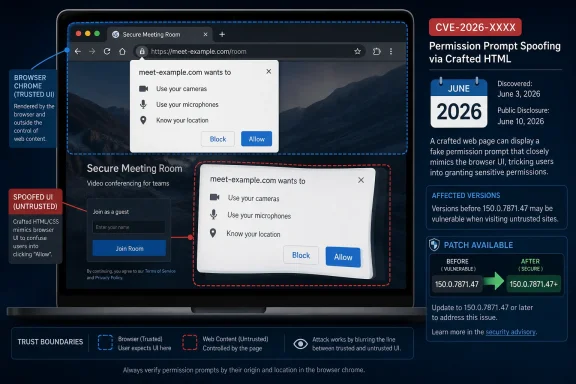
That final clause is doing a lot of work. A permission prompt only matters if it is clearly distinguishable from page content, if it cannot be visually impersonated, and if the user understands which origin is asking for access. When a vulnerability is categorized under CWE-451 — user interface misrepresentation of critical information — the weakness is not merely cosmetic. It is about whether a security-relevant truth can be presented falsely at the moment the user is supposed to decide.
CVE-2026-13996 sits in Chrome’s Permissions component, according to the CVE record supplied by Chrome and enriched by CISA. The public description is terse: inappropriate implementation allowed a remote attacker to perform UI spoofing via a crafted HTML page. That leaves out the mechanics, likely because the Chromium issue tracker entry remains access-restricted while users update.
The lack of detail is normal for browser advisories, but it creates a familiar tension. Defenders must decide how urgently to patch without knowing whether the spoof targets a permission bubble, an origin indicator, a settings affordance, a transient prompt, or some adjacent bit of UI. In the Chrome world, that uncertainty is not an argument for waiting. It is part of the patch model.
That is why UI spoofing bugs tend to age badly in hindsight. They are often dismissed until someone chains them with a convincing lure, a credential prompt, a permissions request, a malicious OAuth flow, or a compromised but trusted website. The vulnerability does not need to break Chrome’s sandbox if it can make the user click through a security boundary the browser was supposed to make legible.
Chrome’s own severity label, Medium, is not meaningless. It tells administrators this is probably not in the same class as a remote code execution flaw with demonstrated exploitation. It also suggests the bug requires a specific interaction and likely does not deliver compromise by page load alone. But Medium is a prioritization signal, not a permission slip to ignore the update.
The SSVC data added by CISA is similarly measured: exploitation is listed as none, automatable as no, and technical impact as partial. That is reassuring as far as it goes. It does not change the operational reality that Chrome is a high-exposure application, that crafted HTML pages are trivial to deliver, and that users are routinely trained by the modern web to approve prompts they barely understand.
For consumers, the practical answer is boring and correct: Chrome should update itself, but users should still visit the browser’s About page and verify the version. On Windows, the relevant fixed Chrome version for this CVE is 150.0.7871.47 or later. If Chrome shows an earlier 150 build, or anything from the 149 line, it is behind this fix.
For administrators, the larger bundle cuts both ways. On one hand, Chrome 150 contains enough security work that deferring it over one medium UI spoofing CVE would be hard to justify. On the other hand, large browser updates are exactly the kind that can trigger compatibility anxiety, especially in environments with legacy extensions, fragile internal apps, kiosk workflows, or strict change windows.
That tension is not theoretical. Browser vendors have compressed the distance between consumer auto-update expectations and enterprise risk management. The user sitting at home gets the patch because Chrome restarts. The enterprise admin has to reconcile that same urgency with regression testing, extension policy, VDI images, application control, and support desk readiness.
The harder question is what happens outside Google Chrome. Chromium is the upstream foundation for Microsoft Edge, Brave, Vivaldi, Opera, and many embedded browser surfaces. A Chromium bug can affect downstream browsers, but the NVD entry for a Chrome-issued CVE often starts with Google Chrome as the named product. That does not automatically mean every Chromium-based browser is affected in the same way, nor does it mean they are safe.
This is where vulnerability scanners routinely annoy Windows administrators. A scanner may key off Chrome’s CPE and miss an affected Chromium derivative, or it may overgeneralize from Chromium advisories and flag a product before the downstream vendor has published its own fixed build. Neither failure mode is rare. Both create noise exactly when admins need clarity.
For Microsoft Edge, the right source is Microsoft’s Edge security release documentation and the actual installed Edge build, not a Chrome CPE alone. Microsoft typically states when Edge Stable or Extended Stable incorporates the latest Chromium security updates, and Edge has its own versioning scheme. A Chrome CPE in NVD is therefore necessary for Chrome detection, but insufficient as a universal Chromium inventory rule.
The important distinction is that Edge does not use Chrome’s version number even when it incorporates Chromium fixes. Microsoft Edge 150 builds appeared through Microsoft’s update channels in early July, while Chrome’s fixed desktop line was 150.0.7871.46/.47. Those numbers do not need to match for the security content to be related, but they do mean admins must verify each product through its own release notes and inventory data.
This is especially important for organizations using Edge Extended Stable. Extended Stable exists to reduce feature churn, not to opt out of security maintenance. If a Chromium fix is pulled into Extended Stable, administrators should not assume they can wait for the next feature milestone simply because the browser is on a slower cadence.
The same caution applies to third-party Chromium browsers. Malwarebytes explicitly warned users of other Chromium-based browsers to watch for their vendor’s next update. That is the sober advice. Chromium’s shared codebase gives the web platform consistency, but it also gives attackers a broad target class and defenders a dependency chain that is only as good as each vendor’s patch turnaround.
A convincing spoof does not have to fool every user. It only has to fool enough users in the right workflow. Think of a fake permission surface over a real web app, a misleading prompt during a video call setup, a page that suggests a browser-native warning has cleared, or a deceptive flow that makes the origin asking for trust appear to be something else.
Chrome has spent years tightening these edges. Permission prompts are less spammy than they once were, abusive notification prompts are throttled, insecure origins have fewer privileges, and browser UI is more constrained. But attackers adapt to the surface that remains, and users are still asked to distinguish browser chrome from website content under time pressure.
That is why “incorrect security UI” is an ominous phrase. The security UI is the part users are supposed to trust precisely because the page cannot control it. When the boundary blurs, the browser’s technical protections may still exist, but the human authorization layer becomes unreliable.
CVE-2026-13996 strengthens the case for that approach. If a permission decision is business-critical, it probably should not be left to a one-off user click on an arbitrary web page. Camera and microphone access for approved conferencing services, serial access for device management portals, clipboard access for internal apps, and location access for line-of-business tools should be governed deliberately.
This does not mean locking every browser API to the floor. Overly restrictive policies push users into unmanaged browsers, personal devices, or shadow IT workarounds. But it does mean treating permission surfaces as part of endpoint security policy rather than as a browser preference buried several clicks deep.
The operational question for sysadmins is not only “Are we patched?” It is also “Which sites can ask our users for sensitive access, and how would we know if that experience changed?” A UI spoofing bug is harder to exploit at scale when the browser is configured to deny untrusted prompts before the user ever sees them.
A reasonable enterprise response is to push Chrome 150.0.7871.47 or later through normal accelerated browser patch channels, verify deployment within days rather than weeks, and monitor for downstream Edge or Chromium-browser updates. For most organizations, this is not an all-hands incident. It is a browser hygiene test.
The consumer response is simpler. Open Chrome’s About page, let it update, and relaunch. Chrome’s auto-update machinery is good, but it is not magic; a browser that has not been restarted can remain exposed longer than users assume.
For vulnerability management teams, the CPE details deserve a second look. The NVD record now contains a Google Chrome CPE for affected versions before 150.0.7871.47, but scanner logic should be checked against real installed versions and downstream browser advisories. If your tooling reports “Chromium” generically, make sure it can distinguish Chrome, Edge, embedded runtimes, and application-bundled browser components.
Google’s patch is the right immediate fix. The broader lesson is that browsers cannot keep outsourcing critical decisions to users while simultaneously allowing websites to become indistinguishable from apps, operating-system surfaces, and identity portals. The more powerful the web platform becomes, the more browser UI has to be boring, unmistakable, and resistant to imitation.
For Microsoft, this is also an Edge story whether or not the CVE record begins with Chrome. Windows has made the browser a core productivity and identity surface, not merely an optional app. That makes Chromium security debt Windows security debt by proximity.
The vulnerability’s medium severity may be technically fair. Its symbolic severity is higher. It is a flaw in the ceremony of trust: the moment when the browser says, “This is the real prompt, this is the real site, and this is the real choice.”
The vulnerability surfaced in the National Vulnerability Database after Chrome published its late-June Stable Channel update, with NVD later adding the affected Chrome CPE for versions before 150.0.7871.47. CISA’s enrichment gives the bug a CVSS 3.1 score of 6.5, with network attack vector, low complexity, no privileges required, user interaction required, and high integrity impact. Google classifies the Chromium issue as Medium, and there is no public indication in the NVD record or CISA SSVC data that it is being exploited in the wild.
That combination — medium severity, user interaction required, no known exploitation — is exactly why this bug risks being underweighted by users and over-abstracted by vulnerability dashboards. CVE-2026-13996 is not a memory corruption monster, not a sandbox escape, and not the sort of zero-day that lights up emergency patch meetings by itself. Its importance lies elsewhere: it is a reminder that browser security is now as much about what users believe they are seeing as what the rendering engine is actually enforcing.
 The Browser Permission Prompt Has Become a Security Boundary
For years, the web’s most dangerous bugs lived in the places security teams knew how to fear: JavaScript engines, GPU stacks, media parsers, WebRTC, font libraries, and sandbox brokers. Those remain dangerous. But modern browsers have also turned user consent into a first-class security primitive.Camera access, microphone access, location, notifications, clipboard operations, USB devices, serial ports, Bluetooth, MIDI, file handling, local network access, and other capabilities are mediated through browser UI. The promise is simple: a website cannot quietly cross certain boundaries unless the browser asks the user, in a context the website cannot fake.
That final clause is doing a lot of work. A permission prompt only matters if it is clearly distinguishable from page content, if it cannot be visually impersonated, and if the user understands which origin is asking for access. When a vulnerability is categorized under CWE-451 — user interface misrepresentation of critical information — the weakness is not merely cosmetic. It is about whether a security-relevant truth can be presented falsely at the moment the user is supposed to decide.
CVE-2026-13996 sits in Chrome’s Permissions component, according to the CVE record supplied by Chrome and enriched by CISA. The public description is terse: inappropriate implementation allowed a remote attacker to perform UI spoofing via a crafted HTML page. That leaves out the mechanics, likely because the Chromium issue tracker entry remains access-restricted while users update.
The lack of detail is normal for browser advisories, but it creates a familiar tension. Defenders must decide how urgently to patch without knowing whether the spoof targets a permission bubble, an origin indicator, a settings affordance, a transient prompt, or some adjacent bit of UI. In the Chrome world, that uncertainty is not an argument for waiting. It is part of the patch model.
Medium Severity Does Not Mean Low Consequence
The CISA-ADP vector is revealing. CVE-2026-13996 is scored as network-exploitable and low-complexity, with no privileges required, but it requires user interaction. Confidentiality and availability are marked as unaffected, while integrity impact is high. In plain English, that means the attacker is not directly stealing data or crashing the browser through the vulnerability itself; the danger is that the user can be manipulated into authorizing or trusting something under false pretenses.That is why UI spoofing bugs tend to age badly in hindsight. They are often dismissed until someone chains them with a convincing lure, a credential prompt, a permissions request, a malicious OAuth flow, or a compromised but trusted website. The vulnerability does not need to break Chrome’s sandbox if it can make the user click through a security boundary the browser was supposed to make legible.
Chrome’s own severity label, Medium, is not meaningless. It tells administrators this is probably not in the same class as a remote code execution flaw with demonstrated exploitation. It also suggests the bug requires a specific interaction and likely does not deliver compromise by page load alone. But Medium is a prioritization signal, not a permission slip to ignore the update.
The SSVC data added by CISA is similarly measured: exploitation is listed as none, automatable as no, and technical impact as partial. That is reassuring as far as it goes. It does not change the operational reality that Chrome is a high-exposure application, that crafted HTML pages are trivial to deliver, and that users are routinely trained by the modern web to approve prompts they barely understand.
Google Patched This Inside a Much Larger Chrome 150 Security Drop
The fix arrived with Google’s June 30 Stable Channel update for desktop, which moved Windows and macOS to Chrome 150.0.7871.46/.47 and Linux to 150.0.7871.46, according to the Chrome Releases blog. Security coverage from Malwarebytes and PCWorld framed the update as another unusually large Chrome security bundle, with hundreds of fixes landing in the Chrome 150 cycle. CVE-2026-13996 is one line item in that larger release, and that matters for how it will be handled in the real world.For consumers, the practical answer is boring and correct: Chrome should update itself, but users should still visit the browser’s About page and verify the version. On Windows, the relevant fixed Chrome version for this CVE is 150.0.7871.47 or later. If Chrome shows an earlier 150 build, or anything from the 149 line, it is behind this fix.
For administrators, the larger bundle cuts both ways. On one hand, Chrome 150 contains enough security work that deferring it over one medium UI spoofing CVE would be hard to justify. On the other hand, large browser updates are exactly the kind that can trigger compatibility anxiety, especially in environments with legacy extensions, fragile internal apps, kiosk workflows, or strict change windows.
That tension is not theoretical. Browser vendors have compressed the distance between consumer auto-update expectations and enterprise risk management. The user sitting at home gets the patch because Chrome restarts. The enterprise admin has to reconcile that same urgency with regression testing, extension policy, VDI images, application control, and support desk readiness.
The NVD Record Is Messy in the Way Vulnerability Management Is Always Messy
The user-facing question around this CVE includes a small but important detail: “Are we missing a CPE here?” In the NVD change history, NIST added a Chrome CPE configuration for Google Chrome versions up to, but excluding, 150.0.7871.47. That is the obvious affected product, and for Chrome itself the CPE story is straightforward enough.The harder question is what happens outside Google Chrome. Chromium is the upstream foundation for Microsoft Edge, Brave, Vivaldi, Opera, and many embedded browser surfaces. A Chromium bug can affect downstream browsers, but the NVD entry for a Chrome-issued CVE often starts with Google Chrome as the named product. That does not automatically mean every Chromium-based browser is affected in the same way, nor does it mean they are safe.
This is where vulnerability scanners routinely annoy Windows administrators. A scanner may key off Chrome’s CPE and miss an affected Chromium derivative, or it may overgeneralize from Chromium advisories and flag a product before the downstream vendor has published its own fixed build. Neither failure mode is rare. Both create noise exactly when admins need clarity.
For Microsoft Edge, the right source is Microsoft’s Edge security release documentation and the actual installed Edge build, not a Chrome CPE alone. Microsoft typically states when Edge Stable or Extended Stable incorporates the latest Chromium security updates, and Edge has its own versioning scheme. A Chrome CPE in NVD is therefore necessary for Chrome detection, but insufficient as a universal Chromium inventory rule.
Windows Users Should Treat Edge as Related, Not Identical
WindowsForum readers live in a dual-browser world whether they like it or not. Chrome is often installed because users demand it; Edge is present because Windows ships it and Microsoft integrates it deeply across the operating system, Microsoft 365, and enterprise management tooling. A Chromium permissions flaw therefore lands in an ecosystem where “browser” is not a single executable.The important distinction is that Edge does not use Chrome’s version number even when it incorporates Chromium fixes. Microsoft Edge 150 builds appeared through Microsoft’s update channels in early July, while Chrome’s fixed desktop line was 150.0.7871.46/.47. Those numbers do not need to match for the security content to be related, but they do mean admins must verify each product through its own release notes and inventory data.
This is especially important for organizations using Edge Extended Stable. Extended Stable exists to reduce feature churn, not to opt out of security maintenance. If a Chromium fix is pulled into Extended Stable, administrators should not assume they can wait for the next feature milestone simply because the browser is on a slower cadence.
The same caution applies to third-party Chromium browsers. Malwarebytes explicitly warned users of other Chromium-based browsers to watch for their vendor’s next update. That is the sober advice. Chromium’s shared codebase gives the web platform consistency, but it also gives attackers a broad target class and defenders a dependency chain that is only as good as each vendor’s patch turnaround.
UI Spoofing Is Social Engineering With Better Engineering
Security people sometimes draw a neat line between technical exploitation and social engineering. CVE-2026-13996 is a useful reminder that the line is artificial. A crafted HTML page that exploits browser UI confusion is both technical and psychological; it manipulates implementation details so that the user’s security judgment is made against a false display.A convincing spoof does not have to fool every user. It only has to fool enough users in the right workflow. Think of a fake permission surface over a real web app, a misleading prompt during a video call setup, a page that suggests a browser-native warning has cleared, or a deceptive flow that makes the origin asking for trust appear to be something else.
Chrome has spent years tightening these edges. Permission prompts are less spammy than they once were, abusive notification prompts are throttled, insecure origins have fewer privileges, and browser UI is more constrained. But attackers adapt to the surface that remains, and users are still asked to distinguish browser chrome from website content under time pressure.
That is why “incorrect security UI” is an ominous phrase. The security UI is the part users are supposed to trust precisely because the page cannot control it. When the boundary blurs, the browser’s technical protections may still exist, but the human authorization layer becomes unreliable.
The Enterprise Risk Is Not Just the CVE, It Is the Prompt Culture
In managed environments, permission prompts are often treated as a user-experience nuisance. Admins configure policies to suppress prompts, pre-grant trusted applications, deny risky APIs, or control which origins can request sensitive capabilities. Those policies are not just convenience settings. They are compensating controls for the reality that users are poor security adjudicators at browser speed.CVE-2026-13996 strengthens the case for that approach. If a permission decision is business-critical, it probably should not be left to a one-off user click on an arbitrary web page. Camera and microphone access for approved conferencing services, serial access for device management portals, clipboard access for internal apps, and location access for line-of-business tools should be governed deliberately.
This does not mean locking every browser API to the floor. Overly restrictive policies push users into unmanaged browsers, personal devices, or shadow IT workarounds. But it does mean treating permission surfaces as part of endpoint security policy rather than as a browser preference buried several clicks deep.
The operational question for sysadmins is not only “Are we patched?” It is also “Which sites can ask our users for sensitive access, and how would we know if that experience changed?” A UI spoofing bug is harder to exploit at scale when the browser is configured to deny untrusted prompts before the user ever sees them.
Patch Urgency Should Be Calibrated, Not Casual
There is no public evidence that CVE-2026-13996 is being exploited in the wild, and CISA’s SSVC entry says exploitation is none. That should prevent panic. It should not prevent action.A reasonable enterprise response is to push Chrome 150.0.7871.47 or later through normal accelerated browser patch channels, verify deployment within days rather than weeks, and monitor for downstream Edge or Chromium-browser updates. For most organizations, this is not an all-hands incident. It is a browser hygiene test.
The consumer response is simpler. Open Chrome’s About page, let it update, and relaunch. Chrome’s auto-update machinery is good, but it is not magic; a browser that has not been restarted can remain exposed longer than users assume.
For vulnerability management teams, the CPE details deserve a second look. The NVD record now contains a Google Chrome CPE for affected versions before 150.0.7871.47, but scanner logic should be checked against real installed versions and downstream browser advisories. If your tooling reports “Chromium” generically, make sure it can distinguish Chrome, Edge, embedded runtimes, and application-bundled browser components.
The Small CVE That Exposes the Bigger Browser Bet
The web’s permission model rests on a bet that the browser can be both a universal application runtime and a trusted security mediator. CVE-2026-13996 does not disprove that bet, but it highlights how fragile the user-facing layer can be. Every new web capability adds another place where origin, intent, and consent must be communicated clearly.Google’s patch is the right immediate fix. The broader lesson is that browsers cannot keep outsourcing critical decisions to users while simultaneously allowing websites to become indistinguishable from apps, operating-system surfaces, and identity portals. The more powerful the web platform becomes, the more browser UI has to be boring, unmistakable, and resistant to imitation.
For Microsoft, this is also an Edge story whether or not the CVE record begins with Chrome. Windows has made the browser a core productivity and identity surface, not merely an optional app. That makes Chromium security debt Windows security debt by proximity.
The vulnerability’s medium severity may be technically fair. Its symbolic severity is higher. It is a flaw in the ceremony of trust: the moment when the browser says, “This is the real prompt, this is the real site, and this is the real choice.”
The Practical Read From This Chrome 150 Permissions Bug
CVE-2026-13996 is not the loudest Chrome bug of the summer, but it is one of the cleaner examples of why browser UI belongs in the threat model. Treat it as a prompt to verify patching, tighten permission governance, and stop assuming that user interaction automatically lowers risk to the point of comfort.- Chrome on Windows should be updated to 150.0.7871.47 or later to address CVE-2026-13996.
- The bug is a medium-severity Permissions flaw that can enable UI spoofing through a crafted HTML page.
- CISA’s enrichment lists no known exploitation, no automation, and partial technical impact, but assigns high integrity impact in the CVSS vector.
- The NVD Chrome CPE is useful for detecting vulnerable Google Chrome installs, but downstream Chromium browsers need their own vendor confirmation.
- Enterprise admins should review browser permission policies for sensitive APIs instead of relying entirely on users to interpret prompts correctly.
- Edge, Extended Stable, and other Chromium-based browsers should be tracked separately, because shared Chromium code does not mean identical version numbers or identical release timing.
References
- Primary source: NVD / Chromium
Published: 2026-07-03T07:00:33-07:00
Loading…
nvd.nist.gov - Security advisory: MSRC
Published: 2026-07-03T07:00:33-07:00
Original feed URL
Loading…
msrc.microsoft.com - Related coverage: cvefeed.io
Loading…
cvefeed.io - Related coverage: ubuntu.com
Loading…
ubuntu.com - Related coverage: malwarebytes.com
Chrome needs another whopper update to fix 382 security bugs | Malwarebytes
Google released a huge update of 382 security fixes, 15 of which were rated as critical. So, it's time to update againwww.malwarebytes.com - Related coverage: techradar.com
Update Chrome now — Google patches new zero-day flaw already being exploited | TechRadar
A new bug could allow crooks to execute arbitrary code in Chromewww.techradar.com
- Related coverage: crowe.com
- Official source: learn.microsoft.com
Release notes for Microsoft Edge Security Updates | Microsoft Learn
Release notes for Microsoft Edge Security Updateslearn.microsoft.com - Related coverage: pcworld.com
Loading…
www.pcworld.com - Related coverage: cirt.gy
Loading…
cirt.gy - Related coverage: www2.gov.bc.ca