

Google Chrome before version 150.0.7871.47 contains CVE-2026-13984, a medium-severity TabStrip flaw disclosed on June 30, 2026, that can let a remote attacker spoof security-related browser UI through a crafted HTML page. The bug is not a code-execution monster, and that is exactly why it is easy to underrate. In modern browsers, the chrome around the page is part of the security boundary. When that boundary lies, users make bad decisions with real credentials, sessions, and money.
As documented by the National Vulnerability Database and tied back to Google’s June Stable Channel update, CVE-2026-13984 lives in the browser’s TabStrip — the area users glance at to understand where they are, what tab is active, and whether the browser is presenting trustworthy state. NVD assigns it a CVSS 3.1 score of 4.3, with network attack vector, low attack complexity, no privileges required, and required user interaction. CISA’s ADP entry reaches the same score but classifies the weakness as user-interface misrepresentation of critical information, which is the more useful mental model for defenders.
For years, browser security has been sold to users through visible promises: the lock icon, the origin display, permission prompts, tab titles, profile indicators, warning interstitials, and the separation between page content and browser-owned interface. The web is hostile by default, so the browser has to maintain a clean line between what a website can draw and what the browser itself is asserting.
A TabStrip spoofing bug blurs that line. The attacker does not need to break encryption or compromise a certificate authority if the user can be made to believe the wrong tab, origin, or state is in front of them. That is why UI spoofing vulnerabilities sit in an awkward severity category: they often score lower than memory corruption bugs, but they attack the same human trust mechanism that phishing kits have spent decades refining.
The practical risk is not that a malicious page magically owns the machine. The risk is that it can stage a convincing enough scene to make a user take the next step. That might mean entering credentials into a fake single sign-on page, approving a prompt under false assumptions, or believing they remain inside a trusted workflow when they have been moved somewhere else.
This is also why Chrome’s own “Medium” severity label should not be read as “minor.” In a browser with billions of users and a large enterprise footprint, medium-severity UI bugs can scale beautifully for attackers. They are cheap to host, easy to distribute, and often fit naturally into social-engineering campaigns that already depend on user interaction.
That score is defensible. It also compresses the attacker’s workflow into a number that can mislead patch prioritization teams. A vulnerability that does not directly leak data can still be a decisive part of a credential-theft chain, particularly when it makes the browser’s own trust cues less reliable.
The “I:L” portion of the vector is doing a lot of work here. Integrity impact in a UI spoofing context means the user’s perception of browser state can be manipulated. That is not the same thing as overwriting a file or modifying a database record, but in authentication flows it can be just as consequential.
CISA’s SSVC data reportedly marks exploitation as “none,” automation as “no,” and technical impact as “partial.” That is reassuring in the narrow sense: there is no public signal in the record that this specific CVE is being exploited in the wild. But “not automatable” does not mean “not weaponizable.” Phishing, fake login flows, malicious ads, and targeted lures are explicitly built around the user doing something.
That distinction matters more in 2026 than it did a decade ago. Browser tabs are no longer just documents. They are cloud desktops, admin consoles, password vaults, banking sessions, OAuth screens, webmail, ticketing systems, SaaS dashboards, and remote collaboration spaces. The tab is often the only visible boundary between “the thing I trust” and “the page that wants me to trust it.”
A crafted HTML page that can induce incorrect security UI in this area gives attackers room to play with ambiguity. The available public description does not spell out a proof of concept, and the Chromium issue is permission-restricted, which is typical while users are still updating. But the class of flaw is clear enough: the page can cause the browser to present a misleading security-relevant interface state.
That is a familiar pattern in browser security. Details stay embargoed not because the bug is theoretical, but because the fix needs time to reach the population. Google routinely restricts access to bug details until a majority of users are protected, and that policy is especially important for UI bugs whose exploitability may become obvious once the rendering or state mismatch is understood.
That context matters for admins because patch urgency rarely maps cleanly to a single CVE. A medium TabStrip spoofing issue may not top the spreadsheet, but the same update train can include critical memory-safety bugs, sandbox escapes, or renderer-chain ingredients. In Chrome operations, the unit of action is often not “fix this CVE”; it is “get the browser onto the current stable build everywhere.”
The versioning wrinkle also matters. NVD’s affected configuration for this CVE says Chrome versions prior to 150.0.7871.47 are vulnerable. Google’s release notation, however, uses split desktop versioning, with 150.0.7871.46/.47 appearing for Windows and Mac and 150.0.7871.46 for Linux in the broader Stable Channel language. That kind of mismatch is exactly where asset-management tools, CPE matching, and compliance dashboards can generate confusion.
For WindowsForum readers, the Windows action remains simple: Chrome on Windows should be at 150.0.7871.47 or later for this CVE. The messier question is how scanners interpret the record across platforms and builds. If a tool blindly treats anything below .47 as exposed without platform nuance, Linux fleets may get noisy results depending on how Google mapped the fix into its platform-specific release.
NVD’s change history indicates that NIST added a CPE configuration for Google Chrome versions up to, but excluding, 150.0.7871.47. That is the expected product-level mapping for Chrome. The problem is not that Chrome has no CPE at all; the problem is that browser versioning, platform-specific stable builds, Chromium derivatives, and embedded browser components do not always fit comfortably into a single product CPE.
Chrome itself is only the most obvious consumer of Chromium code. Microsoft Edge, Brave, Vivaldi, Opera, Electron-based apps, WebView-based products, and application-embedded Chromium forks all live somewhere in the same ecosystem, but they do not all inherit a Chrome CVE in the same way or on the same schedule. A Chrome TabStrip vulnerability may be Chrome-specific if the flaw is in Google’s browser UI implementation, or it may be relevant to other Chromium-based browsers if the affected component is shared.
The public CVE record names Google Chrome as the affected product. That is where defenders should begin, not where they should stop. Enterprises should patch Chrome directly and then watch downstream browser advisories from Microsoft, Brave, Vivaldi, and other vendors rather than assuming the Chrome CPE fully describes their Chromium exposure.
That is why security education that says “check the lock icon” or “look at the tab” has aged badly. Those cues still matter, but they are not magical. They are software-generated indicators, and software can contain bugs that cause indicators to display incorrectly or at the wrong time.
The better user guidance is layered. Users should still look at origins, but organizations should not make origin-checking the last line of defense. Password managers that bind credentials to exact domains, phishing-resistant MFA, FIDO2 security keys, conditional access policies, and browser isolation for high-risk workflows all reduce the blast radius when a UI cue fails.
This CVE is a reminder that browser trust is not one thing. It is a stack. Transport security, origin policy, permission prompts, UI rendering, profile isolation, extension controls, and user habit all reinforce each other — or fail together when an attacker finds the seam.
The fix path is ordinary: update Chrome and restart it. The hard part is not the patch; it is proving that every user actually crossed the restart boundary. Chrome can download an update silently, but the running process may remain old until the browser restarts. On shared machines, VDI pools, kiosk devices, and always-open admin workstations, that gap can linger.
Managed Windows fleets should lean on Chrome’s enterprise policies, browser cloud management, Intune, Group Policy, or whatever endpoint platform already owns software compliance. The useful signal is not merely “update available.” It is the active browser version after restart, by device and user population.
There is also a risk in treating browser patching as a monthly ritual. Chrome’s release cadence and security advisory rhythm do not care about Patch Tuesday. A high-volume Chrome security release on June 30 can be operationally more urgent than some OS updates that arrive with more ceremony.
CVE-2026-13984 is described as an incorrect security UI issue in Chrome’s TabStrip. That language points toward browser interface code, not a generic web-platform primitive like V8, Blink, Skia, or WebRTC. Without a Microsoft advisory naming the CVE for Edge, it would be irresponsible to declare Edge affected solely from the Chrome record.
That said, Edge administrators should not ignore the class of issue. Microsoft’s browser inherits a large amount of Chromium code and ships its own security updates on a rapid cadence. The right operational move is to keep Edge current independently, monitor Microsoft’s release notes and security update guide, and avoid assuming that “we do not deploy Chrome” means “we are not exposed to Chromium-class browser risk.”
The same caution applies to other Chromium browsers. If the vendor ships a distinct tab strip or custom UI layer, the exact vulnerability may not apply. If it consumes the affected upstream component, it may. The authoritative answer has to come from each vendor’s advisory stream.
For administrators, restricted details mean the patch decision cannot wait for a proof-of-concept write-up. By the time a polished exploit demonstration appears, the defensive window has already narrowed. The public metadata is enough to act: affected product, fixed version, attack vector, user interaction requirement, and impact class.
This is one of the quiet tensions in modern vulnerability management. Security teams want enough information to prioritize intelligently. Vendors want to disclose enough to trigger updates without handing attackers a recipe. Users want neither ambiguity nor panic. CVE-2026-13984 sits exactly in that middle zone.
The right response is proportional, not theatrical. This is not a reason to unplug the network. It is a reason to verify that Chrome has actually updated, restart stale browser sessions, and make sure phishing-resistant controls are not still stuck in a planning deck.
A medium UI spoofing bug can be the front end of a higher-impact compromise. It can make the user trust the wrong page, approve the wrong action, or ignore the wrong warning. If the organization’s authentication posture is weak, that “partial” technical impact can become full account takeover through ordinary human behavior.
This is especially relevant for help desk and IT admin workflows. Admins live in browser tabs. They authenticate to cloud consoles, device-management portals, identity providers, ticket systems, and remote-support dashboards. A spoof that would be merely annoying to a casual user can become strategically useful against a privileged operator.
Security teams should therefore evaluate this bug in context. A consumer laptop with auto-update enabled and strong password-manager behavior may have low residual risk. A fleet of unmanaged browsers used to access privileged SaaS portals has a very different risk profile, even if the CVSS score is the same.
That chronology is faster and cleaner than many vulnerability records have been in recent years, but it still shows the lag between vendor disclosure and enriched database consumption. A patch can exist before scanners fully understand it. A CVE can be public before CPE matching is stable. An endpoint can be safe while a dashboard still screams, or vulnerable while a dashboard has not yet learned how to ask the question.
This is why mature teams do not rely on a single source of truth. Vendor release notes tell you what shipped. NVD tells you how the vulnerability is classified and matched. CISA’s enrichment adds decision-support context. Endpoint telemetry tells you whether the fix actually landed.
The submitted record’s “Are we missing a CPE?” prompt should not be read as evidence that defenders are helpless until the database is perfect. It should be read as a warning that machine-readable vulnerability data is an aid, not an oracle.
On unmanaged Windows systems, users can check Chrome’s version through the browser’s About page or by navigating to the update screen. In managed environments, admins should validate through inventory rather than asking users to self-report. The minimum target for this CVE on Windows is 150.0.7871.47, and anything older should be treated as pending remediation.
Organizations with strict change windows sometimes hesitate over browser updates because web apps can break. That risk is real, and recent user reports around Chrome 150 suggest that some application behaviors may change after updates. But freezing a browser because a line-of-business app is brittle is a dangerous bargain. The better pattern is rapid validation rings, fast rollback planning where supported, and pressure on app owners to stop depending on unstable browser behavior.
The browser is now the runtime for the enterprise. Treating updates as optional because they are frequent is the security equivalent of ignoring smoke alarms because they are loud.
As documented by the National Vulnerability Database and tied back to Google’s June Stable Channel update, CVE-2026-13984 lives in the browser’s TabStrip — the area users glance at to understand where they are, what tab is active, and whether the browser is presenting trustworthy state. NVD assigns it a CVSS 3.1 score of 4.3, with network attack vector, low attack complexity, no privileges required, and required user interaction. CISA’s ADP entry reaches the same score but classifies the weakness as user-interface misrepresentation of critical information, which is the more useful mental model for defenders.
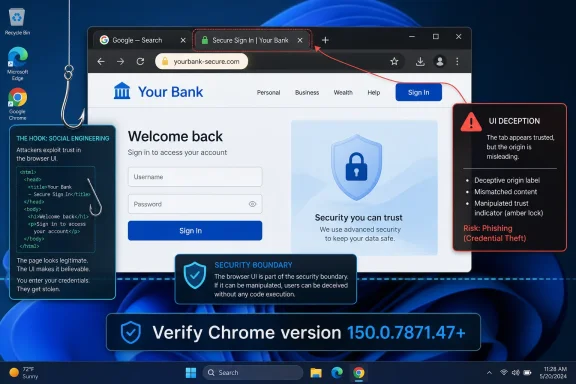 The Browser Frame Is Part of the Security Model
For years, browser security has been sold to users through visible promises: the lock icon, the origin display, permission prompts, tab titles, profile indicators, warning interstitials, and the separation between page content and browser-owned interface. The web is hostile by default, so the browser has to maintain a clean line between what a website can draw and what the browser itself is asserting.A TabStrip spoofing bug blurs that line. The attacker does not need to break encryption or compromise a certificate authority if the user can be made to believe the wrong tab, origin, or state is in front of them. That is why UI spoofing vulnerabilities sit in an awkward severity category: they often score lower than memory corruption bugs, but they attack the same human trust mechanism that phishing kits have spent decades refining.
The practical risk is not that a malicious page magically owns the machine. The risk is that it can stage a convincing enough scene to make a user take the next step. That might mean entering credentials into a fake single sign-on page, approving a prompt under false assumptions, or believing they remain inside a trusted workflow when they have been moved somewhere else.
This is also why Chrome’s own “Medium” severity label should not be read as “minor.” In a browser with billions of users and a large enterprise footprint, medium-severity UI bugs can scale beautifully for attackers. They are cheap to host, easy to distribute, and often fit naturally into social-engineering campaigns that already depend on user interaction.
CVSS Gets the Math Right and Still Undersells the Story
NVD’s vector for CVE-2026-13984 is straightforward: AV:N/AC:L/PR:N/UI:R/S:U/C:N/I:L/A:N. In plain English, the attack can be delivered over the network, is not technically complex, needs no prior access, does require the user to interact, and has a limited integrity impact without direct confidentiality or availability loss. That produces the 4.3 medium score.That score is defensible. It also compresses the attacker’s workflow into a number that can mislead patch prioritization teams. A vulnerability that does not directly leak data can still be a decisive part of a credential-theft chain, particularly when it makes the browser’s own trust cues less reliable.
The “I:L” portion of the vector is doing a lot of work here. Integrity impact in a UI spoofing context means the user’s perception of browser state can be manipulated. That is not the same thing as overwriting a file or modifying a database record, but in authentication flows it can be just as consequential.
CISA’s SSVC data reportedly marks exploitation as “none,” automation as “no,” and technical impact as “partial.” That is reassuring in the narrow sense: there is no public signal in the record that this specific CVE is being exploited in the wild. But “not automatable” does not mean “not weaponizable.” Phishing, fake login flows, malicious ads, and targeted lures are explicitly built around the user doing something.
The TabStrip Is a Small Surface With Outsized Trust
The TabStrip sounds mundane because it is familiar. It is the row of tabs users manipulate thousands of times without thinking. In security terms, however, it is privileged real estate: it belongs to the browser, not the page, and it helps users orient themselves across origins, applications, and identities.That distinction matters more in 2026 than it did a decade ago. Browser tabs are no longer just documents. They are cloud desktops, admin consoles, password vaults, banking sessions, OAuth screens, webmail, ticketing systems, SaaS dashboards, and remote collaboration spaces. The tab is often the only visible boundary between “the thing I trust” and “the page that wants me to trust it.”
A crafted HTML page that can induce incorrect security UI in this area gives attackers room to play with ambiguity. The available public description does not spell out a proof of concept, and the Chromium issue is permission-restricted, which is typical while users are still updating. But the class of flaw is clear enough: the page can cause the browser to present a misleading security-relevant interface state.
That is a familiar pattern in browser security. Details stay embargoed not because the bug is theoretical, but because the fix needs time to reach the population. Google routinely restricts access to bug details until a majority of users are protected, and that policy is especially important for UI bugs whose exploitability may become obvious once the rendering or state mismatch is understood.
The June 30 Chrome Update Was Bigger Than This One CVE
CVE-2026-13984 arrived inside a large Chrome 150 stable update, not as a lone emergency patch. Google’s Stable Channel release moved desktop builds to 150.0.7871.46/.47 for Windows and Mac, with Linux listed at 150.0.7871.46, and security coverage across a very large set of fixes. Malwarebytes characterized the release as another “whopper” update, reporting 382 security fixes in the June 30 drop.That context matters for admins because patch urgency rarely maps cleanly to a single CVE. A medium TabStrip spoofing issue may not top the spreadsheet, but the same update train can include critical memory-safety bugs, sandbox escapes, or renderer-chain ingredients. In Chrome operations, the unit of action is often not “fix this CVE”; it is “get the browser onto the current stable build everywhere.”
The versioning wrinkle also matters. NVD’s affected configuration for this CVE says Chrome versions prior to 150.0.7871.47 are vulnerable. Google’s release notation, however, uses split desktop versioning, with 150.0.7871.46/.47 appearing for Windows and Mac and 150.0.7871.46 for Linux in the broader Stable Channel language. That kind of mismatch is exactly where asset-management tools, CPE matching, and compliance dashboards can generate confusion.
For WindowsForum readers, the Windows action remains simple: Chrome on Windows should be at 150.0.7871.47 or later for this CVE. The messier question is how scanners interpret the record across platforms and builds. If a tool blindly treats anything below .47 as exposed without platform nuance, Linux fleets may get noisy results depending on how Google mapped the fix into its platform-specific release.
The CPE Question Is Not Pedantry
The user-submitted NVD text asks whether a CPE is missing, and that question is more operationally important than it looks. CPE data is how many vulnerability-management systems translate a CVE into “this installed thing on this endpoint is affected.” If the CPE is incomplete, late, or too broad, defenders either miss vulnerable software or drown in false positives.NVD’s change history indicates that NIST added a CPE configuration for Google Chrome versions up to, but excluding, 150.0.7871.47. That is the expected product-level mapping for Chrome. The problem is not that Chrome has no CPE at all; the problem is that browser versioning, platform-specific stable builds, Chromium derivatives, and embedded browser components do not always fit comfortably into a single product CPE.
Chrome itself is only the most obvious consumer of Chromium code. Microsoft Edge, Brave, Vivaldi, Opera, Electron-based apps, WebView-based products, and application-embedded Chromium forks all live somewhere in the same ecosystem, but they do not all inherit a Chrome CVE in the same way or on the same schedule. A Chrome TabStrip vulnerability may be Chrome-specific if the flaw is in Google’s browser UI implementation, or it may be relevant to other Chromium-based browsers if the affected component is shared.
The public CVE record names Google Chrome as the affected product. That is where defenders should begin, not where they should stop. Enterprises should patch Chrome directly and then watch downstream browser advisories from Microsoft, Brave, Vivaldi, and other vendors rather than assuming the Chrome CPE fully describes their Chromium exposure.
UI Spoofing Is the Browser Version of a Fake Badge
The most durable attacks on users are not technically dazzling; they are socially well-timed. A fake badge works because people are trained to trust badges. A spoofed browser UI works because users are trained to trust the browser frame.That is why security education that says “check the lock icon” or “look at the tab” has aged badly. Those cues still matter, but they are not magical. They are software-generated indicators, and software can contain bugs that cause indicators to display incorrectly or at the wrong time.
The better user guidance is layered. Users should still look at origins, but organizations should not make origin-checking the last line of defense. Password managers that bind credentials to exact domains, phishing-resistant MFA, FIDO2 security keys, conditional access policies, and browser isolation for high-risk workflows all reduce the blast radius when a UI cue fails.
This CVE is a reminder that browser trust is not one thing. It is a stack. Transport security, origin policy, permission prompts, UI rendering, profile isolation, extension controls, and user habit all reinforce each other — or fail together when an attacker finds the seam.
Windows Admins Should Treat Chrome Like Infrastructure
In many Windows environments, Chrome is still managed culturally like an app but depended on operationally like infrastructure. That mismatch is dangerous. If the browser is the front door to SaaS, identity, help desk, payroll, CRM, admin portals, and remote access, it deserves the same patch discipline as VPN clients and endpoint agents.The fix path is ordinary: update Chrome and restart it. The hard part is not the patch; it is proving that every user actually crossed the restart boundary. Chrome can download an update silently, but the running process may remain old until the browser restarts. On shared machines, VDI pools, kiosk devices, and always-open admin workstations, that gap can linger.
Managed Windows fleets should lean on Chrome’s enterprise policies, browser cloud management, Intune, Group Policy, or whatever endpoint platform already owns software compliance. The useful signal is not merely “update available.” It is the active browser version after restart, by device and user population.
There is also a risk in treating browser patching as a monthly ritual. Chrome’s release cadence and security advisory rhythm do not care about Patch Tuesday. A high-volume Chrome security release on June 30 can be operationally more urgent than some OS updates that arrive with more ceremony.
The Edge Question Is Inevitable, but the Answer Is Not Automatic
Every Chrome security story now raises the same question: what about Microsoft Edge? Edge is Chromium-based, but it is not Google Chrome. The shared engine means many Chromium vulnerabilities eventually matter to Edge, yet browser-UI bugs can be product-specific depending on where the flaw lives.CVE-2026-13984 is described as an incorrect security UI issue in Chrome’s TabStrip. That language points toward browser interface code, not a generic web-platform primitive like V8, Blink, Skia, or WebRTC. Without a Microsoft advisory naming the CVE for Edge, it would be irresponsible to declare Edge affected solely from the Chrome record.
That said, Edge administrators should not ignore the class of issue. Microsoft’s browser inherits a large amount of Chromium code and ships its own security updates on a rapid cadence. The right operational move is to keep Edge current independently, monitor Microsoft’s release notes and security update guide, and avoid assuming that “we do not deploy Chrome” means “we are not exposed to Chromium-class browser risk.”
The same caution applies to other Chromium browsers. If the vendor ships a distinct tab strip or custom UI layer, the exact vulnerability may not apply. If it consumes the affected upstream component, it may. The authoritative answer has to come from each vendor’s advisory stream.
The Restricted Bug Link Is a Feature, Not a Cover-Up
The Chromium issue linked from the CVE record requires permission. That is normal and, for once, healthy. Public bug trackers are excellent for transparency after the fact, but premature disclosure of browser exploit details can turn a medium-severity flaw into a copy-paste phishing accelerator before patch uptake is high enough.For administrators, restricted details mean the patch decision cannot wait for a proof-of-concept write-up. By the time a polished exploit demonstration appears, the defensive window has already narrowed. The public metadata is enough to act: affected product, fixed version, attack vector, user interaction requirement, and impact class.
This is one of the quiet tensions in modern vulnerability management. Security teams want enough information to prioritize intelligently. Vendors want to disclose enough to trigger updates without handing attackers a recipe. Users want neither ambiguity nor panic. CVE-2026-13984 sits exactly in that middle zone.
The right response is proportional, not theatrical. This is not a reason to unplug the network. It is a reason to verify that Chrome has actually updated, restart stale browser sessions, and make sure phishing-resistant controls are not still stuck in a planning deck.
Medium Does Not Mean Optional
The industry has trained itself to chase critical CVEs first, and that is understandable. Remote code execution, sandbox escapes, kernel privilege escalation, and actively exploited zero-days deserve priority. But attackers do not build campaigns out of CVSS scores; they build them out of working chains.A medium UI spoofing bug can be the front end of a higher-impact compromise. It can make the user trust the wrong page, approve the wrong action, or ignore the wrong warning. If the organization’s authentication posture is weak, that “partial” technical impact can become full account takeover through ordinary human behavior.
This is especially relevant for help desk and IT admin workflows. Admins live in browser tabs. They authenticate to cloud consoles, device-management portals, identity providers, ticket systems, and remote-support dashboards. A spoof that would be merely annoying to a casual user can become strategically useful against a privileged operator.
Security teams should therefore evaluate this bug in context. A consumer laptop with auto-update enabled and strong password-manager behavior may have low residual risk. A fleet of unmanaged browsers used to access privileged SaaS portals has a very different risk profile, even if the CVSS score is the same.
NVD’s Record Shows the Plumbing Behind the Patch
The change history is a useful window into how vulnerability data becomes operational reality. Chrome submitted the CVE on June 30, 2026. CISA-ADP modified the record on July 1 with its own CVSS and SSVC data. NIST added analysis on July 2, including CVSS 3.1 scoring, CWE-290, and the Chrome CPE configuration.That chronology is faster and cleaner than many vulnerability records have been in recent years, but it still shows the lag between vendor disclosure and enriched database consumption. A patch can exist before scanners fully understand it. A CVE can be public before CPE matching is stable. An endpoint can be safe while a dashboard still screams, or vulnerable while a dashboard has not yet learned how to ask the question.
This is why mature teams do not rely on a single source of truth. Vendor release notes tell you what shipped. NVD tells you how the vulnerability is classified and matched. CISA’s enrichment adds decision-support context. Endpoint telemetry tells you whether the fix actually landed.
The submitted record’s “Are we missing a CPE?” prompt should not be read as evidence that defenders are helpless until the database is perfect. It should be read as a warning that machine-readable vulnerability data is an aid, not an oracle.
The Real Fix Is Boring, Which Is Good
There is no exotic mitigation here. Update Chrome. Restart Chrome. Confirm the version. Do it everywhere Chrome exists, including machines that do not belong to power users and devices that live outside the main office.On unmanaged Windows systems, users can check Chrome’s version through the browser’s About page or by navigating to the update screen. In managed environments, admins should validate through inventory rather than asking users to self-report. The minimum target for this CVE on Windows is 150.0.7871.47, and anything older should be treated as pending remediation.
Organizations with strict change windows sometimes hesitate over browser updates because web apps can break. That risk is real, and recent user reports around Chrome 150 suggest that some application behaviors may change after updates. But freezing a browser because a line-of-business app is brittle is a dangerous bargain. The better pattern is rapid validation rings, fast rollback planning where supported, and pressure on app owners to stop depending on unstable browser behavior.
The browser is now the runtime for the enterprise. Treating updates as optional because they are frequent is the security equivalent of ignoring smoke alarms because they are loud.
The Useful Lessons Are Smaller Than the Scare Headline
CVE-2026-13984 is not the most dramatic Chrome flaw of the year, and that is precisely why it is instructive. It shows how much security now depends on visual correctness, rapid update adoption, and the boring accuracy of vulnerability metadata. It also shows why defenders should care about medium-severity browser bugs before attackers package them into something more convincing.- Chrome on Windows should be updated to 150.0.7871.47 or later to address CVE-2026-13984.
- The flaw is a TabStrip security-UI spoofing issue, not a direct remote-code-execution vulnerability.
- The attack requires user interaction, but that still fits common phishing and social-engineering campaigns.
- NVD and CISA both score the vulnerability at CVSS 3.1 4.3, while CISA’s SSVC data indicates no known exploitation at the time reflected in the record.
- The Chrome CPE exists in NVD for Google Chrome, but administrators should separately track Chromium-based browsers and embedded Chromium products through their own vendor advisories.
- The operational priority is to verify active browser versions after restart, not merely to assume auto-update has downloaded the fix.
References
- Primary source: NVD / Chromium
Published: 2026-07-03T07:00:25-07:00
NVD - CVE-2026-13984
 nvd.nist.gov
- Security advisory: MSRC
Published: 2026-07-03T07:00:25-07:00
Original feed URL
Security Update Guide - Microsoft Security Response Center
 msrc.microsoft.com
- Related coverage: cvefeed.io
CVE-2026-13984 - Google Chrome UI Spoofing
Incorrect security UI in TabStrip in Google Chrome prior to 150.0.7871.47 allowed a remote attacker to perform UI spoofing via a crafted HTML page. (Chromium security severity: Medium)cvefeed.io - Related coverage: malwarebytes.com
Chrome needs another whopper update to fix 382 security bugs | Malwarebytes
Google released a huge update of 382 security fixes, 15 of which were rated as critical. So, it's time to update againwww.malwarebytes.com - Official source: nist.gov
National Vulnerability Database
NIST maintains the National Vulnerability Database (NVD), a repository of information on software and hardware flaws that can compromise computer security. This is a key piece of the nation’s cybersecurity infrastructure.www.nist.gov - Related coverage: techradar.com
Update Chrome now — Google patches new zero-day flaw already being exploited | TechRadar
A new bug could allow crooks to execute arbitrary code in Chromewww.techradar.com
- Related coverage: labs.cloudsecurityalliance.org
NVD Enrichment Triage: Enterprise Vulnerability Programs Must Adapt
PDF documentlabs.cloudsecurityalliance.org