

Google Chrome’s June 30, 2026 desktop stable update fixed CVE-2026-13971, a medium-severity Skia memory-initialization flaw affecting Chrome before 150.0.7871.47 that could let an attacker with a compromised renderer read potentially sensitive process memory through a crafted HTML page. The bug is not a drive-by code-execution panic on its face, but it is exactly the kind of browser vulnerability that matters once another exploit has already cracked the first door open. As described by the NVD entry, Chrome’s CVE record, and Google’s Chrome Releases advisory, this is a containment problem hiding inside a graphics library problem. For Windows administrators, the practical story is less “one more medium CVE” than “another reminder that Chromium’s security model is only as strong as its patch velocity.”
CVE-2026-13971 lives in Skia, the 2D graphics library used by Chrome and other Chromium-derived browsers to draw the modern web’s flood of text, images, canvas operations, SVGs, and interface elements. The vulnerability is categorized as uninitialized use, mapped to CWE-457, which means code may read from memory that was never properly initialized before use. In isolation, that sounds mundane; in a browser, it can become a side channel into data that should not be exposed.
The published description is unusually precise about the attacker’s starting position. The attacker must already have compromised the renderer process, and the exploit path is a crafted HTML page. That requirement is why the Chromium severity is medium and why CISA’s ADP scoring gives it a 5.3 CVSS 3.1 base score with high attack complexity, required user interaction, and high confidentiality impact but no integrity or availability impact.
That mix matters. A bug that leaks memory after renderer compromise is not the opening move in most attacks; it is a second-stage advantage. Once a renderer is under attacker control, the browser sandbox is supposed to limit what can be learned, touched, or escaped. A memory disclosure in a shared graphics path can help turn a constrained foothold into a more informed one.
This is the awkward middle ground of browser security in 2026. The most dangerous chains are rarely a single vulnerability with a cinematic name. They are combinations: a renderer bug, an information leak, a sandbox escape, sometimes a kernel or GPU driver issue, and a social lure mundane enough to get a user to click.
That is the bargain every browser makes. The web is untrusted content delivered continuously into privileged local software. The browser’s answer has been process isolation, sandboxing, memory-safe techniques where possible, fuzzing, and rapid updates. CVE-2026-13971 shows why that answer is layered rather than absolute.
Uninitialized memory bugs are old-school in concept but still potent in modern systems. They do not necessarily smash the stack or seize execution. Instead, they may reveal fragments of memory that can contain layout clues, object data, pointer values, tokens, previously processed content, or other material useful to an attacker. In an exploit chain, knowing something is often the precondition for doing something.
Google’s advisory for the June 30 stable channel update says Chrome 150.0.7871.46 for Linux and 150.0.7871.46/.47 for Windows and Mac contain a number of fixes and improvements, with a fuller log available separately. Independent coverage from Born’s IT and Windows Blog and PCWorld put the update in the broader context: Chrome 150 landed with hundreds of fixes, not a small one-off patch.
That discrepancy is not just trivia for vulnerability database obsessives. In enterprise tooling, CPE matching is how scanners decide whether a machine is vulnerable, patched, or in a gray zone. A one-build mismatch can produce false positives, false negatives, or awkward exceptions in dashboards that management increasingly treats as ground truth.
The user-facing answer is simple: get Chrome to 150.0.7871.47 or later on Windows and Mac if that is the fixed build offered to the machine, and do not assume 150.0.7871.46 is safe on platforms where the CVE language and vendor packaging disagree. The administrator-facing answer is more cautious: verify the browser’s actual installed version, the platform, the channel, and the vendor bulletin rather than relying on a single enriched CPE record.
This is especially important because the NVD entry says its own CVSS assessment had not yet been provided, while CISA-ADP had added a vector and SSVC details. That is normal in the early life of a CVE record, but it means automated interpretation is still catching up with vendor disclosure. The more recent and more granular the vulnerability, the less safe it is to treat database enrichment as canonical.
A renderer compromise is bad, but it is supposed to be survivable. Site isolation, sandboxing, privilege separation, and brokered access all exist to keep a compromised renderer from becoming a compromised browser, user profile, or operating system. A memory disclosure in that context may help the attacker understand process state, defeat address-space randomization assumptions, or gather fragments of sensitive data.
That is why confidentiality-only bugs can still matter. The CVSS vector for CVE-2026-13971 assigns confidentiality impact as high, while integrity and availability are none. In plain English, this is about reading, not modifying or crashing. But in browser exploitation, reading memory can be the map that makes later exploitation reliable.
It is also worth noting what the public record does not say. There is no public indication in the supplied NVD details that CVE-2026-13971 was exploited in the wild, and CISA’s SSVC entry lists exploitation as “none.” That lowers urgency relative to an actively exploited zero-day, but it does not turn the update into optional maintenance.
The exact count discrepancy reflects how different outlets and advisories count internal issues, public CVEs, and security-relevant changes. The larger point is stable: this was a large security-bearing browser update. CVE-2026-13971 is one tile in a mosaic, and the mosaic says the browser remains the most aggressively patched application on many Windows PCs for good reason.
That can fatigue users and administrators. Chrome updates often arrive silently, require a browser restart, and collide with open tabs, line-of-business apps, kiosk workflows, virtual desktop images, and patch windows. In unmanaged environments, users postpone relaunches. In managed environments, IT sometimes defers updates to avoid breaking extensions or web apps.
The risk calculus has shifted against delay. When a release contains hundreds of fixes across a browser’s rendering, scripting, networking, UI, media, and platform integration layers, waiting for the “important” CVE to get a scary score misses the point. The browser is no longer just an app; it is a runtime for work.
Microsoft’s Edge release schedule adds its own layer. Microsoft Learn’s Edge release schedule showed Edge 150 targeting the week of July 2, 2026, while Microsoft has also announced a move to a faster two-week major release cadence beginning with version 152. Windows Central reported that Microsoft framed the faster cycle as a way to deliver smaller, steadier changes more often. That is sensible from a release engineering standpoint, but it gives administrators less room to pretend browser patching is a monthly ritual.
The trap is assuming that “Chromium fixed” means “my Chromium-based browser is fixed.” It means the upstream project has a fix. Each downstream browser must ingest it, test it, package it, ship it, and get it installed. Enterprise tools must then detect it accurately.
For Edge, administrators should follow Microsoft’s security update release notes and browser version reporting, not Chrome’s version string. For Chrome, use Google’s release channels and installed version. For third-party Chromium browsers, use that vendor’s advisory. The shared code base creates shared exposure, but the patch state is vendor-specific.
In the supplied change history, NIST added a CPE configuration for Google Chrome with versions up to but excluding 150.0.7871.46, combined with operating-system CPEs for Windows, Linux, and macOS. That modeling appears to sit uneasily beside the CVE description’s “prior to 150.0.7871.47” language and Google’s platform-specific release versioning. If a scanner keys off one interpretation without platform nuance, it may misclassify machines.
The affected-product JSON shown in the CVE record also looks odd: it lists version 150.0.7871.47 with “lessThan” 150.0.7871.47 and status affected. That is a common artifact of version-range representation, where the named version field is less meaningful than the range operator, but it is the sort of thing that confuses human readers and brittle tooling alike.
The best practice is not to argue with the scanner in the abstract. Validate a sample endpoint manually. Check Chrome’s actual version at chrome://settings/help, compare it with Google’s advisory, confirm whether the endpoint is Windows, macOS, or Linux, and then tune scanner exceptions only if the vendor record and local evidence justify it. The database is a starting point, not a substitute for release intelligence.
Google’s own enterprise materials describe Chrome Stable as a fast-moving channel, with minor releases every few weeks and major releases on a regular cadence, while Extended Stable is designed for organizations that need slower feature movement. That tradeoff is not free. Extended Stable may reduce feature churn, but it still must carry critical security fixes, and the lag between upstream disclosure and local deployment remains a measurable risk.
CVE-2026-13971 is a good example because it is not spectacular. It is exactly the kind of medium issue that can be delayed because no one wants to restart a browser fleet before a holiday weekend. Yet the vulnerability class is useful in chains, the component is broadly exposed, and the fix shipped inside a release with many other security corrections.
The lesson is that organizations should define browser patch service-level objectives separately from OS patch SLAs. A seven-day target for actively exploited browser bugs and a shorter-than-monthly target for routine stable security updates is increasingly the realistic baseline. If that sounds aggressive, it is because the web is aggressive.
Phishing, malvertising, compromised legitimate sites, poisoned search results, malicious documentation portals, fake support pages, and weaponized collaboration links all supply user interaction at scale. The gap between “requires a click” and “unlikely” has largely disappeared. A crafted HTML page is not an exotic delivery mechanism; it is the web.
This is also why security teams should be careful with messaging. Telling users “don’t click suspicious links” is not a patch strategy. It is a thin behavioral layer on top of a technical exposure. The durable control is to get vulnerable browser builds out of the environment and keep high-risk browsing activity away from privileged sessions where possible.
For administrators, that means pairing patch management with browser hardening. Site isolation, extension governance, download restrictions, password-manager policy, exploit protection, and endpoint detection all matter. But none of them make an old browser build acceptable once a security update is available.
CVE-2026-13971 appears to follow that familiar pattern. The public issue tracker reference exists, but access may require permissions. The CVE description gives enough to triage impact, classify risk, and verify affected versions, but not enough to reproduce the bug or understand exploit reliability.
That means security teams must act on incomplete information. Waiting for a polished postmortem is a luxury attackers do not grant. A medium-severity information disclosure in Skia, requiring renderer compromise, is enough to justify prompt update when the fixed browser is available.
It also means journalists and vulnerability databases need to avoid overclaiming. There is no public proof here of active exploitation, no public exploit chain, and no evidence in the provided record that CVE-2026-13971 alone escapes the sandbox. The responsible framing is narrower: this is a memory disclosure that becomes more serious in the presence of a renderer compromise.
Managed Chrome environments should verify update policy rather than assuming automatic updates are functioning. Chrome’s updater can be constrained by group policy, network controls, golden images, VDI refresh behavior, application control, or endpoint management drift. A fleet that says “Chrome auto-updates” in the architecture diagram can still carry stale builds in the field.
Security teams should also check browsers that are not named Chrome. Edge, Brave, Vivaldi, Opera, and embedded Chromium runtimes may not share Chrome’s exact version string, but they can share vulnerable upstream code. The correct question is not “Do we run Google Chrome?” It is “Where do we run Chromium-derived rendering code, and how quickly does each vendor ship upstream security fixes?”
For developers shipping Electron or embedded Chromium applications, the same principle applies with more pain. The browser engine inside the app does not magically patch because desktop Chrome updated. If an application bundles Chromium, its owner owns the update path.
That is the wrong way to process browser risk. Severity labels are useful, but they compress too much context. A medium renderer-adjacent information leak in a graphics library can be less urgent than an exploited zero-day, but more strategically relevant than a high-severity bug in a rarely exposed component. Environment matters.
CVE-2026-13971 sits in a high-exposure component, affects a dominant desktop browser, and can disclose sensitive memory after renderer compromise. That is enough to put it above routine backlog status. It does not require panic; it requires disciplined update hygiene.
The fact that CISA-ADP lists exploitation as none should shape response, not eliminate it. There is a difference between emergency patching and prompt patching. This belongs in the latter category unless new evidence changes the threat picture.
CVE-2026-13971 exposes the weakness of relying only on vendor names. The vulnerability is branded as Google Chrome because that is the published CVE source, but the code is in Skia and the broader ecosystem is Chromium. If an inventory system cannot distinguish Chrome build numbers, Edge build numbers, channel types, and embedded browser runtimes, it cannot answer the exposure question cleanly.
The scanner-CPE mismatch makes this harder. A machine can be technically patched but still flagged because enrichment lags or version ranges are modeled incorrectly. Another machine can be vulnerable but missed because the product is not represented with the expected CPE. That is why asset inventory and software version telemetry are security controls, not bookkeeping.
Administrators should treat this update as a chance to audit the path from advisory to endpoint. How long did it take for the advisory to appear in the vulnerability management platform? How long until endpoints reported the fixed build? How many machines needed a browser relaunch? How many had updates disabled by policy? Those answers are more valuable than a single green dashboard.
The concrete takeaways are straightforward:
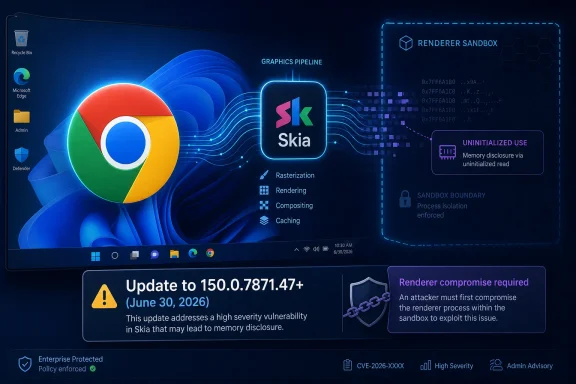 A Medium Bug With Post-Compromise Teeth
CVE-2026-13971 lives in Skia, the 2D graphics library used by Chrome and other Chromium-derived browsers to draw the modern web’s flood of text, images, canvas operations, SVGs, and interface elements. The vulnerability is categorized as uninitialized use, mapped to CWE-457, which means code may read from memory that was never properly initialized before use. In isolation, that sounds mundane; in a browser, it can become a side channel into data that should not be exposed.The published description is unusually precise about the attacker’s starting position. The attacker must already have compromised the renderer process, and the exploit path is a crafted HTML page. That requirement is why the Chromium severity is medium and why CISA’s ADP scoring gives it a 5.3 CVSS 3.1 base score with high attack complexity, required user interaction, and high confidentiality impact but no integrity or availability impact.
That mix matters. A bug that leaks memory after renderer compromise is not the opening move in most attacks; it is a second-stage advantage. Once a renderer is under attacker control, the browser sandbox is supposed to limit what can be learned, touched, or escaped. A memory disclosure in a shared graphics path can help turn a constrained foothold into a more informed one.
This is the awkward middle ground of browser security in 2026. The most dangerous chains are rarely a single vulnerability with a cinematic name. They are combinations: a renderer bug, an information leak, a sandbox escape, sometimes a kernel or GPU driver issue, and a social lure mundane enough to get a user to click.
Skia Is Infrastructure, Not Decoration
Skia does not get the brand recognition of V8, WebAssembly, or the browser sandbox, but it sits in the hot path of almost everything users see. It is a rendering engine component, and rendering engines are among the most heavily exposed code surfaces in consumer computing. If a web page can influence pixels, shapes, fonts, canvas operations, compositing, or image handling, it is asking graphics code to parse and transform hostile input at speed.That is the bargain every browser makes. The web is untrusted content delivered continuously into privileged local software. The browser’s answer has been process isolation, sandboxing, memory-safe techniques where possible, fuzzing, and rapid updates. CVE-2026-13971 shows why that answer is layered rather than absolute.
Uninitialized memory bugs are old-school in concept but still potent in modern systems. They do not necessarily smash the stack or seize execution. Instead, they may reveal fragments of memory that can contain layout clues, object data, pointer values, tokens, previously processed content, or other material useful to an attacker. In an exploit chain, knowing something is often the precondition for doing something.
Google’s advisory for the June 30 stable channel update says Chrome 150.0.7871.46 for Linux and 150.0.7871.46/.47 for Windows and Mac contain a number of fixes and improvements, with a fuller log available separately. Independent coverage from Born’s IT and Windows Blog and PCWorld put the update in the broader context: Chrome 150 landed with hundreds of fixes, not a small one-off patch.
The Version Number Is Where the Story Gets Messy
The CVE description says Chrome prior to 150.0.7871.47 is affected. Google’s release post, however, lists Chrome 150.0.7871.46 for Linux and 150.0.7871.46/.47 for Windows and Mac. The NVD change history shown in the record adds another wrinkle: NIST’s initial analysis added a CPE configuration for Google Chrome versions up to, but excluding, 150.0.7871.46, while the CVE language itself points to “prior to 150.0.7871.47.”That discrepancy is not just trivia for vulnerability database obsessives. In enterprise tooling, CPE matching is how scanners decide whether a machine is vulnerable, patched, or in a gray zone. A one-build mismatch can produce false positives, false negatives, or awkward exceptions in dashboards that management increasingly treats as ground truth.
The user-facing answer is simple: get Chrome to 150.0.7871.47 or later on Windows and Mac if that is the fixed build offered to the machine, and do not assume 150.0.7871.46 is safe on platforms where the CVE language and vendor packaging disagree. The administrator-facing answer is more cautious: verify the browser’s actual installed version, the platform, the channel, and the vendor bulletin rather than relying on a single enriched CPE record.
This is especially important because the NVD entry says its own CVSS assessment had not yet been provided, while CISA-ADP had added a vector and SSVC details. That is normal in the early life of a CVE record, but it means automated interpretation is still catching up with vendor disclosure. The more recent and more granular the vulnerability, the less safe it is to treat database enrichment as canonical.
“Renderer Compromise Required” Is Not a Comfort Blanket
The phrase “who had compromised the renderer process” can sound reassuring because it adds a condition. It should instead make defenders think about exploit chaining. Chrome’s renderer is the part of the browser that processes web content, and it is deliberately isolated because the browser assumes malicious pages exist.A renderer compromise is bad, but it is supposed to be survivable. Site isolation, sandboxing, privilege separation, and brokered access all exist to keep a compromised renderer from becoming a compromised browser, user profile, or operating system. A memory disclosure in that context may help the attacker understand process state, defeat address-space randomization assumptions, or gather fragments of sensitive data.
That is why confidentiality-only bugs can still matter. The CVSS vector for CVE-2026-13971 assigns confidentiality impact as high, while integrity and availability are none. In plain English, this is about reading, not modifying or crashing. But in browser exploitation, reading memory can be the map that makes later exploitation reliable.
It is also worth noting what the public record does not say. There is no public indication in the supplied NVD details that CVE-2026-13971 was exploited in the wild, and CISA’s SSVC entry lists exploitation as “none.” That lowers urgency relative to an actively exploited zero-day, but it does not turn the update into optional maintenance.
The June 30 Patch Was Bigger Than One CVE
Chrome 150’s June 30 stable release was not a boutique fix for a single Skia issue. Google’s release channel post identifies the desktop stable update and says the builds contain multiple fixes and improvements. Born’s IT and Windows Blog reported that the Chrome 150 update fixed 433 vulnerabilities, while PCWorld described Chrome 150 as addressing nearly 400 security flaws, including critical ones.The exact count discrepancy reflects how different outlets and advisories count internal issues, public CVEs, and security-relevant changes. The larger point is stable: this was a large security-bearing browser update. CVE-2026-13971 is one tile in a mosaic, and the mosaic says the browser remains the most aggressively patched application on many Windows PCs for good reason.
That can fatigue users and administrators. Chrome updates often arrive silently, require a browser restart, and collide with open tabs, line-of-business apps, kiosk workflows, virtual desktop images, and patch windows. In unmanaged environments, users postpone relaunches. In managed environments, IT sometimes defers updates to avoid breaking extensions or web apps.
The risk calculus has shifted against delay. When a release contains hundreds of fixes across a browser’s rendering, scripting, networking, UI, media, and platform integration layers, waiting for the “important” CVE to get a scary score misses the point. The browser is no longer just an app; it is a runtime for work.
Windows Shops Feel Chromium Bugs Twice
For WindowsForum readers, Chrome vulnerabilities are rarely just Chrome vulnerabilities. Microsoft Edge is built on Chromium, and other Windows browsers such as Brave, Vivaldi, Opera, and enterprise Chromium variants inherit varying amounts of the same upstream attack surface. They do not all ship the same version number or the same fix on the same day, but the dependency chain matters.Microsoft’s Edge release schedule adds its own layer. Microsoft Learn’s Edge release schedule showed Edge 150 targeting the week of July 2, 2026, while Microsoft has also announced a move to a faster two-week major release cadence beginning with version 152. Windows Central reported that Microsoft framed the faster cycle as a way to deliver smaller, steadier changes more often. That is sensible from a release engineering standpoint, but it gives administrators less room to pretend browser patching is a monthly ritual.
The trap is assuming that “Chromium fixed” means “my Chromium-based browser is fixed.” It means the upstream project has a fix. Each downstream browser must ingest it, test it, package it, ship it, and get it installed. Enterprise tools must then detect it accurately.
For Edge, administrators should follow Microsoft’s security update release notes and browser version reporting, not Chrome’s version string. For Chrome, use Google’s release channels and installed version. For third-party Chromium browsers, use that vendor’s advisory. The shared code base creates shared exposure, but the patch state is vendor-specific.
The CPE Mismatch Is a Scanner Problem Waiting to Happen
The user’s most operationally important observation is buried in the NVD section: “Are we missing a CPE here?” That line appears often enough on NVD pages to be easy to ignore, but it is the warning label for a real enterprise problem. CPEs are not the vulnerability; they are the database’s model of the vulnerable product universe.In the supplied change history, NIST added a CPE configuration for Google Chrome with versions up to but excluding 150.0.7871.46, combined with operating-system CPEs for Windows, Linux, and macOS. That modeling appears to sit uneasily beside the CVE description’s “prior to 150.0.7871.47” language and Google’s platform-specific release versioning. If a scanner keys off one interpretation without platform nuance, it may misclassify machines.
The affected-product JSON shown in the CVE record also looks odd: it lists version 150.0.7871.47 with “lessThan” 150.0.7871.47 and status affected. That is a common artifact of version-range representation, where the named version field is less meaningful than the range operator, but it is the sort of thing that confuses human readers and brittle tooling alike.
The best practice is not to argue with the scanner in the abstract. Validate a sample endpoint manually. Check Chrome’s actual version at chrome://settings/help, compare it with Google’s advisory, confirm whether the endpoint is Windows, macOS, or Linux, and then tune scanner exceptions only if the vendor record and local evidence justify it. The database is a starting point, not a substitute for release intelligence.
The Browser Patch Window Is Now a Security Boundary
For years, enterprise patching was organized around the operating system. Patch Tuesday drove the calendar, Windows Server maintenance windows set the rhythm, and browser updates were either absorbed into OS updates or treated as application housekeeping. Chromium broke that model by making the browser a high-frequency security boundary.Google’s own enterprise materials describe Chrome Stable as a fast-moving channel, with minor releases every few weeks and major releases on a regular cadence, while Extended Stable is designed for organizations that need slower feature movement. That tradeoff is not free. Extended Stable may reduce feature churn, but it still must carry critical security fixes, and the lag between upstream disclosure and local deployment remains a measurable risk.
CVE-2026-13971 is a good example because it is not spectacular. It is exactly the kind of medium issue that can be delayed because no one wants to restart a browser fleet before a holiday weekend. Yet the vulnerability class is useful in chains, the component is broadly exposed, and the fix shipped inside a release with many other security corrections.
The lesson is that organizations should define browser patch service-level objectives separately from OS patch SLAs. A seven-day target for actively exploited browser bugs and a shorter-than-monthly target for routine stable security updates is increasingly the realistic baseline. If that sounds aggressive, it is because the web is aggressive.
User Interaction Still Counts When the Browser Is the Workplace
The CVSS vector includes UI:R, meaning user interaction is required. In browser terms, that often means the user must visit or interact with a malicious page. That should not be oversold as a mitigating factor. The entire job of a browser is to let users interact with pages.Phishing, malvertising, compromised legitimate sites, poisoned search results, malicious documentation portals, fake support pages, and weaponized collaboration links all supply user interaction at scale. The gap between “requires a click” and “unlikely” has largely disappeared. A crafted HTML page is not an exotic delivery mechanism; it is the web.
This is also why security teams should be careful with messaging. Telling users “don’t click suspicious links” is not a patch strategy. It is a thin behavioral layer on top of a technical exposure. The durable control is to get vulnerable browser builds out of the environment and keep high-risk browsing activity away from privileged sessions where possible.
For administrators, that means pairing patch management with browser hardening. Site isolation, extension governance, download restrictions, password-manager policy, exploit protection, and endpoint detection all matter. But none of them make an old browser build acceptable once a security update is available.
Google’s Disclosure Model Still Leaves Gaps by Design
Google’s Chrome advisories routinely restrict access to bug details until most users are updated, and they may keep restrictions in place longer when a bug affects third-party libraries used by other projects. That practice frustrates researchers and defenders who want full technical detail immediately, but it is rational. Publishing exploit-relevant internals before the patch has propagated can help attackers more than defenders.CVE-2026-13971 appears to follow that familiar pattern. The public issue tracker reference exists, but access may require permissions. The CVE description gives enough to triage impact, classify risk, and verify affected versions, but not enough to reproduce the bug or understand exploit reliability.
That means security teams must act on incomplete information. Waiting for a polished postmortem is a luxury attackers do not grant. A medium-severity information disclosure in Skia, requiring renderer compromise, is enough to justify prompt update when the fixed browser is available.
It also means journalists and vulnerability databases need to avoid overclaiming. There is no public proof here of active exploitation, no public exploit chain, and no evidence in the provided record that CVE-2026-13971 alone escapes the sandbox. The responsible framing is narrower: this is a memory disclosure that becomes more serious in the presence of a renderer compromise.
The Practical Fix Is Boring, Which Is Why It Works
On unmanaged Chrome installations, the fix path is to open the Chrome menu, go to Help, then About Google Chrome, let the update check complete, and relaunch when prompted. On Windows and Mac, the target to look for is 150.0.7871.47 or later where that build is available. On Linux, Google’s advisory lists 150.0.7871.46 for the stable update, so administrators should validate against the package repository and vendor bulletin for their distribution and channel.Managed Chrome environments should verify update policy rather than assuming automatic updates are functioning. Chrome’s updater can be constrained by group policy, network controls, golden images, VDI refresh behavior, application control, or endpoint management drift. A fleet that says “Chrome auto-updates” in the architecture diagram can still carry stale builds in the field.
Security teams should also check browsers that are not named Chrome. Edge, Brave, Vivaldi, Opera, and embedded Chromium runtimes may not share Chrome’s exact version string, but they can share vulnerable upstream code. The correct question is not “Do we run Google Chrome?” It is “Where do we run Chromium-derived rendering code, and how quickly does each vendor ship upstream security fixes?”
For developers shipping Electron or embedded Chromium applications, the same principle applies with more pain. The browser engine inside the app does not magically patch because desktop Chrome updated. If an application bundles Chromium, its owner owns the update path.
The Real Risk Is Treating Browser CVEs as Background Noise
The modern CVE feed is noisy enough to make even good security teams numb. Chrome and Chromium releases now routinely contain enormous numbers of fixes, and only a handful receive individual attention. Medium bugs blur together until an exploit chain gives one of them retroactive significance.That is the wrong way to process browser risk. Severity labels are useful, but they compress too much context. A medium renderer-adjacent information leak in a graphics library can be less urgent than an exploited zero-day, but more strategically relevant than a high-severity bug in a rarely exposed component. Environment matters.
CVE-2026-13971 sits in a high-exposure component, affects a dominant desktop browser, and can disclose sensitive memory after renderer compromise. That is enough to put it above routine backlog status. It does not require panic; it requires disciplined update hygiene.
The fact that CISA-ADP lists exploitation as none should shape response, not eliminate it. There is a difference between emergency patching and prompt patching. This belongs in the latter category unless new evidence changes the threat picture.
The Patch Notes Are Really an Asset Inventory Test
A browser CVE is also a test of whether an organization knows what it runs. Chrome installed per-user, Chrome installed machine-wide, Edge Stable, Edge Extended Stable, developer channels, portable browsers, legacy kiosk images, unmanaged lab machines, virtual desktops, and third-party app bundles can all coexist inside the same estate. Vulnerability management often sees only part of that picture.CVE-2026-13971 exposes the weakness of relying only on vendor names. The vulnerability is branded as Google Chrome because that is the published CVE source, but the code is in Skia and the broader ecosystem is Chromium. If an inventory system cannot distinguish Chrome build numbers, Edge build numbers, channel types, and embedded browser runtimes, it cannot answer the exposure question cleanly.
The scanner-CPE mismatch makes this harder. A machine can be technically patched but still flagged because enrichment lags or version ranges are modeled incorrectly. Another machine can be vulnerable but missed because the product is not represented with the expected CPE. That is why asset inventory and software version telemetry are security controls, not bookkeeping.
Administrators should treat this update as a chance to audit the path from advisory to endpoint. How long did it take for the advisory to appear in the vulnerability management platform? How long until endpoints reported the fixed build? How many machines needed a browser relaunch? How many had updates disabled by policy? Those answers are more valuable than a single green dashboard.
The Signal Inside Chrome 150’s Noise
Chrome 150 arrived with the kind of oversized security payload that makes individual CVEs seem small. CVE-2026-13971 deserves attention not because it is the most severe item in the release, but because it illustrates the browser’s layered failure model. Once a renderer is compromised, memory disclosure becomes leverage.The concrete takeaways are straightforward:
- Chrome users on Windows and Mac should update to 150.0.7871.47 or later and relaunch the browser to complete installation.
- Linux administrators should verify the fixed Chrome package against Google’s June 30 stable-channel advisory because the published desktop versioning differs by platform.
- Vulnerability teams should not rely blindly on the initial NVD CPE enrichment, because the record’s version-range details and the CVE description do not line up perfectly.
- Security teams should treat CVE-2026-13971 as a prompt-patching issue rather than an emergency zero-day unless new exploitation evidence appears.
- Organizations using Edge or other Chromium-based browsers should track their own vendor’s update channel instead of assuming Chrome’s fixed version applies directly.
- Developers shipping Electron or embedded Chromium applications should confirm whether their bundled Chromium and Skia code paths require an application update.
References
- Primary source: NVD / Chromium
Published: 2026-07-03T07:00:16-07:00
NVD - CVE-2026-13971
 nvd.nist.gov
- Security advisory: MSRC
Published: 2026-07-03T07:00:16-07:00
Original feed URL
Security Update Guide - Microsoft Security Response Center
 msrc.microsoft.com
- Related coverage: cvefeed.io
CVE-2026-13971 - Google Chrome Skia Information Disclosure
Uninitialized Use in Skia in Google Chrome prior to 150.0.7871.47 allowed a remote attacker who had compromised the renderer process to obtain potentially sensitive information from process memory via a crafted HTML page. (Chromium security severity: Medium)cvefeed.io