

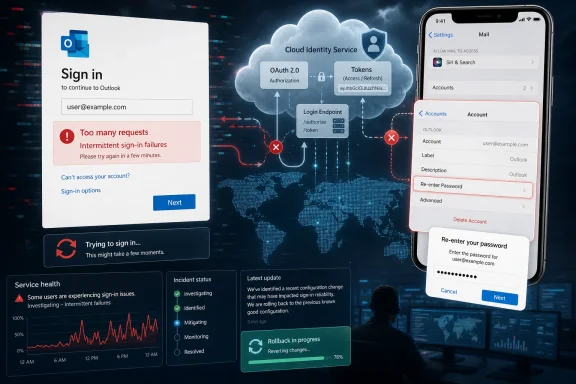
Microsoft Outlook users were unable to sign in on Monday, April 27, 2026, after a Microsoft service change triggered intermittent authentication failures, “too many requests” errors, unexpected sign-outs, and lingering iPhone Mail access problems even after the company rolled back the suspected configuration update. The outage was not a mystery password failure so much as a cloud identity failure wearing the mask of one. As Mashable reported through updates from Microsoft’s service status channels, the fix arrived unevenly: most users recovered, while some iOS users had to re-enter account credentials before mail returned. That distinction matters, because the most dangerous thing during an authentication outage is often the perfectly reasonable thing users do next.
The April 27 incident landed in the most disruptive place Microsoft could have picked: the sign-in path. Users were not merely waiting for messages to sync or watching a web page load slowly. They were being told, in effect, that the service could not decide whether they were allowed through the door.
Microsoft’s own language, relayed by its Microsoft 365 Status account on X and summarized by Mashable, pointed to “intermittent sign-in failures,” “too many requests” errors, and unexpected sign-outs. That phrasing is important. It suggests a failure in authentication flow, throttling, session handling, or related backend configuration rather than a simple client-side bug on one device.
For ordinary users, however, the distinction is invisible. A password prompt looks like a password problem. A repeated sign-in challenge looks like a hacked account, a forgotten credential, or a broken two-factor authentication setup. That is how a service outage becomes a support nightmare: the interface accuses the user long before the vendor explains the system.
By late afternoon Eastern time, Microsoft said a rollback had helped restore service health for most users, according to Mashable’s update. But the company also acknowledged that iPhone users using iOS mail flows could remain affected and needed additional steps. In other words, the main fire was out, but authentication debris was still scattered across devices.
The worst version of this failure is the fake password crisis. A valid password is rejected, a second attempt is made, a verification code is requested, a mobile app is reopened, and suddenly the user has generated exactly the noisy behavior that modern identity systems are designed to slow down. The platform is protecting itself from abuse, but from the user’s perspective, it looks like the platform is punishing them for trying to work.
Mashable’s report noted that user complaints were still elevated on DownDetector even after Microsoft said recovery was underway. That pattern is familiar to anyone who has administered cloud email: status dashboards move in broad service-health strokes, while users recover one cached token, one device, and one confused client app at a time.
The situation was especially fraught because Microsoft’s public status flow reportedly bounced users between its service status page and its X account. A status page that tells users to go to a social media feed for more information has always been a strange compromise. During an email login failure, it becomes almost absurd: the official explanation for why you cannot access a core productivity tool may be sitting on a different platform, in a stream of short posts, mixed with unrelated service notices.
Configuration changes are attractive precisely because they let cloud providers alter behavior without shipping a conventional software update. They are also dangerous for the same reason. A bad configuration can move faster than an app release, reach more users at once, and fail in ways that are hard to reproduce from the outside.
Microsoft’s later statement that telemetry showed recovery after the configuration rollback indicates the company found a meaningful lever. But recovery telemetry is not the same thing as user restoration. Telemetry can show fewer errors across the fleet while a user’s iPhone Mail app still holds a stale credential state and refuses to reconnect.
That gap is why outages often feel dishonest to customers even when the provider is telling the truth. “Service health has returned to normal” can be accurate at the platform level and false at the kitchen-table level. Both things can be true, which is precisely why incident communication has to be more granular than green check marks and optimistic wording.
That is not a fix most users would infer from the original error. If Microsoft Outlook on the web failed, and the service later recovered, a reasonable user might expect Apple Mail to recover too. Instead, some users had to refresh the stored account credential path manually, which suggests the outage left certain client authentication states stranded.
This is where modern email stops being “just email.” Outlook.com, Microsoft accounts, Microsoft 365 identities, Apple’s native Mail app, OAuth flows, app-specific credential prompts, and backend Microsoft throttling all converge in one place: a password box on an iPhone. When it fails, the interface collapses a multi-vendor identity chain into a single accusation: try your password again.
For IT pros, this is the operational lesson. Client apps are not passive windows into cloud services. They cache, retry, refresh tokens, preserve broken states, and sometimes need human intervention after the upstream service has recovered. A cloud outage can therefore create a second wave of support tickets long after the official incident has moved into “monitoring” or “resolved.”
A consumer wants to know whether to change a password, remove an account, or wait. An enterprise administrator wants to know which tenants are affected, whether Conditional Access is involved, whether sign-in logs show false failures, and whether help desks should stop resetting passwords. Microsoft’s public status language often tries to serve both audiences and therefore fully satisfies neither.
For businesses, the practical risk during this kind of outage is not only lost email access. It is the accidental creation of more account events: password resets, repeated MFA challenges, locked accounts, temporary blocks, and confused device re-enrollment. A well-meaning help desk can turn a transient Microsoft incident into a local identity cleanup project.
For consumers, the risk is anxiety. Email remains the recovery channel for banks, shopping accounts, travel plans, medical portals, and other services. When Outlook says a password is wrong or requests are too frequent, users do not merely worry about unread messages. They worry about losing access to the account that proves they own everything else.
The problem is not that X is useless for incident updates. It is fast, widely watched, and easy for reporters and admins to monitor. The problem is that it should not be the canonical place to understand a Microsoft 365 service failure, especially when the impacted users may be locked out of the very account they use to manage Microsoft services.
A good incident page should answer three things plainly: who is affected, what users should avoid doing, and what specific remediation is needed after the service recovers. The April 27 messaging got parts of that right, particularly once Microsoft acknowledged the iOS follow-up steps. But the path there appears to have been too indirect.
The “do not panic-change your password” message should be explicit in outages like this. If the service is rejecting valid credentials, users need to know that retries may worsen throttling or trigger temporary protections. Silence leaves them to troubleshoot by instinct, and instinct during a login failure usually means repeated attempts.
That is why an Outlook sign-in outage lands differently from a broken feature inside Outlook. If search fails, users can still communicate. If formatting breaks, users complain and move on. If authentication breaks, the account itself becomes suspect.
Microsoft sits at the center of this because it has made identity the connective tissue of Windows, Office, Outlook, OneDrive, Teams, Azure, Xbox, and consumer accounts. That integration is convenient when it works. When it fails, the blast radius becomes psychological as much as technical: users are not sure whether Microsoft is down, their account is compromised, their phone is broken, or their password has expired.
The April 27 incident appears to have been a service-side problem, not evidence of a user security failure. But Microsoft’s interface did not make that obvious enough. In identity systems, error wording is part of incident response. A bad error message can send millions of people into the wrong remediation path.
The more delicate question is whether users should remove and re-add accounts. In many email incidents, that becomes the folk remedy passed around forums and social media. It can work, but it can also create more pain if the service is still rejecting authentication or if the user no longer has clean MFA access.
The safer order during an active outage is patience first, credential changes last. Confirm whether Microsoft has acknowledged an incident. Try a different access path, such as Outlook on the web versus Apple Mail, but avoid rapid repeated attempts across every device. If Microsoft says the service has recovered and a specific client remains broken, then refresh that client’s saved credentials.
For administrators, the equivalent is to pause mass remediation. Do not flood users with password reset guidance if sign-in telemetry suggests a platform incident. Do not treat every failure as account compromise when Microsoft is publicly describing intermittent sign-in failures. The correct response to a cloud incident is not always more action; sometimes it is controlled restraint.
A desktop email client used to fail locally. A mail server used to fail for one company. Today, one backend configuration change can disrupt sign-in for users across regions, device types, and account categories. That is the bargain of cloud productivity: fewer local servers, fewer patch nights, fewer bespoke failures — and occasional platform-level incidents that no local admin can fix.
Microsoft’s operational scale is enormous, and that scale cuts both ways. The company can mitigate, rebalance, and roll back across infrastructure most customers could never build. But when something goes wrong in shared identity or service routing, millions of users discover they are tenants in the same building.
The April 27 incident should therefore be read less as an isolated Outlook bug and more as another case study in cloud dependency. The modern workplace runs on authentication, not applications. When authentication stumbles, every app behind it looks broken.
Imagine an Outlook prompt that says: Microsoft is investigating a sign-in issue affecting some users; your password may not be the problem; avoid repeated attempts and check back shortly. That would prevent panic, reduce lockouts, and lower support volume. It would also require Microsoft to connect service-health awareness more directly to the consumer experience.
Enterprise admins already understand this pattern because they live inside dashboards, advisories, and tenant health portals. Consumers do not. But consumers now depend on the same class of cloud identity infrastructure, and they deserve incident-aware messaging too.
This is not merely a nicety. In a world of phishing, account takeover, MFA fatigue attacks, and credential stuffing, users have been trained to take login anomalies seriously. If Microsoft’s own outage produces the same signals as an attack, Microsoft has a duty to distinguish the two as quickly and plainly as it can.
 Outlook Broke at the Front Door, Not in the Mailbox
The April 27 incident landed in the most disruptive place Microsoft could have picked: the sign-in path. Users were not merely waiting for messages to sync or watching a web page load slowly. They were being told, in effect, that the service could not decide whether they were allowed through the door.Microsoft’s own language, relayed by its Microsoft 365 Status account on X and summarized by Mashable, pointed to “intermittent sign-in failures,” “too many requests” errors, and unexpected sign-outs. That phrasing is important. It suggests a failure in authentication flow, throttling, session handling, or related backend configuration rather than a simple client-side bug on one device.
For ordinary users, however, the distinction is invisible. A password prompt looks like a password problem. A repeated sign-in challenge looks like a hacked account, a forgotten credential, or a broken two-factor authentication setup. That is how a service outage becomes a support nightmare: the interface accuses the user long before the vendor explains the system.
By late afternoon Eastern time, Microsoft said a rollback had helped restore service health for most users, according to Mashable’s update. But the company also acknowledged that iPhone users using iOS mail flows could remain affected and needed additional steps. In other words, the main fire was out, but authentication debris was still scattered across devices.
The Error Message Sent Users Down the Wrong Path
“Too many requests” is a technically plausible message and a terrible consumer-facing one. It tells the user that something has happened too often, but not whether the user caused it, Microsoft caused it, or a botnet somewhere is hammering the account. During a live cloud incident, that ambiguity is not a minor UX flaw; it is a force multiplier.The worst version of this failure is the fake password crisis. A valid password is rejected, a second attempt is made, a verification code is requested, a mobile app is reopened, and suddenly the user has generated exactly the noisy behavior that modern identity systems are designed to slow down. The platform is protecting itself from abuse, but from the user’s perspective, it looks like the platform is punishing them for trying to work.
Mashable’s report noted that user complaints were still elevated on DownDetector even after Microsoft said recovery was underway. That pattern is familiar to anyone who has administered cloud email: status dashboards move in broad service-health strokes, while users recover one cached token, one device, and one confused client app at a time.
The situation was especially fraught because Microsoft’s public status flow reportedly bounced users between its service status page and its X account. A status page that tells users to go to a social media feed for more information has always been a strange compromise. During an email login failure, it becomes almost absurd: the official explanation for why you cannot access a core productivity tool may be sitting on a different platform, in a stream of short posts, mixed with unrelated service notices.
Microsoft’s Rollback Was Necessary, but Not Sufficient
The most revealing detail in the incident was not that Microsoft rolled back a change. It was that the rollback did not immediately provide the intended relief, according to Mashable’s mid-afternoon update citing Microsoft’s own status messaging. That is the modern cloud in miniature: “undo the change” sounds simple until the change has already propagated into caches, clients, tokens, routing decisions, and rate-limit states.Configuration changes are attractive precisely because they let cloud providers alter behavior without shipping a conventional software update. They are also dangerous for the same reason. A bad configuration can move faster than an app release, reach more users at once, and fail in ways that are hard to reproduce from the outside.
Microsoft’s later statement that telemetry showed recovery after the configuration rollback indicates the company found a meaningful lever. But recovery telemetry is not the same thing as user restoration. Telemetry can show fewer errors across the fleet while a user’s iPhone Mail app still holds a stale credential state and refuses to reconnect.
That gap is why outages often feel dishonest to customers even when the provider is telling the truth. “Service health has returned to normal” can be accurate at the platform level and false at the kitchen-table level. Both things can be true, which is precisely why incident communication has to be more granular than green check marks and optimistic wording.
iPhone Users Were Left Holding the Client-Side Cleanup
The lingering iOS problem makes this incident more interesting than a generic Outlook outage. Microsoft said impacted iPhone users needed additional steps, and CNET’s workaround, repeated by Mashable, involved going into iPhone Settings, opening Mail, navigating to Accounts, selecting the Outlook account, entering the Outlook password again, tapping Done, and reopening Mail.That is not a fix most users would infer from the original error. If Microsoft Outlook on the web failed, and the service later recovered, a reasonable user might expect Apple Mail to recover too. Instead, some users had to refresh the stored account credential path manually, which suggests the outage left certain client authentication states stranded.
This is where modern email stops being “just email.” Outlook.com, Microsoft accounts, Microsoft 365 identities, Apple’s native Mail app, OAuth flows, app-specific credential prompts, and backend Microsoft throttling all converge in one place: a password box on an iPhone. When it fails, the interface collapses a multi-vendor identity chain into a single accusation: try your password again.
For IT pros, this is the operational lesson. Client apps are not passive windows into cloud services. They cache, retry, refresh tokens, preserve broken states, and sometimes need human intervention after the upstream service has recovered. A cloud outage can therefore create a second wave of support tickets long after the official incident has moved into “monitoring” or “resolved.”
The Consumer and Enterprise Stories Overlap, but They Are Not the Same
Mashable’s report described Microsoft 365 Business and Enterprise customers seeing service interruption language, while much of the public chatter centered on Outlook.com, Hotmail-style personal accounts, and iPhone access. That overlap is not unusual for Microsoft’s identity ecosystem, but it can blur the audience for incident guidance.A consumer wants to know whether to change a password, remove an account, or wait. An enterprise administrator wants to know which tenants are affected, whether Conditional Access is involved, whether sign-in logs show false failures, and whether help desks should stop resetting passwords. Microsoft’s public status language often tries to serve both audiences and therefore fully satisfies neither.
For businesses, the practical risk during this kind of outage is not only lost email access. It is the accidental creation of more account events: password resets, repeated MFA challenges, locked accounts, temporary blocks, and confused device re-enrollment. A well-meaning help desk can turn a transient Microsoft incident into a local identity cleanup project.
For consumers, the risk is anxiety. Email remains the recovery channel for banks, shopping accounts, travel plans, medical portals, and other services. When Outlook says a password is wrong or requests are too frequent, users do not merely worry about unread messages. They worry about losing access to the account that proves they own everything else.
Microsoft’s Status Habit Still Needs Work
Microsoft has improved its public incident communication over the years, but this outage shows the same old weakness: users still had to assemble the story from multiple surfaces. Mashable reported the official service page, Microsoft 365 Status on X, DownDetector reports, and later workaround instructions from CNET. That is too much scavenger hunting for a service as central as Outlook.The problem is not that X is useless for incident updates. It is fast, widely watched, and easy for reporters and admins to monitor. The problem is that it should not be the canonical place to understand a Microsoft 365 service failure, especially when the impacted users may be locked out of the very account they use to manage Microsoft services.
A good incident page should answer three things plainly: who is affected, what users should avoid doing, and what specific remediation is needed after the service recovers. The April 27 messaging got parts of that right, particularly once Microsoft acknowledged the iOS follow-up steps. But the path there appears to have been too indirect.
The “do not panic-change your password” message should be explicit in outages like this. If the service is rejecting valid credentials, users need to know that retries may worsen throttling or trigger temporary protections. Silence leaves them to troubleshoot by instinct, and instinct during a login failure usually means repeated attempts.
The Outage Was a Reminder That Email Is Identity Infrastructure
It is tempting to treat Outlook outages as productivity annoyances: missed meetings, delayed invoices, a few hours of chaos before the inbox returns. That understates the role email plays in 2026. Email is not just where messages arrive; it is where password resets, device alerts, account recovery links, calendar invites, legal notices, and MFA backup paths converge.That is why an Outlook sign-in outage lands differently from a broken feature inside Outlook. If search fails, users can still communicate. If formatting breaks, users complain and move on. If authentication breaks, the account itself becomes suspect.
Microsoft sits at the center of this because it has made identity the connective tissue of Windows, Office, Outlook, OneDrive, Teams, Azure, Xbox, and consumer accounts. That integration is convenient when it works. When it fails, the blast radius becomes psychological as much as technical: users are not sure whether Microsoft is down, their account is compromised, their phone is broken, or their password has expired.
The April 27 incident appears to have been a service-side problem, not evidence of a user security failure. But Microsoft’s interface did not make that obvious enough. In identity systems, error wording is part of incident response. A bad error message can send millions of people into the wrong remediation path.
The Fix Was Simple Only After Someone Else Diagnosed It
For affected iPhone Mail users, the advice repeated by Mashable from CNET was straightforward: reopen the account settings and re-enter the Outlook password. That kind of fix feels almost insultingly basic after hours of outage confusion. But basic fixes are often what remain after a backend incident leaves a local client out of sync.The more delicate question is whether users should remove and re-add accounts. In many email incidents, that becomes the folk remedy passed around forums and social media. It can work, but it can also create more pain if the service is still rejecting authentication or if the user no longer has clean MFA access.
The safer order during an active outage is patience first, credential changes last. Confirm whether Microsoft has acknowledged an incident. Try a different access path, such as Outlook on the web versus Apple Mail, but avoid rapid repeated attempts across every device. If Microsoft says the service has recovered and a specific client remains broken, then refresh that client’s saved credentials.
For administrators, the equivalent is to pause mass remediation. Do not flood users with password reset guidance if sign-in telemetry suggests a platform incident. Do not treat every failure as account compromise when Microsoft is publicly describing intermittent sign-in failures. The correct response to a cloud incident is not always more action; sometimes it is controlled restraint.
The April Outage Fits a Larger Cloud Pattern
This was not Outlook’s first bad day of 2026. Mashable noted that Outlook had also experienced an outage in January, and other outlets covering the April incident pointed to a broader year of Microsoft service disruptions. The point is not that Microsoft is uniquely unreliable; the point is that hyperscale cloud services now fail in ways that are both rare and deeply concentrated.A desktop email client used to fail locally. A mail server used to fail for one company. Today, one backend configuration change can disrupt sign-in for users across regions, device types, and account categories. That is the bargain of cloud productivity: fewer local servers, fewer patch nights, fewer bespoke failures — and occasional platform-level incidents that no local admin can fix.
Microsoft’s operational scale is enormous, and that scale cuts both ways. The company can mitigate, rebalance, and roll back across infrastructure most customers could never build. But when something goes wrong in shared identity or service routing, millions of users discover they are tenants in the same building.
The April 27 incident should therefore be read less as an isolated Outlook bug and more as another case study in cloud dependency. The modern workplace runs on authentication, not applications. When authentication stumbles, every app behind it looks broken.
The Real Lesson Is to Stop Treating Login Errors as User Errors
The most useful shift Microsoft could make is cultural as much as technical. Login errors should not default to a user-blaming posture when the service itself is degraded. If telemetry shows an active authentication incident, the product should say so inside the flow wherever possible.Imagine an Outlook prompt that says: Microsoft is investigating a sign-in issue affecting some users; your password may not be the problem; avoid repeated attempts and check back shortly. That would prevent panic, reduce lockouts, and lower support volume. It would also require Microsoft to connect service-health awareness more directly to the consumer experience.
Enterprise admins already understand this pattern because they live inside dashboards, advisories, and tenant health portals. Consumers do not. But consumers now depend on the same class of cloud identity infrastructure, and they deserve incident-aware messaging too.
This is not merely a nicety. In a world of phishing, account takeover, MFA fatigue attacks, and credential stuffing, users have been trained to take login anomalies seriously. If Microsoft’s own outage produces the same signals as an attack, Microsoft has a duty to distinguish the two as quickly and plainly as it can.
The April 27 Playbook for Anyone Still Untangling Outlook
By now, the April 27 Outlook outage should be resolved for most users, but the incident leaves a practical playbook for the next time a Microsoft sign-in failure appears to be personal and turns out to be global. The point is not to memorize one iPhone settings path. The point is to avoid making a service-side outage worse at the account level.- If Outlook suddenly rejects a known-good password across multiple devices, assume a service incident is possible before changing credentials.
- If Microsoft acknowledges intermittent sign-in failures or “too many requests” errors, stop repeated login attempts long enough for throttling and backend recovery to settle.
- If Outlook on the web works but Apple Mail on iPhone does not, refresh the saved Outlook account credentials in iOS Mail settings after Microsoft reports recovery.
- If you manage users, tell the help desk whether to pause password resets and account re-enrollment until Microsoft’s service health messages are clearer.
- If the account remains inaccessible after Microsoft confirms recovery, then proceed with normal account recovery, MFA checks, and client reconfiguration rather than assuming the outage is still active.
References
- Primary source: Mashable
Published: 2026-07-04T09:50:10.705689
Loading…
mashable.com - Related coverage: androidauthority.com
Loading…
www.androidauthority.com - Related coverage: asoasis.tech
Loading…
asoasis.tech - Related coverage: tomsguide.com
Outlook is down — the latest on the ongoing Microsoft outage | Tom's Guide
What's happening with Microsoft's popular service?www.tomsguide.com - Related coverage: factually.co
Loading…
factually.co - Related coverage: the-independent.com
Loading…
www.the-independent.com
- Related coverage: world.infonasional.com
Loading…
world.infonasional.com - Related coverage: techradar.com
Loading…
www.techradar.com - Official source: learn.microsoft.com
Loading…
learn.microsoft.com - Related coverage: newslocker.com
Loading…
www.newslocker.com - Related coverage: tamiltech.in
Loading…
tamiltech.in - Related coverage: windowscentral.com
"We’ve confirmed service health has returned to normal": Microsoft 365 and Outlook are back up and running | Windows Central
If you're just sitting down to your desk, you may not be able to use Outlook or Microsoft 365.www.windowscentral.com - Related coverage: handlewithcaremo.org
Loading…
handlewithcaremo.org