

Android Auto’s Adobe Acrobat app arrived in June 2026 as an audio-only PDF reader that lets drivers listen to documents through Acrobat’s Read Aloud feature instead of displaying PDF pages on the car screen. That sounds absurd until you remember what modern in-car software is becoming: less a dashboard extension than a controlled, voice-first productivity terminal. As ZDNET’s Artie Beaty found in hands-on use, the surprise is not that PDFs belong in the car; it is that the safest version of a car PDF app is one that refuses to show you the PDF at all.
The Adobe Acrobat arrival, also spotted by 9to5Google in Acrobat for Android version 26.5.0.45958, is easy to mock because the phrase “PDF app for Android Auto” practically writes its own punchline. Nobody should be reading a contract, grant packet, class handout, or quarterly report on a center console at 70 miles per hour. Google and Adobe appear to understand that, which is why Acrobat on Android Auto behaves less like a document viewer and more like a specialized media player.
That distinction matters. The app is not trying to turn the dashboard into a tablet. It is trying to turn dead time into listening time, and that is a much more plausible — and much more consequential — idea.
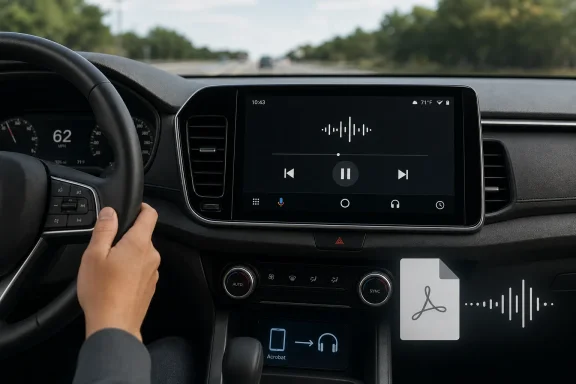
The most important design decision in Acrobat for Android Auto is negative space: it does not display the document. According to ZDNET’s hands-on test, the app does not show PDF text even when the vehicle is parked. It exposes playback controls and relies on Acrobat’s Read Aloud feature to narrate the document.
That is not a compromise; it is the product. The car screen is already a contested surface, crowded by maps, calls, messages, music, climate controls, EV charging information, and a growing number of third-party apps. Adding full PDF rendering to that environment would be a safety problem disguised as a productivity feature.
Instead, Acrobat behaves like a document-shaped podcast app. You pick a PDF, press play, pause, and skip through it with touchscreen or steering-wheel controls. The interaction model is familiar because Android Auto already knows how to handle audio apps, and drivers already know how to consume spoken content without staring at the display.
This is where the initial skepticism starts to fade. A PDF app that displays PDFs in the car would be reckless. A PDF app that reads them aloud is simply another species of audio.
But utility is exactly where PDFs live. Most PDFs are not novels. They are grant guidelines, meeting agendas, court notices, compliance memos, installation manuals, analyst reports, HR packets, syllabus readings, white papers, and bureaucratic slabs of formatted text that nobody loves but many people need to absorb.
For that material, voice quality matters less than throughput. A monotone synthetic voice is perfectly adequate for “Section 4.2: eligible expenses” or “deployment prerequisites for managed devices.” In fact, the dullness may be part of the use case. Acrobat on Android Auto is not promising delight; it is promising to get you through the document pile.
Adobe’s own Play Store listing for Acrobat emphasizes that the Android app can read PDFs aloud and offers both free voices and higher-quality paid options. The Android Auto integration extends that existing mobile feature into the car, rather than inventing a wholly separate automotive document platform. That makes the feature feel less like a gimmick and more like Adobe following the logic of its own app.
Acrobat fits this trajectory. It is not a random PDF viewer crashing the dashboard party; it is another example of Android Auto absorbing tasks that previously lived awkwardly on the phone. If people already listen to work calls, Teams messages, voicemail, podcasts, and audiobooks while driving, listening to a PDF is not the radical leap it first appears to be.
The more interesting shift is conceptual. The car is no longer just where mobile computing pauses. It is increasingly where mobile computing changes modality. Visual tasks become audio tasks. Typing becomes dictation. Browsing becomes curated playback. Reading becomes narration.
That is a subtle but important difference from the old fantasy of the “connected car,” which too often meant slapping more screens and app icons into the cabin. The better version is more restrained: the car gets access to more content, but only after that content has been reshaped for driving.
That restraint should remain non-negotiable. The moment an app like this starts offering “quick review” thumbnails, form fields, comment navigation, or signature prompts from the vehicle display, it crosses from useful adaptation into distraction theater. The fact that something can be technically limited to parked mode does not always solve the problem, because app expectations travel with users.
There is also the cognitive-distraction question. Listening to a dense legal or technical document is not the same as listening to a familiar playlist. A driver parsing grant eligibility rules or security compliance language is spending mental bandwidth. Android Auto’s design can reduce visual distraction, but it cannot make complex listening magically consequence-free.
That does not mean the feature should not exist. It means users need to treat it like any other demanding audio. A light meeting agenda on a familiar route is one thing. A dense incident-response report in heavy traffic is another. The app gives drivers another option, not a license to turn the commute into a deposition.
Sysadmins live in that world. So do consultants, help-desk leads, compliance officers, educators, nonprofit volunteers, small-business owners, and anyone unlucky enough to handle procurement. A read-aloud PDF tool in the car is not glamorous, but it maps neatly onto the way professional information actually moves.
A few examples are obvious. A technician could listen to a vendor deployment guide before arriving onsite. A school administrator could review policy notes between campuses. A nonprofit volunteer, like ZDNET’s Beaty, could make progress through government grant documentation during a drive. A student could listen to assigned readings that were distributed as PDFs instead of accessible audio.
This is also where Acrobat’s ubiquity helps. Adobe says Acrobat Reader has hundreds of millions of installs, and PDFs remain a lingua franca across operating systems. Windows users may live in Edge, Acrobat, Foxit, SumatraPDF, or browser-based viewers on the desktop, but on mobile, Adobe’s app remains one of the default mental destinations for “open this PDF.”
That is often how accessibility ideas become mass-market product ideas. Captions help people in noisy rooms. Voice control helps people carrying groceries. High-contrast modes help people outdoors in sunlight. PDF narration in the car helps drivers, but it also reinforces the broader expectation that documents should not be trapped behind visual layouts.
The catch is that PDF accessibility remains uneven. A well-tagged, text-based PDF can be read aloud in a logical order. A badly scanned image of a document may require OCR. A complex form, table-heavy report, or multi-column academic paper may sound chaotic when flattened into speech. The car app inherits all of those old PDF sins.
That means Acrobat on Android Auto may work beautifully with some files and stumble badly with others. The experience will depend not only on Adobe’s software but on the quality of the original document. Anyone who has wrestled with inaccessible PDFs in government, education, or healthcare knows that “PDF” describes a container, not a guarantee of readability.
But the strategic direction is obvious. Once documents can be narrated in the car, the next temptation is summaries. Then Q&A. Then “brief me on this file before my meeting.” Adobe’s own support material for Acrobat AI Assistant already discusses voice interactions and read-aloud responses in the mobile app, and the company has marketed audio-style document summaries as part of its broader Acrobat productivity push.
That could be genuinely useful. Nobody wants a 74-page procurement document read from title page to appendix if a reliable summary can identify the important sections. A spoken briefing could be more valuable than raw narration, especially for repetitive business documents.
It could also be dangerous in a different way. Summaries introduce interpretation. AI answers introduce error. A driver half-listening to an AI-generated summary of a contract, policy, or technical requirement may come away with confidence that the underlying document does not justify. The dashboard is a terrible place for nuance to die.
That does not make the feature bad. It defines its proper role. Acrobat on Android Auto is useful for previewing, reviewing, and triaging documents. It is not a substitute for reading anything that requires precision, judgment, or legal accountability.
This distinction will matter if Adobe expands the feature. The more Acrobat can do with AI summaries and document chat, the more tempting it becomes to treat the car session as a completed review. Enterprise IT and legal departments should resist that habit. Listening can prepare you to read; it should not replace reading when the stakes are high.
There is a clean analogy to email triage. Hearing a message read aloud while driving is fine. Approving a sensitive financial change based only on that narration is not. PDFs deserve the same boundary.
This is the broader lesson for in-car app ecosystems. The future should not be every phone app mirrored onto the dashboard. It should be a curated set of transformations where each app proves it can become something appropriate for driving. Music becomes playback. Messaging becomes read-and-reply. Navigation becomes glanceable routing. PDFs become narration.
That is a healthier model than the app-store maximalism that infected phones, tablets, smart TVs, and even watches. Cars are not general-purpose computing environments, no matter how large the screen gets. They are safety-critical machines with a computing surface attached.
The best Android Auto apps understand that hierarchy. Acrobat’s Android Auto debut works because it gives up most of what Acrobat normally does.
The car is simply one of the hardest contexts to get right. A laptop can show everything. A phone can show most things. A car should show almost nothing that is not needed for the drive. That forces product teams to ask a useful question: what is the smallest safe version of this task?
For Acrobat, the smallest safe version is playback. For Teams, it might be joining a meeting with audio only. For messages, it is read-and-dictate. For calendars, it is reminders and routing. This kind of reduction is not a step backward; it is the discipline mobile software often lacks.
Enterprise administrators should pay attention because these features tend to arrive first as consumer conveniences and later become workplace expectations. If employees can listen to PDFs through Android Auto, they may start using it for internal documents. That raises familiar questions about document classification, mobile app management, cloud storage connections, and whether sensitive files should be available through unmanaged personal devices.
Adobe’s Play Store listing distinguishes between free voices and upgraded high-quality options, while Acrobat’s broader AI features include cloud-connected services such as AI Assistant and document summaries. The basic Read Aloud feature may not imply the same data flow as AI summarization, but users should not assume all “listen to my PDF” experiences are equivalent.
For personal PDFs, the risk may be low. For business documents, medical files, legal paperwork, grant applications, financial statements, or government forms, the details matter. Is the file opened locally? Is it stored in Adobe cloud storage? Is an AI feature being used? Is the phone connected to a work profile? Is the vehicle shared?
These are not reasons to panic. They are reasons to treat the feature like part of the mobile document workflow rather than a harmless novelty. The car may be where the audio comes out, but the security boundary is still the phone, the app, the account, and the document source.
That is why ZDNET’s verdict feels persuasive. Beaty did not describe a feature that belongs in a daily rotation. He described one that is valuable when the right document collides with the right drive. That is exactly the kind of modest utility many mature platforms need.
Not every feature has to be a new habit. Some features only need to be available at the moment when they save you from wasting time later. The best version of Acrobat on Android Auto may be an app you forget exists until the day before a meeting, class, site visit, or deadline.
That limited ambition is refreshing. In an era when every productivity product wants to become an AI workspace, a companion, a knowledge hub, or a “second brain,” Adobe has accidentally shipped something more grounded: a play button for boring PDFs.
The Adobe Acrobat arrival, also spotted by 9to5Google in Acrobat for Android version 26.5.0.45958, is easy to mock because the phrase “PDF app for Android Auto” practically writes its own punchline. Nobody should be reading a contract, grant packet, class handout, or quarterly report on a center console at 70 miles per hour. Google and Adobe appear to understand that, which is why Acrobat on Android Auto behaves less like a document viewer and more like a specialized media player.
That distinction matters. The app is not trying to turn the dashboard into a tablet. It is trying to turn dead time into listening time, and that is a much more plausible — and much more consequential — idea.
 The Smartest PDF Viewer in the Car Is the One That Shows Nothing
The most important design decision in Acrobat for Android Auto is negative space: it does not display the document. According to ZDNET’s hands-on test, the app does not show PDF text even when the vehicle is parked. It exposes playback controls and relies on Acrobat’s Read Aloud feature to narrate the document.That is not a compromise; it is the product. The car screen is already a contested surface, crowded by maps, calls, messages, music, climate controls, EV charging information, and a growing number of third-party apps. Adding full PDF rendering to that environment would be a safety problem disguised as a productivity feature.
Instead, Acrobat behaves like a document-shaped podcast app. You pick a PDF, press play, pause, and skip through it with touchscreen or steering-wheel controls. The interaction model is familiar because Android Auto already knows how to handle audio apps, and drivers already know how to consume spoken content without staring at the display.
This is where the initial skepticism starts to fade. A PDF app that displays PDFs in the car would be reckless. A PDF app that reads them aloud is simply another species of audio.
Adobe Finds a Use Case Hiding in the Glovebox
The obvious comparison is the audiobook, and that is also where Acrobat is weakest. ZDNET’s test with a PDF book found the text-to-speech voice serviceable but not comparable to a professionally produced audiobook. That should surprise no one. Narration is performance; text-to-speech is utility.But utility is exactly where PDFs live. Most PDFs are not novels. They are grant guidelines, meeting agendas, court notices, compliance memos, installation manuals, analyst reports, HR packets, syllabus readings, white papers, and bureaucratic slabs of formatted text that nobody loves but many people need to absorb.
For that material, voice quality matters less than throughput. A monotone synthetic voice is perfectly adequate for “Section 4.2: eligible expenses” or “deployment prerequisites for managed devices.” In fact, the dullness may be part of the use case. Acrobat on Android Auto is not promising delight; it is promising to get you through the document pile.
Adobe’s own Play Store listing for Acrobat emphasizes that the Android app can read PDFs aloud and offers both free voices and higher-quality paid options. The Android Auto integration extends that existing mobile feature into the car, rather than inventing a wholly separate automotive document platform. That makes the feature feel less like a gimmick and more like Adobe following the logic of its own app.
Android Auto Is Quietly Becoming a Work Surface
Android Auto began as a safer way to bring maps, calls, messages, and music into the vehicle. Over time, the boundaries have widened. Weather radar, parking apps, voice messaging, conferencing, and even limited games have all found their way into Google’s car interface under different safety constraints.Acrobat fits this trajectory. It is not a random PDF viewer crashing the dashboard party; it is another example of Android Auto absorbing tasks that previously lived awkwardly on the phone. If people already listen to work calls, Teams messages, voicemail, podcasts, and audiobooks while driving, listening to a PDF is not the radical leap it first appears to be.
The more interesting shift is conceptual. The car is no longer just where mobile computing pauses. It is increasingly where mobile computing changes modality. Visual tasks become audio tasks. Typing becomes dictation. Browsing becomes curated playback. Reading becomes narration.
That is a subtle but important difference from the old fantasy of the “connected car,” which too often meant slapping more screens and app icons into the cabin. The better version is more restrained: the car gets access to more content, but only after that content has been reshaped for driving.
The Safety Case Depends on Restraint, Not Ambition
The safety argument for Acrobat on Android Auto is only as strong as the app’s refusal to become more capable in the wrong ways. Today’s implementation sounds appropriately constrained. No visible PDF pages. No editing. No signing. No markup. No pretending that a dashboard is an office desk.That restraint should remain non-negotiable. The moment an app like this starts offering “quick review” thumbnails, form fields, comment navigation, or signature prompts from the vehicle display, it crosses from useful adaptation into distraction theater. The fact that something can be technically limited to parked mode does not always solve the problem, because app expectations travel with users.
There is also the cognitive-distraction question. Listening to a dense legal or technical document is not the same as listening to a familiar playlist. A driver parsing grant eligibility rules or security compliance language is spending mental bandwidth. Android Auto’s design can reduce visual distraction, but it cannot make complex listening magically consequence-free.
That does not mean the feature should not exist. It means users need to treat it like any other demanding audio. A light meeting agenda on a familiar route is one thing. A dense incident-response report in heavy traffic is another. The app gives drivers another option, not a license to turn the commute into a deposition.
The Feature Is Better for IT Than for Literature
For WindowsForum readers, the practical use case is not catching up on novels. It is the grimly familiar world of documents that arrive as PDFs because every organization, vendor, regulator, and standards body still treats PDF as the final form of seriousness.Sysadmins live in that world. So do consultants, help-desk leads, compliance officers, educators, nonprofit volunteers, small-business owners, and anyone unlucky enough to handle procurement. A read-aloud PDF tool in the car is not glamorous, but it maps neatly onto the way professional information actually moves.
A few examples are obvious. A technician could listen to a vendor deployment guide before arriving onsite. A school administrator could review policy notes between campuses. A nonprofit volunteer, like ZDNET’s Beaty, could make progress through government grant documentation during a drive. A student could listen to assigned readings that were distributed as PDFs instead of accessible audio.
This is also where Acrobat’s ubiquity helps. Adobe says Acrobat Reader has hundreds of millions of installs, and PDFs remain a lingua franca across operating systems. Windows users may live in Edge, Acrobat, Foxit, SumatraPDF, or browser-based viewers on the desktop, but on mobile, Adobe’s app remains one of the default mental destinations for “open this PDF.”
The Car Is Becoming the Next Accessibility Test
There is another lens here that deserves more attention: accessibility. Read-aloud PDF features are not new, and screen readers have long been central to making documents usable for blind and low-vision users. But Android Auto puts that capability in a mainstream context where hands-free and eyes-free access benefits everyone.That is often how accessibility ideas become mass-market product ideas. Captions help people in noisy rooms. Voice control helps people carrying groceries. High-contrast modes help people outdoors in sunlight. PDF narration in the car helps drivers, but it also reinforces the broader expectation that documents should not be trapped behind visual layouts.
The catch is that PDF accessibility remains uneven. A well-tagged, text-based PDF can be read aloud in a logical order. A badly scanned image of a document may require OCR. A complex form, table-heavy report, or multi-column academic paper may sound chaotic when flattened into speech. The car app inherits all of those old PDF sins.
That means Acrobat on Android Auto may work beautifully with some files and stumble badly with others. The experience will depend not only on Adobe’s software but on the quality of the original document. Anyone who has wrestled with inaccessible PDFs in government, education, or healthcare knows that “PDF” describes a container, not a guarantee of readability.
Adobe’s AI Strategy Is Waiting in the Passenger Seat
Adobe has been pushing Acrobat beyond static document reading for years, and in 2026 the company’s messaging around Acrobat increasingly emphasizes AI Assistant, PDF Spaces, generated summaries, and even podcast-style audio summaries. The Android Auto app, at least as described in ZDNET’s hands-on account, is simpler: it reads the document aloud.But the strategic direction is obvious. Once documents can be narrated in the car, the next temptation is summaries. Then Q&A. Then “brief me on this file before my meeting.” Adobe’s own support material for Acrobat AI Assistant already discusses voice interactions and read-aloud responses in the mobile app, and the company has marketed audio-style document summaries as part of its broader Acrobat productivity push.
That could be genuinely useful. Nobody wants a 74-page procurement document read from title page to appendix if a reliable summary can identify the important sections. A spoken briefing could be more valuable than raw narration, especially for repetitive business documents.
It could also be dangerous in a different way. Summaries introduce interpretation. AI answers introduce error. A driver half-listening to an AI-generated summary of a contract, policy, or technical requirement may come away with confidence that the underlying document does not justify. The dashboard is a terrible place for nuance to die.
The Dashboard Is No Place for Document Finality
There is a reason “I heard it in the car” should not become the last step before a decision. Audio is linear. Documents are spatial. A PDF lets you glance back at a clause, compare a table, inspect a footnote, check a figure, and notice that the exception lives three paragraphs below the rule. Spoken narration strips much of that context away.That does not make the feature bad. It defines its proper role. Acrobat on Android Auto is useful for previewing, reviewing, and triaging documents. It is not a substitute for reading anything that requires precision, judgment, or legal accountability.
This distinction will matter if Adobe expands the feature. The more Acrobat can do with AI summaries and document chat, the more tempting it becomes to treat the car session as a completed review. Enterprise IT and legal departments should resist that habit. Listening can prepare you to read; it should not replace reading when the stakes are high.
There is a clean analogy to email triage. Hearing a message read aloud while driving is fine. Approving a sensitive financial change based only on that narration is not. PDFs deserve the same boundary.
Google’s App Rules Are Doing More Than Policing Distraction
Android Auto’s restrictions are often framed as limitations, but in this case they are the reason the app makes sense. The platform’s safety model forces Acrobat into a narrow lane: audio controls, minimal interface, no document display. That turns a potentially bad idea into a defensible one.This is the broader lesson for in-car app ecosystems. The future should not be every phone app mirrored onto the dashboard. It should be a curated set of transformations where each app proves it can become something appropriate for driving. Music becomes playback. Messaging becomes read-and-reply. Navigation becomes glanceable routing. PDFs become narration.
That is a healthier model than the app-store maximalism that infected phones, tablets, smart TVs, and even watches. Cars are not general-purpose computing environments, no matter how large the screen gets. They are safety-critical machines with a computing surface attached.
The best Android Auto apps understand that hierarchy. Acrobat’s Android Auto debut works because it gives up most of what Acrobat normally does.
Microsoft Users Should Recognize the Pattern
Windows users have seen this story before from another angle. Microsoft Edge, Office, OneDrive, Teams, and Windows itself have all been pushed toward read-aloud features, voice interaction, Copilot summaries, and cross-device continuity. The underlying pitch is that work should follow the user across contexts.The car is simply one of the hardest contexts to get right. A laptop can show everything. A phone can show most things. A car should show almost nothing that is not needed for the drive. That forces product teams to ask a useful question: what is the smallest safe version of this task?
For Acrobat, the smallest safe version is playback. For Teams, it might be joining a meeting with audio only. For messages, it is read-and-dictate. For calendars, it is reminders and routing. This kind of reduction is not a step backward; it is the discipline mobile software often lacks.
Enterprise administrators should pay attention because these features tend to arrive first as consumer conveniences and later become workplace expectations. If employees can listen to PDFs through Android Auto, they may start using it for internal documents. That raises familiar questions about document classification, mobile app management, cloud storage connections, and whether sensitive files should be available through unmanaged personal devices.
The Privacy Story Is Still Mostly Offstage
The ZDNET hands-on piece focuses on usefulness, not privacy, and that is reasonable for a first look. But any document app in the car deserves a second conversation about where the files live, how they are accessed, and whether voice features are local or cloud-assisted.Adobe’s Play Store listing distinguishes between free voices and upgraded high-quality options, while Acrobat’s broader AI features include cloud-connected services such as AI Assistant and document summaries. The basic Read Aloud feature may not imply the same data flow as AI summarization, but users should not assume all “listen to my PDF” experiences are equivalent.
For personal PDFs, the risk may be low. For business documents, medical files, legal paperwork, grant applications, financial statements, or government forms, the details matter. Is the file opened locally? Is it stored in Adobe cloud storage? Is an AI feature being used? Is the phone connected to a work profile? Is the vehicle shared?
These are not reasons to panic. They are reasons to treat the feature like part of the mobile document workflow rather than a harmless novelty. The car may be where the audio comes out, but the security boundary is still the phone, the app, the account, and the document source.
The Surprise Is That the Boring Version Is the Right One
There is a familiar rhythm to modern app coverage: a strange new integration appears, the internet laughs, then someone finds a niche use case that makes it less ridiculous. Acrobat on Android Auto follows that pattern almost perfectly. “PDFs in the car” sounds like a joke. “Listen to the grant guide on the way to the office” sounds like Tuesday.That is why ZDNET’s verdict feels persuasive. Beaty did not describe a feature that belongs in a daily rotation. He described one that is valuable when the right document collides with the right drive. That is exactly the kind of modest utility many mature platforms need.
Not every feature has to be a new habit. Some features only need to be available at the moment when they save you from wasting time later. The best version of Acrobat on Android Auto may be an app you forget exists until the day before a meeting, class, site visit, or deadline.
That limited ambition is refreshing. In an era when every productivity product wants to become an AI workspace, a companion, a knowledge hub, or a “second brain,” Adobe has accidentally shipped something more grounded: a play button for boring PDFs.
The Acrobat Commute Has Boundaries Worth Keeping
The useful way to think about Acrobat on Android Auto is not as a PDF reader, but as a document triage tool for the road. It can help users make progress through material that would otherwise sit untouched. It can also mislead users if they treat passive listening as careful review.- Android Auto’s Acrobat app is useful because it is audio-only, not despite that limitation.
- The feature is best suited to notes, manuals, reports, class material, policy packets, and other documents where rough comprehension is valuable.
- It is a poor substitute for careful reading when contracts, legal obligations, technical specifications, or financial decisions are involved.
- The quality of the experience will depend heavily on whether the PDF contains real, well-structured text rather than messy scans or complex layouts.
- Administrators should think about this as part of mobile document access, especially when employees use personal phones and connected cars for work-adjacent tasks.
References
- Primary source: ZDNET
Published: 2026-07-04T10:52:20.794224
Loading…
www.zdnet.com - Official source: play.google.com
Loading…
play.google.com - Official source: 9to5google.com
Loading…
9to5google.com - Related coverage: helpx.adobe.com
Loading…
helpx.adobe.com - Related coverage: oreateai.com
Loading…
www.oreateai.com - Related coverage: adobe.com
Loading…
www.adobe.com
- Official source: support.google.com
Loading…
support.google.com - Related coverage: android-dz.com
Loading…
www.android-dz.com - Related coverage: apkmirror.com
Loading…
www.apkmirror.com - Related coverage: accessinghigherground.org
Loading…
accessinghigherground.org - Related coverage: news.adobe.com
Loading…
news.adobe.com