

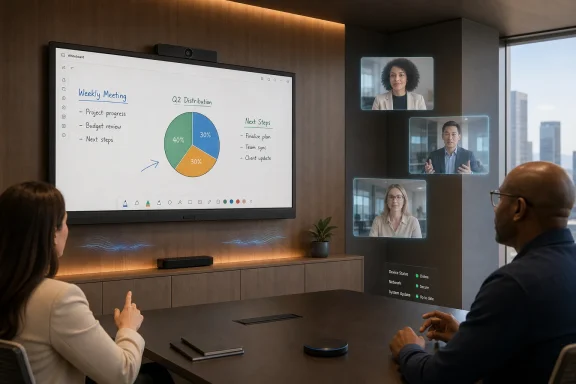
LG Electronics’ One:Quick Works is a 55-inch 4K touch collaboration display with an integrated camera, microphone array, speakers, and Windows 10 IoT Enterprise PC, sold through LG’s business display channels for hybrid meeting rooms and professional collaboration spaces. The product is not new in the strict launch-day sense: LG announced the One:Quick family in November 2021, and the 55CT5WJ model remains listed in LG’s commercial portfolio in 2026. The more interesting story is not that LG built a large touchscreen for conference rooms, but that it is still trying to turn its display business into a software-and-systems business. For WindowsForum readers, that makes One:Quick Works less a gadget than a test case for where meeting-room computing is going.
The pitch is familiar to anyone who has endured the first five minutes of a hybrid meeting. The laptop cannot see the camera, the room microphone is muted in two places, someone has the wrong HDMI adapter, and the expensive screen on the wall is being used as a passive TV. LG’s answer is to collapse that mess into one wall-mounted or stand-mounted appliance: screen, camera, mics, speakers, whiteboard, and Windows PC in a single enclosure.
That sounds tidy. It is also a bet that enterprises want fewer pieces of hardware even if that means putting more trust in one vendor’s box.
The One:Quick Works belongs to LG’s One:Quick line, which the company introduced as a business collaboration family in late 2021. LG’s own announcement grouped the 55-inch One:Quick Works with the smaller One:Quick Flex and the One:Quick Share wireless screen-sharing accessory, framing the lineup around offices that were being redesigned for hybrid work.
That timing matters. By late 2021, the first emergency phase of remote work had passed, and companies were beginning to spend real money on the messy middle ground: offices that still existed, workers who were not there every day, and meeting rooms expected to include people sitting at a table and people dialing in from home. The conference room had become less a place for presentations and more a broadcasting studio with chairs.
LG’s product page for the 55CT5WJ still presents the device in that language. The headline features are blunt: a 55-inch UHD display, built-in 4K camera, microphone, Windows 10 IoT Enterprise, touch support, and meeting-room software. B&H Photo and other professional resellers have described it similarly, as an all-in-one commercial IPS LED touch display for video calling and collaboration rather than a consumer TV with extra ports.
That distinction is important because it explains the price and the audience. One:Quick Works is not aimed at the person comparing TVs at Costco. It is aimed at IT managers, facilities teams, school districts, government offices, healthcare organizations, and integrators who would rather buy a standardized room endpoint than assemble one from a display, NUC, webcam, soundbar, whiteboard camera, and control panel.
In that sense, LG is following the same economic logic that pushed printers into managed print services and security cameras into cloud-managed fleets. The margin is not only in the panel. The margin is in the repeatable deployment.
LG lists Windows 10 IoT Enterprise on the product, and reseller specifications identify the original 55CT5WJ configuration with embedded AMD Ryzen hardware, Radeon graphics, 8GB of memory, and 128GB of storage. Those numbers are not workstation-class, but they do not need to be. The job is to run conferencing clients, digital whiteboarding, screen sharing, web apps, and maybe a browser-based dashboard without making every meeting depend on someone’s laptop.
For Windows administrators, that changes the room from “AV equipment” into “another managed endpoint.” That is both helpful and mildly terrifying. Helpful, because familiar tools can apply: patching, accounts, domain or Azure AD policies depending on the environment, remote assistance, endpoint protection, and inventory. Terrifying, because every meeting-room screen with a PC inside becomes one more device that can fall behind on updates, accumulate local files, or sit logged into the wrong account.
The “IoT Enterprise” label can sound reassuring, but it should not lull anyone into treating the device as inert signage. A Windows-based room system still has an attack surface. It may have browser access, conferencing apps, USB ports, network shares, cached credentials, and local storage. In a corporate environment, the most dangerous endpoint is often not the laptop everyone worries about; it is the shared machine no one owns.
That is why One:Quick Works should be evaluated less like a display and more like a kiosk-class Windows deployment. It needs a hardened baseline, restricted user profiles, a patching cadence, and a plan for app updates. If it is going into a boardroom, it should not become the place where confidential decks are downloaded and forgotten.
Those are commercial display specs, not gaming-monitor bragging rights. Nobody is buying this for high-refresh animation or HDR theatrics. The point is legibility, durability, and predictability in rooms where people stand at odd angles, draw on the glass, and leave the system powered for long stretches.
The camera and audio package is similarly pragmatic. LG’s materials describe a built-in 4K camera and microphone system that can focus on speakers, while detailed spec sheets list a 120-degree field of view, electronic pan-tilt-zoom behavior, a 10-microphone array, beamforming, and integrated 10-watt stereo speakers. That is exactly the feature cluster buyers now expect in a room endpoint: wide enough to see the table, smart enough to favor the active speaker, and integrated enough that nobody needs to Velcro a USB webcam to the top.
The screen supports common room workflows: whiteboarding, annotating, sharing files, connecting external sources, and using conferencing apps. LG’s material references its One:Quick Remote Meeting software, whiteboard functions, screen capture, file sharing, and compatibility with One:Quick Share. The built-in Windows environment also leaves room for standard apps such as Microsoft Teams, Zoom, Webex, Chrome, or line-of-business tools, depending on what IT permits.
That last phrase is doing a lot of work. In a demo, flexibility looks like freedom. In a real enterprise, flexibility looks like governance.
A conventional meeting room assembled from separate parts is ugly but modular. If a webcam dies, someone swaps it. If the mini PC ages out, the screen can stay. If the microphone pickup is poor, the AV team can replace the audio layer without touching the display. The result may be a cable nest, but it is a repairable cable nest.
One:Quick Works collapses that stack. That makes procurement cleaner and installation faster, but it also makes lifecycle planning more important. The display panel may remain perfectly serviceable long after the embedded PC feels old. The camera may be fine while the OS image reaches a support deadline. The microphones may be adequate for one room but not another. A product that simplifies day-one deployment can complicate year-five ownership.
This is not unique to LG. Microsoft’s Surface Hub, Cisco’s collaboration boards, Google Meet hardware, and Poly room systems all carry some version of the same tradeoff. The industry has largely decided that meeting rooms should become appliances, because appliances are easier to sell, easier to standardize, and easier for non-technical employees to use. But appliances age as complete systems, and that is where IT buyers should push vendors hard.
The right procurement question is not “Does it work in the demo?” It is “What happens when the embedded Windows image, conferencing app requirements, or camera expectations change?” For an enterprise buying dozens of units, serviceability and software lifecycle may matter more than the elegance of the first install.
That is the market LG is chasing. A meeting-room display is no longer just the thing that shows the PowerPoint. It is the front door for remote colleagues, clients, contractors, and executives. Bad audio makes remote participants second-class. Bad camera framing makes the room feel distant. A clumsy join flow punishes the first person who tries to start the meeting.
The best argument for One:Quick Works is that it recognizes this shift. The product assumes the room itself must be a collaboration endpoint, not a passive surface waiting for a laptop. The user walks in, taps the display, starts a call, draws on the board, and shares content. In theory, the room is ready before the meeting is.
That also explains why LG emphasizes design. Commercial AV used to tolerate boxes, brackets, and cable channels as the cost of functionality. Modern offices increasingly want technology to disappear into the room. A narrow-bezel 55-inch screen with a built-in camera and minimal external hardware fits the aesthetic of glass-walled offices and executive huddle spaces better than a cart of mismatched peripherals.
Still, the room does not become smart simply because the screen is large. The intelligence is in the workflow: calendar integration, identity handling, guest access, remote management, app compatibility, and support. LG can provide the hardware and some software scaffolding, but the customer’s IT architecture decides whether the experience feels seamless or merely expensive.
That neutrality gives LG a different flavor from tightly integrated room platforms. Surface Hub naturally speaks Microsoft. Google Meet hardware naturally speaks Google. Cisco hardware naturally leans into Cisco’s collaboration stack. LG’s proposition is closer to “bring your software, we will provide the room computer and display.”
But Windows openness is not magic. Every additional app creates maintenance obligations. Every conferencing client wants updates. Every update can change device permissions, camera behavior, sign-in flows, or meeting-room mode requirements. A room display that tries to support everything can become a shared desktop that nobody wants to administer.
The best deployments will narrow the possible paths. A company might standardize on Teams and Zoom, lock down the rest, provision a dedicated room account, and use remote management tools to keep images clean. A weaker deployment will leave the device as an open Windows machine in a room full of visitors, which is how collaboration hardware becomes an unplanned help-desk category.
For WindowsForum’s audience, this is the familiar story of convenience versus control. One:Quick Works can be a tidy endpoint. It can also be a wall-mounted unmanaged PC with a very large attack surface.
LG Electronics, traded in South Korea under KRX: 066570, is a large diversified electronics company whose revenue is not going to swing on one 55-inch collaboration display. Appliances, TVs, vehicle components, HVAC, and broader business solutions matter far more at the company level. One:Quick Works is a signal, not a thesis by itself.
The signal is that LG wants more of its business to look like solutions rather than commodity hardware. In recent investor and corporate communications, LG has emphasized B2B growth areas including HVAC, vehicle solutions, commercial displays, and platform-driven businesses. The company has also discussed synergies across display-focused businesses, including TVs, commercial displays, IT products, and webOS-based services.
One:Quick Works fits that strategy because it packages LG’s display competence with software, compute, camera, audio, and channel relationships. It is not merely a panel sale. It is a room solution sold into corporate budgets, often through integrators and professional resellers, with potential follow-on opportunities in service, accessories, support, and fleet standardization.
That does not make it a guaranteed winner. The collaboration hardware market is crowded, and the biggest software ecosystems have their own hardware partners and certification programs. LG’s challenge is to convince buyers that its display-first approach is flexible enough to justify choosing it over a platform-native room system.
For investors, the question is not whether One:Quick Works is clever. The question is whether LG can repeatedly turn screens into managed business environments where hardware, software, and services reinforce one another.
That puts LG in an interesting middle position. It does not own the dominant meeting software layer. It does not have Microsoft’s enterprise identity footprint, Cisco’s conferencing heritage, or Logitech’s peripheral ubiquity. What it does have is deep display manufacturing experience, global commercial distribution, and credibility in signage and professional panels.
The One:Quick Works therefore competes on consolidation and neutrality. It says, effectively: here is a commercial-grade LG display that is also the room PC, room camera, room microphone, whiteboard, and presentation surface. If your organization does not want to commit the room itself to a single meeting software vendor, that pitch has value.
The risk is that meeting software vendors increasingly define the room experience. Teams Rooms, Zoom Rooms, and Google Meet hardware environments are not just apps; they are management models, certification paths, and user expectations. If those ecosystems pull customers toward approved appliances, LG must either remain compatible enough to be trusted or align more tightly with specific room platforms.
That is the strategic squeeze for every hardware maker in collaboration. The more meetings become software-defined, the less the screen alone decides the sale.
Think of a regional healthcare network standardizing consultation rooms. Think of a university upgrading seminar spaces. Think of a government agency replacing aging projector rooms. Think of a midsize company that wants five or ten huddle rooms to work the same way without involving an AV technician every time someone moves a table.
In those settings, consistency beats novelty. A 55-inch display is large enough for small and medium rooms, the built-in camera and microphone reduce installation decisions, and the Windows PC keeps the software story familiar. The value is not that the device is spectacular. The value is that employees can walk into any room and expect the same basic behavior.
The wrong buyer is the one looking for a magic appliance that removes the need for IT ownership. One:Quick Works may simplify cabling, but it does not eliminate policy. Someone still has to decide how users sign in, whether files are retained, which apps are allowed, how updates are tested, what happens when a meeting fails, and how the device is wiped or repurposed.
The conference room has become part of the endpoint fleet. Buying an all-in-one display does not change that. It only makes the endpoint harder to ignore.
The more important procurement questions are operational. How long will LG support the device image? How easily can IT reimage or lock down the Windows environment? Are firmware, driver, and app updates delivered cleanly? Does the camera behave reliably in the company’s actual rooms, not just in a demo space? Can the microphone array handle HVAC noise, glass walls, and people sitting too far from the display?
There is also the matter of Windows 10 IoT Enterprise in 2026. Windows 10’s mainstream consumer and business lifecycle has already become a migration pressure point for many organizations, while IoT editions have different servicing timelines depending on release and licensing. Buyers should verify the exact OS build, support lifecycle, and upgrade path for the unit they are purchasing rather than assuming the words “Windows 10 IoT” settle the matter.
That is especially true because meeting-room equipment tends to stay deployed longer than laptops. A company may refresh employee PCs every three or four years but leave room displays on walls for seven. The mismatch between display longevity and PC software cadence is one of the category’s central tensions.
The best all-in-one meeting system is not the one with the cleanest brochure. It is the one whose lifecycle does not surprise the people who have to support it.
A bad room makes policy contradictions visible. If employees are told the office is for collaboration but the room cannot include remote colleagues well, the office loses credibility. If remote staff cannot hear side conversations or read the board, hybrid becomes hierarchy. If every meeting starts with someone troubleshooting inputs, the building feels less modern than the laptop at home.
LG’s all-in-one approach is a response to that pain. It tries to make the physical room feel like a single device, as predictable as opening a laptop lid. That ambition is sensible, and it is why the category will keep attracting vendors.
But the future of meeting rooms is unlikely to be decided by hardware alone. AI framing, live transcription, speaker attribution, room analytics, calendaring, identity, privacy controls, and cross-platform meeting intelligence will increasingly define the experience. The screen will remain necessary, but it may become the least differentiated part of the stack.
For LG, that means One:Quick Works is only as strong as the ecosystem around it. The company can win on panel quality and integration, but long-term relevance will depend on management, interoperability, and software refresh.
That shift creates a new class of decisions for IT teams:
LG’s One:Quick Works shows where the market is headed: fewer loose devices, more integrated room endpoints, and a blurred line between AV gear and Windows fleet management. For LG Electronics, it is one small piece of a broader push to make commercial displays part of higher-value business systems. For IT buyers, it is a reminder that the hybrid office will not be fixed by a screen alone, but the screen is increasingly where the success or failure of the whole system becomes visible.
The pitch is familiar to anyone who has endured the first five minutes of a hybrid meeting. The laptop cannot see the camera, the room microphone is muted in two places, someone has the wrong HDMI adapter, and the expensive screen on the wall is being used as a passive TV. LG’s answer is to collapse that mess into one wall-mounted or stand-mounted appliance: screen, camera, mics, speakers, whiteboard, and Windows PC in a single enclosure.
That sounds tidy. It is also a bet that enterprises want fewer pieces of hardware even if that means putting more trust in one vendor’s box.
 LG Is Selling Fewer Screens and More Rooms
The One:Quick Works belongs to LG’s One:Quick line, which the company introduced as a business collaboration family in late 2021. LG’s own announcement grouped the 55-inch One:Quick Works with the smaller One:Quick Flex and the One:Quick Share wireless screen-sharing accessory, framing the lineup around offices that were being redesigned for hybrid work.That timing matters. By late 2021, the first emergency phase of remote work had passed, and companies were beginning to spend real money on the messy middle ground: offices that still existed, workers who were not there every day, and meeting rooms expected to include people sitting at a table and people dialing in from home. The conference room had become less a place for presentations and more a broadcasting studio with chairs.
LG’s product page for the 55CT5WJ still presents the device in that language. The headline features are blunt: a 55-inch UHD display, built-in 4K camera, microphone, Windows 10 IoT Enterprise, touch support, and meeting-room software. B&H Photo and other professional resellers have described it similarly, as an all-in-one commercial IPS LED touch display for video calling and collaboration rather than a consumer TV with extra ports.
That distinction is important because it explains the price and the audience. One:Quick Works is not aimed at the person comparing TVs at Costco. It is aimed at IT managers, facilities teams, school districts, government offices, healthcare organizations, and integrators who would rather buy a standardized room endpoint than assemble one from a display, NUC, webcam, soundbar, whiteboard camera, and control panel.
In that sense, LG is following the same economic logic that pushed printers into managed print services and security cameras into cloud-managed fleets. The margin is not only in the panel. The margin is in the repeatable deployment.
The Conference Room Became a Windows Endpoint
The most consequential spec on the One:Quick Works is not the 55-inch panel. It is the Windows PC inside.LG lists Windows 10 IoT Enterprise on the product, and reseller specifications identify the original 55CT5WJ configuration with embedded AMD Ryzen hardware, Radeon graphics, 8GB of memory, and 128GB of storage. Those numbers are not workstation-class, but they do not need to be. The job is to run conferencing clients, digital whiteboarding, screen sharing, web apps, and maybe a browser-based dashboard without making every meeting depend on someone’s laptop.
For Windows administrators, that changes the room from “AV equipment” into “another managed endpoint.” That is both helpful and mildly terrifying. Helpful, because familiar tools can apply: patching, accounts, domain or Azure AD policies depending on the environment, remote assistance, endpoint protection, and inventory. Terrifying, because every meeting-room screen with a PC inside becomes one more device that can fall behind on updates, accumulate local files, or sit logged into the wrong account.
The “IoT Enterprise” label can sound reassuring, but it should not lull anyone into treating the device as inert signage. A Windows-based room system still has an attack surface. It may have browser access, conferencing apps, USB ports, network shares, cached credentials, and local storage. In a corporate environment, the most dangerous endpoint is often not the laptop everyone worries about; it is the shared machine no one owns.
That is why One:Quick Works should be evaluated less like a display and more like a kiosk-class Windows deployment. It needs a hardened baseline, restricted user profiles, a patching cadence, and a plan for app updates. If it is going into a boardroom, it should not become the place where confidential decks are downloaded and forgotten.
The Hardware Pitch Is Boring in the Right Way
The physical proposition is straightforward. LG’s 55CT5WJ uses a 55-inch UHD 3840×2160 IPS touch panel, supports 10-point multi-touch, and includes an anti-glare surface intended for office lighting. Datasheet material for the model lists a 60Hz refresh rate, 450-nit typical brightness, wide viewing angles, and a 24/7 operation rating.Those are commercial display specs, not gaming-monitor bragging rights. Nobody is buying this for high-refresh animation or HDR theatrics. The point is legibility, durability, and predictability in rooms where people stand at odd angles, draw on the glass, and leave the system powered for long stretches.
The camera and audio package is similarly pragmatic. LG’s materials describe a built-in 4K camera and microphone system that can focus on speakers, while detailed spec sheets list a 120-degree field of view, electronic pan-tilt-zoom behavior, a 10-microphone array, beamforming, and integrated 10-watt stereo speakers. That is exactly the feature cluster buyers now expect in a room endpoint: wide enough to see the table, smart enough to favor the active speaker, and integrated enough that nobody needs to Velcro a USB webcam to the top.
The screen supports common room workflows: whiteboarding, annotating, sharing files, connecting external sources, and using conferencing apps. LG’s material references its One:Quick Remote Meeting software, whiteboard functions, screen capture, file sharing, and compatibility with One:Quick Share. The built-in Windows environment also leaves room for standard apps such as Microsoft Teams, Zoom, Webex, Chrome, or line-of-business tools, depending on what IT permits.
That last phrase is doing a lot of work. In a demo, flexibility looks like freedom. In a real enterprise, flexibility looks like governance.
The All-in-One Room Has One Big Failure Mode
The cleanest thing about an all-in-one collaboration display is also its most obvious weakness: when the box fails, the room fails.A conventional meeting room assembled from separate parts is ugly but modular. If a webcam dies, someone swaps it. If the mini PC ages out, the screen can stay. If the microphone pickup is poor, the AV team can replace the audio layer without touching the display. The result may be a cable nest, but it is a repairable cable nest.
One:Quick Works collapses that stack. That makes procurement cleaner and installation faster, but it also makes lifecycle planning more important. The display panel may remain perfectly serviceable long after the embedded PC feels old. The camera may be fine while the OS image reaches a support deadline. The microphones may be adequate for one room but not another. A product that simplifies day-one deployment can complicate year-five ownership.
This is not unique to LG. Microsoft’s Surface Hub, Cisco’s collaboration boards, Google Meet hardware, and Poly room systems all carry some version of the same tradeoff. The industry has largely decided that meeting rooms should become appliances, because appliances are easier to sell, easier to standardize, and easier for non-technical employees to use. But appliances age as complete systems, and that is where IT buyers should push vendors hard.
The right procurement question is not “Does it work in the demo?” It is “What happens when the embedded Windows image, conferencing app requirements, or camera expectations change?” For an enterprise buying dozens of units, serviceability and software lifecycle may matter more than the elegance of the first install.
Hybrid Work Turned AV Gear Into Strategic Infrastructure
Before 2020, a mediocre conference room was annoying. After the hybrid shift, it became a drag on organizational function.That is the market LG is chasing. A meeting-room display is no longer just the thing that shows the PowerPoint. It is the front door for remote colleagues, clients, contractors, and executives. Bad audio makes remote participants second-class. Bad camera framing makes the room feel distant. A clumsy join flow punishes the first person who tries to start the meeting.
The best argument for One:Quick Works is that it recognizes this shift. The product assumes the room itself must be a collaboration endpoint, not a passive surface waiting for a laptop. The user walks in, taps the display, starts a call, draws on the board, and shares content. In theory, the room is ready before the meeting is.
That also explains why LG emphasizes design. Commercial AV used to tolerate boxes, brackets, and cable channels as the cost of functionality. Modern offices increasingly want technology to disappear into the room. A narrow-bezel 55-inch screen with a built-in camera and minimal external hardware fits the aesthetic of glass-walled offices and executive huddle spaces better than a cart of mismatched peripherals.
Still, the room does not become smart simply because the screen is large. The intelligence is in the workflow: calendar integration, identity handling, guest access, remote management, app compatibility, and support. LG can provide the hardware and some software scaffolding, but the customer’s IT architecture decides whether the experience feels seamless or merely expensive.
Windows Compatibility Is the Selling Point and the Trap
For mixed-platform companies, the embedded Windows PC is a powerful advantage. A Windows room display can run mainstream conferencing software and browser-based tools without forcing the entire organization into a single vendor’s meeting ecosystem. That is appealing for companies where Teams dominates internally, Zoom dominates customer calls, Webex survives in one department, and someone still needs to open a vendor portal in Chrome.That neutrality gives LG a different flavor from tightly integrated room platforms. Surface Hub naturally speaks Microsoft. Google Meet hardware naturally speaks Google. Cisco hardware naturally leans into Cisco’s collaboration stack. LG’s proposition is closer to “bring your software, we will provide the room computer and display.”
But Windows openness is not magic. Every additional app creates maintenance obligations. Every conferencing client wants updates. Every update can change device permissions, camera behavior, sign-in flows, or meeting-room mode requirements. A room display that tries to support everything can become a shared desktop that nobody wants to administer.
The best deployments will narrow the possible paths. A company might standardize on Teams and Zoom, lock down the rest, provision a dedicated room account, and use remote management tools to keep images clean. A weaker deployment will leave the device as an open Windows machine in a room full of visitors, which is how collaboration hardware becomes an unplanned help-desk category.
For WindowsForum’s audience, this is the familiar story of convenience versus control. One:Quick Works can be a tidy endpoint. It can also be a wall-mounted unmanaged PC with a very large attack surface.
LG’s Investor Story Is Bigger Than One Meeting Screen
The source article frames One:Quick Works partly as something LG Electronics shareholders should know about. That is fair, but only if the claim is kept in proportion.LG Electronics, traded in South Korea under KRX: 066570, is a large diversified electronics company whose revenue is not going to swing on one 55-inch collaboration display. Appliances, TVs, vehicle components, HVAC, and broader business solutions matter far more at the company level. One:Quick Works is a signal, not a thesis by itself.
The signal is that LG wants more of its business to look like solutions rather than commodity hardware. In recent investor and corporate communications, LG has emphasized B2B growth areas including HVAC, vehicle solutions, commercial displays, and platform-driven businesses. The company has also discussed synergies across display-focused businesses, including TVs, commercial displays, IT products, and webOS-based services.
One:Quick Works fits that strategy because it packages LG’s display competence with software, compute, camera, audio, and channel relationships. It is not merely a panel sale. It is a room solution sold into corporate budgets, often through integrators and professional resellers, with potential follow-on opportunities in service, accessories, support, and fleet standardization.
That does not make it a guaranteed winner. The collaboration hardware market is crowded, and the biggest software ecosystems have their own hardware partners and certification programs. LG’s challenge is to convince buyers that its display-first approach is flexible enough to justify choosing it over a platform-native room system.
For investors, the question is not whether One:Quick Works is clever. The question is whether LG can repeatedly turn screens into managed business environments where hardware, software, and services reinforce one another.
The Competitive Field Is Already Full of Giants
LG is not entering an empty category. Microsoft’s Surface Hub has long defined the Windows-centric interactive whiteboard idea, even if its pricing and positioning have kept it in enterprise niches. Cisco, Poly, Logitech, DTEN, Neat, Samsung, and Google-aligned hardware partners all compete for meeting-room budgets. Many of them arrive with stronger claims around room certification, camera intelligence, or native platform integration.That puts LG in an interesting middle position. It does not own the dominant meeting software layer. It does not have Microsoft’s enterprise identity footprint, Cisco’s conferencing heritage, or Logitech’s peripheral ubiquity. What it does have is deep display manufacturing experience, global commercial distribution, and credibility in signage and professional panels.
The One:Quick Works therefore competes on consolidation and neutrality. It says, effectively: here is a commercial-grade LG display that is also the room PC, room camera, room microphone, whiteboard, and presentation surface. If your organization does not want to commit the room itself to a single meeting software vendor, that pitch has value.
The risk is that meeting software vendors increasingly define the room experience. Teams Rooms, Zoom Rooms, and Google Meet hardware environments are not just apps; they are management models, certification paths, and user expectations. If those ecosystems pull customers toward approved appliances, LG must either remain compatible enough to be trusted or align more tightly with specific room platforms.
That is the strategic squeeze for every hardware maker in collaboration. The more meetings become software-defined, the less the screen alone decides the sale.
The Best Buyer Is Not the Flashiest Office
The ideal One:Quick Works customer is not necessarily a Silicon Valley headquarters with a trophy boardroom. It is more likely an organization with many similar rooms and too little appetite for bespoke AV engineering.Think of a regional healthcare network standardizing consultation rooms. Think of a university upgrading seminar spaces. Think of a government agency replacing aging projector rooms. Think of a midsize company that wants five or ten huddle rooms to work the same way without involving an AV technician every time someone moves a table.
In those settings, consistency beats novelty. A 55-inch display is large enough for small and medium rooms, the built-in camera and microphone reduce installation decisions, and the Windows PC keeps the software story familiar. The value is not that the device is spectacular. The value is that employees can walk into any room and expect the same basic behavior.
The wrong buyer is the one looking for a magic appliance that removes the need for IT ownership. One:Quick Works may simplify cabling, but it does not eliminate policy. Someone still has to decide how users sign in, whether files are retained, which apps are allowed, how updates are tested, what happens when a meeting fails, and how the device is wiped or repurposed.
The conference room has become part of the endpoint fleet. Buying an all-in-one display does not change that. It only makes the endpoint harder to ignore.
The Spec Sheet Hides the Real Procurement Questions
A product like One:Quick Works invites spec-sheet comparison: 55 inches, 4K panel, 10 touch points, 4K camera, 10-mic array, Windows 10 IoT Enterprise, 8GB RAM, 128GB storage, Wi-Fi, Bluetooth, HDMI, USB-C, LAN. Those details matter, but they are only the start.The more important procurement questions are operational. How long will LG support the device image? How easily can IT reimage or lock down the Windows environment? Are firmware, driver, and app updates delivered cleanly? Does the camera behave reliably in the company’s actual rooms, not just in a demo space? Can the microphone array handle HVAC noise, glass walls, and people sitting too far from the display?
There is also the matter of Windows 10 IoT Enterprise in 2026. Windows 10’s mainstream consumer and business lifecycle has already become a migration pressure point for many organizations, while IoT editions have different servicing timelines depending on release and licensing. Buyers should verify the exact OS build, support lifecycle, and upgrade path for the unit they are purchasing rather than assuming the words “Windows 10 IoT” settle the matter.
That is especially true because meeting-room equipment tends to stay deployed longer than laptops. A company may refresh employee PCs every three or four years but leave room displays on walls for seven. The mismatch between display longevity and PC software cadence is one of the category’s central tensions.
The best all-in-one meeting system is not the one with the cleanest brochure. It is the one whose lifecycle does not surprise the people who have to support it.
The Hybrid Office Is Still Looking for Its Default Shape
One reason products like One:Quick Works remain relevant years after launch is that the hybrid office still has not settled into a single standard. Companies experimented with remote-first, return-to-office mandates, hoteling, smaller footprints, collaboration days, and executive exceptions. The meeting room became the battlefield where all those policies had to work in practice.A bad room makes policy contradictions visible. If employees are told the office is for collaboration but the room cannot include remote colleagues well, the office loses credibility. If remote staff cannot hear side conversations or read the board, hybrid becomes hierarchy. If every meeting starts with someone troubleshooting inputs, the building feels less modern than the laptop at home.
LG’s all-in-one approach is a response to that pain. It tries to make the physical room feel like a single device, as predictable as opening a laptop lid. That ambition is sensible, and it is why the category will keep attracting vendors.
But the future of meeting rooms is unlikely to be decided by hardware alone. AI framing, live transcription, speaker attribution, room analytics, calendaring, identity, privacy controls, and cross-platform meeting intelligence will increasingly define the experience. The screen will remain necessary, but it may become the least differentiated part of the stack.
For LG, that means One:Quick Works is only as strong as the ecosystem around it. The company can win on panel quality and integration, but long-term relevance will depend on management, interoperability, and software refresh.
The One:Quick Works Lesson for Windows Rooms
LG’s 55-inch collaboration display is not revolutionary in 2026, but it is a useful marker for how enterprise rooms are changing. The old AV model treated the room as a collection of inputs and outputs. The new model treats it as a managed computer with a large shared interface.That shift creates a new class of decisions for IT teams:
- A collaboration display with Windows inside should be managed with the same seriousness as any other endpoint on the corporate network.
- An all-in-one room system reduces installation complexity, but it can increase lifecycle dependence on a single vendor’s hardware and software support.
- The embedded PC may age faster than the commercial display panel, so refresh planning should separate screen life from compute life.
- Platform flexibility is valuable only when IT narrows, secures, and maintains the approved meeting workflows.
- Buyers should test camera, microphone, update, identity, and guest-sharing behavior in real rooms before standardizing on any meeting-room appliance.
LG’s One:Quick Works shows where the market is headed: fewer loose devices, more integrated room endpoints, and a blurred line between AV gear and Windows fleet management. For LG Electronics, it is one small piece of a broader push to make commercial displays part of higher-value business systems. For IT buyers, it is a reminder that the hybrid office will not be fixed by a screen alone, but the screen is increasingly where the success or failure of the whole system becomes visible.
References
- Primary source: ad-hoc-news.de
Published: 2026-07-04T13:41:20.794844
Loading…
www.ad-hoc-news.de - Related coverage: lg.com
Loading…
www.lg.com - Related coverage: solutions.lg.com
Loading…
solutions.lg.com - Related coverage: marketscreener.com
Loading…
www.marketscreener.com - Related coverage: bhphotovideo.com
Loading…
www.bhphotovideo.com - Related coverage: techradar.com
Loading…
www.techradar.com
- Related coverage: pcgamer.com
Loading…
www.pcgamer.com