

Microsoft’s Xbox Full Screen Experience is a controller-first Windows 11 gaming shell, expanded from handheld PCs to desktop and laptop Insiders in late 2025 and rolling out more broadly in 2026, that reduces desktop overhead and can produce measurable frame-rate gains on some systems. That is the plain answer behind a feature many PC gamers initially dismissed as another Xbox-branded skin. The more interesting story is that Microsoft is finally admitting, through product design rather than marketing copy, that the normal Windows desktop is not the ideal runtime for every game. As MakeUseOf’s Shaheer Khan found in hands-on testing, the interface change matters less than the resources Windows stops spending while the game is running.
For years, Microsoft’s answer to PC gaming friction was to add another layer: Game Bar, Game Mode, the Xbox app, PC Game Pass, widgets, capture tools, overlays, launchers, notifications, and account plumbing. Some of those pieces were useful, but they also reinforced the central contradiction of Windows gaming. The platform wanted to be both a productivity desktop and a living-room console without ever choosing which job mattered at the moment the game launched.
Xbox Full Screen Experience, now also described in Microsoft support material as Xbox mode, changes the premise. It does not merely make the Xbox app bigger. It starts a gaming-first shell, pushes games into full-screen use, and reduces the normal desktop environment’s claim on memory and attention.
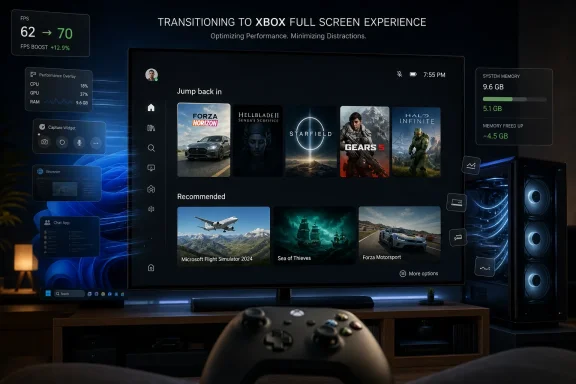
That distinction is why the early performance anecdotes are worth taking seriously, even when they should not be mistaken for universal benchmarks. MakeUseOf reported gains from 62 to 70 FPS in Assassin’s Creed Mirage, 55 to 60 FPS in Resident Evil Requiem, and a much smaller increase from 130 to 132 FPS in Rainbow Six Siege on a Ryzen 5 5600, Radeon RX 5600 XT, and 16GB of DDR4 memory. The pattern is exactly what one would expect if the win is not magic graphics optimization, but reduced operating-system overhead.
Microsoft has been careful to frame the mode as a controller-optimized gaming environment, not as a secret turbo button. But the company has also said the mode can use less memory than the standard Windows desktop, and reporting from Windows Central, Tom’s Hardware, PC Gamer, and others has tracked its expansion from handheld gaming PCs to broader Windows 11 testing. That makes this less of a niche handheld feature and more of a strategic pivot: Windows is learning to get out of its own way.
But the UI is not the real story. Steam Big Picture already proved that PC players like console-style navigation when they are ten feet from the screen. What Microsoft brings to the table is control over Windows itself, and that is where Xbox Full Screen Experience becomes more consequential than a launcher.
The standard Windows 11 desktop is built to be available for anything at any time. It expects you might open Teams, sync OneDrive, receive notifications, index files, render widgets, switch monitors, drag windows, run background updaters, and launch a game all in the same session. That flexibility is the reason Windows dominates PC gaming; it is also the reason Windows sometimes feels like the least disciplined part of a gaming PC.
Xbox mode narrows the job description. When the system enters that environment, the expectation is that the user wants to play games with a controller, not manage overlapping windows. The more Microsoft can suspend, avoid loading, or deprioritize desktop components in that state, the more Windows begins to resemble a console operating environment without actually becoming one.
That matters most on systems with finite shared resources. Handheld PCs with 16GB of unified memory are the obvious case, because system RAM and graphics memory are effectively fighting over the same pool. But MakeUseOf’s desktop test is a reminder that the same principle applies to midrange PCs. A few hundred megabytes or a couple of gigabytes saved may not matter on a 64GB enthusiast tower, but it can matter on a 16GB machine running a modern open-world game, a launcher, an overlay, shader caches, browser tabs, telemetry, and anti-cheat.
That small improvement suggests Xbox Full Screen Experience is not rewriting the graphics stack or turning midrange hardware into a new GPU tier. It is shaving overhead where overhead was relevant. If a game is already light enough, GPU-bound enough, or well within the system’s available memory budget, there may be little for the mode to improve.
That is the correct mental model for this feature. Xbox mode is not DLSS, FSR, frame generation, or a driver-level performance feature. It is closer to a runtime diet for Windows. The gains will vary depending on what the game needs, what the system has available, what background tasks were previously running, and whether the game was bottlenecked by CPU, memory pressure, storage behavior, or GPU throughput.
This is also why Microsoft should be cautious about performance claims. The PC ecosystem punishes averages. A five percent memory reduction on one handheld, a reported 9 percent RAM reduction in another context, and a 13 percent FPS gain in one game on one desktop do not combine into a blanket promise. They point to a real mechanism, but not a guaranteed outcome.
For IT pros and enthusiasts, that distinction is important. Xbox Full Screen Experience is not a replacement for clean drivers, sensible startup apps, enough RAM, a sane antivirus configuration, and good thermals. It is a way for Windows to reduce avoidable interference after those basics are in place.
Windows handhelds exposed the opposite problem. Devices from Asus, Lenovo, MSI, GPD, and Ayaneo offered stronger Windows compatibility on paper, but often felt less coherent in the hand. Users had to navigate desktop UI with touch controls, tolerate launcher sprawl, fiddle with power profiles, and rely on vendor utilities to paper over the fact that Windows was never designed to be a portable console shell.
The ROG Xbox Ally partnership was Microsoft’s acknowledgement that this could not continue indefinitely. If every Windows handheld feels like a tiny laptop pretending to be a console, then Valve owns the product experience even when Windows owns the game library. Xbox Full Screen Experience is Microsoft’s attempt to keep Windows compatibility while borrowing the discipline of a console front end.
That is why bringing the mode to normal desktops and laptops is strategically smart. The living-room gaming PC has always been an idea with more potential than polish. Steam Big Picture helped, but the moment something went wrong—an update prompt, a driver dialog, a launcher login, a focus issue—the illusion collapsed back into desktop computing.
Microsoft cannot eliminate every one of those problems in one mode. But it can create a first-party path where a Windows PC boots or switches into an environment that assumes controller input, game launching, full-screen play, and quick task switching. That is a more credible Xbox-on-PC strategy than simply renaming apps or telling users that “everything is an Xbox.”
MakeUseOf’s account is notable because the Game Bar overhaul inside the full-screen experience was described as one of the best parts of the mode. A cleaner layout, easier settings, accessible per-app audio controls, better Spotify integration, and less apparent frame disruption when opening the overlay are not glamorous changes. They are the kind of changes that make a gaming shell feel like a product rather than a demo.
This is where Microsoft has a real advantage if it executes well. Valve can build an excellent gaming interface, but Microsoft controls the OS-level primitives around audio, capture, input, window switching, HDR, notifications, and system surfaces. If Game Bar becomes a lightweight command center instead of a widget drawer, it could finally justify its place in the stack.
The risk is that Microsoft repeats an old pattern: promising a clean experience and then slowly cluttering it with engagement surfaces. A console-style Windows shell should not become a billboard for subscriptions, rewards, shopping prompts, and social tiles at the expense of launching games quickly. The moment Xbox mode feels like the Microsoft Store with a controller skin, users will compare it unfavorably with SteamOS again.
The early praise for the overlay should therefore be treated as fragile. Microsoft has solved the first-order problem if the interface feels responsive and does not tank frame pacing. The second-order problem is restraint.
This is not unusual for Windows features in staged rollout, Insider testing, or hidden enablement. But it does highlight the gap between Microsoft’s ambition and the current user journey. A console mode that requires registry-adjacent tinkering has not yet become a console mode in any practical sense.
There was another important wrinkle in the MakeUseOf testing: the Xbox app needed to start with Windows for the performance behavior to show up. If that observation holds broadly, Microsoft has a messaging problem. Users who disable startup apps to improve performance may inadvertently disable the very component that makes Xbox mode useful.
That tension is classic Windows. Power users are trained to trim startup entries, kill background services, avoid overlays, and distrust vendor launchers. Xbox Full Screen Experience asks those same users to let an Xbox component launch with the system so Windows can reduce other overhead later. That may be technically reasonable, but it is not emotionally intuitive to the audience most likely to test the feature first.
Microsoft needs to make the dependency visible and self-healing. If Xbox mode requires the Xbox app or a gaming home component to be active at startup, Windows should say so plainly and offer a one-click fix. It should not leave users wondering why their “performance mode” produces no performance difference.
But the PC gaming market is not only halo hardware. Many players are still on 16GB systems, older six-core CPUs, midrange GPUs, budget laptops, and handhelds where every watt and gigabyte matters. Those are the machines where Windows bloat is not a meme; it is a measurable part of the experience.
Handhelds are the strongest case because the constraints are stacked. They run on batteries, often use integrated graphics, share memory between CPU and GPU, and rely on aggressive power management. A mode that reduces idle power, trims memory use, simplifies resume behavior, and avoids unnecessary desktop work can directly affect both performance and usability.
Midrange desktops are the sleeper case. They do not need console UI in the same way handhelds do, but they can still benefit when the OS stops competing with the game. MakeUseOf’s Ryzen 5 5600 and RX 5600 XT setup is exactly the kind of machine many real players own: capable, not new, and sensitive to resource pressure in modern titles.
This is also where the Linux comparison becomes less ideological and more practical. SteamOS and other Linux gaming setups are attractive not simply because they are “lighter,” but because they can be purpose-built around gaming sessions. Xbox Full Screen Experience is Microsoft’s attempt to answer that critique without asking users to give up Windows compatibility.
That makes Xbox Full Screen Experience an appealing compromise. It lets Microsoft say: keep the messy compatibility of Windows, but enter a cleaner environment when it is time to play. In theory, that is the best of both worlds.
In practice, the messy compatibility does not vanish just because the shell changes. Third-party launchers still exist. Anti-cheat still runs. Vendor utilities still matter. Games still update through different stores, and account prompts can still interrupt the living-room fantasy. The mode can reduce Windows desktop overhead, but it cannot fully console-ize a platform whose greatest strength is that every developer and device maker can bolt things onto it.
That is why library aggregation will be crucial. If Xbox mode treats Steam, Epic Games Store, Ubisoft Connect, Battle.net, GOG, and other sources as first-class citizens, users may accept it as a true gaming home. If it privileges Microsoft’s ecosystem too aggressively, it becomes another storefront front end, and PC gamers will route around it.
Microsoft’s public messaging has emphasized access to games and apps, and the Xbox app has been moving toward a broader library view. But the company’s incentives are mixed. Game Pass is a strategic asset, and Windows is a distribution surface. The product will be judged by whether it helps users play their games, not merely Microsoft’s.
On PC, the same concept is harder. Games vary wildly in how they handle focus loss, network connections, memory allocation, DRM, anti-cheat, and graphics device resets. Some tolerate backgrounding gracefully. Others crash, disconnect, hitch, or continue consuming resources as if nothing changed.
That does not make the feature useless. It means users should treat it as convenience rather than a guarantee. Running multiple modern games at once is still expensive, and even a “paused” game can reserve memory or keep processes alive in ways that affect the foreground title.
Here again, Microsoft’s challenge is expectation management. The company should avoid implying console-grade Quick Resume unless it can enforce console-grade behavior. A Windows gaming shell can make switching smoother, but it cannot make every PC game behave like an Xbox title.
The more realistic win is not true multi-game suspension. It is faster movement among games, stores, settings, audio, capture, friends, and desktop escape hatches without needing a keyboard and mouse. That is less flashy, but much more achievable.
The underlying idea is workload-specific Windows. Instead of one desktop surface trying to serve every scenario equally, Microsoft can define modes that load fewer components, prioritize different inputs, and expose different management surfaces. Gaming is the fun test case, but the design pattern could matter elsewhere.
Kiosk mode, Windows 365 boot flows, frontline worker devices, education devices, and dedicated task endpoints all orbit the same question: why load a full general-purpose desktop if the user’s actual job is narrower? Microsoft has explored versions of that question for years, but Xbox mode makes it visible to a large consumer audience.
There is also a security angle. A reduced shell is not automatically a hardened shell, and nobody should assume Xbox Full Screen Experience meaningfully shrinks the attack surface without Microsoft saying so in security terms. But fewer active components, fewer user-facing interruption paths, and clearer session intent can make systems easier to reason about.
For managed environments, the immediate concern is policy. If Xbox mode becomes widely available on Windows 11 PCs, administrators may want controls for enabling, disabling, or restricting it. A gaming shell on a corporate laptop is not inherently dangerous, but unmanaged shell switching, store access, and consumer account integration can complicate compliance expectations.
PC gamers tolerate a lot because the platform gives them freedom. They tolerate driver updates, launcher sprawl, shader compilation, mod conflicts, graphics menus, ini files, and the occasional Windows oddity because the reward is control. But tolerance is not affection.
The Steam Deck succeeded because it reduced the emotional tax. Pick it up, press a button, choose a game, play. The fact that Linux was underneath mattered less than the fact that the user did not have to think about Linux most of the time.
Xbox Full Screen Experience is Microsoft’s attempt to provide the same emotional reduction without giving up Windows. If it works, the user does not have to think about the taskbar, desktop, update prompts, overlapping launchers, or whether the Game Bar overlay will stutter. They just enter a gaming state.
That is a profound shift for Windows. Microsoft is not saying the desktop is obsolete. It is saying the desktop is sometimes the wrong front door.
The feature is still young, unevenly available, and not always easy to enable. Its performance benefits will vary by system and game. It may be transformative on handhelds, modest on midrange desktops, and mostly cosmetic on high-end rigs.
Still, the direction is right. A Windows gaming mode that is more than a toggle, more than a notification suppressor, and more than an overlay is long overdue. Microsoft has the technical leverage to make Windows a better gaming OS not by adding more gaming features, but by subtracting more non-gaming behavior.
That is why the MakeUseOf test resonates. The author expected a gimmick and found measurable gains. The lesson is not that every user should rush to force-enable hidden Windows features with ViVeTool. The lesson is that Windows has been carrying avoidable overhead into gaming sessions for years, and Microsoft has finally shipped a feature that treats that overhead as a design problem.
 Microsoft’s Console Shell Is Really a Windows Confession
For years, Microsoft’s answer to PC gaming friction was to add another layer: Game Bar, Game Mode, the Xbox app, PC Game Pass, widgets, capture tools, overlays, launchers, notifications, and account plumbing. Some of those pieces were useful, but they also reinforced the central contradiction of Windows gaming. The platform wanted to be both a productivity desktop and a living-room console without ever choosing which job mattered at the moment the game launched.Xbox Full Screen Experience, now also described in Microsoft support material as Xbox mode, changes the premise. It does not merely make the Xbox app bigger. It starts a gaming-first shell, pushes games into full-screen use, and reduces the normal desktop environment’s claim on memory and attention.
That distinction is why the early performance anecdotes are worth taking seriously, even when they should not be mistaken for universal benchmarks. MakeUseOf reported gains from 62 to 70 FPS in Assassin’s Creed Mirage, 55 to 60 FPS in Resident Evil Requiem, and a much smaller increase from 130 to 132 FPS in Rainbow Six Siege on a Ryzen 5 5600, Radeon RX 5600 XT, and 16GB of DDR4 memory. The pattern is exactly what one would expect if the win is not magic graphics optimization, but reduced operating-system overhead.
Microsoft has been careful to frame the mode as a controller-optimized gaming environment, not as a secret turbo button. But the company has also said the mode can use less memory than the standard Windows desktop, and reporting from Windows Central, Tom’s Hardware, PC Gamer, and others has tracked its expansion from handheld gaming PCs to broader Windows 11 testing. That makes this less of a niche handheld feature and more of a strategic pivot: Windows is learning to get out of its own way.
The UI Is the Bait, the Process Model Is the Hook
The first thing users notice is the interface. Xbox Full Screen Experience looks like Microsoft’s answer to Steam Big Picture, with a controller-first home screen, a consolidated game library, store access, Game Pass hooks, friends, and simplified navigation. For a PC plugged into a television, that alone has value.But the UI is not the real story. Steam Big Picture already proved that PC players like console-style navigation when they are ten feet from the screen. What Microsoft brings to the table is control over Windows itself, and that is where Xbox Full Screen Experience becomes more consequential than a launcher.
The standard Windows 11 desktop is built to be available for anything at any time. It expects you might open Teams, sync OneDrive, receive notifications, index files, render widgets, switch monitors, drag windows, run background updaters, and launch a game all in the same session. That flexibility is the reason Windows dominates PC gaming; it is also the reason Windows sometimes feels like the least disciplined part of a gaming PC.
Xbox mode narrows the job description. When the system enters that environment, the expectation is that the user wants to play games with a controller, not manage overlapping windows. The more Microsoft can suspend, avoid loading, or deprioritize desktop components in that state, the more Windows begins to resemble a console operating environment without actually becoming one.
That matters most on systems with finite shared resources. Handheld PCs with 16GB of unified memory are the obvious case, because system RAM and graphics memory are effectively fighting over the same pool. But MakeUseOf’s desktop test is a reminder that the same principle applies to midrange PCs. A few hundred megabytes or a couple of gigabytes saved may not matter on a 64GB enthusiast tower, but it can matter on a 16GB machine running a modern open-world game, a launcher, an overlay, shader caches, browser tabs, telemetry, and anti-cheat.
The Benchmarks Say More About Windows Than About Xbox
The most telling number in MakeUseOf’s testing is not the largest one. The jump from 62 to 70 FPS in Assassin’s Creed Mirage is eye-catching, and the 55 to 60 FPS increase in Resident Evil Requiem is meaningful if reproducible. But Rainbow Six Siege barely moving is the useful control case.That small improvement suggests Xbox Full Screen Experience is not rewriting the graphics stack or turning midrange hardware into a new GPU tier. It is shaving overhead where overhead was relevant. If a game is already light enough, GPU-bound enough, or well within the system’s available memory budget, there may be little for the mode to improve.
That is the correct mental model for this feature. Xbox mode is not DLSS, FSR, frame generation, or a driver-level performance feature. It is closer to a runtime diet for Windows. The gains will vary depending on what the game needs, what the system has available, what background tasks were previously running, and whether the game was bottlenecked by CPU, memory pressure, storage behavior, or GPU throughput.
This is also why Microsoft should be cautious about performance claims. The PC ecosystem punishes averages. A five percent memory reduction on one handheld, a reported 9 percent RAM reduction in another context, and a 13 percent FPS gain in one game on one desktop do not combine into a blanket promise. They point to a real mechanism, but not a guaranteed outcome.
For IT pros and enthusiasts, that distinction is important. Xbox Full Screen Experience is not a replacement for clean drivers, sensible startup apps, enough RAM, a sane antivirus configuration, and good thermals. It is a way for Windows to reduce avoidable interference after those basics are in place.
Valve Forced Microsoft to Compete With the Desktop It Built
The uncomfortable truth for Microsoft is that Valve made this conversation unavoidable. SteamOS did not become interesting merely because it was Linux. It became interesting because, on the Steam Deck, it treated gaming as the primary workload and made the operating system feel subordinate to that goal.Windows handhelds exposed the opposite problem. Devices from Asus, Lenovo, MSI, GPD, and Ayaneo offered stronger Windows compatibility on paper, but often felt less coherent in the hand. Users had to navigate desktop UI with touch controls, tolerate launcher sprawl, fiddle with power profiles, and rely on vendor utilities to paper over the fact that Windows was never designed to be a portable console shell.
The ROG Xbox Ally partnership was Microsoft’s acknowledgement that this could not continue indefinitely. If every Windows handheld feels like a tiny laptop pretending to be a console, then Valve owns the product experience even when Windows owns the game library. Xbox Full Screen Experience is Microsoft’s attempt to keep Windows compatibility while borrowing the discipline of a console front end.
That is why bringing the mode to normal desktops and laptops is strategically smart. The living-room gaming PC has always been an idea with more potential than polish. Steam Big Picture helped, but the moment something went wrong—an update prompt, a driver dialog, a launcher login, a focus issue—the illusion collapsed back into desktop computing.
Microsoft cannot eliminate every one of those problems in one mode. But it can create a first-party path where a Windows PC boots or switches into an environment that assumes controller input, game launching, full-screen play, and quick task switching. That is a more credible Xbox-on-PC strategy than simply renaming apps or telling users that “everything is an Xbox.”
The Game Bar Redemption Arc Was Not on Anyone’s Bingo Card
Game Bar has long occupied a strange place in Windows gaming. It was useful enough that many users left it enabled, intrusive enough that others disabled it on sight, and inconsistent enough to become a suspect whenever frame pacing felt wrong. Overlays are always guilty until proven innocent in PC gaming culture.MakeUseOf’s account is notable because the Game Bar overhaul inside the full-screen experience was described as one of the best parts of the mode. A cleaner layout, easier settings, accessible per-app audio controls, better Spotify integration, and less apparent frame disruption when opening the overlay are not glamorous changes. They are the kind of changes that make a gaming shell feel like a product rather than a demo.
This is where Microsoft has a real advantage if it executes well. Valve can build an excellent gaming interface, but Microsoft controls the OS-level primitives around audio, capture, input, window switching, HDR, notifications, and system surfaces. If Game Bar becomes a lightweight command center instead of a widget drawer, it could finally justify its place in the stack.
The risk is that Microsoft repeats an old pattern: promising a clean experience and then slowly cluttering it with engagement surfaces. A console-style Windows shell should not become a billboard for subscriptions, rewards, shopping prompts, and social tiles at the expense of launching games quickly. The moment Xbox mode feels like the Microsoft Store with a controller skin, users will compare it unfavorably with SteamOS again.
The early praise for the overlay should therefore be treated as fragile. Microsoft has solved the first-order problem if the interface feels responsive and does not tank frame pacing. The second-order problem is restraint.
The Setup Friction Shows This Is Still Preview Culture
The least console-like part of Xbox Full Screen Experience is getting it to appear in the first place. MakeUseOf’s test system reportedly required Windows 11 25H2, ViVeTool, and forced feature enablement before the mode was available. That is enthusiast territory, not mainstream product readiness.This is not unusual for Windows features in staged rollout, Insider testing, or hidden enablement. But it does highlight the gap between Microsoft’s ambition and the current user journey. A console mode that requires registry-adjacent tinkering has not yet become a console mode in any practical sense.
There was another important wrinkle in the MakeUseOf testing: the Xbox app needed to start with Windows for the performance behavior to show up. If that observation holds broadly, Microsoft has a messaging problem. Users who disable startup apps to improve performance may inadvertently disable the very component that makes Xbox mode useful.
That tension is classic Windows. Power users are trained to trim startup entries, kill background services, avoid overlays, and distrust vendor launchers. Xbox Full Screen Experience asks those same users to let an Xbox component launch with the system so Windows can reduce other overhead later. That may be technically reasonable, but it is not emotionally intuitive to the audience most likely to test the feature first.
Microsoft needs to make the dependency visible and self-healing. If Xbox mode requires the Xbox app or a gaming home component to be active at startup, Windows should say so plainly and offer a one-click fix. It should not leave users wondering why their “performance mode” produces no performance difference.
The Feature Is Most Honest on Midrange and Handheld Hardware
On a high-end desktop, Xbox Full Screen Experience may feel like a nice interface with occasional side benefits. A Ryzen 9 or Core Ultra desktop with 32GB or 64GB of memory and a top-end GPU has enough headroom that Windows overhead often disappears into the noise. Enthusiast systems can brute-force past inefficiency.But the PC gaming market is not only halo hardware. Many players are still on 16GB systems, older six-core CPUs, midrange GPUs, budget laptops, and handhelds where every watt and gigabyte matters. Those are the machines where Windows bloat is not a meme; it is a measurable part of the experience.
Handhelds are the strongest case because the constraints are stacked. They run on batteries, often use integrated graphics, share memory between CPU and GPU, and rely on aggressive power management. A mode that reduces idle power, trims memory use, simplifies resume behavior, and avoids unnecessary desktop work can directly affect both performance and usability.
Midrange desktops are the sleeper case. They do not need console UI in the same way handhelds do, but they can still benefit when the OS stops competing with the game. MakeUseOf’s Ryzen 5 5600 and RX 5600 XT setup is exactly the kind of machine many real players own: capable, not new, and sensitive to resource pressure in modern titles.
This is also where the Linux comparison becomes less ideological and more practical. SteamOS and other Linux gaming setups are attractive not simply because they are “lighter,” but because they can be purpose-built around gaming sessions. Xbox Full Screen Experience is Microsoft’s attempt to answer that critique without asking users to give up Windows compatibility.
Compatibility Remains Windows’ Trump Card, and Its Burden
Windows still has the largest practical advantage in PC gaming: compatibility. Anti-cheat systems, launchers, mod tools, peripheral utilities, capture software, RGB managers, driver panels, storefronts, and niche games are usually built with Windows first in mind. SteamOS has improved dramatically, but Proton compatibility is still a translation layer, and some multiplayer titles remain difficult or impossible depending on anti-cheat choices.That makes Xbox Full Screen Experience an appealing compromise. It lets Microsoft say: keep the messy compatibility of Windows, but enter a cleaner environment when it is time to play. In theory, that is the best of both worlds.
In practice, the messy compatibility does not vanish just because the shell changes. Third-party launchers still exist. Anti-cheat still runs. Vendor utilities still matter. Games still update through different stores, and account prompts can still interrupt the living-room fantasy. The mode can reduce Windows desktop overhead, but it cannot fully console-ize a platform whose greatest strength is that every developer and device maker can bolt things onto it.
That is why library aggregation will be crucial. If Xbox mode treats Steam, Epic Games Store, Ubisoft Connect, Battle.net, GOG, and other sources as first-class citizens, users may accept it as a true gaming home. If it privileges Microsoft’s ecosystem too aggressively, it becomes another storefront front end, and PC gamers will route around it.
Microsoft’s public messaging has emphasized access to games and apps, and the Xbox app has been moving toward a broader library view. But the company’s incentives are mixed. Game Pass is a strategic asset, and Windows is a distribution surface. The product will be judged by whether it helps users play their games, not merely Microsoft’s.
Quick Resume Dreams Meet PC Reality
MakeUseOf also highlighted a window-switching behavior that can resemble Xbox Series X|S Quick Resume if the PC is powerful enough. The idea is seductive: suspend or background one game, switch to another, and return without a full relaunch. On a console, that feels like magic because the hardware and software assumptions are tightly controlled.On PC, the same concept is harder. Games vary wildly in how they handle focus loss, network connections, memory allocation, DRM, anti-cheat, and graphics device resets. Some tolerate backgrounding gracefully. Others crash, disconnect, hitch, or continue consuming resources as if nothing changed.
That does not make the feature useless. It means users should treat it as convenience rather than a guarantee. Running multiple modern games at once is still expensive, and even a “paused” game can reserve memory or keep processes alive in ways that affect the foreground title.
Here again, Microsoft’s challenge is expectation management. The company should avoid implying console-grade Quick Resume unless it can enforce console-grade behavior. A Windows gaming shell can make switching smoother, but it cannot make every PC game behave like an Xbox title.
The more realistic win is not true multi-game suspension. It is faster movement among games, stores, settings, audio, capture, friends, and desktop escape hatches without needing a keyboard and mouse. That is less flashy, but much more achievable.
Enterprise IT Should Watch the Consumer Feature
At first glance, Xbox Full Screen Experience looks irrelevant to sysadmins. It is a gaming interface, aimed at consumers, handhelds, and living-room PCs. But Windows shell modes have a way of becoming broader platform signals.The underlying idea is workload-specific Windows. Instead of one desktop surface trying to serve every scenario equally, Microsoft can define modes that load fewer components, prioritize different inputs, and expose different management surfaces. Gaming is the fun test case, but the design pattern could matter elsewhere.
Kiosk mode, Windows 365 boot flows, frontline worker devices, education devices, and dedicated task endpoints all orbit the same question: why load a full general-purpose desktop if the user’s actual job is narrower? Microsoft has explored versions of that question for years, but Xbox mode makes it visible to a large consumer audience.
There is also a security angle. A reduced shell is not automatically a hardened shell, and nobody should assume Xbox Full Screen Experience meaningfully shrinks the attack surface without Microsoft saying so in security terms. But fewer active components, fewer user-facing interruption paths, and clearer session intent can make systems easier to reason about.
For managed environments, the immediate concern is policy. If Xbox mode becomes widely available on Windows 11 PCs, administrators may want controls for enabling, disabling, or restricting it. A gaming shell on a corporate laptop is not inherently dangerous, but unmanaged shell switching, store access, and consumer account integration can complicate compliance expectations.
The Real Competition Is Not Linux, but User Patience
It is tempting to frame this as Windows versus Linux. That is partly true, because SteamOS has plainly pressured Microsoft. But the bigger competition is user patience.PC gamers tolerate a lot because the platform gives them freedom. They tolerate driver updates, launcher sprawl, shader compilation, mod conflicts, graphics menus, ini files, and the occasional Windows oddity because the reward is control. But tolerance is not affection.
The Steam Deck succeeded because it reduced the emotional tax. Pick it up, press a button, choose a game, play. The fact that Linux was underneath mattered less than the fact that the user did not have to think about Linux most of the time.
Xbox Full Screen Experience is Microsoft’s attempt to provide the same emotional reduction without giving up Windows. If it works, the user does not have to think about the taskbar, desktop, update prompts, overlapping launchers, or whether the Game Bar overlay will stutter. They just enter a gaming state.
That is a profound shift for Windows. Microsoft is not saying the desktop is obsolete. It is saying the desktop is sometimes the wrong front door.
The FPS Gains Are the Proof, Not the Point
The headline-friendly version of this story is easy: Xbox mode can improve FPS. That is true in some tests, and MakeUseOf’s numbers give the claim a concrete shape. But the more durable point is that Windows gaming performance is not only about GPU drivers and graphics APIs; it is also about how much operating-system machinery insists on being present while the game runs.The feature is still young, unevenly available, and not always easy to enable. Its performance benefits will vary by system and game. It may be transformative on handhelds, modest on midrange desktops, and mostly cosmetic on high-end rigs.
Still, the direction is right. A Windows gaming mode that is more than a toggle, more than a notification suppressor, and more than an overlay is long overdue. Microsoft has the technical leverage to make Windows a better gaming OS not by adding more gaming features, but by subtracting more non-gaming behavior.
That is why the MakeUseOf test resonates. The author expected a gimmick and found measurable gains. The lesson is not that every user should rush to force-enable hidden Windows features with ViVeTool. The lesson is that Windows has been carrying avoidable overhead into gaming sessions for years, and Microsoft has finally shipped a feature that treats that overhead as a design problem.
The Numbers Point to a Narrow but Real Win
The practical read is neither hype nor dismissal. Xbox Full Screen Experience is promising because it attacks a real weakness, but it is not mature enough to become the default recommendation for every Windows gamer.- Users on 16GB systems, handheld PCs, and midrange desktops are the most likely to see meaningful benefits from reduced Windows overhead.
- High-end gaming rigs may notice the cleaner interface more than the frame-rate difference.
- The feature’s performance behavior depends on proper setup, including the Xbox app or gaming home components being available when Windows starts.
- Microsoft needs to make availability, dependencies, and enablement clearer before mainstream users can treat this as a normal Windows feature.
- The best version of Xbox mode will support the whole PC gaming library, not just Microsoft’s store and subscription ecosystem.
- The early FPS gains matter because they prove the concept: a leaner Windows session can be a faster Windows session.
References
- Primary source: MakeUseOf
Published: 2026-07-04T19:01:12.468729
Loading…
www.makeuseof.com - Related coverage: windowscentral.com
Windows 11 just changed the name of Xbox mode (kind of) | Windows Central
Windows 11’s latest Insider build quietly swaps “Xbox mode” for “XBOX mode,” reflecting Microsoft’s broader push to unify the brand.www.windowscentral.com - Related coverage: purepc.pl
Loading…
www.purepc.pl - Related coverage: allthings.how
Loading…
allthings.how - Related coverage: pcguide.com
Loading…
www.pcguide.com - Related coverage: windowslatest.com
Tested: First look at the new Xbox Mode for Windows 11 PCs with console-style gaming UI
Microsoft confirms Xbox Mode for Windows 11 PCs coming in 2026, and I tested the new console-style gaming interface on a Windows PC www.windowslatest.com
- Related coverage: notebookcheck.net
Loading…
www.notebookcheck.net - Related coverage: techradar.com
Loading…
www.techradar.com - Related coverage: tomshardware.com
Microsoft begins rolling out Xbox Mode to Windows 11 desktops and laptops — consolidated storefronts and console-style interface come to PC | Tom's Hardware
The console-style interface, previously limited to handhelds, now works across all Windows 11 PCs.www.tomshardware.com - Related coverage: tomsguide.com
The Xbox Full Screen Experience just arrived on all Windows handhelds — here's how to enable it | Tom's Guide
Microsoft quietly announced that all Windows-based handheld consoles will get the Xbox Full Screen Experience starting November 21.www.tomsguide.com - Related coverage: techspot.com
Microsoft is now testing the Xbox full screen experience on all Windows 11 PCs | TechSpot
The announcement came at the end of Microsoft's November 2025 partner direct event. Making the full screen experience generally available could significantly streamline the process of launching...www.techspot.com - Related coverage: tech.yahoo.com
Loading…
tech.yahoo.com - Related coverage: videocardz.com
Loading…
videocardz.com - Related coverage: trucoteca.com
Loading…
trucoteca.com - Related coverage: pcgamer.com
Loading…
www.pcgamer.com - Related coverage: cincodias.elpais.com
El modo Xbox a pantalla completa llega a Windows 11: estos son los equipos compatibles | Lifestyle | SmartLife | Cinco Días
Te contamos cómo usar este modocincodias.elpais.com