

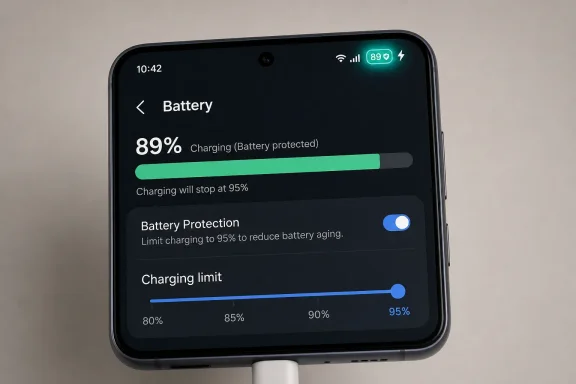
On Samsung phones running One UI 7, a shield inside the battery icon means Battery Protection has stopped charging at the limit you selected, usually in Maximum mode, so the phone is deliberately holding the battery below full charge to reduce long-term battery wear. BGR’s explainer is useful because it captures a small UI change with a much larger point behind it: modern phones no longer treat charging as a dumb electrical transaction. They negotiate, pause, resume, and increasingly tell users when the software has intervened. The shield is not a warning that something is broken; it is Samsung making battery management visible.
For years, smartphone battery advice lived in a fog of half-remembered rules: never charge overnight, always drain to zero, unplug the second it hits 100 percent, avoid fast charging, avoid wireless charging, avoid everything. Some of that folk wisdom came from older battery chemistries and older charging systems, but much of it has survived because batteries remain the one part of a phone that users can feel degrading.
Samsung’s shield icon is a tiny design choice aimed directly at that anxiety. Instead of leaving the user to wonder why the phone is plugged in but not climbing past 80, 85, 90, or 95 percent, One UI 7 shows that the device has intentionally stopped charging. The symbol says, in effect: the phone is not failing to charge; it is refusing to overcharge.
That distinction matters. A stalled battery percentage used to read as a bad cable, a tired charger, a dirty port, or a failing battery. With Battery Protection enabled, the stall is the feature. The shield collapses an invisible software policy into a status-bar signal that ordinary users can understand.
BGR’s report frames this around “overcharging,” and that is the right popular shorthand, even if the underlying chemistry is more nuanced. Lithium-ion phones are not typically sitting there being pumped endlessly past their safe voltage by a reckless charger. The more practical issue is that batteries age faster when they spend lots of time at high charge levels, especially under heat. Samsung’s shield is a consumer-friendly icon for that more complicated reality.
Modern smartphones already include charging controllers and software limits that prevent the battery from being pushed beyond its designed maximum. That is why the old claim that overnight charging automatically “overcharges” a phone is misleading. A phone can remain plugged in overnight without endlessly increasing the battery’s state of charge.
But that does not mean charging habits are irrelevant. There is a difference between preventing an unsafe overcharge and optimizing for battery longevity. A phone can be safe at 100 percent and still age more gracefully if it spends less of its life sitting at that upper bound.
That is the space Samsung is now trying to make legible. Battery Protection is not a panic button; it is a wear-management tool. The shield icon appears when the phone is enforcing that tool, not when disaster has been narrowly avoided.
An 80 percent cap is sensible for a desk worker, a developer with a charger nearby, or anyone trying to stretch a phone’s useful life over several years. It is less attractive for a field technician, traveler, courier, or parent who routinely needs every hour of runtime. By making the cap adjustable, Samsung acknowledges that “battery health” is not a single universal setting.
The shield icon is therefore not merely decorative. It tells you that your chosen charging policy has taken effect. When the phone reaches the selected ceiling, charging stops; if the battery later drops below the threshold, charging can resume, and the familiar lightning symbol returns.
That little swap between shield and lightning is Samsung’s new grammar of charging. Lightning means energy is flowing into the battery. Shield means the software has decided the battery has enough.
In this case, the shield is closer to a seatbelt indicator that says the belt is fastened. It means a protective setting is active. If you enabled Battery Protection yourself, the icon is confirmation that the phone is obeying you.
If you did not enable it deliberately, the shield is still not a sign of battery damage. It means the phone has a charging limit configured somewhere in Battery settings, Quick Settings, Modes and Routines, or a related Samsung optimization path. The fix, if you want full-capacity charging, is not to replace accessories; it is to change the battery-protection setting.
That is an important practical point for support desks and family tech helpers. A user who says “my Samsung won’t charge past 80 percent and has a shield” is probably not describing a hardware failure. They are describing a policy state.
The distinction is easy to miss because both icons live near the same battery indicator and both imply the phone is doing something conservative. But they operate on opposite sides of the energy equation. The shield is about controlling how the battery is charged; the leaf is about controlling how the phone uses power.
Power saving may reduce background activity, lower performance, dim or constrain display behavior, or restrict certain features depending on the model and settings. Battery Protection, by contrast, is primarily about charge limits and battery aging. One tries to make today’s charge last longer; the other tries to make the battery’s lifespan last longer.
That split is exactly why Samsung’s icon language needs to be clear. A battery percentage is no longer enough information. Users need to know whether the phone is draining slowly, charging quickly, charging deliberately, or not charging by design.
That matters in 2026 because the upgrade cycle has changed. Many people no longer replace a flagship phone every year or two just to get a better camera or faster processor. They expect four, five, or more years of software support, and the battery is often the component most likely to make that otherwise capable phone feel old.
Battery software has therefore become a quiet part of the platform war. Samsung, Apple, Google, and others are not only competing on peak charging speed or battery size. They are competing on whether a phone still feels dependable in year three.
The shield icon is a small manifestation of that larger shift. Samsung is telling users that battery care is now a first-class operating-system behavior, not a hidden engineering detail.
This is where battery-health advice often becomes too moralistic. Tech enthusiasts like to talk as though there is a correct way to charge a phone, but the right setting depends on the user’s life. A phone that dies before dinner has failed its owner more immediately than a battery that loses a little capacity two years from now.
Samsung’s adjustable limits are a good compromise because they let users choose their pain point. A 95 percent cap is not as aggressive as 80 percent, but it may still reduce time spent at the highest charge state while preserving most daily runtime. An 85 or 90 percent cap may be the sweet spot for people who want longevity without constantly thinking about chargers.
The best battery setting is the one that fades into the background. If Battery Protection forces you into daily anxiety, turn it down or turn it off. If the shield appears and your phone still comfortably lasts the day, leave it alone.
That shift is not always elegant. Tiny icons can become cryptic, especially when vendors redesign them between major software versions. Samsung’s One UI 7 battery icon already drew attention because of its pill-shaped redesign, and placing more symbols inside or beside that icon raises the risk of confusion.
But hiding the behavior would be worse. If the phone silently stopped at 80 percent with no explanation, users would assume a problem. If Samsung surfaced a full notification every time Battery Protection engaged, users would complain about noise. The shield is a compromise: persistent enough to explain the behavior, quiet enough not to demand action.
For IT administrators, repair shops, and carrier support teams, this is a useful diagnostic marker. The icon compresses several troubleshooting steps into one visual clue. Before swapping cables or testing ports, check whether Battery Protection is doing exactly what it was configured to do.
The more accurate concern is battery stress. High states of charge, heat, rapid cycling, and usage patterns all influence long-term capacity. A charge limit helps with one part of that puzzle, but it does not make a phone immortal.
Vendors have not always explained that well. They often present battery features as either mysterious optimizations or simplistic toggles. The result is a culture where users obsess over percentages without understanding the trade-offs.
Samsung’s shield icon is better than silence, but it should be paired with plain-language explanations in settings. A good battery menu should say not only what a mode does, but whom it is for. Maximum protection is not inherently “best” if it leaves a user stranded; Basic or Adaptive modes may be more sensible for many people.
 Samsung Turns Battery Anxiety Into a Status Icon
For years, smartphone battery advice lived in a fog of half-remembered rules: never charge overnight, always drain to zero, unplug the second it hits 100 percent, avoid fast charging, avoid wireless charging, avoid everything. Some of that folk wisdom came from older battery chemistries and older charging systems, but much of it has survived because batteries remain the one part of a phone that users can feel degrading.Samsung’s shield icon is a tiny design choice aimed directly at that anxiety. Instead of leaving the user to wonder why the phone is plugged in but not climbing past 80, 85, 90, or 95 percent, One UI 7 shows that the device has intentionally stopped charging. The symbol says, in effect: the phone is not failing to charge; it is refusing to overcharge.
That distinction matters. A stalled battery percentage used to read as a bad cable, a tired charger, a dirty port, or a failing battery. With Battery Protection enabled, the stall is the feature. The shield collapses an invisible software policy into a status-bar signal that ordinary users can understand.
BGR’s report frames this around “overcharging,” and that is the right popular shorthand, even if the underlying chemistry is more nuanced. Lithium-ion phones are not typically sitting there being pumped endlessly past their safe voltage by a reckless charger. The more practical issue is that batteries age faster when they spend lots of time at high charge levels, especially under heat. Samsung’s shield is a consumer-friendly icon for that more complicated reality.
The Old Overnight-Charging Panic Has Outlived the Hardware
The classic warning about charging a phone overnight made more sense when users trusted chargers less, battery-management circuits were less sophisticated, and phones offered fewer user-facing controls. Today, the phone, charger, cable, and operating system all participate in charging behavior. The device does not simply keep filling forever because the wall adapter is still connected.Modern smartphones already include charging controllers and software limits that prevent the battery from being pushed beyond its designed maximum. That is why the old claim that overnight charging automatically “overcharges” a phone is misleading. A phone can remain plugged in overnight without endlessly increasing the battery’s state of charge.
But that does not mean charging habits are irrelevant. There is a difference between preventing an unsafe overcharge and optimizing for battery longevity. A phone can be safe at 100 percent and still age more gracefully if it spends less of its life sitting at that upper bound.
That is the space Samsung is now trying to make legible. Battery Protection is not a panic button; it is a wear-management tool. The shield icon appears when the phone is enforcing that tool, not when disaster has been narrowly avoided.
One UI 7 Makes the Limit More Negotiable
Samsung’s Battery Protection options have evolved from a blunt cap into a more flexible set of behaviors. Samsung’s own support materials for recent One UI versions describe Basic, Adaptive, and Maximum protection modes, while Samsung’s battery guidance for One UI 7 says Maximum mode can use selectable limits such as 80, 85, 90, or 95 percent. That flexibility is the important change.An 80 percent cap is sensible for a desk worker, a developer with a charger nearby, or anyone trying to stretch a phone’s useful life over several years. It is less attractive for a field technician, traveler, courier, or parent who routinely needs every hour of runtime. By making the cap adjustable, Samsung acknowledges that “battery health” is not a single universal setting.
The shield icon is therefore not merely decorative. It tells you that your chosen charging policy has taken effect. When the phone reaches the selected ceiling, charging stops; if the battery later drops below the threshold, charging can resume, and the familiar lightning symbol returns.
That little swap between shield and lightning is Samsung’s new grammar of charging. Lightning means energy is flowing into the battery. Shield means the software has decided the battery has enough.
The Shield Is a Reassurance, Not a Fault Light
This is where Samsung’s design choice could easily be misunderstood. Status-bar icons often tell users that something needs attention: no signal, airplane mode, a muted notification, a security warning, a disabled service. A shield can look ominous if you do not know why it is there.In this case, the shield is closer to a seatbelt indicator that says the belt is fastened. It means a protective setting is active. If you enabled Battery Protection yourself, the icon is confirmation that the phone is obeying you.
If you did not enable it deliberately, the shield is still not a sign of battery damage. It means the phone has a charging limit configured somewhere in Battery settings, Quick Settings, Modes and Routines, or a related Samsung optimization path. The fix, if you want full-capacity charging, is not to replace accessories; it is to change the battery-protection setting.
That is an important practical point for support desks and family tech helpers. A user who says “my Samsung won’t charge past 80 percent and has a shield” is probably not describing a hardware failure. They are describing a policy state.
The Leaf Icon Tells a Different Story
BGR also notes another status-bar signal that can confuse users: the leaf icon near the battery percentage. On Samsung phones, that leaf generally indicates power-saving mode. It is about reducing power consumption, not limiting charging.The distinction is easy to miss because both icons live near the same battery indicator and both imply the phone is doing something conservative. But they operate on opposite sides of the energy equation. The shield is about controlling how the battery is charged; the leaf is about controlling how the phone uses power.
Power saving may reduce background activity, lower performance, dim or constrain display behavior, or restrict certain features depending on the model and settings. Battery Protection, by contrast, is primarily about charge limits and battery aging. One tries to make today’s charge last longer; the other tries to make the battery’s lifespan last longer.
That split is exactly why Samsung’s icon language needs to be clear. A battery percentage is no longer enough information. Users need to know whether the phone is draining slowly, charging quickly, charging deliberately, or not charging by design.
Apple and Samsung Are Converging on the Same Battery Reality
Samsung is not alone here. Apple has spent years adding battery-health features to iOS, including optimized charging behavior and, on newer iPhones, user-selectable charge limits. The broad direction is obvious across the industry: phones are becoming more explicit about battery preservation because users are keeping expensive devices longer.That matters in 2026 because the upgrade cycle has changed. Many people no longer replace a flagship phone every year or two just to get a better camera or faster processor. They expect four, five, or more years of software support, and the battery is often the component most likely to make that otherwise capable phone feel old.
Battery software has therefore become a quiet part of the platform war. Samsung, Apple, Google, and others are not only competing on peak charging speed or battery size. They are competing on whether a phone still feels dependable in year three.
The shield icon is a small manifestation of that larger shift. Samsung is telling users that battery care is now a first-class operating-system behavior, not a hidden engineering detail.
The Trade-Off Is Still Real
There is no magic in a shield icon. Limiting charge to 80 percent means you begin the day with less available energy than you would at 100 percent. For some users, that is barely noticeable. For others, it is unacceptable.This is where battery-health advice often becomes too moralistic. Tech enthusiasts like to talk as though there is a correct way to charge a phone, but the right setting depends on the user’s life. A phone that dies before dinner has failed its owner more immediately than a battery that loses a little capacity two years from now.
Samsung’s adjustable limits are a good compromise because they let users choose their pain point. A 95 percent cap is not as aggressive as 80 percent, but it may still reduce time spent at the highest charge state while preserving most daily runtime. An 85 or 90 percent cap may be the sweet spot for people who want longevity without constantly thinking about chargers.
The best battery setting is the one that fades into the background. If Battery Protection forces you into daily anxiety, turn it down or turn it off. If the shield appears and your phone still comfortably lasts the day, leave it alone.
The Status Bar Is Becoming a Battery Policy Dashboard
The deeper story is that the status bar is being asked to carry more meaning than ever. It used to show state: signal, Wi-Fi, Bluetooth, battery. Now it increasingly shows policy: privacy access, focus modes, VPN status, power saving, thermal constraints, charging limits.That shift is not always elegant. Tiny icons can become cryptic, especially when vendors redesign them between major software versions. Samsung’s One UI 7 battery icon already drew attention because of its pill-shaped redesign, and placing more symbols inside or beside that icon raises the risk of confusion.
But hiding the behavior would be worse. If the phone silently stopped at 80 percent with no explanation, users would assume a problem. If Samsung surfaced a full notification every time Battery Protection engaged, users would complain about noise. The shield is a compromise: persistent enough to explain the behavior, quiet enough not to demand action.
For IT administrators, repair shops, and carrier support teams, this is a useful diagnostic marker. The icon compresses several troubleshooting steps into one visual clue. Before swapping cables or testing ports, check whether Battery Protection is doing exactly what it was configured to do.
The Industry Still Owes Users Better Battery Language
The word “overcharging” remains convenient, but it can also distort the conversation. Users hear it and imagine a battery being force-fed electricity past a danger point. Modern devices are generally not that crude.The more accurate concern is battery stress. High states of charge, heat, rapid cycling, and usage patterns all influence long-term capacity. A charge limit helps with one part of that puzzle, but it does not make a phone immortal.
Vendors have not always explained that well. They often present battery features as either mysterious optimizations or simplistic toggles. The result is a culture where users obsess over percentages without understanding the trade-offs.
Samsung’s shield icon is better than silence, but it should be paired with plain-language explanations in settings. A good battery menu should say not only what a mode does, but whom it is for. Maximum protection is not inherently “best” if it leaves a user stranded; Basic or Adaptive modes may be more sensible for many people.
The Small Shield Carries a Practical Message
The immediate lesson from BGR’s report is simple, but the practical implications are broader than one icon in One UI 7. Samsung is turning battery preservation into an everyday visible state, and users should learn to read that state rather than fear it.- The shield inside the Samsung battery icon means charging has stopped because Battery Protection has reached the selected limit.
- The icon is expected behavior on One UI 7 when Maximum battery protection or a similar charge-limit policy is active.
- The lightning bolt returns when the phone is actually charging again after dropping below the configured limit.
- The leaf icon is different because it indicates power-saving mode, not a charging cap.
- Users who need full runtime can raise the limit or disable Battery Protection, while users near chargers can keep a lower cap to reduce long-term wear.
- Support teams should treat the shield as a settings clue before assuming a bad charger, port, cable, or battery.
References
- Primary source: bgr.com
Published: Sat, 04 Jul 2026 11:47:00 GMT
Loading…
www.bgr.com - Related coverage: phonearena.com
One UI 7 gives you more precise control over battery protection - PhoneArena
With One UI 7 Samsung Galaxy owners now have more precise control over how they want to protect their phone's battery.www.phonearena.com - Related coverage: samsung.com
Galaxy Battery protection feature in One UI 6.1 | Samsung UK
Discover effective techniques for optimising your Galaxy device's battery charging. Learn essential tips to extend battery life, maximise performance, and enhance the longevity of your Samsung device's battery.www.samsung.com - Related coverage: samsungmagazine.eu
How to use on Samsung phone One UI 7 customize maximal battery protection – Samsung Magazine
Android 15-based superstructure One UI 7 brings a bunch of new features, as well as smaller useful improvements. One of them is the ability to set a battery charging limit within...samsungmagazine.eu - Related coverage: androidauthority.com
Samsung's giving you more control over charging options in One UI 7
The introduction of fine-grained One UI 7 charging options let you balance today's battery capacity vs tomorrow's.www.androidauthority.com - Related coverage: gadgetbridge.com
How to set a custom charging limit on your Samsung phone? (One UI 7)
Samsung phones that are updated to One UI 7 now let you set a custom charging limit between 80% to 95% to preserve the battery lifespan. www.gadgetbridge.com
- Related coverage: gizmochina.com
Missing battery icon in One UI 7: this bug has an easy fix - Gizmochina
The QuickStar Good Lock module reportedly causes the battery icon to disappear and there's a simple fix to this issue. www.gizmochina.com