

Microsoft released KB5095189 on June 23, 2026, as a cumulative Out of Box Experience update for Windows 11 versions 24H2 and 25H2, delivered during initial setup when OOBE updates are installed and the device has an active Internet connection through Windows Update. The change is small in the way Microsoft documents it and large in the way Windows now behaves before a user ever reaches the desktop. As reported by Neowin and confirmed in Microsoft’s support note, this is not a normal cumulative update you install after setup; it is part of Microsoft’s growing effort to make Windows servicing begin inside setup itself.
That distinction matters because OOBE used to be the awkward handoff between imaging and use: create an account, accept the prompts, land on the desktop, then begin the real work of patching. KB5095189 is another sign that Microsoft wants that handoff to disappear. The modern Windows PC is increasingly expected to be current, policy-aware, and patched before the first Start menu click.
KB5095189’s public changelog is almost comically terse. Microsoft says the cumulative update “improves” the Windows 11 24H2 and 25H2 out-of-box experience and applies only to the OOBE process. That is the sort of language that sounds like a placeholder until you understand the plumbing around it.
The OOBE phase is where Windows completes the practical transition from installed image to usable device. It is also where Microsoft can still assume the machine is in a controlled, pre-user state. By updating this phase, Microsoft gets a chance to fix setup logic, account flows, connectivity handling, update checks, or compatibility behaviors without waiting for a user or administrator to install a post-setup patch.
Neowin’s report correctly places KB5095189 alongside a wider servicing wave: the late-June preview update KB5095093 and separate dynamic updates for setup and recovery under KB5102558 and KB5095615. Taken together, these are not random scraps from the servicing table. They show Microsoft continuing to split Windows maintenance into several time zones: before setup, during setup, during recovery, during OOBE, and after the desktop appears.
That model is more complex than the old “install Windows, then patch Windows” rhythm. It is also more realistic. A Windows installation image is almost always behind the live service by the time it reaches a user, an OEM, a reseller, or an enterprise deployment share.
Microsoft’s own Windows documentation says that, once a device connects to a network during OOBE, critical driver updates and critical zero-day patch updates can begin downloading automatically. Microsoft also says these updates are required for proper device operation and cannot be declined by the user. That is a very different bargain from the old idea that setup was a local process and updating was a later choice.
The logic is defensible. A laptop with broken Wi-Fi, faulty storage firmware behavior, a bad display driver, or an urgent security exposure is not truly “set up” just because Windows copied files successfully. If Microsoft knows a critical fix exists, waiting until after first sign-in may be needlessly risky.
But the tradeoff is equally real. OOBE becomes less predictable, especially for users on slow connections and for IT teams timing provisioning workflows. The first boot is no longer merely the first boot; it is a live servicing transaction.
That narrowness is exactly why it is interesting. Microsoft has spent years breaking Windows setup into updateable components: setup dynamic updates, Safe OS updates, recovery environment updates, servicing stack improvements, compatibility holds, enablement packages, and now increasingly visible OOBE updates. The operating system is no longer a single artifact so much as a set of serviced states.
For enthusiasts, this explains why two installations from the “same” ISO can behave differently if one is connected to the Internet during setup and the other is not. For administrators, it explains why a deployment process that was stable last month can suddenly show a new update page, an extra reboot, or a changed account flow without the base image obviously changing.
For Microsoft, this is the point. If the company can service setup independently, it can react faster to broken first-run flows, hardware-specific setup blockers, security problems, and cloud service changes. Windows setup becomes less like a frozen installer and more like a thin client for the current Windows servicing stack.
That gives users and administrators a visible dividing line. A connected OOBE may receive critical driver updates, zero-day patches, OOBE fixes, and potentially newer update content depending on the device and build. An offline OOBE is more likely to proceed with whatever the installation media already contains, postponing update work until later.
This does not mean offline setup is always better. In fact, for many consumer PCs, connected setup is safer because it can fix hardware and security problems before first use. The device may arrive in a more secure and more functional state, especially if the original image is months old.
But it does mean connected setup is less deterministic. The machine you configure today may not follow the exact same path as one configured next week. That is the unavoidable cost of letting the cloud participate in first boot.
That shared servicing model has been one of Microsoft’s quieter Windows 11 bets. Rather than making every annual release a full platform rupture, the company has increasingly used enablement-style approaches where possible, layering feature exposure on top of a common base. The result is less dramatic than the old Windows feature upgrade era, but it changes how admins should think about version boundaries.
If 24H2 and 25H2 can receive many of the same OOBE and cumulative servicing changes, then “version” becomes less of a hard wall and more of a policy and lifecycle marker. The engineering baseline matters, but the live service matters more. That is good for consistency and potentially maddening for anyone trying to reason from version numbers alone.
The KB5095189 release reinforces that reality. Microsoft is not just patching Windows after it runs. It is patching the pathway into Windows across the current servicing generation.
Zero-day patching during OOBE addresses that gap. If a critical fix is available, Microsoft can apply it before the user starts normal work. In theory, that shortens the exposure window between “connected to the Internet” and “fully patched.”
The same reasoning applies to drivers, though the risk is broader than security. A bad or missing driver can make setup fail, break input, reduce network reliability, or create a poor first-run experience that users blame on Windows rather than on a stale image. OOBE driver updates give Microsoft and hardware partners one more chance to correct those problems.
The risk is that setup becomes dependent on the health of Windows Update, driver classification, and Microsoft’s targeting logic. If the wrong thing is offered or the right thing stalls, the user may experience the failure before ever reaching the desktop. That is a harsher place to troubleshoot than a normal Windows Update session.
Microsoft’s documentation around OOBE update behavior and policy settings gives organizations some levers, especially where Windows Autopilot, Intune, quality update deferrals, and provisioning policies are involved. But critical updates during OOBE are not merely another optional convenience prompt. Microsoft’s position is that some updates are required for the device to operate properly.
That creates a familiar Microsoft management pattern: admins can shape the experience, but not always fully freeze it. If a device is connected and eligible for mandatory OOBE servicing, the provisioning experience may include update checks and installs that were not present in an older deployment run. The more cloud-connected the provisioning model, the more this becomes normal rather than exceptional.
The practical response is not to rage against OOBE updates. It is to test them like part of the deployment stack. IT teams should treat setup media, OOBE behavior, Autopilot profiles, update rings, driver policies, and network access as one system, because Microsoft increasingly does.
That invisibility is a success condition for Microsoft. The ideal OOBE update is one the user never understands because the device simply emerges safer and more compatible. In the consumer market, the alternative is often worse: a machine that reaches the desktop quickly and then spends the next hour downloading drivers, cumulative updates, Store app updates, firmware tools, and security fixes.
Still, Microsoft has to be careful with the first-run experience. Windows 11 setup already carries baggage: Microsoft account nudges, network requirements in many editions and scenarios, privacy screens, OneDrive prompts, Edge positioning, and recovery options. Adding more update work during OOBE may be technically wise while making setup feel slower and less under the user’s control.
That is the paradox of modern Windows onboarding. The more Microsoft fixes before first use, the less the first use feels like the user’s machine.
A failed or delayed OOBE update can look like setup itself is broken. A user may not distinguish between a Microsoft account issue, a network problem, a driver install, a zero-day patch, or an OOBE cumulative update. To them, the brand-new PC is stuck.
That is why Microsoft’s language about download and installation time depending on hardware and Internet connectivity matters. It is a polite way of saying the experience will vary. A fast machine on fiber may breeze through; a budget laptop on congested Wi-Fi may turn “just setting up Windows” into a waiting game.
For support forums, including WindowsForum.com, this means more first-boot mysteries will be update-related. The advice to “disconnect from the Internet and try setup again” may still be useful in some scenarios, but it now comes with a security and completeness caveat. Skipping connected OOBE can avoid one class of setup friction while postponing another class of update work.
This is not necessarily bad. OEM images have long been a source of drift, bundled utilities, outdated drivers, and inconsistent patch levels. If Microsoft can bring a device closer to current during setup, users may benefit even when the preinstalled image is old.
But the change also reduces transparency. A user may not know what changed between the factory image and the desktop they eventually receive. An administrator may need to account for update content that arrived during OOBE rather than through the normal post-enrollment patch flow.
The more Microsoft services the pathway from image to desktop, the more the concept of a “clean install” becomes conditional. Clean from what? Clean media, yes. Clean of live setup changes, not necessarily.
There are understandable reasons for this. OOBE updates may include internal setup components, cloud-flow adjustments, compatibility logic, and changes Microsoft does not want to over-specify. Some fixes may affect only narrow device classes or setup paths. Publishing a granular changelog for every setup component might create more confusion than clarity.
But sparse documentation has a cost. Admins are left to infer whether a new OOBE behavior is expected. Journalists and community sites end up reconstructing intent from adjacent documents. Users see setup change without a clear explanation.
Microsoft has improved Windows release health communication over the years, especially for known issues and safeguard holds. OOBE servicing deserves the same maturity. If setup is now part of the live update system, its updates should be documented with more than “improves the experience.”
This is the Windows equivalent of what has happened across the software industry. Installers used to be artifacts; now they are bootstrap mechanisms. The real product assembles itself from a local payload, live service checks, policy state, identity, hardware targeting, and update metadata.
For Microsoft, this gives Windows a better chance of surviving the messy reality of billions of device configurations. For IT pros, it means deployment knowledge must move from image craftsmanship alone to service choreography. For users, it means the PC they “set up” is already negotiating with Microsoft’s cloud before they have had a chance to personalize the taskbar.
The direction is not reversible. Security expectations, driver complexity, and Windows’ own servicing model all push setup toward live updating. The only real question is how much visibility and control Microsoft is willing to provide around that process.
That distinction matters because OOBE used to be the awkward handoff between imaging and use: create an account, accept the prompts, land on the desktop, then begin the real work of patching. KB5095189 is another sign that Microsoft wants that handoff to disappear. The modern Windows PC is increasingly expected to be current, policy-aware, and patched before the first Start menu click.
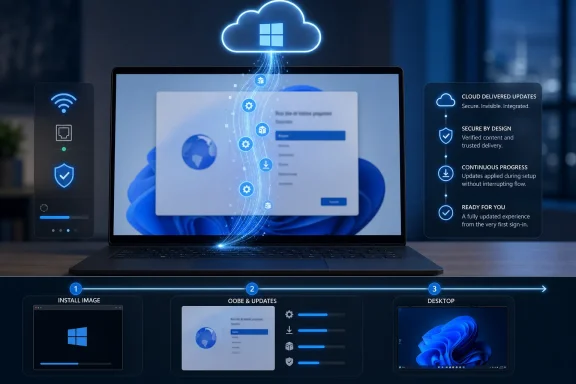 Microsoft Moves the Patch Line Before the Desktop
KB5095189’s public changelog is almost comically terse. Microsoft says the cumulative update “improves” the Windows 11 24H2 and 25H2 out-of-box experience and applies only to the OOBE process. That is the sort of language that sounds like a placeholder until you understand the plumbing around it.The OOBE phase is where Windows completes the practical transition from installed image to usable device. It is also where Microsoft can still assume the machine is in a controlled, pre-user state. By updating this phase, Microsoft gets a chance to fix setup logic, account flows, connectivity handling, update checks, or compatibility behaviors without waiting for a user or administrator to install a post-setup patch.
Neowin’s report correctly places KB5095189 alongside a wider servicing wave: the late-June preview update KB5095093 and separate dynamic updates for setup and recovery under KB5102558 and KB5095615. Taken together, these are not random scraps from the servicing table. They show Microsoft continuing to split Windows maintenance into several time zones: before setup, during setup, during recovery, during OOBE, and after the desktop appears.
That model is more complex than the old “install Windows, then patch Windows” rhythm. It is also more realistic. A Windows installation image is almost always behind the live service by the time it reaches a user, an OEM, a reseller, or an enterprise deployment share.
OOBE Is No Longer Just the Welcome Screen
The phrase Out of Box Experience still sounds like retail packaging language, as if the main job is to show friendly screens while the user chooses a region and signs into a Microsoft account. In Windows 11, OOBE has become a servicing checkpoint. It is a place where Microsoft can inspect network availability, apply critical drivers, install zero-day patches, and potentially stage newer update content before the machine is considered ready.Microsoft’s own Windows documentation says that, once a device connects to a network during OOBE, critical driver updates and critical zero-day patch updates can begin downloading automatically. Microsoft also says these updates are required for proper device operation and cannot be declined by the user. That is a very different bargain from the old idea that setup was a local process and updating was a later choice.
The logic is defensible. A laptop with broken Wi-Fi, faulty storage firmware behavior, a bad display driver, or an urgent security exposure is not truly “set up” just because Windows copied files successfully. If Microsoft knows a critical fix exists, waiting until after first sign-in may be needlessly risky.
But the tradeoff is equally real. OOBE becomes less predictable, especially for users on slow connections and for IT teams timing provisioning workflows. The first boot is no longer merely the first boot; it is a live servicing transaction.
The Tiny KB Number Hides a Bigger Servicing Strategy
KB5095189 is easy to miss because it is narrow by design. It is not a desktop quality update. It is not a feature update. It is not a patch Tuesday security bundle. It is an OOBE-specific cumulative update that appears only when OOBE updates are installed.That narrowness is exactly why it is interesting. Microsoft has spent years breaking Windows setup into updateable components: setup dynamic updates, Safe OS updates, recovery environment updates, servicing stack improvements, compatibility holds, enablement packages, and now increasingly visible OOBE updates. The operating system is no longer a single artifact so much as a set of serviced states.
For enthusiasts, this explains why two installations from the “same” ISO can behave differently if one is connected to the Internet during setup and the other is not. For administrators, it explains why a deployment process that was stable last month can suddenly show a new update page, an extra reboot, or a changed account flow without the base image obviously changing.
For Microsoft, this is the point. If the company can service setup independently, it can react faster to broken first-run flows, hardware-specific setup blockers, security problems, and cloud service changes. Windows setup becomes less like a frozen installer and more like a thin client for the current Windows servicing stack.
The Internet Connection Is the Real Switch
The most important practical condition in KB5095189 is not the KB number. It is connectivity. Microsoft’s note and Neowin’s coverage both emphasize that these updates install automatically during setup if the user has an active Internet connection.That gives users and administrators a visible dividing line. A connected OOBE may receive critical driver updates, zero-day patches, OOBE fixes, and potentially newer update content depending on the device and build. An offline OOBE is more likely to proceed with whatever the installation media already contains, postponing update work until later.
This does not mean offline setup is always better. In fact, for many consumer PCs, connected setup is safer because it can fix hardware and security problems before first use. The device may arrive in a more secure and more functional state, especially if the original image is months old.
But it does mean connected setup is less deterministic. The machine you configure today may not follow the exact same path as one configured next week. That is the unavoidable cost of letting the cloud participate in first boot.
The 24H2 and 25H2 Pairing Tells Its Own Story
KB5095189 applies to both Windows 11 24H2 and 25H2, which is not a throwaway detail. These two releases share enough servicing DNA that Microsoft often treats them together in update documentation. The late-June preview update KB5095093, for example, listed builds for both release lines.That shared servicing model has been one of Microsoft’s quieter Windows 11 bets. Rather than making every annual release a full platform rupture, the company has increasingly used enablement-style approaches where possible, layering feature exposure on top of a common base. The result is less dramatic than the old Windows feature upgrade era, but it changes how admins should think about version boundaries.
If 24H2 and 25H2 can receive many of the same OOBE and cumulative servicing changes, then “version” becomes less of a hard wall and more of a policy and lifecycle marker. The engineering baseline matters, but the live service matters more. That is good for consistency and potentially maddening for anyone trying to reason from version numbers alone.
The KB5095189 release reinforces that reality. Microsoft is not just patching Windows after it runs. It is patching the pathway into Windows across the current servicing generation.
Setup Updates Are Becoming a Security Boundary
The security argument for OOBE updates is straightforward: a device should not spend its first minutes online in a known-vulnerable state if Microsoft already has a fix ready. This is especially true for consumer machines that may go straight from setup to browser sign-ins, password managers, cloud sync, and personal data migration.Zero-day patching during OOBE addresses that gap. If a critical fix is available, Microsoft can apply it before the user starts normal work. In theory, that shortens the exposure window between “connected to the Internet” and “fully patched.”
The same reasoning applies to drivers, though the risk is broader than security. A bad or missing driver can make setup fail, break input, reduce network reliability, or create a poor first-run experience that users blame on Windows rather than on a stale image. OOBE driver updates give Microsoft and hardware partners one more chance to correct those problems.
The risk is that setup becomes dependent on the health of Windows Update, driver classification, and Microsoft’s targeting logic. If the wrong thing is offered or the right thing stalls, the user may experience the failure before ever reaching the desktop. That is a harsher place to troubleshoot than a normal Windows Update session.
Enterprise IT Gets More Control, But Not Total Control
For managed environments, OOBE updates sit in an uncomfortable middle ground. Administrators want devices secure before handoff, but they also want repeatable provisioning. Those goals are not always aligned.Microsoft’s documentation around OOBE update behavior and policy settings gives organizations some levers, especially where Windows Autopilot, Intune, quality update deferrals, and provisioning policies are involved. But critical updates during OOBE are not merely another optional convenience prompt. Microsoft’s position is that some updates are required for the device to operate properly.
That creates a familiar Microsoft management pattern: admins can shape the experience, but not always fully freeze it. If a device is connected and eligible for mandatory OOBE servicing, the provisioning experience may include update checks and installs that were not present in an older deployment run. The more cloud-connected the provisioning model, the more this becomes normal rather than exceptional.
The practical response is not to rage against OOBE updates. It is to test them like part of the deployment stack. IT teams should treat setup media, OOBE behavior, Autopilot profiles, update rings, driver policies, and network access as one system, because Microsoft increasingly does.
Consumers Will Notice the Delay More Than the Architecture
Most home users will not know KB5095189 exists. They will see a new PC pause during setup, check for updates, maybe reboot, and eventually continue. If everything works, the update disappears into the background.That invisibility is a success condition for Microsoft. The ideal OOBE update is one the user never understands because the device simply emerges safer and more compatible. In the consumer market, the alternative is often worse: a machine that reaches the desktop quickly and then spends the next hour downloading drivers, cumulative updates, Store app updates, firmware tools, and security fixes.
Still, Microsoft has to be careful with the first-run experience. Windows 11 setup already carries baggage: Microsoft account nudges, network requirements in many editions and scenarios, privacy screens, OneDrive prompts, Edge positioning, and recovery options. Adding more update work during OOBE may be technically wise while making setup feel slower and less under the user’s control.
That is the paradox of modern Windows onboarding. The more Microsoft fixes before first use, the less the first use feels like the user’s machine.
The Support Burden Shifts Earlier in the Timeline
When something breaks after the desktop appears, users and technicians have tools: Settings, Event Viewer, Reliability Monitor, Windows Update history, DISM, setup logs, recovery options, vendor utilities, and remote support. When something breaks during OOBE, the troubleshooting surface is narrower and the emotional temperature is higher.A failed or delayed OOBE update can look like setup itself is broken. A user may not distinguish between a Microsoft account issue, a network problem, a driver install, a zero-day patch, or an OOBE cumulative update. To them, the brand-new PC is stuck.
That is why Microsoft’s language about download and installation time depending on hardware and Internet connectivity matters. It is a polite way of saying the experience will vary. A fast machine on fiber may breeze through; a budget laptop on congested Wi-Fi may turn “just setting up Windows” into a waiting game.
For support forums, including WindowsForum.com, this means more first-boot mysteries will be update-related. The advice to “disconnect from the Internet and try setup again” may still be useful in some scenarios, but it now comes with a security and completeness caveat. Skipping connected OOBE can avoid one class of setup friction while postponing another class of update work.
The OEM Image Is Losing Its Authority
PC makers still ship images, and enterprises still build them, but Microsoft’s servicing cadence has weakened the authority of any static Windows image. The image is now a starting point, not the final product. OOBE updates make that explicit.This is not necessarily bad. OEM images have long been a source of drift, bundled utilities, outdated drivers, and inconsistent patch levels. If Microsoft can bring a device closer to current during setup, users may benefit even when the preinstalled image is old.
But the change also reduces transparency. A user may not know what changed between the factory image and the desktop they eventually receive. An administrator may need to account for update content that arrived during OOBE rather than through the normal post-enrollment patch flow.
The more Microsoft services the pathway from image to desktop, the more the concept of a “clean install” becomes conditional. Clean from what? Clean media, yes. Clean of live setup changes, not necessarily.
Microsoft’s Documentation Still Says Too Little
The weakest part of KB5095189 is not the update itself. It is the documentation style. Microsoft’s support article gives the date, affected versions, and a generic improvement statement, but it does not enumerate specific fixes.There are understandable reasons for this. OOBE updates may include internal setup components, cloud-flow adjustments, compatibility logic, and changes Microsoft does not want to over-specify. Some fixes may affect only narrow device classes or setup paths. Publishing a granular changelog for every setup component might create more confusion than clarity.
But sparse documentation has a cost. Admins are left to infer whether a new OOBE behavior is expected. Journalists and community sites end up reconstructing intent from adjacent documents. Users see setup change without a clear explanation.
Microsoft has improved Windows release health communication over the years, especially for known issues and safeguard holds. OOBE servicing deserves the same maturity. If setup is now part of the live update system, its updates should be documented with more than “improves the experience.”
The Windows Setup Experience Is Becoming a Managed Service
The bigger trend is unmistakable: Windows setup is becoming a managed service rather than a static wizard. Dynamic updates refresh setup. Recovery updates maintain the repair environment. OOBE updates alter first-run behavior. Quality updates and zero-day patches can arrive before the desktop.This is the Windows equivalent of what has happened across the software industry. Installers used to be artifacts; now they are bootstrap mechanisms. The real product assembles itself from a local payload, live service checks, policy state, identity, hardware targeting, and update metadata.
For Microsoft, this gives Windows a better chance of surviving the messy reality of billions of device configurations. For IT pros, it means deployment knowledge must move from image craftsmanship alone to service choreography. For users, it means the PC they “set up” is already negotiating with Microsoft’s cloud before they have had a chance to personalize the taskbar.
The direction is not reversible. Security expectations, driver complexity, and Windows’ own servicing model all push setup toward live updating. The only real question is how much visibility and control Microsoft is willing to provide around that process.
The First-Boot Patch Era Has Rules of Its Own
KB5095189 is not a blockbuster update, but it is a useful marker for anyone responsible for Windows 11 devices. The concrete lesson is that setup-time servicing is now part of the operating system’s normal lifecycle, not an edge case.- KB5095189 applies to Windows 11 versions 24H2 and 25H2 during the Out of Box Experience, not as a regular desktop cumulative update.
- Devices connected to the Internet during OOBE can automatically receive setup-time updates when OOBE updates are available.
- Microsoft’s OOBE update model can include critical driver updates and zero-day patch content that users cannot decline.
- Enterprises should test OOBE behavior as part of provisioning, especially when using Autopilot, Intune, update rings, or tightly timed deployment workflows.
- Offline setup may produce a more predictable first-run path, but it can also defer important security and driver fixes until after the desktop appears.
- Microsoft needs to document OOBE updates more clearly because first-boot changes now have real operational consequences.
References
- Primary source: neowin.net
Published: Sat, 04 Jul 2026 20:14:00 GMT
Loading…
www.neowin.net - Official source: support.microsoft.com
Loading…
support.microsoft.com - Related coverage: tomshardware.com
Microsoft to force updates to Windows 11 25H2 for PCs with older Windows 11 OS versions — 'intelligent' update system uses machine learning to determine when a device is ready | Tom's Hardware
Microsoft forces 25H2 rollout ahead of 24H2 end-of-supportwww.tomshardware.com - Related coverage: nsaneforums.com
Loading…
nsaneforums.com - Related coverage: windowsforum.com
Loading…
windowsforum.com - Related coverage: windowslatest.com
Microsoft is force-installing Windows 11 25H2 on every PC before 26H2, but it's actually painless
Microsoft is force installing Windows 11 25H2 on all eligible Home and Pro PCs, as it clears the decks ahead of the 26H2 release this fall. www.windowslatest.com
- Related coverage: windowscentral.com
Microsoft confirms Windows 11’s May 2026 update is failing to install with error 0x800f0922 and outlines a mitigation for affected PCs | Windows Central
Windows 11 May 2026 update fails on some PCs, but Microsoft has already shipped a workaround, and it's working on a permanent fix.www.windowscentral.com - Related coverage: billscomputerpot.com
Loading…
billscomputerpot.com - Official source: techcommunity.microsoft.com
- Official source: learn.microsoft.com
Loading…
learn.microsoft.com - Related coverage: gpedit.tplant.com.au
Loading…
gpedit.tplant.com.au - Related coverage: support.nhs.net
Loading…
support.nhs.net - Related coverage: techradar.com
Microsoft may have just saved admins a whole of work (and stress) when it comes to installing vital upgrades
Admins can now update Windows PCs much more easilywww.techradar.com
- Related coverage: packtpub.com
Loading…
www.packtpub.com - Related coverage: subscription.packtpub.com
Loading…
subscription.packtpub.com